


1、安装usb_cam包
pip install pydantic==1.10.14

sudo apt install ros-humble-usb-cam

# 测试打开相机
ros2 launch usb_cam camera.launch.py

# 显示图像
ros2 run image_view image_view image:=/camera1/image_raw
2、安装 camera_calibration
sudo apt install ros-humble-camera-calibration3、执行标定程序
ros2 run camera_calibration cameracalibrator --size 9x6 --square 0.026 image:=/camera1/image_raw camera:=/usb_cam参数说明:
- --size 当前标定板大小
- --square 每个小棋盘格的边长,单位米
- image:=/camera1/image_raw 图像来源主题
- camera:=/usb_cam 相机名称
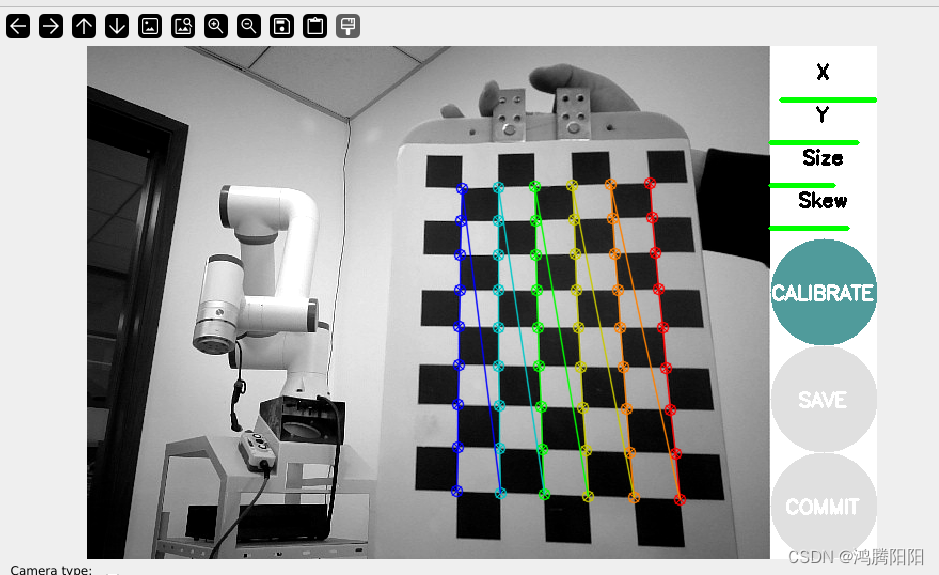
4、通过不停的移动标定板:直到X、Y、Size、Skew四个都变成绿色,点击CALIBRATE按钮;
完成后可点击“save”进行保存,文件保存路径在终端里有显示。再次将标定板放在视野里时,右上角会出现一个数值,代表标定误差。
5、点击SAVE按钮
结果以压缩包形式保存在




 扫一扫
扫一扫


 5015
5015


 被折叠的 条评论
为什么被折叠?
被折叠的 条评论
为什么被折叠?
 到【灌水乐园】发言


