


wpf4net5 (读音 wpf for net5)
终于有点可以学习的时间了,决定系统化折腾下net5版本的wpf的相关技术栈的程序集
第一站就是看下最新版本的CM的变化。
Myget Caliburn.Micro 4.0.185
Nuget 4.0.173
我的以前相关的文章
AY GITHUB WPF TECH APPLY 2- Caliburn.Micro-WPF-aaronyang技术分享 (ayjs.net)
同类MVVM
下载代码:
通过git方式:
git init
相关文章
Ay写给2022的纯xaml [wpf4net5] - Caliburn-Micro[1/16],MyGet-WPF-aaronyang技术分享 (ayjs.net) Download
Ay写给2022的纯xaml [wpf4net5] - Caliburn-Micro-绑定[2/16]-WPF-aaronyang技术分享 (ayjs.net) Download
Ay写给2022的纯xaml [wpf4net5] - Caliburn-Micro-调用vm的方法[3/16]-WPF-aaronyang技术分享 (ayjs.net) Download
Ay写给2022的纯xaml [wpf4net5] - Caliburn-Micro-Coroutine协程[4/16]-WPF-aaronyang技术分享 (ayjs.net) Download
Ay写给2022的纯xaml [wpf4net5] - Caliburn-Micro-Execute 异步里面更新界面UI[5/16]-WPF-aaronyang技术分享 (ayjs.net)
Ay写给2022的纯xaml [wpf4net5] - Caliburn-Micro-EventAggregation[6/16]-WPF-aaronyang技术分享 (ayjs.net)
Ay写给2022的纯xaml [wpf4net5] - Caliburn Micro-Conductor[7/16]-WPF-aaronyang技术分享 (ayjs.net)
Ay写给2022的纯xaml [wpf4net5] - Caliburn Micro-Bubbling[8/16]-WPF-aaronyang技术分享 (ayjs.net)

MyGet配置
在 Visual Studio 中打开 工具 -> 选项 -> NuGet 包管理器 -> 包源:
https://dotnet.myget.org/F/dotnet-core/api/v3/index.json

其他nuget源
如果打不开
caliburn-micro-builds - Caliburn.Micro 4.0.185 | MyGet
建立项目


我用4.0.173版本
建立2个文件夹

在CM中,作者把很多xaml.cs写的代码用 对象池,提供一些接口和对应的实现 ,比如下面的
INavigationService
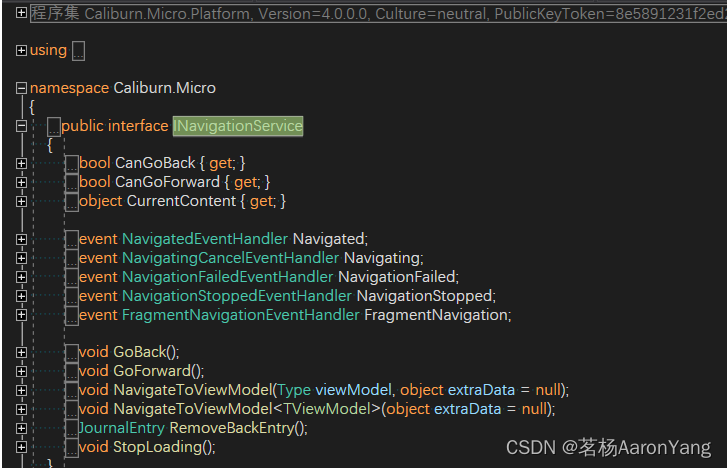
因为提供了,才能根据VM 转到对应的Page,而不是new page给wpf
新增一个 ViewModels/ShellViewModel类 ,这个表示作为主窗体的VM
以后Page,Window,UserControl类型的 所有的页面都只有xaml文件,没有xaml.cs,你可以新建类,然后粘贴本文最最下面的提供的 对应的代码片段
wpf的窗体继承window,CM中,窗体对应的ViewModel继承Screen
using Caliburn.Micro;
using System.Windows.Controls;

namespace cm1.ViewModels
{
    public class ShellViewModel : Screen
    {
        private readonly SimpleContainer container;
        private INavigationService navigationService;

        public ShellViewModel(SimpleContainer container)
        {
            this.container = container;
        }

        public void RegisterFrame(Frame frame)
        {
            navigationService = new FrameAdapter(frame);

            container.Instance(navigationService);


        }
    }
}
注意这里的命名空间,后面要加ViewModel,在CM中,运行时候 XX.ViewModels.XXXViewModel 默认会找XX.Views.XXXView窗体然后运行的
新建 Bootstrapper 继承CM的 BootstrapperBase
在这里我们用CM提供的IOC,项目运行之前,做一些启动工作
using System;
using System.Collections.Generic;
using System.Windows;
using System.Windows.Threading;
using Caliburn.Micro;

namespace cm1
{
    public class Bootstrapper : BootstrapperBase
    {
        private SimpleContainer container;

        public Bootstrapper()
        {
            Initialize();
        }

        protected override void Configure()
        {
            container = new SimpleContainer();

            container.Instance(container);

            container
                .Singleton<IWindowManager, WindowManager>()
                .Singleton<IEventAggregator, EventAggregator>();

            container
               .PerRequest<ShellViewModel>();

        }

        protected override async void OnStartup(object sender, StartupEventArgs e)
        {
            await DisplayRootViewForAsync(typeof(ShellViewModel),null);
        }

        protected override object GetInstance(Type service, string key)
        {
            return container.GetInstance(service, key);
        }

        protected override IEnumerable<object> GetAllInstances(Type service)
        {
            return container.GetAllInstances(service);
        }

        protected override void BuildUp(object instance)
        {
            container.BuildUp(instance);
        }

        protected override void OnUnhandledException(object sender, DispatcherUnhandledExceptionEventArgs e)
        {
            e.Handled = true;
            MessageBox.Show(e.Exception.Message, "An error as occurred", MessageBoxButton.OK);
        }
    }
}
Configure()是重点,在这里注册vm和view

Singleton注册单例,PerRequest每次请求都是要给新的实例
关于Handler,应该类似MVVMLight的Messenger,先忽略
在App.xaml添加资源,移除StartupUri属性
<Application x:Class="cm1.App"
             xmlns="http://schemas.microsoft.com/winfx/2006/xaml/presentation"
             xmlns:x="http://schemas.microsoft.com/winfx/2006/xaml"
             xmlns:local="clr-namespace:cm1">
    <Application.Resources>
        <ResourceDictionary>
            <ResourceDictionary.MergedDictionaries>
                <ResourceDictionary>
                    <local:Bootstrapper x:Key="Bootstrapper" />
                </ResourceDictionary>
            </ResourceDictionary.MergedDictionaries>
        </ResourceDictionary>
    </Application.Resources>
</Application>
新建一个C#类,不是窗体 名字改成 ShellView.xaml ,我们不需要xaml.cs (从现在开始,page,window,usercontrol等只需要xaml,不需要xaml.cs)
<Window x:Class="cm1.Views.ShellView"
        xmlns="http://schemas.microsoft.com/winfx/2006/xaml/presentation"
        xmlns:x="http://schemas.microsoft.com/winfx/2006/xaml"
        xmlns:d="http://schemas.microsoft.com/expression/blend/2008"
        xmlns:mc="http://schemas.openxmlformats.org/markup-compatibility/2006"
        mc:Ignorable="d"     xmlns:cal="clr-namespace:Caliburn.Micro;assembly=Caliburn.Micro.Platform"
        Title="ShellView" Height="450" Width="800">
    <Grid Background="Yellow">
        <Frame cal:Message.Attach="RegisterFrame($source)" DataContext="{x:Null}" />
    </Grid>
</Window>
先忽略 cal:Message.Attach="RegisterFrame($source)" 这行代码
你可以理解为Attach时候,会和当前控件的最可能常用的事件在一起,比如button的话,可能就是click, 会调用 当前VM中的 RegisterFrame方法,传入参数$source 大致猜测传入事件源,类似后台代码的object sender
接下来可以运行项目了,如果出现了 黄色背景色的窗体 就代表成功了
很重要的一个类库 Microsoft.Xaml.Behaviors.Wpf类库
删除对“Microsoft.Expression.Interactions”和“System.Windows.Interactivity”的引用
安装“Microsoft.Xaml.Behaviors.Wpf”NuGet 包。
XAML 文件 – 将 xmlns 命名空间“http://schemas.microsoft.com/expression/2010/interactivity”和“http://schemas.microsoft.com/expression/2010/interactions”替换为“http://schemas.xml”。 microsoft.com/xaml/behaviors“
C# 文件 – 用“Microsoft.Xaml.Behaviors”替换 c# 文件“Microsoft.Xaml.Interactivity”和“Microsoft.Xaml.Interactions”中的使用
在CM中可以用BindableCollection替代ObservableCollection
数据列表视图和VM的定义和使用
来个UserControl类型的FeatureView 和 它对应的FeatureViewModel类
<UserControl  x:Class="cm1.Views.FeatureView"
             xmlns="http://schemas.microsoft.com/winfx/2006/xaml/presentation"
             xmlns:x="http://schemas.microsoft.com/winfx/2006/xaml"
             xmlns:mc="http://schemas.openxmlformats.org/markup-compatibility/2006"
             xmlns:d="http://schemas.microsoft.com/expression/blend/2008"
             xmlns:cal="clr-namespace:Caliburn.Micro;assembly=Caliburn.Micro.Platform"
             mc:Ignorable="d"
             d:DesignHeight="300" d:DesignWidth="300">
    <Grid Margin="20,10">
        <Button  HorizontalContentAlignment="Left">
            <StackPanel Margin="5">
                <TextBlock x:Name="Title" FontSize="14" FontWeight="SemiBold"/>
                <TextBlock x:Name="Description"/>
            </StackPanel>
        </Button>
    </Grid>
</UserControl>
ViewModdel
using System;

namespace cm1.ViewModels
{
    public class FeatureViewModel
    {
        public FeatureViewModel(string title, string description, Type viewModel)
        {
            ViewModel = viewModel;
            Title = title;
            Description = description;
        }

        public string Title { get; }

        public string Description { get; }

        public Type ViewModel { get; }
    }
}
你可以理解这是个 ItemsControl下的ItemTemplate每一行数据的模板和对应的数据结构,这个vm没继承任何通知
我们先把它放在ShellView上显示,列表数据是很常见的需求
修改ShellViewModel
using Caliburn.Micro;
using System.Windows.Controls;

namespace cm1.ViewModels
{
    public class ShellViewModel : Screen
    {
        private readonly SimpleContainer container;
        private INavigationService navigationService;

        public ShellViewModel(SimpleContainer container)
        {
            this.container = container;

            Features = new BindableCollection<FeatureViewModel>
            {
                new FeatureViewModel("Binding Conventions", "Binding view model properties to your view.", null),
                new FeatureViewModel("Action Conventions", "Wiring view events to view model methods.",null),
            };
        }
        public BindableCollection<FeatureViewModel> Features { get; }
        public void RegisterFrame(Frame frame)
        {
            navigationService = new FrameAdapter(frame);

            container.Instance(navigationService);


        }


    }
}
注意 public BindableCollection<FeatureViewModel> Features { get; }
这里的Features这个属性名,在CM中有自己的一套 代码约定,这个集合类型的名字和xaml的控件名字如果一样,就会绑定,比如这里和xaml的ItemsControl的ItemsSource自动绑定
<Window x:Class="cm1.Views.ShellView"
        xmlns="http://schemas.microsoft.com/winfx/2006/xaml/presentation"
        xmlns:x="http://schemas.microsoft.com/winfx/2006/xaml"
        xmlns:d="http://schemas.microsoft.com/expression/blend/2008"
        xmlns:mc="http://schemas.openxmlformats.org/markup-compatibility/2006"
        mc:Ignorable="d"     xmlns:cal="clr-namespace:Caliburn.Micro;assembly=Caliburn.Micro.Platform"
        Title="ShellView" Height="450" Width="800">
    <Grid Background="Yellow">
        <!--<Frame cal:Message.Attach="RegisterFrame($source)" DataContext="{x:Null}" />-->
        <ScrollViewer>
            <ItemsControl x:Name="Features"/>
        </ScrollViewer>
    </Grid>
</Window>
注意: <ItemsControl x:Name="Features"/> 它的name和属性名是一致的
UserControl是你可以理解为局部视图,而page必须在frame里面,UserControl里面的约定和attach调用的方法不一定在它命名规则的ViewModel里,可能在它的宿主的Window的或者page的Viewmodel里面。
运行项目,效果如下:

新建一个Page类型 名叫MenuViewModel,用来显示这个页面,ShellView我们只放个frame用来导航的
我们把ShellView恢复原样子
<Window x:Class="cm1.Views.ShellView"
        xmlns="http://schemas.microsoft.com/winfx/2006/xaml/presentation"
        xmlns:x="http://schemas.microsoft.com/winfx/2006/xaml"
        xmlns:d="http://schemas.microsoft.com/expression/blend/2008"
        xmlns:mc="http://schemas.openxmlformats.org/markup-compatibility/2006"
        mc:Ignorable="d"     xmlns:cal="clr-namespace:Caliburn.Micro;assembly=Caliburn.Micro.Platform"
        Title="ShellView" Height="450" Width="800" WindowStartupLocation="CenterScreen">
    <Grid Background="Yellow">
        <Frame cal:Message.Attach="RegisterFrame($source)" DataContext="{x:Null}" />
    </Grid>
</Window>
然后ShellViewModel,修改代码如下:
        public void RegisterFrame(Frame frame)
        {
            navigationService = new FrameAdapter(frame);

            container.Instance(navigationService);

            navigationService.NavigateToViewModel(typeof(MenuViewModel));
        }
MenuViewModel
using System;
using Caliburn.Micro;


namespace cm1.ViewModels
{
    public class MenuViewModel : Screen
    {
        private readonly INavigationService navigationService;

        public MenuViewModel(INavigationService navigationService)
        {
            this.navigationService = navigationService;

            Features = new BindableCollection<FeatureViewModel>
            {
                new FeatureViewModel("Binding Conventions", "Binding view model properties to your view.", null),
            };
        }

        public BindableCollection<FeatureViewModel> Features { get; }

        public void ShowFeature(FeatureViewModel feature)
        {
            navigationService.NavigateToViewModel(feature.ViewModel);
        }
    }
}
MenuView
<Page x:Class="cm1.Views.MenuView"
      xmlns="http://schemas.microsoft.com/winfx/2006/xaml/presentation"
      xmlns:x="http://schemas.microsoft.com/winfx/2006/xaml"
      xmlns:mc="http://schemas.openxmlformats.org/markup-compatibility/2006"
      xmlns:d="http://schemas.microsoft.com/expression/blend/2008"
      mc:Ignorable="d"
      d:DesignHeight="300" d:DesignWidth="300"
      Title="MenuView">

    <Grid>
        <ScrollViewer>
            <ItemsControl x:Name="Features"/>
        </ScrollViewer>
    </Grid>
</Page>
注意: x:Class="cm1.Views.MenuView" 代码不能省略,如果出现波浪线,手动删除obj文件夹,因为那里的缓存导致的
运行项目会报错的,你还需要在Bootstrapper的Configure方法
        protected override void Configure()
        {
            container = new SimpleContainer();

            container.Instance(container);

            container
                .Singleton<IWindowManager, WindowManager>()
                .Singleton<IEventAggregator, EventAggregator>();

            container
               .PerRequest<ShellViewModel>()
               .PerRequest<MenuViewModel>();
        }
运行项目后,窗体显示了个按钮,接下来给列表按钮绑定单击事件
FeatureView修改代码
   <Button cal:Message.Attach="ShowFeature($dataContext)"  HorizontalContentAlignment="Left">
            <StackPanel Margin="5">
                <TextBlock x:Name="Title" FontSize="14" FontWeight="SemiBold"/>
                <TextBlock x:Name="Description"/>
            </StackPanel>
        </Button>
ShowFeature我们定义在MenuViewModel里面了,我们使用$dataContext传递当前上下文。
接下来添加第一个按钮导航的页面
BindingsViewModel
using System;
using Caliburn.Micro;

namespace cm1.ViewModels
{
    public class BindingsViewModel : Screen
    {

        public BindingsViewModel()
        {

        }
        private string _Right = "右边";

        public string Right
        {
            get { return _Right; }
            set { _Right = value; NotifyOfPropertyChange(); }
        }
    }
}
和 BindingsView
<Page x:Class="cm1.Views.BindingsView"
      xmlns="http://schemas.microsoft.com/winfx/2006/xaml/presentation"
      xmlns:x="http://schemas.microsoft.com/winfx/2006/xaml"
      xmlns:mc="http://schemas.openxmlformats.org/markup-compatibility/2006"
      xmlns:d="http://schemas.microsoft.com/expression/blend/2008"
      mc:Ignorable="d"
      d:DesignHeight="300" d:DesignWidth="300"
      Title="BindingsView">

    <Grid Background="Red">
        <TextBlock x:Name="Testtb" Text="{Binding Right}" FontSize="18" HorizontalAlignment="Center" VerticalAlignment="Center"/>
    </Grid>
</Page>
运行时候,你会发现界面会显示,但是ViewModel貌似没有作为对应View的DataContext
你还需要在Bootstrapper的Configure方法
        protected override void Configure()
        {
            container = new SimpleContainer();

            container.Instance(container);

            container
                .Singleton<IWindowManager, WindowManager>()
                .Singleton<IEventAggregator, EventAggregator>();

            container
               .PerRequest<ShellViewModel>()
               .PerRequest<MenuViewModel>()
               .PerRequest<BindingsViewModel>();
        }
运行效果

CM显示界面,不会自动把VM给View,但是你可以根据VM弹出View
TextBlock的Name名字等于 VM的属性名时候,自动绑定TextBlock的Text属性
本文由 安徽 合肥 杨洋 1991年的 英文名AY ===来自网站 www.ayjs.net 编写
本文由 安徽 合肥 杨洋 1991年的 英文名AY ===来自网站 www.ayjs.net 编写
这个示例的意思,在一个列表中有多种ViewModel,希望不同的vm按照对应的view显示
这个内容下篇再总结了
本文代码下载:Download
| net framework 类库 | net5 中的替代类库 |
| Microsoft.Expression.Interactions System.Windows.Interactivity | Microsoft.Xaml.Behaviors.Wpf |
其他Ay准备升级到net5的纯xaml库
【ay wpf markup】AY XAML应该这样玩【1/18】-WPF-aaronyang技术分享 (ayjs.net)
【ay wpf markup】AY XAML应该这样玩【2/18】-WPF-aaronyang技术分享 (ayjs.net)
【ay wpf markup】AY XAML应该这样玩-写个计算器【3/18】-WPF-aaronyang技术分享 (ayjs.net)
【ay wpf markup】AY XAML应该这样玩-for循环【4/18】-WPF-aaronyang技术分享 (ayjs.net)
【ay wpf markup】AY XAML应该这样玩-ChangedHandler【5/18】-WPF-aaronyang技术分享 (ayjs.net)
【ay wpf markup】AY XAML应该这样玩-ResourceCollection和ScriptHandler【6/18】-WPF-aaronyang技术分享 (ayjs.net)
【ay wpf markup】AY XAML应该这样玩-ResourceObject【7/18】-WPF-aaronyang技术分享 (ayjs.net)
【ay wpf markup】AY XAML应该这样玩-ScriptHandler组合,也是最常用的【8/18】-WPF-aaronyang技术分享 (ayjs.net)
【ay wpf markup】AY XAML应该这样玩-语法集合【9/18】-WPF-aaronyang技术分享 (ayjs.net)
【ay wpf markup】AY XAML应该这样玩-Tower of Hanoi【10/18】-WPF-aaronyang技术分享 (ayjs.net)
【ay wpf markup】AY XAML应该这样玩-写个简单的移动【11/18】-WPF-aaronyang技术分享 (ayjs.net)
【ay wpf markup】AY XAML应该这样玩-写个复杂的绘图【12/18】-WPF-aaronyang技术分享 (ayjs.net)
【ay wpf markup】AY XAML应该这样玩-写个复杂的颜色环【13/18】-WPF-aaronyang技术分享 (ayjs.net)
【ay wpf markup】AY XAML应该这样玩-获得焦点全选【14/18】-WPF-aaronyang技术分享 (ayjs.net)
【ay wpf markup】AY XAML应该这样玩-把Additional.Operations当资源【15/18】-WPF-aaronyang技术分享 (ayjs.net)
【ay wpf markup】AY XAML应该这样玩-给ListView创建数据【16/18】-WPF-aaronyang技术分享 (ayjs.net)
【ay wpf markup】AY XAML应该这样玩-和后台ViewModel交互,操作方法【17/18】-WPF-aaronyang技术分享 (ayjs.net)
默认代码模板
Window
<Window x:Class="Features.CrossPlatform.Views.ShellView"
        xmlns="http://schemas.microsoft.com/winfx/2006/xaml/presentation"
        xmlns:x="http://schemas.microsoft.com/winfx/2006/xaml"
        xmlns:d="http://schemas.microsoft.com/expression/blend/2008"
        xmlns:mc="http://schemas.openxmlformats.org/markup-compatibility/2006"
        xmlns:cal="clr-namespace:Caliburn.Micro;assembly=Caliburn.Micro.Platform"
        mc:Ignorable="d"
        Title="ShellView" Height="450" Width="800">
    <Grid>

    </Grid>
</Window>
Page
<Page x:Class="Features.CrossPlatform.Views.MenuView"
      xmlns="http://schemas.microsoft.com/winfx/2006/xaml/presentation"
      xmlns:x="http://schemas.microsoft.com/winfx/2006/xaml"
      xmlns:mc="http://schemas.openxmlformats.org/markup-compatibility/2006"
      xmlns:d="http://schemas.microsoft.com/expression/blend/2008"
      mc:Ignorable="d"
      d:DesignHeight="300" d:DesignWidth="300"
      Title="">

    <Grid>

    </Grid>
</Page>
UserControl
<UserControl  x:Class="cm1.Views.FeatureView"
             xmlns="http://schemas.microsoft.com/winfx/2006/xaml/presentation"
             xmlns:x="http://schemas.microsoft.com/winfx/2006/xaml"
             xmlns:mc="http://schemas.openxmlformats.org/markup-compatibility/2006"
             xmlns:d="http://schemas.microsoft.com/expression/blend/2008"
             xmlns:cal="clr-namespace:Caliburn.Micro;assembly=Caliburn.Micro.Platform"
             mc:Ignorable="d"
             d:DesignHeight="300" d:DesignWidth="300">
    <Grid>

    </Grid>
</UserControl>


 230
230


 扫一扫
扫一扫


 被折叠的 条评论
为什么被折叠?
被折叠的 条评论
为什么被折叠?
 到【灌水乐园】发言


