 Coffee
Notes that cost a coffee.
A quiet Markdown editor for Mac, iPhone and iPad. Your notes stay plain files in a folder you own, and everything else steps out of the way.
14 days free, no card or account. Then €3 a month. A 19 MB download for macOS 15 or later; iOS 18 or later on iPhone and iPad.
The same notes on your iPhone and iPad.
Coffee keeps your notes in its own folder in iCloud Drive, so your iPhone and iPad find them by themselves, the same files Coffee on your Mac opens. There's no Coffee server in between: iCloud moves the files, and your pins and sort order come along.
On iPad, write with Apple Pencil on lined paper and Coffee turns your handwriting into text, or keeps it in the note as a sketch you can open and draw on again.
Sums, links, tags, diagrams, maths and canvases work there too, with a bar above the keyboard for headings, tasks and photos.
One purchase unlocks Coffee on all of them.
 Or scan it with your iPhone
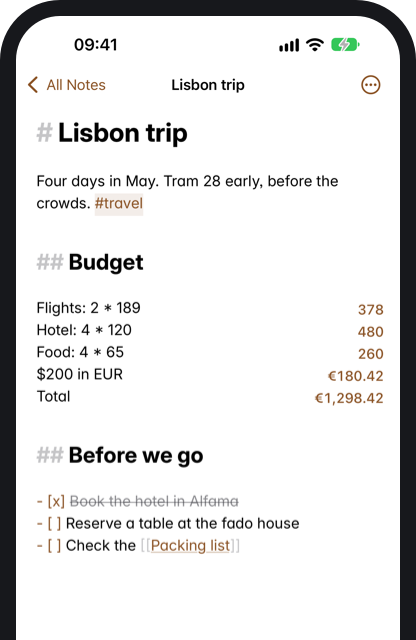
Don't take our word for it. Type.
Write Markdown or just write. See the finished page, the code, or both side by side and type in either one. Press ⌥⌘/ in the app.
Write the question. The answer is already there.
Sums, currencies, time zones and more, in plain words, in any note. The answer sits beside the line and never goes into your file. Go on, change a number. In the app, hold ⌥ and drag one to try another value, or select a column of numbers to see its total.
- Currencies and crypto$30 in EUR, 1 BTC in USD
- Time zonesTokyo time, 2:30 pm HKT in Berlin
- Dates3 days ago, workdays until 24 Dec
- Time and rates3h 5m + 45 min, €40/hour * 7.5 hours
- Units5 km in miles, 100 C in F, 1 GB in MB
- Percentages20% of 50, 20 is what % of 200
- Variables and totalshourly rate = $80, sum, average
- Carry on from above+ 20%, × 2, subtotal, grand total
- Loans and interest$200,000 at 4% for 30 years
- Past exchange rates€100 in USD on 1 Jan 2025
- Totals by tagTaxi: €20 #travel, then total #travel
- Mathssqrt 16, 255 in hex, 7 mod 3
Also 1 cup flour in grams, 2 GB at 100 Mbps and 30 mpg in L/100km. Workdays skip public holidays in Portugal, the US, the UK, Spain, France, Germany and Brazil. The same answers come from Terminal with coffee calc, from AI apps over MCP, and from Shortcuts on iPhone and iPad.
The demo uses sample exchange rates and knows the basics. Coffee uses current rates and understands everything listed here.
What's saved, and what you see
Coffee never writes an answer into your note. The file keeps only what you typed, so other editors, Git and the people you share it with see just that. PDF, Word and EPUB exports print each answer as it stood when you exported, so 3 days ago stays that day's date.
- # Lisbon trip
- Hotel: €95 * 3
- Train: €42 + €42
- Dinners: €28 * 4
- total
- Booked: 3 days ago
- Lisbon trip
- Hotel: €95 * 3€285
- Train: €42 + €42€84
- Dinners: €28 * 4€112
- total€481
- Booked: 3 days agoThu, 5 Nov 2026
- Lisbon trip
- Hotel: €95 * 3 = €285
- Train: €42 + €42 = €84
- Dinners: €28 * 4 = €112
- total = €481
- Booked: 3 days ago = Thu, 5 Nov 2026
Your Word documents, as notes.
Drop a .docx on Coffee and it becomes a note, with its headings, lists, tables, links and pictures still in place. It's plain Markdown from then on, and the original stays exactly as it was. When someone needs a Word file back, export one.
Also imports RTF, ODT and older .doc files. Comments and page layout stay behind.
See what the AI changed
When Claude, Cursor or anything else edits a note's file, Coffee lays out every change. Keep or undo them one at a time. Go on, press the buttons.
Propose a change, without learning Git
Your docs live in a repository, and half your team can't touch them. Now they can: write it, describe it, press Propose. Coffee sends only that note to a new branch and opens the pull request. Nothing else on your Mac changes.
Find anything as you type
Press ⌘K and every note answers on the first letter, accents included. It takes about 14 milliseconds across 5,000 notes. Try it: type "sao" or "tram".
Ask your notes, on this Mac
Press ⌘J or hold Fn and talk. The model and the dictation both run on your Mac, so your notes never leave it.
Ask needs macOS 26 and Apple Intelligence.
PDFs that look designed
Letterhead, title pages and page numbers, with no layout app. Press ⌘E. Pick one of five templates, make your own with your logo and company name, or add one from the template directory. Export Word, EPUB, HTML, LaTeX, OpenDocument and plain text too.
Four days in May. Stay near the river, walk everywhere, and leave one whole afternoon with no plan.
Alfama is steep and lovely. Baixa is flat and easy. Take the tram at least once, and sit on the left.
☑ Book the flights
☐ Find a place near Alfama
☐ Ask Ana about the tram
And everything you'd want from a writing app.
Comments stay out of the file. Your Markdown stays clean.
Comments
Select any words and comment. Click the mark to open it.
The first draft is for you.
Everything but this sentence steps back.
So you keep going.
Press ⌘⇧T and your line stays in the middle.
Focus and typewriter
For long stretches, and for long documents.
A quiet outline
Headings become small marks in the margin. Click one to jump.
Version history
Drag it. Each version says what changed, the ones you name are kept, and restoring can be undone.
Private notes
Touch ID, encrypted on disk, hidden from search and AI.
Keyboard sounds
Dry recordings of Cherry MX Red, Brown and Blue. Press these keys. Off by default in the app.
Clipboard history
What you copy, searchable and encrypted on this Mac. Password managers' items are never kept.
Templates
A template is just a .md file in a folder, with the date filled in. ⌘T opens today's note.
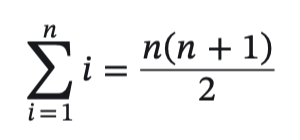
Math, drawn natively
Write TeX between $$ lines, or $…$ inside a sentence, with chemistry in \ce{} and equation numbers from \tag{}. Formulas are drawn as you write, and in your PDFs, Word files and books.
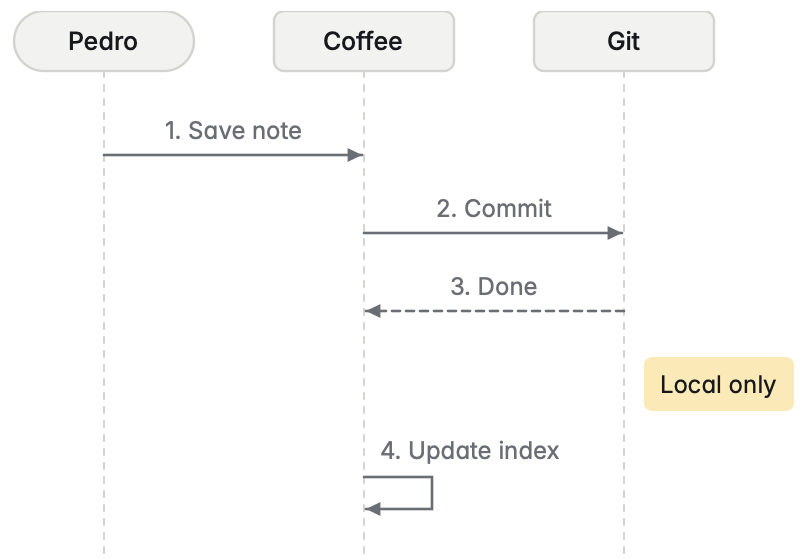
Diagrams from text
Mermaid flowcharts, pie charts, sequence, gantt, class and state diagrams, drawn as you type. No web view, nothing fetched. One that can't be drawn says which line is wrong.
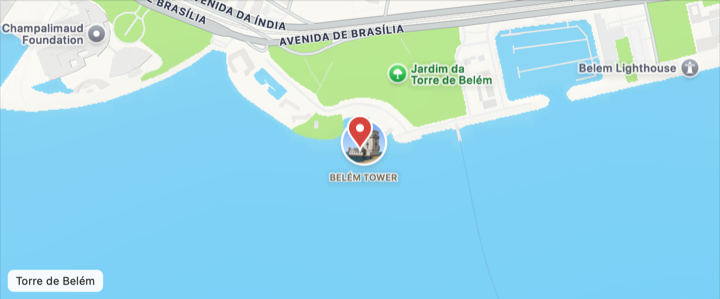
Maps from a link
Paste a Google Maps or Apple Maps link, coordinates or just an address in a map block, and the place is drawn with Apple Maps, with nothing to sign up for. Click the map to drag and zoom it, or tap it on iPad. The note keeps the link.
- 01 Before we go
- 02 Alfama
- 03 Belém
- 04 The way home
A book from your notes
A folder or a tag becomes one EPUB, a chapter per note, ready for Apple Books.
Connect AI apps
Let Claude and others read and write your notes over MCP. Off until you turn it on.
A window for each file
Moving around stays in one window. Open a file from Finder, and it gets its own.
Your files stay plain text, and they open anywhere else too.
Your default for .md files
One button in Settings. Double-click any Markdown or text file and it opens here.
Plan	Price
Monthly	€3
Yearly	€29
Paste anything
Spreadsheet cells become a table. A web page keeps its headings, lists and links.
Move whole sections
Drag a heading in the outline and everything under it comes too. ⌘⇧O
Check document
Broken links, missing images and skipped headings. Press Fix.
Quick capture
A thought, Return, and you're back. It lands in Inbox.md with the time.
Folders, pins and order
Your folders, as they are on disk. Pin the notes you live in, sort each folder by date or title, and fold away any section of the sidebar.
Folders from anywhere
Add a folder from your Mac or an external drive. Its notes join search, links and tags, and stay where they are.
Call about the #work/acme renewal.
Tags, nested
Write #tags in the text or in front matter. A slash nests them, and choosing work shows all of work.
A graph of your notes
See how your notes link, around the one you're in or across the library. Hover to light a note's links, click to open it. ⌥⌘G
Replace in all notes
See every match first, leave any out, and undo the whole replace later. Each note keeps its old version in history.
Book the hotel from [[Lisbon budget]].
Linked from Packing list, Weekly plan
Links between notes
Type [[ to link a note. Rest the pointer on a link to read its start, and rename a note without breaking a link to it.
[TOC]
- Before we go
- Packing
- Alfama
- The way home
See [[Lisbon budget#Hotels]]
Contents, and links to a heading
A line with [TOC] lists the note's headings and keeps up as you write. [[Note#Heading]] and [text](#heading) open right at that heading.
```python
1# Cups for the week
2def cups(days, per_day=2):
3    return days * per_day
4print("Monday", cups(7))
```
Code, coloured
Code blocks are coloured by their language, about 30 of them, from Swift and Python to SQL and YAML. Line numbers are a setting away, and never go into the file.
| Day | Cups | Beans |
|---|---|---|
| Monday | 2 | Kenya |
| Tuesday | 3 | Brazil |
| Wednesday | 1 | Kenya |
| Thursday | 2 | Colombia |
Tables, and lists, reshaped
Make a table of any size, then move, insert and delete columns. Turn a list into bullets, numbers or tasks with ⌥⌘8, ⌥⌘7 or ⌥⌘9.
Emoji by name
Type a colon and a few letters for a list, or a whole :tada: and a space. The file keeps the emoji itself.
1 Tram 28 starts at Martim Moniz.
Callouts and footnotes
GitHub's > [!TIP] boxes and [^1] notes, drawn as you write and carried into PDF and Word.
The hotel is really close to the river, and in order to see the sunset we walked up to the the castle.
Style Check
Small dots under filler words, stock phrases and words typed twice, plus your own list. Nothing goes into the file, and no AI is involved.
Command palette
Every command in the menus, a few letters away.
Search inside pictures
Photos of whiteboards and scanned receipts are read on your Mac, so search finds their words too.
Spotlight and Quick Look
Notes turn up in Spotlight, and the space bar previews them in Finder. Private notes never show their text.
|Plan|Price|
|-|-|
|Monthly|€3|
|Yearly|€29|
| Plan    | Price |
| ------- | ----- |
| Monthly | €3    |
| Yearly  | €29   |
Tidy Note
Lines up table columns, spaces out headings and renumbers lists, in one step you can undo. Only when you ask.
coffee-theme:1:Paper:light:#FBF7EF,#FFFDF8,…Themes
Five to choose from, or your own with a colour for each part of the app, shared as one line of text. Coffee's own follows light, dark or your Mac.
Works on the note you have open. Anything more is asked for in plain words first.
Plugins
Small JavaScript plugins from a directory Coffee reviews, each off until you turn it on.
Present as slides
Each --- line starts a new slide, shown full screen with its formulas and diagrams. ⌥⌘P
Google Drive can keep notes online until they're opened. Mark the Coffee folder Available offline so search finds every note.
Notes in your cloud drive
iCloud Drive, Google Drive, Dropbox, OneDrive and more, through their own Mac apps. History and comments move too.
Canvas
Cards, notes, links and groups on a board, with arrows between them. Saved as a .canvas file that Obsidian opens too.
```query
from: #project
where: status != done
show: status, due
| Title | Status | Due |
|---|---|---|
| Website redesign | doing | 2026-11-20 |
| Hiring plan | draft | 2026-11-28 |
| Office move | waiting | 2026-12-04 |
Notes as a table or a board
A query block lists notes by tag, folder and front matter, and a click opens one. The file keeps only the query.
Agenda
- All day: Mum's birthday
- 09:00–09:30 Standup
- 14:00–15:00 Design review
Today
- Renew passport (overdue)
- Send the invoice
Calendar and Reminders
Today's note starts with the day's events and the reminders due. A task goes to Reminders with ⌃⌘R.
Share > Coffee
Save a page or some text from Safari, Mail, Notes and other apps, as a new note or a line in your inbox.
The small things, done right.
- Search that ignores accentsType "sao" and São Paulo turns up. Accents never stand between you and a note.
- Back where you left offEvery note reopens at the line you were on.
- Files named after their titlesChange the first heading and the file follows, links to it included. No IDs, no "Untitled 14".
- Nothing is lostEvery note keeps its past. Restore any version, and undo the restore.
- Never merged behind your backIf a note changes in two places at once, Coffee keeps both versions and lets you choose.
- Your file stays yoursComments, answers to sums and reviews of AI edits live beside the note, never inside the .md.
What people say about Coffee
“I’m somewhat infuriated by how good it is. If Typora and Soulver had a baby, taught it Git, and entered it in beauty pageants, this might be the result. It’s an outstanding Markdown editor, heavy on geeky features, but without looking geeky or seeming overwhelming.”
One coffee a month.
Every feature, 14 days free, no card to start. One purchase covers your Mac, iPhone and iPad. Cancel any time, and your notes stay yours: they're files in your folder.
Students and teachers get 30% off. Get a code with your school email.
For your whole company.
One yearly invoice, and one place to add and remove people. Everyone gets every feature.
25 people
€625a year, €25 per person50 people
€1,150a year, €23 per person100 people
€2,000a year, €20 per personAlready have a team? Manage it.
Questions
What is Coffee?
A Markdown editor and notes app for Mac, iPhone and iPad, built natively for each. You write in plain .md files that stay in a folder you choose, and you can see the finished page, the code, or both side by side.
How much does it cost?
€3 a month or €29 a year, after 14 days free with no card. You can also pay €79 once and keep it, with two years of updates. Packs for companies start at €625 a year for 25 people.
What do I need to run it?
A Mac with macOS 15 or later, on Apple silicon or Intel, or an iPhone or iPad with iOS 18 or later. Coffee needs no account to start. Ask also needs macOS 26 or iOS 26, and Apple Intelligence.
Can Coffee open my .md files by default?
Yes. One button in Settings makes Coffee the default app for Markdown and text files, so double-clicking one in Finder opens it in its own window.
Can Coffee open Word documents?
It imports them. Open or drop a .docx, .doc, .rtf or .odt file and Coffee makes a new Markdown note from it, with headings, lists, tables, links and pictures. The original isn't changed. Comments and page layout don't come across, tracked changes come in as accepted, and Coffee can also export a note back to Word. It doesn't open Pages files.
Can Coffee open Obsidian canvases?
Yes. Coffee opens and makes .canvas files in the open JSON Canvas format, the one Obsidian uses, with text, note, link and group cards and arrows between them. Cards it doesn't draw, such as pictures, are kept in the file.
What can Coffee calculate?
Write it in plain words in any note and the answer appears beside the line, without going into your file: sums, percentages, currencies and crypto, time zones, dates, units and more. Try $30 in EUR, Tokyo time or 20% of 50.
Where do my notes live?
In a folder you choose, as ordinary Markdown files. It can be on your Mac, or in iCloud Drive, Google Drive, Dropbox, OneDrive or another drive whose Mac app you use. Coffee doesn't keep them on a server, and any other editor can open them.
Do my notes sync between my Mac and iPhone?
Through iCloud Drive. Coffee keeps your notes in its own folder there, and Coffee on your iPhone and iPad finds them by itself. On the Mac, choose Use iCloud Drive in Settings. Coffee has no sync server of its own, so your notes never pass through us. Pins and sort order come along too.
Do I pay again for the iPhone?
No. One purchase unlocks Coffee on your Mac, iPhone and iPad. Sign in with the same email on each. The iPhone app is free to download and has the same 14 days free.
What happens if I cancel?
You can still open, read and export every note in Coffee, and the files are yours either way. Editing in Coffee stops when your paid period ends.
What do I get if I buy it once?
Coffee is yours to keep, with two years of updates. After that it keeps working as it is, and another year of updates is €29 if you want it. If you already subscribe, buying once stops your subscription renewing.
How do company packs work?
Buy a pack, then add people by email on your team page. They download Coffee and sign in with that address. When someone leaves, remove them and give their seat to someone else. To change size, use Billing on the team page.
Is there a student discount?
Yes. Students and teachers get 30% off: enter your school email on the students page and we send you a code for checkout.
Can I get a refund?
All sales are final, because Coffee is free for 14 days before you pay, with no card. Use that time to make sure it's right for you. You can cancel a subscription at any time.
Do I need an account for the trial?
No. Download it and start writing. You only need an email address when you subscribe.
Does anything I write get sent anywhere?
Only what you choose to send. Search and Ask run on your Mac. A change you propose goes to your own repository. Images linked from the web load from their sites, unless you turn that off. If you connect an AI app yourself, that app can read the notes you allow. A plugin can connect to a site only if it names it and you turn it on. Calendar and Reminders are read on your Mac, only when a note asks for them.
Does Coffee work offline?
Yes. Everything you write works offline. Proposing a change needs a connection, and currency sums use the last saved rates until Coffee can fetch new ones. It checks your subscription when it can, and keeps working for weeks without a connection.
Is there a Windows or Android version?
Not today. Coffee is on Mac, iPhone and iPad.
How does Coffee compare with Obsidian, Typora or iA Writer?
Obsidian has thousands of plugins and every platform, Typora a low one-time price, and iA Writer stronger tools for prose. Coffee is on Mac, iPhone and iPad only, and adds AI edit review and sums in your notes. Read the comparisons with Obsidian, Typora and iA Writer, or the Mac editors by who they suit.
Who makes Coffee?
Pedro Thomaz, in Portugal. Write to ola@pedrothomaz.pt and a person will answer.
Already subscribed?
No passwords. Open the link on your Mac to sign in. You can change your card or plan, or cancel, under Settings in the app.
