Before you buy a box to run pfSense or OPNsense, settle one question: how fast is the link you are actually protecting, and what do you want the firewall to do besides route packets? That answer decides almost everything else. A plain NAT gateway on a gigabit line will run happily on a chip that costs $150. Turn on deep packet inspection and a couple of VPN tunnels at 2.5 Gbps and you need real cores, or the throughput falls off a cliff.
This guide compares the best pfSense and OPNsense hardware in 2026: the fanless mini-PC firewall boxes built around Intel’s i226-V 2.5GbE controllers that both platforms recognize without driver patches. We compare the MeLE QuieterDL, CWWK’s N100 four-port, the Qotom Q10932G6, the Protectli VP2420, and Netgate’s official appliances, then walk through how to match a box to your connection, your services, and your tolerance for fiddling. Every spec, price, and stock status below was re-checked against the manufacturers’ datasheets and live listings in September 2026; where we cite throughput or power, it comes from published measurements of these exact boards, not a number we invented.
Our picks at a glance
If you want the short version, here is where each box wins. The reasoning and full specs are in the sections below.
- Best overall, fanless and ready to run: MeLE QuieterDL. Dual i226-V 2.5GbE, N150, fanless, and it ships as a purpose-built firewall box with RAM and storage already fitted.
- Best budget four-port firewall: CWWK N100 4-port. Four discrete i226-V ports, fanless, barebones so you bring your own RAM and SSD.
- Best for IDS/IPS and many segments: Qotom Q10932G6. Eight i3-N305 cores for inline inspection, six i226-V 2.5GbE ports for a fully segmented network.
- Best built-for-firewall box, when it is in stock: Protectli VP2420. Optional coreboot, a real warranty, and US-based support you can actually reach. Its 2.5GbE line is sold out across Protectli’s store as of September 2026, so it is the vendor to watch rather than buy today.
- Best turnkey, officially supported: Netgate 4200. pfSense Plus pre-installed, vendor support, no DIY.
The disclosure box above this article covers the affiliate links. Prices move a lot right now because DDR5 and NVMe pricing has been volatile through 2026, so treat every figure here as a band and check the live listing before you buy.
How we picked these boxes
Three things separate a firewall box that lasts from one that frustrates you. We weighted the picks on all three.
The first is the network controller. We only considered boxes built on Intel i226-V 2.5GbE NICs, because that is the controller pfSense and OPNsense drive natively through the FreeBSD igc driver. Realtek 2.5GbE parts work eventually, but they are the source of most “why does my throughput tank” threads. The i226-V has its own quirk, a connection-drop issue on some early firmware, which we cover in the buying guide and which has a clean fix.
The second is honest CPU headroom. A four-core N100 routes a gigabit at line rate without breaking a sweat, but inline inspection (Suricata or Zenarmor) and VPN encryption are CPU-bound, and that is where the cheap chips run out of room at multi-gig. We leaned on published power and throughput measurements for each board: Serve The Home’s testing of the fanless N100 platform, homenetworkguy’s VP2420 review, and rovingclimber’s i3-N305 power figures. We have not bench-tested every one of these exact units, so where a number is cited rather than measured by us, we say so. Our own iperf3 matrix pitting NAT against IDS against WireGuard on one mini PC is a separate piece.
The third is the thing buyers forget: who supports it when something breaks. CWWK boxes are excellent value and terrible at documentation. Protectli and Netgate cost more and answer the phone. That tradeoff is real money and real time, so it shapes the picks rather than sitting in a footnote.
pfSense and OPNsense hardware compared
The fields below are the ones that change the buying decision. Ports are physical 2.5GbE jacks, idle power is what the box pulls doing nothing (most of its life), and “best for” is the workload the chip was chosen to handle.
| Box | CPU | 2.5GbE ports | NIC | Max RAM | Idle power | Best for |
|---|---|---|---|---|---|---|
| MeLE QuieterDL | Intel N150 (4C/4T) | 2 | i226-V | 16GB single-channel | ~6W | Fanless router-on-a-stick |
| CWWK N100 4-port | Intel N100 (4C/4T) | 4 | i226-V | 32GB DDR5 | under 10W | Dedicated gigabit firewall |
| Qotom Q10932G6 | Intel i3-N305 (8C/8T) | 6 | i226-V | 32GB DDR5 | ~13W | IDS/IPS, VPN, many VLANs |
| Protectli VP2420 | Celeron J6412 (4C/4T) | 4 | i225/i226-V | 32GB DDR4 | ~10W | Coreboot, supported vendor |
| Netgate 4200 | Atom C1110 (4C) | 4 | Intel | fixed | low | Official pfSense Plus, support |
Two patterns jump out. The box with the fewest ports, the MeLE QuieterDL, needs no extra parts to run, and the most expensive box, the Netgate, does not have the fastest silicon. Both make sense once you know what you are paying for, which is exactly what the next sections explain.
MeLE QuieterDL: best overall for most homes

The QuieterDL is the box we steer most people toward, and the reason is a combination the others make you choose between: two Intel i226-V 2.5GbE ports, a fanless chassis, and RAM and storage already fitted, in a box MeLE builds specifically as a firewall router rather than a desktop pressed into the job. The N150 is a modest four-core chip, but routing a 1 Gbps or even a 2.5 Gbps line is light work, and a fanless N150 draws only a few watts at idle with no fan to fail, so it disappears into a closet, stays silent, and barely registers on the power bill.
Who it is for: anyone whose internet is one WAN and one LAN, which is almost every home. You run the WAN into one port, the LAN into the other, and carve out your guest and IoT networks as VLANs behind a managed switch. If you have not done that before, our guide to router-on-a-stick with VLANs walks through the pattern, and it pairs naturally with a managed 2.5GbE switch.
Skip it if: you want physically separate ports for WAN, LAN, and a DMZ without touching VLANs, or you plan to run Suricata at 2.5 Gbps. Two ports and a low-power chip are the limits here, and the single memory channel caps bandwidth if you later push it into heavy virtualization. For plain routing plus a light VPN, none of that bites.
It ships with 16GB of RAM and a 512GB NVMe SSD, far more than a firewall needs and enough headroom to virtualize a service or two later. It is not the cheapest box here: at around $500 to $540 it costs more than a barebones CWWK once you have added parts, and what you pay for is the fanless, ready-to-run, purpose-built firewall design. Check the current MeLE QuieterDL price on Amazon; stock on the dual-2.5GbE N150 configuration runs thin, so confirm it is available before you commit.
CWWK N100 4-port: best budget dedicated firewall
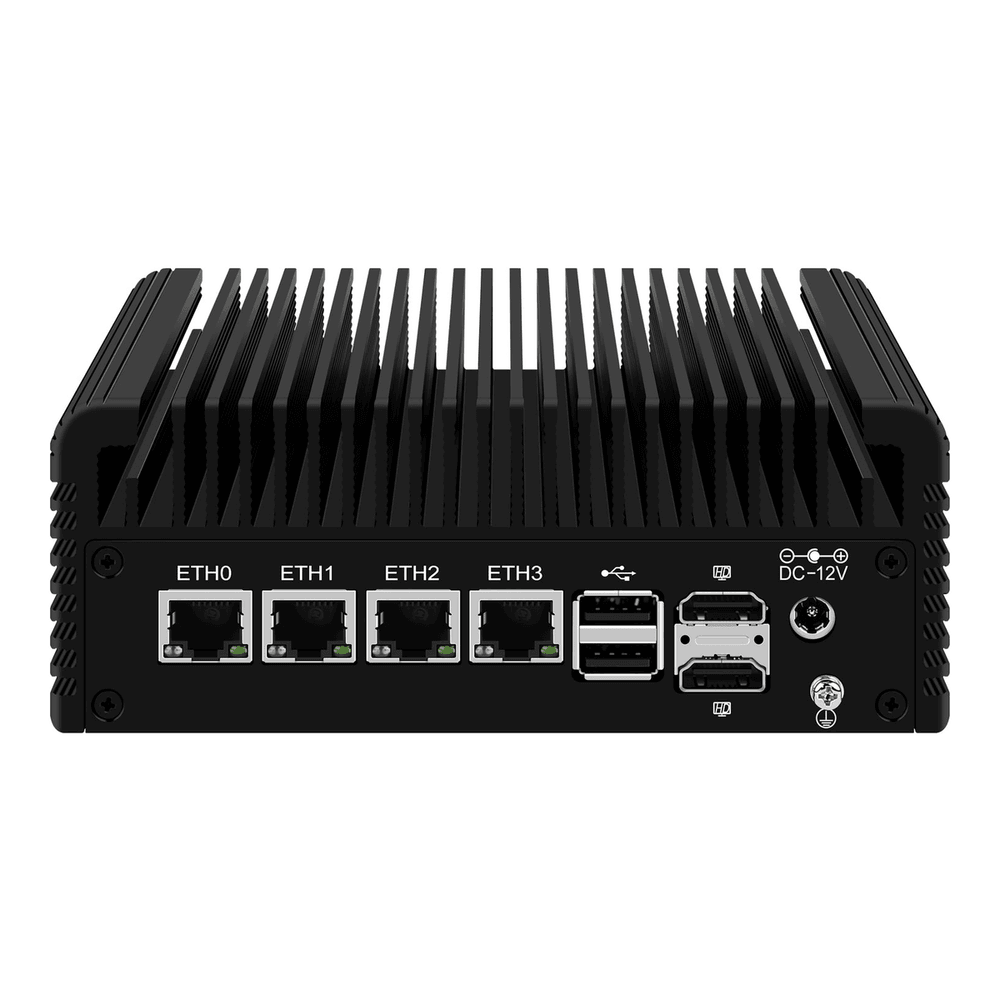
When you want four discrete 2.5GbE ports instead of VLANs on a switch, the CWWK N100 is the value leader. Four i226-V controllers, a fanless aluminium chassis with dual copper heatpipes, and an N100 that pulls under 10W idle once you trim a couple of BIOS settings. Serve The Home reviewed the barebones unit and it routes a gigabit line at wire speed with headroom to spare; the ready-to-run bundles with RAM and an SSD list higher, so check the live price.
Who it is for: the person building a proper firewall with WAN, LAN, a DMZ, and a dedicated management or lab port, all physical. Four ports also makes it a clean platform to install OPNsense or install pfSense and assign interfaces without compromise.
Skip it if: you do not want to source and fit your own DDR5 SODIMM and NVMe drive, or you want a vendor to call when something misbehaves. This is the barebones, DIY end of the market. CWWK’s documentation is thin and its support is hit or miss, which is the price of the price. Buy a current-firmware unit and confirm the BIOS is up to date to avoid an early C-state hang that bit some first-run boards.
One thing worth knowing before you settle on this box: if you want real inspection headroom, an eight-core i3-N305 with six ports is our IDS/IPS pick below. Otherwise the N100 is plenty for routing. Check the live CWWK N100 price and configuration options before ordering, because the barebones and the RAM-plus-SSD bundles are listed separately.
Qotom Q10932G6: best for inspection and a segmented network

This is the box you buy when the firewall has to do more than route. Qotom has built fanless firewall appliances for years, and the Q10932G6 puts an eight-core i3-N305 up to 3.8 GHz in a solid aluminium heatsink chassis. Those cores are what carry Suricata or Zenarmor inline without collapsing your throughput, and its six i226-V ports give you enough physical interfaces to terminate WAN, LAN, DMZ, IoT, lab, and a management network separately. Rovingclimber measured the i3-N305 idling around 13W and peaking near 50W under a sustained CPU benchmark before settling around 34W, so it costs a little more power than the N100, which is the expected trade for the extra cores.
Who it is for: the homelab that runs Suricata IDS/IPS inline, terminates multiple WireGuard tunnels, and wants a port per network segment rather than trunking everything. It is also a capable little virtualization host if you want pfSense or OPNsense in a VM with room left over.
Skip it if: your network is a flat WAN-plus-LAN and you do not run inspection. You would be paying for cores and ports you never light up, and the N100 or the MeLE QuieterDL would serve you better for less power. Qotom sells direct and through Amazon and documents its boxes better than the no-name boards, but support is still email and community forums rather than a phone line.
Check the current Qotom Q10932G6 price on Amazon. It ships barebones, so budget for a DDR5 SO-DIMM and an NVMe drive on top of the headline number, the same as the CWWK N100.
Protectli VP2420: best built-for-firewall box
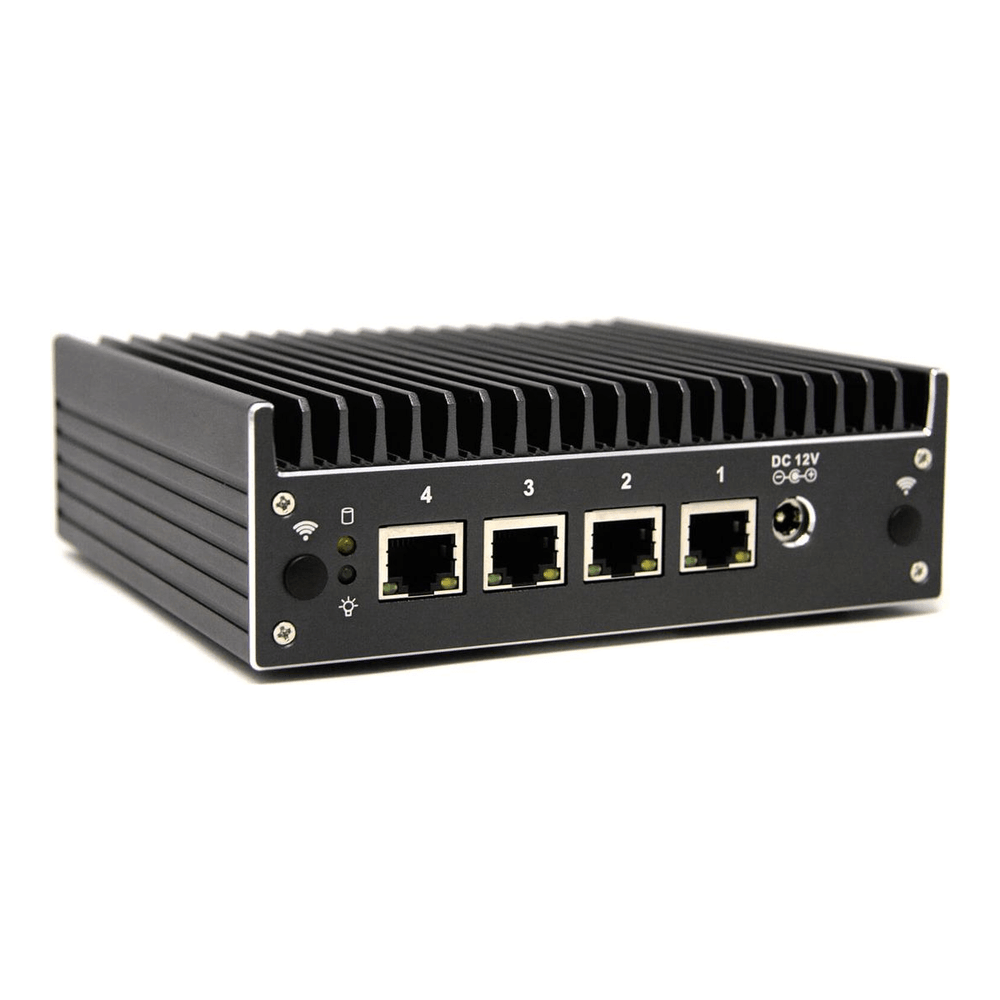
Protectli sells the same idea as CWWK with the rough edges sanded off. The VP2420 runs a quad-core Celeron J6412 with four 2.5GbE ports, and the J6412 is slower per core than an N100, so on raw routing math this is not the fastest box here. What you pay for is everything around the silicon: coreboot firmware as an ordering option, a real warranty, and US-based support that answers when you have a problem. homenetworkguy’s review found it idling in the low-to-mid 50s Celsius and running Zenarmor at a full 2.5 Gbps, so it has the headroom for inspection on a 2.5G line.
There is a detail worth knowing for this guide specifically. Protectli switched the VP2420 to i226-V NICs on units built after June 2024, while earlier units shipped i225-V. Both run on the same FreeBSD igc driver, so the i226-V handling we describe below applies either way.
Who it is for: anyone who wants a firewall appliance rather than a project, values coreboot and a vendor relationship, and would rather pay more than troubleshoot a no-name board alone. It is the box to recommend to someone who will run it for five years and never want to think about the hardware again.
Skip it if: you are optimizing for price-per-core or you want the fastest inspection throughput per dollar. The Qotom i3-N305 will out-muscle it for less money, as long as you accept DIY support. One caveat matters right now: the VP2420 is gone from Amazon and the whole 2.5GbE Vault Pro line is sold out on Protectli’s own store as of September 2026, so treat it as the supported box to buy when it restocks. If you need hardware today, the three boxes above are the ones in stock.
Netgate 4200: best turnkey, officially supported
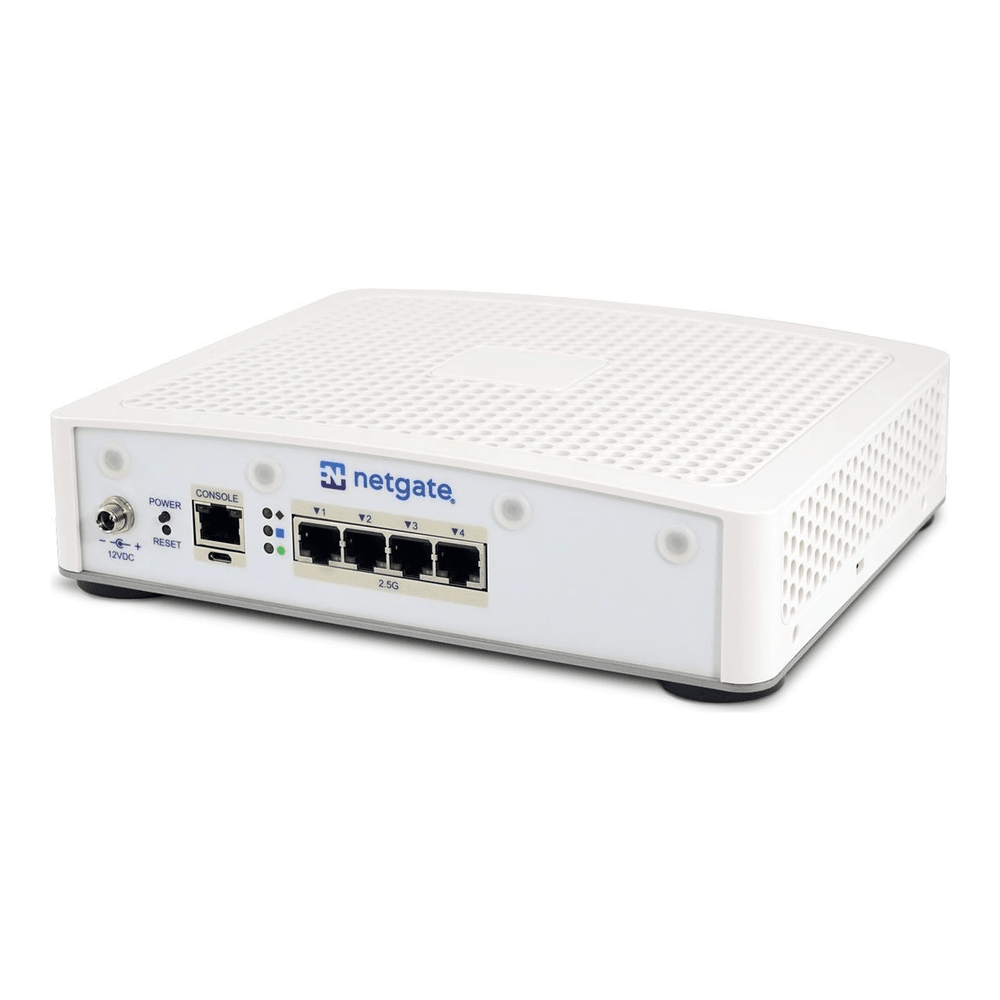
The 4200 is the answer when you do not want to build anything. It is the reference pfSense appliance, an Intel Atom C1110 with four flexible 2.5GbE ports, pfSense Plus pre-installed, and official Netgate support behind it. Netgate rates it around 9 Gbps of L3 routing across those ports (9.28 Gbps on its IMIX test), and because the company writes pfSense, the hardware and software are validated together in a way no generic box can claim.
Who it is for: the buyer who wants a sealed, supported product and is happy to pay for it, or anyone deploying at a site where “call the vendor” needs to be a real option. The lineup scales down to the 1100 for light duty and up through the 2100, so there is a model for most loads.
Skip it if: you want the most compute per dollar or you prefer OPNsense. The Atom is comfortably outclassed on cores by the i3-N305 at a higher price, and you are committing to the pfSense Plus ecosystem. We have not linked an affiliate for Netgate; buy it from Netgate directly so the appliance arrives licensed and supported.
How to choose pfSense or OPNsense hardware
The picks above cover the common cases. If you are between them, these are the decisions that actually matter.
Ports versus VLANs. A two-port box like the MeLE QuieterDL handles any number of networks through VLANs on a managed switch, which is how most production networks are built anyway. Buy four or six physical ports only when you specifically want air-gapped interfaces, a separate physical DMZ, or a dedicated WAN-failover port. More ports is not more secure on its own; it is a convenience, and it costs power and money.
CPU is about services, not routing. Any of these chips routes a gigabit at line rate. The moment you turn on inline inspection or VPN, encryption and pattern-matching become CPU-bound. A four-core N100 or N150 is fine for routing plus a light WireGuard tunnel. Running Suricata or Zenarmor at 2.5 Gbps is where you want the eight cores of the i3-N305 or the validated headroom of a Netgate. If you are unsure, size up on cores; it is the one spec you cannot add later.
RAM and storage are easy. 8GB of RAM is comfortable for pfSense or OPNsense with packages; 16GB is generous and leaves room to virtualize. Any small NVMe or SATA SSD is fine, the firewall writes very little. Do not overspend here.
The i226-V detail to get right. The i226-V is the correct NIC to want, but some early firmware revisions had a connection-drop bug where a link would blip for a few seconds at random. The fix is well understood: update the board firmware (current firmware ships the fix), disable Energy Efficient Ethernet, and on stubborn units disable ASPM in the BIOS. On pfSense and OPNsense the NICs appear under the FreeBSD igc driver, so you can confirm the controller from the shell.
pciconf -lv | grep -A1 igcThe driver and the exact controller print on the next line, which is how you tell an i226-V apart from an i225-V or a Realtek part:
igc0@pci0:1:0:0: class=0x020000 ... 'Ethernet Controller I226-V'That is the whole gotcha. It is not a reason to avoid these boxes, it is a five-minute setup step, and we cover the full diagnosis in our walkthrough on fixing i226-V random NIC drops on OPNsense.
Barebones versus ready to run. CWWK boxes are cheapest barebones, which means buying a DDR5 SODIMM and an NVMe drive separately. That is genuinely cheaper if you have parts on hand, and a minor chore if you do not. Protectli, Netgate, and the MeLE QuieterDL arrive ready to power on. Factor the parts and the assembly time into the price comparison; a barebones box is not as cheap as the headline number once it boots.
Match the box to your connection and your services
Strip away the model names and the choice comes down to two numbers and one preference. The two numbers are your link speed and how much inspection you want to run; the preference is whether you want to build or buy.
On a gigabit line doing plain routing, the MeLE QuieterDL is all the firewall you need, silent and ready to run, and it pairs with a managed switch to carve out your VLANs. Step up to a multi-gig line, or add a DMZ and a few physical segments, and the CWWK N100 four-port is the natural home. Turn on IDS/IPS or terminate several VPN tunnels and the eight-core i3-N305 is the box that keeps your throughput intact. If you would rather not assemble or troubleshoot anything, the Protectli VP2420 buys you a supported appliance, and the Netgate 4200 buys you the official pfSense product with a vendor behind it.
Buy for the services you will actually run, not the throughput number on the box. Cores and ports are the two things you cannot bolt on later, so size those for where your network is heading, and let RAM and storage stay cheap. Whichever box you pick, the i226-V NICs mean pfSense and OPNsense will see every interface the day you plug it in.