You can buy a NAS that works the day it arrives, or you can build one from a board, a case and a power supply. The DIY NAS vs prebuilt question used to have an easy answer: building was cheaper. In 2026 that is only true at one end of the market, and the reason is RAM.
We priced three like-for-like matchups on Amazon on the same day: a budget 4-bay, a mid-range 6-bay with 10GbE, and an ECC box for ZFS. Each one pits a Synology, UGREEN or TrueNAS prebuilt against a DIY build with the same job. Then we added what the spec sheets leave out, starting with power consumption over five years of 24/7 running. We also counted software licences, warranty length and how much of each box you can upgrade later. If you are weighing a DIY NAS vs Synology or a DIY NAS vs UGREEN, the numbers below settle most of it.
Current as of October 2026.
DIY NAS vs prebuilt: the short answer
For most people, a prebuilt wins on price in the mid-range and ECC tiers and on warranty in the budget and mid-range tiers. DIY wins on flexibility, bay count and repairability, and it only wins on price at the budget end. The one exception worth knowing is the Aoostar WTR Pro barebones, which undercuts both Synology and UGREEN if you supply your own RAM and SSD.
| Tier (drives excluded) | Prebuilt | DIY build | Cheaper |
|---|---|---|---|
| Budget 4-bay | Synology DS425+ about $580; UGREEN DXP4800 Plus about $657 | N150 board build about $711; Aoostar WTR Pro barebones build about $577 | Aoostar barebones, by about $3 to $80 |
| Mid 6-bay, 10GbE | UGREEN DXP6800 Pro about $1,100 | Q670 + Core i5 + 32 GB about $1,360 | Prebuilt, by about $260 |
| ECC for ZFS | TrueNAS Mini X+ about $2,000 (last Amazon price) | AM5 + ECC board + 32 GB ECC about $2,387 | Prebuilt, by about $387 |
Prices are Amazon US on October 18, 2026, with two exceptions. The TrueNAS Mini X+ listing is out of stock, so its figure is the last Amazon price and it now has to be ordered from iXsystems. The ASRock Rack board in the ECC build has dropped off Amazon, so it is priced at SabrePC. Prices move weekly during the 2026 memory shortage. Treat each one as a band and check the live price before you buy.
How we priced and measured
Every Amazon price came from Amazon’s product API on the same day, for the exact SKU in each row. Drives are left out of every total. You would buy the same disks for either box, and they’d swamp the difference. The DIY builds get what the prebuilt includes and nothing more: a board, CPU, RAM matching or beating the bundled amount, a case, a PSU, a boot SSD and, where the prebuilt has it, 10GbE.
Power numbers come from independent wall-meter tests (KitGuru, ServeTheHome, Notebookcheck, NASCompares, LocalHake) and from builders who logged their own boxes. Where only a manufacturer figure exists, we say so. Energy cost uses the US average residential rate of 18.19 cents per kWh (EIA, year to date through July 2026). At that rate every watt running 24/7 costs about $1.59 a year. The OS side draws on our own lab, where we ran TrueNAS and Unraid side by side on the same host.
The thing that changed the math this year is memory. TrendForce expects conventional DRAM contract prices to rise another 10 to 15% this quarter. On the day we priced these builds, a single 8 GB DDR5 laptop stick cost about $132, and 32 GB of DDR5 ECC cost about $1,113. A prebuilt that bundles 8 GB now bundles something worth over $100 on its own.
1. Budget 4-bay: Synology DS425+ vs two DIY builds
This is the tier most first-time NAS buyers shop in, and it is the only one where building can come out ahead. The prebuilt benchmark is the Synology DS425+, with the UGREEN DXP4800 Plus as the faster alternative:

| Line | Synology DS425+ | UGREEN DXP4800 Plus | DIY: N150 NAS board | DIY: Aoostar WTR Pro |
|---|---|---|---|---|
| Box / board | about $580 | about $657 | 6-SATA N150 ITX board, about $270 | 5825U barebones, about $399 |
| Case + PSU | included (90 W brick) | included (150 W brick) | Jonsbo N2 about $129 + 450 W SFX about $100 | included (120 W brick) |
| RAM | 2 GB included | 8 GB included | 8 GB DDR5 SODIMM about $132 | 16 GB DDR4 SODIMM about $98 |
| Boot SSD | DSM lives on the drives | 128 GB included | 250 GB NVMe about $80 | 250 GB NVMe about $80 |
| Total | about $580 | about $657 | about $711 | about $577 |
| Network | 1GbE + 2.5GbE | 10GbE + 2.5GbE | 2x 2.5GbE | 2x 2.5GbE |
| Warranty | 3 years | 2 years | 1 year on the board | 12 months |
The fully DIY build on an N150 six-SATA NAS board costs about $131 more than the DS425+. The loose case, PSU and RAM add up faster than the board saves. It does give you five hot-swap bays instead of four, a PCIe slot for a 10GbE card later, and a standard SFX power supply you can replace in five minutes. The DS425+ has no PCIe slot and an external power brick. It also tops out at 6 GB of RAM on its 2019-era J4125, and without a slot there’s no 10GbE upgrade path.
The Aoostar WTR Pro is the one that flips the result. It is a finished 4-bay chassis with a Ryzen 7 5825U, sold without RAM or storage. Add 16 GB of DDR4 (currently cheaper than 8 GB of DDR5) and a boot SSD, and it lands about $3 under the DS425+ and $80 under the DXP4800 Plus. You also get a far faster CPU than either. Aoostar sells the same barebones for about $379 direct.
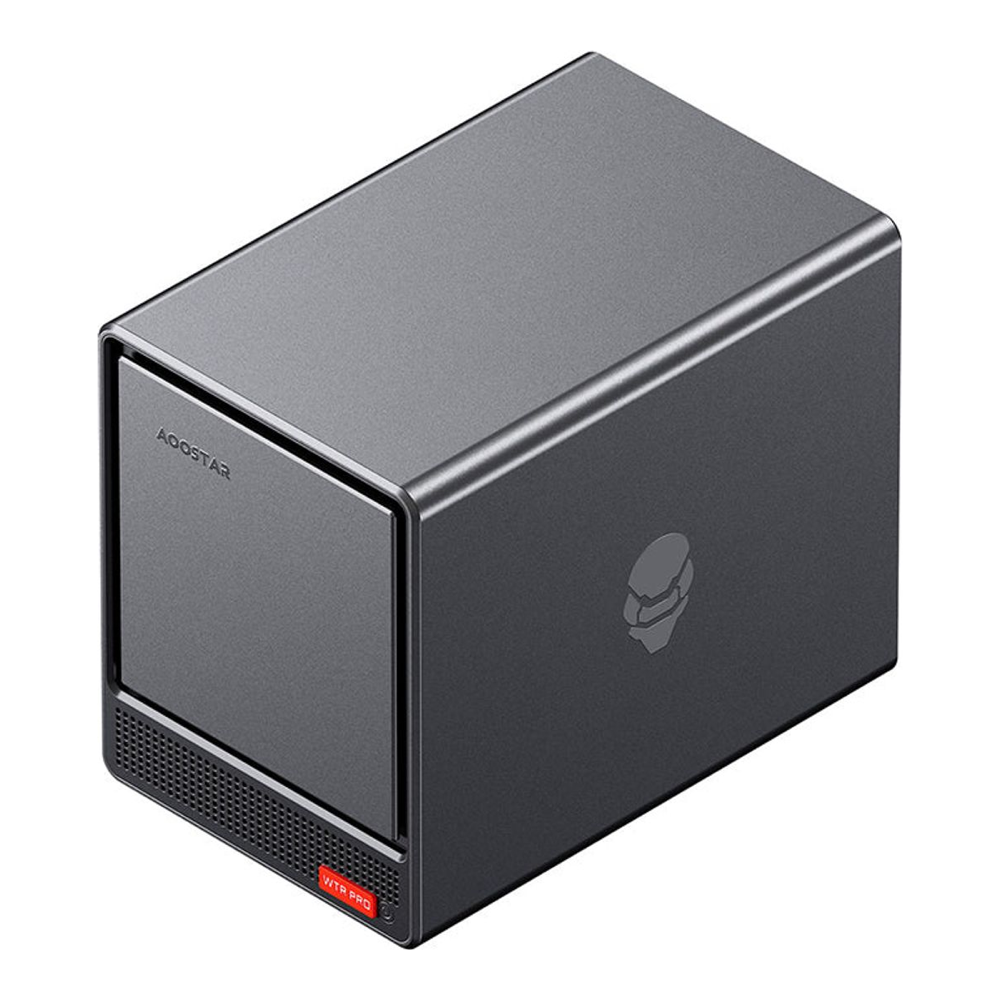
Where the Aoostar falls short is support. It has a 12-month warranty against Synology’s three years, no vendor OS, and a 120 W external brick. On the day we checked, its Amazon listing had 15 reviews, against 100 for the DS425+ and 624 for the DXP4800 Plus. If you want the box to be someone else’s problem when it breaks, the DS425+ is still the safer buy. The DXP4800 Plus is the pick if you want 10GbE from day one. For more four-bay options, see our mini PC NAS builds.
2. Mid-range 6-bay: UGREEN DXP6800 Pro vs a DIY Q670 build
Step up to six bays and 10GbE, and the prebuilt pulls ahead on price. The UGREEN DXP6800 Pro packs a Core i5-1235U, 8 GB of DDR5, two 10GbE ports, two Thunderbolt 4 ports and a PCIe x4 slot, with a 3-year warranty. The price below is the bare unit on Amazon, which is back in stock now that UGREEN’s bundle of the same box with an HDMI cable has sold out:

| Line | UGREEN DXP6800 Pro | DIY: Q670 + Core i5-14400 |
|---|---|---|
| Box / board | about $1,100 | 8-SATA Q670 ITX board, about $210 |
| CPU | Core i5-1235U included | Core i5-14400 about $205 (cooler included) |
| RAM | 8 GB included | 2x 16 GB DDR5 about $480 |
| Case | included, 6 bays | Jonsbo N3 about $160, 8 bays |
| PSU | internal | 750 W SFX Gold about $125 |
| Boot SSD | 128 GB included | 250 GB NVMe about $80 |
| 10GbE | 2 ports included | TP-Link TX401, 1 port, about $100 |
| Total | about $1,100 | about $1,360 |
The DIY build costs about $260 more, and the second 16 GB stick at about $240 accounts for most of that gap. Drop to a single 16 GB stick (still double the UGREEN’s 8 GB, though it runs single-channel) and the DIY total falls to about $1,120, still about $20 over the prebuilt. Swap the Core i5 for a Core i3-14100 as well and it’s about $1,057, roughly $43 under. The 10GbE card moved too: the TX401 went from about $61 to about $100 in about a week, and the DXP6800 Pro bare unit and its cable bundle have each been out of stock at some point this month, so recheck both prices before deciding.
What the DIY box (8-SATA Q670 board plus a Core i5-14400) gives you for the money: eight bays instead of six, a socketed desktop CPU you can upgrade, three Gen4 M.2 slots and a PCIe 5.0 x16 slot. It loses Thunderbolt and the second 10GbE port. The case is the part that makes it feel like a product rather than a project:
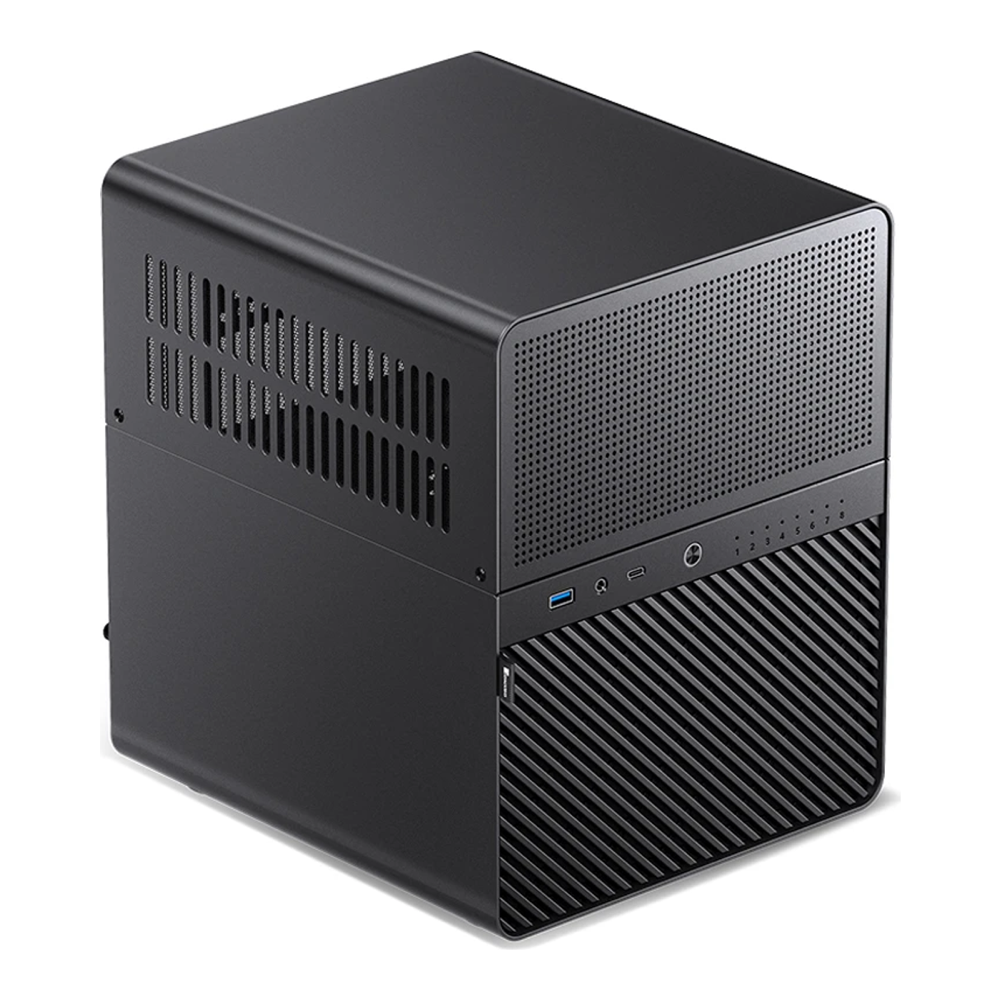
Where the prebuilt falls short is lock-in. UGOS Pro formats pools with ext4 and Btrfs feature flags that stock Linux and TrueNAS cannot mount, so moving to another OS later means copying everything off first. According to NASCompares, UGREEN has said a third-party OS will not void the hardware warranty as long as the software does not harm the hardware, which makes TrueNAS on a DXP6800 Pro a reasonable plan. The DIY board has its own weak spot: Q670 NAS boards from CWWK-family makers carry a 1-year warranty, and this one has a 3.8-star Amazon rating from 23 reviews. Our NAS case picks list other chassis if the N3 is out of stock.
3. ECC for ZFS: TrueNAS Mini X+ vs a DIY AM5 server
If the plan is ZFS with ECC memory, the reference prebuilt is iXsystems’ own TrueNAS Mini X+. It ships with an 8-core Atom C3758, 32 GB of DDR4 ECC, five hot-swap 3.5-inch bays plus two 2.5-inch SSD bays, dual 10GBase-T and IPMI:

| Line | TrueNAS Mini X+ | DIY: Ryzen 5 7600 + ASRock Rack B650D4U-2L2T |
|---|---|---|
| Box / board | about $2,000 | ECC server board with 2x 10GbE + IPMI, about $513 (SabrePC, not on Amazon) |
| CPU | Atom C3758 included | Ryzen 5 7600 about $210 (ships later) |
| ECC RAM | 32 GB included | 2x 16 GB DDR5 ECC about $1,113 |
| Case | included, 5+2 bays | SilverStone CS382 about $228, 8 bays |
| PSU | included | 650 W ATX about $104 |
| HBA + cables | not needed | LSI 9300-8i about $100 + cables about $40 |
| Boot SSD | included | 250 GB NVMe about $80 |
| Total | about $2,000 | about $2,387 |
| Warranty | 1 year, 3 optional | per part; ECC RAM lifetime |
ECC DDR5 is the whole story. Those two sticks cost about $1,113 as a kit, which is 56% of the Mini X+ price by themselves. The DIY build ends about $387 over the prebuilt. Replacing the LSI HBA and its cables with a cheap ASM1166 SATA card cuts that gap to about $285 (plus a few SATA cables). It should also lower idle power: LSI cards idle warm, and a 9400-16i was measured drawing about 10 W constantly.
You still get a lot more machine for the extra money, mostly thanks to the ASRock Rack B650D4U-2L2T board with its onboard 10GbE and IPMI, which has dropped off Amazon and now sells through US resellers such as SabrePC. The Zen 4 CPU is several generations newer than the 2017-era Atom, there are eight bays against 5+2, and every part is a standard one you can replace. Where the Mini X+ falls short is its age and its 1-year base warranty, plus availability: the Amazon listing is out of stock, so it has to be configured and ordered on the TrueNAS Mini store page. If you go the DIY route, our ZFS storage server build walks through the same AM5 platform on TrueNAS, and the HBA card guide covers the controller choice. Check the ECC kit against ASRock Rack’s QVL before ordering, because A-Tech sells the kit as generic server and workstation memory.
DIY vs prebuilt NAS power consumption over five years
Idle power decides the running cost, because a home NAS spends most of its life waiting. None of these rows are perfectly like for like, since drive counts and tuning differ. Read them within a tier:
| Box | Condition | Watts | Per year | 5 years | Source |
|---|---|---|---|---|---|
| Synology DS425+ | drive access (spec) | 28.3 | $45 | $225 | Synology |
| UGREEN DXP4800 Plus | idle, 4 HDDs, 2.5GbE | 24.3 | $39 | $193 | KitGuru |
| Aoostar WTR Pro | idle with drives | 22.5 | $36 | $179 | NASCompares |
| DIY N100 (Brian Moses) | idle, 5 HDDs spinning | 43.3 | $69 | $345 | briancmoses.com |
| UGREEN DXP6800 Pro | idle, 6 HDDs spun down | 39.3 | $63 | $313 | LocalHake |
| DIY Q670 + i5-12500T | tuned idle, 4 HDDs spun down | 18 | $29 | $143 | matthewhill.uk |
| TrueNAS Mini X+ | idle, fully loaded | 89 | $142 | $709 | ServeTheHome |
| DIY Ryzen ECC + HBA (AM4) | idle, 12 HDDs, Titanium PSU | 92.5 | $147 | $737 | TrueNAS forums |
Two patterns stand out. A tuned DIY box can idle lower than any prebuilt: 18 W for a Q670 build with its drives spun down, after BIOS C-state and ASPM tuning. An untuned one idles higher, often because a cheap SATA bridge chip blocks the CPU’s deep sleep states. Prebuilts give you a decent number with no effort, and DIY gives you a better one if you put the effort in. Across the budget rows the gaps run from about $3 to $33 a year, which is too little to decide on. At the ECC tier, a fully loaded box idles near 90 W either way. That is about $710 to $740 over five years, close to twice the $387 price gap, so idle tuning matters more than the purchase price there. A UPS belongs on either kind of box; our UPS picks for a NAS cover sizing.
Software licences: the cost missing from build lists
A prebuilt includes its OS. A DIY box needs one, and the free options are genuinely good:
| OS | Cost | The catch |
|---|---|---|
| TrueNAS Community Edition | Free | ZFS rules: mixed drive sizes waste space |
| OpenMediaVault | Free | More hands-on; plugins for most extras |
| Unraid | $49 Starter (6 devices), $109 Unleashed, $249 Lifetime | Starter and Unleashed include one year of updates, then $36 a year (optional) |
| HexOS | $199 per server in early access, $299 after | Built on TrueNAS; buddy backups still marked coming soon |
| Synology DSM | Included | M.2 pools and DSM 7.4 dedup/compression want Synology drives |
| UGREEN UGOS Pro | Included | Pools do not mount on stock Linux |
| ZimaOS | Free for 4 disks and 3 users; Plus $29 lifetime | ZimaCube 2 ships with Plus |
Count Unraid’s devices carefully. Starter covers six attached storage devices, cache drives and internal boot drives included, so the 8-bay mid-range DIY build needs Unleashed at $109 once it is full. If you run Unraid on it, that $109 licence is more than twice the roughly $43 saving on the trimmed Core i3 variant, so the build ends up dearer than the prebuilt.
Synology’s drive policy is looser than it was before DSM 7.3, but it has not gone away. On DSM 7.3 and later, 2025-model Plus units like the DS425+ accept third-party hard drives and 2.5-inch SATA SSDs for new pools. M.2 NVMe pools and caches still need drives from Synology’s list. The newer hard-drive deduplication and compression features in DSM 7.4 require Synology drives. Synology also limits warranty support if you add non-Synology RAM. If the drives you already own are a mix of brands and sizes, that’s a point for DIY. Our NAS hard drive guide covers which models are CMR.
Time, warranty and the long game
Assembly is the small part. Brian Moses logged about two hours putting his 2025 DIY NAS together. He then ran almost 36 hours of RAM burn-in and 279 hours of drive burn-in before trusting it, and burn-in is worth doing on a prebuilt too. The initial RAID build depends on the OS, not the box. Published ZimaCube 2 and DXP6800 Pro tests took about 18 to 20 hours to build a 4 to 6 drive RAID5, and an Unraid parity sync also takes hours. A TrueNAS RAIDZ pool skips that step entirely, because ZFS only computes parity for data as it’s written. The hours DIY really costs are the research, part picking and BIOS tuning. We did not measure those, but budget an evening or two.
Warranty is where prebuilts usually win (the Mini X+ is the exception at one year): three years from Synology and UGREEN’s 6-bay line, two for the DXP4800 Plus, and one year for most DIY boards. The long game favours DIY. A socketed board and a standard PSU mean one failed part gets replaced in an afternoon. On a prebuilt with a soldered mobile CPU, a failed board out of warranty means replacing the whole box. Upgrades split the same way. The mid-range and ECC DIY boards take 64 GB or more and have full-size PCIe slots (the N150 board stops at 32 GB), while the DS425+ stops at 6 GB with no slot at all.
Build or buy: pick by situation
- First NAS, want it to just work: buy the Synology DS425+. The 3-year warranty and DSM’s polish are worth the small premium over a barebones build.
- Cheapest capable 4-bay: the Aoostar WTR Pro barebones with your own RAM and SSD. It’s the only DIY-style build that beats the prebuilts on price, and its CPU is far stronger. Accept a 12-month warranty and no vendor OS.
- Six bays and 10GbE on a budget: buy the UGREEN DXP6800 Pro, then put TrueNAS on it if you don’t want UGOS lock-in.
- Eight or more bays, or you want to upgrade parts for years: build. The Q670 plus Jonsbo N3 route gives you eight bays and a socketed CPU for about $260 more than the DXP6800 Pro (or about $43 less with a Core i3 and one 16 GB stick). Expect a 1-year board warranty.
- ECC and ZFS for data you can’t lose: the TrueNAS Mini X+ is about $387 cheaper, while a DIY AM5 build is faster and repairable. With today’s ECC prices, we would buy the Mini X+ direct from iXsystems unless you need more than five 3.5-inch bays.
- A drawer full of mismatched drives: build or buy anything with an open OS, then run Unraid ($49 to $249). That’s the case where the OS matters more than the box.
If you already have a mini PC or an old desktop, the cheapest NAS is the one you do not buy. Add drives, install TrueNAS or Unraid, and spend the difference on disks.