
When I spend hours studying or coding, I often don't notice my breathing getting faster or how long I've gone without a break until I'm already tired.
I built SOVA to help with that. It's a desktop focus app that uses your webcam and Presage's SmartSpectra SDK to measure breathing, pulse and heart rate variability (HRV) while you work. It learns your baseline, suggests a short reset when reliable readings show a lasting change, and compares your measurements before and after.

Live camera measurements from SmartSpectra. The heart beats at the measured pulse, and the orange line follows the breathing signal. Recorded with npm run demo, which shortens waiting periods without faking readings.
A regular timer tells me when to stop, but it can't tell whether I've been breathing faster than usual or missing breaks. Breathing apps can help, but I have to remember to open them. I wanted SOVA to notice a sustained change while I'm working and offer a break without getting in the way.
Here's the moment SOVA is built for:
- It learns your baseline. During the first two minutes of a normal focus session, SOVA uses reliable readings to learn what's usual for you.
- It notices a lasting change. If your breathing stays above that baseline, SOVA can offer a short reset. It waits for a pause in typing and holds reminders during meetings or when you've marked yourself as in flow.
- You take a 60-second break. Follow a breathing guide, with your live breath line alongside it when the signal is usable.
- You see what changed. SOVA compares reliable readings from before and after the reset. If there isn't enough good data, it says so rather than inventing a result.
SOVA isn't a stress detector or a medical app. It doesn't diagnose anything, assign health scores or tell you how to feel. It helps you decide when to take a break.
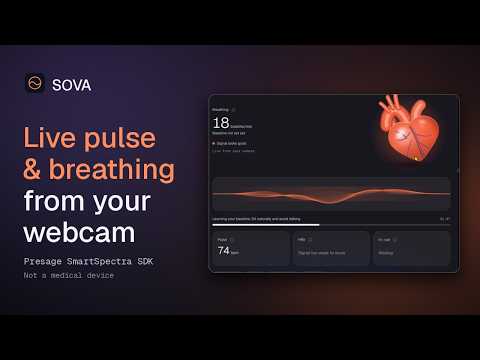
Watch the full demo on YouTube. It includes live pulse and breathing measurements, the signal-quality feedback when readings drop out, and the What SOVA sees panel showing which SDK values were accepted or held back.
SOVA uses @smartspectra/node-sdk 3.4.0 for its live physiological signals. The SDK runs in Electron's main process, and SOVA checks each reading before displaying it or using it to suggest a break.
| Source file | What to look for |
|---|---|
src/main/nativeMeasurement.js |
Starts the native SDK, opens the camera, decodes metric events and handles validation updates |
src/main/main.js |
Connects the SDK to Electron, manages permissions and measurement start/stop |
src/renderer/measurement.js |
Receives measurement events and turns SDK warnings into useful camera guidance |
shared/core/signals.js |
Checks warm-up time, confidence, stability, freshness and valid ranges |
shared/core/cueEngine.js |
Compares readings with your baseline and decides when a reset suggestion is appropriate |
shared/core/pipeline.js and src/renderer/sees.js |
Powers What SOVA sees, including SDK fields, confidence and why a reading was used or withheld |
src/renderer/session.js |
Runs focus sessions, resets, comparisons and optional user-requested AI reflections |
shared/core/breathSound.js |
Handles optional microphone-based breath timing during resets |
The SDK provides breathing rate and waveform, inhale/exhale ratio, pulse, HRV, blink and talking signals, and live camera-quality feedback. SOVA only uses a measurement after it passes the configured checks. An unavailable value stays unavailable; the app doesn't fill it in with a guess.
You'll need a webcam and a free Presage API key for live measurements. There's no SOVA account to create.
Install: Get the Windows installer or Apple Silicon Mac disk image from Releases. The builds aren't signed yet, so your operating system may show a warning. See the installation notes below before proceeding.
Or run from source:
git clone https://github.com/Chima30/sova.git
cd sova
npm install
npm start
On first launch, read the camera consent screen and add your API key in Settings. For the fastest live test, choose Start 60-second check-in on Home. It shows incoming readings and their quality without requiring a full focus session. HRV may need up to 30 extra seconds, and may still be unavailable.
To test the full experience, open Focus, choose a preset and let SOVA learn your baseline. You can use npm run demo to shorten the baseline and reminder waiting periods while keeping measurements real.
- SOVA asks before using your camera. You can decline and keep using the focus timer.
- SOVA doesn't record or save camera video. Its session history, notes and personal baselines are stored on your computer, and you can export or delete them.
- Live SmartSpectra measurement needs a Presage connection and API key. According to Presage's documentation, the SDK also automatically sends derived vitals to its AI Insights service during measurement. SOVA doesn't display those automatic insights.
- SOVA's additional AI reflections are optional. SDK diagnostic telemetry is off by default; that setting is separate from automatic SDK AI Insights.
- Optional microphone breath analysis requires separate permission and does not save audio.
- SOVA is for focus and personal reflection, not diagnosis or medical decisions.
The full consent and data-handling details are below, including Presage's documentation links.
Everything else SOVA does
60-second signal check-in
- A quick look at breathing, pulse and HRV from Home, without starting a focus session or timer
- Live signal quality for each reading (ready, collecting, too weak) and face detection while it measures
- HRV needs a full minute of steady signal, so SOVA waits up to 30 seconds more for it, and shows "not ready" rather than a guess
- Results as the median of steady readings, compared with your last check-in and with your own usual range (the middle half of your past readings, shown only after 5 readings over 3 days), never with population "normal" ranges
- An optional "how are you feeling?" answer saved with the check-in; a Check-ins tab in History
Sessions and signals
- First-run name, goals and camera consent with a plain-language disclosure
- Signal check with a framing preview, then the SDK's live validation feedback (lighting, framing, motion)
- Direct camera capture in the main process at 30 fps, as Presage recommends, with an automatic 640x480 fallback and automatic reconnects for retryable SDK errors
- Personal baseline from the first 2 minutes of steady signal (breathing or pulse), restarted after any interruption, with a recalibrate option
- Calibration reminders when the signal needs attention for more than a minute
- "What SOVA sees": the live values leaving the SDK, with confidence and why any value is held back, computed on this computer with no video saved
- Your check-ins over the last 14 days in Insights, one point per day, with your own usual range shaded
- "Your data stays on this computer" on Home, with export and a confirmed "Forget everything"
- A session story card at the end of each session: focus time, resets and breathing before → after your last reset, drawn over your last steady breath waveform. Save it as a PNG or copy it
- Live breath in the session pill: a small breath line and your rate at the top right, from any page, grey with "No steady signal" when the reading isn't usable
- Today rings on Home: focus against your plan, breaks taken, and resets plus eye rests, with no score
- Soft rising embers behind every page (decorative, no data; still with reduced motion)
- A 3D heart that swells with your breath and beats at your measured pulse, only while each reading is usable
Focus
- Focus session presets: Deep Work, Studying, Reading, Creative Work, General Work
- Pomodoro timer with adaptive breaks (longer after tense blocks, shorter after calm ones)
- Floating focus widget: always on top, draggable, with the timer, live breath line, quick reset, pause and open
- Quick reset shortcut from any app: Ctrl + Shift + B (Cmd + Shift + B on macOS)
- Ambient sounds (rain, forest, soft noise, ambient), generated in the app so they work offline, optionally started by each preset
Cues and smart pauses
- Tension cues when breathing, pulse or HRV stays away from your baseline, shown at a pause in your typing
- Eye-rest reminders from blink detection, falling back to a time reminder
- Meeting snooze from talking detection, away pause when no face is seen for 1 minute, "I'm in flow" snooze, manual meeting pause, quiet hours
- Personal sensitivity settings: your own thresholds, detection window, time between cues, eye-rest rhythm, and an on/off switch per cue
Recovery
- Breathing sessions of 30 s, 60 s, 2 min or 5 min, with preset or custom patterns
- Live breath line against the target pace, inhale:exhale coaching, sound guide for eyes-closed breathing
- Before-and-after values for each reset, recorded only when the signal is reliable
Breath sound analysis (optional, microphone)
- During breathing resets, SOVA measures the room for 3 seconds, then times each audible breath
- The camera's breathing waveform (its direction learned from the guide you follow) says whether each sound was a breath in or out
- Results: average exhale length against the target, how it changed during the reset, breath-to-breath steadiness, and audible inhales. If too few breaths are heard, SOVA says so instead of guessing
Presage AI (optional)
- AI check-in during a session and an AI reflection at the end, generated by Presage LLM Insights from your measured pulse, HRV and breathing plus SOVA's session context
- Prompts follow Presage's guidance and forbid diagnosis, medical advice and emotional claims; replies are labelled as AI-generated
Reflection and insights
- End-of-session reflection (Calm, Productive, Distracted, Tired, Overwhelmed) and session notes
- Focus timeline replay: focus and break blocks, tense stretches, meeting, away and paused time, cues, resets and eye rests
- Before-and-after averages across resets (needs 3 reliable resets)
- Weekly reflection and consistency tracker without streaks
- Personal pattern discovery after 7 live sessions, reporting only what the data shows consistently
- CSV and JSON export, delete all
Everywhere
- Offline: timers, recovery, sounds, history and insights work without internet; live readings need a connection
- Light and dark mode, reduced motion, screen-reader announcements, keyboard access
Planned next: Android app with the same shared rules and config.
How SOVA uses each SDK signal
| Signal | SDK field | SOVA use |
|---|---|---|
| Breathing rate | breathing.rate (30 s window) |
Baseline, tension cues, reset biofeedback |
| Breath waveform | breathing.upperTrace |
Live breath line |
| Inhale:exhale ratio | breathing.inhaleExhaleRatio |
Exhale coaching |
| Pulse | cardio.pulseRate (12 s window, 40 to 110 BPM) |
Baseline, tension cues, before and after |
| HRV | cardio.hrv RMSSD (60 s window) |
Baseline, tension cues, before and after |
| Blinking | face.blinking |
Eye-rest reminders |
| Talking | face.talking |
Automatic meeting snooze |
| Validation status | validationStatus event |
Signal check tips, away detection |
SOVA calls the SDK's requestInsight only when the user has turned on AI reflections. The SDK also sends derived vitals to Presage's AI service automatically during sessions; see Consent and data handling.
Install, run from source and build
Install on Windows
- Download SOVA-Setup-*.exe from the latest release.
- Run it. Windows SmartScreen may warn because the installer is not code-signed yet: click More info, then Run anyway.
- Open SOVA, accept the camera consent, and paste your free Presage API key in Settings.
- Make sure Windows lets desktop apps use the camera: Settings › Privacy & security › Camera › Let desktop apps access your camera.
Install on Mac (Apple Silicon)
- Download SOVA-…-mac-arm64.dmg from the latest release, open it and drag SOVA to Applications.
- The app is not notarized by Apple yet, so the first time, right-click SOVA in Applications and choose Open, then Open again. On macOS 15 or later, if there is no Open button: try to open it once, then go to System Settings › Privacy & Security and choose Open Anyway.
- Accept the camera consent in SOVA, and allow camera access when macOS asks. Paste your free Presage API key in Settings.
Every push to main builds the Windows installer automatically with GitHub Actions (workflow). The Mac disk image is built when the workflow is run by hand, including for every release.
Requirements
- Node.js 20 or later (24 LTS recommended)
- Windows x64, macOS on Apple Silicon, or Linux x64/arm64 with glibc 2.35+ (Ubuntu 22.04+, Debian 12+)
- A webcam
- A free Presage API key from the developer portal
Run from source
git clone https://github.com/Chima30/sova.git
cd sova
npm install
npm start        # or: npm run demo, for the short demo timing
npm install downloads the SDK's native runtime for every supported platform (a few hundred MB). That is expected; only your platform's runtime is loaded.
On first launch, accept the camera consent, then paste your API key in Settings. The key is encrypted with your operating system's secure storage (Electron safeStorage) and is never written to the repo. For development you can instead set an environment variable before npm start:
# macOS / Linux
export SOVA_PRESAGE_API_KEY=your-key
# Windows PowerShell
$env:SOVA_PRESAGE_API_KEY="your-key"
Build installers
npm run dist:win     # Windows installer in release/ (also built by GitHub Actions)
npm run dist:mac     # macOS (Apple Silicon), on a Mac (also built by GitHub Actions)
npm run dist:linux   # Linux AppImage
Packaging follows Presage's guide: the platform runtime folder is copied to resources/smartspectra/ and loaded from there. On macOS the camera usage description and the library-validation entitlement are set in package.json and build/entitlements.mac.plist. On Windows, sign the bundled DLLs with your app for distribution.
Full details: camera, processing, storage, telemetry, microphone and AI
Camera consent
- On first launch SOVA shows a consent screen explaining what the camera is used for, what is stored and what goes to Presage. Live readings start only after the user ticks "I understand and agree" and chooses "Allow camera". Choosing "Not now" keeps SOVA as a plain focus timer with the camera off.
- Consent can be reviewed again at any time in Settings, and is asked again if the disclosure changes.
- The camera is on only during a check-in, focus session or reset initiated by the user. An on-screen "Camera on" indicator (also shown in the floating widget) and a "Pause camera" button are always visible. SOVA never runs the camera in the background or without the user starting a session, and measures only the person who started it.
- During a session the SDK opens the camera directly in SOVA's main process. The framing preview shown before a session uses the window's camera permission, which is granted only to SOVA's own bundled pages, video only, never the microphone.
Processing and sharing
- The SmartSpectra SDK computes every signal on the user's computer. Video and images are never recorded, saved or uploaded.
- The SDK connects to Presage's service to authenticate each measurement session with the user's own API key (Presage counts usage on that key) and to fetch its processing models.
- Presage vitals insights: according to Presage's LLM Insights documentation, while a measurement session runs the SDK automatically sends derived values (pulse rate, HRV and breathing rate, plus a session ID) to Presage, which forwards them to a large language model to produce short "vitals check-ins": once when each signal first becomes stable, then every 60 seconds. No video or facial images are sent. SOVA does not currently expose a separate control for these SDK requests; whether this SDK version supports disabling them independently should be confirmed with Presage. SOVA does not show these check-ins.
- SOVA does not add a separate analytics or cloud-sync destination. SOVA does not add its own cloud sync, advertising or analytics service. Presage handles SDK-related requests under its own policies.
Storage, retention and deletion
- Stored on the user's computer only, as JSON in the app's data folder (on Windows
%APPDATA%\SOVA): session summaries, personal baselines, session events (cues, resets, eye rests, pauses, 30-second tension samples), before-and-after values, signal check-in results (summary values only), breath-sound results, AI reflections, reflections, notes, settings, and the local profile: the name SOVA greets you by, your first-launch goals and the optional "how are you feeling?" check-ins. There are no accounts and no passwords; the profile never leaves the computer. - The Presage API key is encrypted with the operating system's secure storage (Electron
safeStorage) and never written to the repository. - Data is kept until the user deletes it. Settings › Delete all data removes every session, reflection, note, check-in, setting, the local profile and the saved API key.
- Settings › Export CSV or JSON gives the user a full copy of their data.
SDK telemetry
- Off by default in SOVA (
enableTelemetry: false). Users can opt in under Settings › Share anonymous SDK diagnostics. - When on, the SDK sends one aggregate summary per session: SDK version, platform and device model, session outcome, frame-rate and performance counts, and counts of quality warnings. It never includes video, images, measured values, or user or device identifiers. See Presage's telemetry doc and privacy policy.
Microphone (optional, off by default)
- Used only if the user turns on breath sound analysis, after a separate consent prompt, and only while a breathing reset is running.
- The audio is turned into one loudness number every 20 ms inside the app to time breaths. It is never recorded, saved or sent anywhere. Microphone permission is granted only to SOVA's own page and only while this setting is on.
- Only the results (for example average exhale length) are saved with the session.
AI services
- Presage's automatic vitals insights described above run inside the SDK; SOVA does not show them.
- AI reflections (optional, off by default): after a separate consent prompt, SOVA calls the SDK's
requestInsightwhen the user presses AI check-in and at the end of a session of 2 minutes or more. The prompt contains the session summary (preset, focus minutes, counts of cues, resets and eye rests, baseline values, breathing before and after the last reset, last breath-sound result, and the feeling the user chose on Home, if any) and is sent to Presage with the SDK's buffered pulse, HRV and breathing values; Presage forwards it to a large language model. No video, images or microphone audio are included. The reply is stored with the session on the user's computer and included in export and deletion. Replies are labelled as AI-generated and may be inaccurate. - No other AI service is used.
Not medical
- SOVA is a focus and self-reflection tool. It makes no diagnosis or treatment claims, shows no stress score, and is not for medical decisions. Presage states its SDK metrics are for general wellness only and are not FDA-cleared.
- Readings can be wrong during large motion, chewing gum, flickering light, talking (breathing), dark or striped clothing (breathing), or with the face turned away. SOVA hides any value whose confidence is too low instead of showing it.
See AGENTS.md for commands and rules, and docs/state-machines.md for every stateful flow (session, live signal, check-in) with diagrams.
shared/config/sova-config.json   presets, thresholds, windows, cooldowns, breathing patterns
shared/core/                     platform-neutral engines (signals, baseline, cues, session, breathing,
                                 insights, personal overrides, export)
src/main/                        Electron main process, main-process SDK capture, local store
src/preload/                     Presage preload bridge plus SOVA's API
src/renderer/                    UI, SDK wrapper, session and reset screens
test/                            unit tests for the shared core (npm test)
test/smoke/                      Electron smoke test that clicks through the app (npm run smoke)
The shared core holds every rule (confidence gating, baseline, cue timing, adaptive breaks) so the Android app can follow the same behaviour and the same config file.
SOVA's own code is released under the MIT License. The Presage SmartSpectra SDK (@smartspectra/node-sdk) is not covered by it: it is used under Presage's own license and terms, and needs your own Presage API key.
