Releases: microsoft/PowerToys
Release list
Preview v0.101.2632.0

Preview v0.101.2632.0
This preview includes the latest features, fixes, and improvements since PowerToys Preview v0.101.2601.0.
Installer Hashes
| Description | Filename | sha256 hash |
|---|---|---|
| Per user - x64 | PowerToysUserSetup-0.101.2632.0-x64.exe | 4A446BF9880981503BE72FFEDB38D12EC9D3A4BDFAC810852F1185ECEC5C5C74 |
| Per user - ARM64 | PowerToysUserSetup-0.101.2632.0-arm64.exe | EBA67EE5560239B74A73689289E57E4CA50272657752DD1ED607B226702DD533 |
| Machine wide - x64 | PowerToysSetup-0.101.2632.0-x64.exe | B579493124A54992E590CDC8CD6434AB2CCCD5CD121A548CBC86EC69CD2A30C3 |
| Machine wide - ARM64 | PowerToysSetup-0.101.2632.0-arm64.exe | FF51EA569382BA5D2472353D5DD27555AE550A074FE85B107EF5582FC79BDE1F |
Highlights
- Command Palette: Added copyable command deep links with consent prompts and permission management.
- Command Palette: Improved Clipboard History image previews and text formatting.
- Environment Variables: Added a Remove duplicates action to the PATH editor.
- Peek: Restored scrolling and text interaction in previews and added Alt+Left/Right file navigation.
- PowerToys Run: Fixed uppercase temperature-unit conversions with Turkish regional settings.
- Settings: Stopped shortcut-editor flickering when keys are held down.
- Workspaces: Added one-time launch choices for EXEs configured to run as administrator when their signatures cannot be verified.
- General: Addressed WinUI startup crashes reported in CJK environments.
General
- Addressed WinUI startup crashes reported in CJK environments by initializing window titles before title-bar setup across several utilities in #50027 by @MuyuanMS
Command Palette
- Added copyable command deep links with user consent and permission management, and fixed clipped Pin to Dock dialogs in compact windows in #49793 by @jiripolasek
- Improved Clipboard History details with larger image previews and better text formatting, without stretching small images in #50098
- Renewed foreground permissions on every extension command invocation so commands can bring their windows forward after switching between apps in #50651 by @jiripolasek
Environment Variables
- Added a Remove duplicates action to the PATH editor that recognizes equivalent entries while preserving their first spelling and original order in #50585 by @joaogabriel15
File Explorer add-ons
- Consolidated native File Explorer preview handlers and thumbnail providers into one shared component, reducing duplicate code and output files in #50252 by @noraa-junker
Peek
- Prevented accidental title-bar actions on startup, restored scrolling and text interaction in previews, and added Alt+Left/Right for switching files in #50472 by @daverayment
PowerToys Run
- Fixed uppercase CELSIUS and FAHRENHEIT conversions when using Turkish regional settings in #50414 by @cuishuang
Settings
- Stopped the shortcut editor from flickering when a non-modifier key or the Windows key is held down in #49662 by @ShimizuTheLotus and @MuyuanMS
Workspaces
- Added a warning before launching EXE entries set to Run as administrator when their digital signatures cannot be verified, with Skip this app or one-time Run anyway choices in #50508 by @LegendaryBlair
Development
- Migrated Light Switch UI tests to the winappcli-based framework and improved ZoomIt recording, timer, dialog, and Notepad test reliability in #50654
Preview v0.101.2601.0
Preview v0.101.2601.0
This preview includes the latest fixes and improvements since PowerToys Preview v0.101.2572.0.
Installer Hashes
| Description | Filename | sha256 hash |
|---|---|---|
| Per user - x64 | PowerToysUserSetup-0.101.2601.0-x64.exe | 6E3C62216C63D24B7552432CBD58EE98A2CF3B083D420FC93C9495D7E02FB1D9 |
| Per user - ARM64 | PowerToysUserSetup-0.101.2601.0-arm64.exe | 02D5A32138F8DC3F1FAB3BB08F08C77CF72082D4E180CF24D7449CB0110EFD03 |
| Machine wide - x64 | PowerToysSetup-0.101.2601.0-x64.exe | B8BFD979F672813F7DC7D090794E0CD40D5BB681F8A925545B4934BCA191A8E9 |
| Machine wide - ARM64 | PowerToysSetup-0.101.2601.0-arm64.exe | F3B2657D68FF18B939F15B8AD376B68434F2EA98C3035FAB8C6AB92A18F08E4C |
Highlights
- Grab And Move: Improved move and resize responsiveness and added per-application modifier-key exclusions.
- PowerRename: Fixed a shutdown hang related to image metadata decoding.
- ZoomIt: Removed unnecessary Space/Backspace input from Demo Type in Notepad.
Grab And Move
- Improved move and resize responsiveness and added per-application modifier-key exclusions so selected foreground apps retain their shortcuts in #50082 by @foxmsft
PowerRename
- Fixed a shutdown hang by releasing image metadata decoding resources after each operation instead of during DLL teardown in #50593 by @LegendaryBlair
ZoomIt
- Removed unnecessary Space/Backspace input from Demo Type in Notepad and added 47 automated cases covering ZoomIt modes, capture, settings, and test helpers in #50606
Development
- Fixed intermittent Settings unit-test setup failures by aligning generated test certificate lifetimes with their issuers in #50580 by @LegendaryBlair
- Simplified native build prerequisites by removing extra MSVC runtime and ATL component requirements in #50391
- Stabilized Workspaces UI tests by identifying newly started fixture processes without depending on their module lists being initialized in #50596 by @LegendaryBlair
Preview v0.101.2572.0
Preview v0.101.2572.0
This preview includes the latest features, fixes, and improvements since PowerToys Preview v0.101.2522.0.
Installer Hashes
| Description | Filename | sha256 hash |
|---|---|---|
| Per user - x64 | PowerToysUserSetup-0.101.2572.0-x64.exe | E676FD83463135B8DBFD0933864C10F1A51578EFF7147227BD2EF2C6D26F709B |
| Per user - ARM64 | PowerToysUserSetup-0.101.2572.0-arm64.exe | DCA5163AD879CC7EF2F2D48CF9407908433D8AF0DDDFD636A991DA5ED9058888 |
| Machine wide - x64 | PowerToysSetup-0.101.2572.0-x64.exe | C1C5E85891D090774FE60A6685A8A047A192B2DDC5F7A171B70926D01B71A697 |
| Machine wide - ARM64 | PowerToysSetup-0.101.2572.0-arm64.exe | B9278F9982DDACD6D2DE0BED730B7F6EA9E9FEF8F04BEB5B7524243DB45486B7 |
Highlights
- Mouse Utilities: Added Auto Hide Cursor, with independent keyboard-input and pointer-inactivity triggers.
- Keyboard Manager: Added DSC v3 profile deployment for key and shortcut remappings.
- Power Display: Added drag-and-drop and menu controls for reordering saved profiles.
- Quick Accent: Fixed the toolbar remaining stuck after focus leaves the active window.
- Advanced Paste: Fixed crashes with HTML-only clipboard content.
- Settings: Added smooth animations to the update activity banner.
Advanced Paste
- Fixed crashes with HTML-only clipboard content while expanding deterministic offline UI coverage in #50504
Command Palette
- Improved stability by consistently dispatching MainWindow UI messages and session updates on the UI thread in #50392 by @jiripolasek
Keyboard Manager
- Added a DSC v3 resource for deploying key and shortcut remapping profiles through dsc.exe and WinGet Configuration in #49427 by @Gijsreyn
Mouse Utilities
- Added an optional Auto Hide Cursor utility that hides the pointer after keyboard input or inactivity and restores it on genuine mouse input in #50271 by @DamianEdwards
Mouse Without Borders
- Improved Settings reconnection handling by validating each local caller while preserving normal Settings and pairing behavior in #50480
Power Display
- Added drag-and-drop and menu controls for reordering saved profiles while preserving stable profile identities in #50453
- Reduced settings writes and module notifications by persisting only monitor preferences edited in Settings in #50510
Quick Accent
- Fixed the toolbar so it hides when focus leaves the active window, preventing it from remaining stuck on screen in #50212 by @amail80
Settings
- Added smooth show and dismiss animations to the update activity banner in #50375
Development
- Expanded Keyboard Manager UI coverage for remapping search, modifier and application filters, no-results recovery, and bulk deletion in #50352 by @MasaYan24
- Expanded New+ end-to-end UI coverage across Settings and Windows 10 and 11 File Explorer context-menu workflows in #50534
Preview v0.101.2522.0
Preview v0.101.2522.0
This preview includes the latest features, fixes, and improvements since PowerToys Preview v0.101.2512.0.
Installer Hashes
| Description | Filename | sha256 hash |
|---|---|---|
| Per user - x64 | PowerToysUserSetup-0.101.2522.0-x64.exe | 9CEEECEDF9345F740F760178D8AA2C81C3326C343411E256E65A2FA77066883C |
| Per user - ARM64 | PowerToysUserSetup-0.101.2522.0-arm64.exe | C24BABE0A9CE490662628809D70DCE0192151FF6807AF7912B1263C7A12128B1 |
| Machine wide - x64 | PowerToysSetup-0.101.2522.0-x64.exe | 6A278EB64A551610591BF31AE031317D3891D1EF5C91D0809056A2C8EED7F388 |
| Machine wide - ARM64 | PowerToysSetup-0.101.2522.0-arm64.exe | A453AC7BCE2FD90922DF680E374AEBCE75C4FF1128A23E39D11D50F1F28A9D1D |
Highlights
- Text Extractor: Migrated to WinUI 3 while preserving OCR behavior, activation, settings, mixed-DPI overlays, localization, and accessibility.
- Command Palette: Improved responsiveness by prioritizing visible and selected list items.
- Command Palette: Preserved search editing shortcuts in list and grid views.
- Window Hopper: Restored the overlay visuals and fixed backdrop, thumbnail, and icon rendering.
- ZoomIt: Added smooth zoom animations for more fluid transitions.
Command Palette
- Fixed list and grid views so search editing shortcuts work without moving selection, accepting suggestions, or processing keys twice in #50334 by @jiripolasek
- Added Dock display hints for stable item widths, right alignment, and tabular digits, improving dynamic Performance Monitor values in #50364 by @jiripolasek
- Improved responsiveness by prioritizing initialization of visible and selected list items over pending off-screen work in #50469 by @jiripolasek
Text Extractor
- Migrated from WPF to WinUI 3 while preserving activation, settings, OCR behavior, mixed-DPI overlays, localization, and accessibility in #49431
Window Hopper
- Restored overlay visuals while fixing acrylic backdrop behavior, thumbnail rendering, and icon sizing in #50494
ZoomIt
Development
- Expanded Workspaces end-to-end UI coverage across Settings, Quick Access, editor workflows, application capture, and launch scenarios in #50470
Preview v0.101.2512.0
PowerToys v0.101.2512.0 Preview
This preview keeps Command Palette keyboard focus responsive, improves installer process cleanup, and expands end-to-end coverage for Environment Variables and Crop And Lock.
Installer Hashes
| Description | Filename | sha256 hash |
|---|---|---|
| Per user - x64 | PowerToysUserSetup-0.101.2512.0-x64.exe | DF70C660E903CD2A2AD6A2C13496CF65774B687DC5C9FA9490A2A1D8A54173BF |
| Per user - ARM64 | PowerToysUserSetup-0.101.2512.0-arm64.exe | 5BBDCB2377CEB16EBBE98219707C012EBBEBD17B49AC52594CB71709C566849A |
| Machine wide - x64 | PowerToysSetup-0.101.2512.0-x64.exe | CE7D559D794CC499EB761B47468877D55E4B1E644032949D96CB8E2EAD04BBFF |
| Machine wide - ARM64 | PowerToysSetup-0.101.2512.0-arm64.exe | A4A9073FF4C44538F0748E3789A7CCA12A760CCE3844952E5CF6524CF3C9AA36 |
Highlights
- Command Palette: Prevented clicks on empty or non-focusable content from moving focus outside the shell and breaking keyboard shortcuts.
- Installer: Added missing CLI and helper processes to setup cleanup so active binaries do not block updates.
- Environment Variables: Added end-to-end coverage for user variables, profiles, overrides, PATH editing, and persistence.
- Crop And Lock: Added end-to-end coverage for thumbnail and reparent modes with unpackaged and packaged applications.
Command Palette
- Prevented ShellPage from losing focus when empty space or non-focusable content is clicked, preserving the search caret and keyboard shortcuts in #50448 by @jiripolasek.
Installer
- Added missing CLI and helper executables to the process termination list and made executable matching case-insensitive in #50452.
General
- Added recognition for the Shortcut Guide v2 contribution to the PowerToys community page in #50419 by @noraa-junker.
Development
- Added six Environment Variables end-to-end scenarios covering user-variable management, profiles, overrides, PATH editing, persistence, and state recovery in #50429.
- Added the first Crop And Lock end-to-end suite, covering thumbnail and reparent modes, packaged applications, module lifecycle, and selection cancellation in #50431.
Preview v0.101.2492.0
PowerToys v0.101.2492.0 Preview
This preview migrates Color Picker to WinUI 3, adds multiple Command Palette clocks, improves Keyboard Manager validation, and lets Awake turn off the display while Windows is locked.
Installer Hashes
| Description | Filename | sha256 hash |
|---|---|---|
| Per user - x64 | PowerToysUserSetup-0.101.2492.0-x64.exe | AE91DBFD3905635A06FC630E2CC49E08840B54979B1832326B9BAF27CBC0D715 |
| Per user - ARM64 | PowerToysUserSetup-0.101.2492.0-arm64.exe | 2D30FDAF40AE042E67347D9DDC97628C25A0471FDD5535758068363D9C699384 |
| Machine wide - x64 | PowerToysSetup-0.101.2492.0-x64.exe | 30913F8E9E4A97C413C5177A9E7E42BB75EBF7CE13160D69E3EFD1A28010C3AA |
| Machine wide - ARM64 | PowerToysSetup-0.101.2492.0-arm64.exe | FFBC2E5C63F17D22E483FD8239DC3CA9AD0F16BB8AE949483DB6BEFEC869CA32 |
Highlights
- Color Picker: Migrated the picker, editor, zoom magnifier, resources, and input hooks from WPF to WinUI 3.
- Command Palette: Added multiple configurable clocks with independent time zones and formats.
- Awake: Allowed Windows to turn off the display while the workstation is locked without changing unlocked keep-awake behavior.
- PowerDisplay: Added JSON Lines output and structured errors to the CLI for scripting and automation.
Awake
- Added lock-state detection so the display can turn off while the workstation is locked and Awake can resume its configured behavior after unlock in #49388 by @Meister1977.
Color Picker
- Migrated Color Picker from WPF to WinUI 3, including the picking overlay, editor, zoom magnifier, resources, telemetry, and input hooks in #49174.
Command Palette
- Added multiple configurable clocks with independent time zones, display formats, pinning, and centralized updates in #49288 by @jiripolasek.
- Fixed the Remote Desktop extension to filter and rank connections using the entered search text in #50043.
- Fixed dock item activation with Enter and Space in #50044.
- Preserved configured title and subtitle visibility when adding new dock items in #50363.
- Guarded dynamic-page event invocation against extension exceptions in #50390 by @jiripolasek.
- Prevented shortcuts from being handled twice for non-action keyboard hook notifications in #50427 by @jiripolasek.
- Corrected the description of the low-level keyboard hook setting in #50428 by @jiripolasek.
Keyboard Manager
- Fixed duplicate and conflict validation when editing remaps by comparing mapping identities and conditions instead of list positions in #50265 by @MasaYan24.
PowerDisplay
- Added a global
--jsonflag for compact JSON Lines results and structured errors in #50433.
PowerToys Run
- Added the New Chat for Claude community plugin to the third-party plugin list in #50381 by @tit-exe.
Development
- Disabled Settings search-index generation in Debug builds to reduce build time in #49709 by @noraa-junker.
- Added Runner diagnostics for Windows session-end messages and decoded termination reasons in #50273.
- Made automatically selected per-module UI tests and their resolver blocking in CI in #50344 by @app/copilot-swe-agent.
- Migrated Hosts File Editor UI tests to UITest.Next and added missing release-checklist coverage in #50370.
- Added seven Registry Preview end-to-end tests covering editing, importing, Explorer preview, keyboard launch, and file registration in #50387.
Preview v0.101.2453.0
PowerToys v0.101.2453.0 Preview
This preview improves large remapping and grid workflows, makes Peek folder scans more informative, and fixes recording, window-management, and remote-file issues.
Installer Hashes
| Description | Filename | sha256 hash |
|---|---|---|
| Per user - x64 | PowerToysUserSetup-0.101.2453.0-x64.exe | 09CA9096741DBA019D750E100E6FADD4AAA88B9A12DE591D834875D7FB0369E3 |
| Per user - ARM64 | PowerToysUserSetup-0.101.2453.0-arm64.exe | EC2432148A2A2FD5498B9AFE9A3AE5D8F6D21C9282D7B50D2E44B4EDA7199617 |
| Machine wide - x64 | PowerToysSetup-0.101.2453.0-x64.exe | 8B1327A57D6606F736B4E5EEF5D327E63E893E54B9DB01AC6FA1B91DDE047950 |
| Machine wide - ARM64 | PowerToysSetup-0.101.2453.0-arm64.exe | F16539494C3F6463B1496ABBDEBF194C038FC684853D66B6933060AD692876FA |
Highlights
- Keyboard Manager: Added search, filtering, multi-selection, and bulk deletion for large remapping lists.
- Command Palette: Virtualized grid and gallery views for better performance and improved keyboard navigation.
- Peek: Added live file and folder counts, scanning status, partial-result reporting, and more efficient folder enumeration.
- ZoomIt: Fixed silent recording audio when the default audio endpoint uses a multichannel processing format.
Command Palette
- Fixed installed-state detection for Store-only extensions by adding a Store ID lookup fallback in #48746 by @namdpran8.
- Added optional calendar week and ISO week-date display modes to the Clock dock band in #49093 by @MarcelSchm.
- Virtualized grid and gallery views, improved keyboard navigation, and fixed teardown-related back-navigation crashes in #50233 by @jiripolasek.
Crop And Lock
- Fixed crop alignment and clipping, especially with display scaling, by using GDI-compatible window bounds in #49736 by @langningchen.
FancyZones
- Fixed the first window drag after RDP, wake, or unlock incorrectly behaving as if Shift were held in #49926 by @Comma8.
Keyboard Manager
- Added real-time search, modifier and app filters, multi-selection, and bulk deletion to remapping lists in #49287 by @MasaYan24.
Mouse Without Borders
- Created received files in the logged-on user's context so ownership and inherited permissions match the destination folder in #48769.
Peek
- Improved folder previews with live file and subfolder counts, scan status, partial-result error reporting, and lower allocation usage in #50213 by @daverayment.
ZoomIt
- Fixed silent recording audio on multichannel audio endpoints and aligned the recording options layout in #49400 by @markrussinovich.
General
- Fixed WebView2 preview and thumbnail handler launches from folders with restrictive AppContainer ACLs in #48602 by @mansiverma897993.
- Fixed caption button glyph colors after theme changes across PowerToys title bars in #49786 by @jiripolasek.
Development
- Updated the
github/gh-aw-actions/setupdependency to v0.87.2 in #50201. - Added 22 end-to-end Quick Accent UI tests and fixed shutdown and test-signing races in #50289.
- Restored AI issue triage by aligning gh-aw compiler and runtime versions and disabling failure-report issue creation in #50320.
- Centralized reusable DWM cloak, visible-frame, and monitor APIs for UITestAutomation.Next in #50343.
Release v0.101.2362.0

Installer Hashes
| Description | Filename | sha256 hash |
|---|---|---|
| Per user - x64 | PowerToysUserSetup-0.101.2362.0-x64.exe | D56FA7130FA68AFE553068C15A59A6B24C8DBCC9A0989A43EF0FC5A373230DE3 |
| Per user - ARM64 | PowerToysUserSetup-0.101.2362.0-arm64.exe | 4C2AE5156B7E4F1F5BA744BA6E1CF6BFE3D9614978356E6B00AA47CAB86350DB |
| Machine wide - x64 | PowerToysSetup-0.101.2362.0-x64.exe | F27E4B4B01BFF1A74BFA0116C99F9205F7138DB6F7DFCAA9223FB8B635FE6050 |
| Machine wide - ARM64 | PowerToysSetup-0.101.2362.0-arm64.exe | BEE299302C0CD59E282BDC92CC8AAF737713EABCCA77BB8BF09F43745D43CD93 |
Highlights
PowerToys 0.101 introduces Window Hopper for quickly moving between windows from the same app, a redesigned update experience with Stable and Insider channels, and compact mode for Command Palette. This release also continues our WinUI 3 modernization, brings on-device Phi Silica transformations to Advanced Paste, and adds a big set of improvements across PowerDisplay and Shortcut Guide.
🪟 Meet Window Hopper
If you regularly have several windows open from the same app, switching between them is now much faster. Window Hopper works like Alt + Tab, but stays within the app you're currently using. Once the utility is enabled, press the configurable Alt + backtick shortcut to cycle through that app's windows without stepping through everything else on your desktop. It is especially useful when you're juggling multiple browser windows, terminals, File Explorer windows, or editor instances.
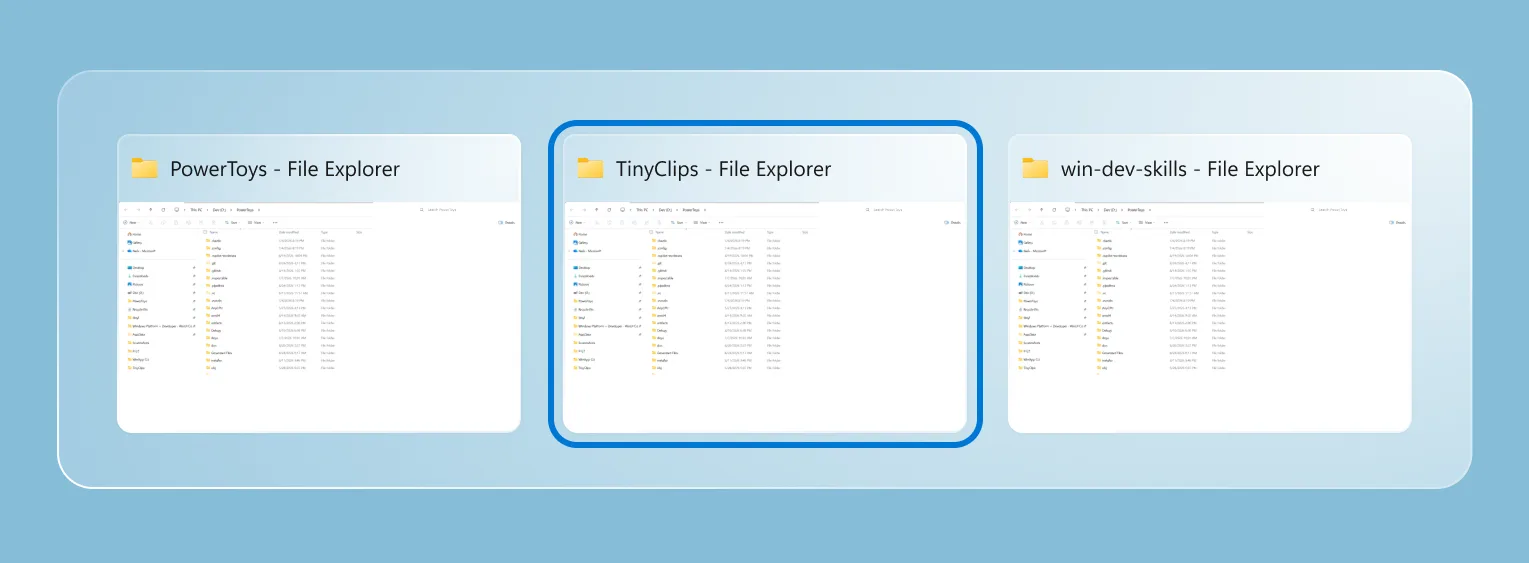
PR: #48281 (with coauthor credit to @wzhudev)
🔄 A smoother update experience and the new Insider channel
PowerToys updates now have a clearer home in Settings. Open Settings > General > Update channel to choose between Stable and Insider. Stable remains the default, while Insider lets you opt in to PowerToys Preview builds and try the latest work sooner. The selected channel remains visible when the setting is collapsed, preview builds are clearly labeled, and managed devices can still have preview updates controlled by organizational policy.
We also redesigned the update experience with clearer badges and a compact status surface that tracks each step, from checking and downloading to installation or errors. Bug reports are easier too, with progress updates, quick access to the generated ZIP, and a prefilled GitHub issue.
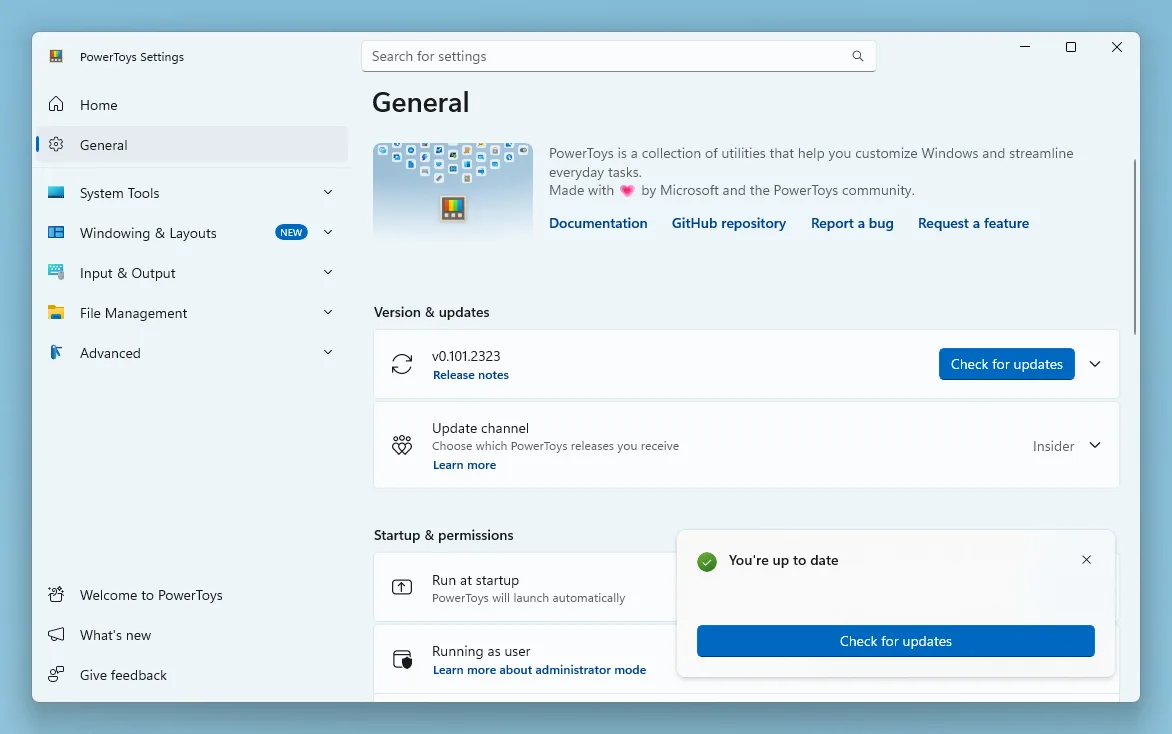
PRs: #49414, #49722, and #49872
⚡ Command Palette goes compact
Command Palette can now stay out of the way until you need the results. Enable compact mode in Command Palette Settings and the palette opens as a focused search box at a configurable vertical position. Start typing and it expands just enough to show matching results; you can also use Down Arrow or Tab to expand it from the keyboard. Pages that need more room, such as detailed views and confirmation dialogs, still expand fully when required. Compact mode is off by default, so the existing full experience remains unchanged unless you opt in.
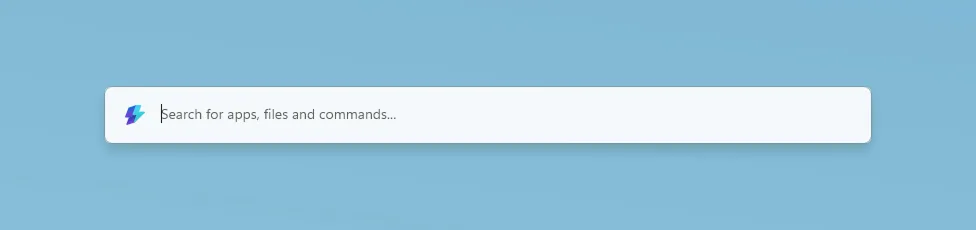
Compact mode is only one part of this Command Palette update:
- Search and responsiveness: Better ranking, cached Window Walker results, and progressive icon loading make results feel faster and more predictable.
- Reliability: Improved backdrop switching, icon loading, dock cleanup, and extension-resource management make prolonged use more stable.
- Dock improvements: Auto-hide reclaims screen space, while the dock clock and an optional bell provide quick access to Notification Center.
- Richer notifications: Extensions can show toasts with configurable positions, icons, and action buttons.
- Performance Monitor: New disk activity metrics and clearer network bands make it easier to keep an eye on system performance.
- Extension Gallery: Deep links can open the gallery or take you directly to a specific extension's installation page.
- Windows Update commands: Update and restart and Update and shut down appear when Windows is waiting for a reboot.
Massive thanks to @jiripolasek for the sustained Command Palette work across this release!
PRs: #48801, #49177, and #49780
🔄 Quick Accent and Mouse Jump move to WinUI 3
We're continuing to modernize PowerToys utilities with WinUI 3, and this release brings refreshed foundations to Quick Accent and Mouse Jump. Quick Accent keeps its familiar character picker while gaining better theming, accessibility, and DPI-aware placement. It also adds an optional Press and hold the letter activation mode: choose it in Quick Accent Settings, configure the hold duration, then hold an accent-capable letter to open the picker. Use the arrow keys or Space to select a character and release the letter to insert it. A quick tap still types the original letter, and normal Ctrl, Alt, AltGr, and Windows-key shortcuts remain unaffected.
Mouse Jump now uses a WinUI 3 interface with improved multi-monitor and mixed-DPI behavior. Invoke Mouse Jump with your configured shortcut, then click the destination in the preview or use the number keys, Home and End, or the arrow keys to select a monitor from the keyboard. Smaller improvements across the two utilities include more reliable Quick Accent activation, better first-frame rendering, expanded language, currency, punctuation, and IPA character sets, plus updated Mouse Jump layout and release support for both x64 and ARM64.
PRs: #48891, #48937, and #48393 (Thanks, @LegendaryBlair and @mikeclayton!)
🖥️ PowerDisplay gets linked controls and faster access
PowerDisplay can now control the brightness of several monitors together. Turn on linked brightness to get one All Displays slider for every included brightness-capable monitor, while keeping selected displays independent when needed. Individual display cards remain available in an expandable section, and applying a saved profile returns to per-monitor control before restoring its values. You can also opt in to brightness control from the tray icon: choose whether scrolling over it adjusts the primary display or all linked displays, then set the amount each mouse-wheel notch should change.
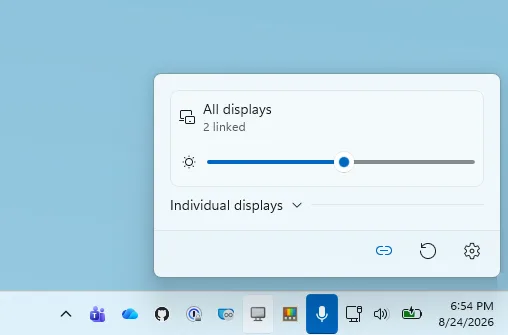
PowerDisplay can now wake supported monitors by selecting On from the display's power-state control, and a new command-line interface lets you inspect displays, change monitor settings, and apply saved profiles from scripts. This release also improves built-in panel detection on hybrid-GPU systems, makes Maximum compatibility mode more resilient with unreliable monitors, preserves recent setting changes during exit, restores saved brightness, contrast, volume, and color temperature more reliably, and cleans up monitor and tray resources more consistently.
PRs: #48207 (Thanks, @gilnatab!), #48628, and #49446
📋 Advanced Paste brings local AI to custom actions
Advanced Paste now supports on-device transformations with Phi Silica on supported Windows devices, so you can use local AI without configuring a cloud endpoint or API key. In Advanced Pas...
Release v0.100.2
Installer Hashes
| Description | Filename | sha256 hash |
|---|---|---|
| Per user - x64 | PowerToysUserSetup-0.100.2-x64.exe | 945FDF327E4D38E4CED61B0727B7AB8A1222958782982052989DDF7CB7096F62 |
| Per user - ARM64 | PowerToysUserSetup-0.100.2-arm64.exe | 5554984D72C30D5FD26355569D1CA8D63B74F0062EE4E59E0186E28216C837AE |
| Machine wide - x64 | PowerToysSetup-0.100.2-x64.exe | 73C04AAC8052420111FE5CDC0098EC8415D87CBDBD42DE253E9AF959781CBF9E |
| Machine wide - ARM64 | PowerToysSetup-0.100.2-arm64.exe | E78BBE00472612FA5BF91D8B253425F674DDD21A32C96B8A120681726CFF40F0 |
Highlights
This patch release fixes a Command Palette memory leak identified in v0.100.1. Check out the v0.100.1 notes for the full list of changes.
Command Palette
Release v0.100.1
Installer Hashes
| Description | Filename | sha256 hash |
|---|---|---|
| Per user - x64 | PowerToysUserSetup-0.100.1-x64.exe | AA6D47950061A856F2A6C5FB12B331658FED930A05A739DDB4FEB95BFAC06187 |
| Per user - ARM64 | PowerToysUserSetup-0.100.1-arm64.exe | 0BE062A7B74F18B54C34F78F0DA4FD5BAEBAE896A484A1B0DD41D882848967CD |
| Machine wide - x64 | PowerToysSetup-0.100.1-x64.exe | 4ADEC909794AE1489CA5D48BC318E9BE6DA6F9817195AE1B8ADBB52B99C4D179 |
| Machine wide - ARM64 | PowerToysSetup-0.100.1-arm64.exe | 4E537C7C7FA31DE6D5FA4DA6DC7479CF33E52EC28F0E2C574032BAE987A4F49B |
Highlights
This patch release fixes several important stability and behavior issues identified in v0.100.0 based on incoming reports. Check out the v0.100.0 notes for the full list of changes.
Color Picker
- Fixed a bug where the main Color Picker window could appear inside the zoomed-in picker view in #48762 by @daverayment
Command Palette
- Fixed Run history initialization in AOT builds in #48463
- Fixed a bug where the Performance Monitor dock item could show
???after restart in #48682 by @giruuuuj - Fixed the Hibernate command using the Sleep icon in #48689 by @MrBisquit
- Limited the "pin to dock" dialog to displays where the dock is enabled in #48723
Keyboard Manager
- Fixed modifier keys remapped to non-modifier keys being delivered as system-key events, which caused unexpected behavior in apps such as Alt-to-Backspace deleting whole words in #47192 by @oMatheusmol
Power Display
- Fixed a bug where selecting On in the monitor power-state control did not wake a monitor from standby in #48628
- Fixed built-in display detection and brightness control on dual-GPU laptops where the internal panel is driven by the discrete GPU in #48637
PowerToys Run
- Fixed VS Code Workspaces discovery after VS Code moved recently opened workspace data to shared storage in #47505
Quick Access
- Fixed Quick Access flyout crashes caused by unhandled XAML exceptions during launch or page navigation in #48457
Shortcut Guide
- Fixed a crash when navigating between Shortcut Guide sidebar sections in #48481
- Fixed number-key rendering in shortcut manifests and added a Postman shortcut manifest in #48461 by @brycewc
- Updated bundled shortcut manifests to use the literal number-key token so number keys render correctly across apps in #48757 by @brycewc
ZoomIt
- Fixed a race condition in audio initialization for ZoomIt video recording in #48685 by @MarioHewardt
