Ludo.ai

AI Sprite Generator: Make and Animate Game Sprites

Make game sprites from a text prompt or your own art, animate them with a motion prompt, keyframes, a reference video or a preset, and download sprite sheets for your engine. Free to start.

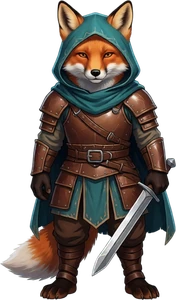
Ludo's Sprite Generator, shown taking one fox warrior sprite through each of its modes:

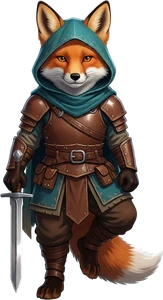
  1. New Sprite: Create a static sprite from a text description. The prompt "a young fox warrior in a teal hooded cloak and brown leather armor, holding a short sword, full body", in the Digital Painting style and the Side-Scroll perspective, returned fox warrior sprites on a transparent background; the front-facing one is the character in every mode below.
  2. Animate: Bring a sprite to life with a described motion. The fox goes in as the first frame, Change Pose turns it side-on, and the motion prompt "runs forward" returns a 36-frame run cycle as a sprite sheet.
  3. Keyframe Animation: Animate through a first, middle and final keyframe. Three poses of the same fox, set as the first, middle and final keyframes, return a 36-frame animation that passes through each one.
  4. New Direction: Re-render an animation facing another direction. The fox's side-view run is the source animation; Change Direction turns its first frame to face the camera, and the same run comes back facing the viewer, 36 frames.
  5. Transfer Motion: Copy a reference video's motion onto your sprite. The fox and the "Kick (Roundhouse)" motion preset, one of 600+ (or a video of your own), return the fox performing the kick in 25 frames.
  6. Edit Spritesheet: Change an existing animation with an instruction. The fox's sword attack and the instruction "set the sword on fire" return the same attack with a flaming sword, every frame changed and the motion kept, 36 frames.
  7. Directional Sprites: Model a character in 3D, style it and render it from any angle. Has its own page: a character modelled in 3D, styled, and rendered as sprites from up to 8 directions that line up.
Generation Mode

Free to start, no card needed.

What is an AI Sprite Generator?

An AI sprite generator turns a text prompt or reference image into game-ready character sprites, then animates them into a packed sprite sheet, which makes Ludo a sprite creator and a sprite sheet creator in one. Beyond characters, Ludo animates many asset types (sprites, VFX sprites, horizontal and vertical tiling sprites, seamless textures, map tiles, parallax layers, UI assets, item icons, portraits, card art and logos), gives you four ways to drive the motion (a text motion prompt, keyframes you set, a reference video, or a named motion preset), and ships 641 motion presets across 34 categories, each with a video preview. Animations run up to 5 seconds and up to 64 frames per sheet, and the default Hydra model returns a matching sound effect with the animation. Sprites can be generated in 32 art styles, five of them pixel art, and export as transparent PNG sheets that import into Unity, Godot and GameMaker, plus TexturePacker JSON frame data for Phaser, PixiJS and Cocos2d, with no drawing or rigging required.

Last updated November 2026

How it works

  1. Describe or uploadType what you want and pick one of 32 art styles, or upload a character you already have.
  2. Animate itWrite a motion prompt, set up to three keyframes, upload a reference video or pick a motion preset, then choose the model and length.
  3. Export to your engineDownload a transparent PNG sprite sheet, a GIF, the frames or an MP4. Change the frame count or size later with Adjust Sprite Sheet.
Animate your own characterDescribe it or upload it, pick a motion, export the sheet. Free to start, no card needed.

Sprite Animations Generated with Ludo

Creature Animations
Hand-painted · 36 frames
phoenix in full flight, wings beating powerfully, trailing ribbons of radiant flame
Combat Animations
16-Bit pixel art · 25 frames
samurai slashing with the katana, then returning to a ready stance
Walking Animations
Low-poly 3D · 36 frames
walking forward at a steady pace
Idle Animations
Cel-shaded · 25 frames
soft idle pose, hair and skirt swaying with subtle breathing
And anything else your game needs.Hit reactions · Spell casting · Jumping · Crouching · Damage taken · Looping cycles · One-shot effects · Transitions · Mounts and vehicles · Weather effects
No account needed

Free sample sprite sheets

Eight animations made with Ludo, ready to drop into a game. Each one comes as a transparent PNG sheet, an animated GIF, a JSON atlas that Phaser and PixiJS load as is, and a normal map for 2D lighting.

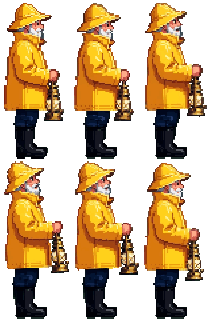
  • 16-Bit styleLighthouse keeper, idle: an animated 16-Bit style sprite sheet generated with Ludo

    Lighthouse keeper, idle

    16-Bit style · Hydra · 32 frames · 70×160

    Prompt

    a friendly old lighthouse keeper in a bright yellow raincoat and a matching yellow sou'wester rain hat, a short white beard and rosy cheeks, navy blue trousers and black rubber boots, holding a brass storm lantern with a bright warm glowing light in one hand in front of the body, the other arm close to the body, full body, standing side view facing right

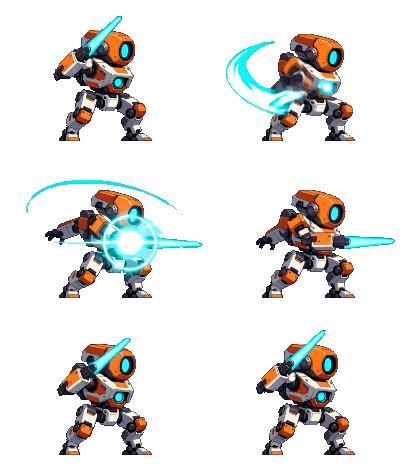
  • 32-Bit stylePocket mech, blade attack: an animated 32-Bit style sprite sheet generated with Ludo

    Pocket mech, blade attack

    32-Bit style · Hydra · 28 frames · 203×157

    Prompt

    a small boxy mech robot with a round orange head with one big glowing cyan visor eye, a white-and-orange armored body, a glowing cyan energy core in the chest, stubby legs and one arm that ends in a long glowing cyan energy blade, full body, side view facing right, in an attack stance: feet wide apart, knees bent, blade arm raised diagonally up and forward

  • AnimeLittle reaper, scythe attack: an animated Anime sprite sheet generated with Ludo

    Little reaper, scythe attack

    Anime · Hydra · 32 frames · 238×160

    Prompt

    a small cute grim reaper in a black hooded robe with a pale skull face and two glowing green eyes, a tattered black cape, gripping a long scythe with a glowing green blade in both hands, full body, side view facing right, in an attack stance: feet wide apart, knees bent, scythe raised diagonally up and forward in front of the body

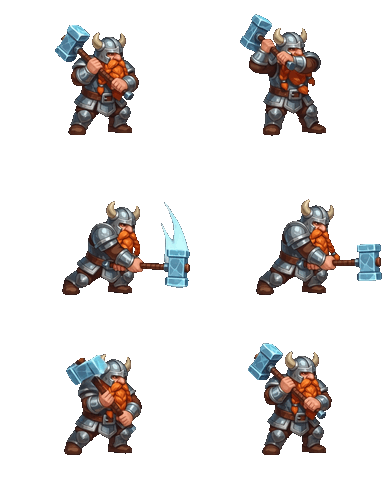
  • Hand-PaintedFrost dwarf, hammer attack: an animated Hand-Painted sprite sheet generated with Ludo

    Frost dwarf, hammer attack

    Hand-Painted · Hydra · 32 frames · 194×160

    Prompt

    a short stout dwarf warrior with a big braided orange beard, a steel horned helmet, blue-and-silver plate armor and a thick brown belt, gripping a large war hammer with a glowing ice-blue head in both hands, full body, side view facing right, in an attack stance: feet wide apart, knees bent, hammer raised diagonally up and back over the shoulder

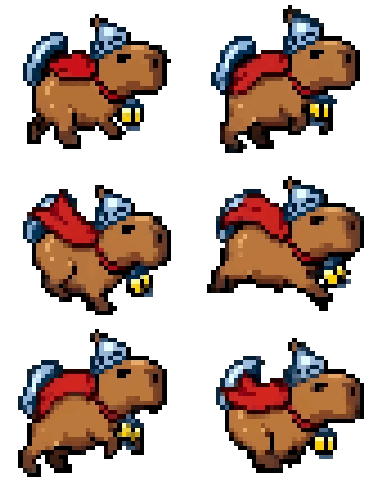
  • 8-Bit styleCapybara knight, run cycle: an animated 8-Bit style sprite sheet generated with Ludo

    Capybara knight, run cycle

    8-Bit style · Hydra · 32 frames · 193×162

    Prompt

    a chubby brown capybara knight in a small steel helmet and a short red cape, wearing a tiny round steel shield on its back, with a small glowing yellow lantern hanging from a collar on its chest, full body, side view facing right, in a running pose: mid-stride with front legs forward and back legs pushed behind, body leaning forward

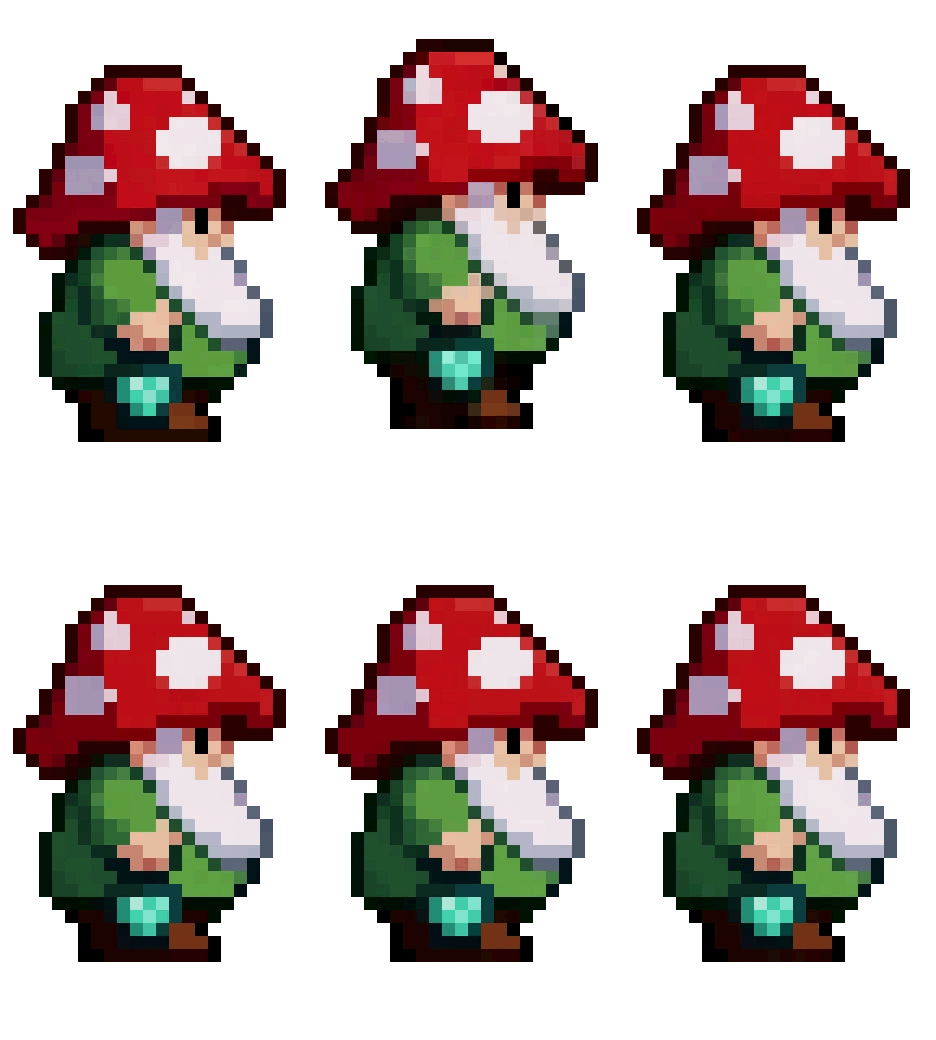
  • Micro Pixel artMushroom gnome, hop: an animated Micro Pixel art sprite sheet generated with Ludo

    Mushroom gnome, hop

    Micro Pixel art · Forge Pixel · 16 frames · 312×520

    Prompt

    a tiny round gnome with a big red mushroom-cap hat with white spots, a fluffy white beard, a green tunic and brown boots, holding a small glowing teal lantern in one hand at its side, full body, standing side view facing right

  • ChibiFlame chef, idle: an animated Chibi sprite sheet generated with Ludo

    Flame chef, idle

    Chibi · Hydra · 32 frames · 124×160

    Prompt

    a cheerful young chef in a crisp white double-breasted chef jacket, a tall puffy white chef hat, a bright red neckerchief, a short red apron, grey trousers and brown shoes, rosy cheeks and short brown hair, holding a small copper frying pan in one hand in front of the body with a bright orange flame flaring up from the pan, the other arm close to the body, full body, standing side view facing right

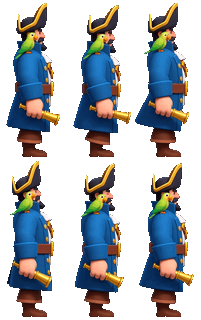
  • Stylized 3DPirate captain, idle: an animated Stylized 3D sprite sheet generated with Ludo

    Pirate captain, idle

    Stylized 3D · Hydra · 32 frames · 67×160

    Prompt

    a pirate captain with a short black beard, a black tricorn hat with gold trim, a long royal blue coat with gold buttons over a white shirt, a brown leather belt and brown boots, a small bright green parrot perched on the shoulder, holding a brass spyglass in one hand down at the side, arms close to the body, full body, standing side view facing right

You own the assets you generate with Ludo and can use them however you like, commercial games included, on every plan, and these eight samples are free to use in your own games. Each one is real Ludo output: the free, offline Ludo toolbox trimmed each one to a web-friendly size (most to half their frames) and wrote the GIF, the JSON atlas and the normal map.

Packing frames of your own? The free sprite sheet packer runs in your browser with no sign-up.

Four ways to drive a sprite animation

Every sprite animation starts from one still frame, generated or uploaded. These are the four ways to say how it should move.

  • phoenix in full flight, wings beating powerfully, trailing ribbons of radiant flame
    What you type
    36 frames, hand-painted

    Text motion prompt

    Describe the movement in plain words, like "run cycle", "idle" or "sword attack", and every frame in between is drawn for you. Add a final frame as well and the animation travels from the first to it.

    • Up to 5 seconds
    • Up to 64 frames
    • Optional final frame
    Sprite Animation
  • Key pose 1: a fighter idleKey pose 2: the fighter kickingKey pose 3: the fighter in a fighting stance
    Idle, kick, stance
    The fighter kicking, 36 frames generated between the three key poses
    36 frames between them

    Keyframes

    Set up to three poses, initial, middle and final, and Ludo draws every frame between them. No motion prompt is needed: the motion comes from the frames. Repeat the first pose as the last and the animation ends where it began.

    • Up to 3 keyframes
    • Prompt optional
    • Loops back to the start
    Keyframe Sprite Animation
  • The clip: a mech walking
    A knight sprite walking with the motion transferred from the mech clip
    The same walk, on a knight

    Reference video

    Upload a clip of the motion you want and Transfer Motion maps that exact movement onto your sprite, timing included. Clips of about four seconds give the best results.

    • Transfer Motion
    • About 4 s clips
    Animate Sprite from Video
  • Preset: run, side, east
    36 frames on a knight

    Motion preset

    Pick a named motion from the library instead of describing one, each with a video preview. Every preset works in 5 camera perspectives (Side, Isometric, Top-Down, Tactical and Hero) and 8 compass directions, so one motion covers a whole character controller.

    • 641 presets
    • 34 categories
    • 5 perspectives
    • 8 directions
    Animation Presets

Sprite sheets from an image or an animation

Every animation comes out as a sprite sheet: all of its frames on one PNG, transparent for cut-out sprites. Start from a sprite you generate or from a character image you already have.

  • Image to sprite sheet

    Upload one character on a transparent background and choose how it moves: a motion prompt, up to three keyframes, a reference video or a preset. If the image still has a background, it is removed on upload and you check the result before you animate. Presets are for humanoid characters; for a creature, use a reference video.

    • One image in
    • Up to 64 frames
    • Up to 5 seconds
    How to turn an image into a sprite sheet
  • Export any animation as a sprite sheet

    Transparent PNG sprite sheets on a regular grid, with TexturePacker JSON frame data for Phaser, PixiJS and Cocos2d, or the frames as PNGs, a GIF or an MP4. The file name carries the frame count, rows and columns, so an engine can slice the sheet by those numbers. Animation Pack keeps a character the same height across a whole moveset, snapped to the ground, with a live preview; Animation Sequence chains clips end to start.

    • Unity
    • Godot
    • Unreal
    • GameMaker
    How to import sprite sheets into your game engine
  • Change the sheet, not the animation

    Adjust Sprite Sheet re-exports the same animation with a different frame count, sprite size or loop setting, and can trim the empty space around the sprite. A sheet that is too big for your atlas does not need a new generation.

    • 4 to 64 frames
    • 32 to 384 px
    • Loop and trim

Change it without starting over

A sprite or a finished animation is a starting point. Turn it, restage it or reword it, and keep everything else.

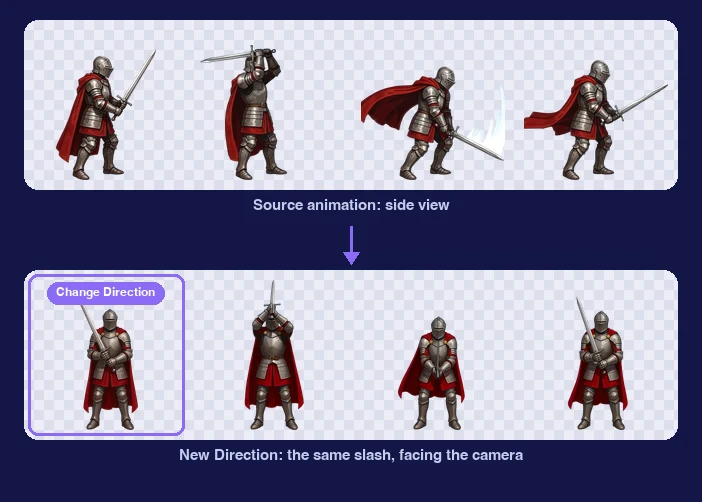
  • A knight's side-view sword slash, the knight turned to face the camera with Change Direction, and the same slash re-rendered facing the camera with New Direction

    New Direction

    Turn a finished animation, not just its first frame. Give New Direction the turned frame and the motion is re-rendered facing the new way with the same timing: a side-view slash becomes the same slash facing the camera. Directional Sprites renders all 8 directions at once from one 3D model.

    • Same motion and timing
    • Any of 8 directions
    How to make an 8-direction sprite sheet
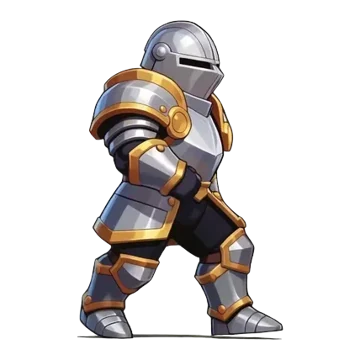
  • The knight sprite mid-walk, side view
    A frame of the walking knight
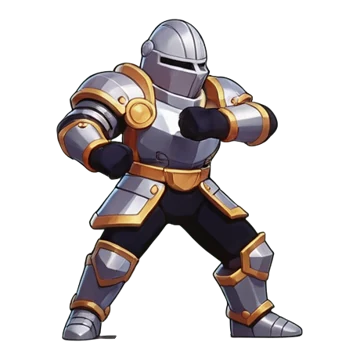
    Pose presetAttack Ready
    The same knight squared up to the front with fists raised, ready to attack
    Same knight, new pose

    Change Pose

    Restage a still sprite before you animate it: pick a preset pose, describe your own, or copy the pose of a person in a reference image. Change Direction turns it to any of 8 camera angles.

    • 8 camera angles
    • Eye level, elevated, high angle
    • Pose from a reference
    Character Pose Generator
  • The knight raising his sword overhead, chopping down and returning to his guard stance
    An overhead strike, 36 frames
    Edit instructiongive the knight a golden helmet
    The same overhead strike with the knight wearing a golden helmet
    Same strike, golden helmet

    Edit Spritesheet

    Type what should be different: restyle a sheet ("give the knight a golden helmet") or change its motion ("make the swing faster"). Or reach for a one-click fix that needs no prompt. Still sprites get the same edits in the image editor.

    • Fix Loop
    • Zoom Out
    • Improve Details
    • Adjust Sprite Sheet

What you get out of it

Four animation models and real pixel art.

  • Animation models

    Hydra, the default, has the best motion and prompt adherence. Griffin gives the highest resolution. Both return a matching sound effect with the animation. Ignis, the cheapest, suits simple shapes and actions and returns sound too, Ignis Pixel suits low-res pixel art, and Generate Audio adds sound to a sheet that came without it.

    • Hydra
    • Griffin
    • Ignis
    • Ignis Pixel
    • Matching sound effect
  • A 16-bit samurai sprite beside a magnified 12 by 12 pixel crop of its face, showing uniform square pixels with hard edges

    Pixel art on a true grid

    Four of the five pixel-art styles snap to a strict grid: every pixel the same size, hard edges, no half-pixels. Ignis Pixel animates low-res art, Use Pixel Grid (on by default) keeps every frame on that grid, and export scales with nearest-neighbor. Convert to Pixel Art opens a soft, off-grid sprite in the Image Generator and snaps it to the pixel size and number of colors you pick.

    • Micro Pixel
    • 8-Bit
    • 16-Bit
    • 32-Bit
    • Free Pixel
    Pixel Art Sprites

Normal maps, lit in your game

Turn on Normal Map in Sprite Sheet Options and the sprite sheet comes back with a normal map laid out exactly like it, frame for frame, so 2D lights in your engine shade the character from the side the light is on. Sprites you already made can get one too, with Generate Normal Map.

Move your pointer over it: the light follows.

A 64-frame pixel-art walk and its 64-frame normal map, one normal per art pixel. More about normal maps

Video

Watch one character and every move made in Ludo

Moss the forest ranger starts as one typed sentence. The tour walks the whole Sprite Generator on him, one feature per chapter: motion prompts on four models, keyframes, 641 presets and Transfer Motion, Change View and New Direction, edits in words, pixel art, the asset types that animate, and an Animation Pack export that runs in a game level.

Transcript: AI Sprite Generator for Games: Full Tour, From Text to Animated Sprite Sheets | Ludo AI

This is Mossbrook, and every character and every move in it came out of one AI sprite generator, Ludo's Sprite Generator.

Moss: Hi, I'm Moss. Every move you saw came from a typed line, a preset or a clip.

In ludo.ai's Sprite Generator, Generation Mode starts on New Sprite: describe the sprite, and it draws it.

Moss is one sentence: a young forest ranger, a green hood, a moss cape and a staff with a glowing acorn.

Under Filters, Art Style has 32 styles, and Mossbrook is Inked Painterly; Perspective is Side-Scroll.

Generate Static Sprite, and there he is, Moss, on a transparent background.

To animate him, one click on his card, Use as First Frame, flips the form to Animate with Moss in the First Frame slot.

The move is typed as a motion prompt, a walk cycle in place, with Animation Margin on Auto.

The Model menu has four: Hydra, Hydra plus, Forge, and Forge Pixel for pixel art.

Animate, and back comes a sprite sheet, 36 frames, and he walks.

Here is the same walk on three of them: Hydra all round, Hydra plus for fine detail, Forge for simple shapes and short moves.

A bigger move, the spell: the staff goes up and the leaves swirl wide, so Animation Margin, Auto, Manual or No margin, goes to Manual with more room.

Generate Audio adds a sound to any sheet from a short description.

Keyframe Animation takes up to three frames, first, middle and final, and draws every frame between them; any slot also takes your own image.

Moss goes into the first slot, the final frame fills in with him on its own, and Change Pose turns a middle copy into a leap.

A motion line adds the jump.

A leap, from three frames and one line.

Transfer Motion copies a movement onto your sprite, from a preset or from a video.

641 presets, each in 5 camera views, Side, Hero, Isometric, Tactical and Top-Down, and 8 directions.

Side view, search walk, Walk Forward Standard, direction East, and Transfer Motion; a run preset went the same way.

Or a video: Choose Video takes a short clip, about 4 seconds works best, and this one was made with Ludo too.

Moss copies the kick, hood, cape and all.

Change Pose on his card also turns him: Change View has 8 angles, and Front-Right at eye level suits a side-scrolling game.

New Direction re-renders a finished animation facing another way: the walk as the Source Animation, that front-right view as the First Frame, and the same walk comes back toward the camera.

For all 8 directions at once, the same list opens Directional Sprites, built from a 3D model.

Any sheet can be changed with words: Edit Animation, an instruction, make his cape and hood autumn orange, and the walk cycle comes back recoloured with the same motion.

Next to it, Improve Details re-renders a Hydra sheet with finer detail, and the menu has Fix Loop and Zoom Out.

For a retro mode, the same sentence with Art Style 32-Bit, and Moss comes back as pixel art on a true pixel grid.

Forge Pixel is the model for pixel art animation: a walk prompt, and the pixels stay pixels.

Not only characters: the type picker has 12 asset types that animate, from a sprite to a logo.

A VFX sprite, a bolt of spinning leaves, typed, generated and animated the same way.

And the rest of Mossbrook, from the HUD heart and the logo to a second character, is each its own type, animated the same way.

Every card's menu downloads the sheet, and Download Sheet plus JSON adds a JSON file with every frame's position and duration.

For a whole moveset, Export, Animation Pack: pick the animations, idle, walk, run, leap, spell and kick, and the preview puts them all at one size on one ground line.

Format can be Spritesheets, Spritesheets plus JSON or Individual Frames; JSON it is, a Pack Name, Export, and the pack goes straight into a game.

This level loads the pack's own files: Moss walks, leaps the log, runs, casts at the toadstool and kicks, every move a typed line, a preset or a clip.

Subscribe for the next tour: the 3D Asset Generator, from one concept image to a rigged, animated character.

Moss: Now I walk, leap, run and cast. Your turn: start free at ludo.ai.

Questions, answered

The short answers. For the full detail on every mode and setting, see the documentation below.

  • You can start free, with no card needed. The free sample sprite sheets on this page, the Ludo toolbox and the sprite sheet packer need no account at all.

  • Yes. You own the assets you generate with Ludo and can use them however you like, commercial games included. No attribution is needed.

  • Four ways: a text motion prompt, keyframes you set (up to three: first, middle and last), a reference video whose motion is transferred to your sprite, or a named motion preset. With keyframes the motion prompt is optional, because the motion comes from the frames you give it. In the app any keyframe slot can be left as an Empty Frame as long as one holds an image; through the API the initial frame is required. Supplying only a final frame gives straight two-keyframe interpolation. When no preset has the move, open My Animations in the preset picker and Generate Animation from a description such as "overhead sword slash": the result is saved to your account and is picked, previewed and applied like a preset from then on. It is made for humanoid characters.

  • Animations run up to 5 seconds, in sheets of up to 64 frames (pick 4, 9, 16, 25, 36, 49 or 64 as the maximum; a short animation can give fewer). The sprite is drawn from 32 to 384 px, or at Max (full resolution), True Size (lined up with your input image) or with an AI 1.5x upscale. Alongside the PNG sheet you can take an animated GIF, the individual frames or an MP4.

  • Any style, if you upload your own art: the animation follows the image. Generate the sprite with Ludo and you can pick from 32 art styles, five of them pixel art (Micro Pixel, 8-Bit, 16-Bit, 32-Bit and Free Pixel), plus cel-shaded, hand-painted, anime, chibi, watercolor, voxel and more.

  • Hydra, the default, has the best motion and prompt adherence and adds a matching sound effect. Griffin gives the highest resolution and the best image fidelity, also with sound. Ignis is the cheapest, for simple body shapes and simple actions, and returns a sound effect too. Ignis Pixel is made for low-res pixel art. A sheet that came without a sound effect can get one afterwards with Generate Audio.

  • Yes. Edit Animation takes a text instruction to restyle a sheet or change its motion. Three one-click fixes need no prompt: Fix Loop for an animation that does not loop cleanly, Zoom Out for a character that drifts out of frame, and Improve Details to re-render a sheet with finer detail. Adjust Sprite Sheet changes the frame count, size and loop trim for free.

  • Yes. Sheet + JSON in the app downloads the PNG sheet with TexturePacker-format frame data for Phaser and PixiJS, and an Animation Pack exports a whole moveset the same way. The sheet is a regular grid, so Unity, Godot and GameMaker can also slice it by frame count and size. After you download, the free, offline Ludo toolbox writes a Godot SpriteFrames file or a sliced Unity import for any sheet, with no account needed.

  • Yes. Upload a static image of your character and animate it with a motion prompt, keyframes, a reference video or a preset. An image that holds only the character works best.

  • Use Change Pose on the still sprite to turn it to any of 8 camera angles, or to restage it in a new pose. To carry a finished animation to the new angle, use New Direction: it re-renders the animation facing the new way and keeps its motion and timing. The step-by-step version is in How to make an 8-direction sprite sheet.

  • Yes. The API, the MCP server and the CLI make the same assets as the web app. Results from the API are kept for 7 days, so download what you want to keep. Setup is on the developer page.

Sprite Generator documentation

Introduction

The Sprite Generator is a powerful AI tool designed to streamline the creation of 2D game assets. It combines image generation and video animation to produce both static sprites and fully animated sprite sheets from simple text prompts or existing images. This tool is perfect for rapid prototyping, creating unique characters and objects, and generating game-ready assets without needing advanced artistic or animation skills.

With the Sprite Generator, you can:

  • Create static sprites from a text description — characters, VFX, UI elements, item icons, portraits, logos, tiling sprites, parallax layers, map tiles, textures, and card art.
  • Animate your own images or newly generated sprites with a text prompt.
  • Pin down a specific action by animating between three keyframes — a first, a middle, and a final frame you control.
  • Transfer motion from a reference video, an existing animation, a library of over 600 ready-made animation clips, or a humanoid animation you generate from a text description.
  • Edit existing animations with free-text instructions and optional reference images — swap items, change colors, add effects, restyle, and more.
  • Extend animations forwards or backwards in time, or generate smooth transitions between two animations.
  • Chain multiple animations into a single continuous sequence, or bundle them into an Animation Pack ready for Unity, Godot, Unreal, GameMaker, or any engine that reads sprite-sheet PNGs.
  • Animate pixel art on its own pixel grid, with a dedicated pixel-art model and automatic grid preservation.
  • Get synchronized sound with every animation made on the default Hydra model — including talking or singing animations — or add a sound effect to any animation afterwards.
  • Export your results as sprite sheets, individual frames, videos, or GIFs.

For how the Sprite Generator fits with Ludo's other tools and how to keep one style across all your assets, see Generating Game Assets.

What Users Are Saying

Jeffry
A game changer
"HOLYYY [...] this Griffin is a game changer."
Jeffry
Ludo User
Silas
I'm shocked
"I've already made a bunch of flying monsters, abominations, and humanoids, made without any problems, and I'm shocked at what great results Ludo gives."
Silas
Ludo User
Exquisite
Insane?!
"Everyone, body generated perfectly. I just uploaded and wrote a prompt. Insane!"
Exquisite
Ludo User
Summer'n
Amazed
"I recently stumbled upon Ludo for some decent Sprite animations and am amazed with the results Ludo provides."
Summer'n
Ludo User
Rex
Liking the output
"I'm really liking the output of the Sprite Generator"
Rex
Ludo User
Geoffrey
Best at posing the sprites
"Thanks for this wonderful AI tool, is the best at posing the sprites."
Geoffrey
Ludo User
NotWheaten
Awesome Product
"Working on a game [...]. The sprite animation is going to be a great way to polish it. Already voted 2 animations thanks to this awesome product"
NotWheaten
Ludo User
ChrisZ09
Love it!
"Played a bit with Ludo to get some alternative animations for the idle state for the [...] platformer. Love it!"
ChrisZ09
Ludo User
Tosha
Ludo is the best!
"Ludo is the best! I've been searching for sprite animator for a long time! [...] to creating 2 animations in Ludo. Death and away from camera. [...] the results is great."
Tosha
Ludo User
Start Creating Sprite Animations Today
Accelerate your 2D game development and build a library of custom animated assets. Sign up now and bring your characters to life.