【Illustrator】Photoshopの「ダイナミックテキスト」をイラレで再現するスクリプト

##追記(2026年9月4日):
Illustratorにもダイナミックテキストが来ます!
現在、ベータ版(30.9)で利用できます。
最近のPhotoshopでは、コンテキストタスクバーから手軽にテキストの形状を変更できるようになっています。
ブロック
円
アーチ
下向き弓
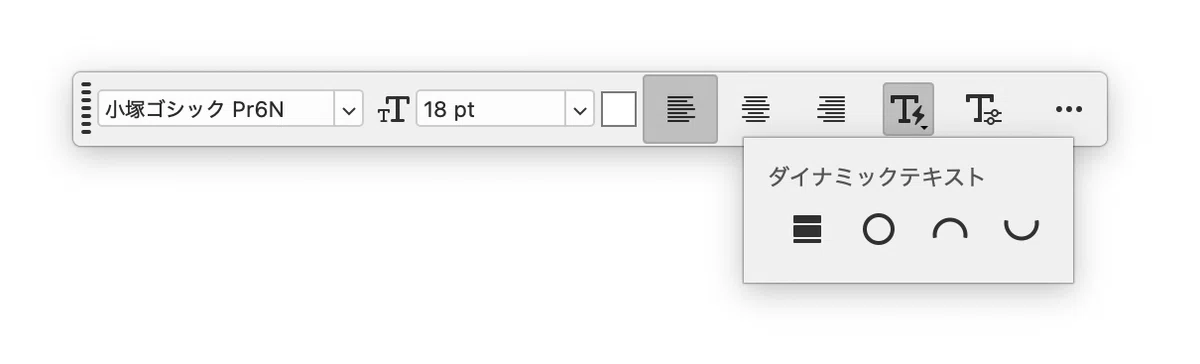
「この機能をIllustratorでも使いたい!」と思い、同様の操作を可能にするスクリプトを作成しました。
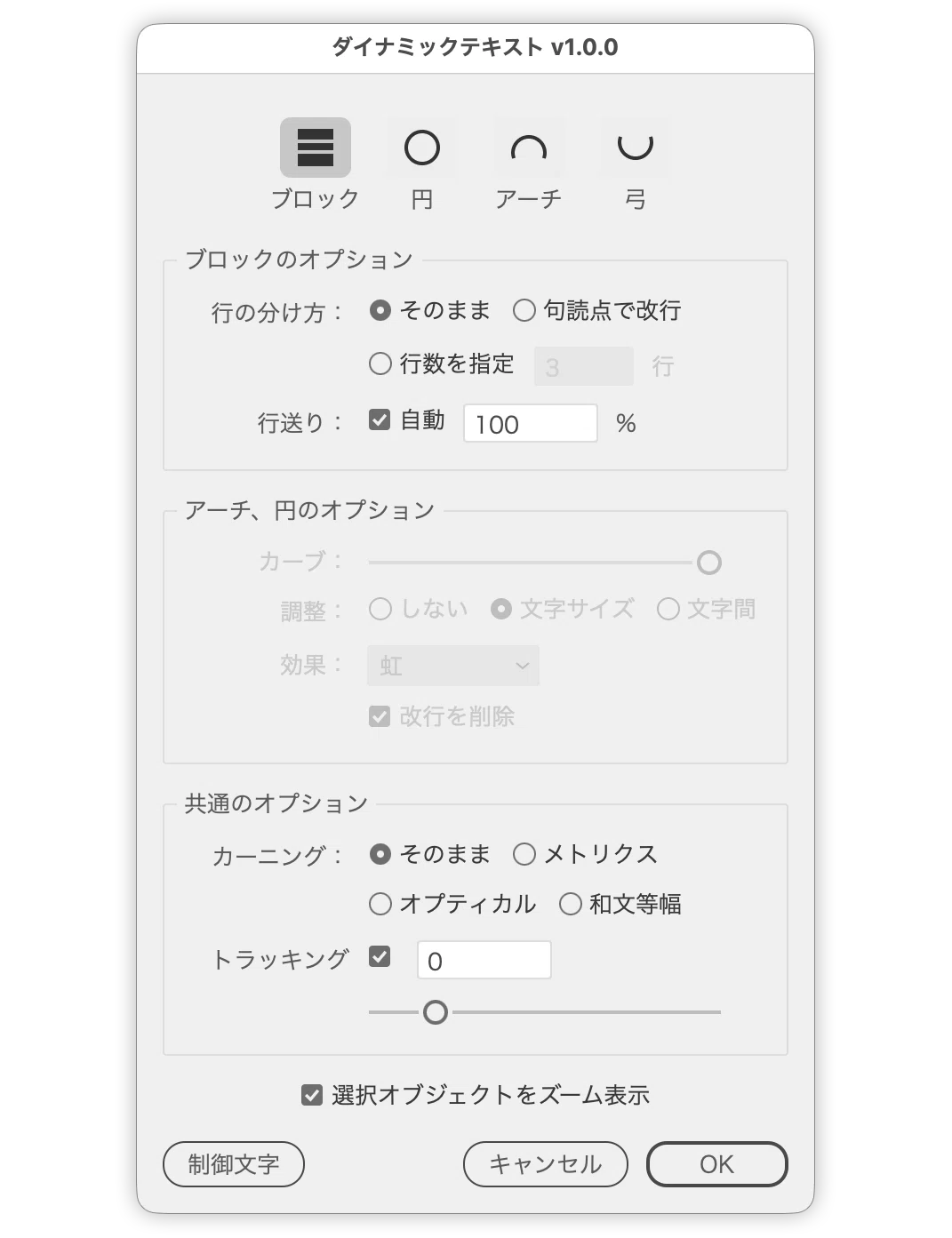
スクリプト
以下のコードをコピーし、テキストエディタにペーストして保存するだけで、無料のスクリプトファイル(.jsx)としてそのまま実行いただけます。
万が一のトラブル(Illustratorの強制終了など)に備え、スクリプトを実行する前は必ずドキュメントを保存してからお試しください。
記事末尾の有料エリアでは、すぐに使えるダウンロード用ファイルを配布しています。
記事の単品購入、または「DTP Transit 定期購読マガジン(月額100円)」をご購読いただくと、今後のスクリプトのアップデート情報を受け取ることができます。
#target illustrator
app.preferences.setBooleanPreference('ShowExternalJSXWarning', false);
/*
### 概要
選択したテキストの文字幅に合わせたパスを作り、アーチ・円・弓のパス上文字に変換します。
パスを使わず、各行の文字サイズを変えて行の幅を最長行にそろえる「ブロック」も選べ、
結果はダイアログを開いたままプレビューできます。
詳細はREADMEを参照。
*/
/*
### Overview
Builds a path sized to the selected text and converts
it into type on a path shaped as an arch, a circle, or
a bow. A Block mode uses no path and instead scales
each line's font size so every line matches the widest
one. The result is previewed while the dialog stays open.
See the README for details.
*/
(function () {
// =========================================
// 基本情報 / Basic info
// =========================================
var SCRIPT_NAME = "DynamicTextGenerator"; /* スクリプト名 / script name */
var SCRIPT_VERSION = "v1.0.0"; /* バージョン / version */
var SCRIPT_AUTHOR = "Masahiro Takano (@swwwitch)"; /* 作者 / author */
var SCRIPT_RELEASED = "2026-05-18"; /* 最初のリリース日 / first release date */
var SCRIPT_UPDATED = "2026-08-11"; /* 更新日 / last updated */
// README (Japanese)
// https://github.com/swwwitch/illustrator-scripts/blob/master/readme-ja/DynamicTextGenerator.md
// README (English)
// https://github.com/swwwitch/illustrator-scripts/blob/master/readme-en/DynamicTextGenerator.md
var SCRIPT_ARTICLE_URL = "https://note.com/dtp_tranist/n/nb9e9082df5e5"; /* 紹介記事 / article URL */
var SCRIPT_INSPIRED_BY = "https://note.com/gautt/n/n92f6faeda048"; /* 着想元:高橋としゆき(@gautt) / inspired by */
// Released under the MIT license
// http://opensource.org/licenses/mit-license.php
// =========================================
// ユーザー設定 / User Settings
// =========================================
/* 円モードで文字が円周に占める割合(カーブ0=ゆるやかな弧/カーブ100=ほぼ一周) */
var CIRCLE_MIN_OCCUPANCY = 0.25;
var CIRCLE_MAX_OCCUPANCY = 0.95;
/* 起動時に選ばれるモード。空文字なら未選択で開く
(modeBlock / modeCircle / modeArch / modeBow) */
var DEFAULT_MODE = '';
/* 結果が画面から外れたときに表示位置を合わせるか(ダイアログの初期値) */
var ZOOM_TO_SELECTION = true;
/* 結果が可視領域からはみ出したときに合わせる倍率(1で余白なし。小さいほど余白が増える) */
var VIEW_FIT_RATIO = 0.9;
/* 起動時のカーニング(keep=そのまま/metrics=メトリクス/optical=オプティカル/mono=和文等幅) */
var DEFAULT_AUTO_KERNING = 'keep';
/* 起動時の効果(EFFECTS の並び順:0=虹/1=歪み/2=3Dリボン/3=階段/4=引力) */
var DEFAULT_EFFECT_INDEX = 0;
/* 起動時のフィット方法(none=しない/fontSize=文字サイズ/tracking=トラッキング) */
var DEFAULT_FIT_METHOD = 'fontSize';
/* カーブスライダーの初期値(0=直線に近い/100=最も丸い) */
var ARC_ROUNDNESS_DEFAULT = 100;
/* アーチ化の前に改行を削除するか(ダイアログの初期値) */
var REMOVE_LINE_BREAKS = true;
/* ブロック:行の分け方の初期値(keep=そのまま/punctuation=句読点で改行/count=行数を指定) */
var BLOCK_LINE_SPLIT = 'keep';
/* ブロック:「行数を指定」の初期値 */
var BLOCK_LINE_COUNT = 3;
/* ブロック:改行位置とみなす句読点 */
var BLOCK_PUNCTUATION = "、。,.";
/* ブロック:幅をそろえたあとに行送りを自動へ切り替えるか(ダイアログの初期値) */
var BLOCK_AUTO_LEADING = true;
/* ブロック:自動行送りの比率(%) */
var BLOCK_AUTO_LEADING_AMOUNT = 100;
/* ブロック:変倍率がこの範囲内なら誤差とみなして変更しない */
var BLOCK_RATIO_EPSILON = 0.001;
// =========================================
// レイアウト / Layout
// =========================================
var MODE_ICON_SIZE = [40, 34]; /* モードアイコンボタンの大きさ / size of a mode icon button */
var MODE_ICON_RADIUS = 9; /* アイコンの円・円弧の半径 / radius of the circle and arcs */
var MODE_ICON_STROKE = 2; /* アイコンの線幅 / stroke width of the icons */
var LABEL_COLUMN_WIDTH = 88; /* 各行の先頭ラベルの幅 / width of the leading label column */
/* 言語判定 / Language */
function getCurrentLang() {
return ($.locale.indexOf("ja") === 0) ? "ja" : "en";
}
var lang = getCurrentLang();
/* 日英ラベル定義 / Japanese-English label definitions */
var LABELS = {
dialog: {
title: { ja: "ダイナミックテキスト", en: "Dynamic Text" }
},
panel: {
blockOptions: { ja: "ブロックのオプション", en: "Block Options" },
arcOptions: { ja: "アーチ、円のオプション", en: "Arch and Circle Options" },
commonOptions: { ja: "共通のオプション", en: "Common Options" }
},
mode: {
block: { ja: "ブロック", en: "Block" },
circle: { ja: "円", en: "Circle" },
arch: { ja: "アーチ", en: "Arch" },
bow: { ja: "弓", en: "Bow" }
},
fieldLabel: {
lineSplit: { ja: "行の分け方:", en: "Line breaks:" },
leading: { ja: "行送り:", en: "Leading:" },
roundness: { ja: "カーブ:", en: "Curve:" },
fit: { ja: "調整:", en: "Adjust:" },
effect: { ja: "効果:", en: "Effect:" },
autoKerning: { ja: "カーニング:", en: "Kerning:" },
tracking: { ja: "トラッキング:", en: "Tracking:" }
},
radio: {
lineSplitKeep: { ja: "そのまま", en: "Keep" },
lineSplitPunctuation: { ja: "句読点で改行", en: "At punctuation" },
lineSplitCount: { ja: "行数を指定", en: "Line count" },
fitNone: { ja: "しない", en: "None" },
fitByFontSize: { ja: "文字サイズ", en: "Font size" },
fitByTracking: { ja: "文字間", en: "Letter spacing" },
kerningKeep: { ja: "そのまま", en: "Keep" },
kerningMetrics: { ja: "メトリクス", en: "Metrics" },
kerningOptical: { ja: "オプティカル", en: "Optical" },
kerningMono: { ja: "和文等幅", en: "Metrics - Roman Only" }
},
checkbox: {
leadingAuto: { ja: "自動", en: "Auto" },
removeLineBreaks: { ja: "改行を削除", en: "Remove line breaks" },
zoomToSelection: { ja: "選択オブジェクトをズーム表示", en: "Zoom to selection" }
},
menu: {
effectRainbow: { ja: "虹", en: "Rainbow" },
effectDistort: { ja: "歪み", en: "Skew" },
effectRibbon: { ja: "3D リボン", en: "3D Ribbon" },
effectStep: { ja: "階段", en: "Stair Step" },
effectGravity: { ja: "引力", en: "Gravity" }
},
unit: {
percent: { ja: "%", en: "%" },
line: { ja: "行", en: "lines" }
},
button: {
zoomToSelection: {
ja: "変換した結果が画面から外れたときに、見える位置へ表示を移します。すでに見えているときは動かしません。",
en: "Moves the view so the converted result stays visible. The view is left alone when it is already in sight."
},
hiddenChar: { ja: "制御文字", en: "Hidden Characters" },
ok: { ja: "OK", en: "OK" },
cancel: { ja: "キャンセル", en: "Cancel" }
},
alert: {
noDocument: { ja: "ドキュメントが開かれていません。", en: "No document is open." },
noText: { ja: "対象のテキストが見つかりません。", en: "No target text found." },
pathFailed: { ja: "パスの生成に失敗しました。", en: "Failed to generate the path." },
needTwoLines: { ja: "2行以上のテキストを選択してください。", en: "Select text with two or more lines." },
selectMode: { ja: "モードを選択してください。", en: "Select a mode." }
},
tooltip: {
modeBlock: {
ja: "パス上文字にはせず、各行の文字サイズを変えて行の幅を最長行にそろえます。パス上文字やエリア内文字は、いったんポイント文字へ変換してからそろえます。",
en: "Creates no path; scales each line's font size so every line matches the widest one. Type on a path and area type are converted to point text first."
},
modeCircle: {
ja: "閉じた円形のパスに変換し、円周に沿わせます。文字は円の上側中央に配置されます。",
en: "Converts to a closed circular path and flows the text around it, centered at the top of the circle."
},
modeArch: {
ja: "上に膨らむアーチ状のパスに変換します。",
en: "Converts the text to a path that bulges upward."
},
modeBow: {
ja: "下に膨らむ弓状のパスに変換します。",
en: "Converts the text to a path that bulges downward."
},
lineSplit: {
ja: "幅をそろえる前に、テキストを何行に分けるかを決めます。",
en: "Decides how the text is split into lines before the widths are fitted."
},
lineSplitKeep: {
ja: "いまの改行のまま、行ごとの幅をそろえます。",
en: "Keeps the current line breaks and fits each line."
},
lineSplitPunctuation: {
ja: "いまの改行をいったん外し、句読点のうしろで改行し直します。文字サイズもいちばん大きい値にそろえます。",
en: "Drops the current line breaks and re-breaks after each punctuation mark. Font sizes are levelled to the largest one."
},
lineSplitCount: {
ja: "いまの改行をいったん外し、指定した行数へ均等に分け直します。近くに句読点があればそこで改行し、文字サイズもいちばん大きい値にそろえます。",
en: "Drops the current line breaks and re-splits the text into the given number of lines, preferring nearby punctuation. Font sizes are levelled to the largest one."
},
leadingAuto: {
ja: "幅をそろえたあとに、行送りを自動へ切り替えます。",
en: "Switches leading to auto after the widths are fitted."
},
leadingAmount: {
ja: "自動行送りの比率です。文字サイズに対する行送りの割合を指定します。",
en: "The auto-leading ratio, given as a percentage of the font size."
},
roundness: {
ja: "0で直線に近く、100で最も丸くなります。円では文字が円周に占める割合=円の大きさを決めます。",
en: "0 is almost straight; 100 gives the roundest curve. In Circle mode it sets how much of the circumference the text occupies."
},
fit: {
ja: "パスの端まで文字を収める方法を選びます。",
en: "Chooses how the text is fitted to the path endpoints."
},
fitNone: {
ja: "パスの長さには合わせず、変換だけを行います。",
en: "Does not fit to the path; only converts the text."
},
fitMethod: {
ja: "文字サイズを変えて合わせるか、文字サイズを保ったまま文字間で合わせるかを選びます。",
en: "Choose whether to fit by changing the font size, or by keeping the font size and adjusting the letter spacing."
},
effect: {
ja: "Illustratorの「パス上文字オプション」の効果を適用します。",
en: "Applies Illustrator's Type on a Path effect."
},
removeLineBreaks: {
ja: "パスに沿わせる前に改行を削除し、1行にまとめます。",
en: "Removes line breaks and joins the text into a single line before it is flowed along the path."
},
kerningKeep: {
ja: "カーニングの設定には手を触れません。",
en: "Leaves the kerning settings untouched."
},
autoKerning: {
ja: "文字幅に影響するため、幅をそろえる前に適用します。「メトリクス」を選ぶとプロポーショナルメトリクスもONになります。",
en: "Applied before the widths are fitted, since it changes the glyph widths. Choosing Metrics also turns proportional metrics on."
},
tracking: {
ja: "既存のトラッキング値に加算します。「調整:文字間」を選んでいるときは自動調整にまかせるため使えません。",
en: "Adds this value to the existing tracking. Unavailable while \"Adjust: Letter spacing\" is selected, since it is set automatically."
},
trackingToggle: {
ja: "ONでトラッキングを調整できます。OFFにすると0に戻ります。",
en: "Enable to adjust tracking. Turning it off resets it to 0."
},
zoomToSelection: {
ja: "変換した結果が画面から外れたときに、見える位置へ表示を移します。すでに見えているときは動かしません。",
en: "Moves the view so the converted result stays visible. The view is left alone when it is already in sight."
},
hiddenChar: {
ja: "制御文字の表示・非表示を切り替えます。改行がどこに入ったかを確かめるときに使います。",
en: "Toggles the display of hidden characters, so you can check where the line breaks landed."
},
ok: {
ja: "設定を適用して閉じます。",
en: "Applies the settings and closes."
},
cancel: {
ja: "プレビューを取り消して閉じます。",
en: "Discards the preview and closes."
}
}
};
/**
* LABELS を上から順にたどって現在のUI言語のラベルを返す
* @param {...string} - LABELS をたどるキー
* @returns {string} ラベル文字列(見つからない場合は空文字)
*/
function getLabel() {
var node = LABELS;
for (var i = 0; i < arguments.length; i++) {
if (node == null) break;
node = node[arguments[i]];
}
return (node && node[lang] != null) ? node[lang] : "";
}
/* ===== ユーティリティ / Utilities ===== */
// Parse a number from a string; return fallback when not numeric
function parseNumber(text, fallback) {
var parsedNumber = Number(text);
if (isNaN(parsedNumber)) return fallback;
return parsedNumber;
}
// Arrow-key increment/decrement for an edittext (Shift = 10, Option = 0.1)
function changeValueByArrowKey(editText, allowNegative, onChanged) {
if (!editText) return;
editText.addEventListener('keydown', function (event) {
if (!event || (event.keyName !== 'Up' && event.keyName !== 'Down')) return;
var currentValue = Number(editText.text);
if (isNaN(currentValue)) return;
var keyboardState = ScriptUI.environment.keyboardState;
var goingUp = (event.keyName === 'Up');
var stepDelta = 1;
if (keyboardState.shiftKey) {
// Snap to multiples of 10 for Shift
stepDelta = 10;
currentValue = goingUp
? Math.ceil((currentValue + 1) / stepDelta) * stepDelta
: Math.floor((currentValue - 1) / stepDelta) * stepDelta;
} else {
stepDelta = keyboardState.altKey ? 0.1 : 1;
currentValue = goingUp ? currentValue + stepDelta : currentValue - stepDelta;
}
// Option keeps one decimal, otherwise round to an integer
currentValue = keyboardState.altKey ? Math.round(currentValue * 10) / 10 : Math.round(currentValue);
if (!allowNegative && currentValue < 0) currentValue = 0;
// Prevent default arrow key behavior (cursor move)
event.preventDefault();
editText.text = String(currentValue);
if (onChanged) onChanged();
});
}
/* ===== アイコン描画 / Icon drawing ===== */
/**
* UI が明るいテーマかどうかを判定する
* @returns {boolean} 明るいUIなら true
*/
function isLightUI() {
/* 取得できないときは暗い側にフォールバック / fall back to dark when unavailable */
try { return app.preferences.getRealPreference("uiBrightness") > 0.5; } catch (e) { }
return false;
}
/**
* UIの明暗に応じたアイコン色・背景色・選択色を返す
* @returns {{icon: number[], bg: number[], selection: number[]}} 描画色(RGBA 0〜1)
*/
function getIconColors() {
if (isLightUI()) {
return { icon: [0.20, 0.20, 0.20, 1], bg: [0.93, 0.93, 0.93, 1], selection: [0.78, 0.78, 0.78, 1] };
}
return { icon: [0.88, 0.88, 0.88, 1], bg: [0.27, 0.27, 0.27, 1], selection: [0.45, 0.45, 0.45, 1] };
}
/**
* 無効(ディム)表示用に、アイコン色を背景色へ寄せて薄くする
* @param {{icon: number[], bg: number[], selection: number[]}} colors - 通常色
* @returns {{icon: number[], bg: number[], selection: number[]}} ディム色
*/
function dimIconColors(colors) {
var towardBackground = 0.6; /* 0=そのまま/1=背景色 / blend factor toward the background */
function blendTowardBackground(color) {
return [
color[0] + (colors.bg[0] - color[0]) * towardBackground,
color[1] + (colors.bg[1] - color[1]) * towardBackground,
color[2] + (colors.bg[2] - color[2]) * towardBackground,
1
];
}
return { icon: blendTowardBackground(colors.icon), bg: colors.bg, selection: blendTowardBackground(colors.selection) };
}
/**
* 矩形を塗る
* @param {object} graphics - ScriptUIGraphics
* @param {object} brush - ブラシ
* @param {number} x - 左
* @param {number} y - 上
* @param {number} rectWidth - 幅
* @param {number} rectHeight - 高さ
* @returns {void}
*/
function fillRect(graphics, brush, x, y, rectWidth, rectHeight) {
graphics.newPath();
graphics.rectPath(x, y, rectWidth, rectHeight);
graphics.fillPath(brush);
}
/**
* 円弧上の座標を求める(0度=右、角度は画面下向きに増える)
* @param {number} centerX - 中心X
* @param {number} centerY - 中心Y
* @param {number} radius - 半径
* @param {number} angleDegrees - 角度(度)
* @returns {number[]} [x, y]
*/
function arcPoint(centerX, centerY, radius, angleDegrees) {
var radians = angleDegrees * Math.PI / 180;
return [centerX + radius * Math.cos(radians), centerY + radius * Math.sin(radians)];
}
/**
* 現在のパスへ円弧を折れ線で追加する(始点へは呼び出し側で moveTo しておく)
* @param {object} graphics - ScriptUIGraphics
* @param {number} centerX - 中心X
* @param {number} centerY - 中心Y
* @param {number} radius - 半径
* @param {number} startAngle - 開始角(度)
* @param {number} endAngle - 終了角(度)
* @param {number} steps - 折れ線の分割数
* @returns {void}
*/
function appendArc(graphics, centerX, centerY, radius, startAngle, endAngle, steps) {
for (var i = 1; i <= steps; i++) {
var arcVertex = arcPoint(centerX, centerY, radius, startAngle + (endAngle - startAngle) * (i / steps));
graphics.lineTo(arcVertex[0], arcVertex[1]);
}
}
/**
* 円弧を描く
* @param {object} graphics - ScriptUIGraphics
* @param {object} pen - ペン
* @param {number} centerX - 中心X
* @param {number} centerY - 中心Y
* @param {number} radius - 半径
* @param {number} startAngle - 開始角(度)
* @param {number} endAngle - 終了角(度)
* @returns {void}
*/
function strokeArc(graphics, pen, centerX, centerY, radius, startAngle, endAngle) {
var startPoint = arcPoint(centerX, centerY, radius, startAngle);
graphics.newPath();
graphics.moveTo(startPoint[0], startPoint[1]);
appendArc(graphics, centerX, centerY, radius, startAngle, endAngle, 32);
graphics.strokePath(pen);
}
/**
* 角丸の矩形を塗る(選択中のアイコンの座布団に使う)
* @param {object} graphics - ScriptUIGraphics
* @param {object} brush - ブラシ
* @param {number} x - 左
* @param {number} y - 上
* @param {number} rectWidth - 幅
* @param {number} rectHeight - 高さ
* @param {number} radius - 角の半径
* @returns {void}
*/
function fillRoundedRect(graphics, brush, x, y, rectWidth, rectHeight, radius) {
var CORNER_STEPS = 8;
graphics.newPath();
graphics.moveTo(x + radius, y);
graphics.lineTo(x + rectWidth - radius, y);
appendArc(graphics, x + rectWidth - radius, y + radius, radius, -90, 0, CORNER_STEPS);
graphics.lineTo(x + rectWidth, y + rectHeight - radius);
appendArc(graphics, x + rectWidth - radius, y + rectHeight - radius, radius, 0, 90, CORNER_STEPS);
graphics.lineTo(x + radius, y + rectHeight);
appendArc(graphics, x + radius, y + rectHeight - radius, radius, 90, 180, CORNER_STEPS);
graphics.lineTo(x, y + radius);
appendArc(graphics, x + radius, y + radius, radius, 180, 270, CORNER_STEPS);
graphics.closePath();
graphics.fillPath(brush);
}
/**
* ダイナミックテキストのアイコン(幅のそろった3本の帯)を描く
* @param {object} graphics - ScriptUIGraphics
* @param {object} brush - ブラシ
* @param {number} centerX - アイコンの中心X
* @param {number} centerY - アイコンの中心Y
* @returns {void}
*/
function drawBlockIcon(graphics, brush, centerX, centerY) {
/* 幅は同じ・高さだけ違う帯で「行の幅がそろった状態」を表す
Bars share one width and differ only in height: lines fitted to the same width */
var barWidth = 20;
var barHeights = [6, 4, 7];
var barGap = 2;
var totalHeight = barGap * (barHeights.length - 1);
for (var i = 0; i < barHeights.length; i++) totalHeight += barHeights[i];
var y = centerY - totalHeight / 2;
for (var j = 0; j < barHeights.length; j++) {
fillRect(graphics, brush, centerX - barWidth / 2, y, barWidth, barHeights[j]);
y += barHeights[j] + barGap;
}
}
/**
* 円のアイコン(輪郭だけの正円)を描く
* @param {object} graphics - ScriptUIGraphics
* @param {object} pen - 線のペン
* @param {number} centerX - アイコンの中心X
* @param {number} centerY - アイコンの中心Y
* @returns {void}
*/
function drawCircleIcon(graphics, pen, centerX, centerY) {
var radius = MODE_ICON_RADIUS;
graphics.newPath();
graphics.ellipsePath(centerX - radius, centerY - radius, radius * 2, radius * 2);
graphics.strokePath(pen);
}
/**
* アーチ・下向き弓のアイコン(半円より少し長い円弧)を描く
* @param {object} graphics - ScriptUIGraphics
* @param {object} pen - 線のペン
* @param {number} centerX - アイコンの中心X
* @param {number} centerY - アイコンの中心Y
* @param {boolean} bulgesUp - 上に膨らむなら true
* @returns {void}
*/
function drawArcIcon(graphics, pen, centerX, centerY, bulgesUp) {
var radius = MODE_ICON_RADIUS;
/* 端が少し垂れた形にするため、半円より20度ずつ長く描く
The arc runs 20 degrees past a half circle so the ends turn over slightly */
var overshoot = 20;
/* 描画範囲の中心をボタンの中心に合わせるための上下のずらし量 */
var arcOffset = radius * (1 - Math.sin(overshoot * Math.PI / 180)) / 2;
if (bulgesUp) {
strokeArc(graphics, pen, centerX, centerY + arcOffset, radius, 180 - overshoot, 360 + overshoot);
} else {
strokeArc(graphics, pen, centerX, centerY - arcOffset, radius, -overshoot, 180 + overshoot);
}
}
/**
* モード選択アイコンを iconbutton に描画する
* @param {object} control - 描画対象の iconbutton
* @param {string} iconType - 描画種別(modeBlock / modeCircle / modeArch / modeBow)
* @param {boolean} selected - 選択中なら true
* @returns {void}
*/
function drawModeIcon(control, iconType, selected) {
var graphics = control.graphics;
var colors = getIconColors();
if (!control.enabled) colors = dimIconColors(colors);
var iconWidth = control.size[0];
var iconHeight = control.size[1];
var centerX = iconWidth / 2;
var centerY = iconHeight / 2;
var iconBrush = graphics.newBrush(graphics.BrushType.SOLID_COLOR, colors.icon);
var iconPen = graphics.newPen(graphics.PenType.SOLID_COLOR, colors.icon, MODE_ICON_STROKE);
/* 背景を塗ってネイティブ枠を隠す / paint the background to hide the native frame */
fillRect(graphics, graphics.newBrush(graphics.BrushType.SOLID_COLOR, colors.bg), 0, 0, iconWidth, iconHeight);
/* 選択中は角丸の座布団を敷く / selected: draw a rounded backdrop */
if (selected) {
fillRoundedRect(graphics, graphics.newBrush(graphics.BrushType.SOLID_COLOR, colors.selection),
0, 0, iconWidth, iconHeight, 6);
}
if (iconType === "modeBlock") {
drawBlockIcon(graphics, iconBrush, centerX, centerY);
} else if (iconType === "modeCircle") {
drawCircleIcon(graphics, iconPen, centerX, centerY);
} else if (iconType === "modeArch") {
drawArcIcon(graphics, iconPen, centerX, centerY, true);
} else if (iconType === "modeBow") {
drawArcIcon(graphics, iconPen, centerX, centerY, false);
}
}
/**
* onDraw から iconType を束縛したクロージャを返す
* @param {string} iconType - 描画種別
* @returns {function} onDraw ハンドラ
*/
function makeModeIconDrawer(iconType) {
return function () {
drawModeIcon(this, iconType, currentMode === iconType);
};
}
/**
* モードキーからモード名を返す
* @param {string} modeKey - モードのキー
* @returns {string} モード名(見つからない場合は空文字)
*/
function getModeLabel(modeKey) {
for (var i = 0; i < MODES.length; i++) {
if (MODES[i].key === modeKey) return getLabel('mode', MODES[i].labelKey);
}
return '';
}
/**
* モードのセル幅を、いちばん長いモード名に合わせて統一する(アイコンの間隔を揃えるため)
* @param {object[]} cells - cell(縦グループ)と caption(モード名)を持つ配列
* @returns {void}
*/
function unifyModeCellWidths(cells) {
var maxWidth = MODE_ICON_SIZE[0];
for (var i = 0; i < cells.length; i++) {
var measuredWidth = 0;
try {
var graphics = cells[i].caption.graphics;
measuredWidth = graphics.measureString(cells[i].caption.text, graphics.font, 1000)[0];
} catch (e) {
measuredWidth = 0;
}
if (measuredWidth > maxWidth) maxWidth = measuredWidth;
}
for (var j = 0; j < cells.length; j++) {
cells[j].cell.preferredSize.width = maxWidth;
cells[j].caption.preferredSize.width = maxWidth;
}
}
/**
* onDraw から iconType を束縛したクロージャを返す
* @param {string} iconType - 描画種別
* @returns {function} onDraw ハンドラ
*/
function makeModeIconDrawer(iconType) {
return function () {
drawModeIcon(this, iconType, currentMode === iconType);
};
}
/* ===== 選択の取得 / Selection ===== */
if (app.documents.length === 0) {
alert(getLabel('alert', 'noDocument'));
return;
}
var doc = app.activeDocument;
var selectedItems = doc.selection;
// Base selection snapshot (used for stable preview while dialog is open)
var baseSelection = [];
try { baseSelection = selectedItems.slice(0); } catch (e) { baseSelection = []; }
var targetTextFrames = getTargetTextFrames(selectedItems);
var selectedPaths = getSelectedPathItems(selectedItems);
if (targetTextFrames.length === 0) {
alert(getLabel('alert', 'noText'));
return;
}
/* ===== ダイアログ / Dialog ===== */
var dialog = new Window('dialog', getLabel('dialog', 'title') + ' ' + SCRIPT_VERSION);
dialog.orientation = 'column';
dialog.alignChildren = ['fill', 'top'];
dialog.margins = [15, 20, 15, 15];
/**
* ラベル+コントロールを横に並べる1行分のグループを追加する
* @param {Panel|Group} parent - 追加先のコンテナ
* @returns {Group} 追加したグループ
*/
function addFieldRow(parent) {
var row = parent.add('group');
row.orientation = 'row';
row.alignChildren = ['left', 'center'];
return row;
}
/**
* 先頭ラベルのない行で、上の行と列を揃えるための空ラベルを置く
* @param {Group} row - 対象の行グループ
* @returns {void}
*/
function addLabelSpacer(row) {
setupLabelColumn(row.add('statictext', undefined, ''));
}
/**
* 各行の先頭ラベルの幅を揃え、右寄せにする
* @param {StaticText} labelText - 対象のラベル
* @returns {void}
*/
function setupLabelColumn(labelText) {
labelText.preferredSize.width = LABEL_COLUMN_WIDTH;
labelText.justify = 'right';
}
/* モード定義(アイコンの表示順)/ Mode definitions in icon display order
- modeBlock : パス上文字にせず、各行の幅を最長行にそろえる
- modeCircle : 閉じた円形パスに変換し、円周に沿わせる
- modeArch / modeBow : パスの膨らむ向き(上/下) */
var MODES = [
{ key: 'modeBlock', labelKey: 'block', tipKey: 'modeBlock' },
{ key: 'modeCircle', labelKey: 'circle', tipKey: 'modeCircle' },
{ key: 'modeArch', labelKey: 'arch', tipKey: 'modeArch' },
{ key: 'modeBow', labelKey: 'bow', tipKey: 'modeBow' }
];
var currentMode = DEFAULT_MODE;
/* 自動カーニングの定義(表示順)。和文等幅は欧文のみメトリクス=和文は等幅
Auto-kerning definitions in display order; "mono" is metrics for Roman only */
var KERNING_METHODS = [
{ key: 'keep', labelKey: 'kerningKeep', tipKey: 'kerningKeep', value: null },
{ key: 'metrics', labelKey: 'kerningMetrics', tipKey: 'autoKerning', value: AutoKernType.AUTO },
{ key: 'optical', labelKey: 'kerningOptical', tipKey: 'autoKerning', value: AutoKernType.OPTICAL },
{ key: 'mono', labelKey: 'kerningMono', tipKey: 'autoKerning', value: AutoKernType.METRICSROMANONLY }
];
/* 効果の定義(表示順)。command は Illustrator のメニューコマンド名
Effect definitions in menu order; command is Illustrator's menu command */
var EFFECTS = [
{ labelKey: 'effectRainbow', command: 'Rainbow' },
{ labelKey: 'effectDistort', command: 'Skew' },
{ labelKey: 'effectRibbon', command: '3D ribbon' },
{ labelKey: 'effectStep', command: 'Stair Step' },
{ labelKey: 'effectGravity', command: 'Gravity' }
];
/* モード選択(アイコンで選ぶ)/ Mode selector (icon buttons) */
var grpMode = dialog.add('group');
grpMode.orientation = 'column';
grpMode.alignChildren = ['fill', 'top'];
grpMode.margins = [15, 5, 15, 5];
grpMode.spacing = 6;
var grpModeIcons = grpMode.add('group');
grpModeIcons.orientation = 'row';
grpModeIcons.alignment = ['center', 'top'];
grpModeIcons.spacing = 8;
var modeButtons = [];
var modeCells = [];
for (var modeIndex = 0; modeIndex < MODES.length; modeIndex++) {
/* アイコンとその名前を縦に組にする / stack the icon and its name */
var modeCell = grpModeIcons.add('group');
modeCell.orientation = 'column';
modeCell.alignChildren = 'center';
modeCell.spacing = 5;
var modeButton = modeCell.add('iconbutton', undefined, undefined, { style: 'toolbutton' });
modeButton.preferredSize = MODE_ICON_SIZE;
// ヘルプチップは「モード名:説明」の形にする / help tip reads "name: description"
modeButton.helpTip = getModeLabel(MODES[modeIndex].key) + (lang === 'ja' ? ':' : ': ') + getLabel('tooltip', MODES[modeIndex].tipKey);
modeButton.onDraw = makeModeIconDrawer(MODES[modeIndex].key);
modeButton.onClick = makeModeSelector(MODES[modeIndex].key);
modeButtons.push(modeButton);
var modeCaption = modeCell.add('statictext', undefined, getModeLabel(MODES[modeIndex].key));
modeCaption.justify = 'center';
modeCaption.helpTip = modeButton.helpTip;
modeCells.push({ cell: modeCell, caption: modeCaption });
}
/* いちばん長いモード名に合わせてセル幅を統一し、アイコンの間隔を揃える
Unify the cell widths to the longest name so the icons stay evenly spaced */
unifyModeCellWidths(modeCells);
/* ブロックのオプション / Block options */
var pnlBlockOptions = dialog.add('panel', undefined, getLabel('panel', 'blockOptions'));
pnlBlockOptions.orientation = 'column';
pnlBlockOptions.alignChildren = ['fill', 'top'];
pnlBlockOptions.margins = [15, 20, 15, 15];
/* 行の分け方(ブロック専用)/ How to split lines (block mode only) */
var grpLineSplit = addFieldRow(pnlBlockOptions);
var stLineSplit = grpLineSplit.add('statictext', undefined, getLabel('fieldLabel', 'lineSplit'));
setupLabelColumn(stLineSplit);
stLineSplit.helpTip = getLabel('tooltip', 'lineSplit');
var rbLineSplitKeep = grpLineSplit.add('radiobutton', undefined, getLabel('radio', 'lineSplitKeep'));
rbLineSplitKeep.helpTip = getLabel('tooltip', 'lineSplitKeep');
var rbLineSplitPunctuation = grpLineSplit.add('radiobutton', undefined, getLabel('radio', 'lineSplitPunctuation'));
rbLineSplitPunctuation.helpTip = getLabel('tooltip', 'lineSplitPunctuation');
/* 「行数を指定」は入力欄を伴うので次の行へ / the line-count choice carries an input, so it gets its own row */
var grpLineCount = addFieldRow(pnlBlockOptions);
// 先頭は上の行と列を揃えるための空ラベル / empty label that keeps the column aligned
addLabelSpacer(grpLineCount);
var rbLineSplitCount = grpLineCount.add('radiobutton', undefined, getLabel('radio', 'lineSplitCount'));
rbLineSplitCount.helpTip = getLabel('tooltip', 'lineSplitCount');
var etLineCount = grpLineCount.add('edittext', undefined, String(BLOCK_LINE_COUNT));
etLineCount.characters = 4;
etLineCount.helpTip = getLabel('tooltip', 'lineSplitCount');
var stLineCountUnit = grpLineCount.add('statictext', undefined, getLabel('unit', 'line'));
stLineCountUnit.helpTip = getLabel('tooltip', 'lineSplitCount');
// 矢印キーで増減 / Arrow-key support for the line count
changeValueByArrowKey(etLineCount, false, refreshPreview);
setLineSplitMode(BLOCK_LINE_SPLIT);
/* 行送り(ブロック専用)/ Leading (block mode only) */
var grpLeading = addFieldRow(pnlBlockOptions);
var stLeading = grpLeading.add('statictext', undefined, getLabel('fieldLabel', 'leading'));
setupLabelColumn(stLeading);
stLeading.helpTip = getLabel('tooltip', 'leadingAuto');
var cbAutoLeading = grpLeading.add('checkbox', undefined, getLabel('checkbox', 'leadingAuto'));
cbAutoLeading.helpTip = getLabel('tooltip', 'leadingAuto');
cbAutoLeading.value = BLOCK_AUTO_LEADING;
var etLeadingAmount = grpLeading.add('edittext', undefined, String(BLOCK_AUTO_LEADING_AMOUNT));
etLeadingAmount.characters = 6;
etLeadingAmount.helpTip = getLabel('tooltip', 'leadingAmount');
var stLeadingUnit = grpLeading.add('statictext', undefined, getLabel('unit', 'percent'));
stLeadingUnit.helpTip = getLabel('tooltip', 'leadingAmount');
// 矢印キーで増減 / Arrow-key support for the leading amount
changeValueByArrowKey(etLeadingAmount, false, refreshPreview);
/* アーチ・円のオプション / Arch and circle options */
var pnlArcOptions = dialog.add('panel', undefined, getLabel('panel', 'arcOptions'));
pnlArcOptions.orientation = 'column';
pnlArcOptions.alignChildren = ['fill', 'top'];
pnlArcOptions.margins = [15, 20, 15, 15];
/* まるみ / Roundness */
var grpRoundness = addFieldRow(pnlArcOptions);
// grpRoundness.margins = [0, 5, 0, 10];
var stArcRoundness = grpRoundness.add('statictext', undefined, getLabel('fieldLabel', 'roundness'));
setupLabelColumn(stArcRoundness);
stArcRoundness.helpTip = getLabel('tooltip', 'roundness');
// Slider: 0 = flat, 100 = roundest(初期値は最大 / defaults to the maximum)
var slArcRoundness = grpRoundness.add('slider', undefined, ARC_ROUNDNESS_DEFAULT, 0, 100);
slArcRoundness.preferredSize.width = 200;
slArcRoundness.helpTip = getLabel('tooltip', 'roundness');
/* フィット / Fit */
var grpFit = addFieldRow(pnlArcOptions);
// 先頭ラベル「パス幅に合わせる:」 / Leading label "Fit to path width:"
var stFit = grpFit.add('statictext', undefined, getLabel('fieldLabel', 'fit'));
setupLabelColumn(stFit);
stFit.helpTip = getLabel('tooltip', 'fit');
// フィット方法:しない/文字サイズ=サイズ変更/トラッキング=サイズ維持で字間調整
var rbFitNone = grpFit.add('radiobutton', undefined, getLabel('radio', 'fitNone'));
rbFitNone.helpTip = getLabel('tooltip', 'fitNone');
var rbFitFontSize = grpFit.add('radiobutton', undefined, getLabel('radio', 'fitByFontSize'));
rbFitFontSize.helpTip = getLabel('tooltip', 'fitMethod');
var rbFitTracking = grpFit.add('radiobutton', undefined, getLabel('radio', 'fitByTracking'));
rbFitTracking.helpTip = getLabel('tooltip', 'fitMethod');
rbFitNone.value = (DEFAULT_FIT_METHOD === 'none');
rbFitFontSize.value = (DEFAULT_FIT_METHOD === 'fontSize');
rbFitTracking.value = (DEFAULT_FIT_METHOD === 'tracking');
/* 効果 / Effect */
var grpEffect = addFieldRow(pnlArcOptions);
// grpEffect.margins = [0, 0, 0, 10];
var stEffect = grpEffect.add('statictext', undefined, getLabel('fieldLabel', 'effect'));
setupLabelColumn(stEffect);
stEffect.helpTip = getLabel('tooltip', 'effect');
var effectNames = [];
for (var effectIndex = 0; effectIndex < EFFECTS.length; effectIndex++) {
effectNames.push(getLabel('menu', EFFECTS[effectIndex].labelKey));
}
var ddEffect = grpEffect.add('dropdownlist', undefined, effectNames);
ddEffect.helpTip = getLabel('tooltip', 'effect');
// 既定はパス上文字の標準スタイルと同じ「虹」 / Default = Rainbow (Illustrator's own default)
ddEffect.selection = DEFAULT_EFFECT_INDEX;
/* 改行の削除 / Remove line breaks */
var grpRemoveLineBreaks = addFieldRow(pnlArcOptions);
// 先頭は上の行と列を揃えるための空ラベル / empty label that keeps the column aligned
addLabelSpacer(grpRemoveLineBreaks);
var cbRemoveLineBreaks = grpRemoveLineBreaks.add('checkbox', undefined, getLabel('checkbox', 'removeLineBreaks'));
cbRemoveLineBreaks.helpTip = getLabel('tooltip', 'removeLineBreaks');
cbRemoveLineBreaks.value = REMOVE_LINE_BREAKS;
/* 共通のオプション(モードをまたいで使う設定)/ Common options shared across modes */
var pnlCommonOptions = dialog.add('panel', undefined, getLabel('panel', 'commonOptions'));
pnlCommonOptions.orientation = 'column';
pnlCommonOptions.alignChildren = ['fill', 'top'];
pnlCommonOptions.margins = [15, 20, 15, 15];
/* カーニング(4つ横並びは幅を取るので2つずつ改行)/ Kerning, two choices per row */
var stAutoKerning = null;
var kerningButtons = [];
var kerningRow = null;
for (var kerningIndex = 0; kerningIndex < KERNING_METHODS.length; kerningIndex++) {
if (kerningIndex % 2 === 0) {
kerningRow = addFieldRow(pnlCommonOptions);
if (kerningIndex === 0) {
stAutoKerning = kerningRow.add('statictext', undefined, getLabel('fieldLabel', 'autoKerning'));
setupLabelColumn(stAutoKerning);
stAutoKerning.helpTip = getLabel('tooltip', 'autoKerning');
} else {
// 先頭は上の行と列を揃えるための空ラベル / empty label that keeps the column aligned
addLabelSpacer(kerningRow);
}
}
var kerningButton = kerningRow.add('radiobutton', undefined,
getLabel('radio', KERNING_METHODS[kerningIndex].labelKey));
kerningButton.helpTip = getLabel('tooltip', KERNING_METHODS[kerningIndex].tipKey);
kerningButton.onClick = makeKerningSelector(kerningIndex);
kerningButtons.push(kerningButton);
}
setKerningMethod(DEFAULT_AUTO_KERNING);
/* トラッキング / Tracking */
var grpTracking = addFieldRow(pnlCommonOptions);
// grpTracking.margins = [0, 0, 0, 10];
var stTracking = grpTracking.add('statictext', undefined, getLabel('fieldLabel', 'tracking'));
setupLabelColumn(stTracking);
stTracking.helpTip = getLabel('tooltip', 'tracking');
// チェックOFFでトラッキング加算を無効化(値は0に固定)/ Checkbox OFF disables tracking (forced to 0)
var cbTracking = grpTracking.add('checkbox', undefined, '');
cbTracking.helpTip = getLabel('tooltip', 'trackingToggle');
cbTracking.value = true;
var etTracking = grpTracking.add('edittext', undefined, '0');
etTracking.characters = 6;
etTracking.helpTip = getLabel('tooltip', 'tracking');
// 矢印キーで増減 / Arrow-key support for tracking
changeValueByArrowKey(etTracking, true, function () { syncTrackingFromEdit(); refreshPreview(); });
/* トラッキングのスライダーは幅を取るので次の行へ / the tracking slider needs room, so it gets its own row */
var grpTrackingSlider = addFieldRow(pnlCommonOptions);
// 先頭は上の行と列を揃えるための空ラベル / empty label that keeps the column aligned
addLabelSpacer(grpTrackingSlider);
var slTracking = grpTrackingSlider.add('slider', undefined, 0, -100, 500);
slTracking.preferredSize.width = 200;
slTracking.helpTip = getLabel('tooltip', 'tracking');
/* 表示の設定(ボタンの上に置く)/ View options, placed just above the buttons */
var grpViewOptions = dialog.add('group');
grpViewOptions.orientation = 'row';
grpViewOptions.alignChildren = ['center', 'center'];
/* グループ自体を中央に置く(ダイアログの fill を上書き)/ center the group itself, overriding the dialog's fill */
grpViewOptions.alignment = ['center', 'top'];
var cbZoomToSelection = grpViewOptions.add('checkbox', undefined, getLabel('checkbox', 'zoomToSelection'));
cbZoomToSelection.helpTip = getLabel('tooltip', 'zoomToSelection');
cbZoomToSelection.value = ZOOM_TO_SELECTION;
/* フッター / Footer */
var grpFooter = dialog.add('group');
grpFooter.orientation = 'row';
grpFooter.alignChildren = ['fill', 'center'];
grpFooter.alignment = ['fill', 'top'];
var grpFooterLeft = grpFooter.add('group');
grpFooterLeft.orientation = 'row';
grpFooterLeft.alignment = ['left', 'center'];
var btnHiddenChar = grpFooterLeft.add('button', undefined, getLabel('button', 'hiddenChar'));
btnHiddenChar.helpTip = getLabel('tooltip', 'hiddenChar');
var grpFooterRight = grpFooter.add('group');
grpFooterRight.orientation = 'row';
grpFooterRight.alignment = ['right', 'center'];
var btnCancel = grpFooterRight.add('button', undefined, getLabel('button', 'cancel'));
btnCancel.helpTip = getLabel('tooltip', 'cancel');
var btnOk = grpFooterRight.add('button', undefined, getLabel('button', 'ok'), { name: 'ok' });
btnOk.helpTip = getLabel('tooltip', 'ok');
/* ===== 表示領域 / View ===== */
/**
* 複数アイテムを囲む外接範囲を求める
* @param {PageItem[]} items - 対象アイテム
* @returns {{left: number, top: number, right: number, bottom: number}|null} 外接範囲(求められない場合は null)
*/
function getItemsBounds(items) {
var bounds = null;
for (var i = 0; i < items.length; i++) {
var itemBounds;
try {
itemBounds = items[i].visibleBounds; // [left, top, right, bottom]
} catch (e) {
continue;
}
if (bounds === null) {
bounds = { left: itemBounds[0], top: itemBounds[1], right: itemBounds[2], bottom: itemBounds[3] };
continue;
}
if (itemBounds[0] < bounds.left) bounds.left = itemBounds[0];
if (itemBounds[1] > bounds.top) bounds.top = itemBounds[1];
if (itemBounds[2] > bounds.right) bounds.right = itemBounds[2];
if (itemBounds[3] < bounds.bottom) bounds.bottom = itemBounds[3];
}
return bounds;
}
/**
* 結果が可視領域に収まっていなければ、見えるように表示位置とズームを合わせる
* すでに見えているときは何もしないので、操作のたびに画面が動くことはない
* @param {PageItem[]} items - 見えるようにしたいアイテム
* @returns {void}
*/
function ensureItemsVisible(items) {
if (!cbZoomToSelection.value) return;
if (!items || items.length === 0) return;
var bounds = getItemsBounds(items);
if (bounds === null) return;
var activeView;
try {
activeView = doc.views[0];
} catch (e) {
return;
}
if (!activeView) return;
var viewBounds = activeView.bounds; // [left, top, right, bottom]
/* すでに全体が見えているなら動かさない / leave the view alone when everything is already visible */
if (bounds.left >= viewBounds[0] && bounds.right <= viewBounds[2] &&
bounds.top <= viewBounds[1] && bounds.bottom >= viewBounds[3]) return;
var targetWidth = bounds.right - bounds.left;
var targetHeight = bounds.top - bounds.bottom;
var visibleWidth = viewBounds[2] - viewBounds[0];
var visibleHeight = viewBounds[1] - viewBounds[3];
/* 収まらないときだけズームアウトする。拡大はしない(操作のたびに倍率が変わると落ち着かない)
Only zoom out when it does not fit; never zoom in, so the magnification stays predictable */
var targetZoom = activeView.zoom;
if (targetWidth > visibleWidth || targetHeight > visibleHeight) {
var zoomByWidth = (targetWidth > 0) ? targetZoom * visibleWidth / targetWidth : targetZoom;
var zoomByHeight = (targetHeight > 0) ? targetZoom * visibleHeight / targetHeight : targetZoom;
targetZoom = Math.min(zoomByWidth, zoomByHeight) * VIEW_FIT_RATIO;
}
/* 中心を合わせてからズームする(ズームは中心を保つ)/ center first, then zoom about that center */
activeView.centerPoint = [bounds.left + targetWidth / 2, bounds.top - targetHeight / 2];
activeView.zoom = targetZoom;
}
/* ===== プレビュー(Undoなし) / Preview (no undo) ===== */
var previewTempItems = []; // items created during preview
var previewHiddenOriginals = []; // originals hidden during preview
function clearPreview() {
// Remove temp items
for (var i = previewTempItems.length - 1; i >= 0; i--) {
try { previewTempItems[i].remove(); } catch (e) { }
}
previewTempItems = [];
// Restore originals visibility
for (var j = previewHiddenOriginals.length - 1; j >= 0; j--) {
try { previewHiddenOriginals[j].hidden = false; } catch (e) { }
}
previewHiddenOriginals = [];
}
function hideOriginalForPreview(item) {
if (!item) return;
for (var k = 0; k < previewHiddenOriginals.length; k++) {
if (previewHiddenOriginals[k] === item) return;
}
try {
item.hidden = true;
previewHiddenOriginals.push(item);
} catch (e) { }
}
function applyPreview() {
clearPreview();
// Restore base selection so preview stays stable even after selection changes
try { doc.selection = baseSelection; } catch (e) { }
var currentSelection = [];
try { currentSelection = doc.selection; } catch (e) { currentSelection = []; }
if (!currentSelection || currentSelection.length === 0) {
currentSelection = baseSelection;
}
targetTextFrames = getTargetTextFrames(currentSelection);
selectedPaths = getSelectedPathItems(currentSelection);
if (!targetTextFrames || targetTextFrames.length === 0) return;
/* モードが選ばれるまでは何も変換しない / nothing to convert until a mode is picked */
if (!isModeSelected()) return;
generatePathText(false, true);
try { app.redraw(); } catch (e) { }
}
/**
* 設定が変わったのでプレビューを貼り直す(プレビューは常時ON)
* @returns {void}
*/
function refreshPreview() {
applyPreview();
}
/* ===== ハンドラ / Handlers ===== */
slArcRoundness.onChange = refreshPreview;
/**
* モードが選択されているか(起動直後は未選択)
* @returns {boolean} 選択されていれば true
*/
function isModeSelected() {
return currentMode !== '';
}
/**
* 円モードが選択されているか
* @returns {boolean} 円モードなら true
*/
function isCircleMode() {
return currentMode === 'modeCircle';
}
/**
* ダイナミックテキストモードが選択されているか
* @returns {boolean} ダイナミックテキストモードなら true
*/
function isBlockMode() {
return currentMode === 'modeBlock';
}
/**
* トラッキングでパス幅に合わせるモードか(ブロックは対象外)
* @returns {boolean} 有効なら true
*/
function isFitByTrackingActive() {
return isFitAvailable() && rbFitTracking.value;
}
/**
* 文字サイズでパス幅に合わせるモードか(ブロックは対象外)
* @returns {boolean} 有効なら true
*/
function isFitByFontSizeActive() {
return isFitAvailable() && rbFitFontSize.value;
}
/**
* パス幅フィットが使えるモードか(パスを作らないブロックだけが対象外)
* @returns {boolean} 使えるなら true
*/
function isFitAvailable() {
return isModeSelected() && !isBlockMode();
}
/**
* モードアイコンを描き直す(選択状態の表示を更新する)
* @returns {void}
*/
function redrawModeIcons() {
for (var i = 0; i < modeButtons.length; i++) {
try { modeButtons[i].notify('onDraw'); } catch (e) { }
}
}
/**
* モードアイコンのクリック処理を、モードキーを束縛して返す
* @param {string} modeKey - 選択するモードのキー
* @returns {function} onClick ハンドラ
*/
function makeModeSelector(modeKey) {
return function () {
if (currentMode === modeKey) return;
currentMode = modeKey;
onModeChanged();
};
}
// パスを作らないブロックではパス幅フィットをディム表示
function updateFitEnabled() {
var fitAvailable = isFitAvailable();
stFit.enabled = fitAvailable;
rbFitNone.enabled = fitAvailable;
rbFitFontSize.enabled = fitAvailable;
rbFitTracking.enabled = fitAvailable;
}
// ダイナミックテキストはパス上文字を作らないため、アーチ用の行をまとめてディム表示
function updatePathTextControlsEnabled() {
var arcActive = isModeSelected() && !isBlockMode();
stArcRoundness.enabled = arcActive;
slArcRoundness.enabled = arcActive;
stEffect.enabled = arcActive;
ddEffect.enabled = arcActive;
cbRemoveLineBreaks.enabled = arcActive;
}
// ブロックのオプションは、ブロックモードのときだけ操作できる
function updateBlockOptionsEnabled() {
var blockActive = isBlockMode();
stLineSplit.enabled = blockActive;
rbLineSplitKeep.enabled = blockActive;
rbLineSplitPunctuation.enabled = blockActive;
rbLineSplitCount.enabled = blockActive;
/* 行数の入力欄は「行数を指定」を選んでいるときだけ / the input follows the "line count" choice */
var lineCountActive = blockActive && rbLineSplitCount.value;
etLineCount.enabled = lineCountActive;
stLineCountUnit.enabled = lineCountActive;
stLeading.enabled = blockActive;
cbAutoLeading.enabled = blockActive;
var leadingAmountActive = blockActive && cbAutoLeading.value;
etLeadingAmount.enabled = leadingAmountActive;
stLeadingUnit.enabled = leadingAmountActive;
}
/**
* カーニングの選択状態を切り替える
* ラジオボタンが行ごとに別グループになり ScriptUI の自動排他が効かないため、明示的に設定する
* @param {number} selectedIndex - 選択する KERNING_METHODS の添字
* @returns {void}
*/
function setKerningMethodByIndex(selectedIndex) {
for (var i = 0; i < kerningButtons.length; i++) {
kerningButtons[i].value = (i === selectedIndex);
}
}
/**
* カーニングの選択状態をキーで切り替える
* @param {string} methodKey - KERNING_METHODS のキー
* @returns {void}
*/
function setKerningMethod(methodKey) {
for (var i = 0; i < KERNING_METHODS.length; i++) {
if (KERNING_METHODS[i].key === methodKey) {
setKerningMethodByIndex(i);
return;
}
}
setKerningMethodByIndex(0);
}
/**
* カーニングのクリック処理を、選択する添字を束縛して返す
* @param {number} selectedIndex - 選択する KERNING_METHODS の添字
* @returns {function} onClick ハンドラ
*/
function makeKerningSelector(selectedIndex) {
return function () {
setKerningMethodByIndex(selectedIndex);
refreshPreview();
};
}
// カーニングは全モード共通。モードが選ばれるまではディム表示
function updateKerningEnabled() {
var kerningAvailable = isModeSelected();
stAutoKerning.enabled = kerningAvailable;
for (var i = 0; i < kerningButtons.length; i++) kerningButtons[i].enabled = kerningAvailable;
}
// 「調整:文字間」を選んでいる間は自動調整にまかせるので、手動トラッキング行をディム表示
function updateTrackingEnabled() {
var trackingAvailable = isModeSelected() && !isFitByTrackingActive();
stTracking.enabled = trackingAvailable;
cbTracking.enabled = trackingAvailable;
var manualTrackingActive = trackingAvailable && cbTracking.value;
etTracking.enabled = manualTrackingActive;
slTracking.enabled = manualTrackingActive;
}
// 円モードに入るときのカーブ値(戻したときに復帰させる)
var arcRoundnessBeforeCircle = null;
// 円モードではカーブを最大(=ほぼ一周)にし、アーチに戻したら元の値へ
function syncRoundnessForMode() {
if (isCircleMode()) {
if (arcRoundnessBeforeCircle === null) arcRoundnessBeforeCircle = slArcRoundness.value;
slArcRoundness.value = slArcRoundness.maxvalue;
} else if (arcRoundnessBeforeCircle !== null) {
slArcRoundness.value = arcRoundnessBeforeCircle;
arcRoundnessBeforeCircle = null;
}
}
function onModeChanged() {
redrawModeIcons();
syncRoundnessForMode();
updateFitEnabled();
updatePathTextControlsEnabled();
updateBlockOptionsEnabled();
updateKerningEnabled();
updateTrackingEnabled();
refreshPreview();
}
function onFitMethodChanged() {
updateTrackingEnabled();
refreshPreview();
}
rbFitNone.onClick = onFitMethodChanged;
rbFitFontSize.onClick = onFitMethodChanged;
rbFitTracking.onClick = onFitMethodChanged;
ddEffect.onChange = refreshPreview;
cbRemoveLineBreaks.onClick = refreshPreview;
cbAutoLeading.onClick = function () {
updateBlockOptionsEnabled();
refreshPreview();
};
/**
* 行の分け方の選択状態を切り替える
* ラジオボタンが2つのグループに分かれていて ScriptUI の自動排他が効かないため、明示的に設定する
* @param {string} splitMode - keep/punctuation/count のいずれか
* @returns {void}
*/
function setLineSplitMode(splitMode) {
rbLineSplitKeep.value = (splitMode === 'keep');
rbLineSplitPunctuation.value = (splitMode === 'punctuation');
rbLineSplitCount.value = (splitMode === 'count');
}
/**
* 行の分け方のクリック処理を、選択する分け方を束縛して返す
* @param {string} splitMode - 選択する分け方
* @returns {function} onClick ハンドラ
*/
function makeLineSplitSelector(splitMode) {
return function () {
setLineSplitMode(splitMode);
updateBlockOptionsEnabled();
refreshPreview();
};
}
rbLineSplitKeep.onClick = makeLineSplitSelector('keep');
rbLineSplitPunctuation.onClick = makeLineSplitSelector('punctuation');
rbLineSplitCount.onClick = makeLineSplitSelector('count');
etLineCount.onChange = refreshPreview;
etLeadingAmount.onChange = refreshPreview;
/* トラッキング UI 同期 / Tracking UI sync (edittext <-> slider) */
var trackingSyncLock = false;
function syncTrackingFromEdit() {
if (trackingSyncLock) return;
trackingSyncLock = true;
try {
var trackingValue = Math.max(-100, Math.min(500, Math.round(parseNumber(etTracking.text, 0))));
etTracking.text = String(trackingValue);
try { slTracking.value = trackingValue; } catch (e) { }
} catch (e) { }
trackingSyncLock = false;
}
function syncTrackingFromSlider() {
if (trackingSyncLock) return;
trackingSyncLock = true;
try {
var trackingValue = Math.round(slTracking.value);
etTracking.text = String(trackingValue);
} catch (e) { }
trackingSyncLock = false;
}
etTracking.onChanging = function () { syncTrackingFromEdit(); refreshPreview(); };
slTracking.onChanging = function () { syncTrackingFromSlider(); };
slTracking.onChange = function () { syncTrackingFromSlider(); refreshPreview(); };
cbTracking.onClick = function () {
// OFFにしたらトラッキングを0に戻す / Reset tracking to 0 when turned off
if (!cbTracking.value) {
etTracking.text = '0';
syncTrackingFromEdit();
}
updateTrackingEnabled();
refreshPreview();
};
syncTrackingFromEdit();
updateFitEnabled();
updatePathTextControlsEnabled();
updateBlockOptionsEnabled();
updateKerningEnabled();
updateTrackingEnabled();
cbZoomToSelection.onClick = refreshPreview;
btnHiddenChar.onClick = function () {
/* 制御文字の表示はドキュメント側の設定なので、プレビューには手を触れない
Hidden characters are a document-level setting, so the preview is left alone */
try {
app.executeMenuCommand('showHiddenChar');
app.redraw();
} catch (e) { }
};
btnCancel.onClick = function () {
clearPreview();
dialog.close(0);
};
btnOk.onClick = function () {
/* モードを選ばずにOKされたら、閉じずに知らせる / stay open when no mode was picked */
if (!isModeSelected()) {
alert(getLabel('alert', 'selectMode'));
return;
}
// 一時オブジェクトを重ねないよう、プレビューを取り消してから本適用する
clearPreview();
if (!generatePathText(true, false)) {
/* 何も適用できなかったので、設定を直せるよう開いたままにしてプレビューへ戻す
Nothing was applied: stay open so the settings can be fixed, and restore the preview */
refreshPreview();
return;
}
dialog.close(1);
};
/* 起動時に一度プレビュー / Auto-apply preview once on open */
applyPreview();
var dialogResult = dialog.show();
if (dialogResult !== 1) return;
/* ===== テキスト・パス収集 / Collect text & paths ===== */
// Get target text items (point text / path text), recursing into groups
function getTargetTextFrames(items) {
var foundTextFrames = [];
for (var i = 0; i < items.length; i++) {
var pageItem = items[i];
if (pageItem.typename === 'TextFrame') {
try {
if (pageItem.kind === TextType.POINTTEXT ||
pageItem.kind === TextType.PATHTEXT ||
pageItem.kind === TextType.AREATEXT) {
foundTextFrames.push(pageItem);
}
} catch (e) { }
} else if (pageItem.typename === 'GroupItem') {
foundTextFrames = foundTextFrames.concat(getTargetTextFrames(pageItem.pageItems));
}
}
return foundTextFrames;
}
// Get selected path items, recursing into groups
function getSelectedPathItems(items) {
var foundPaths = [];
for (var i = 0; i < items.length; i++) {
var pageItem = items[i];
if (pageItem.typename === 'PathItem' || pageItem.typename === 'CompoundPathItem') {
foundPaths.push(pageItem);
} else if (pageItem.typename === 'GroupItem') {
foundPaths = foundPaths.concat(getSelectedPathItems(pageItem.pageItems));
}
}
return foundPaths;
}
/* ===== パススタイル / Path style ===== */
// Run styleFn for each underlying PathItem (handles CompoundPathItem too).
function forEachPathItem(pathItem, styleFn) {
if (!pathItem || !styleFn) return;
if (pathItem.typename === 'CompoundPathItem') {
for (var subPathIndex = 0; subPathIndex < pathItem.pathItems.length; subPathIndex++) {
try { styleFn(pathItem.pathItems[subPathIndex]); } catch (e) { }
}
return;
}
try { styleFn(pathItem); } catch (e) { }
}
// Per-PathItem style: invisible (no fill, stroke color/weight 0).
function styleInvisiblePath(pi) {
pi.filled = false;
pi.stroked = false;
pi.strokeWidth = 0;
}
// Generated arc path: stroke color/weight 0 (invisible guide).
function applyInvisiblePathStyle(pathItem) {
forEachPathItem(pathItem, styleInvisiblePath);
}
/* ===== アーチ生成 / Arc generation ===== */
// If a path is selected together with text, it should not remain.
// Preview: hide it (restored by clearPreview). Execute: delete it.
function removeOrHideSelectedPaths(previewMode) {
if (!selectedPaths) return;
for (var i = selectedPaths.length - 1; i >= 0; i--) {
var selectedPath = selectedPaths[i];
if (!selectedPath) continue;
if (previewMode) {
hideOriginalForPreview(selectedPath);
} else {
try { selectedPath.remove(); } catch (e) { }
}
}
}
// Apply center justification to all paragraphs of a text frame
function applyCenterJustification(textFrame) {
if (!textFrame) return;
for (var i = 0; i < textFrame.paragraphs.length; i++) {
/* 空段落など受け付けないものがあるので1段落ずつ守る / some paragraphs reject the change */
try { textFrame.paragraphs[i].paragraphAttributes.justification = Justification.CENTER; } catch (e) { }
}
try { textFrame.textRange.paragraphAttributes.justification = Justification.CENTER; } catch (e) { }
}
/**
* テキストフレーム内の改行を削除して1行にまとめる
* contents の置換では文字ごとの書式が失われるため、改行文字だけを後ろから削除する
* @param {TextFrame} textFrame - 対象テキストフレーム
* @returns {void}
*/
function removeLineBreaks(textFrame) {
if (!textFrame) return;
var frameCharacters = textFrame.characters;
for (var i = frameCharacters.length - 1; i >= 0; i--) {
try {
if (/^[\r\n]$/.test(frameCharacters[i].contents)) frameCharacters[i].remove();
} catch (e) { }
}
}
/* ===== 効果・トラッキング / Effect & tracking ===== */
// Resolve the menu command for the selected effect (null = none)
function getSelectedEffectCommand() {
try {
if (!ddEffect.selection) return null;
return EFFECTS[ddEffect.selection.index].command;
} catch (e) { }
return null;
}
// Apply the selected path-text effect via menu command (requires selection)
function applyPathTextEffect(textFrame) {
var effectCommand = getSelectedEffectCommand();
if (!effectCommand) return;
/* メニューコマンドは選択に対して働くので、対象だけを選び直してから実行し、必ず元へ戻す
The menu command acts on the selection, so isolate the target and always restore */
var previousSelection = doc.selection;
try {
doc.selection = [];
textFrame.selected = true;
app.executeMenuCommand(effectCommand);
} catch (e) { }
try { doc.selection = previousSelection; } catch (e) { }
}
// Collect every textRange of a frame (falls back to its single textRange)
function collectTextRanges(textFrame) {
var ranges = [];
try {
if (textFrame.textRanges && textFrame.textRanges.length > 0) {
for (var i = 0; i < textFrame.textRanges.length; i++) ranges.push(textFrame.textRanges[i]);
}
} catch (e) { }
if (ranges.length === 0) {
try { if (textFrame.textRange) ranges = [textFrame.textRange]; } catch (e) { ranges = []; }
}
return ranges;
}
/**
* 選択中のカーニング方式を返す
* @returns {object|null} AutoKernType の値。「そのまま」のときは null
*/
function readKerningMethod() {
for (var i = 0; i < kerningButtons.length; i++) {
if (kerningButtons[i].value) return KERNING_METHODS[i].value;
}
return null;
}
/**
* フレーム全体に自動カーニングを適用する
* メトリクスのときだけプロポーショナルメトリクスもONにする(それ以外はOFF)
* @param {TextFrame} textFrame - 対象テキストフレーム
* @returns {void}
*/
function applyAutoKerning(textFrame) {
var kerningMethod = readKerningMethod();
/* 「そのまま」は既存の設定に手を触れない / "Keep" leaves the current settings alone */
if (kerningMethod === null) return;
var useProportionalMetrics = (kerningMethod === AutoKernType.AUTO);
var ranges = collectTextRanges(textFrame);
for (var rangeIndex = 0; rangeIndex < ranges.length; rangeIndex++) {
try {
var charAttributes = ranges[rangeIndex].characterAttributes;
charAttributes.kerningMethod = kerningMethod;
charAttributes.proportionalMetrics = useProportionalMetrics;
} catch (e) {
/* 受け付けない範囲はスキップ / skip ranges that reject these attributes */
}
}
}
/**
* フレーム内の全 textRange のトラッキングに、指定量を加算する
* @param {TextFrame} textFrame - 対象テキストフレーム
* @param {number} trackingDelta - 加算する量(0なら何もしない)
* @returns {void}
*/
function addTrackingToFrame(textFrame, trackingDelta) {
if (!textFrame || !trackingDelta) return;
var ranges = collectTextRanges(textFrame);
for (var rangeIndex = 0; rangeIndex < ranges.length; rangeIndex++) {
try {
var charAttributes = ranges[rangeIndex].characterAttributes;
charAttributes.tracking = charAttributes.tracking + trackingDelta;
} catch (e) { }
}
}
// Add the tracking value from the dialog to the existing tracking
function applyTrackingDelta(textFrame) {
addTrackingToFrame(textFrame, Math.round(parseNumber(etTracking.text, 0)));
}
// Measure rendered text bounds via temporary outlines: [L, T, R, B] or null
function measureTextBounds(sourceText) {
try {
// [0] holds only the first line (used for the baseline),
// [1] holds everything (used for the left/top/right extents).
var measureTexts = [sourceText.duplicate(), sourceText.duplicate()];
measureTexts[0].contents = '';
for (var i = 0; i < sourceText.lines[0].length; i++) {
sourceText.textRanges[i].duplicate(measureTexts[0]);
}
/* 改行を削除する設定のときは、実際にパスへ流し込む形=1行につないだ状態で幅を測る。
元の行のままだと最長行の幅しか得られず、パスが短すぎて文字が欠ける
Measure the joined single line when the line breaks are going to be removed:
otherwise the path would only span the widest line and the text would be clipped */
if (cbRemoveLineBreaks.value) removeLineBreaks(measureTexts[1]);
for (var k = 0; k < measureTexts.length; k++) {
measureTexts[k] = measureTexts[k].createOutline();
}
var bounds = measureTexts[1].geometricBounds; // [L, T, R, B]
bounds[3] = measureTexts[0].geometricBounds[3]; // baseline from the first line
for (var copyIndex = 0; copyIndex < measureTexts.length; copyIndex++) {
try { measureTexts[copyIndex].remove(); } catch (e) { }
}
return bounds;
} catch (e) {
return null;
}
}
// Roundness from the slider, clamped to 0-100
function readRoundnessPercent() {
var percent = ARC_ROUNDNESS_DEFAULT;
try { percent = Number(slArcRoundness.value); } catch (e) { percent = ARC_ROUNDNESS_DEFAULT; }
if (isNaN(percent)) return ARC_ROUNDNESS_DEFAULT;
return Math.max(0, Math.min(100, percent));
}
// Bend a 2-point straight path into an arc by moving its Bézier handles.
// directionSign: +1 = bulge upward, -1 = bulge downward.
// 水平ハンドルは固定、垂直ハンドル=カーブの深さ(50% で pathLength/4)。
function applyArcHandles(arcPath, roundnessPercent, directionSign) {
var pathLength = arcPath.length;
var horizontalHandle = pathLength / 3.5;
var verticalHandle = pathLength * (roundnessPercent / 100) * 0.5 * directionSign;
var pathPoints = arcPath.pathPoints;
pathPoints[0].rightDirection = [
pathPoints[0].rightDirection[0] + horizontalHandle,
pathPoints[0].rightDirection[1] + verticalHandle
];
pathPoints[1].leftDirection = [
pathPoints[1].leftDirection[0] - horizontalHandle,
pathPoints[1].leftDirection[1] + verticalHandle
];
}
/**
* 円モードで文字が占める円周の割合をカーブスライダーから求める
* カーブ0=大きい円(ゆるやかな弧)/カーブ100=小さい円(ほぼ一周)
* @returns {number} 円周に対する文字の割合(0〜1)
*/
function readCircleOccupancy() {
var ratio = readRoundnessPercent() / 100;
return CIRCLE_MIN_OCCUPANCY + (CIRCLE_MAX_OCCUPANCY - CIRCLE_MIN_OCCUPANCY) * ratio;
}
/**
* 4つのアンカーポイントで閉じた正円のパスを作成する
* 始点を下(6時)に置き、下→左→上→右の時計回りにする。
* 中央揃えの文字がパス長の中間=円の上側中央に来るため、上向きの円弧文字になる。
* @param {Layer} layer - パスを追加するレイヤー
* @param {number} centerX - 円の中心X座標
* @param {number} centerY - 円の中心Y座標
* @param {number} radius - 円の半径
* @returns {PathItem} 作成した閉じた円形パス
*/
function createCirclePath(layer, centerX, centerY, radius) {
var HANDLE_RATIO = 0.5522847498; // ベジェ4分割で正円に近似する定数
var handleLength = radius * HANDLE_RATIO;
var circlePath = layer.pathItems.add();
circlePath.setEntirePath([
[centerX, centerY - radius], // 下 / bottom
[centerX - radius, centerY], // 左 / left
[centerX, centerY + radius], // 上 / top
[centerX + radius, centerY] // 右 / right
]);
circlePath.closed = true;
// 各アンカーの方向線を接線方向へ倒して直線を円弧にする
var pathPoints = circlePath.pathPoints;
pathPoints[0].leftDirection = [centerX + handleLength, centerY - radius];
pathPoints[0].rightDirection = [centerX - handleLength, centerY - radius];
pathPoints[1].leftDirection = [centerX - radius, centerY - handleLength];
pathPoints[1].rightDirection = [centerX - radius, centerY + handleLength];
pathPoints[2].leftDirection = [centerX - handleLength, centerY + radius];
pathPoints[2].rightDirection = [centerX + handleLength, centerY + radius];
pathPoints[3].leftDirection = [centerX + radius, centerY + handleLength];
pathPoints[3].rightDirection = [centerX + radius, centerY - handleLength];
try {
circlePath.stroked = false;
circlePath.filled = false;
} catch (e) { }
return circlePath;
}
/**
* テキストの外接範囲から円形のパスを作成する
* 文字幅が円周の一定割合になる半径を求め、円の頂点を元のベースライン位置に合わせる
* @param {number[]} textBounds - 測定済みのテキスト範囲 [L, T, R, B]
* @param {number} baselineY - 元テキストのベースラインY座標
* @param {Layer} layer - パスを追加するレイヤー
* @returns {PathItem|null} 作成した閉じた円形パス(幅が0のときは null)
*/
function createCirclePathFromText(textBounds, baselineY, layer) {
var textWidth = textBounds[2] - textBounds[0];
if (!(textWidth > 0)) return null;
var circumference = textWidth / readCircleOccupancy();
var radius = circumference / (Math.PI * 2);
var centerX = (textBounds[0] + textBounds[2]) / 2;
return createCirclePath(layer, centerX, baselineY - radius, radius);
}
// Create an arc-shaped path sized to the given point text
function createArcPathFromText(sourceText, layer) {
var baselineYMultiplier = 1.02;
// Guard: empty / invalid text
try {
if (!sourceText || sourceText.typename !== 'TextFrame') return null;
if (!sourceText.lines || sourceText.lines.length === 0) return null;
if (!sourceText.textRanges || sourceText.textRanges.length === 0) return null;
} catch (e) {
return null;
}
try {
var textBounds = measureTextBounds(sourceText);
if (!textBounds) return null;
var baselineY = textBounds[3] * baselineYMultiplier;
// 円モードはアーチではなく閉じた円形パスを作る
if (isCircleMode()) {
return createCirclePathFromText(textBounds, baselineY, layer);
}
// Base straight path along the baseline
var arcPath = layer.pathItems.add();
arcPath.setEntirePath([
[textBounds[0], baselineY],
[textBounds[2], baselineY]
]);
try {
arcPath.stroked = false;
arcPath.filled = false;
} catch (e) { }
// Bend the straight path into an arc(上=+ / 下=−)
var directionSign = (currentMode === 'modeBow') ? -1 : 1;
applyArcHandles(arcPath, readRoundnessPercent(), directionSign);
return arcPath;
} catch (e) {
return null;
}
}
/**
* 1つのテキストから、パスとその上のパス上文字を作る
* @param {TextFrame} sourceText - 変換元のポイント文字
* @param {TextFrame} originalText - 選択されていた元のテキスト(重ね順の基準に使う)
* @param {boolean} previewMode - プレビューなら true
* @returns {TextFrame|null} 作成したパス上文字(パスを作れなかった場合は null)
*/
function createPathTextFrom(sourceText, originalText, previewMode) {
var currentLayer = originalText.layer;
// Create an arc-like path from the text bounds
var arcPath = createArcPathFromText(sourceText, currentLayer);
if (!arcPath) return null;
// Generated arc path: stroke color/weight 0 (invisible guide)
applyInvisiblePathStyle(arcPath);
if (previewMode) previewTempItems.push(arcPath);
var textOnAPath = currentLayer.textFrames.pathText(arcPath);
// Keep stacking position (avoid appearing to disappear behind other objects)
try { textOnAPath.move(originalText, ElementPlacement.PLACEBEFORE); } catch (e) { }
if (previewMode) previewTempItems.push(textOnAPath);
// Keep the path used by the PathText invisible (AI may override style on conversion)
if (textOnAPath.textPath) applyInvisiblePathStyle(textOnAPath.textPath);
// Duplicate textRanges from the source text frame
for (var i = 0; i < sourceText.textRanges.length; i++) {
sourceText.textRanges[i].duplicate(textOnAPath);
}
// 改行の削除:1本のパスに沿わせるので、改行を消して1行にまとめる
if (cbRemoveLineBreaks.value) removeLineBreaks(textOnAPath);
// 行揃え:常に中央 ※ duplicate 後に適用しないと上書きされる
applyCenterJustification(textOnAPath);
// 自動カーニング ※ 文字幅が変わるので、トラッキングとフィットより先に適用する
applyAutoKerning(textOnAPath);
// トラッキング(既存値 + 指定値)※ フィット前に適用してオーバーセット判定へ反映
// 「文字間」フィット時は手動値を加算しない(ディム表示と挙動を一致させる)
if (!isFitByTrackingActive()) applyTrackingDelta(textOnAPath);
// 効果(パス上文字の効果をメニューコマンドで適用)
applyPathTextEffect(textOnAPath);
return textOnAPath;
}
// Main process: generate an arc path and place the text on it
function generatePathText(showAlerts, previewMode) {
if (typeof previewMode === 'undefined') previewMode = false;
if (typeof showAlerts === 'undefined') showAlerts = true;
var createdPathTexts = [];
/* 変換元として一時的に作ったポイント文字。作り終えたら必ず取り除く
Point-text stand-ins created as the source; always removed once the conversion is done */
var temporarySources = [];
/* モード未選択のまま呼ばれても何もしない / do nothing while no mode is picked */
if (!isModeSelected()) return false;
// ブロックはパスを作らず、選択したテキストの行の幅をそろえるだけ
if (isBlockMode()) {
return generateBlockText(showAlerts, previewMode);
}
// A path selected together with text should not remain in arc mode
removeOrHideSelectedPaths(previewMode);
for (var j = 0; j < targetTextFrames.length; j++) {
var originalText = targetTextFrames[j];
/* パス上文字・エリア内文字は、いったん普通のテキスト(ポイント文字)へ戻してから作り直す。
パス上文字は溢れて隠れていた行が戻り、エリア内文字は枠の折り返しが外れるため、
どのモードでも同じ形のテキストを変換元にできる
Path text and area type are turned back into plain point text first, so every mode
starts from the same shape of text */
var sourceText = originalText;
if (!isPointTextFrame(originalText)) {
sourceText = duplicateAsPointText(originalText);
if (sourceText === null) {
if (showAlerts) alert(getLabel('alert', 'pathFailed'));
continue;
}
temporarySources.push(sourceText);
}
var textOnAPath = createPathTextFrom(sourceText, originalText, previewMode);
if (textOnAPath === null) {
if (showAlerts) alert(getLabel('alert', 'pathFailed'));
continue;
}
createdPathTexts.push(textOnAPath);
// Remove or hide the original text frame
if (previewMode) {
hideOriginalForPreview(originalText);
} else {
originalText.remove();
// Select the created text on a path
textOnAPath.selected = true;
}
}
/* 変換元の一時テキストを片づける / drop the temporary sources */
for (var sourceIndex = temporarySources.length - 1; sourceIndex >= 0; sourceIndex--) {
try { temporarySources[sourceIndex].remove(); } catch (e) { }
}
// フィット:「しない」以外を選んだとき(ループ後にまとめて適用)
if (isFitByTrackingActive()) {
// 文字サイズを保ったまま、トラッキングでパス幅に合わせる
try { fitTextToPathByTracking(createdPathTexts); } catch (e) { }
} else if (isFitByFontSizeActive()) {
// 文字サイズを変更してパス幅に合わせる(従来)
try { fitTextToPathByFontSize(createdPathTexts); } catch (e) { }
}
// 保険:フィットの設定にかかわらず、パスに収まらないぶんは縮めて文字を欠けさせない
try { preventOverset(createdPathTexts); } catch (e) { }
// 変換で位置が大きく変わるので、結果が画面から外れていたら見える位置へ
ensureItemsVisible(createdPathTexts);
return createdPathTexts.length > 0;
}
/* ===== ダイナミックテキスト / Dynamic text ===== */
/**
* 改行や空白しか含まない行かどうかを判定する
* @param {TextRange} textLine - 判定する行
* @returns {boolean} 内容が空とみなせる場合 true
*/
function isBlankLine(textLine) {
return textLine.contents.replace(/[\r\n\x03\s ]/g, '').length === 0;
}
/**
* 行の内容を一時テキストフレームへ複製し、アウトライン化して外形幅を測る
* 一時オブジェクトは成否にかかわらず必ず削除する
* @param {Document} targetDoc - 対象ドキュメント
* @param {TextRange} line - 測定する行
* @returns {number} 行の外形幅(pt)。測定できない場合は0
*/
function measureLineWidth(targetDoc, line) {
var tempTextFrame = null;
var outlineGroup = null;
var width = 0;
try {
tempTextFrame = targetDoc.textFrames.add();
line.duplicate(tempTextFrame, ElementPlacement.INSIDE);
/* createOutline() は元のテキストフレームを消費するので参照を手放す
createOutline() consumes the source frame, so drop the reference */
outlineGroup = tempTextFrame.createOutline();
tempTextFrame = null;
width = outlineGroup.width;
} catch (outlineError) {
/* アウトライン化できないときはフレーム幅で代用 / Fall back to the frame width */
try { width = (tempTextFrame !== null) ? tempTextFrame.width : 0; } catch (e) { width = 0; }
}
/* 残っている一時オブジェクトを後始末する / Clean up whichever temporary object survived */
try { if (outlineGroup !== null) outlineGroup.remove(); } catch (e) { }
try { if (tempTextFrame !== null) tempTextFrame.remove(); } catch (e) { }
return width;
}
/**
* ストーリー内の指定範囲の文字サイズを変倍する(固定行送りの場合は行送りも追従させる)
* @param {Story} story - 対象ストーリー
* @param {number} startIndex - 開始文字インデックス
* @param {number} endIndex - 終了文字インデックス(この位置は含まない)
* @param {number} ratio - 変倍率
* @returns {void}
*/
function scaleCharacterSizes(story, startIndex, endIndex, ratio) {
for (var i = startIndex; i < endIndex; i++) {
try {
var charAttributes = story.characters[i].characterAttributes;
charAttributes.size *= ratio;
/* 固定行送りのときだけ行が重ならないよう行送りも変倍する
Scale leading as well, but only when it is fixed */
if (!charAttributes.autoLeading) {
charAttributes.leading *= ratio;
}
} catch (e) {
/* 設定できない文字はスキップ / Skip characters that reject the change */
}
}
}
/**
* 各行の文字サイズを最長行の幅にそろえる
* 先に全行を測ってから変倍する(変倍で行が再合成されても対象がずれないようにするため)
* @param {Document} targetDoc - 対象ドキュメント
* @param {TextFrame} textFrame - 対象テキストフレーム
* @returns {boolean} 1行でも測定できた場合 true
*/
function fitLinesToWidestLine(targetDoc, textFrame) {
var lines = textFrame.lines;
var lineMetrics = [];
var maxWidth = 0;
var i;
/* 1. 全行の外形幅と最大幅を測る(この時点ではテキストを変更しない)
1. Measure every line and the widest width; the text is not touched yet */
for (i = 0; i < lines.length; i++) {
var textLine = lines[i];
var lineWidth = isBlankLine(textLine) ? 0 : measureLineWidth(targetDoc, textLine);
lineMetrics.push({ start: textLine.start, end: textLine.end, width: lineWidth });
if (lineWidth > maxWidth) {
maxWidth = lineWidth;
}
}
if (maxWidth === 0) {
return false;
}
/* 2. 行ごとに変倍する。行オブジェクトではなくストーリー内の文字インデックスで指定して
変倍による行の再合成の影響を受けないようにする
2. Scale line by line, addressing characters by story index rather than by line object
so re-composition during scaling cannot shift the target range */
var story = textFrame.story;
for (i = 0; i < lineMetrics.length; i++) {
var lineMetric = lineMetrics[i];
if (lineMetric.width <= 0) continue;
var scaleRatio = maxWidth / lineMetric.width;
/* 幅がほぼ同等の行はスキップ / Skip lines that already match the widest one */
if (Math.abs(scaleRatio - 1) < BLOCK_RATIO_EPSILON) continue;
scaleCharacterSizes(story, lineMetric.start, lineMetric.end, scaleRatio);
}
return true;
}
/**
* テキストフレームの行送りを自動に切り替え、各段落の自動行送り比率を設定する
* @param {TextFrame} textFrame - 対象テキストフレーム
* @param {number} autoLeadingAmount - 自動行送りの比率(%)
* @returns {void}
*/
function applyAutoLeading(textFrame, autoLeadingAmount) {
/* フレーム全体を自動行送りにする / Switch the whole frame to auto leading */
try { textFrame.textRange.characterAttributes.autoLeading = true; } catch (e) { }
var paragraphs = textFrame.paragraphs;
for (var i = 0; i < paragraphs.length; i++) {
try {
paragraphs[i].characterAttributes.autoLeading = true;
paragraphs[i].paragraphAttributes.autoLeadingAmount = autoLeadingAmount;
} catch (e) {
/* 空段落など設定できないものはスキップ / Skip paragraphs that reject the setting */
}
}
}
/**
* 行送り入力欄から自動行送りの比率を読み取る
* @returns {number} 自動行送りの比率(%)
*/
function readLeadingAmount() {
var amount = parseNumber(etLeadingAmount.text, BLOCK_AUTO_LEADING_AMOUNT);
/* 0以下や数値でない入力は既定値に読み替える / fall back to the default for non-positive input */
if (!(amount > 0)) amount = BLOCK_AUTO_LEADING_AMOUNT;
return amount;
}
/**
* 選ばれている行の分け方を返す
* @returns {string} keep/punctuation/count のいずれか
*/
function readLineSplitMode() {
if (rbLineSplitPunctuation.value) return 'punctuation';
if (rbLineSplitCount.value) return 'count';
return 'keep';
}
/**
* 「行数を指定」の入力値を読み取る
* @returns {number} 分ける行数(1以上の整数)
*/
function readLineCount() {
var lineCount = Math.round(parseNumber(etLineCount.text, BLOCK_LINE_COUNT));
if (!(lineCount > 0)) lineCount = BLOCK_LINE_COUNT;
return lineCount;
}
/**
* 指定位置に改行を挿入する(contents の書き換えでは文字ごとの書式が失われるため)
* @param {TextFrame} textFrame - 対象テキストフレーム
* @param {number[]} positions - 挿入位置(文字インデックス)の昇順配列
* @returns {void}
*/
function insertLineBreaks(textFrame, positions) {
/* 後ろから挿入すれば、まだ処理していない前側のインデックスがずれない
Insert from the end so the not-yet-used earlier indexes stay valid */
for (var i = positions.length - 1; i >= 0; i--) {
try {
textFrame.insertionPoints[positions[i]].characters.add('\r');
} catch (e) { }
}
}
/**
* 句読点のうしろを改行位置として拾う
* @param {string} text - 対象の文字列(改行を外した状態)
* @returns {number[]} 改行を入れる位置の配列
*/
function findPunctuationBreaks(text) {
var positions = [];
for (var i = 0; i < text.length; i++) {
if (BLOCK_PUNCTUATION.indexOf(text.charAt(i)) < 0) continue;
/* 末尾の句読点で改行すると空行ができるので入れない / no break after the final mark */
if (i + 1 >= text.length) continue;
positions.push(i + 1);
}
return positions;
}
/**
* 目標位置の近くに句読点があれば、そのうしろを改行位置として返す
* @param {string} text - 対象の文字列
* @param {number} targetPosition - 均等割りで求めた位置
* @param {number} snapRange - 前後に探す文字数
* @returns {number} 実際に改行する位置
*/
function snapToPunctuation(text, targetPosition, snapRange) {
for (var offset = 0; offset <= snapRange; offset++) {
var forward = targetPosition + offset;
if (forward > 0 && forward < text.length &&
BLOCK_PUNCTUATION.indexOf(text.charAt(forward - 1)) >= 0) return forward;
var backward = targetPosition - offset;
if (backward > 0 && backward < text.length &&
BLOCK_PUNCTUATION.indexOf(text.charAt(backward - 1)) >= 0) return backward;
}
return targetPosition;
}
/**
* 指定行数へ均等に分ける改行位置を求める(近くに句読点があればそこを優先)
* @param {string} text - 対象の文字列(改行を外した状態)
* @param {number} lineCount - 分ける行数
* @returns {number[]} 改行を入れる位置の配列
*/
function findEvenBreaks(text, lineCount) {
var positions = [];
var textLength = text.length;
if (lineCount < 2 || textLength < lineCount) return positions;
var charactersPerLine = textLength / lineCount;
var snapRange = Math.floor(charactersPerLine / 3);
var previousPosition = 0;
for (var i = 1; i < lineCount; i++) {
var position = snapToPunctuation(text, Math.round(charactersPerLine * i), snapRange);
/* 空行を作らないよう、前の改行位置より必ず後ろにする / never produce an empty line */
if (position <= previousPosition) position = previousPosition + 1;
if (position >= textLength) break;
positions.push(position);
previousPosition = position;
}
return positions;
}
/**
* ブロックにする前に、テキストの行の分け方を整える
* 「そのまま」以外は、いまの改行をいったん外してから分け直す
* @param {TextFrame} textFrame - 対象テキストフレーム
* @returns {void}
*/
function applyLineSplit(textFrame) {
var splitMode = readLineSplitMode();
if (splitMode === 'keep') return;
/* 行をまたいで混ざったサイズを先にそろえる / level the sizes before the lines are re-cut */
unifyFontSize(textFrame);
removeLineBreaks(textFrame);
var text = '';
try { text = textFrame.contents; } catch (e) { return; }
if (text.length === 0) return;
var positions = (splitMode === 'punctuation')
? findPunctuationBreaks(text)
: findEvenBreaks(text, readLineCount());
insertLineBreaks(textFrame, positions);
}
/**
* ポイント文字かどうかを判定する
* @param {TextFrame} textFrame - 判定するテキストフレーム
* @returns {boolean} ポイント文字なら true
*/
function isPointTextFrame(textFrame) {
if (!textFrame) return false;
try { return textFrame.kind === TextType.POINTTEXT; } catch (e) { }
return false;
}
/**
* テキストフレームの中身をポイント文字へ写した複製を作る(元は残す)
* エリア内文字の折り返しや、パス上文字が1行しか表示できない制約から外れるため、
* 行の測定や行の分け直しはこの複製に対して行う
* @param {TextFrame} sourceTextFrame - 写し取る元のテキストフレーム
* @returns {TextFrame|null} 作成したポイント文字(失敗した場合は null)
*/
function duplicateAsPointText(sourceTextFrame) {
var pointText = null;
try {
var bounds = sourceTextFrame.geometricBounds; // [L, T, R, B]
pointText = sourceTextFrame.layer.textFrames.add();
/* 中身をそのまま移して文字ごとの書式を保つ / carry the per-character formatting over */
for (var i = 0; i < sourceTextFrame.textRanges.length; i++) {
sourceTextFrame.textRanges[i].duplicate(pointText);
}
/* 行揃えは textRanges の複製では移らないので個別に写す
Justification does not travel with the ranges, so copy it separately */
try {
pointText.textRange.paragraphAttributes.justification =
sourceTextFrame.textRange.paragraphAttributes.justification;
} catch (e) { }
/* 重ね順と位置を元のテキストに合わせる / keep the stacking order and position */
try { pointText.move(sourceTextFrame, ElementPlacement.PLACEBEFORE); } catch (e) { }
try { pointText.position = [bounds[0], bounds[1]]; } catch (e) { }
return pointText;
} catch (copyError) {
try { if (pointText !== null) pointText.remove(); } catch (e) { }
return null;
}
}
/**
* パス上文字・エリア内文字をポイント文字へ変換する(元のテキストフレームは取り除く)
* Illustratorには解除のコマンドがないため作り直す
* @param {TextFrame} textFrame - 変換するテキストフレーム
* @returns {TextFrame|null} 作成したポイント文字(失敗した場合は null)
*/
function convertToPointText(textFrame) {
var pointText = duplicateAsPointText(textFrame);
if (pointText === null) return null;
try { textFrame.remove(); } catch (e) { }
return pointText;
}
/**
* フレーム内の文字サイズの最小値と最大値を返す
* @param {TextFrame} textFrame - 対象テキストフレーム
* @returns {{smallest: number, largest: number}} 文字サイズの範囲(読めなければ 0)
*/
function getFontSizeRange(textFrame) {
var ranges = collectTextRanges(textFrame);
var smallest = 0;
var largest = 0;
for (var rangeIndex = 0; rangeIndex < ranges.length; rangeIndex++) {
try {
var fontSize = ranges[rangeIndex].characterAttributes.size;
if (smallest === 0 || fontSize < smallest) smallest = fontSize;
if (fontSize > largest) largest = fontSize;
} catch (e) { }
}
return { smallest: smallest, largest: largest };
}
/**
* フレーム全体の文字サイズに同じ比率を掛ける(文字ごとのサイズ差を保つ)
* @param {TextFrame} textFrame - 対象テキストフレーム
* @param {number} ratio - 変倍率
* @returns {void}
*/
function scaleFontSize(textFrame, ratio) {
var ranges = collectTextRanges(textFrame);
for (var rangeIndex = 0; rangeIndex < ranges.length; rangeIndex++) {
try {
var charAttributes = ranges[rangeIndex].characterAttributes;
charAttributes.size = charAttributes.size * ratio;
} catch (e) { }
}
}
/**
* フレーム全体の文字サイズを、いちばん大きい値にそろえる
* 行を分け直すと、以前のブロック処理で行ごとに違っていたサイズが1行の中に混ざるため、
* 分け直す前にそろえる。もともと均一なテキストでは何も変わらない
* @param {TextFrame} textFrame - 対象テキストフレーム
* @returns {void}
*/
function unifyFontSize(textFrame) {
var largestSize = getFontSizeRange(textFrame).largest;
if (!(largestSize > 0)) return;
var ranges = collectTextRanges(textFrame);
for (var rangeIndex = 0; rangeIndex < ranges.length; rangeIndex++) {
try { ranges[rangeIndex].characterAttributes.size = largestSize; } catch (e) { }
}
}
/**
* ダイナミックテキストを適用する
* プレビューはUndoを使わない仕組みのため、複製へ適用して元のテキストを隠す
* @param {boolean} showAlerts - 対象が1つもないときに警告を出すなら true
* @param {boolean} previewMode - プレビューなら true
* @returns {void}
*/
function generateBlockText(showAlerts, previewMode) {
var appliedTexts = [];
for (var i = 0; i < targetTextFrames.length; i++) {
var originalText = targetTextFrames[i];
/* プレビューはUndoを使わないため、複製へ適用して元のテキストは隠す
Preview never undoes, so work on a duplicate and hide the original */
var workingText = originalText;
if (previewMode) {
try {
workingText = originalText.duplicate();
} catch (e) {
continue;
}
}
/* ポイント文字以外は行ごとに測れないので、いったんポイント文字へ変換する。
パス上文字はアーチや円にしたときに溢れて隠れていた行がここで戻り、
エリア内文字は枠の折り返しが外れて段落がそのまま行になる
Anything other than point text cannot be measured line by line, so convert it first */
if (!isPointTextFrame(workingText)) {
var convertedText = convertToPointText(workingText);
if (convertedText === null) {
discardWorkingText(workingText, originalText, previewMode);
continue;
}
workingText = convertedText;
}
/* 幅をそろえる前に、行の分け方を整える / decide the lines before fitting their widths */
applyLineSplit(workingText);
/* 1行では最長行が自分自身になり変倍が起きないため対象外 / a single line has nothing to fit to */
if (getLineAmount(workingText) <= 1) {
discardWorkingText(workingText, originalText, previewMode);
continue;
}
/* カーニングとトラッキングは行の幅を変えるので、幅をそろえる前に適用する
Kerning and tracking change the line widths, so both come before the fitting */
applyAutoKerning(workingText);
applyTrackingDelta(workingText);
if (!fitLinesToWidestLine(doc, workingText)) {
discardWorkingText(workingText, originalText, previewMode);
continue;
}
if (cbAutoLeading.value) applyAutoLeading(workingText, readLeadingAmount());
if (previewMode) {
previewTempItems.push(workingText);
hideOriginalForPreview(originalText);
} else {
/* 変換でオブジェクトが差し替わっているので、選択を作り直したテキストへ移す */
try { workingText.selected = true; } catch (e) { }
}
appliedTexts.push(workingText);
}
if (appliedTexts.length === 0) {
if (showAlerts) alert(getLabel('alert', 'needTwoLines'));
return false;
}
// 行の分け直しで大きさが変わるので、結果が画面から外れていたら見える位置へ
ensureItemsVisible(appliedTexts);
return true;
}
/**
* 適用できなかった作業用テキストを片づける
* プレビュー用の複製だけを取り除き、本適用で解除済みのテキストは残す(パス上文字へは戻せないため)
* @param {TextFrame} workingText - 作業対象のテキストフレーム
* @param {TextFrame} originalText - 元のテキストフレーム
* @param {boolean} previewMode - プレビューなら true
* @returns {void}
*/
function discardWorkingText(workingText, originalText, previewMode) {
if (!previewMode) return;
if (workingText === originalText) return;
try { workingText.remove(); } catch (e) { }
}
/* ===== フィット / Fit ===== */
// True if the frame is editable PathText (a fit target; open and closed paths alike)
function isEditablePathText(textFrame) {
try {
if (!textFrame || textFrame.typename !== 'TextFrame') return false;
if (textFrame.kind !== TextType.PATHTEXT) return false;
if (!textFrame.editable || textFrame.locked || textFrame.hidden) return false;
return !!textFrame.textPath;
} catch (e) { }
return false;
}
// Overset detection: some characters are pushed past the visible lines
function isOverset(textFrame, lineAmount) {
try {
if (!textFrame) return false;
if (textFrame.lines.length > 0) {
var charactersOnVisibleLines = 0;
if (typeof (lineAmount) === 'undefined' || lineAmount === null) {
lineAmount = 1;
} else {
lineAmount = Math.floor(lineAmount);
if (lineAmount < 1) lineAmount = 1;
if (lineAmount > textFrame.lines.length) lineAmount = textFrame.lines.length;
}
for (var i = 0; i < lineAmount; i++) {
charactersOnVisibleLines += textFrame.lines[i].characters.length;
}
return (charactersOnVisibleLines < textFrame.characters.length);
} else if (textFrame.characters.length > 0) {
return true;
}
} catch (e) { }
return false;
}
// Visible line count of a frame (always >= 1)
function getLineAmount(textFrame) {
try {
if (textFrame.lines && textFrame.lines.length > 0) return textFrame.lines.length;
} catch (e) { }
return 1;
}
/**
* パスに収まらず文字が欠けるときだけ、文字サイズを縮めて収める(アーチ・円の保険)
* 円のような閉じたパスも対象にし、すでに収まっている場合は何も変更しない。
* 文字ごとのサイズ差を保つため、絶対値の代入ではなく比率で変倍する。
* @param {TextFrame[]} frames - 生成したパス上文字
* @returns {void}
*/
function preventOverset(frames) {
if (!frames || frames.length === 0) return;
var shrinkOptions = {
coarseRatio: 0.9, // 収まるまで一気に縮める比率 / coarse shrink ratio
fineRatio: 1.005, // 縮めすぎた分を戻す比率 / fine grow-back ratio
minFontSize: 0.5,
maxCoarseIter: 40,
maxFineIter: 25
};
for (var i = 0; i < frames.length; i++) {
var textFrame = frames[i];
if (!isEditablePathText(textFrame)) continue;
try {
if (textFrame.characters.length <= 0) continue;
var lineAmount = getLineAmount(textFrame);
// 収まっているなら触らない(「しない」を選んだときの見た目を変えない)
if (!isOverset(textFrame, lineAmount)) continue;
var smallestSize = getFontSizeRange(textFrame).smallest;
var appliedRatio = 1;
var iterations = 0;
// 1. 収まるまで大きめの比率で縮める
while (isOverset(textFrame, lineAmount) && iterations < shrinkOptions.maxCoarseIter) {
if (smallestSize * appliedRatio * shrinkOptions.coarseRatio < shrinkOptions.minFontSize) break;
scaleFontSize(textFrame, shrinkOptions.coarseRatio);
appliedRatio *= shrinkOptions.coarseRatio;
iterations++;
}
// 2. 縮めすぎた分を細かく戻し、あふれたら1段戻して確定
iterations = 0;
while (!isOverset(textFrame, lineAmount) && iterations < shrinkOptions.maxFineIter) {
scaleFontSize(textFrame, shrinkOptions.fineRatio);
iterations++;
}
if (isOverset(textFrame, lineAmount)) scaleFontSize(textFrame, 1 / shrinkOptions.fineRatio);
} catch (e) { }
}
}
// 文字サイズでパスの端まで広げる(開いた/閉じたパスの両方)。
// あふれるまで拡大するところまでを担当し、収める側は preventOverset に任せる。
// 絶対値を代入すると文字ごとのサイズ差が消えるため、比率で変倍する。
function fitTextToPathByFontSize(frames) {
if (!frames || frames.length === 0) return false;
var growOptions = {
growRatio: 2, // あふれるまで一気に拡大する比率 / coarse grow ratio
maxGrowIter: 12,
maxFontSize: 2000
};
for (var i = 0; i < frames.length; i++) {
var textFrame = frames[i];
if (!isEditablePathText(textFrame)) continue;
try {
if (textFrame.characters.length <= 0) continue;
var lineAmount = getLineAmount(textFrame);
/* すでにあふれているなら拡大は不要(preventOverset が収める)
Already overset: nothing to grow, preventOverset will pull it back */
var iterations = 0;
while (!isOverset(textFrame, lineAmount) && iterations < growOptions.maxGrowIter) {
if (getFontSizeRange(textFrame).largest * growOptions.growRatio > growOptions.maxFontSize) break;
scaleFontSize(textFrame, growOptions.growRatio);
iterations++;
}
} catch (e) { }
}
return true;
}
// Fit PathText to the path endpoints by adjusting tracking only, keeping the font size (open and closed paths).
// - A coarse pass drives the text across the overset boundary,
// - then a fine pass settles on the widest tracking that still fits.
function fitTextToPathByTracking(frames) {
if (!frames || frames.length === 0) return false;
var trackingOptions = {
coarseStep: 50, // tracking units per coarse step
fineStep: 1, // tracking units per fine step
minTracking: -1000, // tightest allowed cumulative delta
maxTracking: 20000, // loosest allowed cumulative delta
maxIter: 4000
};
function fitByTracking(textFrame) {
try {
if (!textFrame || textFrame.characters.length <= 0) return;
var lineAmount = getLineAmount(textFrame);
var applied = 0; // cumulative tracking delta applied so far
var iterations;
if (isOverset(textFrame, lineAmount)) {
// Too wide: tighten (coarse) until it fits
iterations = 0;
while (isOverset(textFrame, lineAmount) && iterations < trackingOptions.maxIter) {
if (applied - trackingOptions.coarseStep < trackingOptions.minTracking) break;
addTrackingToFrame(textFrame, -trackingOptions.coarseStep);
applied -= trackingOptions.coarseStep;
iterations++;
}
// Loosen back (fine) until it overflows again
iterations = 0;
while (!isOverset(textFrame, lineAmount) && iterations < trackingOptions.maxIter) {
if (applied + trackingOptions.fineStep > trackingOptions.maxTracking) break;
addTrackingToFrame(textFrame, trackingOptions.fineStep);
applied += trackingOptions.fineStep;
iterations++;
}
// Stepped one fineStep too far: pull back once so it fits
if (isOverset(textFrame, lineAmount)) {
addTrackingToFrame(textFrame, -trackingOptions.fineStep);
applied -= trackingOptions.fineStep;
}
} else {
// Fits with room: loosen (coarse) until it overflows
iterations = 0;
while (!isOverset(textFrame, lineAmount) && iterations < trackingOptions.maxIter) {
if (applied + trackingOptions.coarseStep > trackingOptions.maxTracking) break;
addTrackingToFrame(textFrame, trackingOptions.coarseStep);
applied += trackingOptions.coarseStep;
iterations++;
}
// Tighten back (fine) until it fits
iterations = 0;
while (isOverset(textFrame, lineAmount) && iterations < trackingOptions.maxIter) {
if (applied - trackingOptions.fineStep < trackingOptions.minTracking) break;
addTrackingToFrame(textFrame, -trackingOptions.fineStep);
applied -= trackingOptions.fineStep;
iterations++;
}
}
} catch (e) { }
}
for (var i = 0; i < frames.length; i++) {
var textFrame = frames[i];
if (!isEditablePathText(textFrame)) continue;
fitByTracking(textFrame);
}
return true;
}
}());
関連する過去のスクリプト
これまでにも、テキスト処理を効率化するスクリプトをいくつか作成・公開してきました。あわせてご活用ください。
アップデート履歴
機能追加・不具合修正を順次行なっています。
v1.0.1
ローカライズを変更(弓→下向き弓)
v1.0.2
UIの文言の調整
「アーチ」、「下向き弓」のとき、カーブの値を最大にすると、完全な半円になるようにした
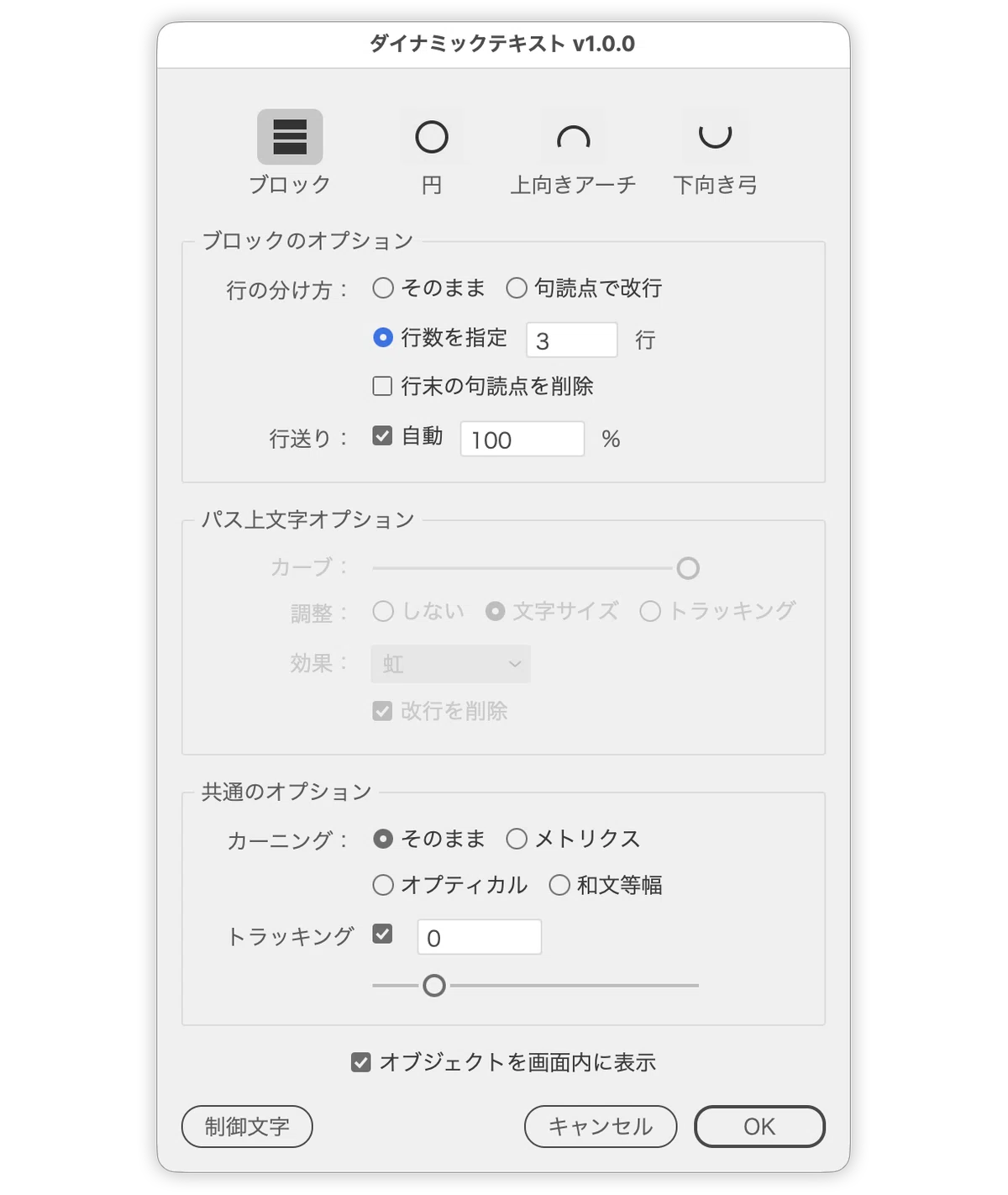
v1.1.0
パス上文字オプションに新しいパラメーター「パスに対しての割合」を追加
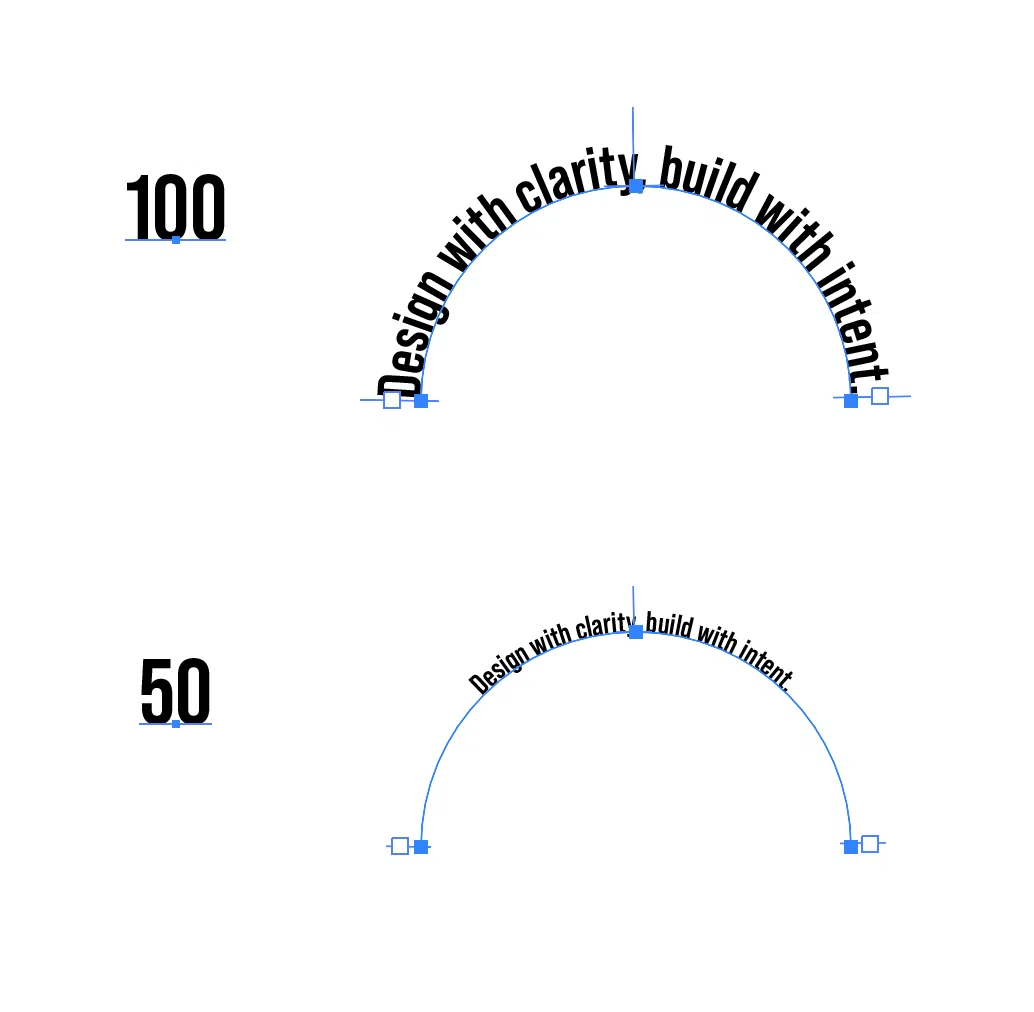
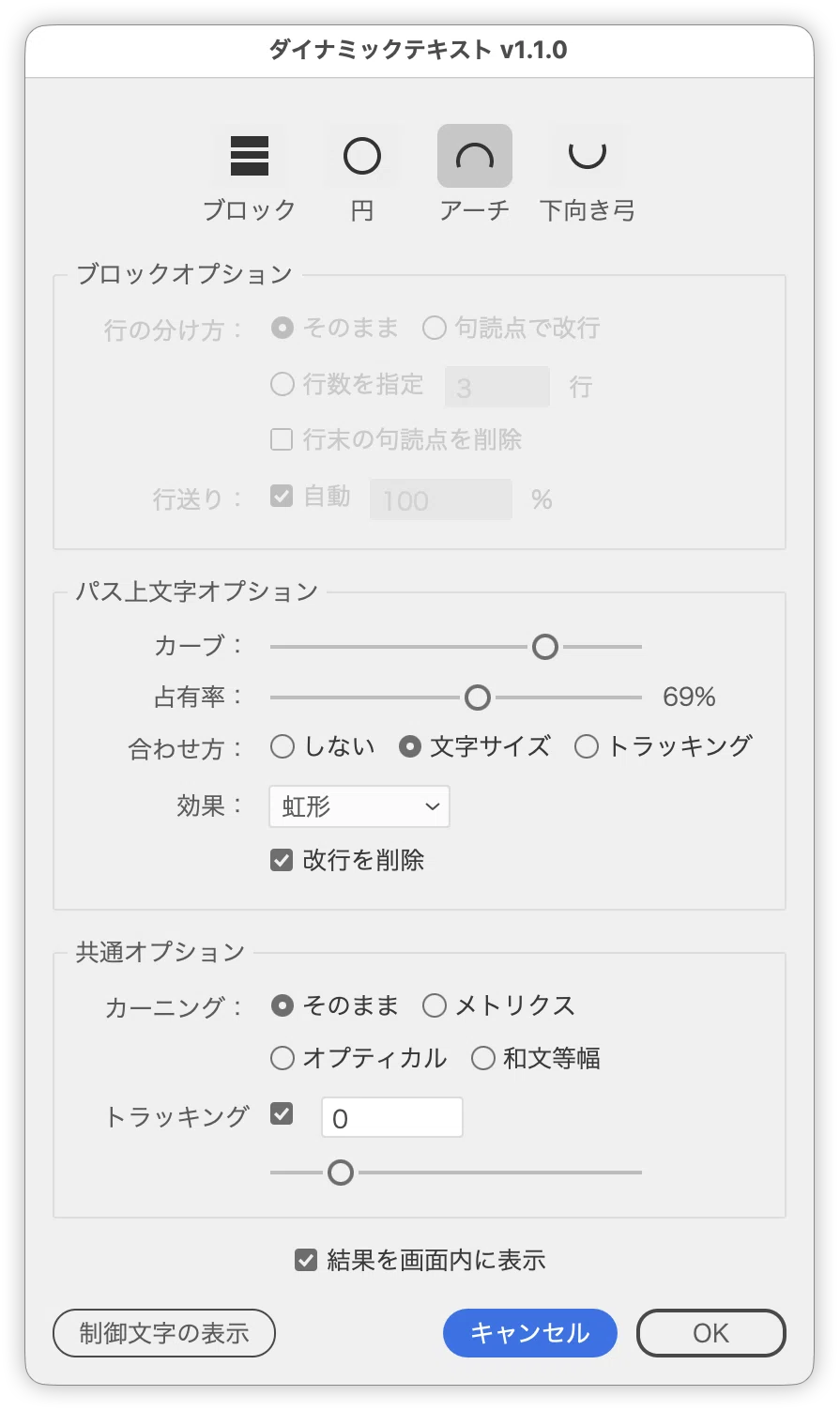
ダウンロード
ここから先は
91字
/
4ファイル
¥ 300
Amazon Payで支払うと最大2%還元のチャンス! 9/30まで
定期マガジンを購読されるとサンプルファイルをダウンロードいただけます。 https://note.com/dtp_tranist/m/mebd7eab21ea5
