【YOLOv3,YOLO11対応】iPad Swift Playgroundで「見る」をつくる

週刊プレイグラウンズ第34号
視覚サポートテクノロジー試行シリーズ
はじめに
既存のテクノロジーを組み合わせるだけでも、最新じゃなくても、
何かサポートができるのでは?
今回はそんな試みです。
このシリーズは、視覚に障がいのある方から「ボッチャ(パラリンピック競技)、ボールの位置を知りたい」という相談を受けたことから始めることにしました。
ボッチャという具体的な競技を起点にしていますが、目指すテクノロジーはそれだけに留まりません。物の位置を検出して伝える仕組みは、ボードゲーム、料理、整理整頓、日常のちょっとした「探す」という行為そのものを支える可能性を持っています。
なぜYOLOを選んだのか ― 検討の経緯
最初に立てた課題はシンプルです。
ジャックボール(ボッチャの白色のボール)が、どの方向に、どれくらいの距離にあるのか。大まかでもいい、まずはそこからはじめよう。
そして最終目標は、iPadをコートにかざしてコート平面とその位置関係を認識します。コートに投げ入れたボールを検出し、その方向と距離を音声で伝えます。ユーザが位置を変えるとそれに対応します。
これに応えるために、Appleが提供する複数のテクノロジーを比較検討しました。
検討したフレームワーク
フレームワーク : 役割
Vision : 画像内の物体・特徴の認識
CoreML : 学習済みAIモデルの実行
CreateML : 独自モデルの学習
ARKit : 空間認識・距離計測
Apple Intelligence(Foundation Models Framework):
生成AIによる高度な判断
検討したセンサー
・通常のカメラ(全機種で利用可能)
・LiDAR(iPad Pro等の一部機種のみ)
検討した判定手法
・形で識別する(球体であること)
・色で識別する(白いジャックボール)
・立体(深度) で識別する(床に置かれた物体であること)
これらを一つずつ考察しある結論に至りました。
一つの技術だけでは足りない。
形だけでは床の模様を誤検出する。
色だけでは似た色の物に引っかかる。
LiDARは精度が高いが対応機種が限られる。
できるだけ多くの環境で使えるアプリにしたい。
そこで、最終的に選んだのは複数のテクノロジーを組み合わせる方法です。
・YOLO(物体検出AI) で「ボールらしき物」をまず画面内から見つける
・色判定 でジャックボール特有の白色かどうかを絞り込む
・ARKit で、見つけた物の実際の距離と方向を計算する
・平面認識 によって、ユーザーがカメラを構えたまま自由に動いても位置情報がずれない仕組みを作る
特別な機種を前提にせず、
通常のカメラを搭載したiPadであれば誰でも使える。
そのことを優先しました。
今回のシリーズでまず取り上げるYOLOは、その最初の柱です。
3世代のYOLOを試してみて
今回はYOLOv3で解説しましたが、実は同じコードの骨格で yolo11nも動作を確認できました。同じアプリの中で、同じコードで(画像のサイズはモデルに合わせる)世代の異なるAIモデルを入れ替えるだけで動くというのはCoreMLの設計の良さを感じる瞬間でした。
なおYOLO26は、CoreMLの対応が.mlmodelから.mlpackageに更新されたため、iPad Swift Playgroundでの動作確認はできませんでした。
モデル名/リリース年(世代)/ライセンス
YOLOv3/2018年(第3世代)/MIT
YOLO11/2024年(Ultralytics第11世代)/AGPL-3.0
YOLO26/2025年(Ultralytics最新世代)/AGPL-3.0
世代が新しくなるほど、同じ「nano」サイズでも検出精度や処理効率が上がっていく傾向があります。ただしライセンスには注意が必要です。YOLOv3はMITライセンスで配布や改変が比較的自由ですが、YOLO11n・YOLO26nはAGPL-3.0という、利用条件に一定の制約があるライセンスで提供されています。商用での利用を考える場合は、それぞれのライセンス文書を確認することをお勧めします。
1. なぜiPad Swift Playgroundなのか
今回も開発環境はiPad Swift Playgroundです。理由は6つです。
1. 高度なアプリが作れる
「プログラミング学習のアプリ」という印象を持たれがちですが、実際にはSwiftUI・ARKit・CoreMLといった高度なフレームワークをフルに使えます。今回扱うYOLO(物体検出AI)も問題なく動作します。
2. 開発と実機テストが同一の機材=iPadで完結する
コードを書いたその場で、カメラを使った動作確認ができます。Mac(開発機)とiPadとの間を往復する必要がありません。
3. App Storeへの公開も同じアプリから可能
Playgroundアプリで作ったプロジェクトは、そのままApp Storeに有料・無料で公開できます。「練習用に作ったら終わり」ではなく、必要なら誰かに届ける道までつながっています。(開発者登録は必要です)
4. 必要ならXcodeにシームレスに移行できる
PlaygroundのプロジェクトファイルはそのままXcodeで開けます。コードも100%移行できます。もしさらに複雑なコードが必要になったときに環境を乗り換えもスムーズです。
5. 生成AIとの協働でプログラミングの間口が広がった
コードを書く作業の多くをAIと相談しながら進められる時代になりました。「プログラミング経験がないから無理」という前提そのものが変わってきています。必要なのは熱意・情熱です。
6. テクノロジーの実用化には、アイデアと当事者性が大切
技術力よりも「何を作るべきか」という問いの立て方の方が難しい、というのが実感です。iPadという身近な道具で開発できることは、当事者自身が手を動かして試す敷居を大きく下げます。
シリーズの全体構成
今回使う技術は YOLO(You Only Look Once) という物体検出AIです。iPadのカメラ映像から、人・椅子・ボールなど80種類の物体をリアルタイムで検出し、画面上の位置と確信度(どれくらい確かか)を返してくれます。
ただし「画面のどこに何があるか」が分かるだけでは、まだ実用には足りません。「どの方向に、どれくらいの距離にあるか」という、人が実際に動くための情報に変換する必要があります。そこでARKitという空間認識の技術を組み合わせていきます。
内容
第1回 YOLOをiPad Swift Playgroundで動作させる
第2回 デジタルズームで遠くの対象も検出できるようにする
第3回 検出した対象の色を判定する
第4回 ARKitをiPad Swift Playgroundで動作させる
第5回 ARKitにYOLO物体検出を統合する
第6回 カメラをかざして目標物への距離と方向を自動で読み上げる
第1回から第3回まではカメラ映像だけの世界、第4回からは「実空間のどこにあるか」を扱う世界に入ります。この2つを最終的に組み合わせることで、「探しているものが、前方3m10cm、右20cmにあります」と音声で伝えられるところまでを試行します。
今回やること
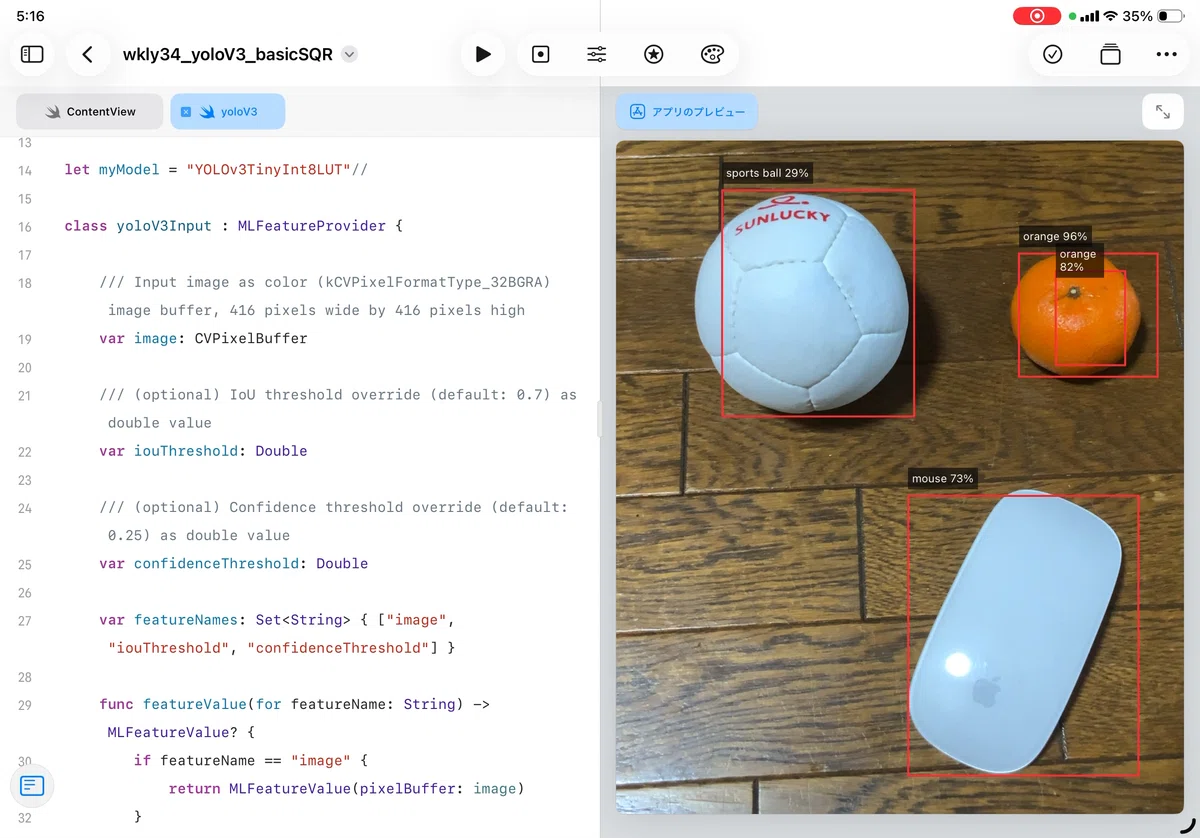
YOLOをiPad Swift Playgroundで動かす、シリーズ最初の一歩です。Apple公式が無料で提供しているYOLOv3モデルを使い、最小構成でカメラ映像にリアルタイムで矩形(バウンディングボックス)を表示するところまで作ります。
Xcodeが自動生成するコードのままではPlaygroundで動かないという、最初の壁にもぶつかります。この失敗とその理由も含めて記録します。
2. モデルの入手
YOLOのモデルファイルは、Apple公式の配布ページから入手します。
「YOLOv3」のセクションにモデルが6種類あります。
この中から YOLOv3TinyInt8LUT.mlmodel(8.9MB) を選びました。
選んだ理由は…
MITライセンスで公開されており配布のハードルが低い
8.9MBという軽さでアプリの容量が少なくて済む
iPadのNeural Engine(AI処理)と相性が良く推論が高速
より大きなモデルでもストレスなく動作する場合もあります。
精度、速度によってモデルを選んでください。
ダウンロードはiPadのSafariからそのまま行えます。
Macは必要ありません。
3. iPad Swift Playgroundへの配置
ダウンロードした YOLOv3TinyInt8LUT.mlmodel を、Playgroundプロジェクトのサイドバーにドラッグ&ドロップするとリソースとして保存されます。
物体検出にカメラを使用します。アプリ設定の「機能」メニューで「カメラ」を追加します。目的説明の文字列には「物体認識に使います」などと記すと良いでしょう。
4. Xcodeの自動生成コードを、Playground向けに直す
ここだけは、iPadだけではできず、そしてここが今回の核心です。
ただし、iPad Swift Playgroundに対応したコードをこの記事の最後に掲載します。そのまま利用してください。
したがって、この記事の読者の方は、iPadだけで、Mac(Xcode)なしで、取り組むことができます。
Macで試すなら次の方法です(読み飛ばして構いません)
.mlmodel ファイルをXcode上にドラッグすると、推論用のラッパークラス(YOLOv3TinyInt8LUT.swift)が自動生成されます。便利な仕組みですが、このコードはXcode専用に書かれており、そのままPlaygroundに持ち込むとクラッシュします。
なぜクラッシュするのか
自動生成コードのモデル読み込み部分を見てみます。
// ❌ Xcodeが生成するオリジナル
class var urlOfModelInThisBundle : URL {
    let bundle = Bundle(for: self)
    return bundle.url(forResource: "YOLOv3TinyInt8LUT",
                      withExtension: "mlmodelc")!
}
問題は2つの前提のズレにあります。
① Bundle(for: self) という参照方法
Xcodeアプリの世界では、このコードでフレームワーク内のリソースを正しく見つけられます。ところがPlaygroundでは、この参照方法は機能しません。Bundle.main でなければモデルが見つからず、起動直後にクラッシュします。
② .mlmodelc という拡張子
Xcodeはアプリをビルドする際に .mlmodel を事前にコンパイルし、.mlmodelc という最適化済みファイルを生成します。Playgroundにはこのビルド工程がないため、.mlmodelc はそもそも存在しません。
エラーメッセージは「モデルが見つかりません」とだけ表示され、原因がこの2点のどちらか、あるいは両方なのかは一見してわかりません。最初にここで数十分悩むというのが、このシリーズらしい正直な記録です。
修正版
重要:この記事の最後にファイルを掲載します。そのファイルは自動で作成されたものに次の修正を加えたものです。
プロジェクトに単純に追加するだけで、YOLOモデルを利用できます。
// ✅ Playground対応版
class var urlOfModelInThisBundle : URL {
    let bundle = Bundle.main  // ← Bundle(for: self) から変更
    guard let modelURL = bundle.url(forResource: "YOLOv3TinyInt8LUT",
                                    withExtension: "mlmodel") else {  // ← .mlmodelc から変更
        fatalError("YOLOv3TinyInt8LUT.mlmodel がResourcesに見つかりません")
    }
    do {
        return try MLModel.compileModel(at: modelURL)  // ← 実行時にコンパイル
    } catch {
        fatalError("モデルのコンパイルに失敗しました: \(error)")
    }
}
MLModel.compileModel(at:) というAPIが鍵です。Xcodeがビルド時に行うコンパイル作業を、アプリ起動時にその場で行います。起動が数秒遅くなりますが、それ以降の動作に影響はありません。
この2行の違いさえ押さえれば、Xcode用に書かれた他のCoreMLモデルのコードも、同じ要領でPlaygroundに持ち込めます。 YOLOに限らず、画像分類や音声認識など、CoreML全般に通用する気づきです。
5. コード・アプリ機能の全体
最小構成のアプリ機能のコード全体です。Detection構造体・物体検出ロジック・カメラ制御・画面表示をすべて1つのファイルに収めています。
import SwiftUI
import AVFoundation
import CoreML

// MARK: - 検出結果モデル
struct Detection: Identifiable {
    let id = UUID()
    let label: String
    let confidence: Float
    let rect: CGRect  // 正規化座標(左上原点、0〜1)
}

// MARK: - 物体検出
final class ObjectDetector: ObservableObject {
    @Published var detections: [Detection] = []

    private let model: yoloV3
    private let queue = DispatchQueue(label: "ObjectDetectorQueue")
    private var isProcessing = false
    private let ciContext = CIContext()
    private let iou: Double  = 0.7
    private let conf: Double = 0.25

    private struct LetterboxInfo {
        var srcW: CGFloat = 0
        var srcH: CGFloat = 0
        var scale: CGFloat = 1
        var padX: CGFloat  = 0
        var padY: CGFloat  = 0
    }
    private var lastLB = LetterboxInfo()
    private let lbLock = NSLock()

    init() {
        do {
            self.model = try yoloV3()
        } catch {
            fatalError("モデルの初期化に失敗: \(error)")
        }
    }

    func process(sampleBuffer: CMSampleBuffer,
                 captureAngle: CGFloat,
                 mirrored: Bool) {
        guard !isProcessing else { return }
        guard let pb = CMSampleBufferGetImageBuffer(sampleBuffer) else { return }
        isProcessing = true
        queue.async {
            defer { self.isProcessing = false }
            guard let input416 = self.makeCenterSquare416(//makeCenterSquare416//makeLetterbox416
                from: pb,
                captureAngle: captureAngle,
                mirrored: mirrored
            ) else {
                DispatchQueue.main.async { self.detections = [] }
                return
            }
            do {
                let input = yoloV3Input(
                    image: input416,
                    iouThreshold: self.iou,
                    confidenceThreshold: self.conf
                )
                let out  = try self.model.prediction(input: input)
                let dets = self.decode(confidence: out.confidence,
                                       coordinates: out.coordinates)
                DispatchQueue.main.async { self.detections = dets }
            } catch {
                print("推論エラー:", error)
                DispatchQueue.main.async { self.detections = [] }
            }
        }
    }

    private struct CropInfo {
        var srcW: CGFloat = 0
        var srcH: CGFloat = 0
        var side: CGFloat = 0
        var offsetX: CGFloat = 0
        var offsetY: CGFloat = 0
    }
    private var lastCrop = CropInfo()

    private func makeCenterSquare416(from pb: CVPixelBuffer,
                                     captureAngle: CGFloat,
                                     mirrored: Bool) -> CVPixelBuffer? {
        var ci = CIImage(cvPixelBuffer: pb)

        let a = (Int(captureAngle.rounded()) % 360 + 360) % 360
        switch a {
        case 90:  ci = ci.oriented(.left)
        case 180: ci = ci.oriented(.down)
        case 270: ci = ci.oriented(.right)
        default:  break
        }
        if mirrored {
            let e = ci.extent
            ci = ci.transformed(by: CGAffineTransform(scaleX: -1, y: 1)
                .translatedBy(x: -e.width, y: 0))
        }

        let extent = ci.extent
        let srcW = extent.width, srcH = extent.height
        guard srcW > 0, srcH > 0 else { return nil }

        // 中央正方形を切り出し
        let side = min(srcW, srcH)
        let offsetX = (srcW - side) / 2
        let offsetY = (srcH - side) / 2
        let cropRect = CGRect(x: extent.origin.x + offsetX,
                              y: extent.origin.y + offsetY,
                              width: side, height: side)

        lbLock.lock()
        lastCrop = CropInfo(srcW: srcW, srcH: srcH, side: side,
                            offsetX: offsetX, offsetY: offsetY)
        lbLock.unlock()

        let cropped = ci.cropped(to: cropRect)
            .transformed(by: CGAffineTransform(translationX: -cropRect.origin.x,
                                               y: -cropRect.origin.y))
        let scale = 416.0 / side
        let scaled = cropped.transformed(by: CGAffineTransform(scaleX: scale, y: scale))

        var dst: CVPixelBuffer?
        CVPixelBufferCreate(kCFAllocatorDefault, 416, 416,
                            kCVPixelFormatType_32BGRA,
                            [kCVPixelBufferCGImageCompatibilityKey: true,
                     kCVPixelBufferCGBitmapContextCompatibilityKey: true] as CFDictionary,
                            &dst)
        guard let dst else { return nil }
        ciContext.render(scaled, to: dst)
        return dst
    }

    private func decode(confidence: MLMultiArray, coordinates: MLMultiArray) -> [Detection] {
        lbLock.lock()
        let cp = lastCrop
        lbLock.unlock()

        let n = confidence.shape[0].intValue
        let c = confidence.shape[1].intValue
        guard n > 0, c > 0, cp.side > 0 else { return [] }

        func confVal(_ i: Int, _ j: Int) -> Float {
            confidence[[NSNumber(value: i), NSNumber(value: j)]].floatValue
        }
        func coordVal(_ i: Int, _ j: Int) -> Float {
            coordinates[[NSNumber(value: i), NSNumber(value: j)]].floatValue
        }
        func sigmoid(_ x: Float) -> Float { 1 / (1 + exp(-x)) }

        var results: [Detection] = []

        for i in 0..<n {
            var bestJ     = 0
            var bestScore = confVal(i, 0)
            for j in 1..<c {
                let s = confVal(i, j)
                if s > bestScore { bestScore = s; bestJ = j }
            }
            if bestScore < 0 || bestScore > 1 { bestScore = sigmoid(bestScore) }
            guard bestScore >= Float(conf) else { continue }

            let x = coordVal(i, 0), y = coordVal(i, 1)
            let w = coordVal(i, 2), h = coordVal(i, 3)

            // 416空間 → 正方形クロップ空間(パディング計算が無いのでシンプル)
            let cropScale = cp.side / 416.0
            let cx = (CGFloat(x) - CGFloat(w) / 2) * 416 * cropScale
            let cy = (CGFloat(y) - CGFloat(h) / 2) * 416 * cropScale
            let cw = CGFloat(w) * 416 * cropScale
            let ch = CGFloat(h) * 416 * cropScale

            // クロップ空間 → 元のフルフレーム座標
            let sx = cx + cp.offsetX
            let sy = cy + cp.offsetY

            guard cw > 0, ch > 0 else { continue }

            var nx = sx / cp.srcW
            var ny = sy / cp.srcH
            var nw = cw / cp.srcW
            var nh = ch / cp.srcH

            if nx < 0 { nw += nx; nx = 0 }
            if ny < 0 { nh += ny; ny = 0 }
            if nx + nw > 1 { nw = 1 - nx }
            if ny + nh > 1 { nh = 1 - ny }
            guard nw > 0, nh > 0 else { continue }

            results.append(Detection(label: cocoClassName(bestJ),
                                     confidence: bestScore,
                                     rect: CGRect(x: nx, y: ny, width: nw, height: nh)))
        }
        return results
    }

    private func cocoClassName(_ idx: Int) -> String {
        let a: [String] = ["person","bicycle","car","motorcycle","airplane",
                           "bus","train","truck","boat","traffic light"]
        let b: [String] = ["fire hydrant","stop sign","parking meter","bench",
                           "bird","cat","dog","horse","sheep","cow"]
        let c: [String] = ["elephant","bear","zebra","giraffe","backpack",
                           "umbrella","handbag","tie","suitcase","frisbee"]
        let d: [String] = ["skis","snowboard","sports ball","kite","baseball bat",
                           "baseball glove","skateboard","surfboard","tennis racket","bottle"]
        let e: [String] = ["wine glass","cup","fork","knife","spoon",
                           "bowl","banana","apple","sandwich","orange"]
        let f: [String] = ["broccoli","carrot","hot dog","pizza","donut",
                           "cake","chair","couch","potted plant","bed"]
        let g: [String] = ["dining table","toilet","tv","laptop","mouse",
                           "remote","keyboard","cell phone","microwave","oven"]
        let h: [String] = ["toaster","sink","refrigerator","book","clock",
                           "vase","scissors","teddy bear","hair drier","toothbrush"]
        let names = a + b + c + d + e + f + g + h
        return idx >= 0 && idx < names.count ? names[idx] : "class\(idx)"
    }
}

// MARK: - カメラセッション
final class CameraSession: NSObject, AVCaptureVideoDataOutputSampleBufferDelegate {
    let session     = AVCaptureSession()
    private let detector: ObjectDetector
    private let outputQueue = DispatchQueue(label: "CameraOutputQueue")
    private let videoOutput = AVCaptureVideoDataOutput()
    private var videoDevice: AVCaptureDevice?
    private weak var previewLayer: AVCaptureVideoPreviewLayer?

    @available(iOS 17.0, *)
    private var rotationCoordinator: AVCaptureDevice.RotationCoordinator?
    private var rotationObs: NSKeyValueObservation?

    init(detector: ObjectDetector) {
        self.detector = detector
        super.init()
        setupSession()
    }

    private func setupSession() {
        session.beginConfiguration()
        session.sessionPreset = .high
        guard let device = AVCaptureDevice.default(.builtInWideAngleCamera,
                                                   for: .video, position: .back),
              let input  = try? AVCaptureDeviceInput(device: device),
              session.canAddInput(input) else {
            session.commitConfiguration(); return
        }
        videoDevice = device
        session.addInput(input)
        videoOutput.videoSettings = [
            kCVPixelBufferPixelFormatTypeKey as String: kCVPixelFormatType_32BGRA
        ]
        videoOutput.setSampleBufferDelegate(self, queue: outputQueue)
        guard session.canAddOutput(videoOutput) else {
            session.commitConfiguration(); return
        }
        session.addOutput(videoOutput)
        session.commitConfiguration()
    }

    func attachPreviewLayer(_ layer: AVCaptureVideoPreviewLayer) {
        self.previewLayer = layer
        guard #available(iOS 17.0, *),
              let device = videoDevice else { return }
        let rc = AVCaptureDevice.RotationCoordinator(device: device, previewLayer: layer)
        rotationCoordinator = rc
        rotationObs = rc.observe(
            \.videoRotationAngleForHorizonLevelPreview,
             options: [.initial, .new]
        ) { [weak self] rc, _ in
            self?.applyRotation(
                previewAngle: rc.videoRotationAngleForHorizonLevelPreview,
                captureAngle: rc.videoRotationAngleForHorizonLevelCapture
            )
        }
    }

    private func applyRotation(previewAngle: CGFloat, captureAngle: CGFloat) {
        if let pConn = previewLayer?.connection,
           pConn.isVideoRotationAngleSupported(previewAngle) {
            pConn.videoRotationAngle = previewAngle
        }
        if let oConn = videoOutput.connection(with: .video),
           oConn.isVideoRotationAngleSupported(captureAngle) {
            oConn.videoRotationAngle = captureAngle
        }
    }

    func start() { if !session.isRunning { session.startRunning() } }
    func stop()  { if session.isRunning  { session.stopRunning()  } }

    func captureOutput(_ output: AVCaptureOutput,
                       didOutput sampleBuffer: CMSampleBuffer,
                       from connection: AVCaptureConnection) {
        let angle: CGFloat
        if #available(iOS 17.0, *) {
            angle = connection.videoRotationAngle
        } else {
            angle = 0
        }
        detector.process(sampleBuffer: sampleBuffer,
                         captureAngle: angle,
                         mirrored: connection.isVideoMirrored)
    }
}

// MARK: - カメラプレビュー
struct CameraView: UIViewRepresentable {
    @ObservedObject var detector: ObjectDetector
    @Binding var previewLayer: AVCaptureVideoPreviewLayer?

    func makeCoordinator() -> Coordinator {
        Coordinator(detector: detector, previewLayer: $previewLayer)
    }
    func makeUIView(context: Context) -> PreviewView {
        let view = PreviewView()
        view.videoPreviewLayer.session = context.coordinator.session
        DispatchQueue.main.async {
            context.coordinator.previewLayer = view.videoPreviewLayer
            context.coordinator.cameraSession.attachPreviewLayer(view.videoPreviewLayer)
        }
        context.coordinator.start()
        return view
    }
    func updateUIView(_ uiView: PreviewView, context: Context) {}

    final class Coordinator {
        let cameraSession: CameraSession
        var session: AVCaptureSession { cameraSession.session }
        private var previewLayerBinding: Binding<AVCaptureVideoPreviewLayer?>
        init(detector: ObjectDetector,
             previewLayer: Binding<AVCaptureVideoPreviewLayer?>) {
            self.cameraSession        = CameraSession(detector: detector)
            self.previewLayerBinding  = previewLayer
        }
        var previewLayer: AVCaptureVideoPreviewLayer? {
            get { previewLayerBinding.wrappedValue }
            set { previewLayerBinding.wrappedValue = newValue }
        }
        func start() { cameraSession.start() }
        func stop()  { cameraSession.stop()  }
    }
}

final class PreviewView: UIView {
    override class var layerClass: AnyClass { AVCaptureVideoPreviewLayer.self }
    var videoPreviewLayer: AVCaptureVideoPreviewLayer {
        layer as! AVCaptureVideoPreviewLayer
    }
    override init(frame: CGRect) {
        super.init(frame: frame)
        videoPreviewLayer.videoGravity = .resizeAspectFill
    }
    required init?(coder: NSCoder) { fatalError() }
    override func layoutSubviews() {
        super.layoutSubviews()
        videoPreviewLayer.frame = bounds
    }
}

// MARK: - 検出オーバーレイ
struct DetectionOverlay: View {
    let detections:   [Detection]
    let previewLayer: AVCaptureVideoPreviewLayer?

    var body: some View {
        GeometryReader { _ in
            ForEach(detections) { det in
                let r = previewLayer.map {
                    $0.layerRectConverted(fromMetadataOutputRect: det.rect)
                } ?? .zero
                ZStack(alignment: .topLeading) {
                    Rectangle().stroke(.red, lineWidth: 2)
                    Text("\(det.label) \(Int(det.confidence * 100))%")
                        .font(.caption)
                        .padding(4)
                        .background(.black.opacity(0.6))
                        .foregroundStyle(.white)
                        .offset(y: -28)
                }
                .frame(width: r.width, height: r.height)
                .position(x: r.midX, y: r.midY)
            }
        }
        .allowsHitTesting(false)
    }
}

// MARK: - エントリーポイント
struct ContentView: View {
    @StateObject private var detector = ObjectDetector()
    @State private var previewLayer: AVCaptureVideoPreviewLayer?

    var body: some View {
        ZStack {
            CameraView(detector: detector, previewLayer: $previewLayer)
                .ignoresSafeArea()
            DetectionOverlay(detections: detector.detections,
                             previewLayer: previewLayer)
            .ignoresSafeArea()
        }
    }
}
「カメラ映像を受け取る → 416×416に整形する → 推論する → 矩形に変換する → 画面に重ねる」という一連の流れが、このファイル一枚に収まっています。次回以降の改良も、この骨格に少しずつ機能を足していく形で進みます。
6. 動作確認と気づき
最初にハマったポイント
自動生成コードのままビルドすると、起動した瞬間に fatalError で停止します。表示されるのは「モデルが見つかりません」というメッセージだけで、原因が Bundle の参照方法にあるとは一見気づけません。Playgroundでは Bundle.main を使う、この一点に気づくまでにしばらく時間がかかりました。同じ壁に当たる方の時間を、この記録が少しでも節約できればと思います。
実際に動かしてみて
人、椅子、ボトルといった大きめの物体は、安定して検出できました。ボッチャボールのような小さな球体は sports ball として検出されることもありますが、確信度はまだ低く、検出が途切れることも多いです。COCOデータセット(YOLOが学習に使った80種類の物体)には「ボッチャボール」という分類自体が存在しないため、ある意味当然の結果でもあります。
この「まだ足りない部分」をどう補っていくかが、次回以降のテーマになります。
次回予告
今回はカメラ全体を416×416に縮めて渡しています。特に遠くにあるボールは検出から漏れやすい状態です。次回はデジタルズームを実装し、見たい範囲を絞り込んでから検出することで、小さな対象への対応を考慮します。
yoloV3.swift
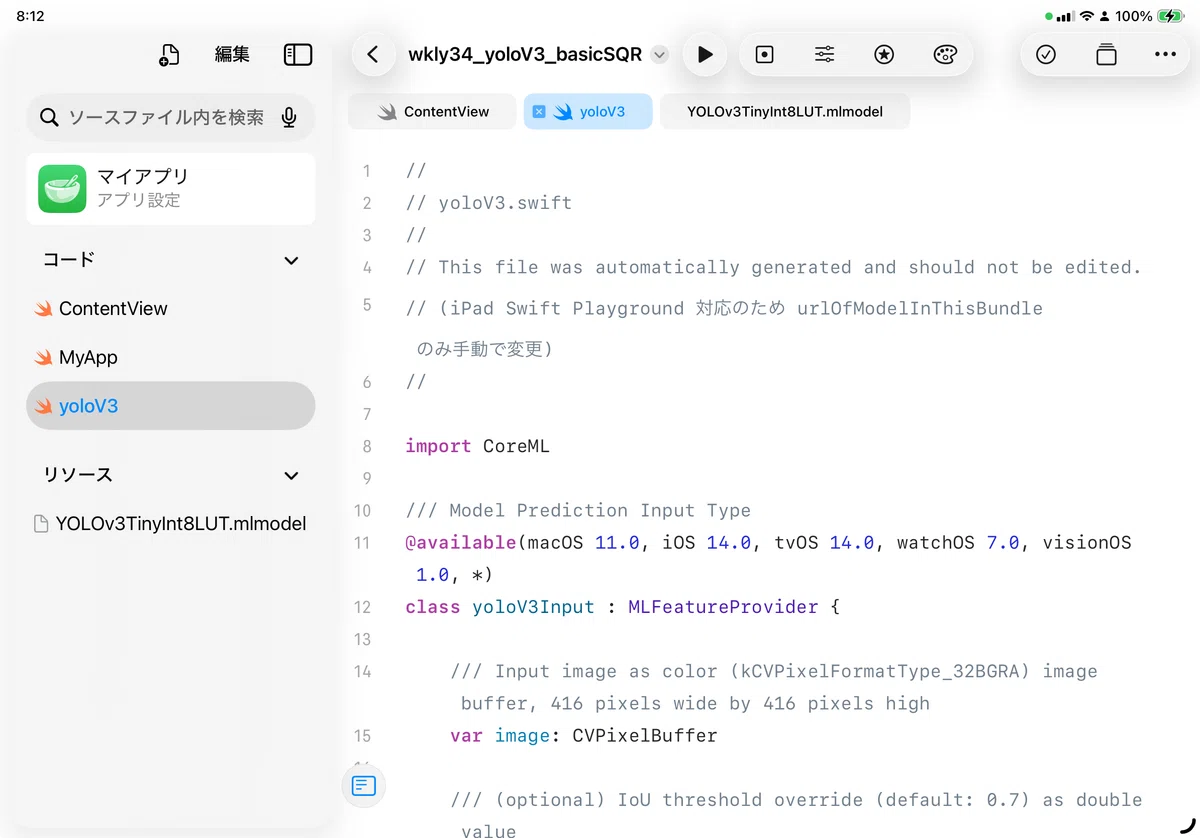
次のスクリーンショットのように、.mlmodelとyoloV3.swiftコードをセットします。あとは、ContentView.swiftにコードを記述します。
//
// yoloV3.swift
//
// This file was automatically generated and should not be edited.
//

import CoreML


/// Model Prediction Input Type
@available(macOS 12.0, iOS 15.0, tvOS 15.0, watchOS 8.0, visionOS 1.0, *)


let myModel = "YOLOv3TinyInt8LUT"//

class yoloV3Input : MLFeatureProvider {

    /// Input image as color (kCVPixelFormatType_32BGRA) image buffer, 416 pixels wide by 416 pixels high
    var image: CVPixelBuffer

    /// (optional) IoU threshold override (default: 0.7) as double value
    var iouThreshold: Double

    /// (optional) Confidence threshold override (default: 0.25) as double value
    var confidenceThreshold: Double

    var featureNames: Set<String> { ["image", "iouThreshold", "confidenceThreshold"] }

    func featureValue(for featureName: String) -> MLFeatureValue? {
        if featureName == "image" {
            return MLFeatureValue(pixelBuffer: image)
        }
        if featureName == "iouThreshold" {
            return MLFeatureValue(double: iouThreshold)
        }
        if featureName == "confidenceThreshold" {
            return MLFeatureValue(double: confidenceThreshold)
        }
        return nil
    }

    init(image: CVPixelBuffer, iouThreshold: Double, confidenceThreshold: Double) {
        self.image = image
        self.iouThreshold = iouThreshold
        self.confidenceThreshold = confidenceThreshold
    }

    convenience init(imageWith image: CGImage, iouThreshold: Double, confidenceThreshold: Double) throws {
        self.init(image: try MLFeatureValue(cgImage: image, pixelsWide: 416, pixelsHigh: 416, pixelFormatType: kCVPixelFormatType_32ARGB, options: nil).imageBufferValue!, iouThreshold: iouThreshold, confidenceThreshold: confidenceThreshold)
    }

    convenience init(imageAt image: URL, iouThreshold: Double, confidenceThreshold: Double) throws {
        self.init(image: try MLFeatureValue(imageAt: image, pixelsWide: 416, pixelsHigh: 416, pixelFormatType: kCVPixelFormatType_32ARGB, options: nil).imageBufferValue!, iouThreshold: iouThreshold, confidenceThreshold: confidenceThreshold)
    }

    func setImage(with image: CGImage) throws  {
        self.image = try MLFeatureValue(cgImage: image, pixelsWide: 416, pixelsHigh: 416, pixelFormatType: kCVPixelFormatType_32ARGB, options: nil).imageBufferValue!
    }

    func setImage(with image: URL) throws  {
        self.image = try MLFeatureValue(imageAt: image, pixelsWide: 416, pixelsHigh: 416, pixelFormatType: kCVPixelFormatType_32ARGB, options: nil).imageBufferValue!
    }

}


/// Model Prediction Output Type
@available(macOS 12.0, iOS 15.0, tvOS 15.0, watchOS 8.0, visionOS 1.0, *)
class yoloV3Output : MLFeatureProvider {

    /// Source provided by CoreML
    private let provider : MLFeatureProvider

    /// Boxes × Class confidence (see user-defined metadata "classes") as multidimensional array of floats
    var confidence: MLMultiArray {
        provider.featureValue(for: "confidence")!.multiArrayValue!
    }

    /// Boxes × Class confidence (see user-defined metadata "classes") as multidimensional array of floats
    var confidenceShapedArray: MLShapedArray<Float> {
        MLShapedArray<Float>(confidence)
    }

    /// Boxes × [x, y, width, height] (relative to image size) as multidimensional array of floats
    var coordinates: MLMultiArray {
        provider.featureValue(for: "coordinates")!.multiArrayValue!
    }

    /// Boxes × [x, y, width, height] (relative to image size) as multidimensional array of floats
    var coordinatesShapedArray: MLShapedArray<Float> {
        MLShapedArray<Float>(coordinates)
    }

    var featureNames: Set<String> {
        provider.featureNames
    }

    func featureValue(for featureName: String) -> MLFeatureValue? {
        provider.featureValue(for: featureName)
    }

    init(confidence: MLMultiArray, coordinates: MLMultiArray) {
        self.provider = try! MLDictionaryFeatureProvider(dictionary: ["confidence" : MLFeatureValue(multiArray: confidence), "coordinates" : MLFeatureValue(multiArray: coordinates)])
    }

    init(features: MLFeatureProvider) {
        self.provider = features
    }
}


/// Class for model loading and prediction
@available(macOS 12.0, iOS 15.0, tvOS 15.0, watchOS 8.0, visionOS 1.0, *)
class yoloV3 {
    let model: MLModel

    /*
    /// URL of model assuming it was installed in the same bundle as this class
    class var urlOfModelInThisBundle : URL {
        let bundle = Bundle(for: self)
        return bundle.url(forResource: "yoloV3", withExtension:"mlmodelc")!
    }
    */
    /*
    /// these are the function for iPad Playgrounds model
    class var urlOfModelInThisBundle : URL {
        //_sed for 本物のApp let bundle = Bundle(for: ImageClassification.self)
        //return bundle.url(forResource: "ImageClassifier", withExtension:"mlmodelc")!
        // iPad Swift Playgrounds 対応として コンパイルド・モデルをロード
        //          return try! MLModel.compileModel(at: URL(fileReferenceLiteralResourceName: "ImageClassifier.mlmodel"))
        //          return try! MLModel.compileModel(at: URL(fileReferenceLiteralResourceName: "ImageClassification.mlmodel"))//MobileNetV2
        return try! MLModel.compileModel(at: URL(fileReferenceLiteralResourceName: myModel ))//MobileNetV2
    }
    */
    class var urlOfModelInThisBundle : URL {
        // Playgrounds の場合は main バンドルを使う
        let bundle = Bundle.main

        // Resources に置いた yoloV3.mlmodel を探す
        guard let modelURL = bundle.url(forResource: "YOLOv3TinyInt8LUT", withExtension: "mlmodel") else {
            fatalError("YOLOv3TinyInt8LUT.mlmodel がバンドル内に見つかりません")
        }

        // .mlmodel をその場でコンパイルして .mlmodelc の URL を得る
        do {
            let compiledURL = try MLModel.compileModel(at: modelURL)
            return compiledURL
        } catch {
            fatalError("YOLOv3TinyInt8LUT.mlmodel のコンパイルに失敗しました: \(error)")
        }
    }

    /**
     Construct yoloV3 instance with an existing MLModel object.

     Usually the application does not use this initializer unless it makes a subclass of yoloV3.
     Such application may want to use `MLModel(contentsOfURL:configuration:)` and `yoloV3.urlOfModelInThisBundle` to create a MLModel object to pass-in.

     - parameters:
     - model: MLModel object
     */
    init(model: MLModel) {
        self.model = model
    }

    /**
     Construct a model with configuration

     - parameters:
     - configuration: the desired model configuration

     - throws: an NSError object that describes the problem
     */
    convenience init(configuration: MLModelConfiguration = MLModelConfiguration()) throws {
        try self.init(contentsOf: type(of:self).urlOfModelInThisBundle, configuration: configuration)
    }

    /**
     Construct yoloV3 instance with explicit path to mlmodelc file
     - parameters:
     - modelURL: the file url of the model

     - throws: an NSError object that describes the problem
     */
    convenience init(contentsOf modelURL: URL) throws {
        try self.init(model: MLModel(contentsOf: modelURL))
    }

    /**
     Construct a model with URL of the .mlmodelc directory and configuration

     - parameters:
     - modelURL: the file url of the model
     - configuration: the desired model configuration

     - throws: an NSError object that describes the problem
     */
    convenience init(contentsOf modelURL: URL, configuration: MLModelConfiguration) throws {
        try self.init(model: MLModel(contentsOf: modelURL, configuration: configuration))
    }

    /**
     Construct yoloV3 instance asynchronously with optional configuration.

     Model loading may take time when the model content is not immediately available (e.g. encrypted model). Use this factory method especially when the caller is on the main thread.

     - parameters:
     - configuration: the desired model configuration
     - handler: the completion handler to be called when the model loading completes successfully or unsuccessfully
     */
    class func load(configuration: MLModelConfiguration = MLModelConfiguration(), completionHandler handler: @escaping (Swift.Result<yoloV3, Error>) -> Void) {
        load(contentsOf: self.urlOfModelInThisBundle, configuration: configuration, completionHandler: handler)
    }

    /**
     Construct yoloV3 instance asynchronously with optional configuration.

     Model loading may take time when the model content is not immediately available (e.g. encrypted model). Use this factory method especially when the caller is on the main thread.

     - parameters:
     - configuration: the desired model configuration
     */
    class func load(configuration: MLModelConfiguration = MLModelConfiguration()) async throws -> yoloV3 {
        try await load(contentsOf: self.urlOfModelInThisBundle, configuration: configuration)
    }

    /**
     Construct yoloV3 instance asynchronously with URL of the .mlmodelc directory with optional configuration.

     Model loading may take time when the model content is not immediately available (e.g. encrypted model). Use this factory method especially when the caller is on the main thread.

     - parameters:
     - modelURL: the URL to the model
     - configuration: the desired model configuration
     - handler: the completion handler to be called when the model loading completes successfully or unsuccessfully
     */
    class func load(contentsOf modelURL: URL, configuration: MLModelConfiguration = MLModelConfiguration(), completionHandler handler: @escaping (Swift.Result<yoloV3, Error>) -> Void) {
        MLModel.load(contentsOf: modelURL, configuration: configuration) { result in
            switch result {
            case .failure(let error):
                handler(.failure(error))
            case .success(let model):
                handler(.success(yoloV3(model: model)))
            }
        }
    }

    /**
     Construct yoloV3 instance asynchronously with URL of the .mlmodelc directory with optional configuration.

     Model loading may take time when the model content is not immediately available (e.g. encrypted model). Use this factory method especially when the caller is on the main thread.

     - parameters:
     - modelURL: the URL to the model
     - configuration: the desired model configuration
     */
    class func load(contentsOf modelURL: URL, configuration: MLModelConfiguration = MLModelConfiguration()) async throws -> yoloV3 {
        let model = try await MLModel.load(contentsOf: modelURL, configuration: configuration)
        return yoloV3(model: model)
    }

    /**
     Make a prediction using the structured interface

     It uses the default function if the model has multiple functions.

     - parameters:
     - input: the input to the prediction as yoloV3Input

     - throws: an NSError object that describes the problem

     - returns: the result of the prediction as yoloV3Output
     */
    func prediction(input: yoloV3Input) throws -> yoloV3Output {
        try prediction(input: input, options: MLPredictionOptions())
    }

    /**
     Make a prediction using the structured interface

     It uses the default function if the model has multiple functions.

     - parameters:
     - input: the input to the prediction as yoloV3Input
     - options: prediction options

     - throws: an NSError object that describes the problem

     - returns: the result of the prediction as yoloV3Output
     */
    func prediction(input: yoloV3Input, options: MLPredictionOptions) throws -> yoloV3Output {
        let outFeatures = try model.prediction(from: input, options: options)
        return yoloV3Output(features: outFeatures)
    }

    /**
     Make an asynchronous prediction using the structured interface

     It uses the default function if the model has multiple functions.

     - parameters:
     - input: the input to the prediction as yoloV3Input
     - options: prediction options

     - throws: an NSError object that describes the problem

     - returns: the result of the prediction as yoloV3Output
     */
    @available(macOS 14.0, iOS 17.0, tvOS 17.0, watchOS 10.0, visionOS 1.0, *)
    func prediction(input: yoloV3Input, options: MLPredictionOptions = MLPredictionOptions()) async throws -> yoloV3Output {
        let outFeatures = try await model.prediction(from: input, options: options)
        return yoloV3Output(features: outFeatures)
    }

    /**
     Make a prediction using the convenience interface

     It uses the default function if the model has multiple functions.

     - parameters:
     - image: Input image as color (kCVPixelFormatType_32BGRA) image buffer, 416 pixels wide by 416 pixels high
     - iouThreshold: (optional) IoU threshold override (default: 0.7) as double value
     - confidenceThreshold: (optional) Confidence threshold override (default: 0.25) as double value

     - throws: an NSError object that describes the problem

     - returns: the result of the prediction as yoloV3Output
     */
    func prediction(image: CVPixelBuffer, iouThreshold: Double, confidenceThreshold: Double) throws -> yoloV3Output {
        let input_ = yoloV3Input(image: image, iouThreshold: iouThreshold, confidenceThreshold: confidenceThreshold)
        return try prediction(input: input_)
    }

    /**
     Make a batch prediction using the structured interface

     It uses the default function if the model has multiple functions.

     - parameters:
     - inputs: the inputs to the prediction as [yoloV3Input]
     - options: prediction options

     - throws: an NSError object that describes the problem

     - returns: the result of the prediction as [yoloV3Output]
     */
    func predictions(inputs: [yoloV3Input], options: MLPredictionOptions = MLPredictionOptions()) throws -> [yoloV3Output] {
        let batchIn = MLArrayBatchProvider(array: inputs)
        let batchOut = try model.predictions(from: batchIn, options: options)
        var results : [yoloV3Output] = []
        results.reserveCapacity(inputs.count)
        for i in 0..<batchOut.count {
            let outProvider = batchOut.features(at: i)
            let result =  yoloV3Output(features: outProvider)
            results.append(result)
        }
        return results
    }
}
