  • 94 Product updates

Filter by product

Spend less time on office admin with these new updates

Spend less time on office admin with these new updates

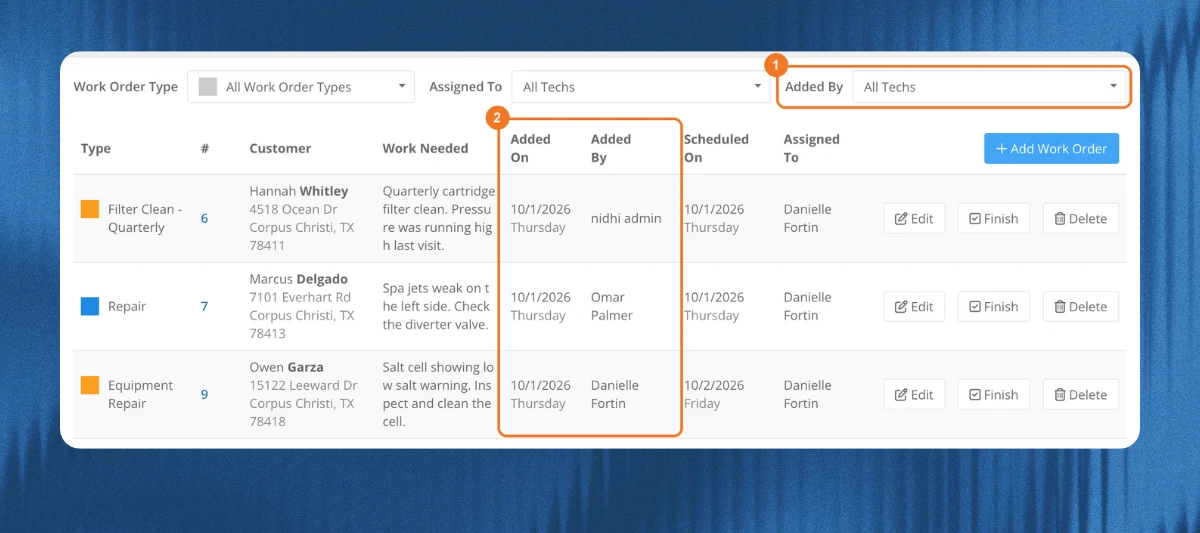
A tech finds a broken pump and leaves a note. Back at the office, someone copies that note into a work order, fixes an address that carried over from the last customer you added, then moves a stop to even out a busy day. None of it’s hard. It just eats up time.This set of releases takes those jobs off your plate. Tech notes carry over for you, addresses fill in as you type, and moving a stop takes one simple drag.🙌 See who added each work order Now you can see which techs are finding repair work and give them credit for it. Some of you even asked for this at the 2026 Skimmer Pro Summit, where owners and admins wanted this data to build a reward system for their techs.The Scheduled list now shows Added On and Added By Filter the list by who added the work order📝 Tech notes go straight into work orders and quotesNo more copying and pasting notes in the office, which means less admin work. Create a work order from a service note or issue, and the tech’s notes fill in Tech Instructions, with the issue name, tech, and date Create a quote from a service note or issue, and the tech’s notes and office notes fill in Internal Notes Tech Instructions and Internal Notes are never shown to the customer🔀 Move a stop on the route dashboardNow you can rebalance a day without changing the regular route.Drag a stop onto another tech to move it for that day It goes to the end of that tech’s route🏠 Address suggestions when you add a customerAdding a customer is faster, with fewer typos, and new customers don’t end up with the wrong address.Start typing the billing address and pick a suggestion City, state, and zip fill in for you Skimmer no longer carries over the city, state, and zip from the last customer you added🛒 Office notes on shopping list itemsThe office can track follow-ups right on the item.Add a note to a shopping list item, like “waiting on customer approval” Each note shows who updated it and when Notes are office only. They don’t show in the app or to the customer Give these a try and tell us what you think in the comments. Got feedback or an idea for what’s next? Drop it below :) 

Related products:Mobile appWork ordersRoute management
New Feature: Tech Performance Report

New Feature: Tech Performance Report

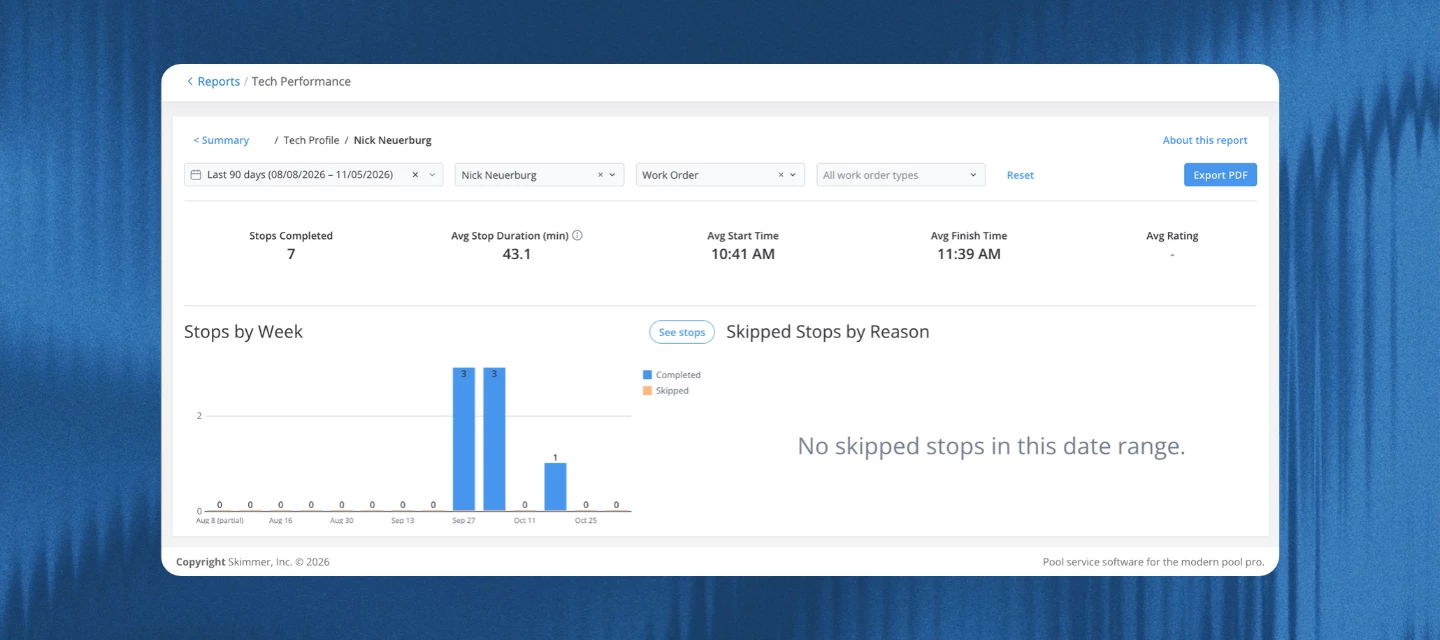
One question we hear a lot from owners running a crew: how's each tech actually doing? Until now, answering it meant pulling route history and reviews one tech at a time.Starting today, it's one report. The tech performance report shows how many stops each tech completes, how long their stops take, and how customers rate them, all next to your team average.NOTE: this feature is included in Scaling Up and Enterprise Compare stops, time per stop, and ratings against your team average.The summary page shows your team's totals compared to the previous period, plus charts for stops and average stop time by tech with a team average line. The table below lists every tech's numbers in one place, including skipped stops and their average start and finish times. Back up coaching conversations with real numbers.Click any tech's name to open their profile. You'll see their stops and stop time over time, why they skipped stops, and how their ratings break down from 5 stars to 1. You can open their full stop list and every piece of feedback, then export the profile as a PDF for your one-on-one. Spot changes in stop time or stop count early.The trend chart gives each tech their own line, so you can see when someone's stop time or stop count starts to change. Show or hide techs from the legend to focus on one or two. Good to knowOwners and admins can open the report. It's included on Scaling Up and Enterprise. Stops under 1 minute, and stops over 2 hours (4 hours for work orders), still count toward stops completed, but they're left out of the average so it stays fair. If a tech has a lot of short stops, it's worth checking how they use the app. Start and finish times are the first stop started and the last stop completed each day. They aren't clock-in or clock-out times. TipsUse the Stop type filter to compare similar work. The report opens on cleanings, and techs who do more work orders will show longer stop times. Ratings can swing on one response, since most techs get only a few a month. Check the rating distribution on a tech's profile, not just the average. Export the table to CSV, Excel, or PDF, or export a tech's profile as a PDF to bring to a one-on-one. Try it now: Go to Reports > Tech Performance.  Want more details? Read the help article What would you want to see in this report next? Let us know below. Your feedback helps shape what comes in the next version. 

Related products:Reporting
What’s new in the Skimmer mobile app: Mobile 26.0

What’s new in the Skimmer mobile app: Mobile 26.0

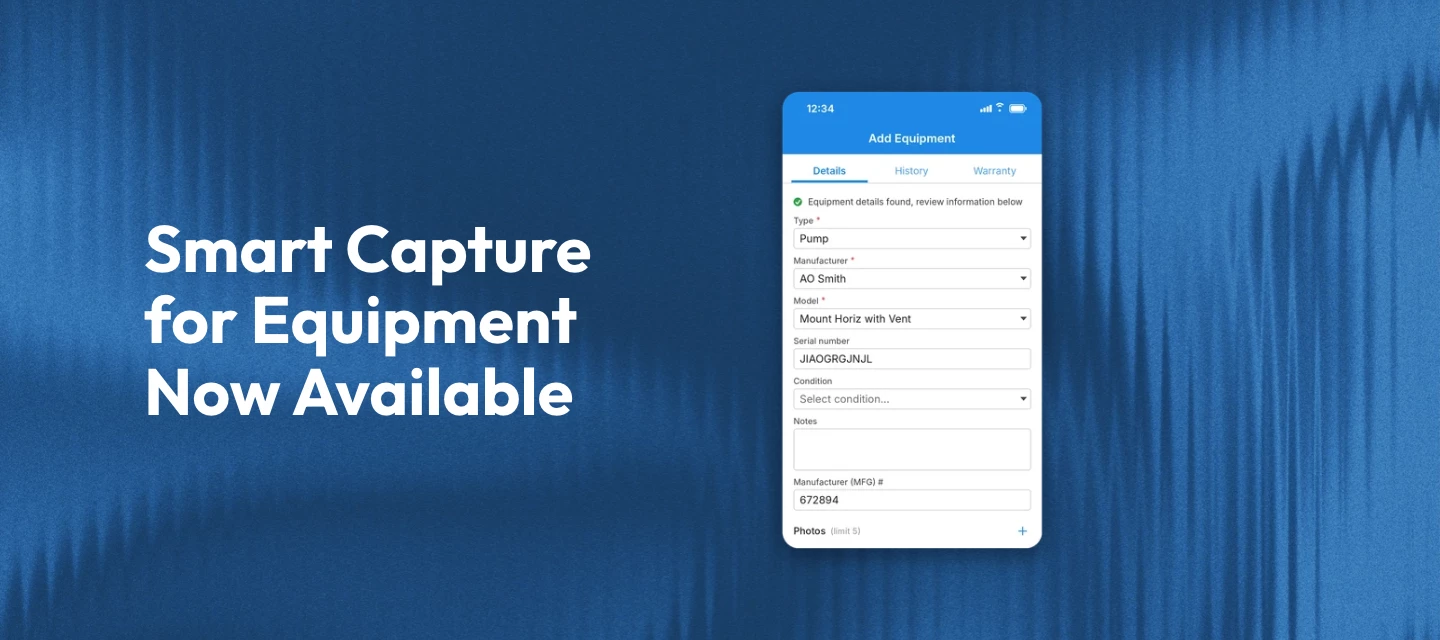
This month’s mobile update is about less typing in the field. Techs can snap a photo of an equipment dataplate and let Skimmer fill in the details. There are also sync improvements and a round of bug fixes. Smart capture for equipment No more squinting at a faded dataplate and typing serial numbers by hand. When you add equipment from a route stop, work order, or customer page, tap scan to add equipment. Take a photo of the dataplate or pick one from your photo library, and Skimmer fills in the “Add Equipment form” for you.That includes:Type Manufacturer Model Serial number] Manufacture date and specs like horsepower, voltage, and BTU.The scan works without a signal, but it’s more accurate when you’re online. It only fills empty fields, so it won’t replace anything you’ve already entered, and every field stays editable. Skimmer also saves the dataplate photo to the equipment record so anyone can double-check a value later. We recommend giving every field a quick look before you tap Save.Note: The scan is only available when adding new equipment. It isn’t available when editing existing equipment or in the web app. If a manufacturer or model is missing from Skimmer’s equipment catalog, you’ll need to select it yourself, and you can contact support@getskimmer.com to get it added. Want to see it in action? Watch the video and learn more →  Also in this releaseMobile sync is more reliable, including on devices with the wrong date or time set. Customer first and last names now accept up to 50 characters and company names up to 100, matching the web app. Extra spaces at the start or end of a name are removed when you save. Warranty cards on “Add Equipment” and “Edit Equipment” now show the same parts and labor expiration dates as the web app, and preview the new dates while you edit.Bug fixesFixed an issue on some Samsung devices where taking a photo from a route stop could crash the app and photos didn’t save. Fixed an issue where route stop and work order photos sometimes reached the office late. The app now retries a failed upload during the same sync. Fixed an issue where service texts, like on the way or service complete, could fail to send for customers or service locations created in the app before the next sync.That’s it for this month’s mobile update. More to come next release.Heads up for iPhone users: Mobile 26.0 is larger than 200 MB, so your iPhone may ask whether to download now or wait for Wi-Fi. If you have unlimited data and want to skip that prompt, open Settings, tap App Store, tap App Downloads under Cellular Data, and select Always Allow. Keep in mind this changes the setting for all app downloads, not just Skimmer.Make sure your team is on the latest version to get all of this:Update for iOS → | Update for Android →

Related products:Mobile app
Skimmer monthly release roundup: October 2026

Skimmer monthly release roundup: October 2026

 October’s updates focus on cutting the busywork out of running your pool service business: new integrations, smarter marketing tools, cleaner invoicing, and a safer way to log in. Here’s everything that shipped this month.Integrations Marketplace Your Integrations Center now has two kinds of integrations in one place: the ones Skimmer builds and maintains, and the marketplace integrations that connect Skimmer to other apps you already use, with a guided setup wizard to get you going. New marketplace integrations this month include FieldPay, which sends completed route stops and work orders over automatically so you can approve payouts without entering each job by hand, and Google Calendar, which can send customers a calendar invite for new work orders and turn calendar events into work orders. Four CRM integrations, GoHighLevel, HubSpot, Nutshell, and Zoho CRM, also joined the marketplace, each one keeping your contacts and Skimmer customers in sync so you’re not entering the same person twice.Learn more → Marketing Suite updates You can now build your own automations and segments right from your Skimmer data: describe what you want in plain language, and it gets built for you. On the campaigns page, create now includes automation (sends on a set date or whenever a customer joins a segment) and segment (a saved audience you can reuse), and the type column shows whether each one is custom or managed. Campaign emails, texts, and review requests also show up in each customer’s activity log now, filterable by all activity, customer activity, or marketing activity. Plus customers can review and change their own text marketing consent from a new settings page in their customer portal.Learn more → Service rate benchmarks report The new service rate benchmarks report shows how your service rates stack up against other pool service companies in the zip codes and metro areas you work in, and flags the locations where you’re pricing below the area median so you know where a rate change might make sense. To keep everyone’s numbers private, Skimmer only shows a benchmark when there are enough companies and service locations in an area. You’ll find it in the operation reports section of the reports page.Note: this report is visible by default to owners, admins, and executives. Other roles need the “can view service rate benchmarks report” permission.Learn more → Bulk print for invoices and quotes You can now select multiple invoices or quotes and print them all at once, instead of one at a time, using a cleaner new layout that also matches the PDF attached to emailed invoices. Printed invoices include a pay online link when you accept online payments, and quotes include a get pre-approved link when a customer has a Sunbit financing offer. They also no longer show your customer’s phone number, use smaller text, and fit single and double window #10 envelopes. Login security updates Skimmer now checks every login for signs that something’s off, like a new device or browser, a new network or location, or a long time since your last login, and emails you a short verification code when something looks unusual so you can confirm it’s you. A few other changes came with this: you can log in with a one-time email code instead of a password now, and it keeps you signed in just as long as a password would.You’ll also get an email alert any time your password changes, and the forgot password flow now emails a link to a reset page where your new password works across web, and the mobile app. Skimmer Bookkeeping updates A few changes if you use Skimmer Bookkeeping:Canceling the add-on now depends on your current month’s payment: a paid or in-progress month runs Bookkeeping through the end of the billing period, a failed payment ends access right away at no extra charge, and an uncharged month ends access immediately if you cancel before the 15th (or bills through the period if you cancel on or after). Each draw on a working capital line of credit also now creates its own loan in your books, with repayments tracked against the right draw, so your balance sheet shows what you actually owe. And owners can give other roles access to working capital by turning on the new “can view Stripe capital” permission. Invoicing updates The select customers step now has the same filters as the customers page, so you can layer route assignment, payment method, or suspended route filters on top of all customers, customers with tags, or specific customers. It also loads reliably now for companies with a lot of route stops, even at month-end, so you’re not stuck waiting on a page that times out. You can now choose net 10 as a payment due option, both on the invoice settings page and in the onboarding wizard, so invoices come due 10 days after the invoice date. Scheduled work order emails got a redesign The email your customers get when a work order is scheduled now uses Skimmer’s styled email design, opening with the customer’s name and a banner showing the scheduled date, your company logo, and your footer. The message text still comes from the email message field on your work order types settings page, so anything you’ve customized there carries over. A few more things worth knowingWhat used to be called service reviews is now service feedback everywhere in Skimmer, to make clear these are private ratings, not public reviews. Your alert thresholds, settings, emails, and links all work the same as before. AI phone notification emails now show call times in your company’s time zone, and the AI phone page shows a heading above its tabs when it’s active. Voided payments now show up on the payouts report as a negative line item, same as a standard refund, starting with this release. The link back on a customer profile now reads “back” and takes you right there, even after you’ve clicked into other pages on the profile. Picking a customer on a Heritage order now shows the overdue invoices icon and count right next to the clear button. The public API now lets you filter invoice searches by payment status as well as invoice status. Every webhook now includes the event type and timestamp, and new webhooks are available for customer status changes, late-payment suspensions, completed route stops, and invoice status changes. That’s all for October. More to come next month.Heads up: Skimmer Pro now requires version 12.16 or later. If you or your techs are on an older version, update before your next sign-in. Update for iOS → | Update for Android → 

Related products:Monthly release roundup
NEW in Skimmer: Integration Marketplace

NEW in Skimmer: Integration Marketplace

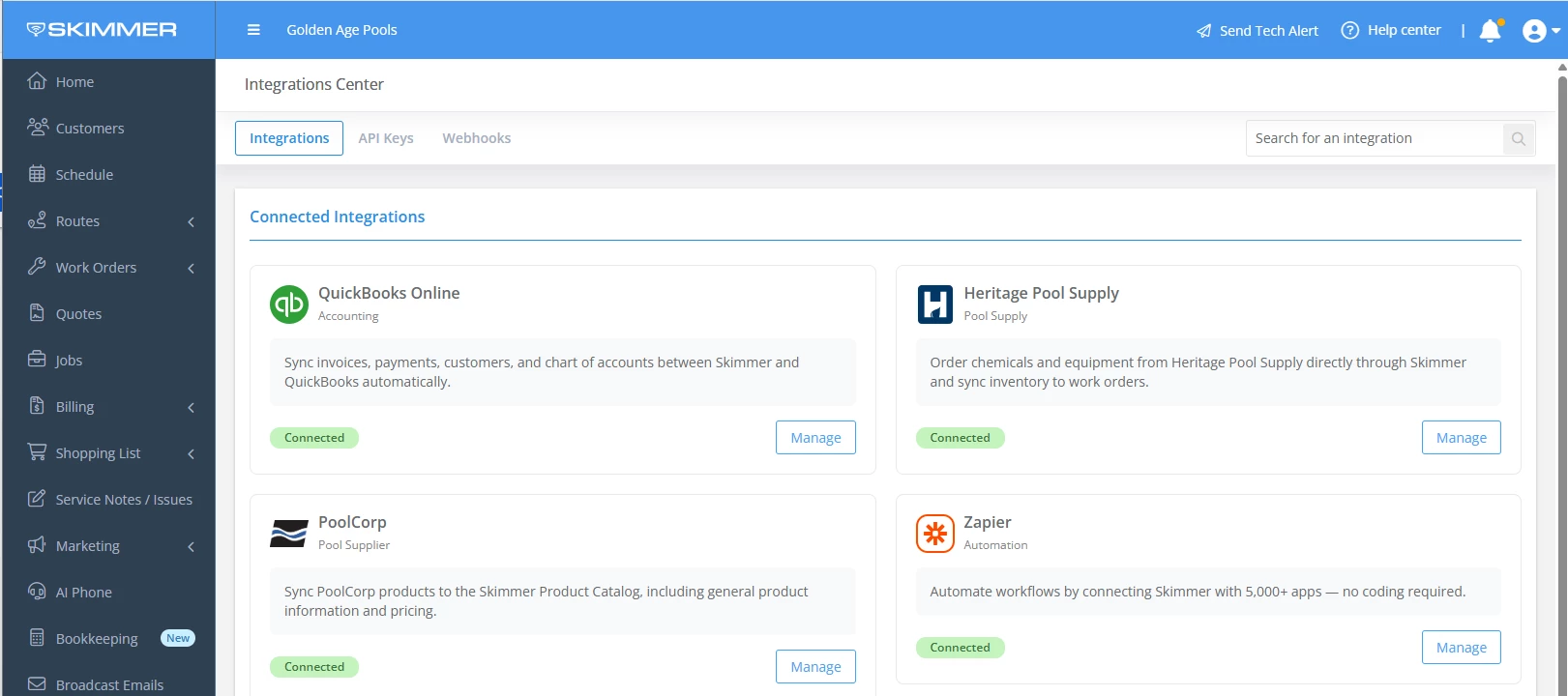
Most of you run your business on more than one tool. A CRM for leads. Payroll for your techs. A supplier account or two for parts and chemicals. Getting those tools to work with Skimmer used to mean a support ticket or a workaround.As of today, owners and admins can do it themselves. 🔗 Integration Marketplace Integration Marketplace lives inside Skimmer. Browse the integrations available to your account, see what each one does, add it, and set it up without leaving the app.New integrations you can connect:PoolCorp: Connect your Pool360 account, bring PoolCorp products into your catalog, and get price updates every night—learn more below.  CRM: Send customer info from Skimmer to HubSpot, GoHighLevel, Nutshell, or Zoho so you're not entering it twice. FieldPay: Connect FieldPay to pay your techs instantly for completed work. Google Calendar: Send calendar invitations to customers when a new work order is added in Skimmer.Some are included in your plan. Others are paid add-ons you can buy right from the page.👉 More on the PoolCorp product sync:PoolCorp is the one many of you have been asking for. If you buy from PoolCorp, connect your Pool360 account and bring your PoolCorp products into your Skimmer catalog. Prices update every night, so your costs stay current without you checking a price list.Buy from both PoolCorp and Heritage? Set a default supplier for your catalog, then pick a different supplier for any item where it makes sense. Your techs see the updated cost in the mobile app after their next sync.To be clear: this release is products and pricing. Placing PoolCorp orders from Skimmer isn't part of it.Check it outLog in to Skimmer and open Integration Marketplace to see what's available for your account. You'll need owner or admin access to add an integration. What would you connect next? Tell us in the comments. Your requests help decide what we add to the marketplace. 

Related products:Integrations
New in Marketing Suite: Build your own automations and segments

New in Marketing Suite: Build your own automations and segments

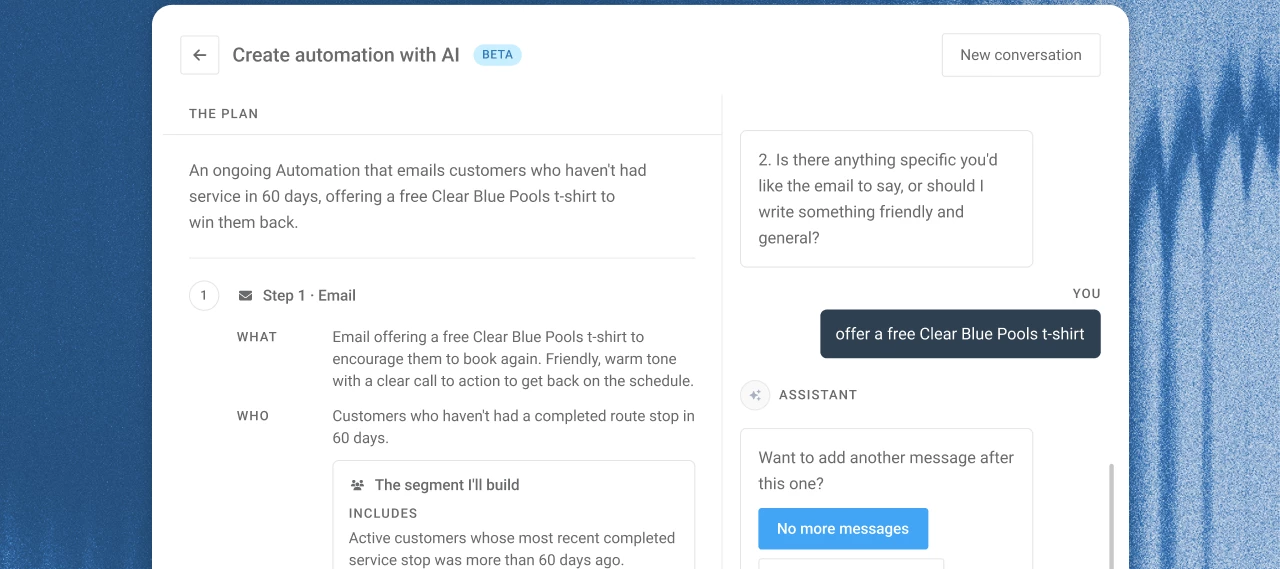
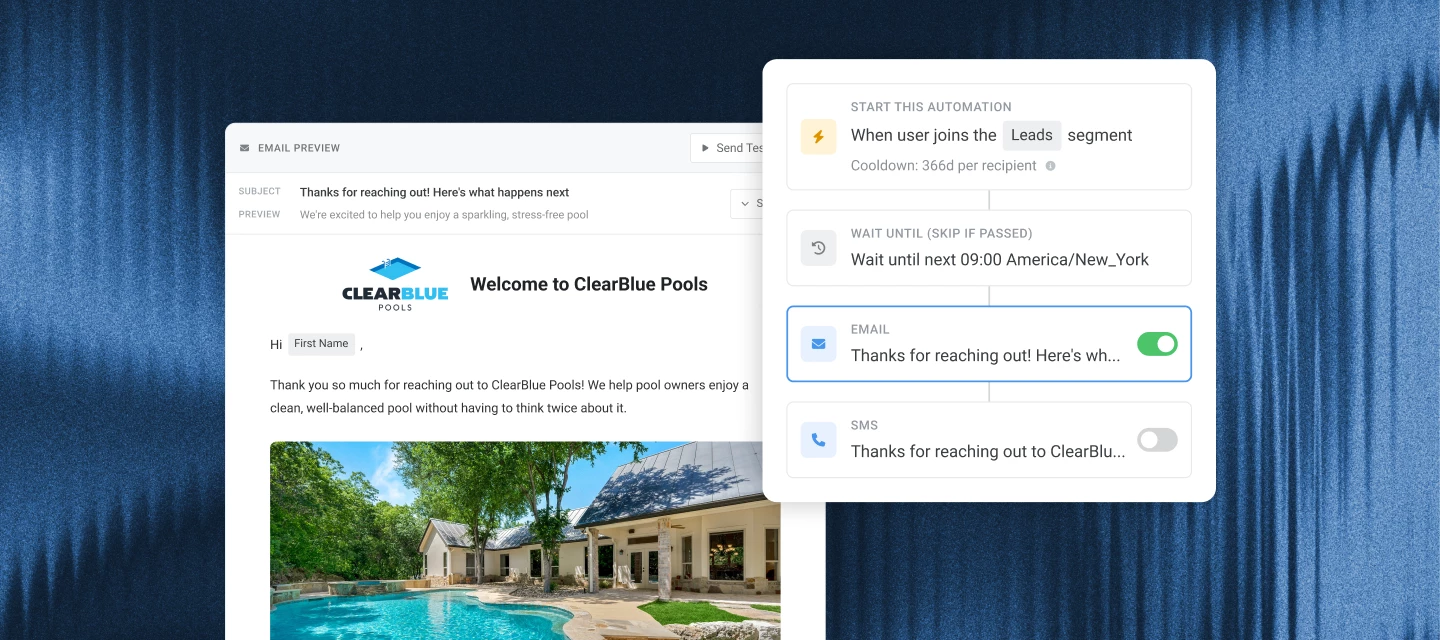
Since Marketing Suite launched, the question we've heard most is "can I customize this?" Starting today, you can.Campaigns now has a Create button. Describe your campaign idea the way you'd explain it to your office manager. Campaigns asks a few follow-up questions about who should get it, when it should go out, and whether it's an email or a text. Then it builds the audience and drafts the message for you, turning a manual custom email automation build into a quick-and-easy conversation with AI.  🎯  What you can targetYour segments run on the data you already keep in Skimmer:Bodies of water: pools, spas, and water features Latest CYA and TDS readings Equipment, like salt systems and filters Work orders by type and completion date Route stops, invoices, service locations, and customer tagsSegments stay current on their own. When a customer attribute matches, like a new CYA reading over 100, they move into the segment and the automation goes out. 📤  A few ideas to try  What you type What it does "Find pools with a CYA of 100 or more in the last 30 days and offer a drain and refill." Sends an offer as new high readings come in "Remind customers with a hot tub to book a spa cleaning." Reaches every pool owner with a hot tub "Send a friendly reminder to customers more than a week late on an invoice." Nudges past-due customers without a phone call "Email my customers in 85251 about our equipment install special." Runs a local promo by ZIP code  👉  You can add steps or change the wait time on any automation, including the pre-built ones. 💡  Good-to-know tipsThe builder drafts the content. Read it over and send yourself a test before you turn it on. Segments use the data in Skimmer, so they're only as complete as what's recorded. Equipment and pool size are the fields most often left blank. Texts only go to customers who opted in, and your SMS number needs approval before your first text (3–7 business days).Already using Marketing Suite?Go to Campaigns and click Create to try it now. Or, see it in action with an interactive demo! What's the first campaign you'd build? Share it below. We're collecting ideas for the next round of starter prompts.Don't have Marketing Suite yet? It's a $150/mo add-on that includes Campaigns and Reviews. See what's included. 

Related products:Integrations
New feature: Service rate benchmarks report

New feature: Service rate benchmarks report

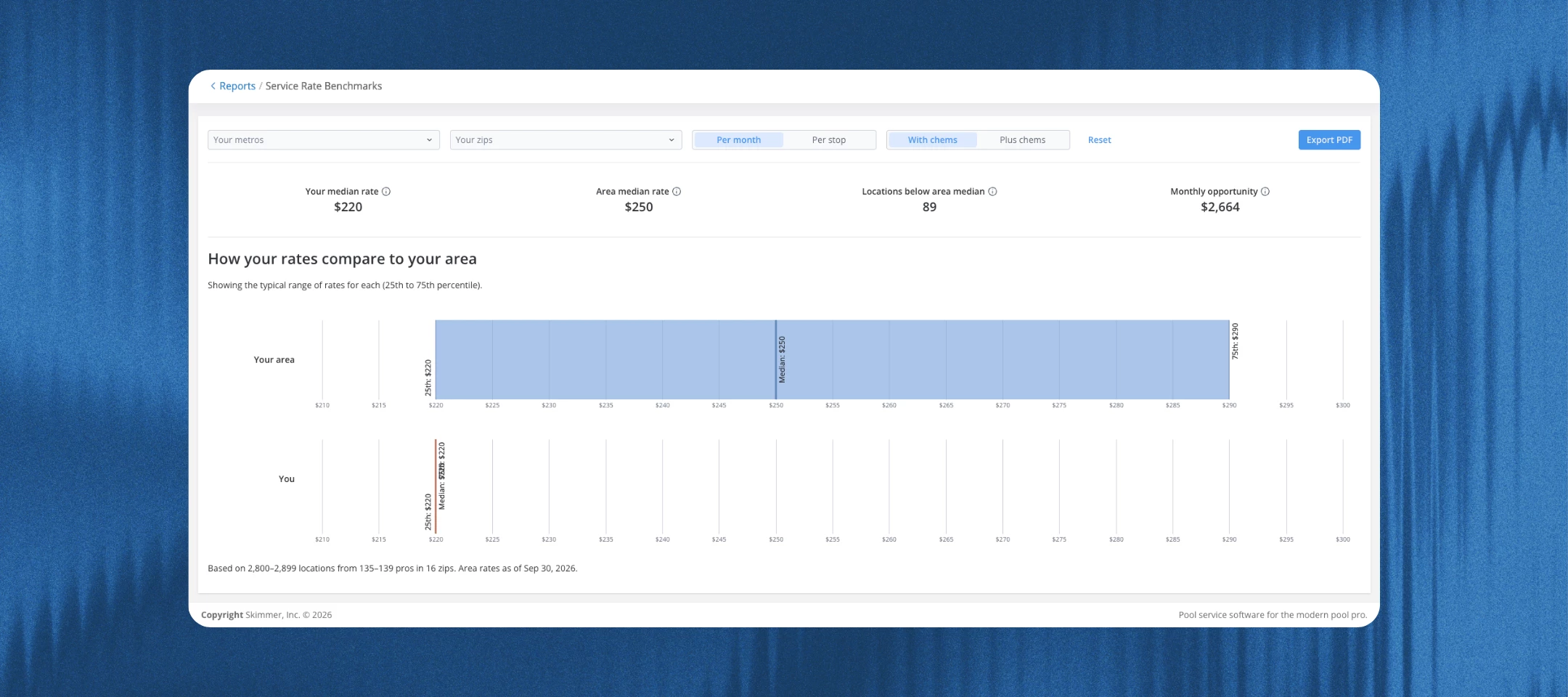
Setting your rates usually comes down to gut feel, what a neighbor charges, or a number you picked years ago. And if you’ve taken over someone else’s pricing, it’s hard to tell whether it holds up. Either way, you haven’t easily been able to tell if you’re charging what the market supports.The new service rate benchmarks report gives you a reference point. It shows how your rates compare with what other pool businesses charge in the areas you already service, right inside Skimmer. ⚙️ Here are some things to note before getting started:Area rates refresh on the 1st of each month, using rates as of the last day of the previous month Only service locations with a rate type and a rate above $0 are included, so check that your service rates are set up - See this interactive video on how to get that set up! Find it in Reports > Service Rate Benchmarks 📊 Make informed pricing decisionsCompares your median rate with the area median for each ZIP code you service, split by rate type (per month or per stop) and chemicals (with chems or plus chems) Shows the area’s typical range (25th to 75th percentile) next to your own Four tiles up top: your median rate, area median rate, service locations below area median, and monthly opportunity Filter by metro or ZIP code, and export to PDF 💲 Prioritize which customers to repriceLists every service location priced below its area median, with your rate, the area median, and the difference The biggest gaps sit at the top, and a toggle shows all your service locations Monthly opportunity estimates the added revenue each month if every below-median service location were priced at its area median The report doesn’t change any rates or factor in pool size, extra services, or customer history, so some below-median rates may be right where they are 🔍 Sanity-check inherited pricingToggle the list to show all your service locations, not just the ones below the median Check rates you didn’t set yourself against what the area charges 🔒 How rates are protectedOther pros never see your company name, your customers, your service locations, or your rates Each area shows only three numbers: the median and the typical range around it A benchmark needs at least 5 pros and 30 service locations, and no single pro can make up more than 25% of it. If a ZIP code doesn’t qualify, the report uses the wider metro area (labeled “Metro”), then the state. Pro and service location counts show as ranges, like “5–9 pros,” so no one can work backward to a single company Rates from active pros are included automaticallyClick the link below for more information about how it works.https://help.getskimmer.com/article/368-service-rate-benchmarks-report 

Related products:Reporting
Skimmer monthly release roundup: September 2026

Skimmer monthly release roundup: September 2026

September's updates round out how you connect the tools you already use, see what's happening across your business, and manage your Skimmer account. Here's what shipped.  Skimmer Bookkeeping Skimmer Bookkeeping is a new add-on: a real bookkeeper categorizes your transactions and reconciles your accounts, so your books stay current without you doing it yourself after hours. Find it under Bookkeeping in your left navigation, where you can book a demo or subscribeLearn more →  Skimmer Marketing Suite Marketing Suite gives you three ways to bring in more business without hiring a marketing person: automated email and SMS campaigns, review requests with a private heads-up before anything goes public, and ad spend tracking that shows which dollars are actually working. Find it all in the Marketing Suite section of your left navigation in Skimmer.Note: Campaigns and reviews are add-ons. Ads attribution is available on Skimmer for Enterprise.Learn more about campaigns and reviews → Learn more about ads attribution →Integrations center No more digging through settings to remember what's connected. The new integrations center puts every integration Skimmer offers on one screen: QuickBooks Online, Heritage Pool Supply, Zapier, Orenda, and LaMotte Spin Touch, plus API keys and webhooks if you're on Enterprise.Note: Enterprise subscriptions also get API keys and webhooks tabs, so you can create and manage API keys and reach the webhooks portal.Learn more →  Service feedback See how a visit actually went, straight from the reviews customers are already leaving. One tap on the service email, a rating per stop and per tech, and an alert the second someone's unhappy, so you can call them before they call someone else. Ratings are private. Nothing posts to Google, Facebook, or Yelp. Also, your reviews are easier to read now too. The new service feedback report rolls up average rating, review volume, and comment trends over time, with a rating distribution chart and a filterable table you can drill into. Learn more → Readings report  Stop clicking into every customer just to check water. The readings report shows the latest readings and dosages across the board and flags what's out of range, based on your readings & dosages office alertsLearn more → Work order updateSkimmer now shows photos taken during a work order in the body of water's service history.  That's all for September. More to come next month.Don't forget to update your mobile app for the latest fixes and features:Update for iOS → | Update for Android → 

Related products:Monthly release roundup
What's new in the Skimmer mobile app: Mobile 12.16

What's new in the Skimmer mobile app: Mobile 12.16

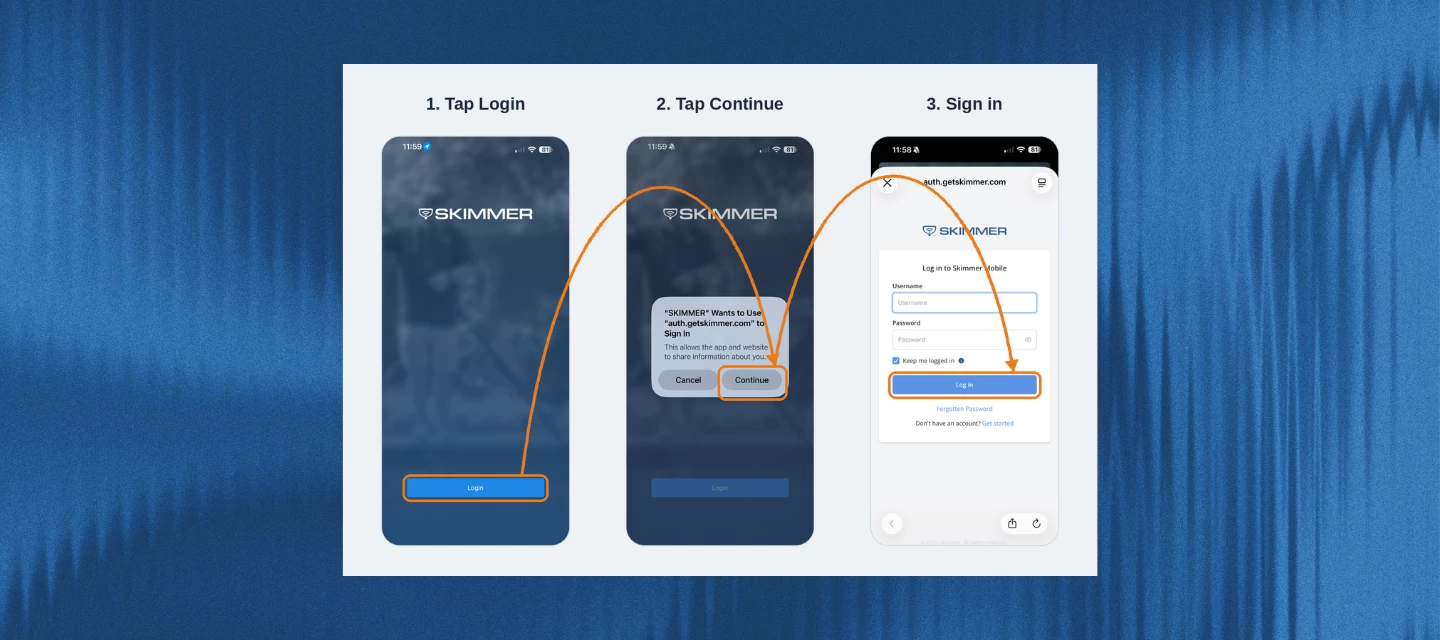
This release brings a big update to how techs log in, plus some improvements under the hood that make syncing more dependable and diagnostic data easier to understand. You'll see a new sign-in screen, tighter password protections, and a handful of fixes that clean up rough edges on mobile. Here's everything that's changing. A new way to log inSkimmer's sign-in process is moving to a more secure system, the same upgrade that rolled out on the web app back in August. It keeps things familiar while running on more reliable technology behind the scenes.Here's what changes on mobile:The login screen no longer has username and password fields. Instead, you'll tap Sign In and land on Skimmer's secure sign-in page to enter your credentials. After the update, everyone will need to log back in and set up biometric login (Face ID or fingerprint) again. If you're on iOS and don't use biometrics, you'll see an extra confirmation prompt each time you log in. Turning on biometric login is the only way to skip that extra tap. Skimmer also added new password protections: if your password shows up in a known data breach, or doesn't meet Skimmer's complexity requirements, you'll be prompted to set a new one right away. Clearer messaging on diagnostic data Based on feedback from pros, Skimmer cleaned up the language around the “Send Diagnostic Data” option in Settings. It now clearly explains that sending the data shares app logs with Skimmer — it doesn't open a support ticket or notify anyone automatically, so you'll still want to reach out to support separately. You'll also see a confirmation with the date and time once it's sent, and a clear message if sending fails.  More reliable syncingSkimmer made several improvements under the hood to cut down on sync issues, especially around route stops and work orders. So now, if you undo an action, it stays undone, even if a conflicting change comes in at the same time.Also in this release:Route optimization and travel-time estimates now run on an upgraded mapping engine for better accuracy. Upgraded core device-connection technology for better stability and security when connecting to devices like the Lamotte SpinTouch. The Settings screen now shows your actual role name instead of a generic label. A heads up before you updateSkimmer Pro 12.16 is a larger download. iPhone users may see a pop-up saying the app exceeds 200 MB and asking whether to download now or wait for wifi. If you've got an unlimited data plan and don't want to see this message, you can turn it off in your iPhone settings. That's it for this month's mobile update. More to come next release.Make sure your team is on the latest version to get all of this:[Update on iOS →]  [Update on Android →]

Related products:Mobile app
NEW: Marketing Suite brings automated campaigns and reviews into Skimmer

NEW: Marketing Suite brings automated campaigns and reviews into Skimmer

Marketing Suite is now available in Skimmer, automating your customer outreach and helping you manage your online reputation. It runs on the same customer and job data you already track in Skimmer, so campaigns and review requests are based on your real service history, not an imported list. Here’s what’s included: ✉️ Email and SMS Campaigns:Pre-built email and SMS automations, purpose-built for pool pros, ready to turn on and send A plain English audience builder that lets you describe who you want to reach, no spreadsheet exports required AI-drafted subject lines, copy, and images to help you get started when you have your own idea 🌟 Reviews:An NPS survey goes out to your customers, automatically, via email or SMS. Customers rate your company 1-10. Happy customers who rated your company a 9 or 10 land on a direct link to post their review on Google. A 1-8 score opens a comment box asking what went wrong. After that is sent to your team, a Google review link is shared if they want to leave a public review. AI-drafted review replies give you a starting point when a new review comes in. Every Google review builds your search ranking and brings in more customers. Private feedback comes to you first and tells you what to fix before it becomes a public problem. 📊 Results tied to revenue:See which campaigns worked with purchases tied back to real Skimmer transactions, not just opens and clicks.You can get started today for $150/month, or learn more about Marketing Suite.  

New Feature: Service Feedback

New Feature: Service Feedback

You finish a job, everything went smooth, and then... nothing. No idea how the customer actually felt about it. Or the opposite — something was off, and you don't find out until you've already lost the account. Either way, you're always finding out too late.Service reviews fixes that. It's a simple way to hear directly from pool owners right after every visit, so you know how you're doing before it turns into a bigger problem. ⭐ How it works Pool owners rate their service with a quick 1–5 star tap, right from the service-complete email they already getTakes about 30 seconds — no login, no app to download They can add a short written note if they want to explain the rating Ratings are tied to the specific visit and tech, so you always know exactly what the feedback is about 🔔 Getting the heads-up when it matters If a rating comes in low, you get an alert — by panel, email, or urgent notification, your choice You set the threshold for what counts as "low" for your company That means you can follow up with the customer before it turns into a churn, instead of finding out after the fact 🔒 Private by design These ratings are for your team only — nothing gets posted publicly or shared anywhere else Stars show up on Service History, the Route Dashboard, and in the customer's activity feed Tap into any rating to see the full details: score, written reason, tech, and timestamp Over time, this data becomes a clearer picture of how each visit — and each tech — is performing ⚙️ Setup and control It's on by default, so there's nothing you need to do to start collecting ratings Don't want it? Turn it off anytime in Service Email Settings Missed ratings aren't lost — owners get another chance to rate recent visits from their invoice emailClick the link below for more information about how it works.https://help.getskimmer.com/article/357-service-reviews  

Related products:Route management
Bookkeeping is now available in Skimmer!

Bookkeeping is now available in Skimmer!

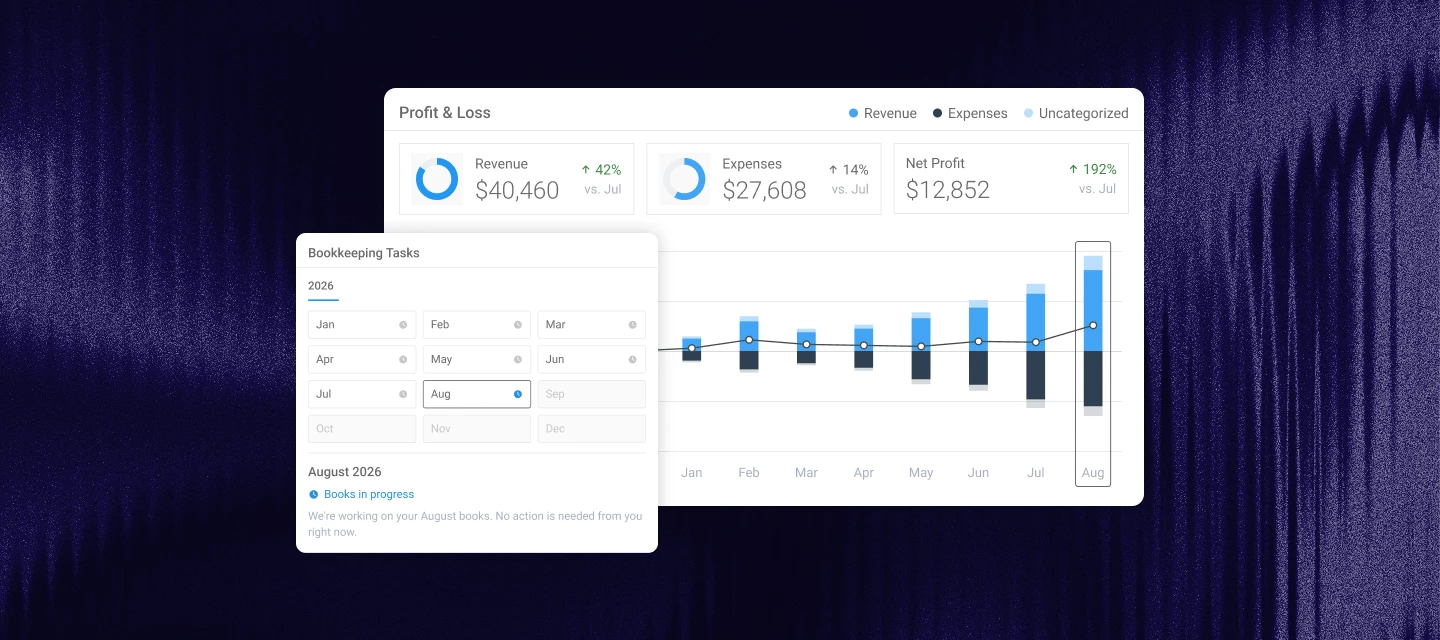
You can now hand your books to a dedicated US-based bookkeeper without leaving Skimmer.Here's what that means. You get a real person assigned to your business at onboarding, who works only with pool service companies. They categorize your transactions every week. You get a P&L, balance sheet, and cash flow statement within 5 business days of month end. At year end, you get a tax packet you can hand straight to your CPA.Your sales pull in from Skimmer automatically, so there's no double entry and your revenue ties to your deposits. The chart of accounts is built for pool service, not restaurants or retail.Your job each month is answering a few texts, and it takes only 20 minutes to set up. What's included:A dedicated bookkeeper reachable by text, email, or scheduled call Weekly transaction categorization across your business bank accounts and cards Monthly P&L, balance sheet, and cash flow within 5 business days Loan, lease, and fixed asset tracking Payroll recorded and reconciled from read-only access to your payroll system Year-end tax packet: annual P&L, balance sheet, trial balances, and transaction list Import from QuickBooks Online, Xero, and other common tools Catch-up bookkeeping if you're behindWhat's not included:We don't pay bills or run payroll We don't file taxes or calculate quarterly estimates (we do send reminders two weeks before the deadline) Accrual accounting (for now) We don't give tax or business advice—that's your CPA's jobPricing: starting at $198/month, compared to $330-$660 per month on average for a typical local firm. Getting started: Set up a 20-minute onboarding call to meet your bookkeeper, connect your accounts, and set up texting.  👉BOOK A MEETING👈 Have any questions? Drop them in the comments below!

Related products:Integrations
New report: Readings Report

New report: Readings Report

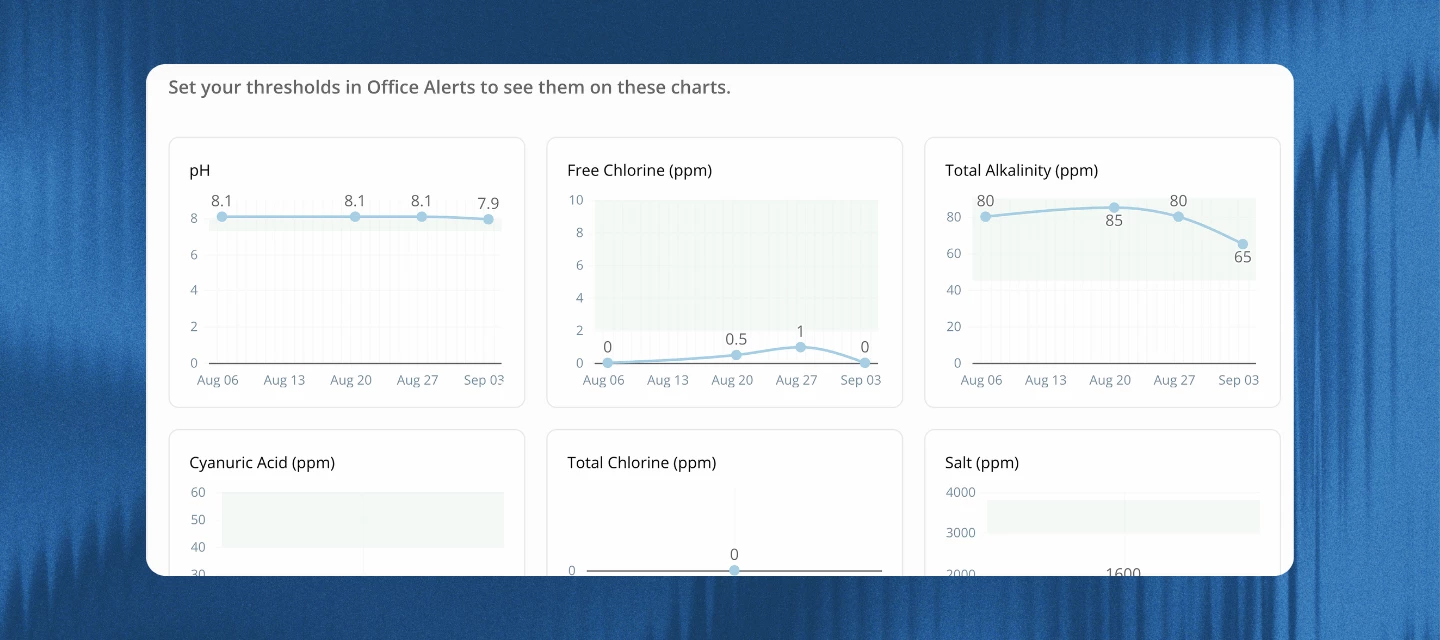
Finding a pool that's drifting out of range used to mean opening customer profiles one at a time, or exporting a CSV and doing the math yourself. The new readings report fixes that, and here's how to get the most out of it.  What it doesThe readings report shows every pool you service in one list, with the last service date and whether any readings came back outside the ranges you've set. No more clicking into each pool to find out something's wrong. Click into any pool from that list and you'll get trend charts for each reading type, plus a full readings and dosages history with out-of-range values highlighted.You'll find it under Reports > Readings, and you'll also see the latest readings and dosages right on each customer's body of water tab. Set it up first: Office Alerts thresholds Before the report can flag anything as too high or too low, it needs to know what "too high" and "too low" mean for your business. It pulls those ranges from your Office Alerts settings.Go to your Office Alerts / Issues settings and set thresholds for "Reading was too high or too low" on the readings you care about most, like free chlorine or pH. This is quick to set up and you don't need to turn on the Panel, Email, or Urgent options for it to work. Once it's set, you'll get:Green range bands on your trend charts Red highlighting on out-of-range values in the readings and dosages table "Out of range" and "In range" statuses in the summary viewThe report still works without thresholds set (last service date, tech, and "no readings" status all show up regardless), but the ranges are what unlock most of its value. How to read itThe report has two views:1. Summary viewThis is where it opens. It lists every pool with its last service date, tech, stop type, and reading status, so you can scan your whole book of business in one pass. Filter by date, customer, tech, stop type, or reading status to narrow it down, like pulling up just the pools flagged "out of range" or "no readings" this week.  2. Reading trends viewClick into any pool from the summary view to see this. You'll get a chart for each reading type, so you can tell in seconds whether a reading is a one-off or a pattern that's been building, like free chlorine sliding down stop after stop. Below the charts is the full readings and dosages history table, with out-of-range values highlighted.   Make it a habitPull up the report daily or weekly to catch pools that need attention before the customer calls. It's also worth a look when you want to export a pool's history for your records or to share with a customer, or when you want to see which pools a tech hasn't logged readings for lately. Learn more about the readings report here → https://help.getskimmer.com/article/351-readings-report 

Skimmer monthly release roundup: August 2026

Skimmer monthly release roundup: August 2026

 August's updates focus on two things pool service businesses ask for most: clearer visibility into the money side of the business, and less manual work turning what your team reports in the field into something your office can act on. Here's everything that shipped:  Working Capital Eligible owners can now view and act on Stripe Capital financing offers right inside Skimmer. A tile on your Skimmer Home page introduces available offers, and you can add a Capital widget for a quick look at financing status anytime. Head to Billing > Capital for a closer look before deciding whether to apply. If you take a loan, repayments now show up in the Payouts report under a new Capital Deduction column.Learn more -->   Office alerts updates Three changes to office alerts this month. Create work orders, quotes, and jobs from alerts: When a tech flags something in the field, your office can now turn it into a work order, quote, or job without retyping a thing. Customer and service location details carry over automatically, and the new record links straight back to what the tech originally reported. Create from the Service Notes / Issues page, the Alerts panel, or a customer's Recent Activities section. Alert emails sent to your office now include the photos a technician attached to an issue, so your team can see what the tech saw without opening Skimmer.  The “customer status change” alert, which used to only fire for changes made in the web app, now also triggers when a tech changes a customer's status from mobile, so your office stays in the loop no matter where the change happens. Equipment management Equipment tracking is now live across web and mobile. Add or edit records using redesigned web forms with Details, History, and Warranty tabs, or track equipment right from a customer's Pool tab in Skimmer Mobile. Skimmer only shows the spec fields relevant to that equipment type, and warranty end dates calculate automatically once you set a coverage option. Equipment Type, Manufacturer, and Model lists now sort alphabetically too, so it's faster to find what you're looking for. Heritage ordering updates Reordering supplies takes one click now. The new reorder button on the Heritage Orders page pulls up a past purchase with everything already filled in, instead of making you build it from scratch.  Relating an order to a quote is now its own step, look for the “Relate to quote” link, and completed orders finally sort correctly under the Past tab.  We also cleaned up the error messages: if a customer is missing an address Heritage needs, Skimmer now tells you exactly what's missing instead of showing a generic error. Report improvements A handful of reports got a refresh this month. The Chemical Dosages report export now matches Skimmer's standard format, with Chemicals, Techs, Customers, and Pools tabs, each with its own export button.  The Profit Report also has a new look, with Customers and Techs tabs plus a Summary/Details toggle.  The Labor Report gained a Serviced Locations total and a Work Order Trends tab Invoice Details Report added City, State, and Tax columns The Payouts Report now shows Stripe Capital payouts as non-clickable entries.  The nightly data export also now includes invoice category values, if your team relies on that for reporting or accounting. New banners on Skimmer HomeIf you're on a free trial, Skimmer Home now shows a banner counting down how many days you have left, so you always know where you stand. And if you haven't set up payments yet, you'll see a banner to help you get started collecting them. A few more smaller updatesSkimmer now requires version 12.10 or later of the mobile app to sign in. Update now so nothing interrupts your team in the field. Learn more about everything released in Mobile 12.15 here →  Sign-in now runs on more reliable technology behind the scenes. The process works the same, but your account locks after 10 failed attempts in an hour. Resetting your password clears the lock right away. AI Insights got better at understanding reading-related questions, gives clearer messaging when there's no result, and handles more question types accurately, including scheduling boundaries and labor versus revenue figures. The AI phone agent can now update a service location's gate code during the call itself, so your office doesn't have to make the change afterward. Use the “Include in run” checkbox on the Invoice Details view to add or remove an invoice from the current billing run without leaving that screen. We renamed a couple of things: Service Types in Invoice Settings is now Pool Service Types, and the Service Type filter and column on the Service Notes / Issues page is now Stop Type. Just new names, nothing else changes. That's all for August. More to come next month.Don't forget to update your mobile app for the latest fixes and features:Update for iOS → | Update for Android → 

What's new in the Skimmer mobile app: Mobile 12.15

What's new in the Skimmer mobile app: Mobile 12.15

August’s mobile update is about giving your team more control and information without leaving the app. Techs can manage permissions and equipment info on the spot, start a route from wherever they actually are, and office staff have a new way to reach the field in real time. Permissions management in SettingsYou can now see and manage your camera, microphone, notification, and location permissions right from the Skimmer app, no more digging through your phone's settings to figure out why something isn't working. Each permission shows whether it's on or off, has a link straight to your device settings, and includes a quick note on what it's used for. On iOS, some permissions won't show up in your phone's settings until you've used the feature that needs them. Skimmer now tells you that up front, so a missing permission doesn't look like something's broken. Tech Alerts Office staff can now send a message straight to a tech's phone as a push notification, even if the Skimmer app is closed. Pick one tech, a group, or everyone on today's routes, write a message, and it lands in the field right away. It's the tech-to-office half of the Office Alerts you may already be using, so now the conversation runs both ways.Note: Available on Scaling Up and Skimmer Enterprise. Also, techs need the notifications permission turned on to receive alerts.[Learn more →] Equipment tracking on the Pool tabPool equipment now shows up right on the customer's Pool tab. Tap into a piece of equipment to see its details, service history, and warranty status, or add a new piece without leaving the screen you're already on. Start a route from your current locationWhen you optimize a route, you can now start from wherever you actually are instead of a fixed address. Turn on the location permission and Skimmer builds the whole route around your real starting point, not just the first stop. Also in this releaseLinks from emails, texts, and notifications now open straight to the right screen in the app instead of just the home screen, with a loading indicator, so it's clear something's happening. Skimmer now warns you before moving a stop that already has completed work logged, so an accidental drag-and-drop can't wipe out someone's progress. Emails for completed services and work orders now include the stop and work order numbers, so office staff can quickly match an email to the right job. Techs can now add equipment straight from a route stop or work order without needing the can add/edit customer permission.Bug fixesFixed an issue where the app could silently skip its startup sync, leaving techs looking at outdated routes, work orders, or customer info with no warning. Fixed a bug where checklists could show up twice on some routes. Fixed a crash on iOS that happened when a tech tried to attach a video to a quote without granting camera access. Skimmer now asks for permission instead of crashing. Fixed an issue where viewing a quote's PDF on mobile showed a license error instead of the document. Fixed a bug where the Android app could get stuck on the splash screen after being closed and reopened. Make sure your team is on the latest version to get all of this:Update for iOS → | Update for Android →

Related products:Mobile app
NEW FEATURE: Tech alerts - send a message straight to your techs' phones

NEW FEATURE: Tech alerts - send a message straight to your techs' phones

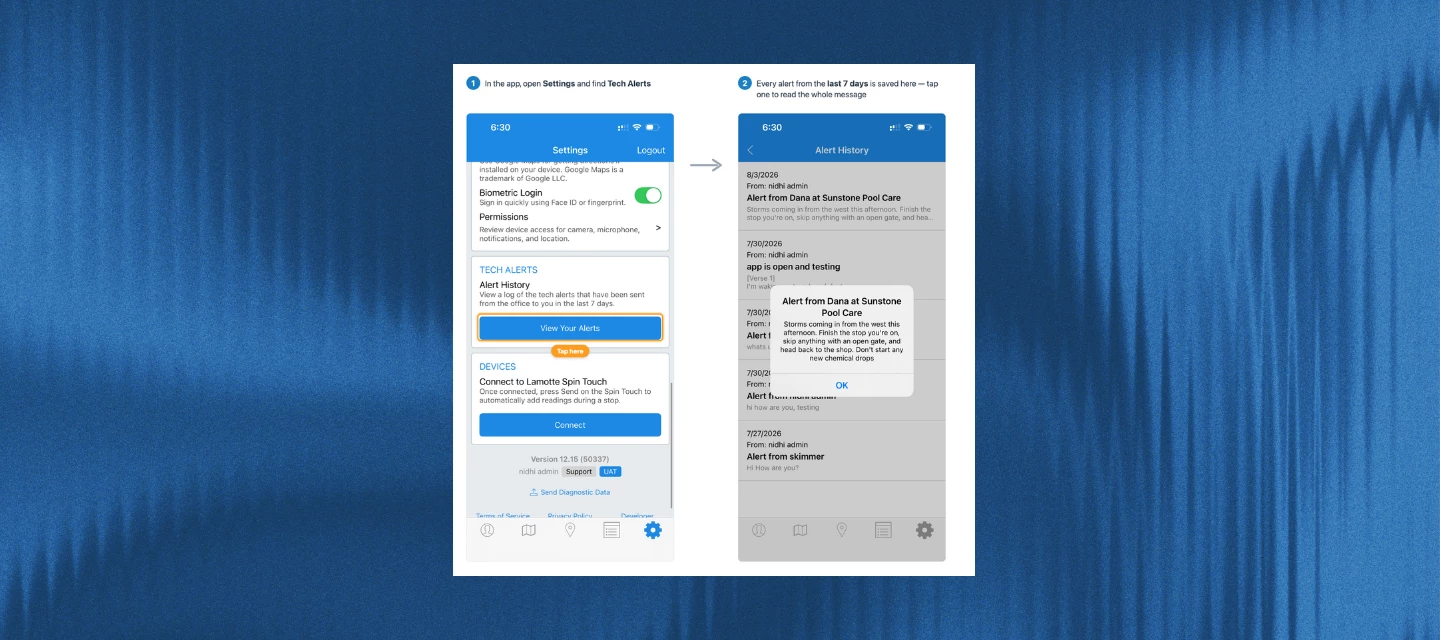
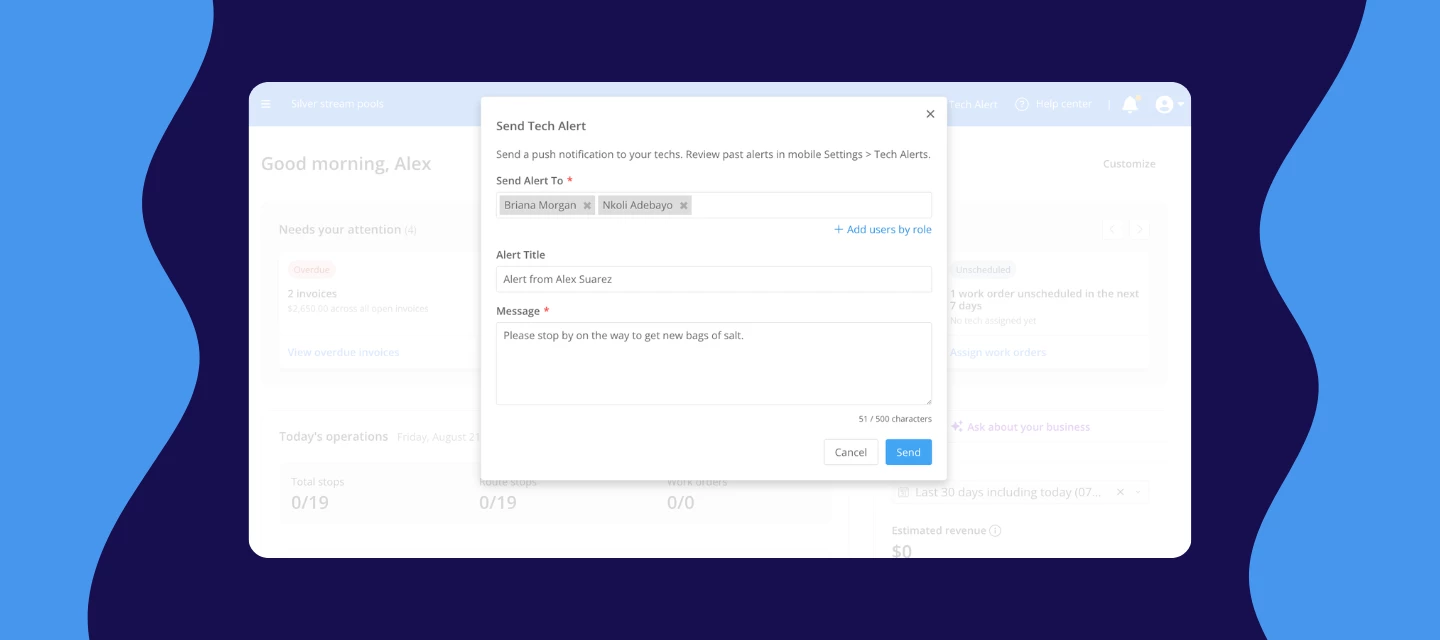
A schedule changes and one of your techs is already three stops in. You call. It goes to voicemail, because they're at a pool with wet hands. You text, and nothing comes back. Twenty minutes later they call you, and by then you've reshuffled the day around them anyway.Now with tech alerts, you have somewhere to put that message. It goes straight to your tech's phone as a push notification, even when the Skimmer app is closed. You don't have to interrupt them, and you don't have to wait for a callback. The message is on their lock screen, and it's still in the app when they get to it.WATCH VIDEO How it worksLook for the paper plane icon in your top navigation and choose “Send tech alert” Pick who needs it: one person, a few people, or everyone in a role. “Add users by role” grabs all your route techs at once  Type your message, up to 500 characters. The title fills in with your name, and you can change it Send it. The alert lands on their phone right awayNOTE: If a tech misses it or swipes it away, it isn't gone. Every alert is saved on their phone under Settings › Tech alerts for 7 days.  Before this rolled out to everyone, a group of pros had been running tech alerts day to day.  Some of it is urgent, but a lot of it is just the small stuff that used to mean a phone call, a missed call, or a note that got buried. That's the real value here: one less thing you have to chase down by voice.Here's what showed up in their alerts:A route changed after the tech had already left A customer canceled or moved a stop Extra work got added at a stop Access details changed at a gate A quick heads-up to the whole team before the end of the day Walking a newer tech through something in the appA few things to knowTechs need version 12.15 or later of the Skimmer app. Anyone on an older version can't receive alerts at all, so ask them to update from the App Store or Google Play Update for iOS → | Update for Android → Each tech needs to open the app once with notifications allowed before alerts will reach them. If a tech says they're not getting alerts, that's almost always why. Alerts go one way. Techs can see your message but can't reply in the app There's no read receipt, so follow up on anything that has to be confirmed You can send to anyone on your team, not just techs. Office staff and managers too This feature is available on the Scaling Up and Enterprise plans.Click the link below to learn more about how Tech Alert works👇🏼:https://help.getskimmer.com/article/349-send-alerts-to-your-techsThis feature's only going to get better from here. Got a use case you'd love it to cover down the road? Drop it in the comments. 

Related products:Mobile app
Get access to fast funding for your business with Working Capital through Stripe
Skimmer monthly release roundup: July 2026

Skimmer monthly release roundup: July 2026

July was very busy here at Skimmer HQ. These updates are about giving you more control with less manual work: order supplies without leaving Skimmer, get straight answers from AI Insights, move quote items to work orders without retyping them, and clear out alerts and issues in bulk instead of one at a time. Here's everything that shipped in July. Heritage ordering You can now order supplies directly from Heritage without leaving Skimmer, and link those orders to customers, quotes, and work orders. We also added a couple of safeguards: removing a line item from an order now asks you to confirm first, and leaving an order page with unsaved changes gives you a warning instead of silently losing your work. Want to see order history at a glance? There's now a procurement report, linked right from the reports page.Learn more:   AI Insights  AI Insights is officially out of early access and available to everyone. Ask it a question about your business in plain language, like how many stops got skipped this week and why, what your profit looked like last month, or what you spent on chemicals, and get a straight answer instead of building a custom report. We also fixed the accuracy on future and scheduled work questions, and profit answers now come from a tested, consistent source every time.Learn more:  Quote and job item handling   Picking line items off a quote and sending them straight to a work order or job is now built in. No more retyping what's already on the quote. Anything already taken care of is automatically hidden, so you only see what actually needs your attention. This also works in the mobile app starting with version 12.14.Note: Available on Scaling Up and Enterprise plans.WATCH VIDEO   Skimmer Home The Dashboard page has a new name and a new job: Skimmer Home. It's built to be your home base: new accounts get a getting started checklist, and everyone gets a view of what needs attention today, how routes are progressing, and how the business is doing overall. Learn more: Texting quotes Quotes can now be sent to customers by text, just like invoices already are. If you've already got invoice texts turned on, quote texts get switched on for you automatically. Check the  Service Text Settings if you want to change that. Service notes and issues Clearing out notes and issues just got faster. Select several at once and mark them all as resolved or reopened in one action, and you'll get a quick confirmation showing how many were updated.  Office alerts The alerts panel now updates instantly when a status changes, so you don't have to check two places. You can also filter the alerts bell and panel by type, and customer emails about an issue now include the service location's address. QuickBooks Online (QBO) improvements Pulling in products, services, categories, and accounts from QBO is faster now, especially if you've got a lot of data there. And if you haven't set up QBO payout sync yet, you can now pick a bank account for Payment Deposit To Account instead of being stuck until sync is configured. API and export enhancements A few improvements for anyone relying on Skimmer's API or automated exports: invoice queries and line items now carry more detail, and the nightly export includes customer activity log data.  Mobile app updates Mobile release 12.14 landed with a batch of field-facing improvements. If you're living out of your phone all day, this one's worth a look:Biometric login. Log in with Face ID or a fingerprint instead of typing your username and password every time, especially handy when your hands are wet or you're wearing gloves. PDF attachments on quotes. Attach and view PDF documents, spec sheets, warranty paperwork, signed proposals, right from your phone or tablet, no trip back to a computer needed. Swipe-through photo viewer. Browse job photos in a carousel instead of tapping back to a gallery between each one. Faster video uploads on Android. Videos are compressed better, so they upload quicker and use less data in the field. Duplicate issue fix. If an issue's type gets reassigned on the web, both issues now show up on mobile instead of one silently disappearing from the list. Route Dashboard improvements. The "on my way" button is bigger and easier to tap one-handed, and Skimmer now catches and prevents duplicate route stops. That's all for July. More to come next month.Don't forget to update your mobile app for the latest fixes and features:Update for iOS → | Update for Android → 

Related products:Monthly release roundup
Your new Skimmer home is here!

Your new Skimmer home is here!

We rebuilt the first thing you see when you log in. Instead of jumping between screens to find what needs attention, Skimmer Home gives you one view of your day, your routes, and your business.Why it mattersMost mornings start with the same questions: What's overdue? Who's running behind? How's the business doing? Home answers all three in one place, so you can act before the day gets away from you.What you getNeeds your attention - Your morning gut check. It surfaces what's most likely to need action today: overdue invoices, failed payments, skipped stops, unscheduled work orders, quotes awaiting approval, new leads, and more. Each card shows a count or dollar amount and links straight to the list. Cards only show when there's something to act on, so an empty section means you're on track. Today's operations - A real-time look at how routes are progressing. See team totals for the day, plus each technician's start time with an on-time or late flag, stop count, estimated finish, and a progress bar. Click a tech for their full stop-by-stop timeline, or assign any work order that still needs a name on it. Business health - A quick snapshot of performance over the last 30 days: estimated revenue, customers serviced, skip rate, and chemical cost. Change the date range anytime, or click through to the full report. You can also ask about your business in plain language and get answers back.Ask about your businessBusiness health includes an AI insights drawer. Select Ask about your business and type a question in plain language, no reports to build or filters to set. Ask things like which customers you've lost this month or how your skip rate is trending, and get an answer back in seconds. It's available to anyone with the "Can view AI insights" permission.Make it yoursHit Customize in the top-right to turn sections and metrics on or off. Your setup is yours alone, so it won't change what anyone else on your account sees. Everything also follows your permissions, so you only see what you're cleared to see.AvailabilitySkimmer Home is live now for all accounts. Just log in to see it.Log in and take a look. Then tell us what you'd add next in the thread below.

New Feature! Heritage ordering: search, quote, order, and track, all without leaving Skimmer.

New Feature! Heritage ordering: search, quote, order, and track, all without leaving Skimmer.

Our Heritage integration lets you search Heritage's catalog, place orders, and track them directly in Skimmer, with every purchase tied to the correct work order, customer, and body of water. SEE IT IN ACTION BELOW Here’s what you can now do with the Heritage integration:🛒 OrderingSearch Heritage's full catalog or your linked Skimmer products by name or part number Place an order without leaving Skimmer: select products, quantities, and delivery method Set role-based permissions so techs can draft orders while admins review and submit so that spending stays controlled📋 Order managementTrack every order in one view with live status updates: draft, submitted, on hold, acknowledged, shipped, invoiced Track what your company buys through Heritage Orders and how much you're spending with the procurement report.📝 Quote-to-orderAdd Heritage items to a quote with live pricing The parts cost in your quote reflects what Heritage is actually charging, not what you looked up last week🔗 Job costingTie Heritage purchases to work orders, bodies of water, and customers Supports billing accuracy and gives you a record of what was installed and where One-off purchases are tracked through "other" so th Getting started: You'll need an active Heritage Pool+ account to place orders.If you're already using the Heritage integration, you're all set — log in and go to Heritage orders. New to Heritage in Skimmer?https://help.getskimmer.com/article/344-heritage-ordering walks you through how it works and how to set it up quickly Have questions? Drop them in the comments below :)  

Related products:Integrations
AI Insights is here — ask your business data anything

AI Insights is here — ask your business data anything

You know that question you answered three times this week — "how many customers do we have on AutoPay?" or "which pools have CYA over 100?" — the one where you had to open a report, filter it down, and still weren't sure you were looking at the right thing? AI Insights is built for exactly that.Starting today, AI Insights is available to all Skimmer customers on the web app. It's a data assistant you can access from your home page or the Reports page — you type a question about your business and get a clear, summarized answer back in seconds.  Here’s how you can use it for your business: 📋 Ask anything about your businessQuestions or statements both work — "which customers owe me money?" or "show me skipped stops this month" Covers customers, routes, stops, chemicals, dosages, invoices, work orders, and more For the sharpest answers, keep questions short and specific. Questions outside that scope get a clear fallback.⚡ Less digging, faster answersAnswers come back in seconds, not after navigating multiple screens Download results as a CSV (up to 10,000 rows) for deeper review Work order, invoice, and customer references are clickable — go straight to the detail page from your answer🔒 Built with privacy and security in mindAI Insights can only read your data, never change it Sensitive information — stored cards, gate codes — is blocked by design Your data stays scoped to your company only Getting startedLook for "Ask about your business" on your Skimmer home page, or find it under Reports. The more you use it, the better it gets. Use the thumbs up/thumbs down on each answer to let us know how it's doing.Need more guidance? Check out the link below to learn morehttps://help.getskimmer.com/article/332-ai-insights  

Related products:Reporting
Skimmer monthly release roundup: June 2026

Skimmer monthly release roundup: June 2026

June's updates are about giving your team cleaner data and fewer dead ends — whether that's finding a customer faster, keeping your product list accurate, or getting a heads-up before a small problem becomes a big one. Office alerts & issues You asked for a way to know what's happening across your routes without waiting for a tech to tell you. Office alerts let you set up notifications for the things that matter most to your business — chemistry readings outside your thresholds, missed service stops, overdue invoices, and more. At the same time, your techs can now log issues from the field directly in the mobile app, with a photo and description attached, so your office always has context when something goes wrong.This is one of the bigger additions we've shipped in a while. If you want the full walkthrough, we put together a dedicated post with everything you need to get started.[Learn more about alerts & issues →  Customer lead sources You can now create up to 50 lead sources, up from the previous limit of 25. If your business has grown past the old cap or you've been tracking lead sources outside Skimmer to work around it, this gives you more room to track where new customers are actually coming from.  Customer search by service location address When you search for a customer, Skimmer now checks all service location addresses on the account, not just the billing address. If you know the pool address but not the account name, you can find it now with a quick search.   AI phone: revamped statistics and leads tabs If you're using AI phone, a clearer picture awaits you. The statistics and leads tabs have been redesigned to show you exactly what AI phone is doing for your business — the revenue captured from calls you missed, the types of calls coming in, and when those opportunities happen most often.  Discontinued products You can now mark a product as discontinued from the Add Product or Edit Product fields and also filter the product list to view active products, discontinued products, or both. Discontinued products remain visible on your Products page with a discontinued icon, so you know they're there, but they won't appear when you select products in quotes, work orders, shopping lists, or service stops on mobile. NOTE: If a product was already added to an existing record before it was discontinued, it'll stay on that record — discontinuing only prevents new selections going forward. Service types in the service rates pageYou can now see and update the service type for each service location directly from the service rates page. Use the dropdown to update a single location on the spot, or use bulk edit to update multiple locations at once. As always, don't forget to update your mobile app to the most current version for the latest improvements.Update for iOS | Update for AndroidMore coming in July! 🚀🚀 

Related products:Monthly release roundup
Office alerts and issues starter packs are here — catch problems before they cost you

Office alerts and issues starter packs are here — catch problems before they cost you

Hey community!We just launched Alerts & Issues and we know that sometimes the hardest part isn't turning it on — it's knowing where to start.So ​@cshalli put together something that makes that easy: starter packs. Each one is a small group of alerts and issues built around a specific problem your business already has, and tells you exactly what to turn on and what you get for it.The packsProtect the relationship(start here) — field-reported issues only. Your tech flags a problem, your customer gets a heads-up email automatically. No more finding out when they call you. Protect the margin(popular) — alerts for over-dosing, too much time at a stop, and aging equipment. Catches the things quietly eating into your profit.. Cover your back — timestamped photos and notes when something was already broken before your tech got there. Documented proof, every time. Green pool prevention(popular) — low chlorine, high CYA, and cloudy water issues all in one pack. Catch a pool going bad before the customer sees it. Cash flow — get notified when a payment fails, AutoPay turns off, or a card expires. Stop losing money because nobody noticed Eyes for the pipeline — aging equipment, cracked plaster, heaters not firing. Turns every stop into a chance to find your next repair job. Did the work actually happen — alerts when a stop was too short or readings weren't entered. Good for making sure service actually happened the way it should. Don't forget to invoice — get notified when a work order finishes or a job wraps up. Nothing falls through before you send invoices. Where to start If you're new to this, turn on the protect-the-relationship pack and the don't-forget-to-invoice pack first. They solve the two things every pool company feels: customers calling angry and money left on the table.Once those are running, you can layer in the rest.The setup guidesEverything you need to get started are covered in the links below:Starter guide to Skimmer Alerts & Issues — all the packs with full detail How to set up alerts Alert inspiration: thresholds worth considering How to set up issues Customer email templates for issues Let us know what alert types you’ve set up so far in the comments! 

NEW FEATURES: Office alerts and issues

NEW FEATURES: Office alerts and issues

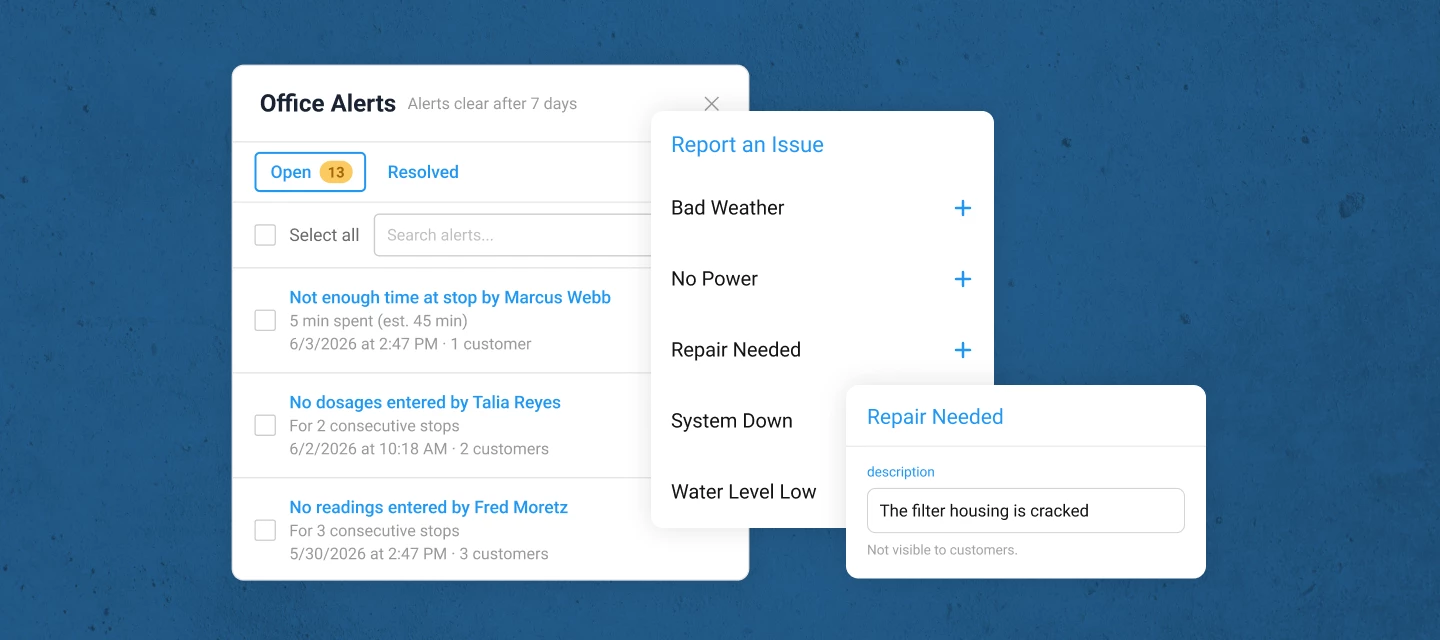
You set up a reading alert two weeks ago and forgot about it. Then this morning, you received a notification that your tech recorded a chlorine level of 0.2 at a customer’s property. Twice in a row. Without an alert, you’d have found out when they called to complain. Instead, you caught it in time to act.That’s what alerts & issues are built for. Skimmer watches your operation in real time and tells you when something needs your attention — the moment it happens, not days later.WATCH THE VIDEO TO SEE HOW IT WORKS!  🔔 Office alerts Configure alerts for the conditions that matter to you — readings or dosages out of range, a tech who hasn’t started, a stop that got skipped, a route left unfinished, a payment that failed, a quote approved or rejected, and more Alerts land in a new bell-icon panel in your top nav, visible from anywhere in Skimmer — no separate page to navigate to Set urgency on any alert so the bell shows an orange dot when something needs immediate attention Mark alerts resolved (or reopen them), and your whole team sees the updated status — no duplicate follow-up Configure email delivery per alert type, including additional recipients for specific alerts (e.g., only your billing person gets payment alerts) New alerts default to panel-on, email-off — you opt in to email for the alerts that warrant it 📱 IssuesTechs can now report structured field problems from mobile during any service stop or work order stop not just freeform service notes They select a pre-defined issue type (Water Level Low, System Down, No Power, Bad Weather, Repair Needed), add a description and up to 5 photos, and sync issues land in a dedicated issues tab on the Notes & issues page (previously Service Notes), separate from service notes, filterable, and trackable Office staff can review tech notes and photos, add an office note, and mark the issue resolved with a full audit trail of who handled what and when Optional: You can configure a customer-facing email to notify pool owners automatically when a specific issue type is reported at their property Export any filtered view to CSV for reporting, insurance documentation, or customer communication ⚙️ SetupOffice alerts : go to Settings > Office alerts  to configure your alert rules. Readings and dosage alerts need a one-time setup because Skimmer needs to know which readings you track and what thresholds matter to you — This takes about 5 minutes Issues: configure issue types in Settings > Office alerts . Default issue types are available but start off. Turn on and customize the ones you want before your techs start using them Admins and owners get panel access automatically. You can extend panel visibility to other roles under Settings > Roles & Permissions Questions or early feedback? Please drop them in the comments :)  

AI phone: What we are seeing after 30 days.

AI phone: What we are seeing after 30 days.

When we launched AI phone in April, we said it would handle the calls that pool pros don't have time for. We are over 30 days post-launch and we’d love to share what we’ve seen so far. Across pool pros using AI phone:12,000+ calls answered. 99% of incoming calls were picked up, including nights, weekends, and during routes. 3-6 hours saved per pool pro, per month on phone time and data entry. That's a full workday of phone time back, every month. 4-6 missed leads captured per pool pro. These are calls that would've gone to voicemail and never gotten a callback. ~$200k in captured revenue, from calls AI phone answered. 96.6% positive or neutral customer interactions. Very few pool owners even knew it was an AI. Most importantly, pool owners are getting what they need when their pool pros are busy. Here’s feedback from a pool pro like you:"Holy cow, what an amazing system. We set it up last week, and within 3 to 5 minutes after I finished setting it up, I had 2 calls. Both were sales. AI phone picked it up, took in all the information of the new clients, and put it in the system. All I had to do was schedule it. It's paid for itself already for at least the next 7 months, just off 2 sales that I missed."Larry, Bluewater Pools AZ Why this will be useful for your business:It's built into Skimmer, so it already knows your customers, your route, and your schedule It's trained on proprietary pool service data and language, not generic call center scripts 10-minute setup, no extra apps to wire up If you haven't turned on AI phone yet, here's the experiment we'd suggest: turn it on for 30 days, see your own numbers, and decide from there. [Turn on AI phone in your Skimmer account] Not considering using AI phone? We would love to hear why below. 

Related products:AI phone