Pandas Sidetable Just Announced
An informative and insightful overview of dataframes.

Pandas is a very powerful and versatile Python data analysis library that expedites the preprocessing steps of data science projects. It provides numerous functions and methods that are quite useful in data analysis.
Although the built-in functions of Pandas are capable of performing efficient data analysis, custom made functions or libraries add value to Pandas. In this post, we will explore one of these add-ons.
Yesterday, Chris Moffitt announced a new pandas utility library called sidetable. Here is the github repo of sidetable. I find it quite useful and plan to apply in my daily analyses. That's why I wanted to share and spread the word by working through some examples.
Sidetable creates a frequency table based on selected columns. Consider we have a dataset that contains some measurements on a categorical variable (e.g. model). We have many different models and each model has many observations (rows). By using sidetable, we get an overview that shows how much each model occupies in the dataset. This can also be achieved using value_counts function of pandas but sidetable is more informative as we will see in the examples.
We first need to install it with pip or !pip if you use a jupyter notebook:
Then import it:
We can now use stb as an accessor on dataframes. I will use US cars dataset available here on kaggle. It contains data on used cars that are sold at auctions.
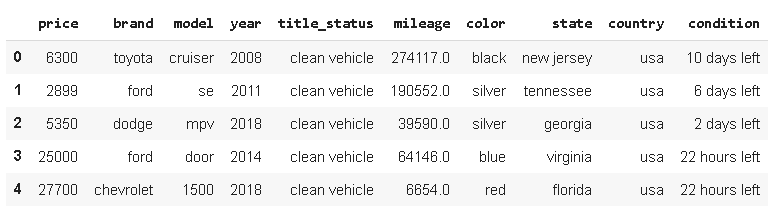
We may want to see what the dominating brands are. One way is to use value_counts function. Top 10 brands in terms of the number of occurrences in the dataset:
We can get the frequency ratios by using normalize parameter:
Almost 50% of the cars in the dataset are Ford. It is more informative than seeing just the counts. Sidetable takes it one step further.
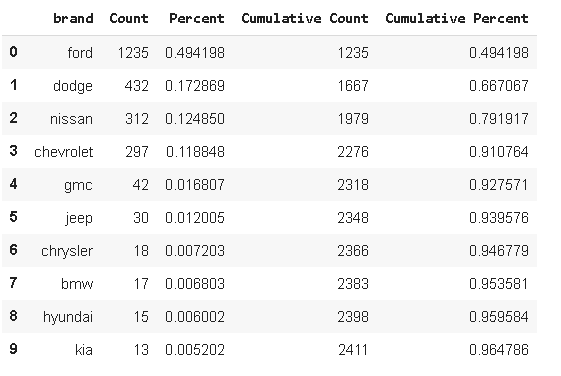
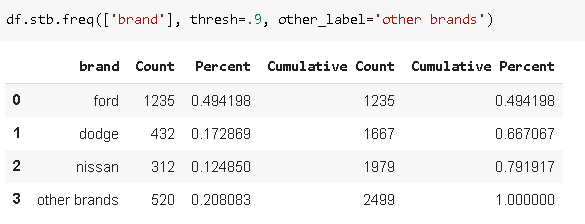
Sidetable returns both count and percent for each brand as well as cumulative values. It is definitely more informative than value_counts. We get more insight in terms of the distribution in the dataset. One extra feature that comes with cumulative values is that we can set a threshold on cumulative percent. Then, the categories after threshold is reached are marked as "others". We can also specify a label for "other" using other_label parameter. For instance, we may want to see the brands that constitutes 90% of the dataset.
We can also pass multiple columns and see more specific distribution. Let's see the top brand-year combinations in the dataset.
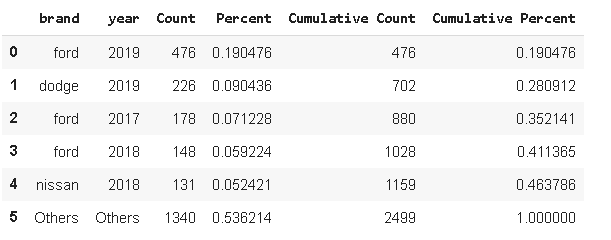
Ford dominates the dataset by having a share of 50%. Most of the ford cars are 2019 model which contains 19% of the entire dataset. Please note that 19% indicates the ratio in the entire dataset, not only in the ford brand. To get the distribution within the ford brand, we can apply a filter to the dataframe.
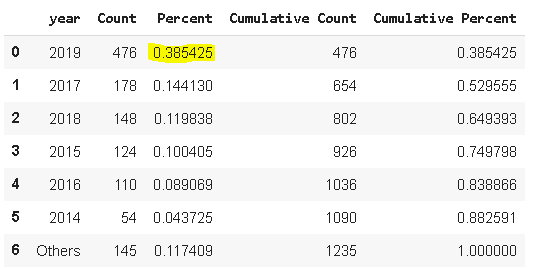
As we can see, 2019 model ford cars are 38% of all the ford brand cars. Recall from the previous example, 2019 model ford cars occupied 19% of the entire dataset.
Another useful feature of sidetable is that it provides distribution based on a value. For instance, we can check the total price of the cars in each brand. The column to be aggreated is passed to the value parameter.
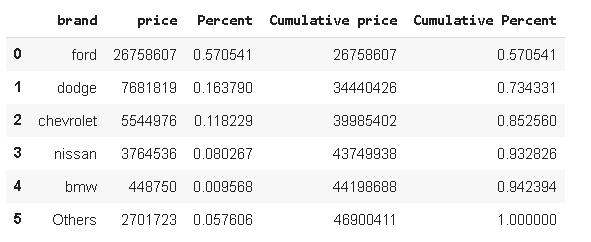
The total price of the ford cars in the dataset is more 26 million which is 57% of the total price of all cars. Recall from previous examples that 49% of all the cars in the dataset is ford brand. In terms of total price, the rate goes up to 57% which indicates the average price of ford cars is more than the average price of other brands. There are, of course, other features that have an effect on the price such as year, mileage, title status and so on. But, it provides a general insight.
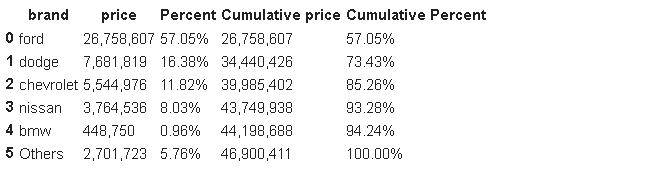
If the format of the values does not seem appealing, it can be changed using style parameter.
I think the success and prevalence of Pandas come from the versatile, powerful and easy-to-use functions to manipulate and analyze data. There are almost always multiple ways to do a task with Pandas. The custom made utility libraries added on Pandas optimize certain operations and bring more value to Pandas. Thanks again to Chris Moffitt for this valuable tool.
Since a big portion of time spent on a data science project is spent during data cleaning and preprocessing steps, Pandas is a valuable asset to have in your arsenal.
Thank you for reading. Please let me know if you have any feedback.