

In a microservices architecture, application configuration values often change after deployment. Restarting services every time a configuration changes can lead to downtime and operational overhead. Spring Boot Actuator provides a mechanism to refresh application configurations dynamically without restarting the application.
- Allows updating configuration properties without restarting services.
- Reduces downtime and improves system availability.
- Simplifies centralized configuration management in microservices.
Refresh Configuration
Refresh Configuration is a feature that allows a Spring Boot application to reload its configuration properties dynamically at runtime. This is commonly used with Spring Cloud Config Server and the Spring Boot Actuator /refresh endpoint.
- When the refresh endpoint is invoked, Spring reloads the updated configuration properties and applies them to the application without requiring a restart.
Components Used in Refresh Configuration
1. Config Server
The Config Server stores and manages centralized configuration files.
- Provides configuration properties to microservices.
- Allows centralized management of application settings.
2. Config Client
The Config Client fetches configuration values from the Config Server.
- Retrieves configuration during startup.
- Supports refreshing updated configurations dynamically.
3. Spring Boot Actuator
Spring Boot Actuator provides monitoring and management endpoints.
- Exposes the /refresh endpoint.
- Triggers runtime configuration updates.
4. @RefreshScope
The @RefreshScope annotation enables beans to reload updated configuration values.
- Refreshes bean instances dynamically.
- Applies new configuration values without restarting.
Working Of Refresh Configuration
Step 1: Configuration is stored in Config Server
- Configuration properties are stored in Git or another repository.
- Config Server serves these properties to microservices.
Step 2: Microservice fetches configuration
- The microservice loads configuration values during startup.
- Properties become available in application beans.
Step 3: Configuration file is updated
- Changes are made to the centralized configuration repository.
- Updated values become available in Config Server.
Step 4: Refresh endpoint is called
- The /actuator/refresh endpoint is invoked.
- Spring reloads the latest configuration.
Step 5: Application updates properties
- Beans annotated with @RefreshScope are recreated.
- New property values are applied immediately.
Steps To Implements Refresh Configuration using Spring Boot Actuator
Step 1: Create Spring Boot Project
Create a Spring Boot project with the following dependencies:
- Spring Web
- Spring Boot Actuator
- Spring Cloud Config Client
- Spring Boot DevTools
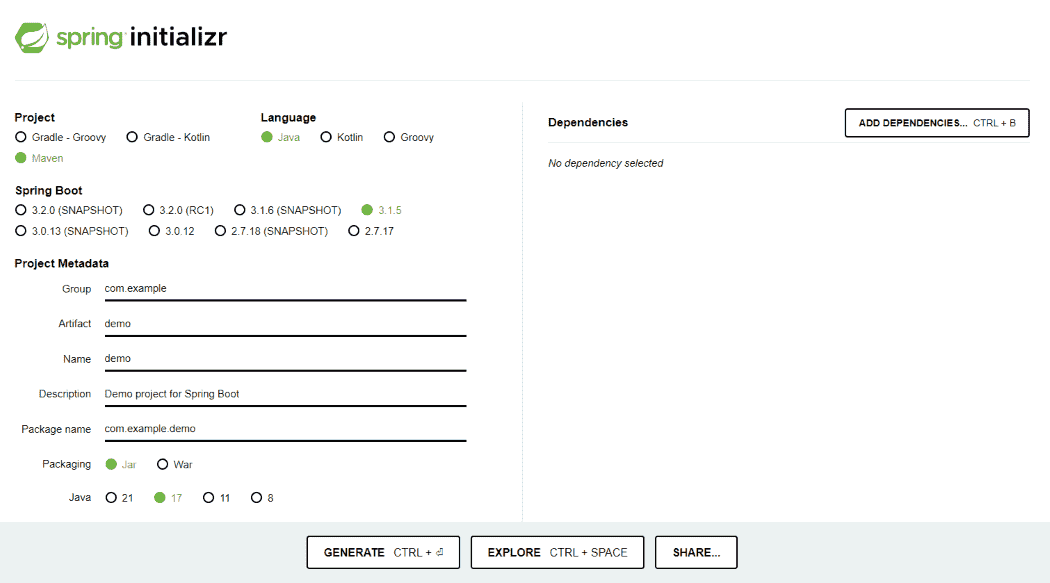
Generate the project and run it in IntelliJ IDEA/Eclipse IDE by referring to the above article.
Step 2: Add Required Dependencies
These dependencies enable Spring Cloud Config Client and Actuator refresh functionality.
<dependency>
    <groupId>org.springframework.cloud</groupId>
    <artifactId>spring-cloud-starter-config</artifactId>
</dependency>

<dependency>
    <groupId>org.springframework.boot</groupId>
    <artifactId>spring-boot-starter-actuator</artifactId>
</dependency>
Step 3: Configure application.properties
Configure the Config Server URL and expose the Actuator refresh endpoint.
spring.application.name=employee-service
spring.config.import=optional:configserver:http://localhost:8888
management.endpoints.web.exposure.include=refresh
management.endpoint.refresh.enabled=true
Step 4: Create Configuration Bean
The @RefreshScope annotation allows the bean to reload updated configuration values dynamically.
package com.example.controller;

import org.springframework.beans.factory.annotation.Value;
import org.springframework.cloud.context.config.annotation.RefreshScope;
import org.springframework.web.bind.annotation.GetMapping;
import org.springframework.web.bind.annotation.RestController;

@RestController
@RefreshScope
public class ConfigController {

    @Value("${application.message}")
    private String message;

    @GetMapping("/message")
    public String getMessage() {
        return message;
    }
}
Step 5: Create Configuration File in Config Repository
Store centralized configuration properties in the Config Server repository.
application.message=Welcome to Spring Cloud Config
Step 6: Run Config Server and Application
Start these services:
- Config Server
- Spring Boot Application
Step 7: Update Configuration
Modify the property:
application.message=Configuration Updated Successfully
Step 8: Invoke Refresh Endpoint
The refresh endpoint forces the application to reload the latest configuration values.
POST http://localhost:8080/actuator/refresh
Output:
Before Refresh
Welcome to Spring Cloud Config
After Refresh
Configuration Updated Successfully
Advantages
- Supports dynamic configuration updates.
- Eliminates the need for application restarts.
- Improves availability and reduces downtime.
- Simplifies centralized configuration management.
- Works seamlessly with Spring Cloud Config.
Limitations
- Only beans annotated with @RefreshScope are refreshed.
- Refreshing a large number of beans may impact performance.
- Configuration changes are not applied automatically unless the refresh endpoint is triggered.
