

In a microservices architecture, managing the network locations of multiple services manually can become complex as applications grow. Eureka Server acts as a centralized service registry that keeps track of all available microservice instances, enabling seamless service registration and discovery.
- Service Registry for maintaining information about all registered microservices.
- Client Registration to automatically register service instances on startup.
- Service Discovery to help microservices locate and communicate with each other dynamically.
Why use Eureka Server in Spring Boot Applications?
Eureka Server follows the Register–Lookup–Connect principle. This approach simplifies service management in distributed environments.
- Centralized Service Registry: Maintains a directory of all available microservices and their network locations.
- Automatic Registration: Clients automatically register and deregister with Eureka Server, reducing manual configurations.
- Load Balancing Support: Enables client-side load balancing using libraries such as Ribbon.
- Health Monitoring: Supports health checks to ensure only healthy instances remain discoverable.
- Seamless Spring Cloud Integration: Works efficiently within the Spring Cloud ecosystem, making scaling and deployment simpler.
Configuring the Eureka Server
Step 1: Create Spring Boot Project
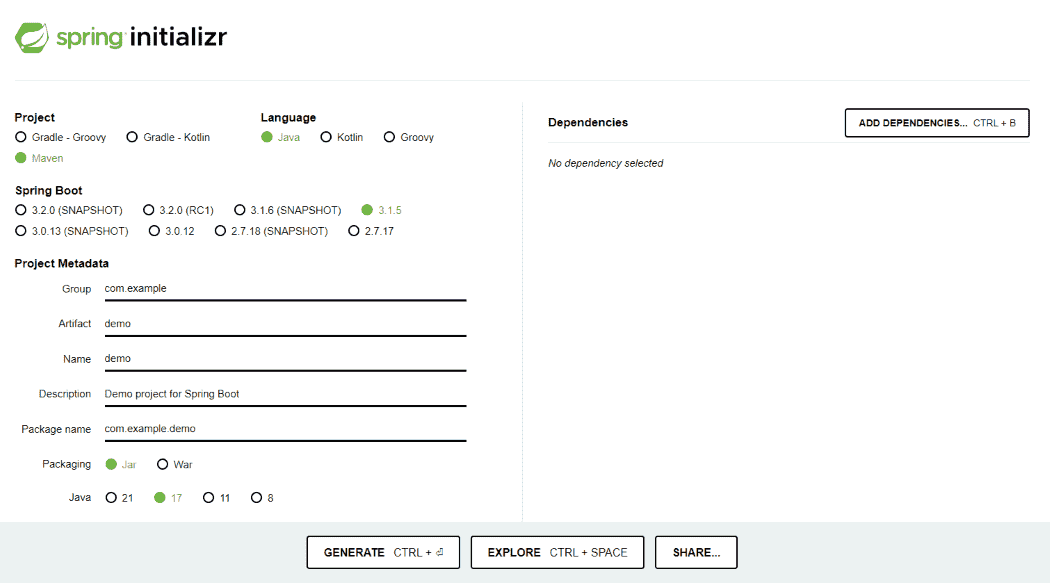
Create a Spring Boot project using Spring Initializr.
Add Dependencies:
- Spring Web
- Eureka Server
- Spring DevTools
Step 2: Verify Maven Dependencies
Check the following dependencies in the pom.xml file of both server and client applications.
<?xml version="1.0" encoding="UTF-8"?>
<project xmlns="http://maven.apache.org/POM/4.0.0"
         xmlns:xsi="http://www.w3.org/2001/XMLSchema-instance"
         xsi:schemaLocation="http://maven.apache.org/POM/4.0.0
         https://maven.apache.org/xsd/maven-4.0.0.xsd">

    <modelVersion>4.0.0</modelVersion>

    <parent>
        <groupId>org.springframework.boot</groupId>
        <artifactId>spring-boot-starter-parent</artifactId>
        <version>3.3.0</version>
        <relativePath/>
    </parent>

    <groupId>org.geeksforgeeks</groupId>
    <artifactId>eureka-server</artifactId>
    <version>0.0.1-SNAPSHOT</version>
    <name>eureka-server</name>
    <description>Spring Boot Eureka Server Example</description>

    <properties>
        <java.version>17</java.version>
        <spring-cloud.version>2023.0.2</spring-cloud.version>
    </properties>

    <dependencies>

        <!-- Spring Web -->
        <dependency>
            <groupId>org.springframework.boot</groupId>
            <artifactId>spring-boot-starter-web</artifactId>
        </dependency>

        <!-- Eureka Server -->
        <dependency>
            <groupId>org.springframework.cloud</groupId>
            <artifactId>spring-cloud-starter-netflix-eureka-server</artifactId>
        </dependency>


        <!-- DevTools -->
        <dependency>
            <groupId>org.springframework.boot</groupId>
            <artifactId>spring-boot-devtools</artifactId>
            <scope>runtime</scope>
            <optional>true</optional>
        </dependency>

        <!-- Testing -->
        <dependency>
            <groupId>org.springframework.boot</groupId>
            <artifactId>spring-boot-starter-test</artifactId>
            <scope>test</scope>
        </dependency>

    </dependencies>

    <dependencyManagement>
        <dependencies>
            <dependency>
                <groupId>org.springframework.cloud</groupId>
                <artifactId>spring-cloud-dependencies</artifactId>
                <version>${spring-cloud.version}</version>
                <type>pom</type>
                <scope>import</scope>
            </dependency>
        </dependencies>
    </dependencyManagement>

    <build>
        <plugins>
            <plugin>
                <groupId>org.springframework.boot</groupId>
                <artifactId>spring-boot-maven-plugin</artifactId>
            </plugin>
        </plugins>
    </build>

</project>
Step 3: Configure Application Properties
Define Eureka-related configurations in application.yml or application.properties.
server:
port: 8761
spring:
application:
name: EUREKA-SERVER
eureka:
client:
register-with-eureka: false
fetch-registry: false
Step 4: Enable Eureka Server
To convert a Spring Boot application into a Eureka Server, use the @EnableEurekaServer annotation.
package org.geeksforgeeks.registry.serviceregistry;

import org.springframework.boot.SpringApplication;
import org.springframework.boot.autoconfigure.SpringBootApplication;
import org.springframework.cloud.netflix.eureka.server.EnableEurekaServer;

@SpringBootApplication
@EnableEurekaServer
public class ServiceRegistryApplication {

    public static void main(String[] args) {
        SpringApplication.run(ServiceRegistryApplication.class, args);
    }
}
Step 5: Run the Application
- Right-click the project.
- Run ServiceRegistryApplication.
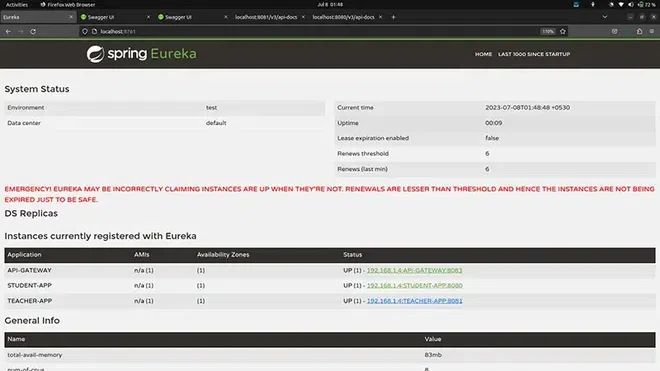
After the application starts successfully, Eureka Server will be available on port 8761. Once the Eureka Server is running, access the dashboard at:
URL: http://localhost:8761
The dashboard displays all registered microservices and their statuses. Example registered services:
- API-GATEWAY
- STUDENT-APP
- TEACHER-APP
Use Cases of Eureka Server
Eureka Server is widely used in:
- Microservices Architecture: Core component for service registration and discovery.
- Distributed Systems: Simplifies service communication and dependency management.
- Load Balancing and Failover: Works with load balancers for efficient traffic distribution.
Alternatives to Eureka Client
While Eureka is widely adopted, other tools also offer service registration and discovery features:
- Consul: Developed by HashiCorp, supports health checking, key-value storage, and multi-datacenter setups.
- Apache ZooKeeper: Provides service discovery and configuration management, often used in large distributed systems.
- Etcd: Lightweight and ideal for Kubernetes-based environments requiring high availability.
