

BLIP (Bootstrapping Language-Image Pre-training) is a multimodal AI model that combines computer vision and natural language processing to understand both images and text together. It is trained on large-scale image–text pairs, enabling strong performance in vision-language tasks.
- It generates meaningful captions for images by understanding visual content in natural language.
- It supports tasks like visual question answering and image–text retrieval using transformer-based cross-modal learning.
Architecture
BLIP’s core structure is a multimodal encoder-decoder setup made for both understanding and generation tasks:
- Unimodal Encoder: Separately encodes images and text.
- Image-grounded Text Encoder: Integrates visual context into text encoding using cross-attention layers.
- Image-grounded Text Decoder: Generates text from images with causal self-attention mechanisms.
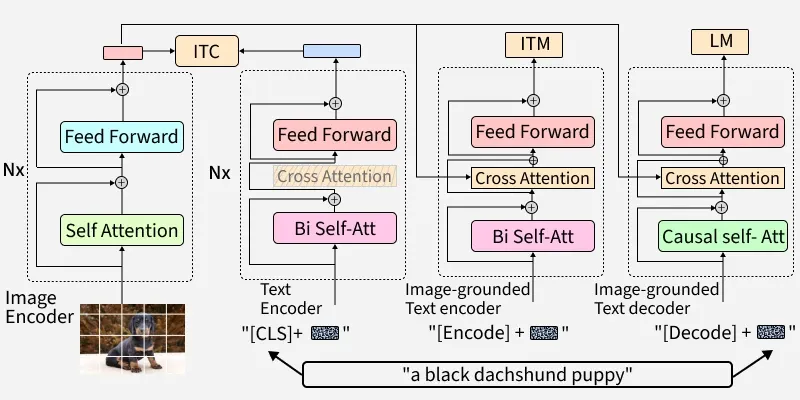
Pretraining Objectives of BLIP
BLIP uses three main objectives during pre-training:
- Image-Text Contrastive Loss (ITC): Aligns visual and textual feature spaces, promoting similarity between matching image-text pairs while distinguishing negatives.
- Image-Text Matching Loss (ITM): Encourages detailed multimodal representation with a classification task, determining if a text matches an image.
- Language Modeling Loss (LM): Trains the model to generate plausible text from images using an autoregressive approach.
Step-by-Step Implementation
Step 1: Install and Import Required Libraries
We will import all the necessary libraries,
- torch: Deep learning framework backing most Hugging Face models.
- transformers: Provides easy access to BLIP and other state-of-the-art models.
- numpy: For efficient numerical operations (sometimes used for data formatting).
- pillow: For image loading and manipulation in Python.
!pip install torch transformers numpy pillow

from PIL import Image
import requests
2. Download BLIP Model
We will load the pretrained BLIP model,
- BlipProcessor: Handles preprocessing of images/text and postprocessing model output.
- BlipForConditionalGeneration: The BLIP model itself for image captioning.
- from_pretrained: Fetches a ready-to-use model and processor from the Hugging Face Hub.
from transformers import BlipProcessor, BlipForConditionalGeneration
from PIL import Image
import requests

processor = BlipProcessor.from_pretrained('Salesforce/blip-image-captioning-base')
model = BlipForConditionalGeneration.from_pretrained('Salesforce/blip-image-captioning-base')
3. Prepare Input Data
Used sample can be downloaded from here.
Load and format the image and text data that we intend to use with the model,
- Image.open: Loads an image into memory so it can be processed (required for the model).
- requests.get(url, stream=True).raw: Downloads the image directly from a URL.
url = "URL_TO_IMAGE"
image = Image.open(requests.get(url, stream=True).raw)
4. Run the Model and Fetch Result
Use the processor to prepare the inputs and run inference with the model,
- processor(images=image, return_tensors="pt"): Converts the image into a format (PyTorch tensor) suitable for model input.
- model.generate(**inputs): Runs the model to produce a caption for the image.
- processor.decode(output, skip_special_tokens=True): Converts the model’s output tensor into a human-readable string, skipping any unused special tokens.
inputs = processor(images=image, return_tensors="pt")

output = model.generate(**inputs)

caption = processor.decode(output[0], skip_special_tokens=True)
print("Generated Caption:", caption)
Output:
Generated Caption: a small dog running through the grass
Comparison of BLIP with other Models
Let's see the comparison of BLIP with various other models such as CLIP, DALL-E and ViT,
Aspect | BLIP | CLIP | DALL-E | ViT |
|---|---|---|---|---|
Primary Role | Image captioning, VQA, matches image & text | Matches images with text, search & tagging | Creates images from text description | Image classification, AI model building block |
Architecture | Image & language transformers (multimodal) | Separate image and text encoders, compared | Large text-to-image transformer decoder | Splits image into patches, processes as tokens |
Training Approach | Contrastive + captioning on big datasets | Contrastive learning on huge image-text pairs | Learns to “draw” based on text prompts | Trained on large datasets, scales extremely well |
Adaptability | Easy to fine-tune for many tasks | Handles zero-shot tasks well | Best for image generation | Widely used as model backbone |
Strengths | Excels at both describing and understanding images | Robust for matching images and text | Makes creative, highly detailed images | High accuracy for image recognition tasks |
Applications
- Visual Question Answering (VQA): Answers questions about image content for applications like education, support systems, and interactive tools.
- Image Captioning: Generates descriptions for images, improving accessibility and supporting content creation.
- Content Moderation: Detects and filters inappropriate visual content to maintain platform safety and compliance.
- E-commerce & Retail: Improves product understanding and recommendation systems using image–text context.
- Healthcare: Assists in interpreting medical images like X-rays and MRIs for faster preliminary analysis.
Advantages
- Multimodal Strength: Handles both images and text together, delivering rich, context-aware results.
- Versatility: Adaptable for various tasks, captioning, answering questions, moderation and more.
- Performance: Sets a high standard for accuracy in generating and understanding content across modalities.
- Open Source: Easily accessible models and code for customization.
Limitations
- Data Quality: Needs diverse and unbiased data to avoid mistakes and bias.
- Training Demands: High computing power is required for best results.
- Accuracy: Can miss details in very complex or unusual images.
- Scalability: Large models may be slower and require work to use for new problems.
