

Bootstrap 5 is a popular front-end CSS framework used to build responsive and mobile-first websites quickly. It provides a collection of pre-built components, a flexible grid system, and utility classes that help developers create modern web interfaces with less code.
- Bootstrap 5 can be installed using a CDN, npm, or by downloading the framework files.
- The installation method depends on your project type, development workflow, and customization requirements.
Using CDN Links
A Content Delivery Network (CDN) allows you to use Bootstrap without downloading or installing any files. You only need to add the Bootstrap CSS and JavaScript CDN links to your HTML file, making it the quickest way to start using Bootstrap. It is best suited for Learning Bootstrap, Small website and Quick prototypes and demos.
Syntax:
<!-- Bootstrap 5 CSS -->
<link rel="stylesheet" href=
"https://cdn.jsdelivr.net/npm/bootstrap@5.3.8/dist/css/bootstrap.min.css">

<!-- Bootstrap 5 JS via CDN -->
<script src=
"https://cdn.jsdelivr.net/npm/bootstrap@5.3.8/dist/js/bootstrap.bundle.min.js"> </script>
Linking Bootstrap 5 CSS via CDN:
<link rel="stylesheet" href=
"https://cdn.jsdelivr.net/npm/bootstrap@5.3.8/dist/css/bootstrap.min.css">
Linking Bootstrap 5 JS via CDN:
<script src="https://cdn.jsdelivr.net/npm/bootstrap@5.3.8/dist/js/bootstrap.bundle.min.js"></script>
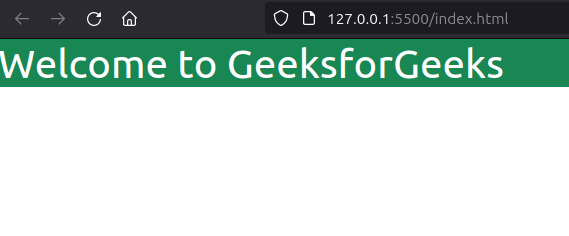
Example: Illustration of installation of Bootstrap5 via CDN Links.
<!DOCTYPE html>
<html lang="en">

<head>
    <meta charset="UTF-8">
    <meta name="viewport"
          content="width=device-width, initial-scale=1.0">
    <title>GfG</title>
    <link rel="stylesheet" href=
"https://cdn.jsdelivr.net/npm/bootstrap@5.3.8/dist/css/bootstrap.min.css">
</head>

<body>

    <h3 class="bg-success text-white ">
      GeeksforGeeks
      </h3>
    <script src=
"https://cdn.jsdelivr.net/npm/bootstrap@5.3.8/dist/js/bootstrap.bundle.min.js">
      </script>
</body>

</html>
Output:

Using Package Managers
This method involves using package managers like npm or yarn to install and manage Bootstrap as a project dependency. This method is recommended for modern web development because it makes managing and updating packages easier.
Syntax:
// Using npm
npm install bootstrap

// Using yarn
yarn add bootstrap
Package.json File:
{
  "dependencies": {
    "bootstrap": "^5.3.8"
  }
}
Import Bootstrap:
After installing Bootstrap, import its CSS and JavaScript files into your project.
import "bootstrap/dist/css/bootstrap.min.css";
import "bootstrap/dist/js/bootstrap.bundle.min.js";
Note: Modern frameworks such as React, Next.js, and Vite use imports instead of linking files directly from the
node_modulesfolder.
Example: Install Bootstrap using npm.
import "bootstrap/dist/css/bootstrap.min.css";
import "bootstrap/dist/js/bootstrap.bundle.min.js";
Output:
Downloading the Bootstrap File
You can also install Bootstrap by downloading its files and adding them to your project manually. This method is useful when working offline or when you want to keep Bootstrap files locally.
Syntax:
<link rel="stylesheet" href="path/to/bootstrap.min.css">
<script src="path/to/bootstrap.bundle.min.js"></script>
Steps to Install the Bootstrap 5
Below are the steps to install the Bootstrap 5
Step 1: Download Bootstrap 5
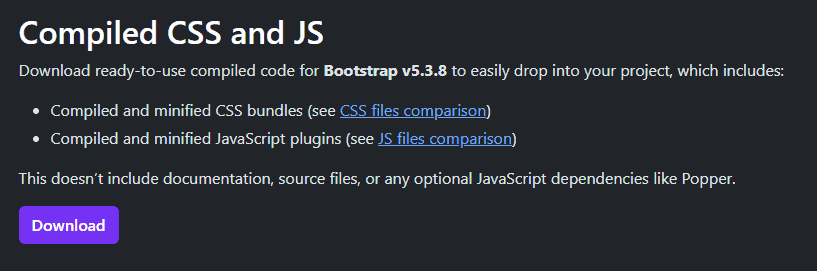
Navigate to the official Bootstrap website (https://getbootstrap.com/) and locate the "Download" button. Click on it to download the latest version of Bootstrap. You'll receive a ZIP file containing the necessary files.
Step 2: Extract the ZIP File
Once the download is complete, locate the ZIP file in your downloads folder and extract its contents. You can do this by right-clicking on the file and selecting "Extract All" or using your preferred extraction tool.
Step 3: Include Bootstrap Files
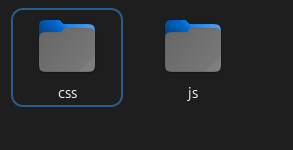
Copy the css and js folders from the extracted Bootstrap package into your project directory.
Step 4: Link Bootstrap CSS
Open your HTML file using a text editor. Inside the <head> section, include the Bootstrap CSS file by adding the following line:
Step 5: Link Bootstrap JS
To enable Bootstrap's JavaScript features, include the Bootstrap JS file. Add the following lines just before the closing </body> tag:
Step 6: Utilize Bootstrap Components
With the CSS and JS linked, you can now start using Bootstrap's components and utilities in your HTML. Refer to the official Bootstrap documentation for a wide range of components and their implementation.
Example: Illustration of Installation of Bootstrap 5 File.
<!DOCTYPE html>
<html lang="en">

<head>
    <meta charset="UTF-8">
    <meta name="viewport"
          content="width=device-width, initial-scale=1.0">
    <title>GfG</title>
    <link rel="stylesheet" href="css/bootstrap.min.css">
</head>

<body>

    <h3 class="bg-success text-white ">GeeksforGeeks</h3>
    <script src="js/bootstrap.bundle.min.js"></script>

</body>

</html>
Output:
