
Session Initiation Protocol (SIP) is an application-layer signaling protocol used to establish, modify, manage, and terminate multimedia communication sessions over IP networks.
- Supports voice, video, and instant messaging over IP networks.
- Designed for packet-switched networks rather than traditional circuit-switched telephone systems.
- Scalable and suitable for large, distributed communication environments.
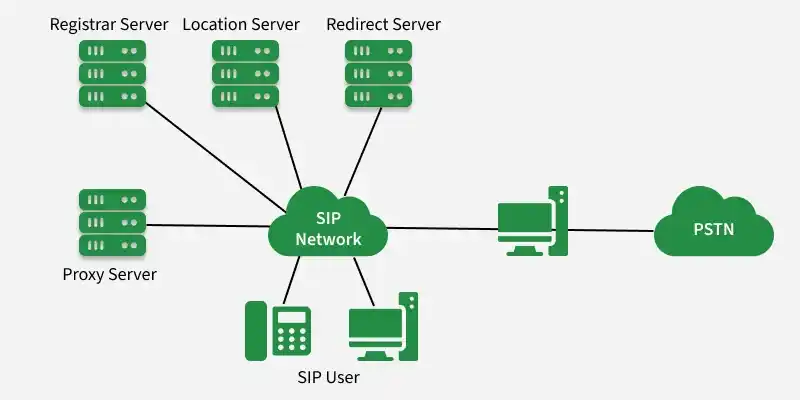
SIP Architecture
SIP architecture includes endpoints and signaling servers that handle registration, routing, and session delivery.
- User Agent (UA): Endpoint that sends and receives SIP messages (UAC = requester, UAS = responder).
- Proxy Server: Forwards requests/responses and applies routing rules, policies, and authentication.
- Registrar Server: Processes
REGISTERand stores user-to-contact bindings (SIP URI → current contact). - Redirect Server: Returns the next reachable address and tells the client to contact it directly (no forwarding).
- Location Service: Database used to resolve where a user is currently reachable.
Working
SIP establishes and controls a communication session using structured signaling exchanges.
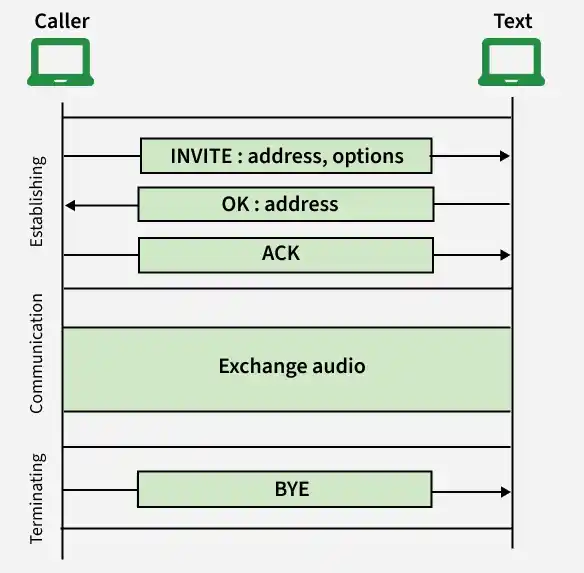
- REGISTER (optional): Endpoint registers its current contact address with the registrar.
- INVITE: Caller requests session setup with the callee (directly or via a proxy).
- Routing: Proxy uses location information to forward the INVITE to the callee’s reachable address.
- 1xx responses: Progress updates such as trying/ringing.
- 200 OK: Callee accepts and confirms session establishment.
- ACK: Caller confirms the final response and the dialog becomes active.
- Mid-call control (if needed): Session state can be updated using signaling (e.g., hold/resume/transfer).
- BYE + 200 OK: Either side ends the session; the other acknowledges termination.
SIP Messages
SIP messages are the signaling units used to control a session. They are exchanged in a request–response pattern, where a device sends a request method and the other side returns a status response.
1. Request Methods
- INVITE: Initiates a session.
- ACK: Confirms the final response to an INVITE.
- BYE: Terminates an active session.
- CANCEL: Cancels a pending request before completion.
- REGISTER: Updates the user’s current contact address in the network.
- OPTIONS: Queries capabilities of an endpoint/server.
2. Response Types
- 1xx: Informational / in progress
- 2xx: Success
- 3xx: Redirection
- 4xx: Client error
- 5xx: Server error
- 6xx: Global failure
Applications
- VoIP: Call setup and control for Internet voice calling.
- Video conferencing: Signaling for multi-party video meetings.
- Unified Communications (UC): Connects voice, video, messaging, and presence in one platform.
- IP telephony: Supports desk phones and softphones for call handling over data networks.
- Messaging & presence: Enables chat sessions and user availability/online status.
Advantages
- Interoperability: Works across different vendors and VoIP platforms using a common signaling standard.
- Scalability: Supports large enterprise and service-provider deployments with many concurrent users.
- Mobility support: Keeps users reachable even when they switch networks or IP addresses.
- Advanced call features: Enables services like transfer, forwarding, conferencing, and call waiting.
- Easy integration: Fits well with PBX/UC systems and cloud communication infrastructure.
Disadvantages
- Security risks: Without TLS/authentication, signaling can be targeted (spoofing, eavesdropping, DoS).
- NAT traversal problems: Devices behind NAT may need STUN/TURN to maintain reliable reachability.
- Needs companion protocols: SIP controls signaling; media and session details rely on RTP and SDP.
- Configuration complexity: Routing, server setup, and security policies require careful implementation.
- Network dependency: High latency, jitter, or packet loss can degrade call stability and user experience.
