
Errors are common in C++ programs and may occur during compilation, linking, execution, or because of incorrect program logic. Understanding these errors helps in debugging and developing reliable applications.
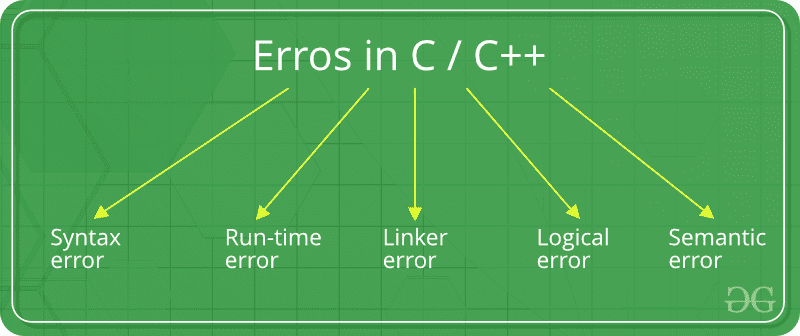
- The major types of errors in C++ are syntax, runtime, logical, linker, and semantic errors.
- Each type occurs at a different stage of program development or execution.
Types of Errors in C++
The major types of errors in C++ are:
Syntax Errors
Syntax errors occur when the rules of C++ syntax are violated. These errors are detected by the compiler before the program is executed. Common causes include:
- Missing semicolons.
- Missing brackets or parentheses.
- Incorrect keywords or operators.
- Invalid statement structure.
#include <iostream>
using namespace std;

int main() {
  cout << "Geeks for geeks!" // missing semicolon
  return 0;
}
Output
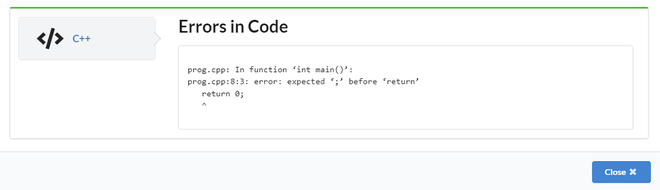
Explanation: The compiler reports an error because the semicolon after the cout statement is missing.
Runtime Errors
Runtime errors occur after successful compilation while the program is executing. They usually happen because the program performs an invalid operation. Common causes include:
- Division by zero.
- Invalid memory access.
- Dereferencing null pointers.
- Array index out of bounds.
#include <iostream>
using namespace std;

int main()
{
    int arr[5];

    cout << arr[10];

    return 0;
}
Output
Segmentation fault Explanation: The program attempts to access memory outside the array boundary, resulting in a runtime error.
Logical Errors
Logical errors occur when the program compiles and executes successfully but produces incorrect results due to faulty logic. Common causes include:
- Incorrect conditions.
- Wrong formulas.
- Incorrect loop implementation.
- Misplaced statements.
#include <iostream>
using namespace std;

int main() {
  int j;
  // Cause of Logical error
  for(j=0;j<=5;j++);
  {
    cout << "Geeks for geeks";
  }
    return 0;
}
Output
Geeks for geeks
Explanation: The semicolon immediately after the for loop creates an empty loop. As a result, the block executes only once instead of five times.
Linker Errors
Linker errors occur after successful compilation when the linker cannot combine object files into an executable. Common causes include:
- Missing main() function.
- Undefined function definitions.
- Missing libraries.
- Multiple definitions of the same symbol.
#include <iostream>
using namespace std;

int Main() {

    cout << "Geeks for geeks";
    return 0;
}
Output
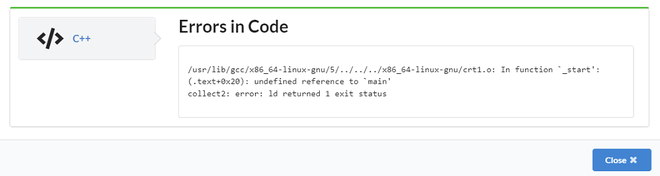
Explanation: The linker expects a function named main(). Since the program defines Main() instead, no valid entry point is found.
Semantic Errors
Semantic errors occur when the program follows C++ syntax but violates the language's meaning or rules. Common causes include:
- Invalid assignments.
- Incompatible operations.
- Misuse of expressions.
- Invalid use of operators.
#include <iostream>
using namespace std;

int main()
{
    int a = 10, b = 20, c;
    a + b = c;

    cout << c;
    return 0;
}
Output
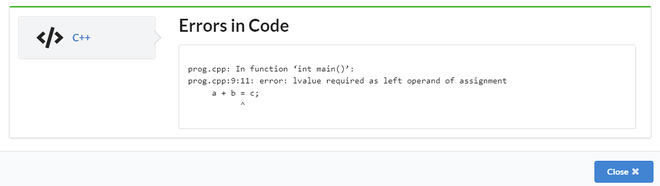
Explanation: The expression a + b is not a valid assignable object, so the assignment statement is semantically incorrect.
Summary of Error Types
| Error Type | Detected By | Occurs When |
|---|---|---|
| Syntax Error | Compiler | C++ syntax rules are violated. |
| Runtime Error | Operating System / Runtime | An invalid operation occurs during execution. |
| Logical Error | Programmer | The program executes but produces incorrect results. |
| Linker Error | Linker | Required symbols or program entry points are missing. |
| Semantic Error | Compiler | The syntax is correct but the statement has invalid meaning. |
