
Apache Cassandra is an open-source, distributed NoSQL database designed to handle large volumes of data across multiple servers. Apache Cassandra has the capability to handle structured, semi-structured, and unstructured data.
- Cassandra supports ACID properties at the single-partition (single-row) level.
- It is scalable, highly available and also fault-tolerant.
- It does not support full multi-row or multi-table ACID transactions.
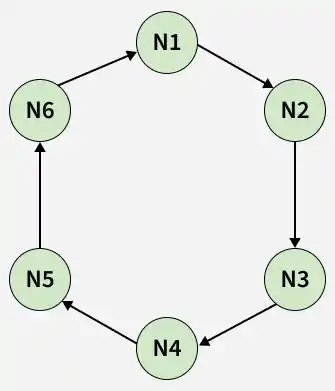
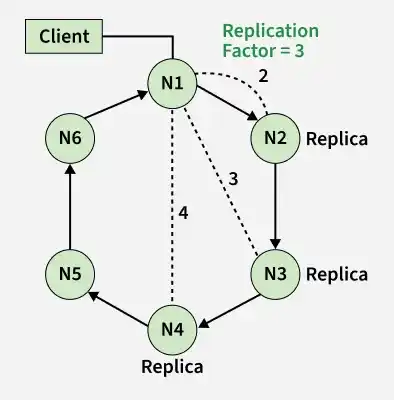
Apache Cassandra uses a masterless peer-to-peer architecture, where all nodes are equal and there is no single point of failure. In Apache Cassandra, multiple replicas of data can be created by configuring the replication strategy and Replication Factor (RF) when creating a keyspace.
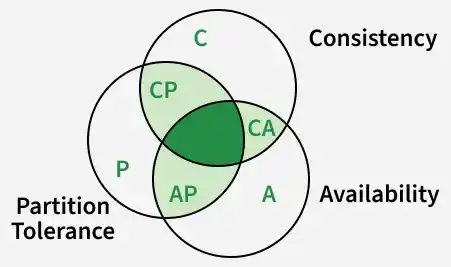
It provides high availability and partition tolerance while offering tunable consistency, allowing applications to balance consistency and availability based on their requirements.
Example:
CREATE KEYSPACE Example
WITH replication = {
    'class': 'SimpleStrategy',
    'replication_factor': 3
};
In this example, Replication Factor (RF) = 3 means Cassandra stores three replicas of each partition on different nodes according to the configured replication strategy.
cqlsh: cqlsh is the command-line shell used to interact with Apache Cassandra using Cassandra Query Language (CQL)
CQL query for Basic Operation:
Step 1: To create keyspace use the following CQL query.
CREATE KEYSPACE Emp
WITH replication = {
    'class': 'SimpleStrategy',
    'replication_factor': 1
};
Step 2: Use the following CQL command to select the keyspace.
Syntax:
USE keyspace-name
USE Emp;
Step 3: To create a table use the following CQL query.
Example:
CREATE TABLE Emp_table (
    name text PRIMARY KEY,
    Emp_id int,
    Emp_city text,
    Emp_email text
);
Step 4: To insert into Emp_table use the following CQL query.
Insert into Emp_table(name, Emp_id, Emp_city, Emp_email)
  VALUES ('Ashish', 1001, 'Delhi', 'ashish05.rana05@gmail.com');

Insert into Emp_table(name, Emp_id, Emp_city, Emp_email)
  VALUES ('Ashish Gupta', 1001, 'Bangalore', 'ashish@gmail.com');

Insert into Emp_table(name, Emp_id, Emp_city, Emp_email)
  VALUES ('Amit', 1002, 'Noida', 'abc@gmail.com');

Insert into Emp_table(name, Emp_id, Emp_city, Emp_email)
  VALUES ('Dhruv', 1003, 'Pune', 'xyz@gmail.com');

Insert into Emp_table(name, Emp_id, Emp_city, Emp_email)
  VALUES ('Shivang', 1004, 'Mumbai', 'test@gmail.com');

Insert into Emp_table(name, Emp_id, Emp_city, Emp_email)
  VALUES ('Aayush', 1005, 'Gurugram', 'cass_write@gmail.com');

Insert into Emp_table(name, Emp_id, Emp_city, Emp_email)
  VALUES ('Bhagyesh', 1006, 'Chandigarh', 'welcome@gmail.com');
Step 5: To read data, use the following CQL query.
SELECT * FROM Emp_table;