
Jenkins is an open-source automation server that streamlines the software development lifecycle by automating build, test, and deployment processes. It is widely used in Continuous Integration and Continuous Delivery/Deployment (CI/CD) to improve development efficiency and software quality.
- Open-source and platform-independent automation server for modern software development.
- Extensible through thousands of plugins that integrate with Git, Docker, Kubernetes, Maven, Selenium, and more.
- Supports distributed builds and pipeline automation for scalable and efficient development workflows.
Jenkins Architecture and Core Concepts
Jenkins follows a master-slave architecture, where the Jenkins server (master) manages build jobs and delegates their execution to agent nodes (slaves). This setup ensures efficient resource utilization and parallel execution.
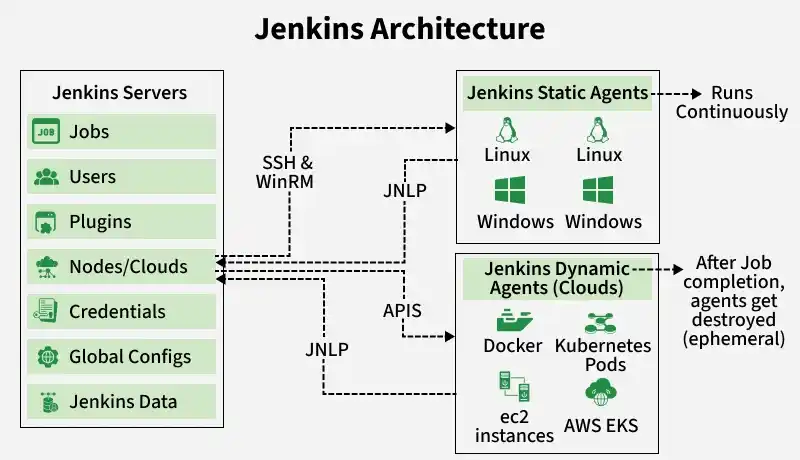
1. Jenkins Server (Controller)
The left section represents the Jenkins Server, which is the central component responsible for managing the Jenkins environment.
- Jobs: Creates, schedules, and manages build, test, and deployment jobs.
- Users: Manages user accounts and access permissions.
- Plugins: Extends Jenkins functionality by integrating with external tools.
- Nodes/Clouds: Configures static agents and cloud platforms for job execution.
- Credentials: Securely stores passwords, SSH keys, and API tokens.
- Global Configs: Stores system-wide Jenkins configuration settings.
- Jenkins Data: Maintains jobs, build history, logs, plugins, and configuration files.
2. Jenkins Static Agents
The top-right section represents Static Agents.
- These are permanent Linux or Windows machines connected to the Jenkins Server.
- They continuously wait for jobs from the controller.
- Once a job is assigned, they execute build, test, and deployment tasks.
- They communicate with the controller using SSH, WinRM, or JNLP.
- Since they remain active all the time, they are suitable for frequently executed jobs.
Runs Continuously: Static agents stay online even after completing a job.
3. Jenkins Dynamic Agents (Cloud)
Dynamic agents are temporary resources created only when required.
- Automatically provisioned when a build starts.
- Execute the assigned job in an isolated environment.
- Removed automatically after the job completes to optimize resource usage.
Common platforms include:
- Docker Containers
- Kubernetes Pods
- AWS EC2 Instances
- Amazon EKS
4. Communication Methods
The Jenkins Controller communicates with agents using different protocols.
- SSH & WinRM: Connect Linux and Windows static agents.
- JNLP: Enables agents to establish a connection with the Jenkins Controller.
- APIs: Provision and manage cloud-based dynamic agents.
Jenkins Workflow
Jenkins automates the software delivery process through a sequence of pipeline stages.
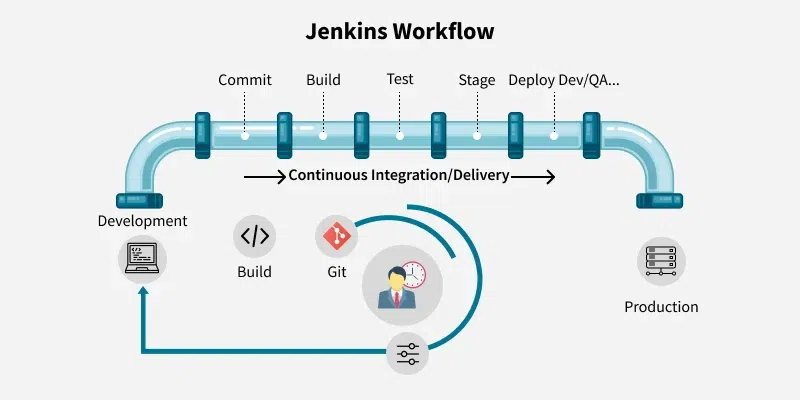
- Development: Developers write or modify the application code in the local development environment.
- Commit: The source code is committed to a version control system such as Git, triggering the Jenkins pipeline.
- Build: Jenkins retrieves the latest code, compiles the application, and generates build artifacts.
- Test: Automated tests validate the application's functionality, quality, and stability.
- Stage: The validated build is deployed to a staging or QA environment for further verification.
- Deploy (Dev/QA): Jenkins deploys the application to the target development or QA environment.
- Production: After successful validation, the application is deployed to the production environment.
- Continuous Integration/Delivery: Jenkins automates the entire workflow from code commit to deployment, ensuring faster and more reliable software delivery.
Key Features of Jenkins
- Automates Continuous Integration and Continuous Delivery pipelines.
- Supports Pipeline as Code using Jenkinsfile.
- Integrates with Git, Docker, Kubernetes, Maven, Selenium, AWS, and many other tools.
- Supports distributed builds across multiple agents.
- Runs on Windows, Linux, and macOS.
- Supports Java, Python, Node.js, .NET, and many other technologies.
- Offers thousands of plugins to extend functionality.
- Provides build history, logs, notifications, and reporting.
CI/CD in Jenkins
Jenkins automates the software delivery pipeline by integrating code changes, validating applications, and deploying releases efficiently.
Continuous Integration (CI)
Automatically builds and tests code whenever developers commit changes to the repository.
- Integrates code changes frequently to detect issues early.
- Runs automated builds and tests after each commit.
Continuous Delivery (CD)
Prepares validated applications for deployment while allowing manual approval before production.
- Keeps the application in a deployable state.
- Supports manual approval before production deployment.
Continuous Deployment
Automatically releases validated applications to production without manual intervention.
- Deploys successful builds directly to production.
- Enables faster and consistent software releases.
Jenkins Use Cases
- Build Automation: Compiles source code and generates build artifacts.
- Test Automation: Executes automated tests using Selenium, JUnit, TestNG, and other frameworks.
- Continuous Integration: Builds and validates applications whenever code changes are committed.
- Continuous Delivery: Prepares applications for deployment across multiple environments.
- Continuous Deployment: Automatically deploys validated applications to production.
- Release Automation: Streamlines software release and version management.
- Cloud Integration: Integrates with Docker, Kubernetes, AWS, Azure, and Google Cloud.
- Monitoring and Reporting: Tracks build status, test results, and pipeline execution.
Advantages of Jenkins
- Free and open-source automation server.
- Reduces manual effort and human errors.
- Improves software quality through automated testing.
- Enables faster and more frequent software releases.
- Supports scalable distributed build environments.
- Easily integrates with a wide range of development and DevOps tools.
Limitations of Jenkins
- Initial setup and configuration can be complex.
- Managing numerous plugins may increase maintenance effort.
- Large Jenkins environments require regular monitoring and optimization.
- Pipeline scripting may require knowledge of Groovy.
- User interface is less modern compared to some newer CI/CD tools.
