
A self-referential structure is a structure that contains one or more pointers to the same type of structure as one of its members. These pointers allow multiple structure objects to be linked together, making them the foundation of many dynamic data structures.
- Contains one or more pointers to the same structure type.
- Commonly used to create linked lists, trees, graphs, and other dynamic data structures.
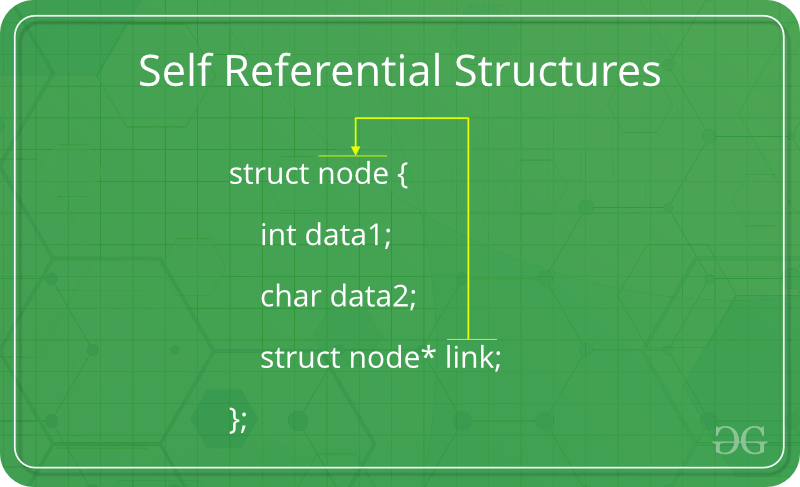
The above diagram shows a structure where the member link is a pointer to another object of the same structure type.
Syntax
struct structure_name {
data_type member1;
data_type member2;
struct structure_name* pointer_name;
};
Here,
- member1 and member2 are normal data members.
- pointer_name stores the address of another object of the same structure.
#include <iostream>
using namespace std;

struct Node {
    int data1;
    char data2;
    Node* link;
};

int main()
{
    Node obj;

    obj.data1 = 10;
    obj.data2 = 'A';
    obj.link = nullptr;

    return 0;
}
// Define the 'Node' class
class Node {
    // Data members to store the data
    int data1;
    int data2;

    // Reference to the next node
    Node link;

    // Constructor to initialize the data members
    public Node(int data1, int data2)
    {
        this.data1 = data1;
        this.data2 = data2;
        this.link = null;
    }

    // Default constructor
    public Node()
    {
        this.data1 = 0;
        this.data2 = 0;
        this.link = null;
    }
}

// Main class to demonstrate the creation of Node instance
public class Main {
    public static void main(String[] args)
    {
        // Create an instance of the 'Node' class using the
        // default constructor
        Node ob = new Node();

        // Optionally, you can print the node's data to
        // verify
        System.out.println("Data1: " + ob.data1
                           + ", Data2: " + ob.data2);
    }
}
class node:
    def __init__(self):
        self.data1 = 0
        self.data2 = ''
        self.link = None


if __name__ == '__main__':
    ob = node()
// Define the 'node' object
class node {
    constructor(data1, data2) {
        this.data1 = data1;
        this.data2 = data2;
        this.link = null;
    }
}
// Create an instance of the 'Node' object
let ob = new Node();
Explanation: In the above example, link is a pointer to another object of type Node. Therefore, Node is a self-referential structure.
Note: Always initialize self-referential pointers to nullptr (or NULL in older C++ versions) before using them.
Types of Self Referential Structures
Self-referential structures can be classified based on the number of self-pointers they contain. The choice of structure depends on how many connections each node needs to maintain.
Self Referential Structure with Single Link
A self-referential structure with a single link contains one pointer that points to another object of the same structure type.
- Contains a single self-pointer to connect one node to another.
- Each node can directly reference only one next node.
- Commonly used to implement singly linked lists.
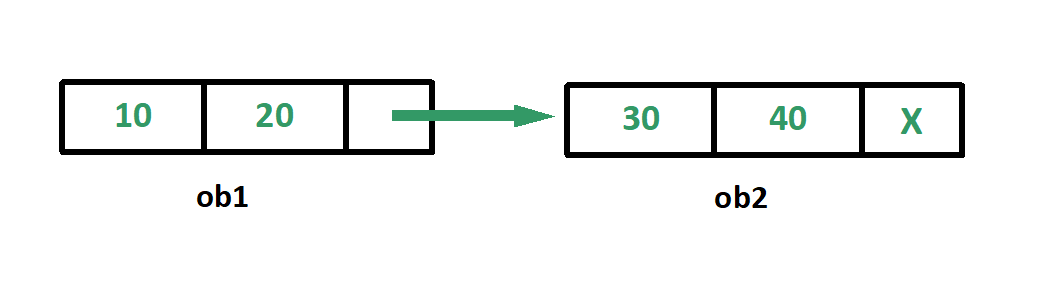
Example: The following program creates two structure objects and links them using a single self-pointer.
#include <stdio.h>

struct node {
    int data1;
    char data2;
    struct node* link;
};

int main()
{
    struct node ob1; // Node1

    // Initialization
    ob1.link = NULL;
    ob1.data1 = 10;
    ob1.data2 = 20;

    struct node ob2; // Node2

    // Initialization
    ob2.link = NULL;
    ob2.data1 = 30;
    ob2.data2 = 40;

    // Linking ob1 and ob2
    ob1.link = &ob2;

    // Accessing data members of  ob2 using ob1
    printf("%d", ob1.link->data1);
    printf("\n%d", ob1.link->data2);
    return 0;
}
// java implementation of above approach
public class Main {
    static class Node {
        int data1;
        int data2;
        Node link;
    }

    public static void main(String[] args)
    {
        Node ob1 = new Node(); // Node1

        // Initialization
        ob1.link = null;
        ob1.data1 = 10;
        ob1.data2 = 20;

        Node ob2 = new Node(); // Node2

        // Initialization
        ob2.link = null;
        ob2.data1 = 30;
        ob2.data2 = 40;

        // Linking ob1 and ob2
        ob1.link = ob2;

        // Accessing data members of  ob2 using ob1
        System.out.println(ob1.link.data1);
        System.out.println(ob1.link.data2);
    }
}
// This code is implemented by Chetan Bargal
class node:
    def __init__(self):
        self.data1=0
        self.data2=0
        self.link=None

if __name__ == '__main__':
    ob1=node() # Node1

    # Initialization
    ob1.link = None
    ob1.data1 = 10
    ob1.data2 = 20

    ob2=node() # Node2

    # Initialization
    ob2.link = None
    ob2.data1 = 30
    ob2.data2 = 40

    # Linking ob1 and ob2
    ob1.link = ob2

    # Accessing data members of  ob2 using ob1
    print(ob1.link.data1)
    print(ob1.link.data2)
using System;

public class MainClass {
    public class Node {
        public int data1;
        public int data2;
        public Node link;
    }

    public static void Main(string[] args)
    {
        Node ob1 = new Node(); // Node1

        // Initialization
        ob1.link = null;
        ob1.data1 = 10;
        ob1.data2 = 20;

        Node ob2 = new Node(); // Node2

        // Initialization
        ob2.link = null;
        ob2.data1 = 30;
        ob2.data2 = 40;

        // Linking ob1 and ob2
        ob1.link = ob2;

        // Accessing data members of  ob2 using ob1
        Console.WriteLine(ob1.link.data1);
        Console.WriteLine(ob1.link.data2);
    }
}
class node {
  constructor() {
    this.data1 = 0;
    this.data2 = 0;
    this.link = null;
  }
}

// Create node1
let ob1 = new node();

// Initialization
ob1.link = null;
ob1.data1 = 10;
ob1.data2 = 20;

// Create node2
let ob2 = new node();

// Initialization
ob2.link = null;
ob2.data1 = 30;
ob2.data2 = 40;

// Linking ob1 and ob2
ob1.link = ob2;

// Accessing data members of ob2 using ob1
console.log(ob1.link.data1);
console.log(ob1.link.data2);
Output
30
40
Explanation
- obj1.link stores the address of obj2.
- Using obj1.link, we can access the members of obj2.
- The last node stores nullptr to indicate the end of the link.
Self Referential Structure with Multiple Links
A self-referential structure with multiple links contains two or more self-pointers, allowing a node to connect with multiple nodes.
- Contains multiple self-pointers, such as next and prev.
- Allows traversal in multiple directions or connections to multiple nodes.
- Used to build advanced data structures like doubly linked lists, trees, and graphs.
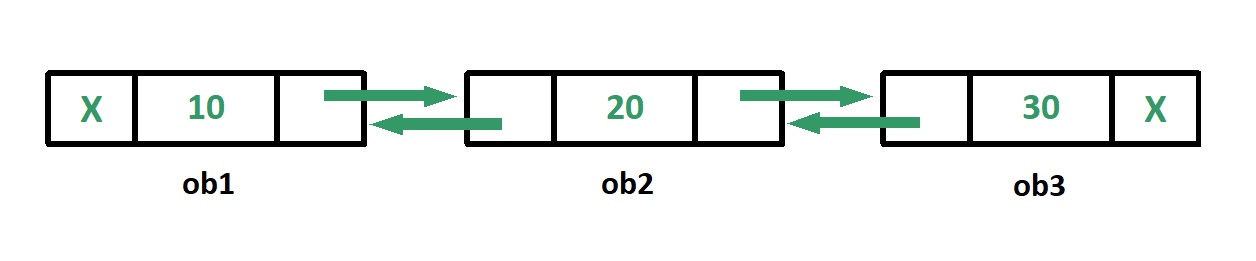
Example: The following program connects multiple structure objects using two self-pointers (prev_link and next_link).
#include <stdio.h>

struct node {
    int data;
    struct node* prev_link;
    struct node* next_link;
};

int main()
{
    struct node ob1; // Node1

    // Initialization
    ob1.prev_link = NULL;
    ob1.next_link = NULL;
    ob1.data = 10;

    struct node ob2; // Node2

    // Initialization
    ob2.prev_link = NULL;
    ob2.next_link = NULL;
    ob2.data = 20;

    struct node ob3; // Node3

    // Initialization
    ob3.prev_link = NULL;
    ob3.next_link = NULL;
    ob3.data = 30;

    // Forward links
    ob1.next_link = &ob2;
    ob2.next_link = &ob3;

    // Backward links
    ob2.prev_link = &ob1;
    ob3.prev_link = &ob2;

    // Accessing  data of ob1, ob2 and ob3 by ob1
    printf("%d\t", ob1.data);
    printf("%d\t", ob1.next_link->data);
    printf("%d\n", ob1.next_link->next_link->data);

    // Accessing data of ob1, ob2 and ob3 by ob2
    printf("%d\t", ob2.prev_link->data);
    printf("%d\t", ob2.data);
    printf("%d\n", ob2.next_link->data);

    // Accessing data of ob1, ob2 and ob3 by ob3
    printf("%d\t", ob3.prev_link->prev_link->data);
    printf("%d\t", ob3.prev_link->data);
    printf("%d", ob3.data);
    return 0;
}
public class Main {
    public static void main(String[] args)
    {
        // Create nodes
        Node ob1 = new Node(); // Node1
        Node ob2 = new Node(); // Node2
        Node ob3 = new Node(); // Node3

        // Initialize data for each node
        ob1.data = 10;
        ob2.data = 20;
        ob3.data = 30;

        // Set forward links
        ob1.next_link = ob2;
        ob2.next_link = ob3;

        // Set backward links
        ob2.prev_link = ob1;
        ob3.prev_link = ob2;

        // Accessing data of ob1, ob2 and ob3 by ob1
        System.out.println(ob1.data + "\t"
                           + ob1.next_link.data + "\t"
                           + ob1.next_link.next_link.data);

        // Accessing data of ob1, ob2 and ob3 by ob2
        System.out.println(ob2.prev_link.data + "\t"
                           + ob2.data + "\t"
                           + ob2.next_link.data);

        // Accessing data of ob1, ob2 and ob3 by ob3
        System.out.println(ob3.prev_link.prev_link.data
                           + "\t" + ob3.prev_link.data
                           + "\t" + ob3.data);
    }
}

class Node {
    int data;
    Node prev_link;
    Node next_link;
}
class node:
    def __init__(self):
        self.data = 0
        self.prev_link = None
        self.next_link = None


if __name__ == '__main__':
    ob1 = node()  # Node1

    # Initialization
    ob1.prev_link = None
    ob1.next_link = None
    ob1.data = 10

    ob2 = node()  # Node2

    # Initialization
    ob2.prev_link = None
    ob2.next_link = None
    ob2.data = 20

    ob3 = node()  # Node3

    # Initialization
    ob3.prev_link = None
    ob3.next_link = None
    ob3.data = 30

    # Forward links
    ob1.next_link = ob2
    ob2.next_link = ob3

    # Backward links
    ob2.prev_link = ob1
    ob3.prev_link = ob2

    # Accessing  data of ob1, ob2 and ob3 by ob1
    print(ob1.data, end='\t')
    print(ob1.next_link.data, end='\t')
    print(ob1.next_link.next_link.data)

    # Accessing data of ob1, ob2 and ob3 by ob2
    print(ob2.prev_link.data, end='\t')
    print(ob2.data, end='\t')
    print(ob2.next_link.data)

    # Accessing data of ob1, ob2 and ob3 by ob3
    print(ob3.prev_link.prev_link.data, end='\t')
    print(ob3.prev_link.data, end='\t')
    print(ob3.data)
class Node {
    constructor(data) {
        this.data = data;
        this.prev_link = null;
        this.next_link = null;
    }
}

function main() {
    // Create nodes
    let ob1 = new Node(); // Node1
    let ob2 = new Node(); // Node2
    let ob3 = new Node(); // Node3

    // Initialize data for each node
    ob1.data = 10;
    ob2.data = 20;
    ob3.data = 30;

    // Set forward links
    ob1.next_link = ob2;
    ob2.next_link = ob3;

    // Set backward links
    ob2.prev_link = ob1;
    ob3.prev_link = ob2;

    // Accessing data of ob1, ob2, and ob3 by ob1
    console.log(ob1.data + "\t" + ob1.next_link.data + "\t" + ob1.next_link.next_link.data);

    // Accessing data of ob1, ob2, and ob3 by ob2
    console.log(ob2.prev_link.data + "\t" + ob2.data + "\t" + ob2.next_link.data);

    // Accessing data of ob1, ob2, and ob3 by ob3
    console.log(ob3.prev_link.prev_link.data + "\t" + ob3.prev_link.data + "\t" + ob3.data);
}

// Execute the main function
main();
Output
10    20    30
10    20    30
10    20    30
Explanation
- Each node contains two self-pointers: prev and next.
- These pointers allow traversal in both forward and backward directions.
- Such structures are widely used to implement doubly linked lists and similar data structures.
Applications of Self Referential Structures
Self-referential structures are the building blocks of many dynamic data structures.
- Linked Lists: Each node stores data along with a pointer to the next (and sometimes previous) node.
- Stacks: Dynamic stacks can be implemented using linked list nodes connected through self-pointers.
- Queues: Self-referential structures make it easy to perform efficient enqueue and dequeue operations.
- Trees: Each node contains pointers to its child nodes, forming hierarchical structures.
- Graphs: Nodes can maintain pointers to multiple connected nodes, representing complex relationships.
