

Apache JMeter is an open-source tool developed by the Apache Software Foundation for load and performance testing. It helps evaluate the speed, stability, and reliability of web applications, APIs, databases, and servers by simulating multiple virtual users. JMeter is widely used to measure application performance under different workload conditions.
- Supports multiple protocols including HTTP, HTTPS, FTP, JDBC, REST, and SOAP.
- Simulates multiple virtual users to evaluate application performance.
- Generates graphical reports and detailed performance metrics.
Example: An e-commerce website expects 5,000 users during a sale. Apache JMeter can simulate thousands of virtual users to verify whether the website can handle the expected traffic without performance issues.
Architecture of Apache JMeter
Apache JMeter follows a modular architecture that allows users to create, execute, and analyze performance tests efficiently.
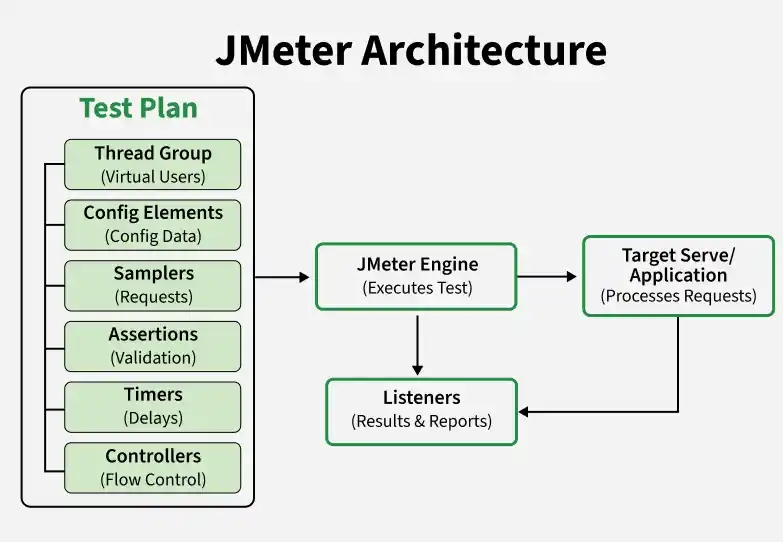
Components of Apache JMeter Architecture
- Test Plan: The main container that organizes all test elements such as Thread Groups, Samplers, Listeners, and Assertions. It defines the overall test structure.
- Thread Group: Represents virtual users and controls user count, ramp-up time, and loop execution.
- Samplers: Send requests to the server using protocols like HTTP, FTP, JDBC, and APIs.
- Listeners: Collect and display test results in tables, graphs, and reports.
- Assertions: Validate responses to ensure the application behaves as expected.
- Configuration Elements: Store reusable settings such as server details and request defaults.
- Timers: Introduce delays between requests to simulate real user behavior.
- Controllers: Manage the execution flow and order of test requests.
Working Process of Apache JMeter
Apache JMeter simulates virtual users that send requests to a target server and analyzes the responses to measure application performance.
- Create a Test Plan to define the test structure.
- Add a Thread Group to configure virtual users.
- Configure Samplers to send requests to the target server.
- Add Configuration Elements, Timers, and Assertions as required.
- Execute the test to simulate the desired workload.
- The server processes the requests and returns responses.
- JMeter collects metrics such as response time, throughput, latency, and error rate.
- Listeners generate reports, graphs, and dashboards for performance analysis.
Types of Testing Supported by Apache JMeter
Apache JMeter supports multiple testing approaches to evaluate the performance, reliability, scalability, and basic functionality of applications, servers, databases, and APIs.
- Load Testing: Checks how an application performs under expected user traffic and normal workload conditions.
- Stress Testing: Evaluates system behavior under extremely high traffic to identify breaking points and system stability.
- Performance Testing: Measures application response time, throughput, latency, and resource utilization.
- Scalability Testing: Verifies whether the application can efficiently handle increasing numbers of users or requests.
- Spike Testing: Checks how the system responds to sudden increases and decreases in user traffic.
- Endurance (Soak) Testing: Measures application performance over an extended period to detect memory leaks and performance degradation.
- API Testing: Tests REST APIs, SOAP web services, and other APIs by validating requests, responses, and performance.
- Database Testing: Evaluates database performance by executing queries and measuring response times under different workloads.
- Distributed Load Testing: Simulates a large number of virtual users by distributing the test load across multiple JMeter machines.
- Functional Validation: Performs basic validation of API responses using assertions to verify expected results.
Applications of Apache JMeter
Apache JMeter is widely used to evaluate the performance and scalability of various applications, services, and infrastructure components.
- Used for performance testing of web applications under different user loads.
- Used for API performance testing of REST, SOAP, and microservices.
- Used to measure database performance by executing SQL queries under different workloads.
- Used for testing cloud-based and distributed applications.
- Used to evaluate the performance of FTP servers, messaging services (JMS), and network protocols such as TCP.
- Used to simulate thousands of virtual users before product releases or high-traffic events.
- Used to identify performance bottlenecks and improve application scalability and reliability.
Limitations of Apache JMeter
Apache JMeter has some limitations related to resource usage, GUI performance, and support for certain testing scenarios.
- Requires high memory and CPU resources during large-scale load testing.
- GUI mode may become slow and less efficient when executing heavy workloads. Non-GUI mode is recommended for large tests.
- Provides limited support for desktop application UI testing.
- Advanced reporting, monitoring, and analysis features may require additional plugins or external tools.
- Managing and maintaining complex test plans and scripts can become difficult in large projects.
- Does not support real browser rendering, making it unsuitable for front-end performance and user interface testing.
- Distributed testing setup and configuration can be complex for very large-scale performance tests.
