

Java 8, released by Oracle in March 2014, is one of the most significant versions of Java. It introduced several modern programming features such as Lambda Expressions, Stream API, Functional Interfaces, Optional Class, and the new Date & Time API, making Java code more concise, readable, and efficient.
- Introduced Functional Interfaces with support for lambda expressions.
- Added Default and Static Methods in interfaces.
- Introduced the Optional Class to reduce NullPointerException
Java 8 Interview Questions for Freshers
Here in this section we have compiled some Java 8 basic questions.
1. What features do you know or use in Java 8?
Java 8 introduced several powerful features that make Java code more concise, readable, and efficient. These features support functional programming and improve collection processing and date-time handling.
- Lambda Expressions: Enable writing concise anonymous functions, reducing boilerplate code and making functional programming easier.
- Stream API: Provides a functional way to process collections using operations like filter(), map(), sorted(), and collect().
- Functional Interfaces: Interfaces with a single abstract method, such as Predicate, Function, Consumer, and Supplier, used with lambda expressions.
- Method References: Allow referring to existing methods using the :: operator instead of writing lambda expressions.
- Default and Static Methods: Allow interfaces to include method implementations without affecting existing implementations.
- Optional Class: Helps avoid NullPointerException by representing optional values and providing methods like isPresent() and orElse().
- Date and Time API (java.time): Introduces immutable classes like LocalDate, LocalTime, and LocalDateTime for better date and time handling.
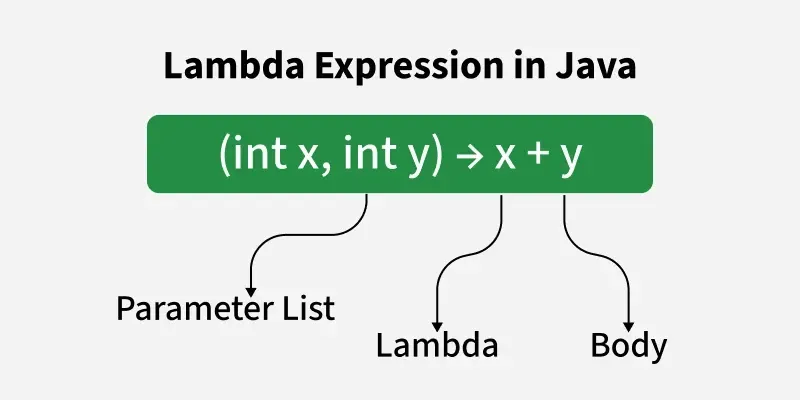
2. What is Lambda Expression?
Lambda Expression basically shows an instance of functional interface in other words you could say that it provides a clear and concise way to represent a method of performing functional interface using an expression Lambda Expressions have been added in Java 8 and provide the functionality below.
- This enables to treat any functionality as a method argument, and code as data.
- A Function that can be created independently of any class.
- Lambda expression can be moved around like an object and it can be executed on demand.
3. What is Stream API in Java 8?
Stream API is introduced in Java 8 and it is used to process collections of objects with the functional style of coding using the lambda expression. So to understand what is stream API you must have knowledge of both lambda and functional interface.
- Supports operations such as filter(), map(), sorted(), distinct(), reduce(), and collect().
- Does not store data; it processes data from a source like collections or arrays.
- Does not modify the original collection.
4. What is Functional Interface in Java 8?
An interface with only one abstract method is known as a functional interface but there is no restriction, in a functional interface you can have n number of default methods and static methods.
- Can have multiple default and static methods.
- Can also inherit methods from the Object class.
- Supports Lambda Expressions and Method References.
5. What is Stream in Java 8?
A stream is a sequence of objects that helps different methods that can be pipelined to produce the desired outcome. The features of Java Stream are:
- Stream is not a data structure rather it takes input from Collections, Arrays, I/O channels.
- Stream doesn't change the original data structure they only provide the result as per the pipeline methods.
6. When to use map and flatMap?
map(): It is used where we have to map the elements of a particular collection to a specific function, and then we need to return the stream that contains the updated results.
Example: Multiply all the elements of a list by 3 and return the updated list.
flatMap(): It is used where we have to transform or flatten the string, as we can't flatten our string using map().
Example: Get the first Character of all the String present in a List of Strings and return the result in form of a stream.
7. Can we extend a functional interface from another functional interface?
Yes, a functional interface can extend another functional interface, provided the resulting interface still has only one abstract method. If extending another interface introduces more than one abstract method, the interface will no longer be a functional interface and cannot be implemented using a lambda expression.
- If multiple inherited abstract methods have the same signature, it is still considered a functional interface.
- If different abstract methods are inherited, the interface is not a functional interface.
- The @FunctionalInterface annotation helps the compiler detect violations.
8. What are the advantages of Lambda Expression?
Lambda Expressions were introduced in Java 8 to support functional programming. They provide a concise way to implement functional interfaces without creating anonymous inner classes, making the code more readable, maintainable, and efficient.
- Avoid writing anonymous implementation
- Saves a lot of code
- Code is directly readable without interpretation
9. Differentiate Between Comparable and Comparator in Java.
Java provides two interfaces for configuring objects using class data members:
| Feature | Comparable | Comparator |
|---|---|---|
| Package | java.lang | java.util |
| Purpose | Defines the natural ordering of objects | Defines custom or multiple sorting orders |
| Implemented By | The class whose objects are being sorted | A separate class, anonymous class, or lambda expression |
| Method | compareTo(T obj) | compare(T obj1, T obj2) |
| Number of Sorting Orders | Only one natural ordering | Multiple custom sorting orders |
| Modification Required | Yes, the original class must be modified | No, the original class remains unchanged |
| Sorting Method | Collections.sort(list) | Collections.sort(list, comparator) |
| Java 8 Support | Does not directly use lambdas | Supports lambda expressions and method references |
10. Tell a few functional interfaces which are already there before Java 8?
Before Java 8, several interfaces already had a single abstract method and became functional interfaces in Java 8.
- Runnable: Executes a task (
run()). - Callable<V>: Executes a task and returns a result (
call()). - Comparator<T>: Defines custom sorting (
compare()). - Comparable<T>: Defines natural sorting (compareTo()).
11. What are all functional interfaces introduced in Java 8?
Java 8 introduced several built-in functional interfaces in the java.util.function package to support lambda expressions and functional programming.
Common Functional Interfaces
- Function<T, R>: Accepts one input and returns a result.
- Predicate<T>: Tests a condition and returns
trueorfalse. - Consumer<T>: Accepts an input and performs an operation without returning a value.
- Supplier<T>: Supplies a value without taking any input.
- UnaryOperator<T>: Operates on a single operand and returns the same type.
- BinaryOperator<T>: Operates on two operands of the same type and returns the same type.
- BiFunction<T, U, R>: Accepts two inputs and returns a result.
- BiPredicate<T, U>: Tests a condition on two inputs.
- BiConsumer<T, U>: Accepts two inputs and performs an operation.
12. Tell a few stream methods you used in your project?
Some commonly used Java 8 Stream methods in real-world projects are:
- filter(): Filters elements based on a condition.
- map(): Transforms each element into another form.
- flatMap(): Flattens nested collections into a single stream.
- sorted(): Sorts elements in natural or custom order.
- distinct(): Removes duplicate elements.
- forEach(): Performs an action on each element.
- collect(): Collects stream elements into a
List,Set, orMap. - groupingBy(): Groups elements based on a property.
- reduce(): Combines all elements into a single result.
Note: The interviewer might ask you to explain some methods in detail.
For more details, refer to this article: Java 8 Stream
13. What are the disadvantages of Lambda expression?
- Difficult to debug because stack traces are less readable.
- Complex lambda expressions can reduce code readability.
- Can only be used with functional interfaces (interfaces with one abstract method).
- Not suitable for implementing large or complex business logic.
- Local variables used inside a lambda must be final or effectively final.
- May have a learning curve for developers new to functional programming.
14. What is Optional Class in Java 8?
In Java 8, Optional Class is a container object.
- The Optional class used to represent a value that may be present or may not be.
- This class helps in avoiding null pointer exceptions by providing methods to check the presence of a value before accessing it.
- This helps null values handling more effectively.
Example:
Optional<String> optionalName = Optional.ofNullable("John");

// Check if value is present
if (optionalName.isPresent()) {
    System.out.println("Name is present: " + optionalName.get());
} else {
    System.out.println("Name is not present");
}
15. Provide Some Optional Methods in Java 8.
Some Optional methods are described below.
of: It creates an Optional with a non-null value.ofNullable: It creates an Optional with a given nullable value.empty: It creates an empty Optional.isPresent: This checks whether the Optional contains a non-null value.get: It gets the value if present, otherwise it throws an exception i.e. NoSuchElementException.orElse: It returns the value if present, otherwise returns the specified default value.orElseGet: It returns the value if present, otherwise it returns the result of invoking the supplier function.orElseThrow: It returns the value if present, otherwise it throws an exception produced by the provided supplier.map: It applies a function to the value if present and return a new Optional with the result, or return an empty Optional if no value is present.filter: It applies a predicate to the value if present and return an Optional with the value if it matches the predicate, otherwise return an empty Optional.
16. What is Date-Time API in Java 8?
The Date-Time API in Java 8 provides a set of classes for date-time conversions, including timelines and advanced programming.
- It imports the java.time package, and this package contains LocalDate, LocalTime, LocalDateTime, ZonedDateTime, and other classes.
- This API provides better robustness, consistency and thread safety compared to legacy Date and Calendar classes.
17. What is Optional equals() method in Java?
In Java, the equals() method of the Optional class is used to compare two Optional objects for equality.
- It returns true if both the Optional objects contains the same value.
- And, it returns false if both does not contain the same value.
Illustration:
import java.util.Optional;

public class Main
{
    public static void main(String args[])
{
        // Creating Optional objects
        Optional<String> opt1 = Optional.of("Sweta");
        Optional<String> opt2 = Optional.of("Sweta");
        Optional<String> opt3 = Optional.of("Dash");

        // Comparing Optional objects
        System.out.println(opt1.equals(opt2));   // true
        System.out.println(opt1.equals(opt3));   // false
    }
}
18. What is Default Methods In Java 8?
In Java 8, Default methods allows interfaces to have method implementations. This means that interfaces can contain concrete methods along with the abstract methods. The Default methods are defined using the default keyword.
Illustration:
interface Vehicle
{
    // Abstract method
    void start();

    // Default method
    default void stop()
{
        System.out.println("Vehicle stopped");
    }
}

class Car implements Vehicle
{
    @Override
    public void start()
{
        System.out.println("Car started");
    }
}

public class Main
{
    public static void main(String args[])
{
        Car car = new Car();
        car.start(); // Output: Car started
        car.stop();  // Output: Vehicle stopped
    }
}
19. How are functional interfaces and Lambda Expressions related?
Functional interfaces in Java are interfaces that only contains one abstract method.
- Lambda expressions provide a simple way to implement functional interfaces.
- Lambda expressions can be used wherever functional interfaces are needed.
- This allows us to write expressive and concise code.
Illustration:
// Functional interface
interface MyFunctionalInterface {
    void myMethod();
}

public class Main {
    public static void main(String[] args) {
        // Lambda expression for implemention of the functional interface
        MyFunctionalInterface myLambda = () -> System.out.println("Hello Lambda!");

        // calling method, using lambda expression
        myLambda.myMethod();
    }
}
20. What is ArrayList forEach() method in Java?
In Java, the forEach() method is used to iterate over each ArrayList element.
- It performs specified operation for each element.
- It simplifies iteration and shortens the code.
- It takes a
Consumeras a parameter, which represents the action to be performed on each element.
Example:
ArrayList<Integer> numbers = new ArrayList<>();
numbers.add(1);
numbers.add(2);
numbers.add(3);
numbers.forEach(num -> System.out.println(num));
21. What is the difference between Collection and Stream in Java 8?
Collection and Stream are both used to work with groups of objects, but they serve different purposes. A Collection is used to store and manage data in memory, whereas a Stream is used to process and manipulate data in a functional and declarative manner.
| Feature | Collection | Stream |
|---|---|---|
| Purpose | Stores and manages data | Processes and manipulates data |
| Data Storage | Stores elements in memory | Does not store elements |
| Traversal | Can be traversed multiple times | Can be traversed only once |
| Modification | Allows adding, removing, and updating elements | Does not modify the original data |
| Execution | Immediate (eager) | Lazy (processed only when a terminal operation is invoked) |
| Iteration | External iteration (using loops or iterators) | Internal iteration |
| Parallel Processing | Manual implementation | Supports parallel processing using parallelStream() |
| Java Version | Since Java 1.2 | Introduced in Java 8 |
22. What is Lazy Evaluation in Stream API?
Lazy evaluation means intermediate operations such as filter(), map(), and sorted() are not executed immediately. They are executed only when a terminal operation like collect(), count(), or forEach() is called.
- Terminal operation triggers execution.
- Improves performance.
- Avoids unnecessary computations.
Example:
list.stream()
.filter(x -> x > 10)
.map(x -> x * 2)
.collect(Collectors.toList());
23. What are Intermediate and Terminal Operations in Stream API?
In Java 8 Stream API, stream operations are classified into Intermediate Operations and Terminal Operations. Intermediate operations transform or filter the stream and return another stream, while terminal operations produce the final result or perform an action, ending the stream pipeline.
- Intermediate Operations: Intermediate operations return a new Stream and are lazy, meaning they are not executed until a terminal operation is invoked.
- Terminal Operations: Terminal operations consume the stream and produce a final result such as a value, collection, or side effect. Once a terminal operation is executed, the stream cannot be reused.
| Feature | Intermediate Operations | Terminal Operations |
|---|---|---|
| Purpose | Transform or filter data | Produce the final result |
| Return Type | Stream | Value, Collection, Optional, or void |
| Execution | Lazy (not executed immediately) | Triggers execution of the stream pipeline |
| Chaining | Can be chained multiple times | Ends the stream pipeline |
| Reusability | Returns another Stream | Stream cannot be reused after execution |
| Examples | filter(), map(), sorted(), distinct() | collect(), forEach(), reduce(), count() |
24. What is Collectors in Java 8?
Collectors is a utility class provided in the java.util.stream package that contains predefined implementations of the Collector interface. It is mainly used with the collect() terminal operation to accumulate, transform, summarize, and group the elements of a stream into different data structures such as List, Set, Map, or a single aggregated result.
- Simplifies data aggregation and transformation.
- Eliminates the need for manual iteration.
Commonly Used Collectors
| Collector Method | Purpose |
|---|---|
toList() | Collects elements into a List |
toSet() | Collects elements into a Set |
toMap() | Collects elements into a Map |
joining() | Concatenates String elements |
groupingBy() | Groups elements based on a classifier |
partitioningBy() | Partitions elements into two groups based on a condition |
counting() | Counts the number of elements |
summarizingInt() | Calculates count, sum, average, min, and max |
mapping() | Applies a mapping function before collecting |
25. What is the reduce() method in Stream API?
The reduce() method is a terminal operation in the Java 8 Stream API that combines all the elements of a stream into a single result using an accumulator function. It repeatedly applies the specified operation to the stream elements until only one value remains. It is commonly used for operations such as calculating the sum, product, maximum, minimum, or concatenating strings.
- Supports both sequential and parallel streams.
- Does not modify the original collection.
Java 8 Interview Questions for Experienced
Once you have gained confidence after solving the basic questions, let's increase the level of questions. Here in this section, we have listed more complex Java 8 questions.
26. What is the difference between Collection and Stream in Java 8?
Collection and Stream are both used to work with groups of objects, but they serve different purposes. A Collection is used to store and manage data in memory, whereas a Stream is used to process and manipulate data in a functional and declarative manner.
| Feature | Collection | Stream |
|---|---|---|
| Purpose | Stores and manages data | Processes and manipulates data |
| Data Storage | Stores elements in memory | Does not store elements |
| Traversal | Can be traversed multiple times | Can be traversed only once |
| Modification | Allows adding, removing, and updating elements | Does not modify the original data |
| Execution | Immediate (eager) | Lazy (processed only when a terminal operation is invoked) |
| Iteration | External iteration (using loops or iterators) | Internal iteration |
| Parallel Processing | Manual implementation | Supports parallel processing using parallelStream() |
| Java Version | Since Java 1.2 | Introduced in Java 8 |
27. What is the difference between findFirst() and findAny()?
Both findFirst() and findAny() are terminal operations in the Java 8 Stream API that return an Optional<T> containing an element from the stream.
| Feature | findFirst() | findAny() |
|---|---|---|
| Purpose | Returns the first element | Returns any element from the stream |
| Encounter Order | Preserves encounter order | Does not guarantee encounter order |
| Parallel Streams | May be slower because it maintains order | Faster and optimized for parallel streams |
| Return Type | Optional<T> | Optional<T> |
| Best Use Case | When the first element is required | When any matching element is sufficient |
28. How to find duplicate elements in a Stream in Java?
The following program finds duplicate elements in a Java Stream by using a HashSet to track previously seen elements.
import java.util.*;
import java.util.stream.*;

public class GfG
{

    // Function to find the
    // duplicates in a Stream
    public static <T> Set<T>
    findDuplicateInStream(Stream<T> stream)
    {

        // Set for storing the duplicate elements
        Set<T> items = new HashSet<>();

        // Returning the set of duplicate elements
        return stream

            // Set.add() returns false
            // if the element was
            // already present in the set.
            // Hence filter such elements
            .filter(n -> !items.add(n))

            // Collect duplicate elements
            // in the set
            .collect(Collectors.toSet());
    }

    // Driver code
    public static void main(String args[])
    {

        // Initial stream
        Stream<Integer> stream
            = Stream.of(2, 17, 5,
                        20, 17, 30,
                        4, 23, 59, 23);

        // Print the found duplicate elements
        System.out.println(
            findDuplicateInStream(stream));
    }
}
Output
[17, 23]
Explanation: The program uses a HashSet to store unique elements while traversing the stream. If Set.add() returns false, the element is already present and is identified as a duplicate. Finally, all duplicate elements are collected into a Set using Collectors.toSet().
29. What is the difference between map() and peek()?
Both map() and peek() are intermediate operations in the Java 8 Stream API, but they serve different purposes.
| Feature | map() | peek() |
|---|---|---|
| Purpose | Transforms each element into a new value | Performs an action without modifying elements |
| Returns | A stream of transformed elements | The same stream after performing the action |
| Modification | Yes, transforms the data | No, does not modify the data |
| Primary Use | Data transformation | Debugging, logging, or inspecting elements |
| Function Used | Function<T, R> | Consumer<T> |
| Execution | Intermediate (lazy) | Intermediate (lazy) |
29. Count occurrence of a given character in a string using Stream API in Java.
The following program counts the number of occurrences of a specific character in a string using the Java 8 Stream API.
import java.util.stream.*;

class GFG
{
    public static long count(String s, char ch)
    {
        // converting the string to an IntStream of the character codes,
        // filter by the character code of the specified character,
        // and count the occurrences
        return s.chars()
            .filter(c -> c == ch)
            .count();
    }

    // Main method to test count method
    public static void main(String args[])
    {
        String str = "geeksforgeeks";
        char c = 'g';
        System.out.println(count(str, c));
    }
}
Output
2
Explanation: The chars() method converts the string into an IntStream of character values. The filter() method selects only the matching character, and count() returns the total number of occurrences.
30. How to get Slice of a Stream in Java?
The following program retrieves a slice of a stream between the specified start and end indices using skip() and limit().
 import java.util.*;
import java.util.stream.Stream;

class GFG
{

    // Method to get a slice of a stream from startIndex to endIndex
    public static <T> Stream<T>
    getSliceOfStream(Stream<T> stream, int startIndex,
                                        int endIndex)
    {
        return stream
            // Skip elements until the startIndex
            .skip(startIndex)
            // Limit the stream to elements between startIndex and endIndex
            .limit(endIndex - startIndex + 1);
    }

    public static void main(String args[])
    {
        // Create a list of integers
        List<Integer> list = new ArrayList<>();
        for (int i = 10; i <= 19; i++)
            list.add(i);

        // Get a stream from the list
        Stream<Integer> intStream = list.stream();

        // Print the original list
        System.out.println("List: " + list);

        // Get a slice of the stream from index 3 to 7
        Stream<Integer>
            sliceOfIntStream = getSliceOfStream(intStream, 3, 7);

        // Print the slice of the stream
        System.out.println("\nSlice of Stream:");
        sliceOfIntStream.forEach(System.out::println);
    }
}
Output
List: [10, 11, 12, 13, 14, 15, 16, 17, 18, 19]

Slice of Stream:
13
14
15
16
17
Explanation: The skip(startIndex) method ignores the initial elements, while limit(endIndex - startIndex + 1) restricts the stream to the required range. This combination effectively extracts a portion of the stream.
31. How to Reverse elements of a Parallel Stream in Java?
The following program reverses the elements of a parallel stream by collecting them into a list, reversing the list, and converting it back into a stream.
import java.util.*;
import java.util.stream.*;

class GFG
{

    // Generic function to reverse
    // the elements of the parallel stream
    public static <T> Collector<T, ?, Stream<T> > reverseStream()
    {
        return Collectors
            .collectingAndThen(Collectors.toList(),
                            list -> {
                                Collections.reverse(list);
                                return list.stream();
                            });
    }

    // Driver code
    public static void main(String args[])
    {

        // Get the parallel stream
        List<Integer> lists = Arrays.asList(217, 317, 417, 517);
        Stream<Integer> stream = lists.parallelStream();

        // Reverse and print the elements
        stream.collect(reverseStream())
            .forEach(System.out::println);
    }
}
Output
517
417
317
217
Explanation: The stream elements are first collected into a List using Collectors.toList(). The list is reversed using Collections.reverse(), and then converted back into a stream for processing or display.
32. What is Spliterator in Java 8?
Spliterator (Split Iterator) is an advanced iterator introduced in Java 8 for traversing and partitioning elements of a data source. It is primarily used by the Stream API to support efficient sequential and parallel processing. Unlike a regular Iterator, a Spliterator can split its elements into multiple parts, allowing different threads to process them simultaneously.
- Can split data into smaller parts for parallel processing.
- Used internally by the Stream API.
- Supports both sequential and parallel traversal.
Common Methods
| Method | Description |
|---|---|
tryAdvance() | Processes the next element if available |
forEachRemaining() | Processes all remaining elements |
trySplit() | Splits the elements into two Spliterators |
estimateSize() | Returns the estimated number of remaining elements |
characteristics() | Returns the characteristics of the Spliterator |
33. Write a Program to Iterate over a Stream with Indices in Java 8.
The following program demonstrates how to iterate over stream elements along with their indices using IntStream.range().
import java.util.stream.IntStream;

class GFG {
    public static void main(String[] args) {

        // Array of Strings
        String[] array = { "G", "E", "E", "k" };

        // Iterating over the indices of an array
        IntStream
                // Generate indices from 0 to array length
                .range(0, array.length)
                // Map each index to its corresponding string representation
                .mapToObj(index -> String.format("%d -> %s", index, array[index]))
                // print each and every element of the stream
                .forEach(System.out::println);
    }
}
Output
0 -> G
1 -> E
2 -> E
3 -> k
Explanation: IntStream.range() generates indices from 0 to the array length. Each index is mapped to its corresponding element using mapToObj(), and the result is printed using forEach(). This approach provides access to both the index and the value while iterating.
34. What is CompletableFuture?
CompletableFuture is just an extension of the future object introduced in JDK5.
- In Java, CompletableFuture is used for asynchronous programming.
- Asynchronous programming is a method of writing non-blocking code by executing a task on a separate thread than the main application thread.
- And, notifies the main thread of its progress, completion, or failure.
35. Why CompletableFuture why not Future?
- Future cannot be manually completed.
- Multiple Futures can't be chained together.
- We can't combine multiple Futures together.
- No exception handling.
36. What is method reference in Java 8?
Method reference is a concise way to use a lambda expression for calling a method directly. It simplifies the code by providing a shorthand notation. are four types of method references that are listed below:
- Static Method Reference
- Instance Method Reference of a particular object
- Referencing an instance method of an unspecified object belonging to a specific class.
- Constructor Reference.
Example:
numList.stream().filter(n -> n > 5).sorted().forEach(System.out::println);
37. What is MetaSpace in Java 8?
In Java 8, Metaspace stores class metadata in native memory, separate from the heap. It can dynamically expand, overcoming size limitations, and enhances garbage collection efficiency, auto-tuning, and metadata distribution.
- It is used by the JVM to store metadata about loaded classes and methods.
- It replaces the PermGen space, offering dynamic allocation, separate memory management from the heap, and improved garbage collection, thereby mitigating PermGen space errors.
38. What is Java class dependency analyser in Java 8?
The Java Class Dependency Analyzer in Java 8 is a tool for analyzing dependencies between classes in a Java application.
- It helps in understanding the structure and interactions within a codebase.
- Useful for analyzing dependencies and managing code complexity.
- It can provide insights into potential refactoring or optimizations.
- Typically visualized through diagrams or dependency graphs for easier comprehension.
39. What are the characteristics of Spliterator?
A Spliterator provides a set of characteristics that describe the properties of the elements it traverses. These characteristics help the JVM and Stream API optimize sequential and parallel stream processing.
| Characteristic | Description |
|---|---|
| ORDERED | Elements have a defined encounter order. |
| DISTINCT | All elements are unique (no duplicates). |
| SORTED | Elements are sorted according to their natural order or a comparator. |
| SIZED | The exact number of elements is known. |
| SUBSIZED | All Spliterators created by trySplit() are also SIZED. |
| NONNULL | Elements are guaranteed not to be null. |
| IMMUTABLE | The data source cannot be modified during traversal. |
| CONCURRENT | The data source can be safely modified while being traversed. |
40. What are the best practices while using Java 8 Streams?
Java 8 Streams make code concise and expressive, but they should be used carefully to ensure good performance, readability, and maintainability.
Best Practices
- Prefer method references (System.out::println) over lambda expressions when they improve readability.
- Keep stream pipelines short and easy to understand.
- Use map() for transforming data and filter() for filtering data.
- Use peek() only for debugging or logging, not for modifying data.
- Avoid modifying the source collection while processing a stream.
- Use parallel streams only for CPU-intensive tasks and large datasets.
- Avoid stateful lambda expressions because they can lead to unpredictable behavior.
- Use Optional to handle missing values instead of null.
- Close streams created from I/O resources (such as files) using try-with-resources.
- Prefer built-in Collectors instead of writing manual aggregation logic.
