
Unchecked exceptions are exceptions that occur during program execution (runtime) and are not checked by the Java compiler at compile time. They are caused mainly by programming mistakes, such as accessing an invalid array index or using a null object reference. These exceptions belong to the RuntimeException class and its subclasses.
- The compiler does not force programmers to handle them.
- They usually occur due to logical or programming errors.
- They can be handled using a try-catch block to prevent program termination.
Exception Hierarchy
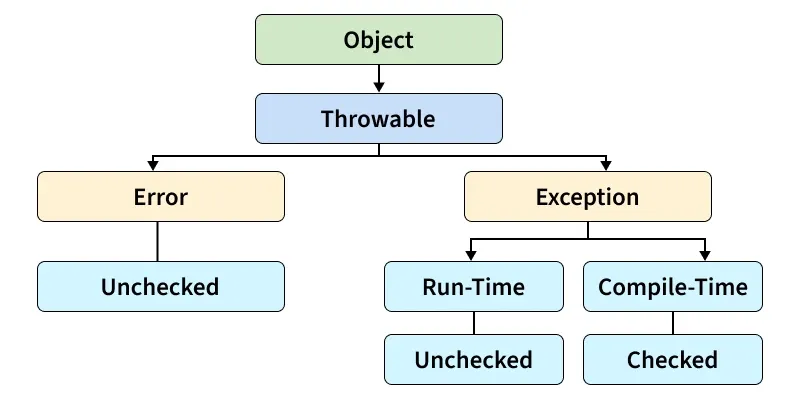
- Object: The root class of all classes in Java.
- Throwable: The parent class of all errors and exceptions that can be thrown.
- Error: Represents serious system-level problems that applications generally cannot recover from.
- Exception: Represents conditions that applications can catch and handle.
- RuntimeException (Unchecked Exception): Occurs at runtime due to programming mistakes and does not require compile-time handling.
- Checked Exception: Checked by the compiler and must be handled using
try-catchorthrows. - Examples of RuntimeException: NullPointerException, ArrayIndexOutOfBoundsException, NumberFormatException, etc.
- Examples of Checked Exception: IOException, ClassNotFoundException, SocketException, SQLException, etc.
Types of Unchecked Exceptions
ArrayIndexOutOfBoundsException
This exception occurs when a program tries to access an array element using an index that is less than 0 or greater than or equal to the array size.
- Occurs while accessing an invalid array index.
- Belongs to the RuntimeException class.
// Importing Classes/Files
import java.io.*;

class GFG {

    // Main Driver Function
    public static void main(String[] args)
    {
        // Array containing 4 elements
        int a[] = { 1, 2, 3, 4 };

        // Try to access elements greater than
        // index size of the array
        System.out.println(a[5]);
    }
}
Explanation: In this example, the program tries to access the 6th element (index 5) of an array that contains only 5 elements (index 0–4). Since the index does not exist, Java throws an ArrayIndexOutOfBoundsException. By handling it with a try-catch block, the program displays a user-friendly message instead of terminating unexpectedly.
Output:

Handling ArrayIndexoutOfBoundException: Try-catch Block we can handle this exception try statement allows you to define a block of code to be tested for errors and catch block captures the given exception object and perform required operations. The program will not terminate.
// Importing Classes/Files
import java.io.*;

public class GFG {

    // Main Driver Method
    public static void main(String[] args)
    {
        // Inserting elements into Array
        int a[] = { 1, 2, 3, 4, 5 };

        // Try block for exceptions
        try {

            // Forcefully trying to access and print
            // element/s beyond indexes of the array

            System.out.println(a[5]);
        }

        // Catch block for catching exceptions
        catch (ArrayIndexOutOfBoundsException e) {

            // Printing display message when index not
            // present in a array is accessed
            System.out.println(
                "Out of index  please check your code");
        }
    }
}
Output:

NullPointerException
This exception occurs when a program tries to access a method or property using an object reference that contains null instead of a valid object.
- One of the most common runtime exceptions.
- Can be avoided by checking for null before accessing objects.
// Importing Classes/Files
import java.io.*;

public class GFG {
    // Main Driver Method
    public static void main(String[] args)
    {

        // Instance of string a has null value
        String a = null;

        // Comparing null value with the string value
        // throw exception and Print
        System.out.println(a.equals("GFG"));
    }
}
Explanation: In this example, the string variable contains a null reference. Calling the equals() method on a null object causes a NullPointerException. The exception is caught using a try-catch block, allowing the program to display an error message and continue execution safely.
Output:


Handling Technique for NullPointerException
// Importing Files/Classes
import java.io.*;

public class GFG {

    // Driver Main Method
    public static void main(String[] args)
    {
        // Assigning NULL to string
        String m = null;

        // Try-Catch Block
        try {

            // Checking the null value with GFG string
            // and throw exception
            if (m.equals("GFG")) {
                // Print String
                System.out.println("YES");
            }
        }

        // Try-Catch Block
        catch (NullPointerException e) {

            // Handles the exception
            System.out.println(
                "Object reference cannot be null");
        }
    }
}
Output:

