
The toString() method of the Object class returns the string representation of an object. Since every Java class directly or indirectly inherits from the Object class, all classes automatically have access to this method.
- Defined in the java.lang.Object class.
- Can be overridden to display meaningful object information.
- Widely used for debugging, logging, and displaying object details.
public class Geeks {

    String name;
    String age;

    Geeks(String name, String age) {
        this.name = name;
        this.age = age;
    }

    public static void main(String[] args) {

        Geeks g1 = new Geeks("Geeks", "22");

        System.out.println(g1);
    }
}
Output
Geeks@2b2fa4f7
Explanation: Since the Geeks class does not override the toString() method, Java automatically invokes the Object class implementation, which returns the class name followed by the hexadecimal hash code.
Syntax
public String toString() {
return getClass().getName() + "@"
+ Integer.toHexString(hashCode());
}
- Return Value: Returns a
Stringrepresenting the object. - Default Behavior: If toString() is not overridden, it returns: ClassName@HexadecimalHashCode
Object Class Hierarchy
Every class in Java directly or indirectly inherits from the Object class, allowing all objects to access common methods such as toString(), equals(), hashCode(), and clone().
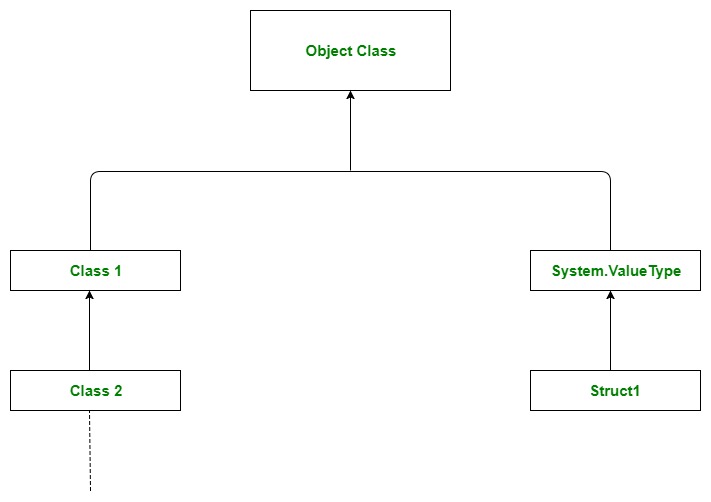
Explanation:
- Object is the root class of all Java classes.
- Every class inherits from the Object class either directly or indirectly.
- If a class does not explicitly extend another class, it automatically extends Object.
- Classes that extend other classes also inherit Object through the inheritance chain.
- Therefore, methods like toString(), equals(), hashCode(), and getClass() are available to every Java object.
Example: Overriding the toString() method to enhance the output formatting.
public class Geeks
{

    String name;
    String age;

    Geeks(String name, String age) {
        this.name = name;
        this.age = age;

    }

    // Overriding toString() method
    @Override
    public String toString() {
        return "Geeks object => {" +
                "name='" + name + '\'' +
                ", age='" + age + '\''+
                '}'
                ;
    }

  // Main Method
  public static void main(String[] args)
    {

        Geeks g1 = new Geeks("Geeks", "22");

        // printing the hashcode of the objects
        System.out.println(g1.toString());


    }
}
Output
Geeks object => {name='Geeks', age='22'}
Explanation: The toString() method is overridden to return a custom string containing the object's field values instead of the default class name and hash code.
Advantages of toString() Method
- Returns a string representation of an object.
- Improves debugging and logging.
- Makes printed objects easier to understand.
- Can be customized by overriding.
- Automatically invoked when an object is printed.
- Used extensively throughout the Java Collections Framework.
