

Java 8 Streams can process data either sequentially or in parallel, allowing developers to choose the most suitable execution model based on their application's requirements. While sequential streams process elements one at a time, parallel streams leverage multiple threads to improve performance for computationally intensive tasks.
- Sequential and parallel streams operate on the same Stream API but differ in how they execute operations.
- The choice between them depends on factors such as dataset size, processing complexity, and available CPU cores.
- Both stream types support the same intermediate and terminal operations, making it easy to switch between them with minimal code changes.
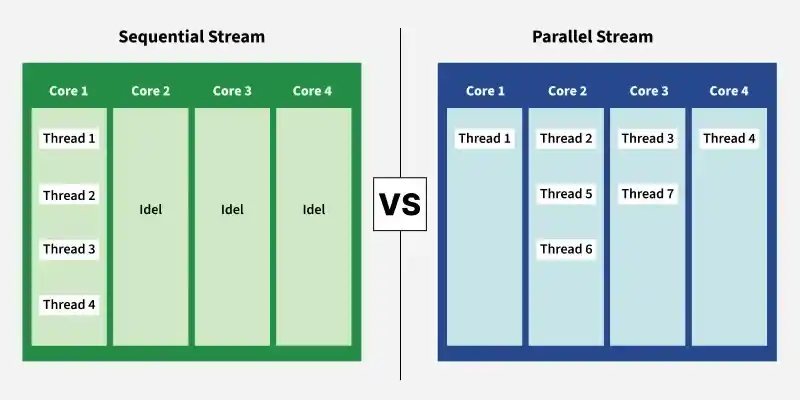
Sequential Stream
A Sequential Stream processes elements one at a time in the order they appear in the source. It uses a single thread for execution and is the default behavior of Java Streams.
- Uses a single thread for processing, making execution simple and predictable.
- Suitable for small to medium-sized datasets where parallel processing offers little benefit.
- stream() method returns a sequential stream in Java.
Syntax
collection.stream();
import java.io.*;
import java.util.*;
import java.util.stream.*;

class SequentialStreamDemo {

    public static void main(String[] args)
    {
        // create a list
        List<String> list = Arrays.asList( "Hello ",
                          "G", "E", "E", "K", "S!");

        // we are using stream() method
          // for sequential stream
        // Iterate and print each element
          // of the stream
        list.stream().forEach(System.out::print);
    }
}
Output
Hello GEEKS!
When to Use Sequential Streams?
- Processing small or medium-sized collections.
- When maintaining element order is important.
- For simple operations with minimal overhead.
- When code readability and easier debugging are priorities.
Parallel Stream
A Parallel Stream processes elements concurrently using multiple threads from the Fork/Join common thread pool. It is designed to improve performance for large datasets and CPU-intensive operations by utilizing multiple processor cores.
- Uses multiple threads to process stream elements simultaneously.
- One of the simple ways to obtain a parallel stream is by invoking the parallelStream() method of Collection interface.
- Another way is to invoke the parallel() method of BaseStream interface on a sequential stream.
It is important to ensure that the result of the parallel stream is the same as is obtained through the sequential stream, so the parallel streams must be stateless, non-interfering, and associative.
Syntax
Using parallelStream():
collection.parallelStream();
using parallel():
collection.stream().parallel();
import java.io.*;
import java.util.*;
import java.util.stream.*;

class ParallelStreamExample {
    public static void main(String[] args)
    {
        // create a list
        List<String> list = Arrays.asList("Hello ",
                         "G", "E", "E", "K", "S!");

        // using parallelStream()
        // method for parallel stream
        list.parallelStream().forEach(System.out::print);
    }
}
Output
ES!KGEHello
Note: If we want to make each element in the parallel stream to be ordered, we can use the forEachOrdered() method, instead of the forEach() method.
Example:
import java.io.*;
import java.util.*;
import java.util.stream.*;

class ParallelStreamWithOrderedIteration {

    public static void main(String[] args)
    {
          // create a list
        List<String> list
            = Arrays.asList("Hello ","G", "E", "E", "K", "S!");

        // using parallelStream() method for parallel stream
        list.parallelStream().forEachOrdered(System.out::print);
    }
}
Output
Hello GEEKS!
When to Use Parallel Streams?
- Processing large collections of data.
- CPU-intensive computations.
- Independent operations without shared mutable state.
- When performance improvement outweighs thread management overhead.
Sequential Stream vs Parallel Stream
| Feature | Sequential Stream | Parallel Stream |
|---|---|---|
| Execution | Single thread | Multiple threads |
| Processing | One element at a time | Multiple elements simultaneously |
| Order | Preserves encounter order | Order is not guaranteed with forEach() |
| Performance | Better for small datasets | Better for large datasets and CPU-intensive tasks |
| Thread Safety | Simpler | Requires thread-safe operations |
| Default Stream | Yes | No |
| Debugging | Easier | More difficult |
