
This article provides a comprehensive explanation of full-stack data flow in Remix. It focuses on efficiently managing data between the server and the client using tools like loaders, actions, and hooks. The article also highlights the best practices for handling data fetching, form submission, and managing UI state within Remix applications.
Table of Content
Key Terms
- Remix: A full-stack web framework focused on user experience and fast load times.
- Loader: A Remix function that fetches data for a component before it renders.
- useFetcher: A Hook provided by Remix for programmatic form submission without navigating
- Action: A function in Remix that manages form submissions or other mutations.
Full stack Data Flow in Remix happens in these steps
- Loaders: Fetch data from the server before rendering the page, ensuring that all necessary data is available, boosting performance.
- Actions: Handle form submissions and events server-side, allowing complex data processing without client-side JavaScript.
- Forms: Provide declarative form handling for server-side submission, reducing the need for custom scripts.
- useFetcher Hook: Fetch data without navigating, useful for updating parts of the UI without reloading the entire page.
Steps to Create an Application
Step 1: Install Remix
Create a new Remix project
npx create-remix@latest <your Project Name>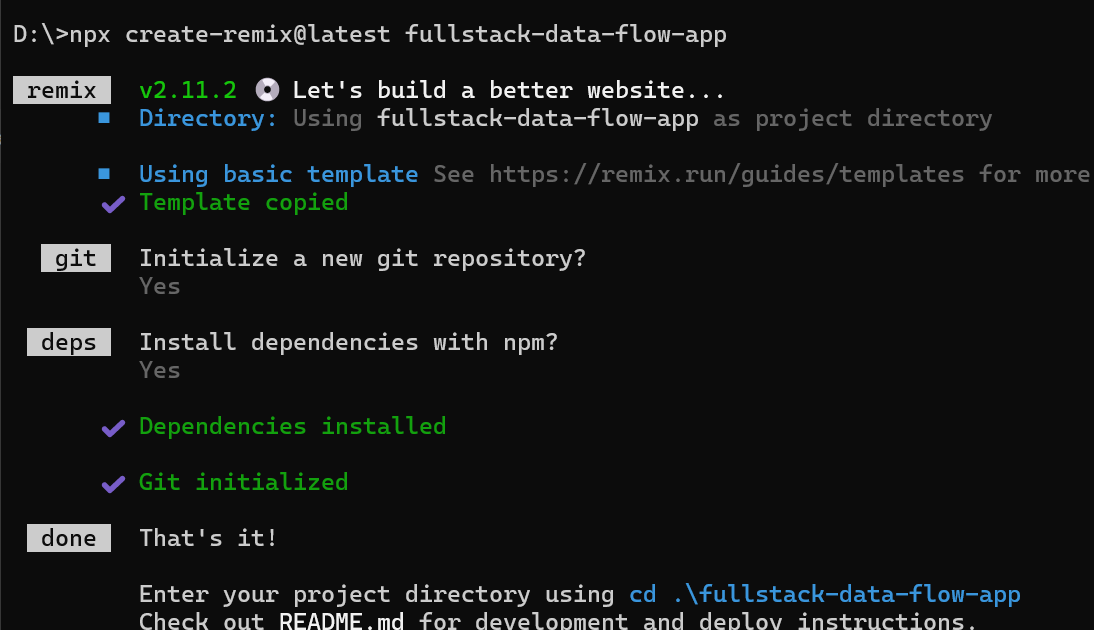
Step 2: Navigate to Your Project Directory
cd fullstack-data-flowStep 3: Install Dependencies
npm installUpdated Dependencies:
dependencies: {
    "@remix-run/node": "^2.11.2",
    "@remix-run/react": "^2.11.2",
    "@remix-run/serve": "^2.11.2",
    "isbot": "^4.1.0",
    "react": "^18.2.0",
    "react-dom": "^18.2.0"
  }
Project Structure:
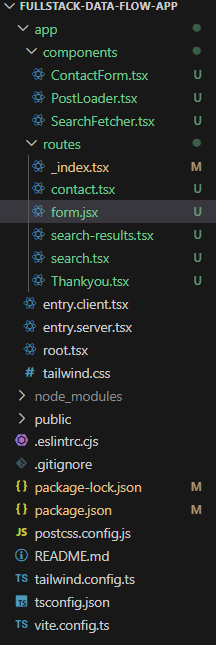
Loader
Loaders in Remix are used to fetch data on the server side before the component renders. This ensures that the page is delivered with the necessary data, reducing load times and improving user experience by avoiding additional client-side requests after the page is loaded.
Syntax:
export const loader = async () => {
  const response = await fetch('https://jsonplaceholder.typicode.com/posts');
  const posts = await response.json();
  return { posts };
};
Where:
- Path: app/components/PostsLoader.tsx
- This component demonstrates how to use loaders to fetch data server-side before rendering.
- Index Route (_index.tsx): This will render the PostsLoader component.
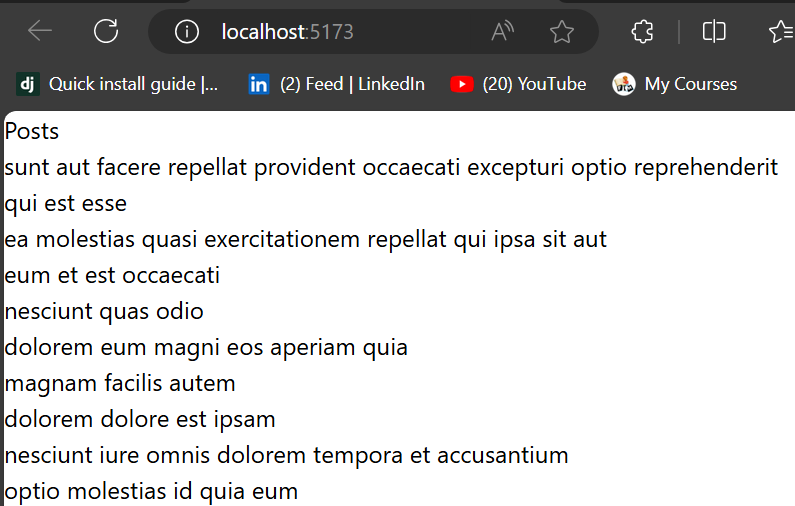
Example: This Demonstrates fetching product data using a loader before rendering the page. In this example we use PostLoader.tsx component and it will called at _index.tsx these two files are used in this approach.
// app/components/PostsLoader.tsx
import { useLoaderData } from "@remix-run/react";

// Loader function to fetch data
export const loader = async () => {
  const response = await fetch("https://jsonplaceholder.typicode.com/posts");
  const posts = await response.json();
  return { posts };
};

// Component to display posts
export default function PostsLoader() {
  const { posts } = useLoaderData<{ posts: { id: number; title: string }[] }>();
  return (
    <div>
      <h1>Posts</h1>
      <ul>
        {posts.map((post) => (
          <li key={post.id}>{post.title}</li>
        ))}
      </ul>
    </div>
  );
}
// app/routes/_index.tsx
import PostsLoader, { loader as postsLoader } from "../components/PostLoader";
// Export the loader to be used in this route
export { postsLoader as loader };

export default function Index() {
  return (
    <div>
      <PostsLoader />
    </div>
  );
}
Output:
Actions and useTransition
Actions in Remix handle form submissions and other events directly on the server side. When a user submits a form, the action processes the data, performs logic like saving to a database or performing calculations, and then sends the response back to the client, reducing client-side complexity.
Here we are not using any data base to store the form data we are just using console.log. If you want to use any database according to your requirement you can use it.
Syntax:
export const action = async ({ request }) => {
  const formData = await request.formData();
  const name = formData.get("name");
  // Handle data mutation, e.g., save to a database
  return { success: true };
};
Where:
- Path: app/components/ContactForm.tsx
- This component handles form submissions using Remix actions and manages the submission state with useTransition.
- Contact Route (contact.tsx): This will render the ContactForm component.
- It will display the result in Terminal
Example: Shows server-side form submission handled with the action function for user input. To see the desired output you can route to htpp://localhost:3000/contact.
// app/components/ContactForm.tsx
import { Form, redirect } from "@remix-run/react";
import { useTransition } from "react";
import Thankyou from "../routes/Thankyou";
import { Link } from "@remix-run/react";
// Action function to handle form submission
export const action = async ({ request }: { request: Request }) => {
  const formData = await request.formData();
  const name = formData.get("name");
  const email = formData.get("email");
  // Process form data (e.g., save to a database)
  console.log(`Received: Name - ${name}, Email - ${email}`);

  // Redirect after successful form submission
  return redirect("/Thankyou");
};
// Component for the contact form
export default function ContactForm() {
  const transition = useTransition();
  const isSubmitting = transition.state === "submitting";

  return (
    <Form
      method="post"
      onSubmit={() => {
        <h1>thank you for submitting the data</h1>;
      }}
    >
      <label>
        Name:{" "}
        <input
          type="text"
          name="name"
          required
          style={{ border: "2px solid black" }}
        />
      </label>
      <p></p>
      <br />
      <label>
        Email:{" "}
        <input
          type="email"
          name="email"
          required
          style={{ border: "2px solid black" }}
        />
      </label>
      <p></p>
      <br />
      <button
        type="submit"
        disabled={isSubmitting}
        style={{ border: "2px solid black" }}
      >
        <p></p>
        {isSubmitting ? "Submitting..." : "Submit"}
      </button>
      <p></p>
    </Form>
  );
}
//app/routes/Thankyou.tsx
import React from "react";

function Thankyou() {
  return <div>Thanks for submitting the data</div>;
}

export default Thankyou;
// app/routes/contact.tsx
import ContactForm, { action as contactAction } from "~/components/ContactForm";
// Export the action to be used in this route
export { contactAction as action };

export default function Contact() {
  return (
    <div>
      <h2>Contact Us</h2>
      <ContactForm />
    </div>
  );
}
Output:
Form Components
Remix provides declarative form handling, where form submissions are processed server-side without the need for custom JavaScript. This approach simplifies form management, allowing developers to focus on server-side validation, logic, and data processing, while Remix handles the seamless communication between client and server.
Syntax:
<Form method="post" action="/your-action">
  {/* form fields */}
</Form>
Example: Implements a form that submits user data server-side, with no need for client-side scripting. In this approach we can use only one component that is form.jsx. An input field and a submit button will appear. We can route htpp://localhost:3000/form
// routes/form.jsx
import { Form, useActionData } from "@remix-run/react";

export const action = async ({ request }) => {
    const formData = await request.formData();
    const name = formData.get("name");
    return { message: `Welcome, ${name}!` };
};

export default function FormPage() {
    const actionData = useActionData();
    return (
        <div>
            <h1>Submit Your Name</h1>
            <Form method="post">
                <input type="text" name="name" placeholder="Your Name" />
                <button type="submit">Submit</button>
            </Form>
            {actionData?.message && <p>{actionData.message}</p>}
        </div>
    );
}
Output:
UseFetcher Hook
The useFetcher hook in Remix allows fetching data without changing the current page route. This is useful for partial updates, such as loading new content or data dynamically, without causing a full page refresh or navigation. It enhances performance and provides a smoother user experience.
Syntax:
import { useFetcher } from "@remix-run/react";
const fetcher = useFetcher();
- Path: app/components/SearchFetcher.tsx
- This component uses the useFetcher hook to fetch search results without navigating away from the current page.
- Search Route (search.tsx): This will render the SearchFetcher component.
- Search-result Route(search-result.tsx).This is render the Searched information.Here I am using Mock data
Example:Fetches user data on the current page without navigating, using useFetcher. we will need to route htpp://localhost:3000/search .It will show one input tag and a search button .Here we can use Mock data in search result to get the output you can use as per your requirement.
// app/components/SearchFetcher.tsx
import { useFetcher } from "@remix-run/react";
// Component for handling searches with input and button
export default function SearchFetcher() {
const fetcher = useFetcher();
const isSearching = fetcher.state === "submitting";
return (
<div>
<fetcher.Form method="get" action="/search-results">
<input
type="text"
name="query"
placeholder="Search..."
required
style={{ border: "2px solid black" }}
/>
<button
type="submit"
disabled={isSearching}
style={{ border: "2px solid black" }}
>
{isSearching ? "Searching..." : "Search"}
</button>
</fetcher.Form>
{/* Check if fetcher has completed and if results are empty */}
{fetcher.data && (
<>
{fetcher.data.results.length === 0 ? (
<div>No Data Found</div>
) : (
<ul>
{fetcher.data.results.map(
(result: { id: number; name: string }) => (
<li key={result.id}>{result.name}</li>
)
)}
</ul>
)}
</>
)}
</div>
);
}
// app/routes/search.tsx
import SearchFetcher from "~/components/SearchFetcher";

export default function Search() {
  return (
    <div>
      <h2>Search</h2>
      {/* Render the SearchFetcher component */}
      <SearchFetcher />
    </div>
  );
}
// app/routes/search-results.tsx
import { json } from "@remix-run/node";
import { useLoaderData } from "@remix-run/react";
// Loader function to handle fetching of search results
export const loader = async ({ request }: { request: Request }) => {
  const url = new URL(request.url);
  const query = url.searchParams.get("query") || "";
  // Mock data or fetch from an API
  const allResults = [
    { id: 1, name: "React" },
    { id: 2, name: "Remix" },
    { id: 3, name: "React Router" },
  ];
  // Filter results based on the search query
  const filteredResults = allResults.filter((item) =>
    item.name.toLowerCase().includes(query.toLowerCase())
  );
  return json({ results: filteredResults });
};
// Component to display the search results
export default function SearchResults() {
  const { results } = useLoaderData<{
    results: { id: number; name: string }[];
  }>();

  if (results.length === 0) {
    return <div>No Data Found</div>;
  }
  return (
    <div>
      <h1>Search Results</h1>
      <ul>
        <>
          <h1>search result</h1>
          {results.map((result) => (
            <li key={result.id}>{result.name}</li>
          ))}
        </>
      </ul>
    </div>
  );
}
Output:
Conclusion
By following these steps, you can effectively manage full-stack data flow in Remix. This configuration allows you to build applications with smooth and fast interactions. The applications should be highly interactive and effective with the handling of data. Server-rendered applications are very efficient.
