

The Java Virtual Machine (JVM) is an abstract machine that provides the runtime environment for executing Java bytecode. It is a part of the Java Runtime Environment (JRE) and is responsible for loading, verifying, and executing Java class files. The JVM also manages runtime memory and provides services such as garbage collection.
- Java source code (.java) is compiled by javac into bytecode (.class).
- The JVM loads and links the required classes before executing them.
- Bytecode can be interpreted or compiled into native machine code by the JIT compiler.
Architecture of JVM
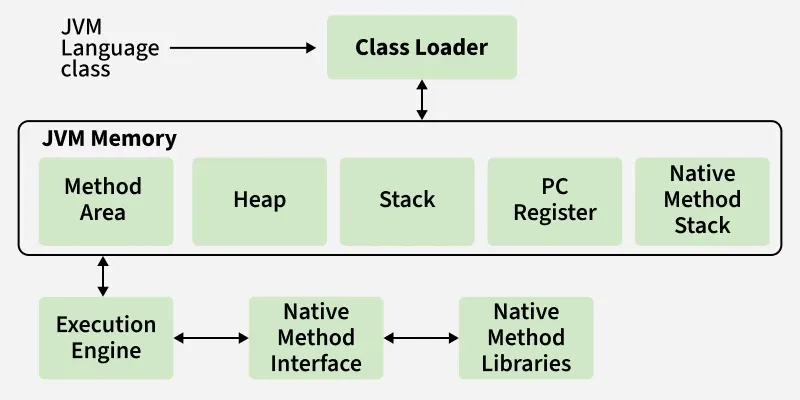
Components of JVM Architecture
Now, we are going to discuss each component of the JVM in detail.
1. Class Loader Subsystem
It is mainly responsible for three activities.
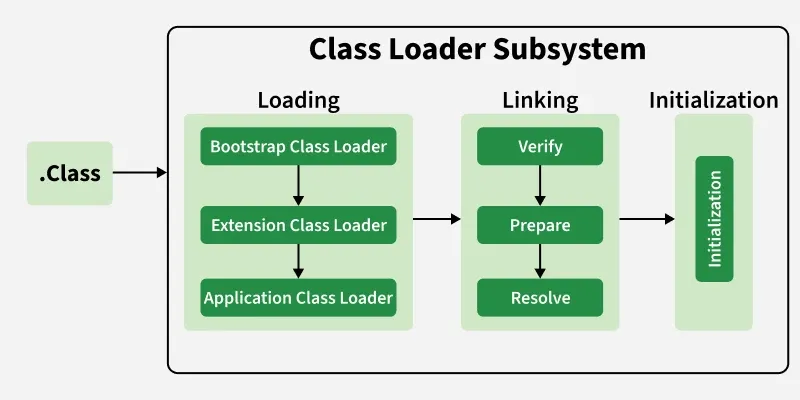
1. Loading
- Finds and loads the binary representation of a class.
- Creates the runtime Class object associated with the loaded class.
- Class loading can happen when a class is first actively used.
class GFG{

    static{

        System.out.println("GFG class is loaded by the JVM!");
    }

    public void display(){

        System.out.println("Method of GFG class is executed.");
    }
}

public class Test{
    public static void main(String[] args) throws Exception{

        System.out.println("Main method started.");

        // Loading the class explicitly using Class.forName()
        Class.forName("GFG");

        System.out.println("Class loaded successfully.");

        // Creating object to execute method
        GFG obj = new GFG();
        obj.display();
    }
}
Output
Main method started.
GFG class is loaded by the JVM!
Class loaded successfully.
Method of GFG class is executed.
Explanation: This code shows how the JVM loads and initializes a class using Class.forName(). It loads the GFG class and executes its static block, then creates a GFG object and calls the display() method.
Note: For every loaded “.class” file, only one object of the class is created.
2. Linking: Responsible for preparing the loaded class for execution. It includes three steps:
- Verification: Ensures the bytecode follows JVM rules and is safe to execute.
- Preparation: Allocates memory for static variables and assigns default values.
- Resolution: Converts symbolic references into direct references in memory.
3. Initialization
- Assigns actual values to static variables.
- Executes static blocks defined in the class.
Class Loader Types
- Bootstrap Class Loader: Loads core Java classes (JAVA_HOME/lib).
- Extension Class Loader: Loads classes from extensions directory (JAVA_HOME/jre/lib/ext).
- System/Application Class Loader: Loads classes from the application classpath.
public class Geeks
{
    public static void main(String[] args)
    {
        // String class is loaded by bootstrap loader, and
        // bootstrap loader is not Java object, hence null
        System.out.println(String.class.getClassLoader());

        // Test class is loaded by Application loader
        System.out.println(Geeks.class.getClassLoader());
    }
}
Output
null
jdk.internal.loader.ClassLoaders$AppClassLoader@8bcc55f
Explanation: This code prints the class loaders of String and Geeks. String is loaded by the Bootstrap Class Loader, so it returns null, while Geeks is loaded by the Application Class Loader.
2. JVM Memory Areas
- Method Area: Stores class-level information like class name, parent class, methods, variables, and static data. Shared across the JVM.
- Heap Area: Stores all objects. Shared across the JVM.
- Stack Area: Each thread has its own runtime stack; stores method calls, local variables in stack frames. Destroyed when the thread ends.
- PC Registers: Hold the address of the currently executing instruction for each thread.
- Native Method Stacks: Each thread has a separate stack for native method execution.
3. Execution Engine
Execution engine executes the “.class” (bytecode). It reads the byte-code line by line, uses data and information present in various memory area and executes instructions. It can be classified into three parts:
- Interpreter: It interprets the bytecode line by line and then executes. The disadvantage here is that when one method is called multiple times, every time interpretation is required.
- Just-In-Time Compiler(JIT): It is used to increase the efficiency of an interpreter. It compiles the entire bytecode and changes it to native code so whenever the interpreter sees repeated method calls, JIT provides direct native code for that part so re-interpretation is not required, thus efficiency is improved.
- Garbage Collector: It destroys un-referenced objects. For more on Garbage Collector, refer Garbage Collector.
4. Java Native Interface (JNI)
JNI is a standard interface that allows Java code running inside the JVM to interact with native code written in languages such as C and C++.
5. Native Method Libraries
Native Method Libraries are libraries containing native code required by the JVM or Java applications when executing native methods. These libraries are commonly written in languages such as C or C++.
Advantages of JVM
- Provides platform independence through bytecode.
- Enables Java's Write Once, Run Anywhere capability.
- Provides automatic memory management using garbage collection.
- Improves performance through JIT compilation.
- Provides runtime security through bytecode verification.
- Manages memory and resources efficiently.
- Supports multithreaded execution.
- Provides a consistent runtime environment across different platforms.
