

The ORDER BY clause in PostgreSQL is used to sort the rows returned by a query based on one or more columns. By default, it sorts data in ascending order, but it can also sort in descending order.
- Can sort numeric, text and date values.
- Can be combined with clauses such as WHERE, LIMIT and OFFSET.
Syntax
SELECT column1, column2, ...
FROM table_name
ORDER BY column1 [ASC | DESC], column2 [ASC | DESC], ...;
Where:
- column1, column2, ... : The columns to retrieve.
- table_name: The name of the table.
- ORDER BY: Specifies the column(s) used for sorting.
- ASC (optional): Sorts data in ascending order (default).
- DESC (optional): Sorts data in descending order.
Examples of ORDER BY Clause
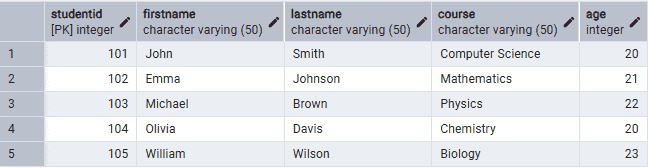
Firstly, create a Student table and insert some records into it.
CREATE TABLE Student (StudentID INT PRIMARY KEY,FirstName VARCHAR(50),LastName VARCHAR(50),Course VARCHAR(50),Age INT);INSERT INTO Student (StudentID, FirstName, LastName, Course, Age)VALUES(101, 'John', 'Smith', 'Computer Science', 20),(102, 'Emma', 'Johnson', 'Mathematics', 21),(103, 'Michael', 'Brown', 'Physics', 22),(104, 'Olivia', 'Davis', 'Chemistry', 20),(105, 'William', 'Wilson', 'Biology', 23);
Output:
Example 1: Sort Data in Ascending Order
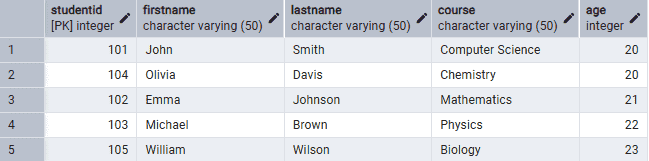
The following query sorts the students by age in ascending order.
Query:
SELECT *
FROM Student
ORDER BY Age;
Output:
Example 2: Sort Data in Descending Order
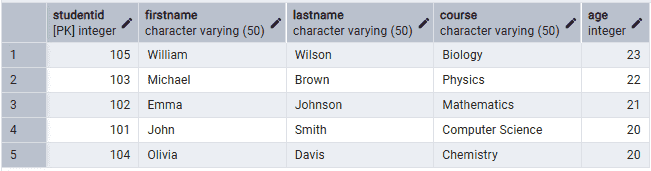
The following query sorts the students by age in descending order.
Query:
SELECT *
FROM Student
ORDER BY Age DESC;
Output:
Example 3: Sort by Multiple Columns
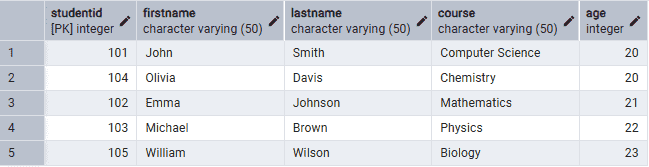
The following query first sorts the data by age in ascending order and then by first name in ascending order.
Query:
SELECT *
FROM Student
ORDER BY Age ASC, FirstName ASC;
Output:
Example 4: Use ORDER BY with a WHERE Clause
The following query retrieves students older than 20 years and sorts them by age.
Query:
SELECT *
FROM Student
WHERE Age > 20
ORDER BY Age;
Output:
Example 5: Use ORDER BY with LIMIT
The following query retrieves the two oldest students.
Query:
SELECT *
FROM Student
ORDER BY Age DESC
LIMIT 2;
Output:

