
Next.js supports lazy loading to load components and resources only when needed, improving performance and reducing the initial page load time.
- Loads components and resources only when required.
- Reduces the JavaScript bundle size for better performance.
- Supports lazy loading with next/dynamic and next/image.
Steps to Create a Next.js App
Step 1: Create a Next.js application.
npx create-next-app@latest my-app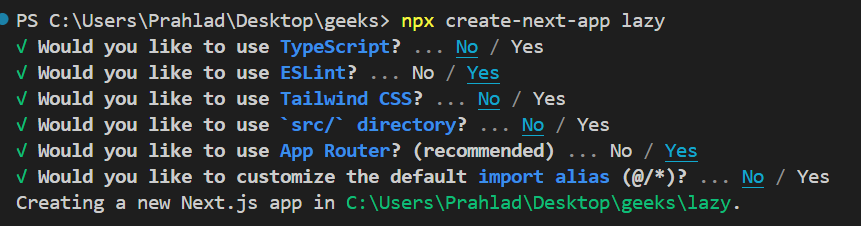
Step 2: Navigate to the project directory
cd my-appStep 3: Create a component inside the app/components folder.
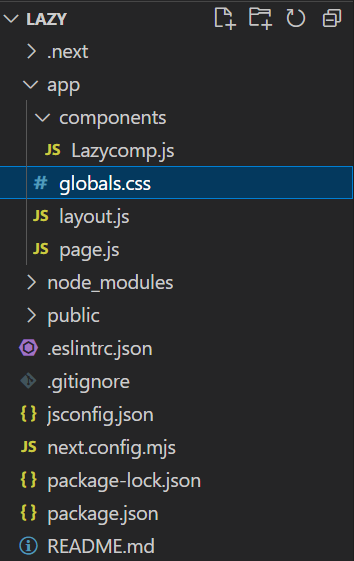
Lazy Loading with next/dynamic
The next/dynamic function enables lazy loading of Client Components in Next.js. It loads components only when they are needed, reducing the initial JavaScript bundle size and improving page performance.
Example:
"use client";

import { useState } from "react";
import dynamic from "next/dynamic";

const LazyComp = dynamic(() => import("./components/LazyComp"), {
    loading: () => <p>Loading...</p>,
});

export default function Home() {
    const [shown, setShown] = useState(false);

    return (
        <div style={{ margin: "30px" }}>
            <p>GeeksforGeeks Lazy Loading in Next.js</p>

            <button
                style={{
                    background: "green",
                    color: "white",
                }}
                onClick={() => setShown(!shown)}
            >
                Load Component
            </button>

            {shown && <LazyComp />}
        </div>
    );
}
export default function LazyComp() {
    return (
        <div style={{ margin: "30px" }}>
            Lazy loading in Next.js loads components only when they are needed,
            reducing the initial bundle size and improving application
            performance. It helps deliver a faster and more responsive user
            experience, especially in large applications.
        </div>
    );
}
Start your application using the following command:
npm run devOutput:

Lazy Loading with React.lazy() and Suspense
React.lazy() enables lazy loading of React components by dynamically importing them when required. In Next.js, it can be used with Suspense to display a fallback UI while the component is loading.
Note: next/dynamic is the recommended approach for lazy loading components in Next.js. React.lazy() can also be used in Client Components when appropriate.
Example:
"use client";

import { useState, Suspense, lazy } from "react";

const LazyComp = lazy(() => import("./components/LazyComp"));

export default function Home() {
    const [shown, setShown] = useState(false);

    return (
        <div style={{ margin: "30px" }}>
            <p>GeeksforGeeks Lazy Loading in Next.js</p>

            <button
                style={{
                    background: "green",
                    color: "white",
                }}
                onClick={() => setShown(!shown)}
            >
                Load Component
            </button>

            {shown && (
                <Suspense fallback={<h1>Loading...</h1>}>
                    <LazyComp />
                </Suspense>
            )}
        </div>
    );
}
export default function LazyComp() {
    return (
        <div style={{ margin: "30px" }}>
            Lazy loading in Next.js loads components only when they are
            needed, reducing the initial bundle size and improving
            application performance. This helps deliver a faster and more
            responsive user experience.
        </div>
    );
}
Start your application using the following command:
npm run devOutput:
