
Middleware in Next.js allows you to intercept requests before they reach a route or page. It is commonly used for authentication, authorization, redirects, request modification, and other custom logic.
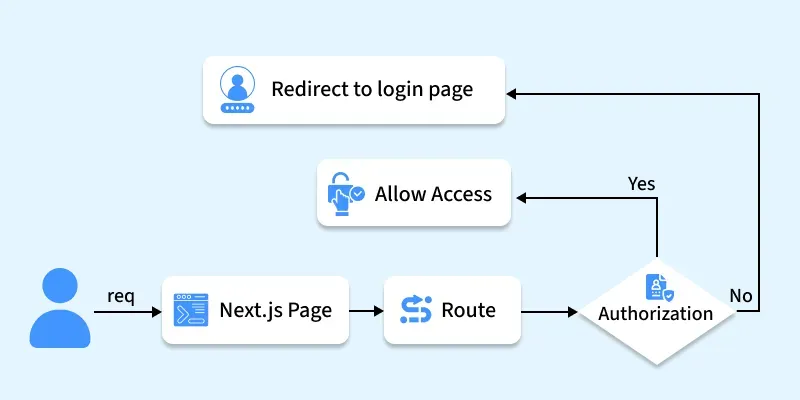
- Middleware functions are executed before the request reaches the final route handler.
- They can be used to intercept and modify requests and responses.
- Middleware is defined in the middleware.js file at the root of your project.
- It allows you to write custom logic for tasks like authentication, rate limiting, and more.
- Middleware runs on the Edge Runtime, ensuring low latency and high performance.
Core Concepts of Next.js Middleware
The following concepts explain how Middleware works in Next.js and how it can be configured to handle incoming requests effectively.
1. Convention
In Next.js, you can implement Middleware is created in a middleware.js (or middleware.ts) file at the project root. If your project uses a src directory, place the file inside the src folder (src/middleware.js).
Middleware is created in middleware.js (or middleware.ts) at the project root. If your project uses a src directory, place it in src/middleware.js.
import { NextResponse } from 'next/server'
import type { NextRequest } from 'next/server'

// This function can be marked `async` if using `await` inside
export function middleware(request: NextRequest) {
  return NextResponse.redirect(new URL('/home', request.url))
}

// See "Matching Paths" below to learn more
export const config = {
  matcher: '/about/:path*',
}
2. Matching Paths
The middleware file will be invoked for every route in your project, If you want to apply to any specific route then you have to mention a route matcher inside middleware.js file.
route matcher (specific path):
// Main Middleware Function

export const config = {
  matcher: '/profile/:path*',
}
route matcher (multiple path):
// Main Middleware Function
export const config = {
  matcher: [ '/profile/:path*',  '/about/:path*' ]
}
Syntax:
import { NextResponse } from 'next/server'

export function middleware(request) {
  return NextResponse.redirect(new URL('/home', request.url))
}

//Matching Path
export const config = {
  matcher: '/about/:path*',
}
3. NextResponse
The NextResponse API empowers you to:
- Redirect incoming requests to an alternate URL.
- Revise responses by showcasing a specified URL.
- Configure request headers for API Routes, getServerSideProps, and rewrite destinations.
- Implement response cookies.
- Define response headers.
For generating a response from Middleware, you can:
- Rearrange to a route (Page or Route Handler) responsible for generating a response.
- Directly yield a NextResponse. Refer to the section on Producing a Response.
4. Using Cookies
Cookies function as standard headers. During a request, they reside in the Cookie header, while in a response, they are located within the Set-Cookie header. Next.js simplifies cookie management with its cookies extension on NextRequest and NextResponse.
For incoming requests, cookies offer the following methods: get, getAll, set, and delete, enabling you to retrieve, manipulate, and remove cookies. You can verify the presence of a cookie with has or clear all cookies with remove.
For outgoing responses, cookies provide methods such as get, getAll, set, and delete, facilitating the handling and modification of cookies before sending the response.
import { NextResponse } from 'next/server';

export function middleware(request) {
  // Assume a "Cookie:nextjs=fast" header to be present on the incoming request
  // Getting cookies from the request using the `RequestCookies` API
  let cookie = request.cookies.get('nextjs');
  console.log(cookie); // => { name: 'nextjs', value: 'fast', Path: '/' }
  const allCookies = request.cookies.getAll();
  console.log(allCookies); // => [{ name: 'nextjs', value: 'fast' }]

  request.cookies.has('nextjs'); // => true
  request.cookies.delete('nextjs');
  request.cookies.has('nextjs'); // => false

  // Setting cookies on the response using the `ResponseCookies` API
  const response = NextResponse.next();
  response.cookies.set('vercel', 'fast');
  response.cookies.set({
    name: 'vercel',
    value: 'fast',
    path: '/',
  });
  cookie = response.cookies.get('vercel');
  console.log(cookie); // => { name: 'vercel', value: 'fast', Path: '/' }
  // The outgoing response will have a `Set-Cookie:vercel=fast;path=/` header.

  return response;
}
5. Setting Headers
Indeed, with the Next Response API, you can effectively manage both request and response headers. This capability has been available since Next.js version 13.0.0.
import { NextResponse } from 'next/server';

export function middleware(request) {
  // Clone the request headers and set a new header `x-hello-from-middleware1`
  const requestHeaders = new Headers(request.headers);
  requestHeaders.set('x-hello-from-middleware1', 'hello');

  // You can also set request headers in NextResponse.rewrite
  const response = NextResponse.next({
    request: {
      // New request headers
      headers: requestHeaders,
    },
  });

  // Set a new response header `x-hello-from-middleware2`
  response.headers.set('x-hello-from-middleware2', 'hello');
  return response;
}
6. CORS
This middleware function adds CORS headers to the response to allow requests from any origin, methods, and headers. For pre flighted requests (OPTIONS method), it responds immediately with appropriate headers and a status code of 200.
import { NextResponse } from 'next/server';

export function middleware(request) {
  // Set CORS headers to allow requests from any origin
  const response = NextResponse.next();
  response.headers.set('Access-Control-Allow-Origin', '*');
  response.headers.set('Access-Control-Allow-Methods', 'GET, POST, OPTIONS');
  response.headers.set('Access-Control-Allow-Headers', 'Content-Type, Authorization');

  // For preflighted requests, respond immediately with appropriate headers
  if (request.method === 'OPTIONS') {
    response.status = 200;
    return response;
  }

  // Continue processing other requests
  return response;
}
7. Producing Response
Directly responding from Middleware is supported by returning either a Response or Next Response instance. This functionality has been available since Next.js version 13.1.0.
import { isAuthenticated } from '@lib/auth';

// Limit the middleware to paths starting with `/api/`
export const config = {
  matcher: '/api/:path*',
};

export function middleware(request) {
  // Call our authentication function to check the request
  if (!isAuthenticated(request)) {
    // Respond with JSON indicating an error message
    return new Response(
      JSON.stringify({ success: false, message: 'authentication failed' }),
      { status: 401, headers: { 'Content-Type': 'application/json' } }
    );
  }
}
Steps to Set Up Middleware in Next.js
Step 1: Create a NextJS application using the following command and answer some few questions.
npx create-next-app@latest app_nameStep 2: After creating your project folder, move to it using the following command.
cd app_nameProject Structure:
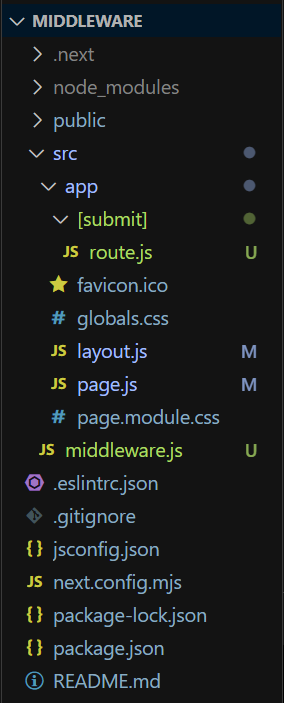
Example: Demonstrate the use of middleware in Next.js
Create a form which will take username and password from the user, when a user submits the form middleware validates the submitted credentials before allowing the request to reach the route handler. If it matches then, it procced next and request will be sent to the server(route.js) and it will display Welcome message else it will directly response a Invalid Username & Password message.
Note: Remove included CSS file from layout.js.
//File path: src/app/page.js

export default function Home() {
    return (
        <>
            <h1>Login Page</h1>
            <form method="post" action="/submit">
                <label>Username</label>
                <input type="text"
                    placeholder="Enter Username"
                    name="username" required />
                <br />
                <label>Password</label>
                <input type="password"
                    placeholder="Enter Password"
                    name="password" required />
                <br />
                <button type="submit">Submit</button>
            </form>
        </>
    );
}
//File path: src/app/[submit]/route.js

import { NextResponse } from "next/server";

//Handling POST request
export async function POST(req, res) {

    //Response
    return new NextResponse(`<h1>Welcome</h1>`,
        {
            status: 200,
            headers: { 'content-type': 'text/html' }
        }
    );
}
//File path: src/middleware.js

import { NextResponse } from "next/server"

export async function middleware(req) {
    //Get the Form Data
    const Formdata = await req.formData();
    let username = Formdata.get('username');
    let password = Formdata.get('password');

    if (username == "gfg" && password == "123") {
        return NextResponse.next()
    } else {
        return new NextResponse(
            `<h1>Invalid Username & Password</h1>`,
            {
                status: 401,
                headers: { 'content-type': 'text/html' }
            }
        );
    }
}

export const config = {
    matcher: '/submit/:path*',
}
Start your application using the command:
npm run devOutput:
Note: Middleware runs on the Edge Runtime and should be used for lightweight tasks such as authentication, redirects, and request rewriting. Avoid heavy database operations or long-running computations inside middleware.
