
generateStaticParams() is a built-in Next.js App Router function used to generate static routes for dynamic pages during the build process. It returns a list of route parameters, allowing Next.js to pre-render dynamic pages for better performance and SEO.
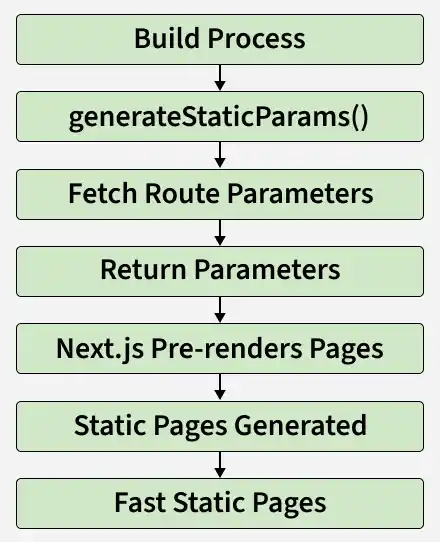
- Generates static routes for dynamic pages at build time.
- Used with dynamic route segments such as [id] or [slug].
- Improves performance by pre-rendering pages.
- Enhances SEO through static page generation.
Syntax:
export async function generateStaticParams() {
  return [
    { slug: "post-1" },
    { slug: "post-2" },
  ];
}

export default async function Page({
  params,
}: {
  params: Promise<{ slug: string }>;
}) {
  const { slug } = await params;

  return <h1>{slug}</h1>;
}
- Parameters: generateStaticParams() does not accept any arguments. In nested routes, child functions can access parent route parameters through the params object.
- Return Type: generateStaticParams() returns an array of objects containing dynamic route parameters used by Next.js to generate static pages at build time.
Types of Dynamic Route Segments
generateStaticParams() can be used with different types of dynamic route segments depending on the routing requirements.
1. Single Dynamic Segment
A single dynamic segment represents a route with one dynamic parameter, such as [id], where each parameter value generates a separate static page.
export function generateStaticParams() {
  return [{ id: "a" }, { id: "b" }, { id: "c" }];
}

export default async function Page({
  params,
}: {
  params: Promise<{ id: string }>;
}) {
  const { id } = await params;

  return <h1>Student ID: {id}</h1>;
}
- The route app/student/[id]/page.tsx contains a single dynamic segment [id].
- generateStaticParams() returns three id values: a, b, and c.
- Next.js statically generates the pages /student/a, /student/b, and /student/c during the build process.
- The Page component receives the generated id through the params object.
2. Multiple Dynamic Segments
Multiple dynamic segments represent a route with two or more dynamic parameters, such as [name] and [subject], where each combination generates a separate static page.
export function generateStaticParams() {
  return [
    { name: "a", subject: "english" },
    { name: "b", subject: "hindi" },
    { name: "c", subject: "maths" },
  ];
}

export default async function Page({
  params,
}: {
  params: Promise<{ name: string; subject: string }>;
}) {
  const { name, subject } = await params;

  return (
    <main>
      <h1>Student: {name}</h1>
      <h2>Subject: {subject}</h2>
    </main>
  );
}
- The route app/student/[name]/[subject]/page.tsx contains two dynamic segments: [name] and [subject].
- generateStaticParams() returns different combinations of name and subject.
- Next.js statically generates pages such as /student/a/english, /student/b/hindi, and /student/c/maths.
- The Page component receives the generated name and subject values through the params object.
3. Catch-all Dynamic Segment
A catch-all dynamic segment represents a route that can match one or more URL segments using `[...slug]`.
export function generateStaticParams() {
  return [
    { slug: ["a", "english"] },
    { slug: ["b", "hindi"] },
    { slug: ["c", "maths"] },
  ];
}

export default async function Page({
  params,
}: {
  params: Promise<{ slug: string[] }>;
}) {
  const { slug } = await params;

  return (
    <main>
      <h1>Slug: {slug.join(" / ")}</h1>
    </main>
  );
}
- [...slug] matches one or more dynamic URL segments.
- generateStaticParams() returns the values for the slug array.
- Next.js generates a static page for each returned slug.
- The Page component accesses the slug values through params.
Parameter Generation Strategies
generateStaticParams() also supports different strategies for generating route parameters based on the structure of nested dynamic routes.
1. Generate params from the Bottom Up
Generate params from the bottom up creates parameters for child dynamic segments by fetching and returning all required route values.
export async function generateStaticParams() {
  const products = await fetch("https://.../products").then((res) =>
    res.json()
  );

  return products.map((product) => ({
    category: product.category.slug,
    product: product.id,
  }));
}

export default async function Page({
  params,
}: {
  params: Promise<{ category: string; product: string }>;
}) {
  const { category, product } = await params;

  return (
    <main>
      <h1>Category: {category}</h1>
      <h2>Product ID: {product}</h2>
    </main>
  );
}
- generateStaticParams() fetches product data from an API.
- It returns category and product values for each route.
- Next.js generates a static page for every returned route.
- The Page component receives category and product through the params object.
2. Generate params from the Top Down
Generate params from the top down first generates the parent dynamic segment and then generates the child segments using the parent parameters.
export async function generateStaticParams({
  params,
}: {
  params: Promise<{ category: string }>;
}) {
  const { category } = await params;

  const products = await fetch(
    `https://.../products?category=${category}`
  ).then((res) => res.json());

  return products.map((product) => ({
    product: product.id,
  }));
}

export default async function Page({
  params,
}: {
  params: Promise<{ category: string; product: string }>;
}) {
  const { category, product } = await params;

  return (
    <main>
      <h1>Category: {category}</h1>
      <h2>Product ID: {product}</h2>
    </main>
  );
}
- The parent route generates the category parameter first.
- generateStaticParams() uses the parent category to generate product values.
- Next.js creates a static page for each category and product combination.
- The Page component receives both values through the params object.
Note: In nested dynamic routes, generateStaticParams() receives the parent route parameters through the params object, allowing child routes to generate their own static parameters.
Generate only a subset of params
Generating only a subset of params allows you to statically generate selected routes while preventing access to routes that are not generated.
export const dynamicParams = false;

export async function generateStaticParams() {
  const posts = await fetch("https://.../posts").then((res) => res.json());

  const topPosts = posts.slice(0, 10);

  return topPosts.map((post) => ({
    slug: post.slug,
  }));
}

export default async function Page({
  params,
}: {
  params: Promise<{ slug: string }>;
}) {
  const { slug } = await params;

  return (
    <main>
      <h1>{slug}</h1>
    </main>
  );
}
- generateStaticParams() selects only the top 10 posts.
- Next.js generates static pages for the returned slug values.
- dynamicParams = false returns a 404 page for routes that are not generated.
- Only the selected routes are available as static pages.
Implementation of Static Blog Pages Using generateStaticParams()
Creating a blog application that displays blog posts using dynamic routes and then optimize it using generateStaticParams() so that all blog pages are pre-rendered during the build process.
Step 1: Create a Next.js Project
Create a new Next.js application.
npx create-next-app@latest my-next-appMove into the project directory.
cd my-next-appStart the development server
npm run devStep 2: Create the Dynamic Route
Inside the app directory, create the following folder structure.
app/
└── blog/
    └── [slug]/
        └── page.tsx
The [slug] folder represents a dynamic route. For example:
- /blog/1
- /blog/2
- /blog/25
Step 3: Fetch Blog Posts Dynamically
Add the following code to app/blog/[slug]/page.tsx.
export default async function BlogPost({
  params,
}: {
  params: Promise<{ slug: string }>;
}) {
  const { slug } = await params;

  const response = await fetch(
    `https://jsonplaceholder.typicode.com/posts/${slug}`
  );

  const post = await response.json();

  return (
    <main
      style={{
        padding: "20px",
        backgroundColor: "#000",
        color: "#fff",
        minHeight: "100vh",
      }}
    >
      <h1>Blog Post</h1>

      <br />

      <h2>Title : {post.title}</h2>

      <br />

      <p>{post.body}</p>
    </main>
  );
}
Step 4: Generate Static Routes
Instead of generating pages only when users visit them, use generateStaticParams() to generate all blog routes during the build process.
Update app/blog/[slug]/page.tsx.
export async function generateStaticParams() {
  const response = await fetch(
    "https://jsonplaceholder.typicode.com/posts"
  );

  const posts = await response.json();

  return posts.map((post: { id: number }) => ({
    slug: post.id.toString(),
  }));
}

export default async function BlogPost({
  params,
}: {
  params: Promise<{ slug: string }>;
}) {
  const { slug } = await params;

  const response = await fetch(
    `https://jsonplaceholder.typicode.com/posts/${slug}`
  );

  const post = await response.json();

  return (
    <main
      style={{
        padding: "20px",
        backgroundColor: "#000",
        color: "#fff",
        minHeight: "100vh",
      }}
    >
      <h1>Blog Post</h1>

      <br />

      <h2>Title : {post.title}</h2>

      <br />

      <p>{post.body}</p>
    </main>
  );
}
Step 5: Build the Application
Run the build command.
npm run buildStep 6: Start the development server.
npm run devOpen any generated route.
http://localhost:3000/blog/1or
http://localhost:3000/blog/25Output:
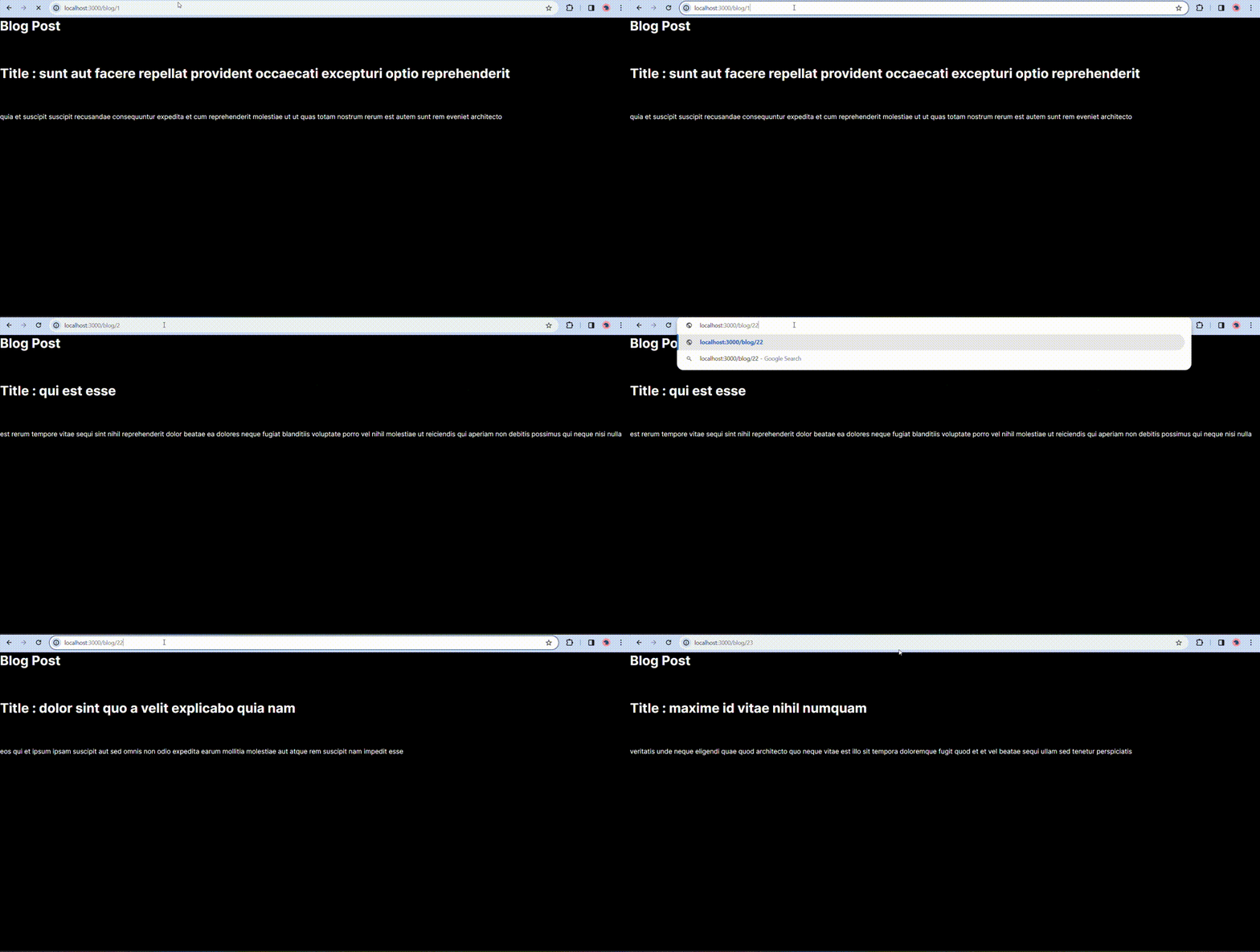
Uses of generateStaticParams()
Here are some uses:
- Pre-render dynamic pages at build time.
- Improve SEO with statically generated pages.
- Reduce server-side rendering overhead.
- Generate routes from APIs or databases.
- Build static blogs, product pages, and documentation sites.
