
In React, a component is a reusable, self-contained unit of UI. Component-based architecture organizes an application as a tree of such components, each managing its own logic, state, and UI.
- Each component handles a single responsibility, keeping the codebase clean and maintainable.
- Components can be reused across different parts of the app or even in other projects.
- The tree structure makes it easy to add, modify, or remove features without affecting unrelated parts.
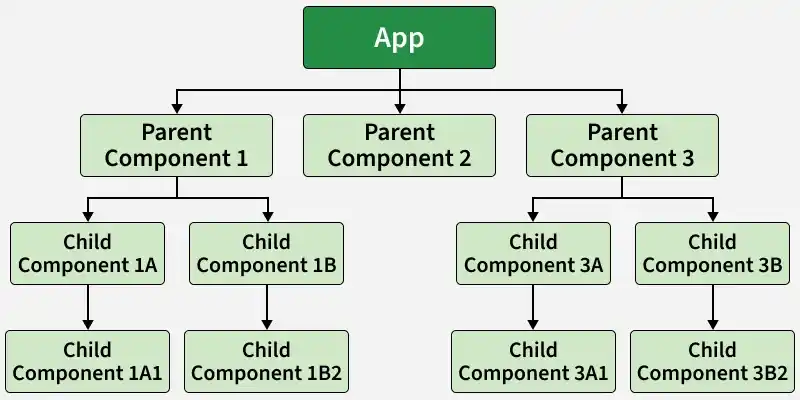
- The App component acts as the root of the component tree.
- Parent components can render child components, which may further contain nested children
- This creates a hierarchical structure.
Features
React components offer key features like reusability, modularity, scalability, and maintainability, making applications easier to build, manage, and expand.
- Reusability: Components can be used multiple times across the application.
- Modularity: Each component focuses on a specific functionality.
- Scalability: Large applications are built by combining smaller components.
- Maintainability: Changes remain localized, making updates easier.
- Enhanced Collaboration: Different developers can work on different components.
- Improved Performance: Optimizations like React.memo() can improve rendering efficiency.
Types of Components in React
React provides different types of components—primarily functional and class components—each designed to handle UI rendering and state management in flexible ways.
1. Functional Components
Functional components are simple JavaScript functions that return JSX (React elements). They do not maintain internal state or lifecycle methods (before React Hooks were introduced).
import Greetings from './Greetings'
import React from 'react'
const App = function () {
    return (<>
        <Greetings name='Geeks'></Greetings>
    </>)
}

export default App
import React, { Component } from "react";
const Greetings = function (props) {
    return (<>
        <h1>{`Hello ${props.name}`}</h1>
    </>)
}

export default Greetings
In this code,
- The
Appcomponent renders theGreetingscomponent and passes the value"Geeks"through thenameprop. - The
Greetingscomponent receives the passed value in thepropsobject. - The expression
props.nameretrieves the value"Geeks"and inserts it into the template literalHello ${props.name}. - React renders the resulting text
Hello Geeksinside the<h1>element on the page.

2. Class Components
Before the introduction of Hooks, React class components were commonly used to manage state and lifecycle methods.
import Greetings from './Greetings'
import React, { Component } from 'react'
class App extends Component {
    render() {
        return (<>
            <Greetings name='James Smith'></Greetings>
            <Greetings name='Steven Smith'></Greetings>

        </>)
    }
}
export default App
import React, { Component } from "react";
class Greetings extends Component {
    render() {
        return (<>
            <h1>{`Welcome ${this.props.name}`}</h1>
        </>)

    }
}
export default Greetings
In this code,
- The
Appclass component renders theGreetingscomponent twice and passes different values to thenameprop. - Each
Greetingscomponent receives its respective value throughthis.props.name. - The expression
Welcome ${this.props.name}creates a personalized welcome message for each component instance. - React renders two separate headings on the page:
Welcome James SmithandWelcome Steven Smith

Principles of React Component-Based Architecture
React’s component-based architecture is built on principles like composition, one-way data flow, and reusability, enabling scalable and maintainable UI development.
- Composition over Inheritance: Combine components to build complex UIs instead of using inheritance.
- One-Way Data Flow: Data flows from parent to child components via props.
- Component Reusability: Design components to be reusable across different parts of the application.
- Encourages modular and maintainable code for large-scale applications.
Challenges in Component Based Architecture
While component-based architecture in React offers many benefits, it also presents challenges like complex state management, inter-component communication, and testing difficulties.
- State Management: Handling state across many components can get complex.
- Communication Overhead: Passing data between components may add extra effort.
- Component Interdependence: Poor separation can lead to maintenance issues.
- Routing Management: Managing complex or nested routes can be cumbersome.
- Testing Complexity: Isolating components and mocking dependencies can be challenging.
