
ReactJS Babel is a JavaScript compiler that converts JSX and modern JavaScript syntax into browser-compatible code, allowing React applications to run across different environments.
- Transforms JSX into standard JavaScript.
- Converts modern JavaScript features for broader browser support.
- Enables the use of newer syntax in React applications.
Working of Babel with ReactJS
Babel works with ReactJS by converting JSX and modern JavaScript code into browser-compatible JavaScript before the application runs.
- Transforms JSX Syntax: Converts JSX elements into standard JavaScript function calls that browsers can understand.
- Supports Modern JavaScript Features: Compiles newer JavaScript syntax into versions compatible with older browsers.
- Uses Presets and Plugins: Applies React-specific and JavaScript transformation rules during the build process.
- Improves Browser Compatibility: Ensures React applications run consistently across different browsers and environments.
- Integrates with Build Tools: Works seamlessly with tools like Webpack, Vite, and Create React App to automate code compilation.
Babel as a Transpiler Instead of a Compiler
Babel is often referred to as a transpiler rather than a compiler because its primary function is to translate one version of JavaScript into another version of JavaScript.
- Transpiling usually refers to the process of translating source code from one version of a language to another version of the same language (e.g., from ES6 to ES5, or JSX to JavaScript).
- Compiling, on the other hand, refers to the broader process of converting high-level code into machine code or bytecode, which can then be executed directly by a computer or runtime environment (e.g., compiling C or C++ code to machine code).
Note: Babel only transforms source code syntax and does not generate machine code, which is why it is categorized as a transpiler.
Steps to Use Babel with React(Without CRA)
Step 1: Create a directory for the project.
mkdir my-app
cd my-app
Step 2: Initialize the application using the following command.
npm init -yStep 3: Install the required React dependencies
npm i react react-dom Step 4: Install webpack and babel using the command
npm install webpack webpack-cli webpack-dev-server \
@babel/core @babel/preset-env @babel/preset-react babel-loader \
html-webpack-plugin --save-dev
Step 5: Inside the scripts section of package.json file add the following code
"scripts": {
      "start": "webpack-dev-server --mode development --open",
      "build": "webpack --mode production"
}
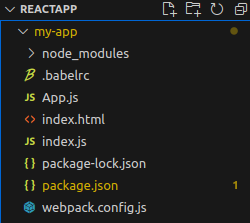
Step 6: Create the files named index.html, App.js, index.js, webpack.config.js, .babelrc
Folder Structure
Dependencies
{
    "scripts": {
        "start": "webpack-dev-server --mode development --open",
        "build": "webpack --mode production"
    }
    "dependencies": {
        "babel-core": "^6.26.3",
        "babel-preset-env": "^1.7.0",
        "babel-preset-react": "^6.24.1"
    },
    "devDependencies": {
        "@babel/core": "^7.22.9",
        "@babel/preset-env": "^7.22.9",
        "@babel/preset-react": "^7.22.5",
        "babel-loader": "^9.1.3",
        "html-webpack-plugin": "^5.5.3",
        "react": "^18.2.0",
        "react-dom": "^18.2.0",
        "webpack": "^5.88.2",
        "webpack-cli": "^5.1.4",
        "webpack-dev-server": "^4.15.1"
    }
}
Step 7: Add the following code in index.html, index.js, and App.js
<!--index.html-->

<html>

<head>
</head>

<body>
    <div id="root"></div>
</body>

</html>
// index.js

import React from 'react';
import ReactDOM from 'react-dom';
import App from './App';

ReactDOM.render(<App />, document.getElementById('root'));
// App.js

import React, { Component } from 'react';
class App extends Component {
    render() {
        return (
            <div>
                <h1>Hello Geeks</h1>
            </div>
        );
    }
}
export default App;
//webpack.config.js

const path = require('path');
const webpack = require('html-webpack-plugin');
module.exports = {
    entry: './index.js',
    output: {
        path: path.resolve(__dirname, 'dist'),
        filename: 'bundle.js',
    },
    module: {
        rules: [
            {
                test: /\.(js|jsx)$/,
                exclude: /node_modules/,
                use: {
                    loader: 'babel-loader',
                },
            },
        ],
    },
    plugins: [
        new webpack({
            template: './index.html',
        }),
    ],
};
Step 8: Inside the .babelrc file add the following code
{
    "presets": ["@babel/preset-env", "@babel/preset-react"]
}
Step 9: To run the application type the following command in a web browser
npm startOutput

Note: Babel is usually installed manually only in custom React setups, while tools like Create React App include it automatically.
Popular Babel Presets and Plugins for ReactJS
Babel has various presets and plugins that can be used to customize the transpilation process for ReactJS development.
Tool/Plugin | Purpose |
@babel/preset-env | Auto-transpiles based on target environments |
@babel/preset-react | Converts JSX to JavaScript |
@babel/plugin-transform-runtime | Reduces duplicated helper code, smaller bundles |
@babel/plugin-proposal-class-properties | Allows using class fields syntax |
Real-Life Use Cases of Babel
- Legacy Application Migration: Modernizes older React and JavaScript projects while maintaining compatibility.
- Experimental Feature Adoption: Allows developers to use upcoming JavaScript features through Babel plugins.
- Library Development: Produces code that can run across a wider range of consumer applications and environments.
