

The SYSNONYM is the alternative name or the alias name for the database objects so the same database object can be referred by different names without using the complex names that are defined before. The SYNONYM can be created for the tables, stored procedures, user-defined functions, or any database objects.
The SYNONYMS becomes invalid when:
- The base table is dropped.
- The name of the base table is changed.
- Creating a synonym for a synonym is not possible.
Syntax:
CREATE SYNONYM [ schema_name_1. ] synonym_name FOR target_object
The object can be server_name. [ database_name ]. [ schema_name_2 ] .object_name or database_name. [ schema_name_2 ] .object_name or schema_name_2.object_name.
Usage of the SYNONYNM
Step 1: Create the database Geeksforgeeks by using the following SQL query
Query
CREATE DATABASE Geeksforgeeks
Step 2: Use the GFG Database.
Query
USE GeeksforGeeks
Step 3: Create a table with the name courses which contains the course name course cost and the number of candidates enrolled in it.
Query
CREATE TABLE CoursesActive(
    courseId INT PRIMARY KEY,
    courseName VARCHAR(100),
       courseCost INT,
    studentsEnrolled BIGINT
);
Step 4: Insert the rows into the table CoursesActive to perform some Operations
Query
INSERT INTO CoursesActive
VALUES (1001, 'Data Structures And Algorithms', 4050, 20000000),
(1002, 'Java for Beginners',1215,100000),
(1003, 'Java Advanced',2435,200000),
(1004, 'DBMS',1620,3000000),
(1005, 'Operating Systems',1458, 200000),
(1006, 'Python', 2000, 1500000),
(1007, 'Machine Learning',5000,3000000),
(1008, 'Git and Github',500,1000000),
(1009, 'C++',1000,30000),
(1010, 'Data Science',5000, 378678);
Step 5: Check the table now
Query
SELECT * FROM CoursesActive
The Result Looks Like:
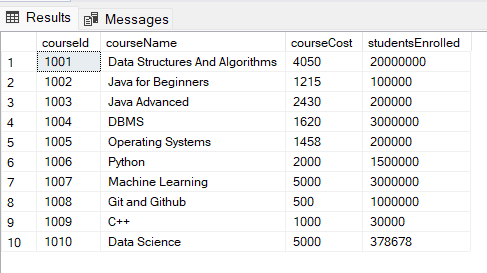
How to Create a Synonym for Table CoursesActive.
Query
CREATE SYNONYM CoursesActiveSynonym
FOR CoursesActive

SELECT * FROM CoursesActiveSynonym
The Result Looks Like:

Explanation: In the result we can the rows in the synonym table 'CoursesActiveSynonym' which has the same rows as the base table 'CoursesActive'.
How to Create a Synonym for Table Along with its schemaName.
Step 1: Create a database GeeksforGeeksSchool
Query
CREATE DATABASE GeeksforgeeksSchool
Step 2: Use the database
Query
USE GeeksforgeeksSchool
Step 3: Create a schema 'Courses'
Query
CREATE SCHEMA Courses
Step 4: Create a table in the schema 'CoursesActive'
Query
CREATE TABLE Courses.CoursesActive (courseId INT PRIMARY KEY,
    courseName VARCHAR(100),
       courseCost INT,
    studentsEnrolled BIGINT
);
Step 5: Insert rows into the table
Query
INSERT INTO CoursesActive
VALUES (2001, 'Data Structures And Algorithms', 4050, 20000000),
       (2002, 'Java for Beginners',1215,100000),
       (2003, 'Java Advanced',2435,200000),
       (2004, 'DBMS',1620,3000000);
Step 6: Create the Synonym schoolCourses for the table CoursesActive
Query
CREATE SYNONYM schoolCourses
FOR GeeksforgeeksSchool.Courses.CoursesActive
Explanation: We have created a synonym for a table CoursesActive in the schema Courses in the Database GeeksforgeeksSchool with the name schoolCourses
Check the Synonym Table
Query
SELECT * FROM schoolCourses
The Result Looks Like:
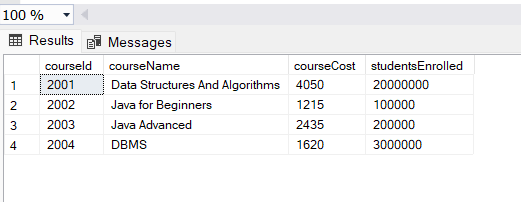
Explanation: In the result, we can see that the synonym also has the same information as the base table.
How to Updates the Base Table After Adding a Row
Query
INSERT INTO schoolCourses
VALUES (2006,'Devops', 550, 20000000);

SELECT * FROM schoolCourses

SELECT * FROM Courses.CoursesActive
Explanation: We have inserted a row in the synonym table 'schoolCourses' and checked if the change is reflected in the base table using the SELECT statement.
The Result Looks Like:
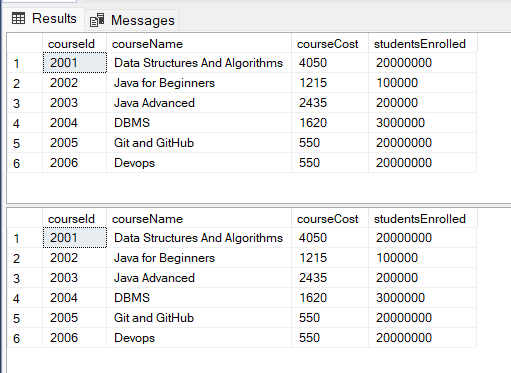
Explanation: In the result, the first table is the synonym and the second is the base table on inserting the row in the synonym table it got reflected in the base table as well we can see that there is no difference in both the tables.
How to Create a Synonym for a Stored Procedure in an SQL Server
Step 1: Create a stored procedure to find the most sold course.
Query
CREATE PROCEDURE StoredProcedureForTheMostSellingSchoolCourse
AS
BEGIN
SELECT TOP(1) courseName FROM Courses.CoursesActive ORDER BY studentsEnrolled DESC;
END;
Explanation: In this query, we have created a stored procedure that gives the top 1st courseName from the table when it is got sorted by the number of studentsEnrolled in descending order.
Step 2: Checking the Stored Procedure.
Query
EXEC StoredProcedureForTheMostSellingSchoolCourse
Explanation: We have executed the stored procedure.
The Result Looks Like:

Explanation: Here the best selling course is Data Structures and Algorithms so the result we have is through the stored procedure which takes the TOP 1 of the table by sorting on the studentsEnrolled column in Descending order.
Step 3: Create a synonym for the stored procedure and checking that it
Query
CREATE SYNONYM mostSellingCourse
FOR StoredProcedureForTheMostSellingSchoolCourse

EXEC mostSellingCourse
Explanation: In the query, firstly we created the synonym 'mostSellingCourse' for stored procedure 'StoredProcedureForTheMostSellingSchoolCourse' and then we have executed it using the EXEC command.
The Result Looks Like:
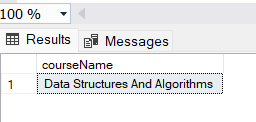
Explanation: In the above query new stored procedure synonym is created for StoredProcedureForTheMostSellingSchoolCourse and the new synonym is executed.
Deleting a Synonym
We can't create a duplicate or ALTER the synonym, to alter the synonym the current synonym should be dropped and then it can be recreated.
Syntax for Deletion of a Synonym :
Query :
DROP SYNONYM IF EXISTS [schema_name].synonym_name
IF EXISTS can be used for the conditional dropping of the synonym.
How to DELETE a Synonym and Access it After the Deletion.
Query
DROP SYNONYM IF EXISTS schoolCourses

SELECT * FROM schoolCourses
Explanation: In the query, we are first checking if there exist a synonym 'schoolCourses', if it exist we are drop it using the drop statement, and using select statement we check if the synonym exists.
The Result Looks Like:

Explanation: In this query, we have dropped the schoolCourses SYNONYM so we are unable to access the synonym after its deletion.
How to Check Already Existing Synonyms.
Method 1: Using the Query
Query
SELECT  name, base_object_name, type
FROM sys. synonyms
Explanation: Using the select statement we are specifying the columns name, base_object_name,and type to display in the result.
The Result Looks Like:
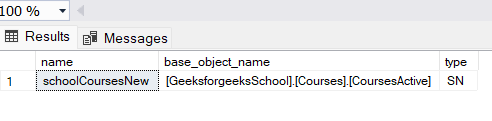
Explanation: In the result we can see the name , base object name and the type of the synonym using this query
Method 2: Using the Object Explorer of the UI
On the Object Explorer, We have a Geeksforgeeks database in which GeeksforgeeksSchool Schema has a Synonyms folder where our all Created Synonyms are placed.
The Result Looks Like:

Where to Use Synonyms
- In a scenario where we have lengthy names and want to keep an alias with a short name.
- It enhances security since it helps hide the schema details.
- In case we want to avoid hardcoding by using different development environments
- To enable dynamic schema and server changes, the synonym pointing will change when the schema is changed.
- To enhance the readability by providing meaningful synonyms.
Advantages of Using Synonym
- Synonyms reduce the efforts by helping us keep the length reduced alias
- All the changes made in the base table will be reflected here and the changes made in the synonym also change in the base table
- Creates and abstraction the base table.
Drawbacks
When the base table gets renamed the old synonyms get invalid and become dangling synonyms so whenever a renaming or new table is created then the respective synonyms should be made.
Conclusion
Synonyms in SQL Server act as a alias for the databbase objects and give straightforward naming convention. It allow developer to give simple or easy name to the database or tables for its simplicity. Overall, it make database more adaptable.
