This SQL project focuses on analyzing customer information, purchase history and order records in an e-commerce platform. It demonstrates SQL concepts such as LIKE, IN, BETWEEN, EXISTS, CASE and set operators to filter data, identify customer activity and analyze order patterns.
Dataset Overview
The E-Commerce Customer Analysis project consists of two main tables.
| Table | Description |
|---|---|
| Customers | Stores customer names, email addresses, locations and registration dates |
| Orders | Stores order details, including order amounts, statuses and order dates |
Step 1: Create the E-Commerce Tables
First, create the required tables using the CREATE TABLE statement. A primary key uniquely identifies each record, while a foreign key connects orders to customers.
CREATE TABLE customers (customer_id INT PRIMARY KEY,customer_name VARCHAR(100),email VARCHAR(150),city VARCHAR(100),registration_date DATE);CREATE TABLE orders (order_id INT PRIMARY KEY,customer_id INT,order_amount DECIMAL(10, 2),order_status VARCHAR(30),order_date DATE,FOREIGN KEY (customer_id)REFERENCES customers(customer_id));
Output:
customers table:

orders table:

Step 2: Insert Customer Records
Insert sample customer information into the customers table.
INSERT INTO customers
    (customer_id, customer_name, email, city, registration_date)
VALUES
    (101, 'James Wilson', 'james@example.com', 'New York', '2024-01-15'),
    (102, 'Emily Carter', 'emily@example.com', 'Chicago', '2024-03-20'),
    (103, 'Michael Brown', 'michael@example.com', 'Boston', '2023-11-10'),
    (104, 'Sophia Miller', 'sophia@example.com', 'New York', '2024-06-05'),
    (105, 'Daniel Taylor', 'daniel@example.com', 'Seattle', '2023-08-18'),
    (106, 'Olivia Davis', 'olivia@example.com', 'Chicago', '2024-09-12');
Output:
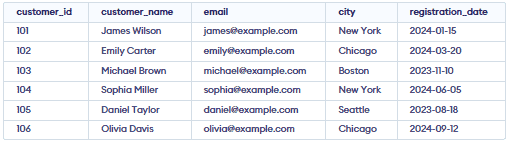
This query inserts six customer records into the customers table.
Step 3: Insert Order Records
Insert purchase details into the orders table.
INSERT INTO orders(order_id, customer_id, order_amount, order_status, order_date)VALUES(1001, 101, 250.00, 'Completed', '2024-02-10'),(1002, 102, 120.00, 'Pending', '2024-04-15'),(1003, 103, 450.00, 'Completed', '2024-01-20'),(1004, 101, 180.00, 'Completed', '2024-05-12'),(1005, 104, 90.00, 'Cancelled', '2024-06-18'),(1006, 105, 600.00, 'Completed', '2024-07-25'),(1007, 106, 320.00, 'Pending', '2024-10-05'),(1008, 103, 150.00, 'Completed', '2024-11-14');
Output:
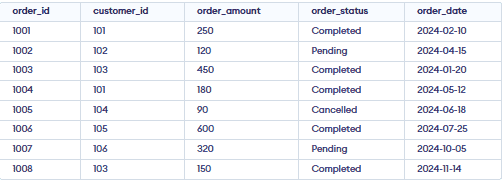
This query inserts eight order records associated with different customers.
Step 4: Filter Customers Using LIKE
The LIKE operator searches for a specified pattern in a column. It is useful for finding customers whose names or email addresses match a particular pattern.
Query: Find customers whose names start with 'M'.
SELECT customer_id, customer_name, emailFROM customersWHERE customer_name LIKE 'M%';
Output:

- This query returns customers whose names begin with the letter M. The % wildcard represents zero or more characters.
Step 5: Filter Customers Using IN
The IN operator checks whether a value matches any value in a specified list.
Query: Find customers living in New York or Chicago.
SELECT customer_id, customer_name, cityFROM customersWHERE city IN ('New York', 'Chicago');
Output:

- This query retrieves customers whose city is either New York or Chicago.
Step 6: Filter Orders Using BETWEEN
The BETWEEN operator selects values within a specified range, including both boundary values.
Query: Find orders with amounts between 150 and 400.
SELECT order_id, customer_id, order_amountFROM ordersWHERE order_amount BETWEEN 150 AND 400;
Output:

- This query returns orders with amounts greater than or equal to 150 and less than or equal to 400.
Step 7: Find Customers Using EXISTS
The EXISTS operator checks whether a subquery returns at least one row. It is useful for identifying customers who have placed orders.
Query: Find customers who have placed at least one order.
SELECT customer_id, customer_nameFROM customers cWHERE EXISTS (SELECT 1FROM orders oWHERE o.customer_id = c.customer_id);
Output:
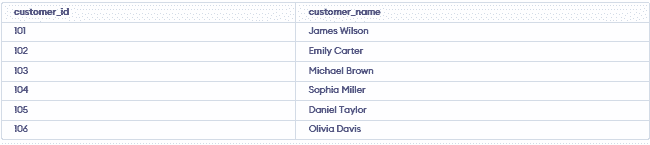
- This query returns customers for whom a matching record exists in the
orderstable.
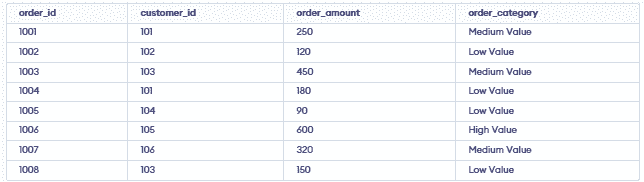
Step 8: Categorize Orders Using CASE
The CASE expression applies conditional logic to return a value based on specified conditions.
Query: Categorize orders based on their amount.
SELECTorder_id,customer_id,order_amount,CASEWHEN order_amount >= 500 THEN 'High Value'WHEN order_amount >= 200 THEN 'Medium Value'ELSE 'Low Value'END AS order_categoryFROM orders;
Output:
Step 9: Combine Customer Lists Using UNION
Set operators combine the results of two or more compatible SELECT statements. The UNION operator combines results and removes duplicate rows.
Query: Find customers who either live in New York or have placed a completed order.
SELECT customer_id, customer_nameFROM customersWHERE city = 'New York'UNIONSELECT c.customer_id, c.customer_nameFROM customers cJOIN orders oON c.customer_id = o.customer_idWHERE o.order_status = 'Completed';
Output:

- This query returns a unique list of customers who satisfy either condition.
Step 10: Combine Customer Lists Using UNION ALL
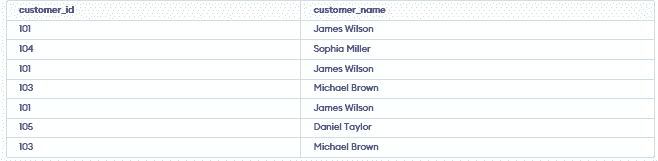
Unlike UNION, the UNION ALL operator retains duplicate rows in the combined results.
Query: Combine customers from New York with customers who have placed completed orders.
SELECT customer_id, customer_nameFROM customersWHERE city = 'New York'UNION ALLSELECT c.customer_id, c.customer_nameFROM customers cJOIN orders oON c.customer_id = o.customer_idWHERE o.order_status = 'Completed';
Output: