

This SQL project focuses on managing employee records using queries such as SELECT, INSERT, UPDATE, DELETE, duplicate removal and Dynamic SQL to maintain and analyze employee information.
Dataset Overview
The Employee Data Analysis project consists of two main tables. These tables are connected using primary and foreign keys.
| Table | Description |
|---|---|
| Employees | Stores employee details, including name, salary, department and joining date |
| Departments | Stores department names and their unique identifiers |
Below are the steps to build and analyze the Employee Data Analysis database using SQL queries.
Step 1: Create the Employee Data Analysis Tables
First, create the required tables using the CREATE TABLE statement. A primary key uniquely identifies each record, while a foreign key connects employees to their departments.
CREATE TABLE departments (department_id INT PRIMARY KEY,department_name VARCHAR(100));CREATE TABLE employees (employee_id INT PRIMARY KEY,employee_name VARCHAR(100),email VARCHAR(150),department_id INT,job_role VARCHAR(100),salary DECIMAL(10, 2),joining_date DATE,FOREIGN KEY (department_id)REFERENCES departments(department_id));
Output:
department table:

employees table:

- The departments and employees tables are created successfully.
Step 2: Insert Department Records
Before adding employees, insert the department details into the departments table using the INSERT INTO statement.
INSERT INTO departments (department_id, department_name)
VALUES
    (1, 'IT'),
    (2, 'HR'),
    (3, 'Finance'),
    (4, 'Marketing');
Output:
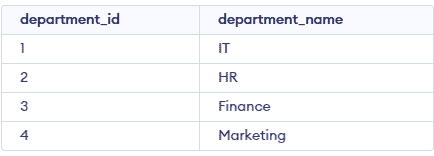
- This query inserts four department records into the departments table.
Step 3: Insert Multiple Employee Records
The organization can add several employee records in a single INSERT INTO statement instead of executing separate queries for each employee.
INSERT INTO employees (employee_id, employee_name, email, department_id, job_role, salary, joining_date)
VALUES
    (101, 'James Wilson', 'james@example.com', 1, 'Data Analyst', 55000, '2024-01-15'),
    (102, 'Emily Johnson', 'emily@example.com', 2, 'HR Executive', 42000, '2023-06-10'),
    (103, 'Michael Brown', 'michael@example.com', 3, 'Financial Analyst', 60000, '2022-09-20'),
    (104, 'Olivia Davis', 'olivia@example.com', 1, 'Software Developer', 70000, '2021-03-12'),
    (105, 'William Taylor', 'william@example.com', 4, 'Marketing Executive', 45000, '2024-05-18'),
    (106, 'Sophia Miller', 'sophia@example.com', 3, 'Accountant', 48000, '2023-11-25');
Output:
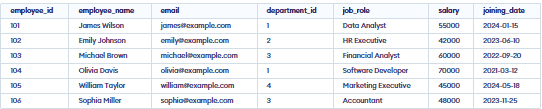
This query inserts six employee records into the employees table.
Step 4: Retrieve Employee Records
The HR department needs to view employee information, review salary details and sort employees based on their salaries. The following SELECT queries can be used.
Query 1: Display all employee records
SELECT * FROM employees;Output:
This query retrieves all columns and records from the employees table.
Query 2: Display employee names and salaries
The HR team needs to review employee salaries without retrieving other personal or job details.
SELECT employee_name, salaryFROM employees;
Output:

This query retrieves only employee names and salaries.
Query 3: Find employees earning more than 50,000
The organization wants to identify employees whose salaries exceed 50,000 for a salary review.
SELECT employee_name, salaryFROM employeesWHERE salary > 50000;
Output:

This query returns employees whose salaries are greater than 50,000.
Query 4: Display employees in descending order of salary
The HR department wants to identify the highest-paid employees first.
SELECT employee_name, salaryFROM employeesORDER BY salary DESC;
Output:
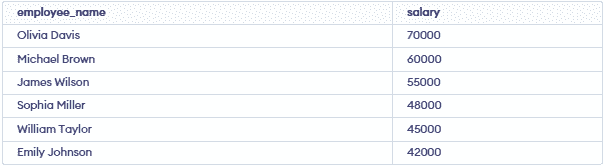
This query sorts employees from the highest salary to the lowest salary.
Step 5: Update Employee Salary
Employee 101 receives a salary revision following a performance review, increasing their salary to 62,000.
UPDATE employeesSET salary = 62000WHERE employee_id = 101;
Output:

This query updates the salary of employee 101 to 62,000.
Note: Always use an appropriate WHERE condition when updating specific records. Without it, every employee's salary may be updated.
Step 6: Delete an Employee Record
The HR department needs to remove employee 107's record from the employees table using the DELETE statement with a WHERE condition.
DELETE FROM employeesWHERE employee_id = 107;
This query deletes the record of employee 107.
Note: The DELETE statement removes records but preserves the table structure. Any dependent records or foreign key constraints must also be considered.
