
The RENAME VIEW operation is used to change the name of an existing view without affecting its structure or data. It helps assign a more meaningful name to the view while keeping its contents unchanged.
Syntax:
EXEC sp_rename 'old_view_name', 'new_view_name';Explanation:
- sp_rename: Renames an existing view.
- old_view_name: Current name of the view.
- new_view_name: New name assigned to the view.
Example: Renaming a View in SQL Server
Consider the Sales table containing product_id and quantity columns. We will first create a view based on this table and then rename it. Here, product_id identifies the product, while quantity represents the number of units sold.
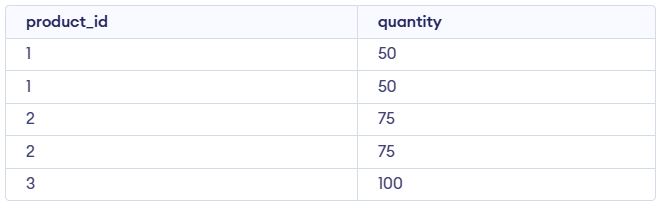
Create the sales_report View
The view sales_report aggregates the total quantity of each product from the Sales table.
Query:
CREATE VIEW sales_report AS
SELECT product_id, SUM(quantity) AS total_quantity
FROM Sales
GROUP BY product_id;

SELECT * FROM sales_report;
Output:

Rename the sales_report View
We rename the sales_report view to monthly_sales_report using the sp_rename stored procedure in SQL Server.
Query:
EXEC sp_rename 'sales_report', 'monthly_sales_report';Verification
To verify that the view was successfully renamed, we query the newly named view.
Query:
select * from monthly_sales_report;Output:

Advantages of Renaming Views
- Adaptability: Update view names to reflect changing business logic.
- Consistency: Aligns object names with naming standards.
- Clarity: Improves schema readability and understanding.
- Dependency Safety: Keeps stored procedures and permissions intact.
- Efficiency: Saves time compared to dropping and recreating views.
