If you’ve spent any real time building REST APIs with Spring, you’ve probably hit this wall: your PagingAndSortingRepository gives you gorgeous, self-documenting PagedModel responses out of the box, complete with next, prev, and self links. Then you write a custom repository, maybe because you need a native query, a complex join, or some business logic Spring Data can’t infer from a method name, and suddenly all that HATEOAS magic just… vanishes. You’re left writing pagination metadata by hand, wondering why a framework that promised convention over configuration abandoned you the moment you needed control.
This isn’t a bug. It’s a structural consequence of how Spring Data REST and Spring HATEOAS actually generate those links, and understanding why will save you hours of debugging a “missing feature” that was never going to exist in the first place.
What Is PagedModel and Why Does It Work So Well by Default?
PagedModel is a Spring HATEOAS wrapper class that represents a paginated collection of resources alongside navigational links and page metadata. It automatically attaches next, prev, first, and last links when Spring Data REST exposes a repository, because the framework already knows the query, the Pageable parameters, and the underlying Page<T> object at the moment it builds the response.
That last part is the whole story, really. Spring Data REST doesn’t generate those links through some clever runtime inspection of your database. It generates them because the entire request lifecycle, from the incoming query parameters to the final serialized response, is owned end-to-end by the framework’s own machinery. When you call a derived query method like findByLastName(String lastName, Pageable pageable) on a standard PagingAndSortingRepository, Spring intercepts that call, wraps the result in a Page<T>, and hands it off to PagedResourcesAssembler, which has full visibility into the original request URI, the current page number, and the total element count. Building next and prev links from that is almost trivial arithmetic.
The elegance here is real. For CRUD-shaped APIs, this is genuinely one of the better pagination implementations in the Java ecosystem, and it’s part of why so many teams default to it without thinking twice.
Where Custom Repositories Break the Chain
Here’s the catch, and it’s worth sitting with for a second: PagedResourcesAssembler needs a Page<T> object and, critically, the original Pageable and request context to build accurate links. A custom repository implementation, one where you’ve written your own method using EntityManager, a JdbcTemplate, or a native query annotation, doesn’t automatically produce that context. You’re not going through Spring Data REST’s request pipeline anymore. You’re just a method returning data.
Think about what actually has to happen for a next link to be correct. The assembler needs to know the current page index, the page size, the sort order, and the total count of matching records, then reconstruct a URI pointing to page N+1 with all of that preserved. When Spring Data builds this for you automatically, it’s because the repository proxy and the Pageable argument resolver are working together, both aware of the same request. The instant you write a custom implementation, even one that technically returns a Page<T>, you’ve stepped outside that coordinated system. The Page object exists, but nothing is automatically wiring it into PagedResourcesAssembler with the correct base URI, because that wiring happens at the controller layer, not the repository layer, and Spring Data REST’s automatic exposure was never designed to detect “this is a custom implementation, let me still build links for it.”
This trips people up because the mental model of “the repository returns a Page, therefore pagination should just work” is intuitive but wrong. Pagination links aren’t a property of the data. They’re a property of the request, and custom repositories, by definition, opt out of Spring’s automated request-to-response wiring.
There’s a second, subtler issue too: total count queries. Standard derived queries let Spring Data auto-generate a COUNT query alongside your SELECT. Custom implementations using native SQL or EntityManager criteria queries often require you to write that count query yourself, and if it’s even slightly out of sync with your main query’s filtering logic, your totalElements and therefore your last link will be silently wrong. That’s a bug that can live in production for months before anyone notices the last page is off by one.
A Practical Example of the Failure Mode
Picture a ProductRepository where you need a custom method for a geo-radius search, something no derived query can express:
public interface ProductRepositoryCustom {
    Page<Product> findNearby(double lat, double lng, double radiusKm, Pageable pageable);
}
Your implementation manually constructs a native query, executes it, wraps the results, and returns a PageImpl<>(content, pageable, total). Functionally, this works. Structurally, it’s invisible to Spring Data REST’s automatic resource assembly. If you expose this through a @RepositoryRestController or a plain @RestController, you now have to explicitly inject PagedResourcesAssembler<Product> and call .toModel(page) yourself in the controller method. Skip that step, and you’ll return a raw Page<Product> with Jackson-serialized pagination metadata that has no _links section at all, breaking any HATEOAS-aware client expecting standard navigation.
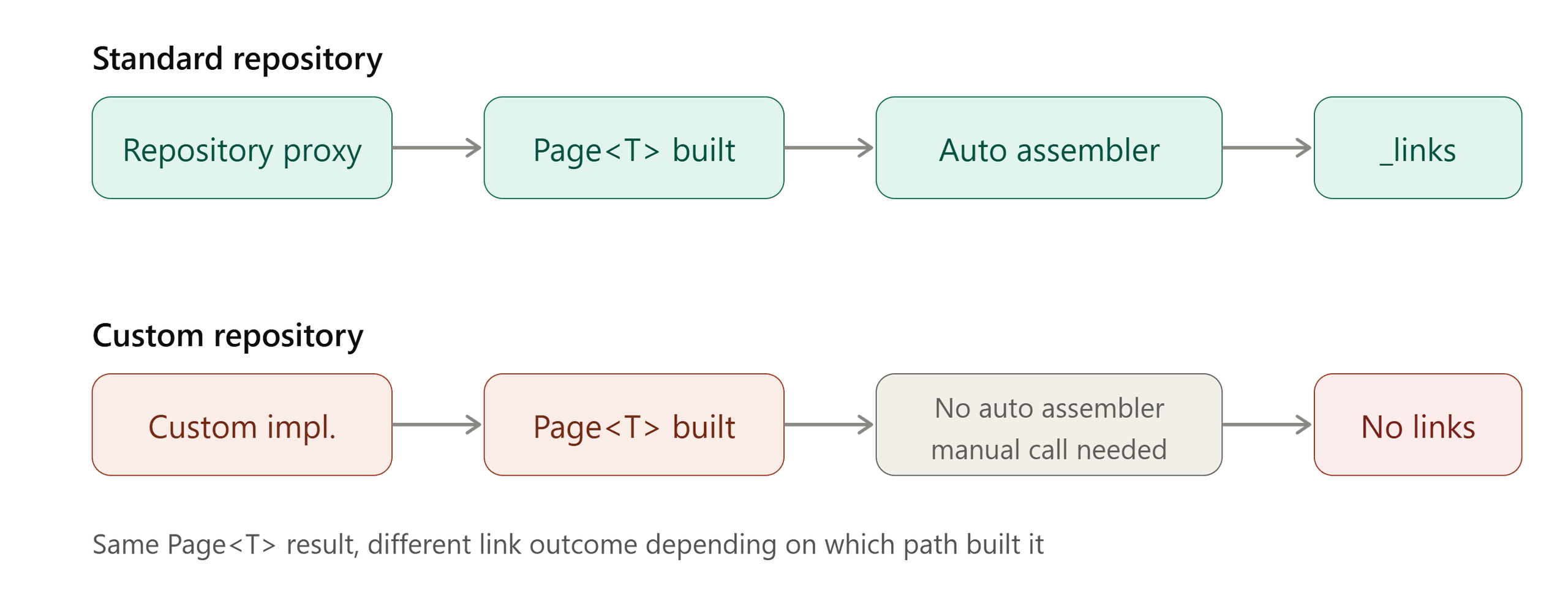
A side-by-side comparison diagram showing two request flows, one for a standard PagingAndSortingRepository call (request → repository proxy → Page<T> → automatic PagedResourcesAssembler → JSON with _links) and one for a custom repository call (request → custom implementation → raw Page<T> → missing links unless manually assembled).
How to Fix It: Manual Assembly Is the Real Answer
The good news is that this isn’t unsolvable, it just requires accepting that custom repositories mean custom responsibility for link generation. The Spring HATEOAS reference documentation covers the PagedResourcesAssembler API in detail, and the fix is generally a few lines of controller code:
@GetMapping("/products/nearby")
public PagedModel<EntityModel<Product>> nearby(
        @RequestParam double lat, @RequestParam double lng,
        @RequestParam double radiusKm, Pageable pageable,
        PagedResourcesAssembler<Product> assembler) {

    Page<Product> page = productRepository.findNearby(lat, lng, radiusKm, pageable);
    return assembler.toModel(page);
}
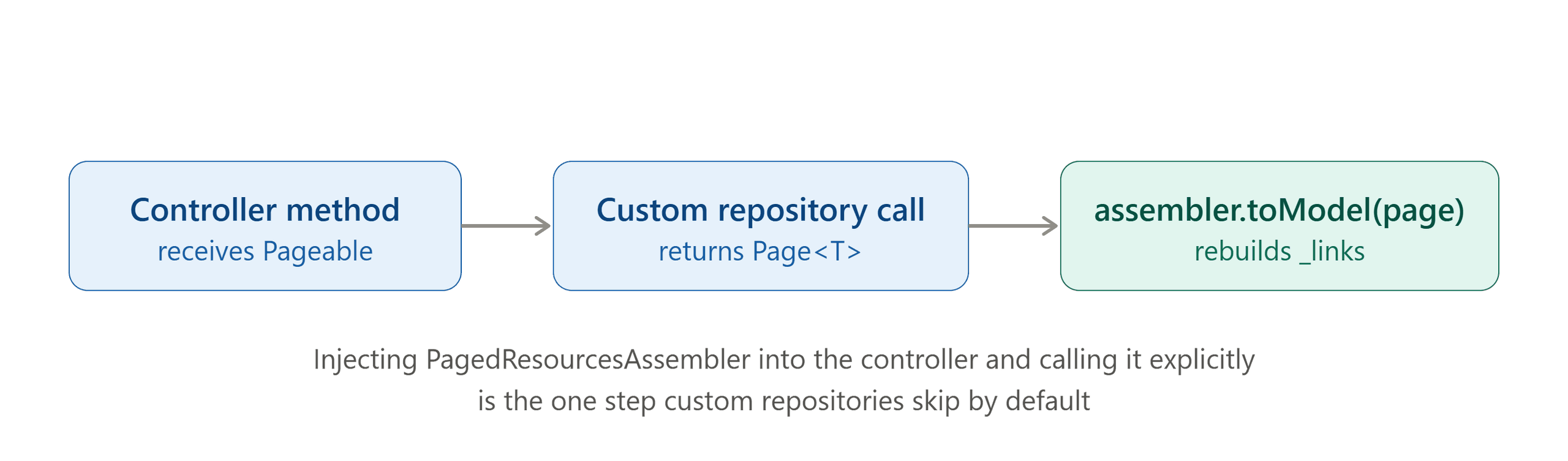
Injecting PagedResourcesAssembler directly into your controller and calling toModel() explicitly gives you the same next/prev/self link structure Spring Data REST would have generated automatically, because you’re now manually performing the exact wiring step the framework normally does behind the scenes. This is, frankly, the cleanest workaround, and it scales well once your team internalizes the pattern.
A few teams take a different route and reach for Slice<T> instead of Page<T> when they don’t strictly need a total count, since Slice only needs to know whether a next page exists, which sidesteps the count-query accuracy problem entirely. It’s a reasonable trade-off if your UI only needs “load more” behavior rather than jump-to-page navigation. Some deeper discussion of when Slice beats Page shows up in community write-ups on Spring Data pagination strategies, and it’s worth a read if you’re designing a new API from scratch rather than retrofitting an existing one.
Another pattern worth knowing: building a custom RepresentationModelAssembler<Product, EntityModel<Product>> bean to centralize how individual resources get their self-links, then combining that with PagedResourcesAssembler at the collection level. This separates “how does one Product become a hypermedia resource” from “how does a page of Products become a paginated hypermedia collection,” and it keeps controllers thin even as your custom repository logic grows more elaborate. Teams running high-traffic public APIs often lean on this separation specifically because it’s testable in isolation, something recent API design guidance increasingly recommends over monolithic controller methods.
A code-annotated screenshot or flow graphic showing the controller method with PagedResourcesAssembler
What this means for your API design
None of this is an argument against custom repositories, they exist precisely because real-world query requirements outgrow what derived methods and Specifications can express cleanly. The lesson is simpler than it looks: treat PagedResourcesAssembler as a tool you own and invoke deliberately, not a background service that follows your data everywhere. Once your team internalizes that pagination links are a request-layer concern rather than a data-layer side effect, custom repositories stop feeling like a HATEOAS dead end and start feeling like exactly what they are, a normal extension point that just needs one extra line of wiring.
Frequently asked questions
Why doesn’t PagedModel show next/prev links with a custom repository?
Because Spring Data REST builds those links inside its own request pipeline, which a custom repository bypasses by default. You need to call PagedResourcesAssembler.toModel() manually in your controller to get that functionality back.
Can I use Slice instead of Page to avoid the problem?
Yes, and in many cases it’s preferable. Slice<T> doesn’t need a total count query, so you avoid entirely the risk of mismatch between a custom query and a custom count query, at the cost of not having a total page count.
Is it safe to mix standard and custom repositories in the same project?
Absolutely, as long as your team knows the two models don’t produce links the same automated way. Document explicitly which endpoints require manual assembly so you don’t end up with inconsistent HATEOAS responses across your API.
Does this problem also affect the Spring Data JPA Specification API?
Generally not in the same way, since Specification queries still usually go through standard repository methods returning Page<T> via the normal proxy mechanism. The problem shows up specifically when you write fully custom method implementations, not when you’re just composing dynamic criteria.