Every Java team that adds a machine learning model faces the same early choice. Do you load the model inside your application, or do you call it over the network? The answer depends on one number that most teams never measure.
Two ways to put a model into a Java application
The first option is in-process inference. Your JVM loads the model file and runs it directly. For ONNX models, the ONNX Runtime Java API does this. It is a binding for Java 8 or newer, and the library documentation explains that the jar bundles the native runtime together with the JNI glue.
Alternatively, you can use the Deep Java Library (DJL). It is an engine-agnostic Java framework, and it ships an ONNX Runtime engine. The DJL team even advises against using the engine classes directly, because that would tie your code to one engine.
The second option is a remote service. The model lives behind an HTTP endpoint, and your application sends it requests. DJL Serving is one example. It is a stand-alone model server with a REST inference API and dynamic batching.
What each choice buys you
Both approaches work. However, they trade different things, as Table 1 shows.
| Aspect | In-process (ONNX Runtime or DJL) | Remote service |
|---|---|---|
| Latency per call | No network hop | Adds serialization and a round trip |
| Scaling | Scales with your app instances | Model tier scales separately |
| Memory | Every app instance holds a model copy | One copy per model server |
| Releases | Model ships with the app | Model changes without an app deploy |
| Failure | A native crash hits your app | Isolated, but network errors appear |
| GPUs | Every app instance needs access | Concentrated in one tier |
Table 1. The main trade-offs between the two designs.
What a call really costs
Most of Table 1 is easy to reason about. Latency is not, so I measured it. I built three synthetic ONNX models of different sizes and ran each one in two ways: directly in the process, and behind a local HTTP service.
One honest limit first. Maven Central was unreachable from my test environment, so I could not run the Java ONNX Runtime API itself. Instead, I used the Python binding of ONNX Runtime 1.24.4 with one thread per session. Later, I cross-checked the service side with a Java HTTP client.
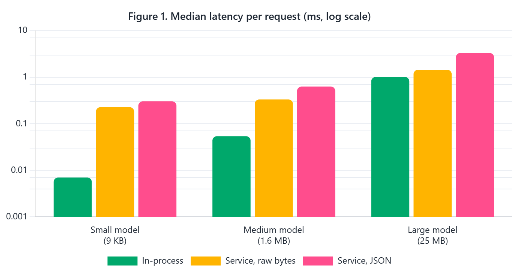
The gap is striking for small models. The small model took about 0.007 ms in process, but 0.303 ms behind a JSON service. In other words, the call became roughly 43 times slower, even though the network was only loopback. As the model grows, the fixed cost matters less, because the compute dominates. Table 2 shows the ratios.
| Model | In-process p50 | JSON service vs in-process | Binary service vs in-process |
|---|---|---|---|
| Small (9 KB) | 0.007 ms | 43 times slower | 32 times slower |
| Medium (1.6 MB) | 0.054 ms | 12 times slower | 6 times slower |
| Large (25 MB) | 1.010 ms | 3.3 times slower | 1.4 times slower |
Table 2. Median latency ratios from the same run as Figure 1.
The wire format matters more than the network
Notice the third series in the chart. I also sent the same input as raw bytes instead of JSON. For the medium model, that cut the median from 0.630 ms to 0.332 ms. The difference grows with batch size, since JSON turns every float into text.
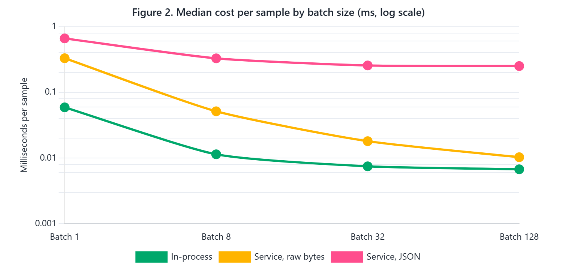
At a batch of 128, the JSON service needed 32.1 ms, while the binary service needed 1.3 ms, and in-process inference needed 0.86 ms. Therefore, batching helps a remote service only when the payload stays compact. Fortunately, binary formats are a design choice, not a law of nature.
Measure your own service from Java
The numbers above come from my machine, so yours will differ. The snippet below times repeated POST calls with the JDK’s built-in HttpClient. It needs JDK 11 or newer, and it sends a 256-value JSON input like the one my medium model expects. Point it at your own endpoint and adjust the payload.
cat > Ping.java <<'EOF'
import java.net.URI;
import java.net.http.*;
import java.util.Arrays;

public class Ping {
  public static void main(String[] a) throws Exception {
    String url = a[0];
    int n = Integer.parseInt(a[1]);
    String json = "{\"x\":[[" + "0.1,".repeat(255) + "0.1]]}";
    HttpClient c = HttpClient.newHttpClient();
    HttpRequest r = HttpRequest.newBuilder(URI.create(url))
      .header("Content-Type", "application/json")
      .POST(HttpRequest.BodyPublishers.ofString(json)).build();
    long[] t = new long[n];
    for (int i = 0; i < n + 200; i++) {
      long s = System.nanoTime();
      c.send(r, HttpResponse.BodyHandlers.ofString());
      if (i >= 200) t[i - 200] = System.nanoTime() - s;
    }
    Arrays.sort(t);
    System.out.printf("p50 %.3f ms, p99 %.3f ms%n",
      t[n / 2] / 1e6, t[(int) (n * 0.99)] / 1e6);
  }
}
EOF
java Ping.java http://localhost:8080/predict 2000
Against my local service, this Java client reported a median between 0.84 and 0.98 ms across three runs. That is the same order of magnitude as the Python client’s 0.63 ms, although its 99th percentile was higher, between 7.5 and 8.6 ms, on a single shared core.
When each design wins
Now the decision becomes practical. Compare the call overhead with the compute time of your model. When the overhead is a large share of the total, the network hop dominates, and in-process inference wins. When compute dominates, the hop barely matters, and a remote service becomes attractive for its other benefits. This is a rule of thumb, not a law, but it matches the trend in Table 2.
Favor in-process for small, hot models
Small models in a latency-sensitive path, such as scoring a request before it is handled, belong in the process. Moreover, there is no extra service to deploy, monitor, or secure. DJL helps here when you want to keep the option of switching engines later.
Favor a service for heavy or shared models
Large models, GPU workloads, and models used by many applications fit a service better. Memory is also a concern, since every replica of your application holds its own copy when the model runs in-process. My large test model alone was about 25 MB per instance. In addition, a service lets data scientists release new model versions without redeploying the Java application.
Decision checklist
- Measure the call overhead of your own stack with a simple timer like Ping.
- Compare it with the model’s compute time at your real batch size.
- Prefer a compact binary payload when you call a service with batches.
- Keep inference behind a small interface, so you can switch designs later.
- Count the model copies you will hold in memory across all replicas.
What we have learned
In-process inference and remote model services are both valid, but they cost very different amounts per call. In my benchmark, a small model ran in about 0.007 ms in process, while the same model behind a JSON service needed about 0.3 ms, roughly 43 times more, even on loopback. The penalty shrinks as the model grows, down to about 3.3 times for a 25 MB model. The wire format mattered more than the network: raw bytes beat JSON by a wide margin, and at a batch of 128 the binary service came within about 1.5 times of in-process speed. Therefore, choose in-process for small, latency-critical models, and a service for heavy, GPU-bound, or widely shared ones. Above all, measure the overhead on your own stack before you decide.