Running large language models locally using tools like Ollama fundamentally changes how we build AI applications. It enables fast experimentation, offline development, and removes dependency on external APIs or usage costs.
However, local models come with a major limitation: their knowledge is fixed at training time. This makes them unreliable for tasks that require up-to-date information, such as current events or evolving technical documentation.
This is where the Ollama Web Search API becomes transformative. By connecting a local model like Qwen to real-time web data, you turn a static model into an intelligent agent capable of reasoning, searching, and acting. In this article, we will build a personal web research AI agent using Quarkus, LangChain4j, and Ollama.
1. Prerequisites
Before starting, ensure you have:
- Java 21+
- Maven installed
- Ollama installed and running locally
- Qwen model pulled (e.g.,
ollama pull qwen3:8b)
2. System Architecture Overview
A well-defined system design ensures that every component operates with a clear purpose and contributes meaningfully to the overall functionality. By organizing the architecture thoughtfully, each part of the application is assigned a distinct and essential responsibility, enabling the system to function efficiently, scale effectively, and remain easy to understand and maintain.
- Quarkus: Acts as the runtime and application framework. It provides REST endpoints, dependency injection, configuration, and fast startup performance.
- LangChain4j: Handles interaction with the LLM. It enables tool calling, prompt management, and AI service abstraction.
- Ollama: Runs the LLM locally (e.g., Qwen). It processes prompts and generates responses without external dependencies.
- Ollama Web Search API: Provides real-time web data. It allows the agent to fetch fresh information when the LLM determines it needs external context.
3. Initializing the Quarkus Project
To get started quickly, you can bootstrap the application using the official Quarkus project generator: Quarkus Project Generator. On the generator page, configure your project (Group ID, Artifact ID, and package name), then add the following extensions:
- rest: Enables building RESTful APIs using JAX-RS. This allows us to expose our AI agent through HTTP endpoints.
- rest-client: Provides a type-safe way to call external HTTP services. We will use this to communicate with the Ollama Web Search API.
- quarkus-langchain4j-ollama: Integrates LangChain4j with Ollama, making it easy to interact with local LLMs like Qwen and support tool calling.
- smallrye-fault-tolerance: Adds resilience features such as retries, timeouts, and circuit breakers, ensuring the application remains stable when external services fail or respond slowly.
These dependencies provide the foundation for building our AI-powered web research agent.
After selecting these extensions and generating the project, download and extract it. The generated project will already include the selected dependencies. The screenshot below (from the Quarkus generator) shows these extensions selected during project creation.
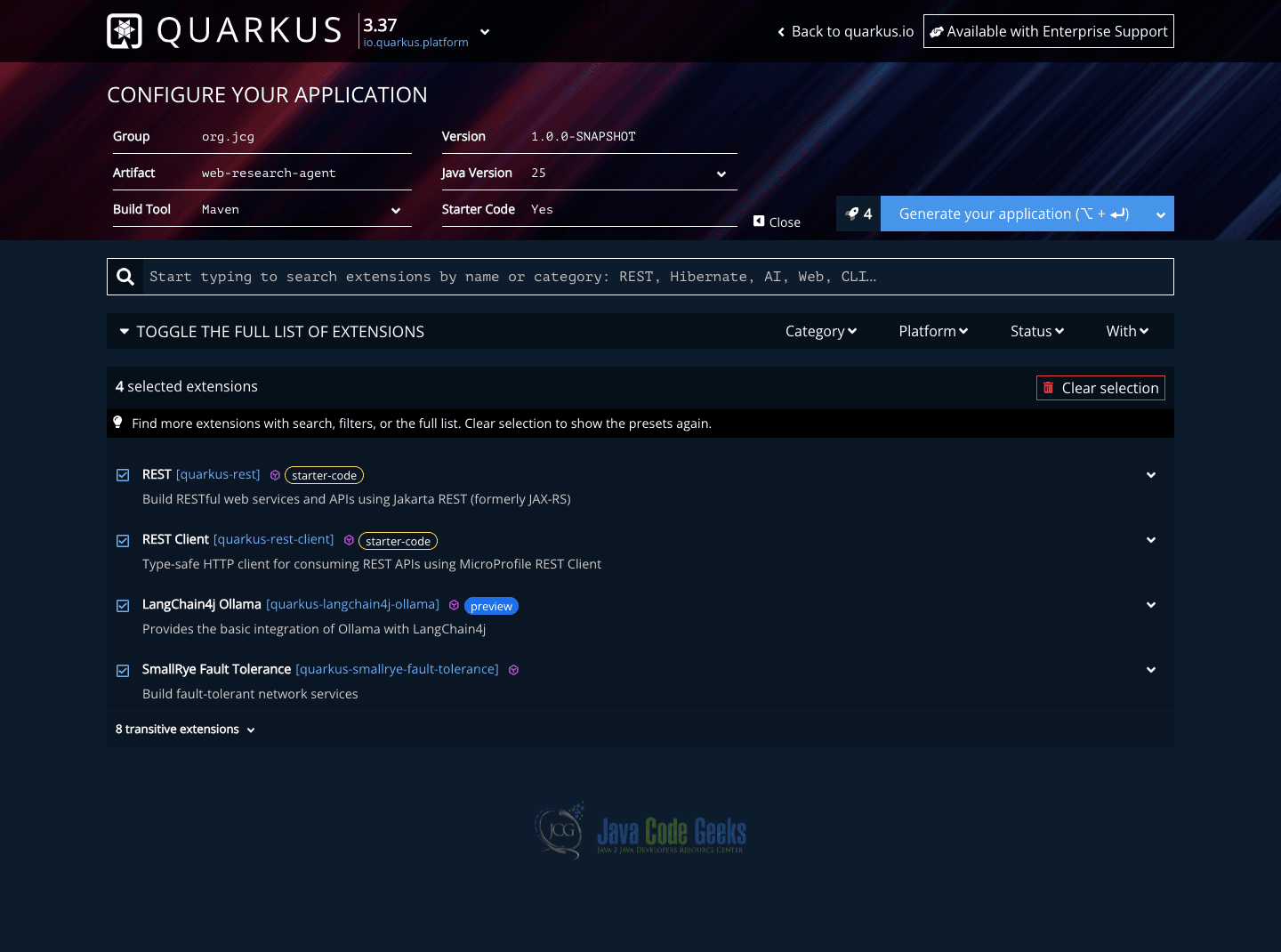
The generated pom.xml file will automatically include a set of dependencies similar to the ones shown below, reflecting the extensions selected during project creation.
        <dependency>
            <groupId>io.quarkus</groupId>
            <artifactId>quarkus-rest</artifactId>
        </dependency>
        <dependency>
            <groupId>io.quarkus</groupId>
            <artifactId>quarkus-rest-client</artifactId>
        </dependency>
        <dependency>
            <groupId>io.quarkus</groupId>
            <artifactId>quarkus-smallrye-fault-tolerance</artifactId>
        </dependency>
        <dependency>
            <groupId>io.quarkiverse.langchain4j</groupId>
            <artifactId>quarkus-langchain4j-ollama</artifactId>
        </dependency>
        <dependency>
            <groupId>io.quarkus</groupId>
            <artifactId>quarkus-rest-client-jackson</artifactId>
        </dependency>
With this setup, the project is ready to support REST endpoints, external API communication, LLM integration, and fault-tolerant behavior which is everything needed to build a robust web research AI agent.
4. Configuring the Ollama Web Search API Integration
To enable real-time research, visit the Ollama platform to generate an API key and export it locally for use in the application.
export OLLAMA_API_KEY=your_api_key_here
This API allows your agent to perform web searches dynamically when needed.
Configuration: application.properties
quarkus.langchain4j.ollama.base-url=http://localhost:11434
quarkus.langchain4j.ollama.chat-model.model-name=qwen3:8b
quarkus.langchain4j.ollama.timeout=120s

quarkus.langchain4j.ollama.log-requests=true
quarkus.langchain4j.ollama.log-responses=true

quarkus.rest-client.search-api.url=https://ollama.com/api

ollama.web.search.api.key=${OLLAMA_API_KEY}
- base-url: Points to your local Ollama instance, allowing the application to send prompts directly to the locally running LLM without relying on external services.
- model-name: Specifies the model to be used for chat interactions, ensuring that all requests are processed by the selected LLM configured in your local Ollama environment.
- timeout: Defines how long the system should wait for a response from the model, ensuring that longer-running operations, such as reasoning combined with web search do not terminate too early.
quarkus.langchain4j.ollama.log-requests=true: Logs every request sent to the Ollama model. Helps you see prompts, parameters, and tool callsquarkus.langchain4j.ollama.log-responses=true: Logs responses returned by the model. Useful for debugging parsing issues or unexpected outputsquarkus.rest-client.search-api.url=https://ollama.com/api. Base URL for the external web search service. The REST client will append/web_searchto call the endpointollama.web.search.api.key=${OLLAMA_API_KEY}: Injects the API key from the environment variable (OLLAMA_API_KEY).
5. Integrating Web Search Capabilities into the AI Agent
First, it is important to understand the role of adding a custom web search capability to your AI agent. While large language models are highly capable, they depend on pre-trained data and have a knowledge cutoff, which means they may not always provide the most current or updated information.
By integrating a web search feature, the agent can retrieve real-time, relevant data from external sources whenever needed. This greatly improves the accuracy, reliability, and overall usefulness of its responses. As a result, the agent moves beyond relying only on static knowledge and becomes capable of performing dynamic, up-to-date research, making it far more effective for real-world use cases.
Building the REST Client
To integrate with the Ollama Web Search API, we define a type-safe REST client interface using Quarkus’ REST Client along with fault-tolerance features.
@Path("/web_search")
@RegisterRestClient(configKey = "search-api")
public interface SearchApiClient {

    @POST
    @Produces(MediaType.APPLICATION_JSON)
    @Consumes(MediaType.APPLICATION_JSON)
    @Timeout(30000)
    @Retry(maxRetries = 3, delay = 3000)
    QueryResponse search(@HeaderParam("Authorization") String bearerToken, QueryRequest request);

    public record QueryRequest(String query) {}
    public record SearchResult(String title, String url, String content) {}
    public record QueryResponse(List<SearchResult> results) {}
}
This interface defines how your application communicates with the external search API:
@Path("/web_search")specifies the endpoint path exposed by the remote service. (endpoint connects your application to Ollama’s Web Search API)@RegisterRestClientenables Quarkus to generate an implementation of this interface and inject it where needed.@POSTindicates that the request is sent using the HTTP POST method.@Producesand@Consumesensure that JSON is used for both request and response payloads.@Timeout(30000)prevents the application from waiting indefinitely by enforcing a 30-second limit for responses—important for longer-running AI queries.@Retry(maxRetries = 3, delay = 3000)adds resilience by retrying failed requests up to three times with a delay between attempts.@HeaderParam("Authorization")allows us to pass the bearer token dynamically at runtime, keeping authentication flexible and secure.QueryRequest,SearchResultandQueryResponse: Based on the Ollama Web Search API documentation,QueryRequest,SearchResultandQueryResponseserve as custom request and response models that encapsulate the structure of the data exchanged with the API.
6. Implementing the Web Query Service Layer
With the REST client and data models in place, the next step is to implement the component that bridges our AI agent with real-time web data. This is where a WebQueryService class ccomes into play. It acts as an injectable service that the language model can invoke whenever it needs fresh, external information beyond its training data. Below is the implementation of a WebQueryService class:
@ApplicationScoped
public class WebQueryService {

    @Inject
    @RestClient
    SearchApiClient apiClient;

    @ConfigProperty(name = "ollama.web.search.api.key")
    String apiKey;

    @Tool("Search the web for real-time information on a given topic")
    public String search(String query) {
        String bearerToken = "Bearer " + apiKey;
        QueryRequest request = new QueryRequest(query);

        QueryResponse response = apiClient.search(bearerToken, request);

        if (response == null || response.results() == null || response.results().isEmpty()) {
            return "No relevant results found.";
        }

        return response.results().stream()
                .map(result -> String.format(
                "Title: %s\nLink: %s\nContent: %s\n",
                result.title(),
                result.url(),
                result.content()
        )).collect(Collectors.joining("\n"));

    }
}
The SearchApiClient is injected using the @RestClient annotation, enabling communication with the external web search API. The API key is securely loaded from configuration using @ConfigProperty.
The search method is annotated with @Tool, which makes it discoverable and callable by the language model through Langchain4j. When the model determines that it needs up-to-date information, it can invoke this method with a query string.
Inside the method, a QueryRequest is constructed and sent to the external API along with the authorization header. The response is then processed and transformed into a readable string format that the model can easily consume.
After implementing the web search capability, the next step is to connect it directly to our AI layer so the model can intelligently decide when to use it. This is where we use LangChain4j’s @RegisterAiService abstraction, which allows us to define an interface that the model uses as its entry point.
@RegisterAiService(tools = WebQueryService.class)
public interface ResearchAssistant {

    @SystemMessage("""
        You are a helpful research assistant.
        Use the web query service when you need up-to-date information.
    """)
    String answer(@UserMessage String question);
}
This interface acts as the primary interaction layer between our application and the language model. When a user submits a question through the answer method, LangChain4j processes the request and determines whether the WebQueryService tool should be invoked.
The @SystemMessage defines the behavior and tone of the assistant, guiding the model to act as a research-focused helper. Importantly, it explicitly instructs the model to use the web query service when current or external information is required, enabling more accurate and context-aware responses.
7. Exposing the Research Assistant via REST API
With the AI service defined and capable of leveraging the WebQueryService for real-time information, the final step is to make this functionality accessible to external clients. This is done by exposing a Jakarta REST resource that acts as the entry point to our AI agent.
@Path("/chat")
public class ResearchAgentController {

    @Inject
    ResearchAssistant assistant;

    @POST
    @Consumes(MediaType.TEXT_PLAIN)
    public String chat(String message) {
        return assistant.answer(message);
    }

}
This controller defines an HTTP API endpoint at /chat that allows clients to interact with our research assistant. The ResearchAssistant interface is injected using CDI.
When a POST request is sent to this endpoint with a plain text question, the chat method forwards that input directly to the AI service via the answer method. The model then processes the request, and if needed, it can invoke the WebQueryService to retrieve real-time information before generating a response.
8. Testing and Validating the Agent
After the AI research agent has been fully connected, from the REST endpoint through the AI service to the web query tool, it is essential to evaluate how it responds to different types of queries. The objective is to ensure that the model can effectively use its built in knowledge while also recognizing when to retrieve current information through real-time web search.
Start by asking a question that a well-trained LLM can answer using its existing knowledge base, without requiring any external data retrieval.
Sample Request
curl -X POST http://localhost:8080/chat \
  -H "Content-Type: text/plain" \
  -d "What is Quarkus and why is it used in Java development?"
Sample Response
Quarkus is a Kubernetes-native Java framework  designed for building lightweight, fast, and cloud-optimized applications. It is particularly
well-suited for microservices and serverless architectures because it offers fast startup times, low memory usage, and developer-friendly features such as live reload and unified configuration.
In this case, the model responds directly without invoking the web query service, demonstrating its ability to use pre-trained knowledge effectively.
Next, ask a question that requires up-to-date information, something that likely falls outside the model’s training cutoff. This will test whether the agent correctly leverages the web search tool.
curl -X POST http://localhost:8080/chat \
  -H "Content-Type: text/plain" \
  -d "What are the latest features introduced in Qwen models in 2026?"
Sample Response
 {"model":"qwen3:8b","created_at":"2026-07-31T07:31:41.118411Z","message":{"role":"assistant","content":"\u003cthink\u003e\nOkay, the user is asking about the latest features introduced in Qwen models in 2026.
First, I need to check if there's any up-to-date information available. Since I don't have access to real-time data, I should use the search function provided.
The query should be specific to Qwen's 2026 features. Let me make sure to phrase the search correctly to get the most relevant results. I'll look for announcements, official blogs, or press releases from Alibaba Cloud or Qwen's official channels. Also, considering the year 2026,
I should check if there are any recent updates post-2023. Let me structure the tool call with the appropriate parameters.\n\u003c/think\u003e\n\n","tool_calls":[{"function":{"name":"search","arguments":{"query":"latest features of Qwen models in 2026"}}}]}
In this scenario, the AI agent recognizes that the question requires fresh information and automatically invokes the WebQueryService behind the scenes to fetch relevant data from the Ollama Web Search API. The retrieved results are then combined, filtered, and summarized into a clear and useful answer. This demonstrates how the system seamlessly blends the model’s existing knowledge with real-time web data, resulting in more accurate, current, and context-aware responses.
9. Conclusion
In this article, we learned how to build an AI research assistant that combines the strengths of a large language model with real-time web search. Starting from defining custom request and response models, we integrated a web query service, exposed it as a tool, and connected it to an AI service that can decide when to use it.
We then made the agent accessible via a REST endpoint and tested how it behaves with both general knowledge and up-to-date questions. This approach shows how we can go beyond static AI responses and create applications that stay relevant by fetching fresh information when needed.
10. Download the Source Code
You can download the full source code of this example here: build a personal AI web research agent with ollama and qwen
This article demonstrated how to build a personal AI-powered web research agent using Ollama and Qwen.