Read the papers.
Write the paper.
One Mac app instead of Zotero, Obsidian, a PDF reader and a writing app. Your sources, your highlights, your notes and your citations sit in the same window, so the passage you read in March is one click away in November.
Every AI feature runs on your Mac. Nothing you read or write gets uploaded, and none of it trains anyone’s model. The AI searches what you’ve already read. The thinking stays yours.

Made for the rigor of programs like
What is note.md?
The academic IDE
note.md is a macOS app that combines a PDF reader, a reference manager, a markdown note editor and a writing environment in a single window. It stores everything as plain markdown files on your Mac, and its AI features run on-device instead of in the cloud.
All your PDFs, in one place
Drop in every paper for your thesis. Read, organize and tag them without leaving the app. No more Zotero tab open in the background.
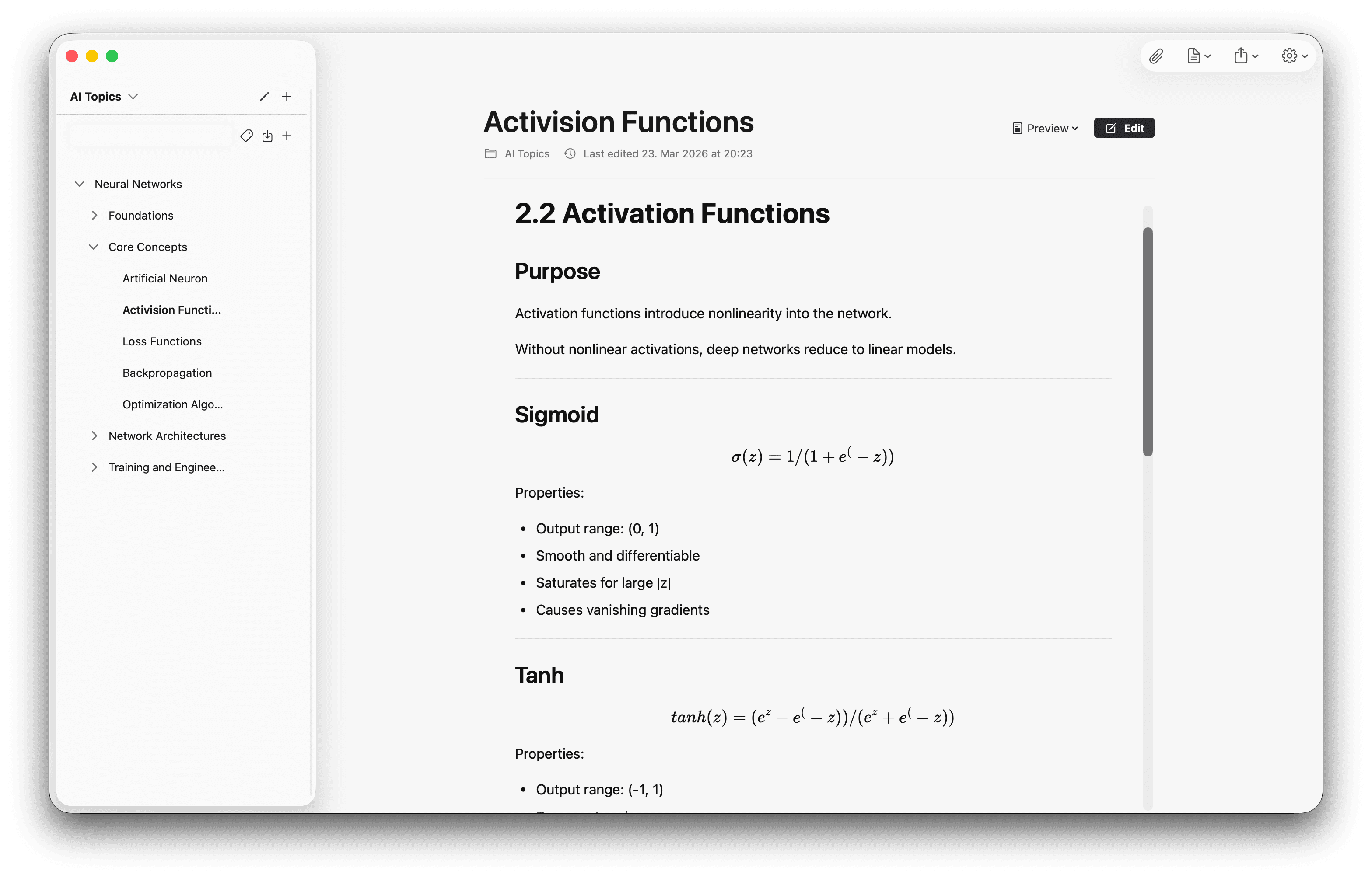
Notes that become your paper
Take linked notes in markdown as you read. Watch them grow into the chapter you’re actually writing. No separate Obsidian vault to sync.
Citations that just work
Insert BibTeX or APA citations straight from a PDF’s metadata, with every cite linked back to the highlight it came from.
Yours, ten years from now.
Built for how researchers actually work
Local and Private Vault
Your notes never leave your machine. Your thoughts stay yours.
Real markdown + LaTeX
GitHub-flavored markdown, complex tables and LaTeX math, all in plain-text files you can open in any editor.
Your notes, linked
Connect ideas with bidirectional links and see the whole network in a visual graph view.
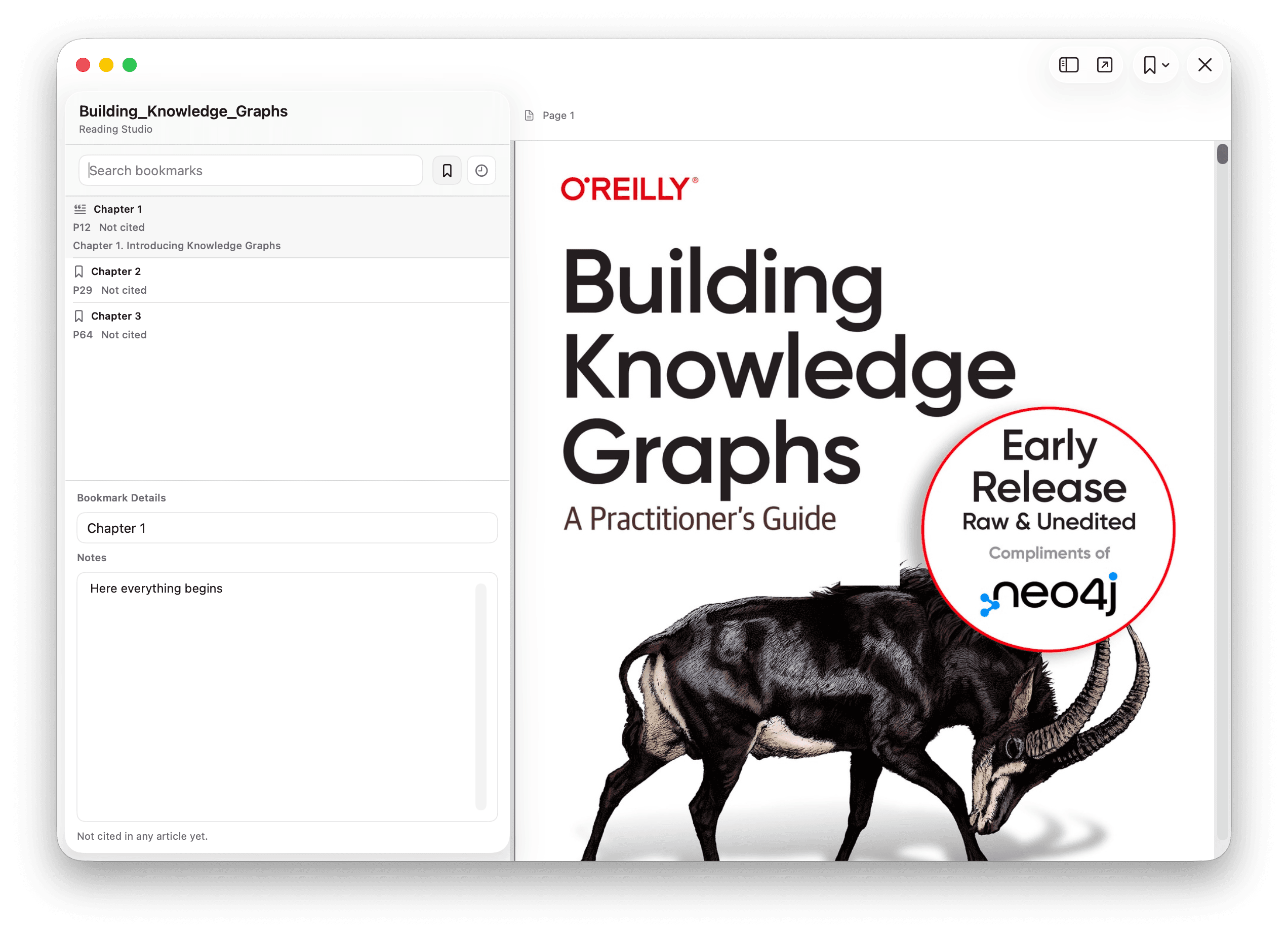
Reading Studio.
Read with intention, highlight key insights, and cite sources in your markdown notes with a single click.
Side-by-Side Reading
View your PDF and your note editor in a seamless dual-pane interface.
Smart Citations
Automatically generate BibTeX or APA citations from PDF metadata.
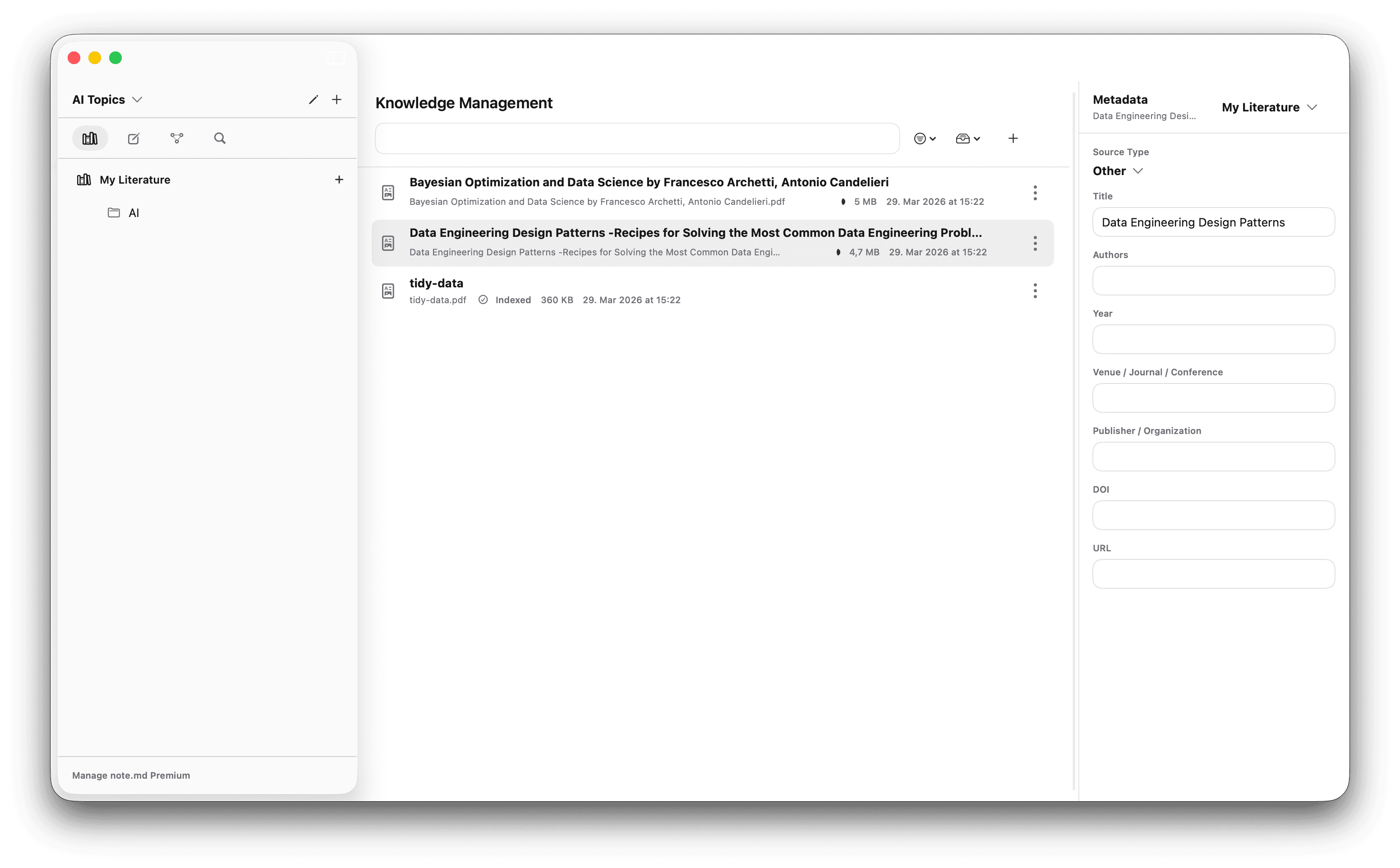
Knowledge Management.
Import scientific papers and complex PDFs directly into your workspace. Fill the metadata, and export all your sources at once as a .bib file.
Source Management
View all your PDFs and sources at once and structure them by topic.
Automatic Indexing (Premium)
Automatically extract figures, charts, and tables from your PDFs and insert them into your articles.
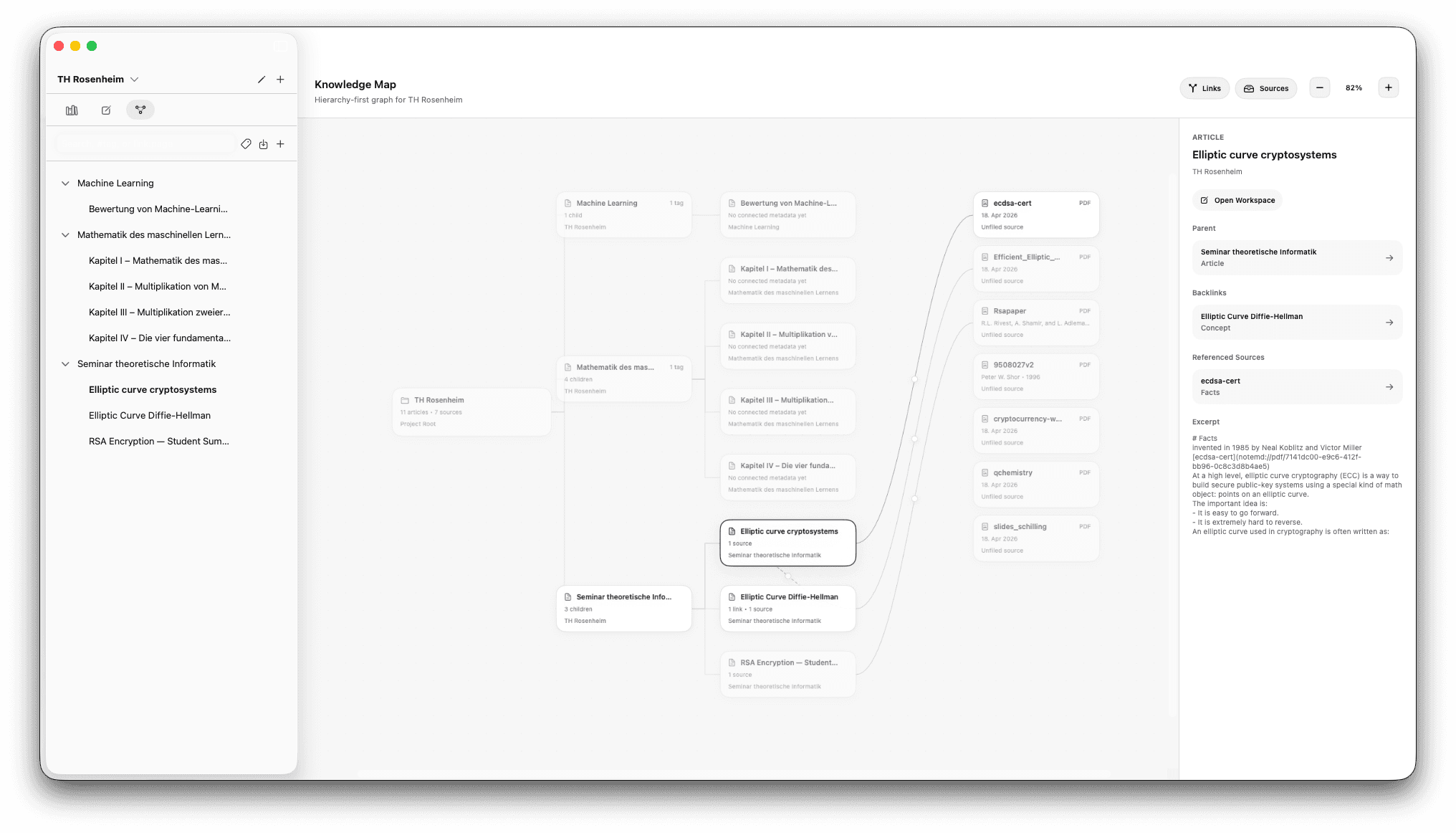
Graph View.
See how your articles and sources are connected.
Relations
View your sources and your notes together in one connected graph.
Neo4j Support
Export your graph in a Neo4j-friendly format.
Semantic Search.
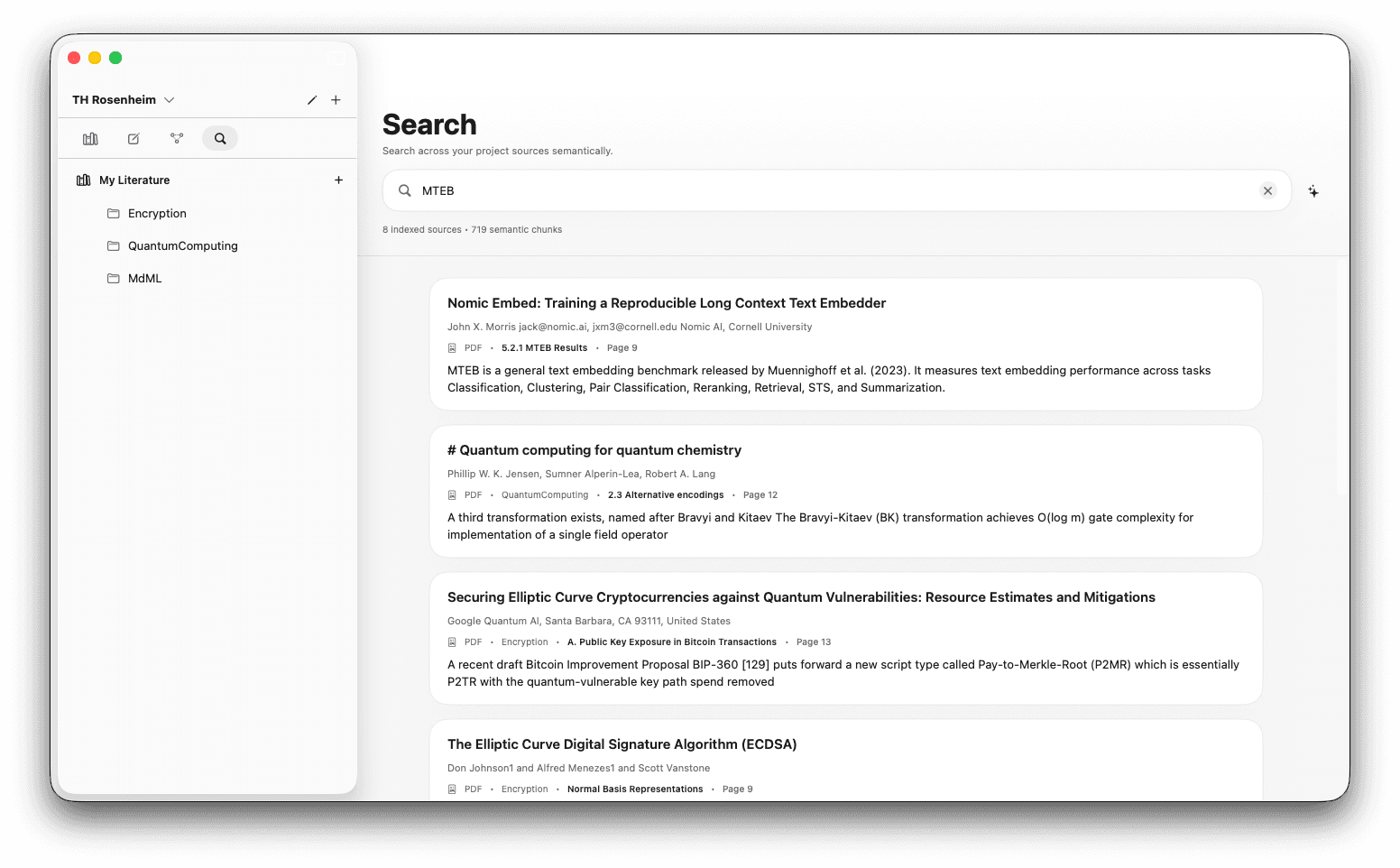
Search your workspace by meaning instead of exact phrasing, powered by local AI models that keep your data private.
Search by Meaning
Find relevant passages even when the wording in your query does not match the source text.
Time Saver
Skip manual hunting across files and jump straight to the material you actually need.
Put it to work.
Real research workflows, end to end. Local AI helps you search and organize what you’ve read. You do the thinking.
Read and annotate research papers
Highlight, bookmark, annotate and cite in one window, replacing Preview, Zotero and a separate notes app. Every citation in your draft links back to the exact passage and the note you wrote when you read it.
See workflow →Research workflowRun a literature review
Sort papers into a real library, let local AI fill an editable matrix you control, then search every passage by meaning. The AI proposes; you review, correct, and write the synthesis, every claim still linked to its source.
See workflow →Writing workflowWrite your first article
Articles are your project's knowledge vault. Block-based markdown with slash commands for citations, source images, evidence-scanning, and links that auto-build your knowledge graph as you write.
See workflow →Knowledge workflowBuild a knowledge graph
Articles on the left, sources on the right, mirroring your articles sidebar. Every /cite, /link, /wiki or /pdf you place in an article becomes an edge in the graph. Your reading and writing build the network as you go.
See workflow →How note.md actually works.
Technical deep-dives into the local AI behind every feature. No black boxes: chunk sizes, ranking math, model parameters, and failure modes, all documented.
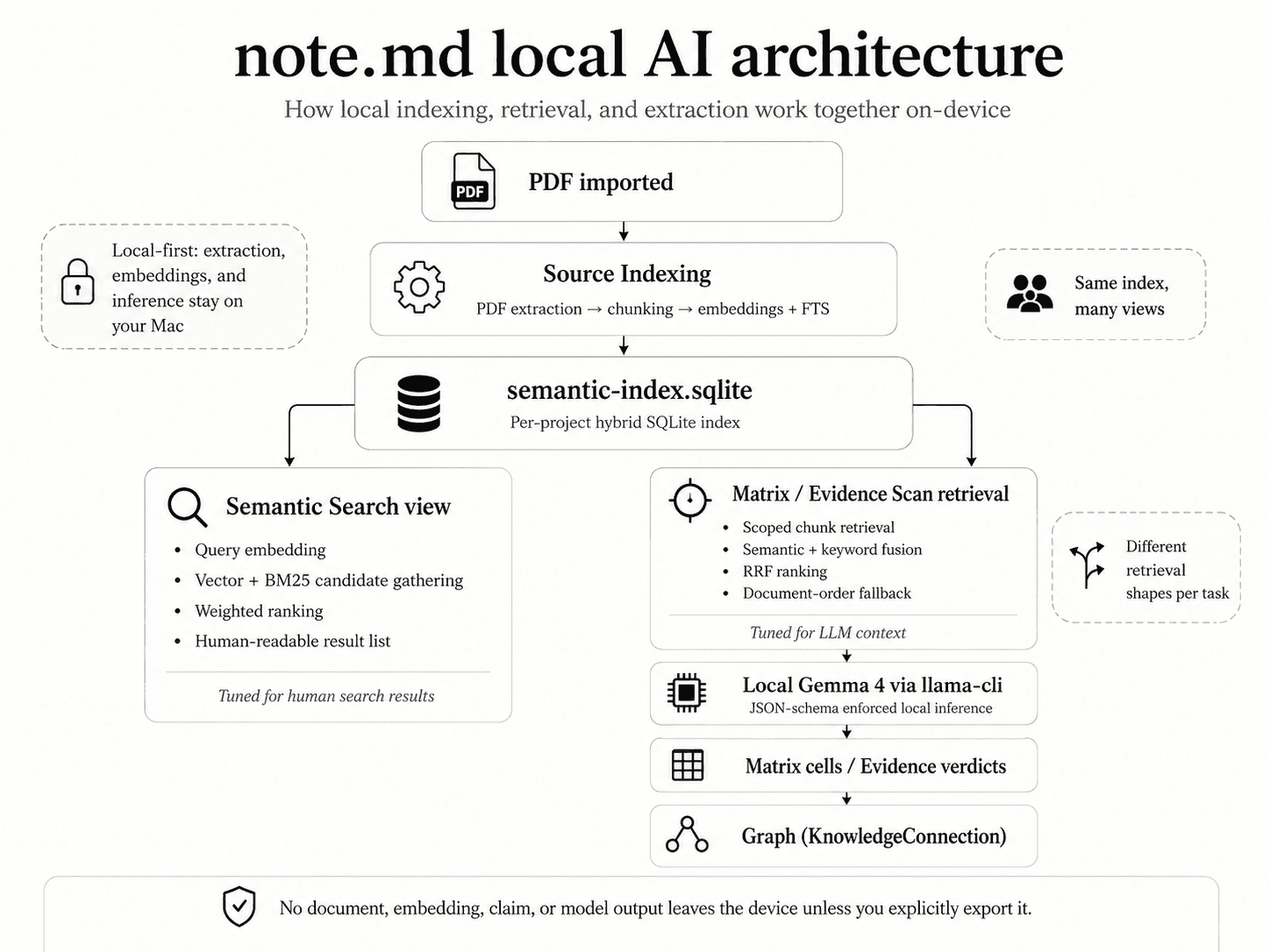
The local AI architecture behind note.md
How on-device indexing, retrieval, and inference fit together to power semantic search, Matrix extraction, and Evidence Scan, and what the app does and does not send off your Mac. Your text is never on that list.
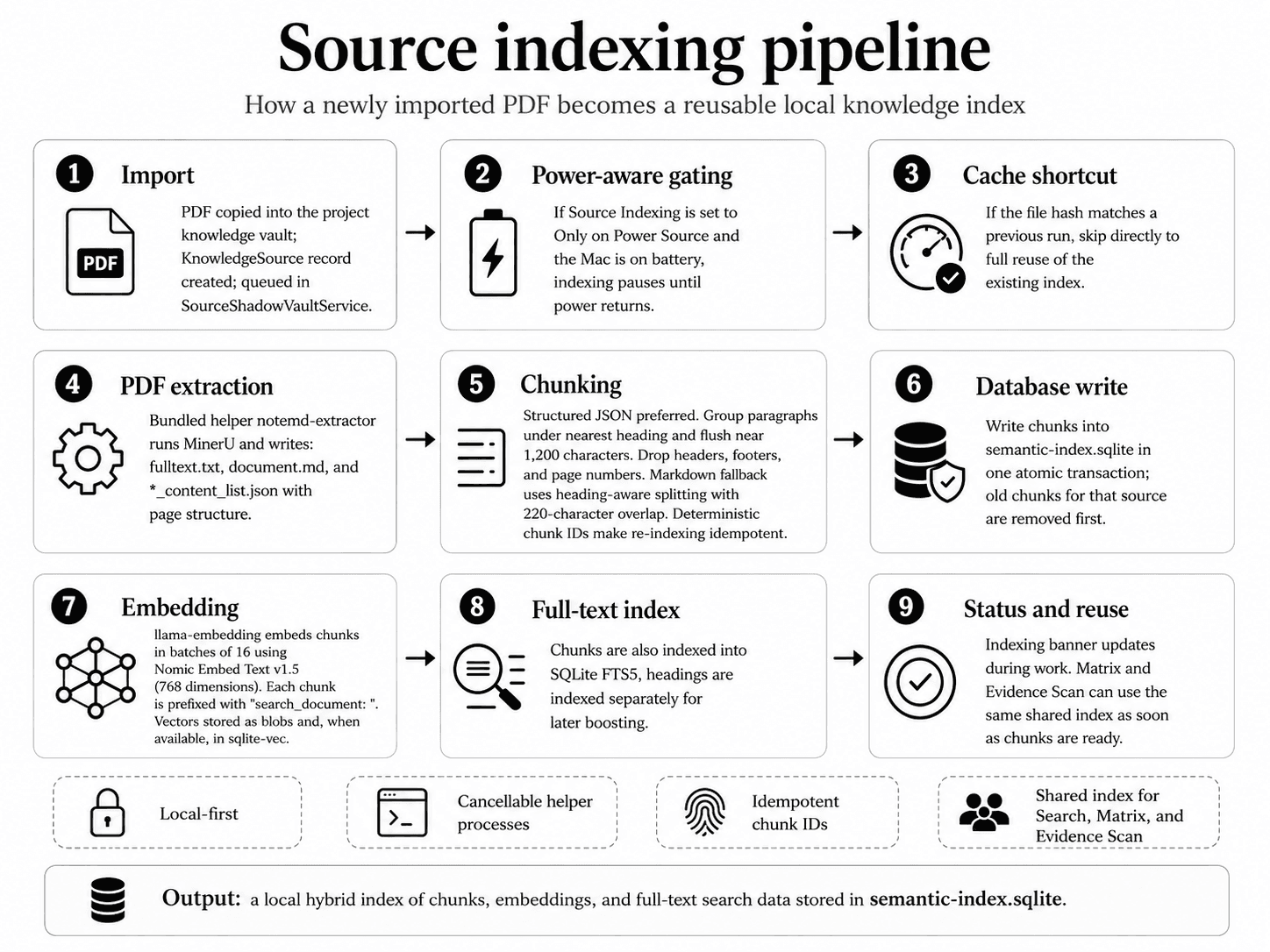
Source indexing: turning PDFs into a local knowledge index
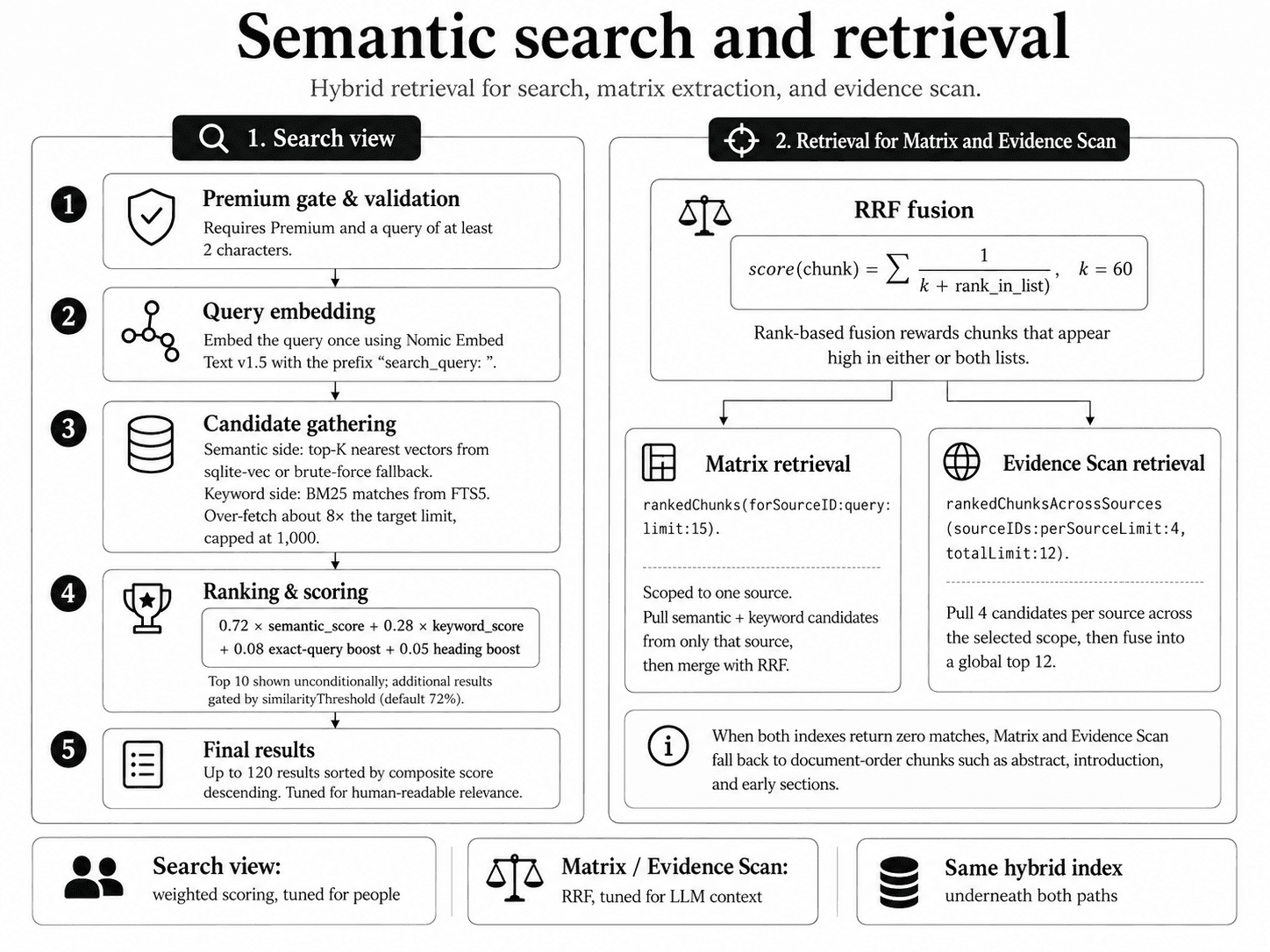
Hybrid semantic search: meaning + keywords, fused
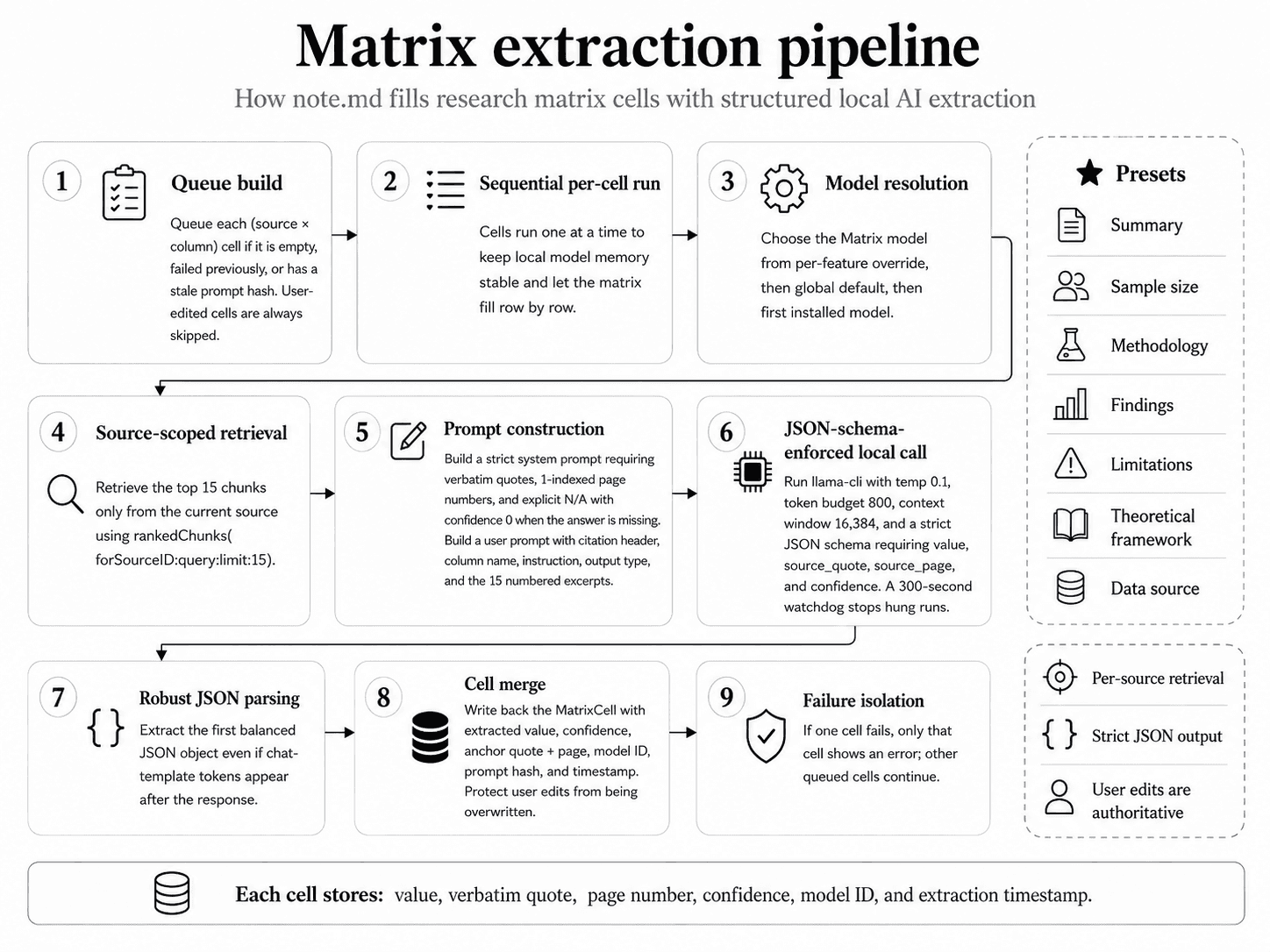
Matrix extraction: filling research tables with local AI
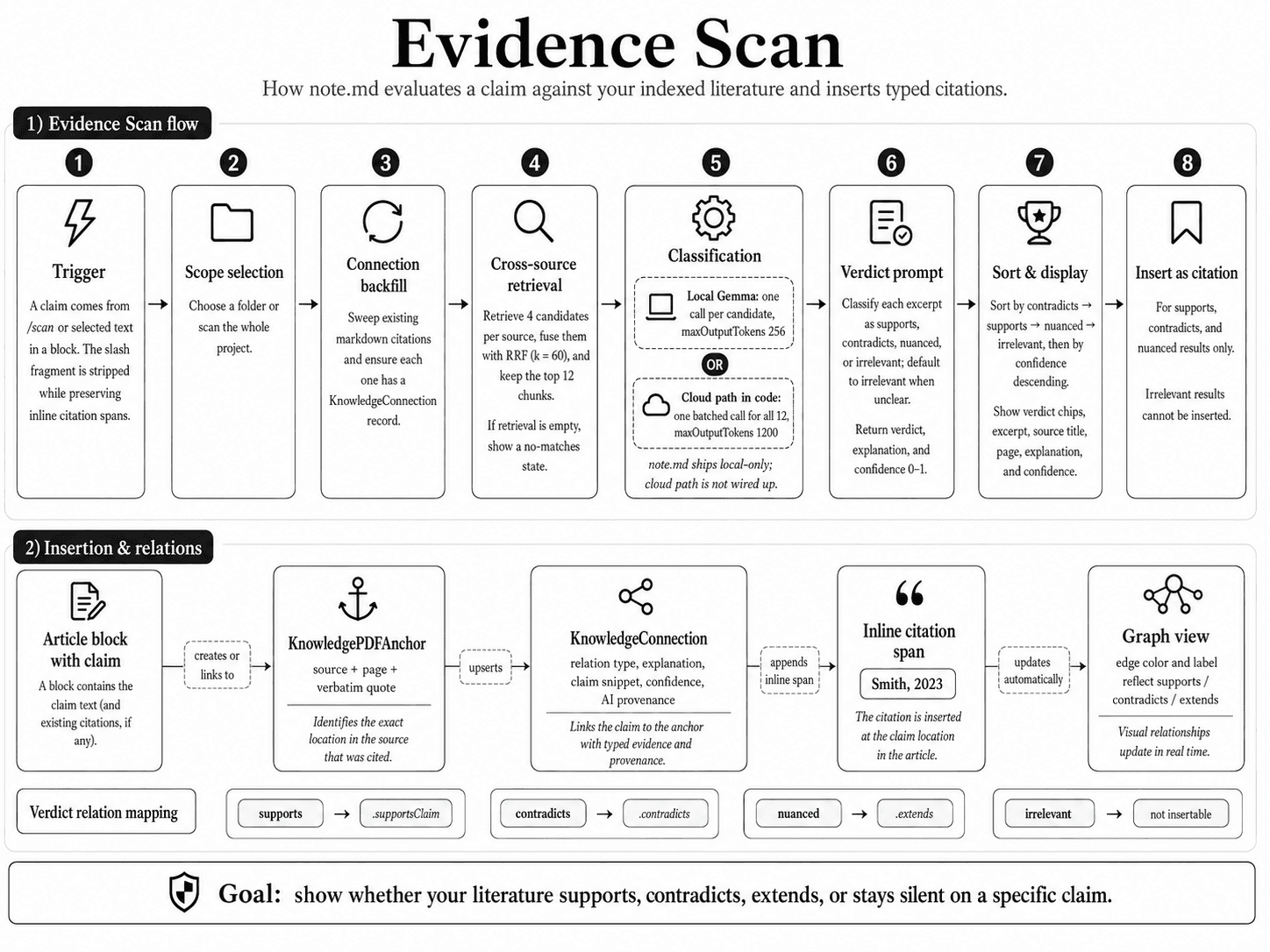
Evidence Scan: finding support and contradictions for any claim
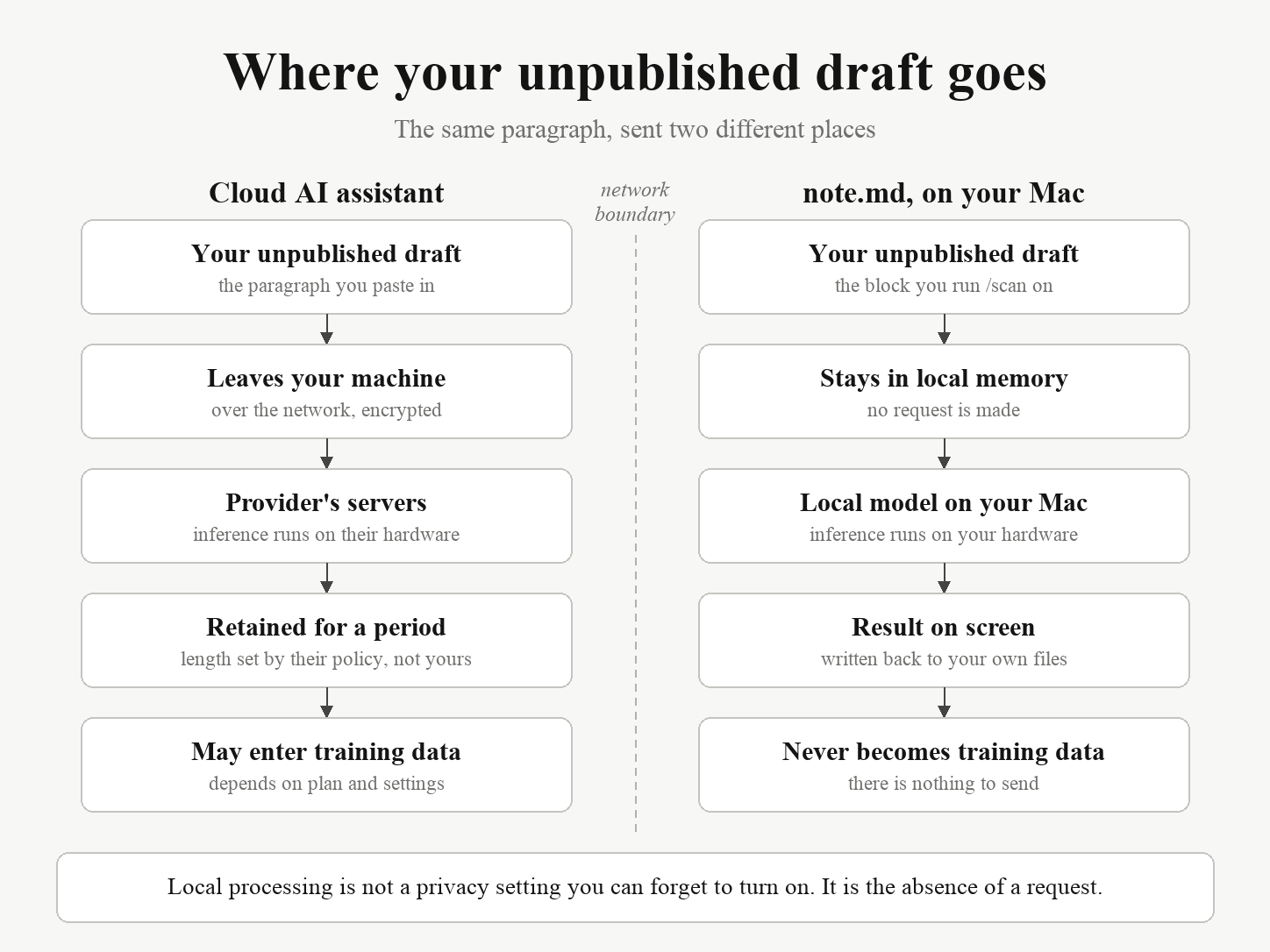
Should you paste unpublished research into ChatGPT?
note.md vs. the Zotero and Obsidian stack.
Most researchers already run some version of this: Zotero for references, Obsidian for notes, Preview or Zotero’s reader for the PDFs, and a plugin or two holding it together. It works. Here is what changes when the four become one.
| What you're doing | Zotero + Obsidian + a PDF reader | note.md |
|---|---|---|
| Reading a paper while writing about it | Zotero's reader or Preview in one window, Obsidian in another, arranged by hand every session | One window, PDF and editor side by side |
| Getting a highlight into your notes | Annotate in Zotero, then pull it across with the ZotLit plugin and a note template you wrote and now maintain | The highlight and your annotation are the same object, already attached to the source |
| Citing one specific passage | Cite the paper, then find the page again yourself when a reviewer asks where it came from | /cite anchors to the exact bookmark. Click it in November and you land on the passage you read in March, your original note still attached |
| Searching by what you meant, not what you typed | Keyword search across the vault, or upload the PDFs to a cloud AI tool and hope the policy holds | Local semantic search over every indexed passage, running on your Mac |
| Checking whether your library backs a claim | Reread, or search likely phrasings one at a time | /scan treats the sentence as a claim and returns supporting, contradicting and nuanced passages |
| Surviving an update | Zotero, Obsidian, Better BibTeX and two or three plugins, each versioned separately | One app |
| Where the files actually live | Vault on disk, library synced through Zotero's servers or your own WebDAV | A folder of markdown files and PDFs on your Mac |
Where the stack still wins: Zotero is free, runs on Windows and Linux, has two decades of citation styles behind it, and plugs into Word and Google Docs. Obsidian has a plugin for nearly everything and syncs to your phone. note.md is macOS only, and it is a younger app. If you need Word integration this week or you work across three operating systems, keep the stack. If you are on a Mac and tired of maintaining the wiring between four apps, that is the trade note.md is offering.
Zotero, Obsidian, Mendeley, Paperpile and EndNote each get a page of their own, saying what they still do better and who should not switch. Read the comparisons.
What people ask before switching.
- What's the best app for organising research papers on Mac?
- It depends what you want it to do. If you only need a citation manager, Zotero is the long-standing free option. If you only need notes, Obsidian or Notion are popular choices. note.md is built for the people who want all of it in one place (reading PDFs, taking linked notes, managing citations and writing) without juggling four apps or syncing libraries across them.
- Is there a good Zotero alternative for Mac?
- Zotero is excellent at what it does (managing references), but it's a separate app from where you actually write. note.md keeps the reference manager, the PDF reader, the notes editor and the citation system in one window, with every citation in your draft linked back to the exact highlighted passage you took it from.
- How do I keep my notes, sources and citations in one place?
- Use a single tool that holds all three rather than syncing between them. In note.md, your sources (PDFs) live in Knowledge Management, your notes are written as articles in the same project, and citations created with /cite stay anchored to specific bookmarks inside your PDFs, so months later you can still click any citation and land on the exact passage that justified it.
- Can I use note.md without an internet connection?
- Yes. note.md is local-first: your notes, your PDFs, your indexes and all AI features run entirely on your Mac. You don't need an internet connection to read, write, search, or run local-AI workflows like /scan or matrix extraction. The one download is the language model behind /scan and matrix extraction: several gigabytes, fetched once when you install it in AI Settings. After that, none of this needs a connection.
- Will note.md use my notes to train AI models?
- No. Your notes never leave your machine. All AI in note.md runs locally on-device. There is no cloud server collecting your content, no telemetry uploading the text of your articles or sources, and nothing of yours used for model training.
- Does note.md work with my existing PDFs and Zotero library?
- With your PDFs, yes: drop any of them into Knowledge Management and note.md reads the metadata out of the file and generates the citation from it; that reading happens while indexing, which is part of Premium, so without it the citation starts from the filename and the rest is yours to fill in. Importing a Zotero export is a different thing and is not supported yet, so collections, tags and Zotero notes do not come across in one step. That import is being worked on. Going the other way already works, since your bibliography exports as a standard .bib file for LaTeX or another reference manager.
Free to start. Premium unlocks local AI.
The full writing workspace is free, forever. Premium adds the local-AI workflows: semantic search, Matrix extraction, Evidence Scan. Students from $4.99/mo.
Focus on what matters.
Download note.md and stop scattering your work across Zotero, Obsidian, your PDF reader and a writing app. Private, local-first, and free to start.
Free on the App Store