Repository navigation
DTP_Resolving_Internal_Discouraged_Access_Warnings
← Back to the DTP Ganymede Discouraged Access page
This document shows how to set access rule exceptions for filtering out internal Discouraged Access warning in DTP Ganymede and future versions.
An access rule exception needs to be set for the plug-in project's build configuration.
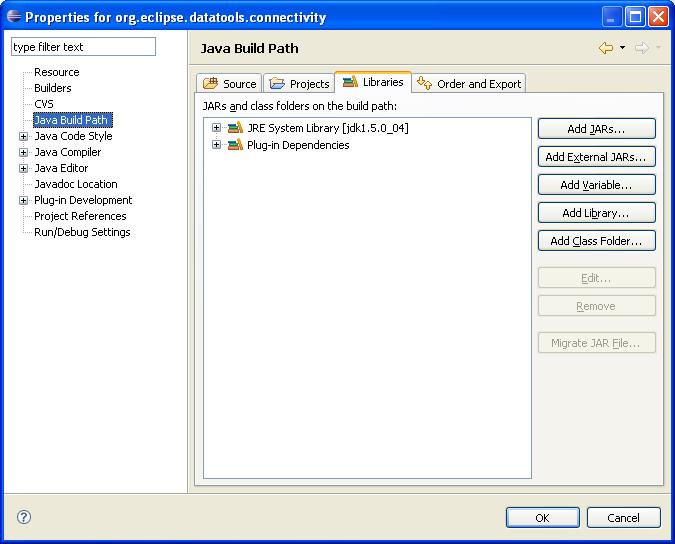
- For the plug-in project, open the build configuration page (either or "Properties" from the context menu for the plug-in project), and select the "Libraries" tab for "Java Build Path":
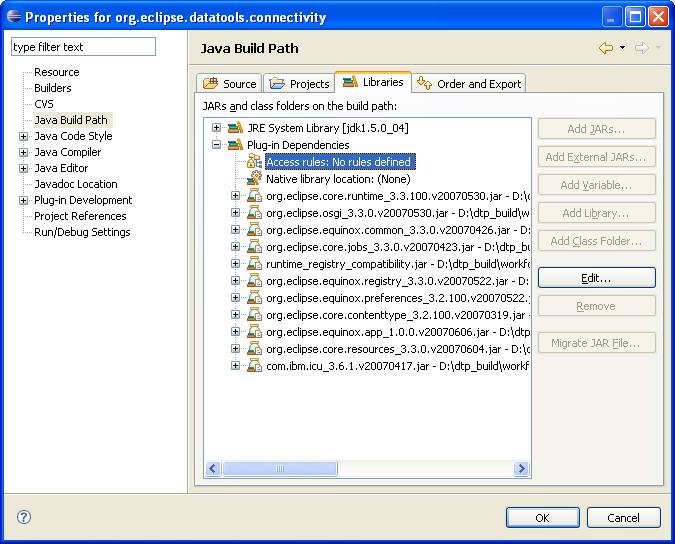
- Expand the "Plug-in Dependencies" node (note: watch out, since the "JRE System Library" node has an "Access rules" child too, and setting the filter there will not work as expected) and select "Access rules":
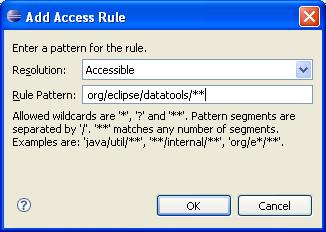
- "Edit" then "Add" to define the following rule:
-
Accept the changes to the Access Rules, and rebuild the plug-in
-
The internal Discouraged Access warnings should disappear for that plug-in
(Migrated from https://wiki.eclipse.org/DTP_Resolving_Internal_Discouraged_Access_Warnings
