



关于TIMESTAMP和DATETIME的比较
一个完整的日期格式如下:YYYY-MM-DD HH:MM:SS[.fraction],它可分为两部分:date部分和time部分,其中,date部分对应格式中的“YYYY-MM-DD”,time部分对应格式中的“HH:MM:SS[.fraction]”。对于date字段来说,它只支持date部分,如果插入了time部分的内容,它会丢弃掉该部分的内容,并提示一个warning。
相同点:
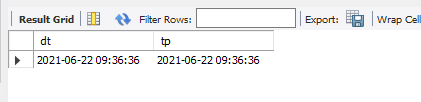
两者都可用来表示YYYY-MM-DD HH:MM:SS[.fraction]类型的日期
drop table test;
create table test (dt datetime,tp timestamp);
insert into test select now(),now();
不同点
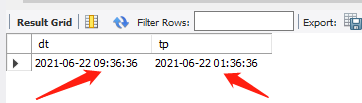
对于timestamp,他把客户端插入的时间从当前时区转化为utc(世界标准时间)进行存储,查询时,将其又转化为客户端当前时区返回,而datetime,不做任何改变,进步是原因输入和输出。
我们来验证下,改变时区
show variables like '%time_zone%';
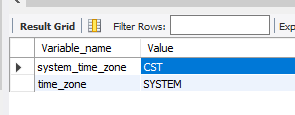
上述“CST”指的是MySQL所在主机的系统时间,是中国标准时间的缩写,China Standard Time UT+8:00
修改时区
set time_zone='+0:00';
select *from test;
存储范围:
timestamp所能存储的时间范围为:'1970-01-01 00:00:01.000000' 到 '2038-01-19 03:14:07.999999'。
datetime所能存储的时间范围为:'1000-01-01 00:00:00.000000' 到 '9999-12-31 23:59:59.999999'。

总结:TIMESTAMP和DATETIME除了存储范围和存储方式不一样,没有太大区别。当然,对于跨时区的业务,TIMESTAMP更为合适。
存储精度
两个存储精度最大都是可以到秒后6位, 如果我们要存储精度为6位的,需要使用 datetime(6) 和 timestamp(6), 另外也要注意 插入数据的时候也要有这么长精度的时间格式才可以,比如 now(6)
ALTER TABLE `channel_management`.`test`
ADD COLUMN `dt6` DATETIME(6) NULL AFTER `tp`,
ADD COLUMN `tp6` TIMESTAMP(6) NULL AFTER `dt6`;
insert into test(dt,tp,dt6,tp6) select now(),now(),now(6),now(6);
select *from test;

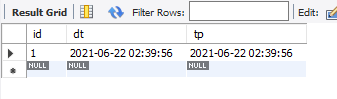
默认值和updte操作
drop table test;
CREATE TABLE `test` (
  `id` int(11) NOT NULL AUTO_INCREMENT,
  `dt` datetime  default now() ,
  `tp` timestamp  default current_timestamp  ,
  PRIMARY KEY (`id`)
) ;
insert into test(id) select 1;
更新字段时候自动更新时间

drop table test;
CREATE TABLE `test` (
  `id` int(11) NOT NULL AUTO_INCREMENT,
  `dt` datetime  default now() ,
  `tp` timestamp  default current_timestamp  ,
  `dt_u` datetime  default null  on update now(),
  `tp_u` timestamp  default null on update current_timestamp  ,
  PRIMARY KEY (`id`)
) ;
insert into test(id) select 1;
select *from test;
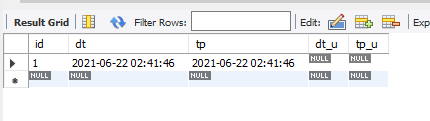
update test set id=2 where id=1;
select *from test;

在MySQL 5.6.5版本之前,Automatic Initialization and Updating只适用于TIMESTAMP,而且一张表中,最多允许一个TIMESTAMP字段采用该特性。从MySQL 5.6.5开始,Automatic Initialization and Updating同时适用于TIMESTAMP和DATETIME,且不限制数量。
unix_timestamp 和 from_unixtime
我们可以使用bigint 或者double来表示时间,默认是到秒,如果要毫秒则要使用double来表示了
select unix_timestamp((now(3))),unix_timestamp((now(6))),unix_timestamp()
如果存储的是数字,要转换回时间格式则要使用from_unixtime
select from_unixtime(1624330899,'%Y-%m-%d %H:%i:%s'),from_unixtime(1624330899),
       from_unixtime(1624330899.127,'%Y-%m-%d %H:%i:%s.%f'),
	   from_unixtime(1624330899.127413,'%Y-%m-%d %H:%i:%s.%f'),from_unixtime(1624330899.127413)

日期格式说明如下
以下说明符可用在 format字符串中:
说明符
说明
%a
工作日的缩写名称 (Sun..Sat)
%b
月份的缩写名称(Jan..Dec)
%c
月份,数字形式(0..12)
%D
带有英语后缀的该月日期(0th, 1st, 2nd, 3rd, ...)
%d
该月日期, 数字形式(00..31)
%e
该月日期, 数字形式(0..31)
%f
微秒(000000..999999)
%H
小时(00..23)
%h
小时(01..12)
%I
小时(01..12)
%i
分钟,数字形式(00..59)
%j
一年中的天数(001..366)
%k
小时(0..23)
%l
小时(1..12)
%M
月份名称(January..December)
%m
月份, 数字形式(00..12)
%p
上午(AM)或下午(PM)
%r
时间, 12小时制(小时hh:分钟mm:秒数ss后加AM或PM)
%S
秒(00..59)
%s
秒(00..59)
%T
时间, 24小时制(小时hh:分钟mm:秒数ss)
%U
周(00..53), 其中周日为每周的第一天
%u
周(00..53), 其中周一为每周的第一天
%V
周(01..53), 其中周日为每周的第一天; 和%X同时使用
%v
周(01..53), 其中周一为每周的第一天; 和%x同时使用
%W
工作日名称(周日..周六)
%w
一周中的每日(0=周日..6=周六)
%X
该周的年份,其中周日为每周的第一天, 数字形式,4位数;和%V同时使用
%x
该周的年份,其中周一为每周的第一天, 数字形式,4位数;和%v同时使用
%Y
年份, 数字形式,4位数
%y
年份, 数字形式(2位数)
%%
‘%’文字字符





 扫一扫
扫一扫


 142
142

 被折叠的 条评论
为什么被折叠?
被折叠的 条评论
为什么被折叠?
 到【灌水乐园】发言





