





使用 Google Gemini 3.5 Flash 进行零样本目标检测:入门教程
本教程演示如何使用 Google Gemini 3.5 Flash 进行零样本目标检测,并使用 supervision 库解析模型返回的检测结果。
本文将覆盖以下内容:
- 为 Gemini 构造目标检测提示词
- 使用单个提示词完成多类别检测
- 分类别检测,并合并检测结果
- 针对密集场景使用结构化输出(强制 JSON)
📋 目录
- 🔧 安装必需软件包
- 🔑 配置 API Key
- 🖼️ 下载示例图片
- 🛠️ 导入依赖与工具函数
- 🥑 示例:牛油果检测(单次提示词)
- 🎈 示例:热气球
- 🐦 示例:鸟类
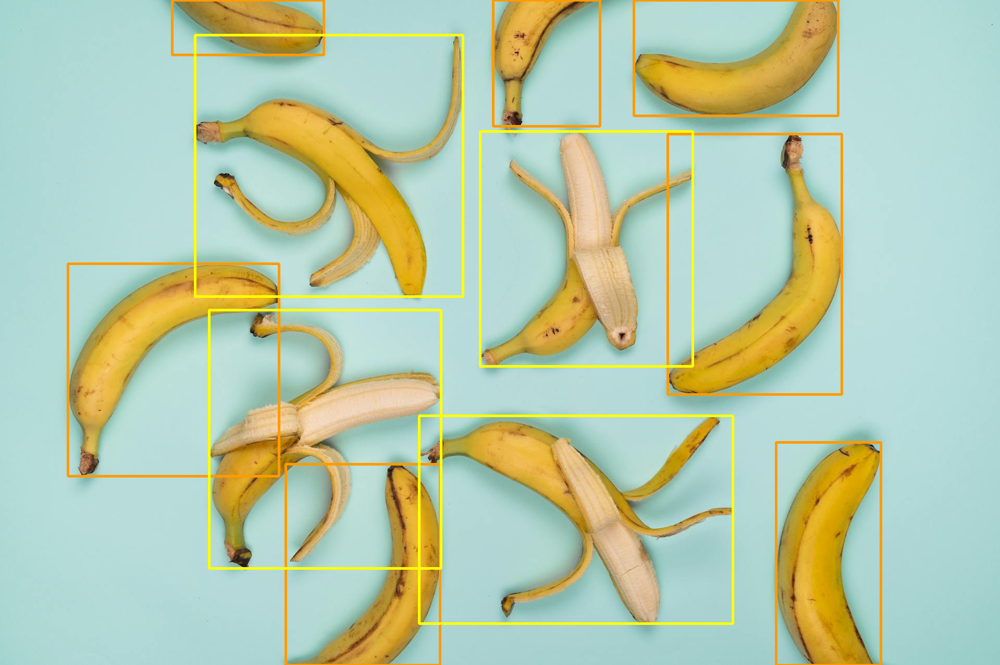
- 🍌 示例:香蕉
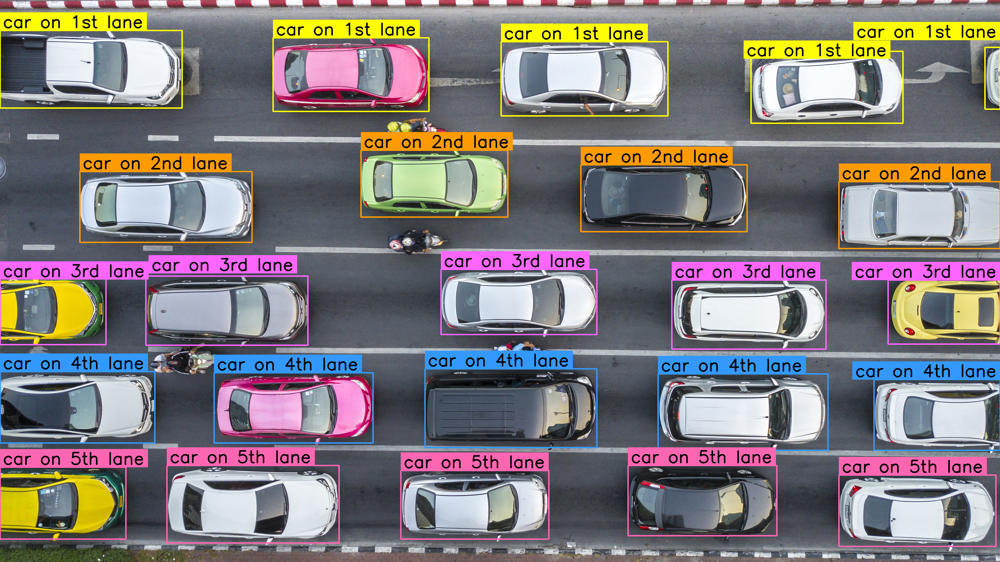
- 🚗 示例:车辆与车道
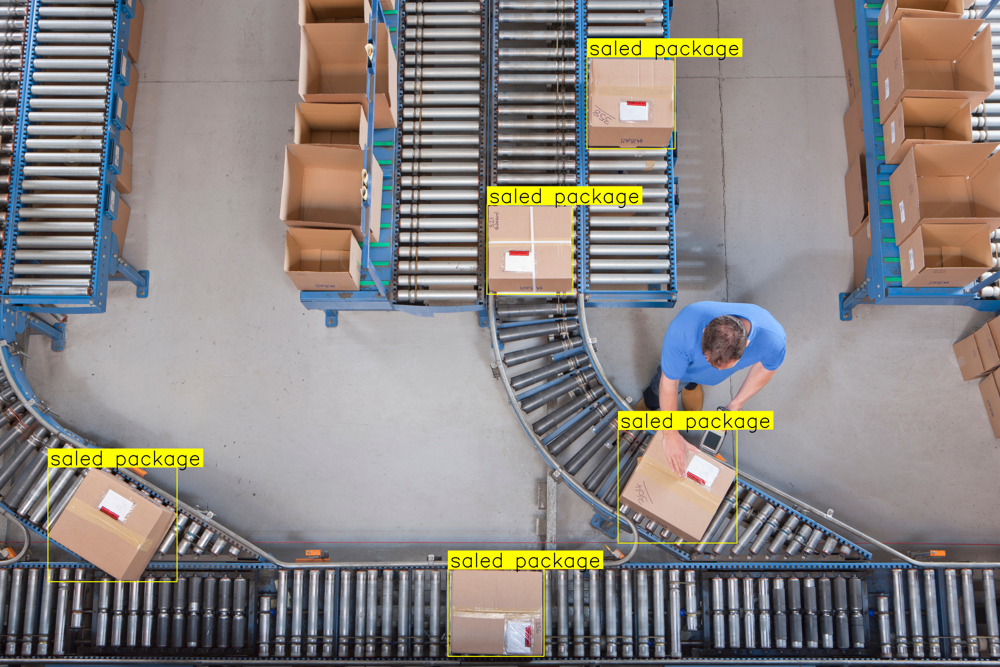
- 📦 示例:密封包裹
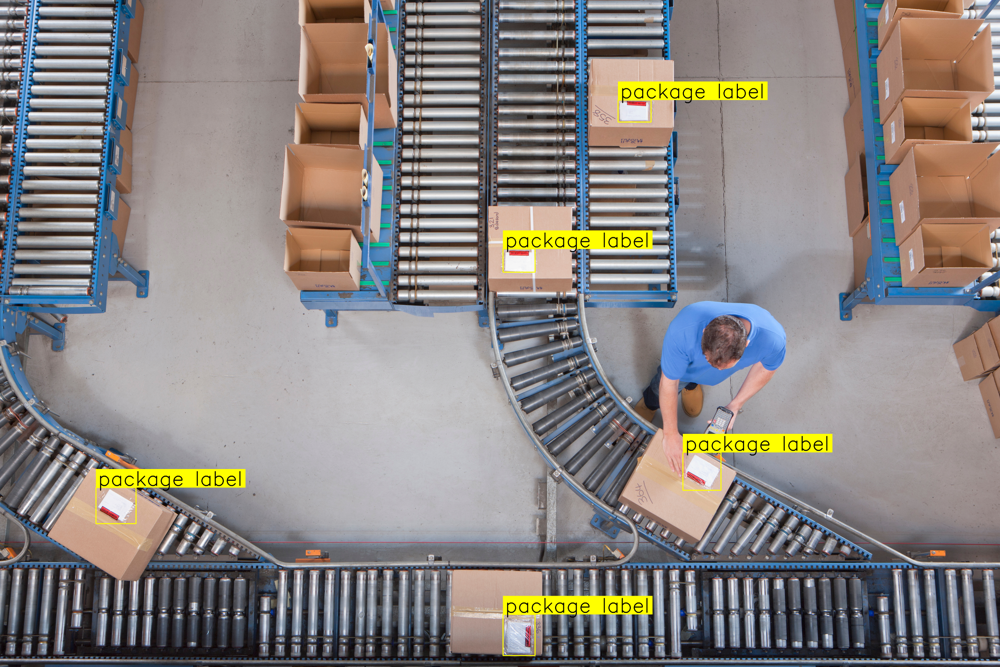
- 🏷️ 示例:包裹标签
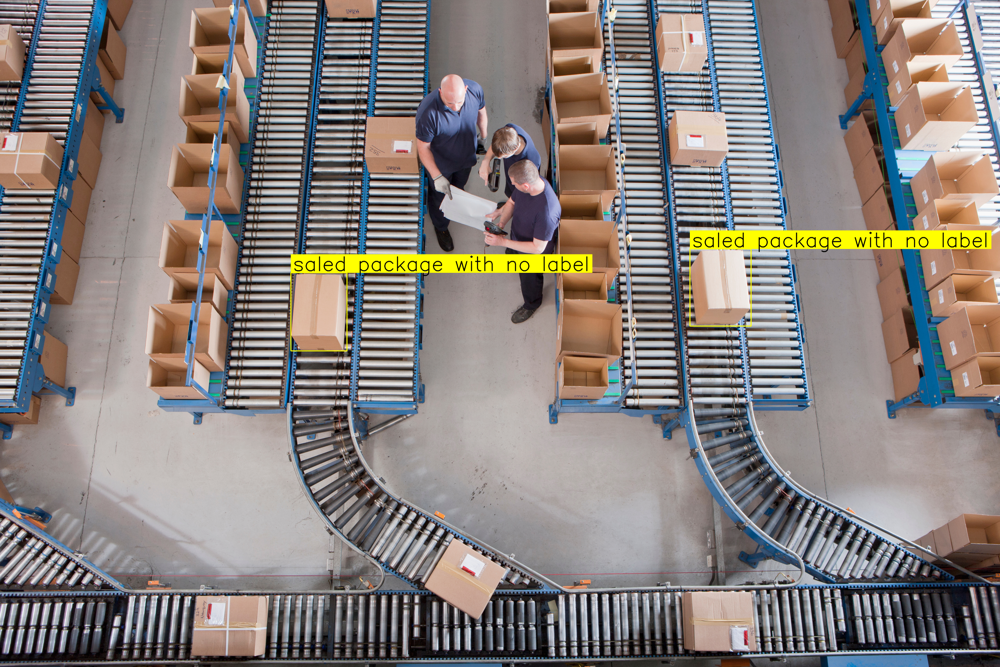
- 🏭 示例:传送带上的包裹
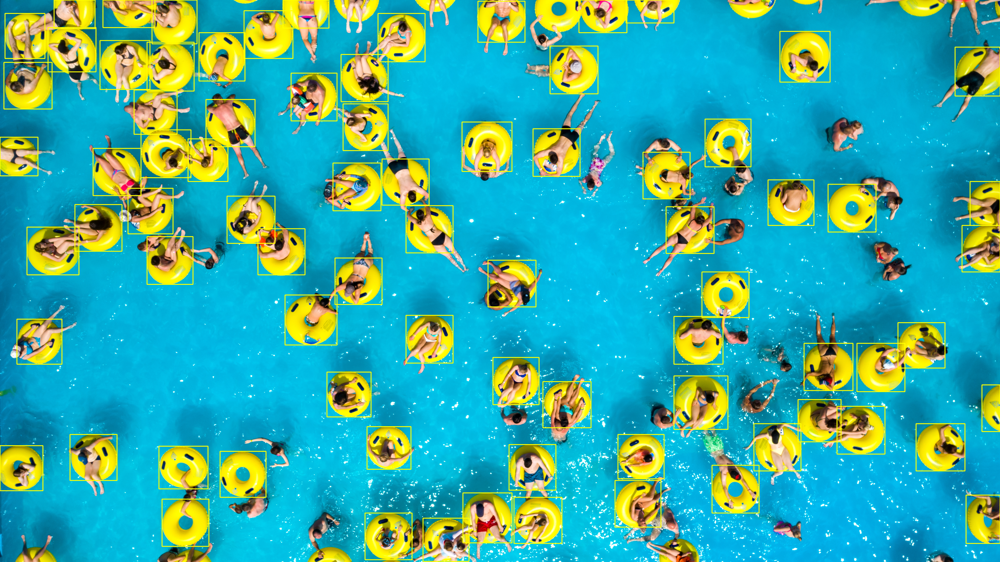
- 🏊 示例:黄色游泳圈(自由格式响应)
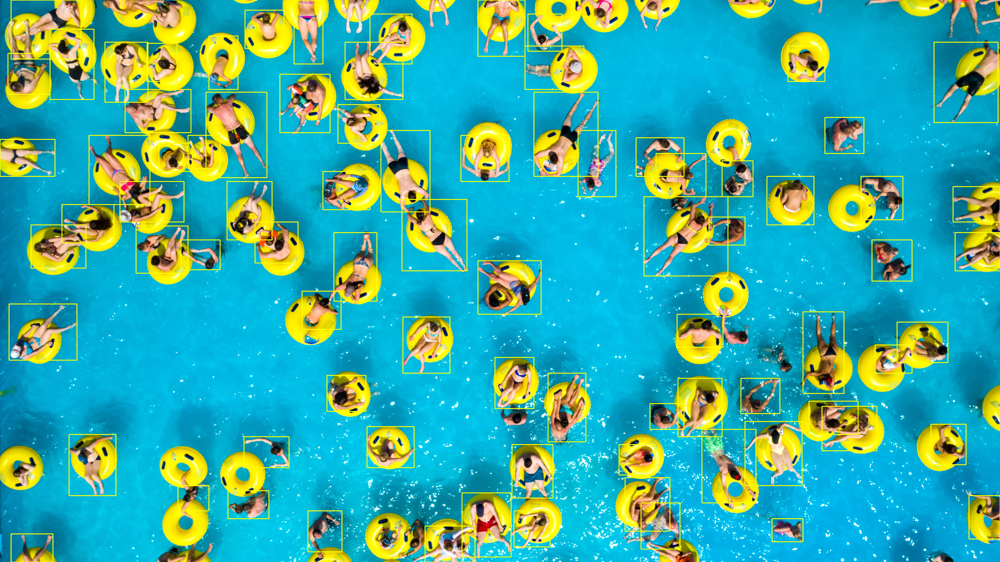
- 👤 示例:人员检测(结构化输出)
安装必需软件包
!pip install -q google-genai "supervision @ git+https://github.com/roboflow/supervision.git@add-gemini-3.5-vlm-support"
配置 API Key
你需要从 Google AI Studio 获取 Gemini API key。然后在 Colab 的 Secrets 中将它添加为 GOOGLE_API_KEY。
from google.colab import userdata
from google import genai

GOOGLE_API_KEY = userdata.get('GOOGLE_API_KEY')
client = genai.Client(api_key=GOOGLE_API_KEY)
下载示例图片
!wget -q https://storage.googleapis.com/com-roboflow-marketing/playground-examples/pexels-vanessa-loring-5966631.jpg
!wget -q https://storage.googleapis.com/com-roboflow-marketing/playground-examples/pexels-eyup-sayar-290427017-18373303.jpg
!wget -q https://storage.googleapis.com/com-roboflow-marketing/playground-examples/pexels-mutecevvil-18013812.jpg
!wget -q https://storage.googleapis.com/com-roboflow-marketing/playground-examples/pexels-shvets-production-7195054.jpg
!wget -q https://storage.googleapis.com/com-roboflow-marketing/playground-examples/pexels-spencer-4353558.jpg
!wget -q https://storage.googleapis.com/com-roboflow-marketing/playground-examples/top-shot-of-a-worker-scanning-boxes-using-a-bar-co-2026-01-11-09-59-09-utc.jpg
!wget -q https://storage.googleapis.com/com-roboflow-marketing/playground-examples/warehouse-workers-inspecting-boxes-along-conveyor-2026-01-11-09-55-23-utc.jpg
!wget -q https://storage.googleapis.com/com-roboflow-marketing/playground-examples/top-view-of-people-relaxing-in-the-pool-on-yellow-2026-03-24-21-54-59-utc.jpg
!wget -q https://storage.googleapis.com/com-roboflow-marketing/playground-examples/aerial-drone-photograph-of-traffic-jam-in-metropol-2026-03-18-17-36-02-utc.jpg
导入依赖与工具函数
这里定义一个提示词模板,要求 Gemini 返回 [ymin, xmin, ymax, xmax] 格式的边界框,并将坐标归一化到 0-1000 范围。同时,我们还定义一个可复用的图像标注函数,用于把检测框绘制到图片上。
from google.genai import types
from pydantic import BaseModel, Field
from PIL import Image
import supervision as sv


DETECTION_PROMPT_TEMPLATE = """
Carefully examine this image and detect ALL visible objects, including small, distant, or partially visible ones.
IMPORTANT: Focus on finding as many objects as possible, even if you are only moderately confident.
Make sure each bounding box is as tight as possible.
Valid object classes: {class_list}
For each detected object, provide:
- "label": the exact class name from the list above
- "confidence": your certainty (between 0.0 and 1.0)
- "box_2d": the bounding box [ymin, xmin, ymax, xmax] normalized to 0-1000
Detect everything that matches the valid classes. Do not be conservative; include objects even with moderate confidence.
Return a JSON array, for example:
[
    {{"label": "{class_example}", "confidence": 0.95, "box_2d": [100, 200, 300, 400]}}
]
"""

COLOR = sv.ColorPalette.from_hex([
    "#ffff00", "#ff9b00", "#ff66ff", "#3399ff", "#ff66b2", "#ff8080",
    "#b266ff", "#9999ff", "#66ffff", "#33ff99", "#66ff66", "#99ff00"
])


class Detection(BaseModel):
    label: str
    confidence: float = Field(ge=0, le=1)
    box_2d: list[int] = Field(min_length=4, max_length=4)


def build_detection_prompt(classes: list[str]) -> str:
    return DETECTION_PROMPT_TEMPLATE.format(
        class_list=", ".join(classes),
        class_example=classes[0],
    ).strip()


def annotate_image(image, detections, with_labels=True):
    text_scale = sv.calculate_optimal_text_scale(resolution_wh=image.size)
    thickness = sv.calculate_optimal_line_thickness(resolution_wh=image.size)

    annotated = image.copy()
    annotated = sv.BoxAnnotator(
        color=COLOR, thickness=thickness
    ).annotate(annotated, detections)

    if with_labels:
        annotated = sv.LabelAnnotator(
            color=COLOR,
            text_color=sv.Color.BLACK,
            text_scale=text_scale,
            text_thickness=thickness,
            smart_position=True,
        ).annotate(annotated, detections)

    annotated.thumbnail((1000, 1000))
    return annotated
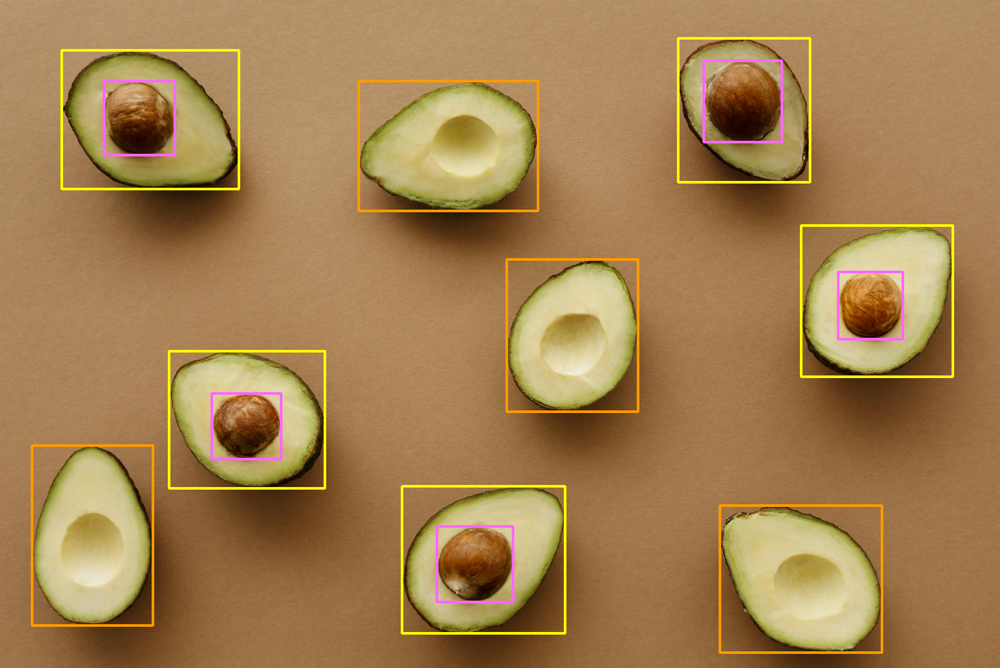
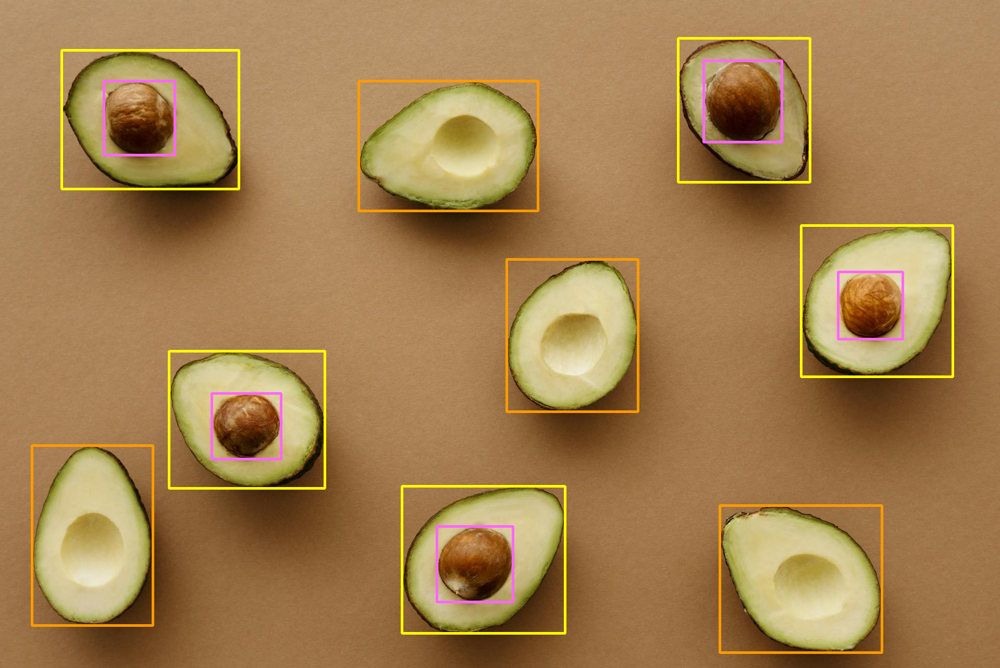
示例:牛油果检测(单次提示词)
在一次 API 调用中检测所有与牛油果相关的类别。
IMAGE_PATH = "pexels-vanessa-loring-5966631.jpg"
CLASSES = ["avocado with the pit", "avocado without the pit", "pit"]

image = Image.open(IMAGE_PATH)
prompt = build_detection_prompt(CLASSES)

response = client.models.generate_content(
    model="gemini-3.5-flash",
    contents=[image, prompt],
    config=types.GenerateContentConfig(
        temperature=0,
        thinking_config=types.ThinkingConfig(thinking_budget=0)
    ),
)
print(response.text)
detections = sv.Detections.from_vlm(
    vlm=sv.VLM.GOOGLE_GEMINI_3_5,
    result=response.text,
    resolution_wh=image.size,
    classes=CLASSES,
)

annotate_image(image, detections, with_labels=False)
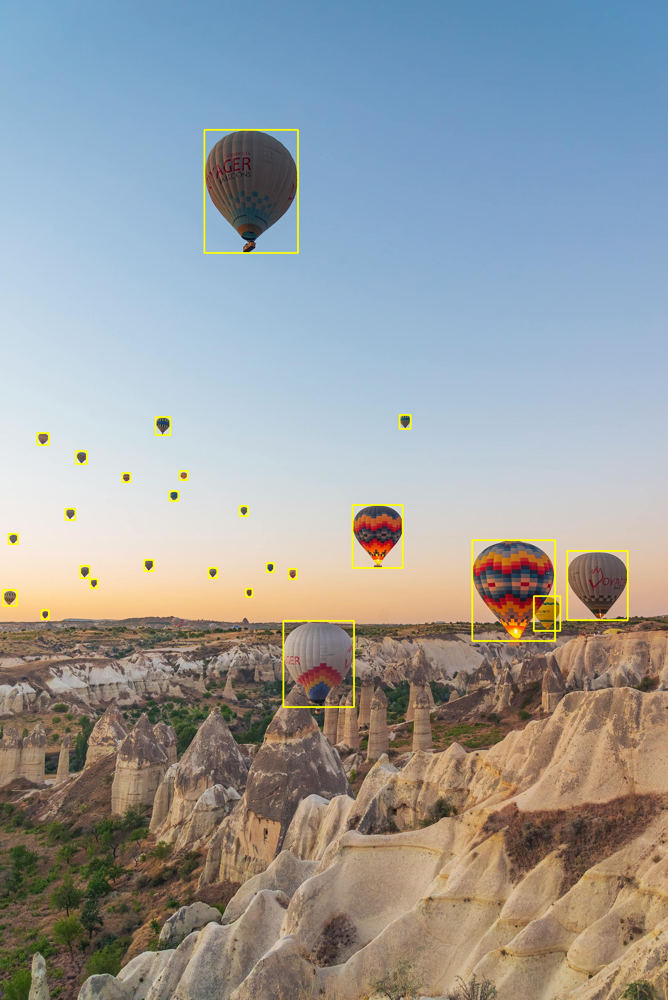
示例:热气球
IMAGE_PATH = "pexels-eyup-sayar-290427017-18373303.jpg"
CLASSES = ["air balloon"]

image = Image.open(IMAGE_PATH)
prompt = build_detection_prompt(CLASSES)

response = client.models.generate_content(
    model="gemini-3.5-flash",
    contents=[image, prompt],
    config=types.GenerateContentConfig(
        temperature=0,
        thinking_config=types.ThinkingConfig(thinking_budget=0)
    ),
)

detections = sv.Detections.from_vlm(
    vlm=sv.VLM.GOOGLE_GEMINI_3_5,
    result=response.text,
    resolution_wh=image.size,
    classes=CLASSES,
)

annotate_image(image, detections, with_labels=False)
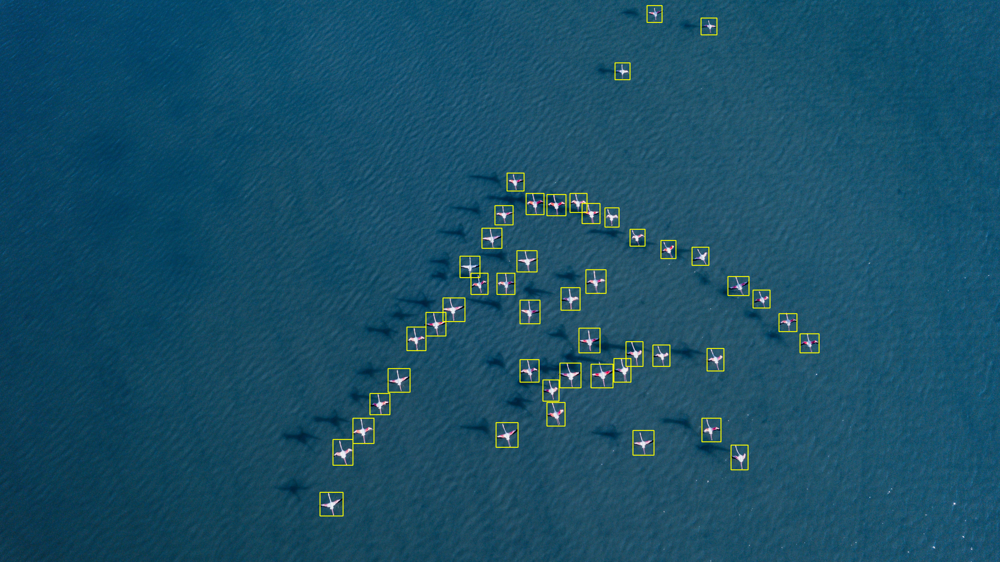
示例:鸟类
IMAGE_PATH = "pexels-mutecevvil-18013812.jpg"
CLASSES = ["bird"]

image = Image.open(IMAGE_PATH)
prompt = build_detection_prompt(CLASSES)

response = client.models.generate_content(
    model="gemini-3.5-flash",
    contents=[image, prompt],
    config=types.GenerateContentConfig(
        temperature=0,
        thinking_config=types.ThinkingConfig(thinking_budget=0)
    ),
)

detections = sv.Detections.from_vlm(
    vlm=sv.VLM.GOOGLE_GEMINI_3_5,
    result=response.text,
    resolution_wh=image.size,
    classes=CLASSES,
)

annotate_image(image, detections, with_labels=False)
示例:香蕉
IMAGE_PATH = "pexels-shvets-production-7195054.jpg"
CLASSES = ["open banana", "closed banana"]

image = Image.open(IMAGE_PATH)
prompt = build_detection_prompt(CLASSES)

response = client.models.generate_content(
    model="gemini-3.5-flash",
    contents=[image, prompt],
    config=types.GenerateContentConfig(
        temperature=0,
        thinking_config=types.ThinkingConfig(thinking_budget=0)
    ),
)

detections = sv.Detections.from_vlm(
    vlm=sv.VLM.GOOGLE_GEMINI_3_5,
    result=response.text,
    resolution_wh=image.size,
    classes=CLASSES,
)

annotate_image(image, detections, with_labels=False)
示例:车辆与车道
IMAGE_PATH = "aerial-drone-photograph-of-traffic-jam-in-metropol-2026-03-18-17-36-02-utc.jpg"
CLASSES = ["car on 1st lane", "car on 2nd lane", "car on 3rd lane", "car on 4th lane", "car on 5th lane", "car on 6th lane"]

image = Image.open(IMAGE_PATH)
prompt = build_detection_prompt(CLASSES)

response = client.models.generate_content(
    model="gemini-3.5-flash",
    contents=[image, prompt],
)

detections = sv.Detections.from_vlm(
    vlm=sv.VLM.GOOGLE_GEMINI_3_5,
    result=response.text,
    resolution_wh=image.size,
    classes=CLASSES,
)

annotate_image(image, detections, with_labels=True)
示例:密封包裹
IMAGE_PATH = "top-shot-of-a-worker-scanning-boxes-using-a-bar-co-2026-01-11-09-59-09-utc.jpg"
CLASSES = ["saled package"]

image = Image.open(IMAGE_PATH)
prompt = build_detection_prompt(CLASSES)

response = client.models.generate_content(
    model="gemini-3.5-flash",
    contents=[image, prompt],
    config=types.GenerateContentConfig(
        temperature=0,
        thinking_config=types.ThinkingConfig(thinking_budget=0)
    ),
)

detections = sv.Detections.from_vlm(
    vlm=sv.VLM.GOOGLE_GEMINI_3_5,
    result=response.text,
    resolution_wh=image.size,
    classes=CLASSES,
)

annotate_image(image, detections, with_labels=True)
示例:包裹标签
IMAGE_PATH = "top-shot-of-a-worker-scanning-boxes-using-a-bar-co-2026-01-11-09-59-09-utc.jpg"
CLASSES = ["package label"]

image = Image.open(IMAGE_PATH)
prompt = build_detection_prompt(CLASSES)

response = client.models.generate_content(
    model="gemini-3.5-flash",
    contents=[image, prompt],
    config=types.GenerateContentConfig(
        temperature=0,
        thinking_config=types.ThinkingConfig(thinking_budget=0)
    ),
)

detections = sv.Detections.from_vlm(
    vlm=sv.VLM.GOOGLE_GEMINI_3_5,
    result=response.text,
    resolution_wh=image.size,
    classes=CLASSES,
)

annotate_image(image, detections, with_labels=True)
示例:传送带上的包裹
IMAGE_PATH = "warehouse-workers-inspecting-boxes-along-conveyor-2026-01-11-09-55-23-utc.jpg"
CLASSES = ["saled package with no label"]

image = Image.open(IMAGE_PATH)
prompt = build_detection_prompt(CLASSES)

response = client.models.generate_content(
    model="gemini-3.5-flash",
    contents=[image, prompt],
    config=types.GenerateContentConfig(
        temperature=0,
        thinking_config=types.ThinkingConfig(thinking_budget=0)
    ),
)

detections = sv.Detections.from_vlm(
    vlm=sv.VLM.GOOGLE_GEMINI_3_5,
    result=response.text,
    resolution_wh=image.size,
    classes=CLASSES,
)

annotate_image(image, detections, with_labels=True)
示例:黄色游泳圈(自由格式响应)
在目标数量较多的密集场景中,模型可能会在 JSON 数组完整结束之前截断响应。这里使用标准提示词,不强制指定输出格式。
IMAGE_PATH = "top-view-of-people-relaxing-in-the-pool-on-yellow-2026-03-24-21-54-59-utc.jpg"
CLASSES = ["yellow swim ring"]

image = Image.open(IMAGE_PATH)
prompt = build_detection_prompt(CLASSES)

response = client.models.generate_content(
    model="gemini-3.5-flash",
    contents=[image, prompt],
    config=types.GenerateContentConfig(
        temperature=0,
        thinking_config=types.ThinkingConfig(thinking_budget=0)
    ),
)

detections = sv.Detections.from_vlm(
    vlm=sv.VLM.GOOGLE_GEMINI_3_5,
    result=response.text,
    resolution_wh=image.size,
    classes=CLASSES,
)

annotate_image(image, detections, with_labels=False)
示例:人员检测(结构化输出)
使用 response_mime_type="application/json" 和 response_schema 可以强制 Gemini 返回符合我们 schema 的合法 JSON。对于自由格式响应可能在 JSON 中途截断的密集场景,这种方式尤其有用。
IMAGE_PATH = "top-view-of-people-relaxing-in-the-pool-on-yellow-2026-03-24-21-54-59-utc.jpg"
CLASSES = ["person"]

image = Image.open(IMAGE_PATH)
prompt = build_detection_prompt(CLASSES)

response = client.models.generate_content(
    model="gemini-3.5-flash",
    contents=[image, prompt],
    config=types.GenerateContentConfig(
        response_mime_type="application/json",
        response_schema=list[Detection],
        temperature=0,
        thinking_config=types.ThinkingConfig(thinking_budget=0)
    ),
)

detections = sv.Detections.from_vlm(
    vlm=sv.VLM.GOOGLE_GEMINI_3_5,
    result=response.text,
    resolution_wh=image.size,
    classes=CLASSES,
)

annotate_image(image, detections, with_labels=False)






 扫一扫
扫一扫


 370
370

 被折叠的 条评论
为什么被折叠?
被折叠的 条评论
为什么被折叠?
 到【灌水乐园】发言





