



在甘特图的实际应用中,通过自定义列头样式可以显著提升数据的可读性。例如,高亮周末或特定日期,能帮助团队更直观地识别工作日和非工作日。vxe-gantt 提供了 taskViewConfig.scales 中的 headerCellStyle 回调函数,让你可以灵活地为时间轴上的每个刻度单元格定制样式。
核心配置:headerCellStyle
通过在 scales 配置中为特定层级(如 day、date)添加 headerCellStyle 函数,你可以根据日期信息返回自定义的样式对象。
taskViewConfig: {
  scales: [
    { type: 'month' },
    {
      type: 'day',
      headerCellStyle ({ dateObj }) {
        // 根据 dateObj 返回样式对象
        if (dateObj.e === 0 || dateObj.e === 6) { // 周日或周六
          return { color: '#65c16f' } // 文字颜色变绿
        }
        return {} // 默认样式
      }
    }
  ]
}
代码
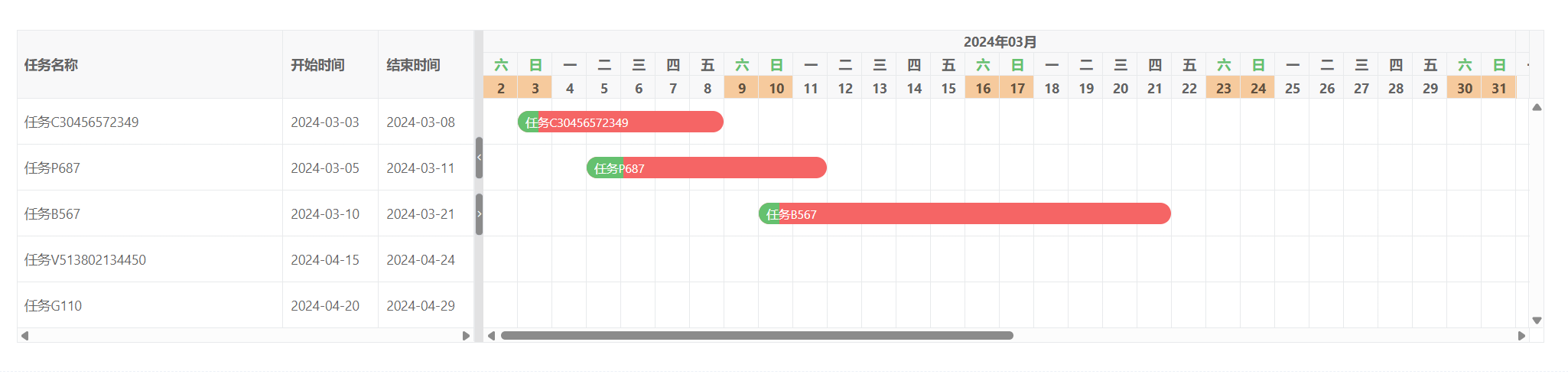
<template>
  <div>
    <vxe-gantt v-bind="ganttOptions"></vxe-gantt>
  </div>
</template>

<script setup>
import { reactive } from 'vue'

const ganttOptions = reactive({
  border: true,
  taskViewConfig: {
    showNowLine: true,
    scales: [
      { type: 'month' },
      {
        type: 'day',
        headerCellStyle ({ dateObj }) {
          // 周六周日高亮
          if (dateObj.e === 0 || dateObj.e === 6) {
            return {
              color: '#65c16f'
            }
          }
          return {}
        }
      },
      {
        type: 'date',
        headerCellStyle ({ dateObj }) {
          // 周六周日高亮
          if (dateObj.e === 0 || dateObj.e === 6) {
            return {
              backgroundColor: '#f6ca9d'
            }
          }
          return {}
        }
      }
    ]
  },
  taskBarConfig: {
    showProgress: true,
    showContent: true,
    barStyle: {
      round: true,
      bgColor: '#f56565',
      completedBgColor: '#65c16f'
    }
  },
  columns: [
    { field: 'title', title: '任务名称' },
    { field: 'start', title: '开始时间', width: 100 },
    { field: 'end', title: '结束时间', width: 100 }
  ],
  data: [
    { id: 10002, title: '任务C30456572349', start: '2024-03-03', end: '2024-03-08', progress: 10 },
    { id: 10004, title: '任务P687', start: '2024-03-05', end: '2024-03-11', progress: 15 },
    { id: 10006, title: '任务B567', start: '2024-03-10', end: '2024-03-21', progress: 5 },
    { id: 10007, title: '任务V513802134450', start: '2024-04-15', end: '2024-04-24', progress: 70 },
    { id: 10008, title: '任务G110', start: '2024-04-20', end: '2024-04-29', progress: 50 }
  ]
})
</script>
参数详解
headerCellStyle 回调接收一个包含 dateObj 的对象,dateObj 提供了关于当前刻度日期的详细信息:
| 属性 | 说明 | 示例值 |
|---|---|---|
| dateObj.y | 年份 | 2024 |
| dateObj.M | 月份(0-11) | 2 (代表3月) |
| dateObj.d | 日期(1-31) | 15 |
| dateObj.e | 星期几(0-6,0=周日,1=周一 … 6=周六) | 0 或 6 |
例如,动态获取节假日数据
如果需要标记法定节假日,可以结合外部数据源:
// 假设从 API 获取的节假日列表
const holidays = ['2024-05-01', '2024-10-01']

{
  type: 'date',
  headerCellStyle ({ dateObj }) {
    const dateStr = `${dateObj.y}-${String(dateObj.m + 1).padStart(2, '0')}-${String(dateObj.d).padStart(2, '0')}`
    if (holidays.includes(dateStr)) {
      return { backgroundColor: '#ffcccc', color: '#d32f2f' }
    }
    return {}
  }
}
通过 taskViewConfig.scales 中 headerCellStyle 回调,你可以为 vxe-gantt 的时间轴列头赋予无限的自定义能力。无论是简单的周末高亮,还是复杂的动态样式,都能通过几行代码轻松实现,让甘特图更贴合业务场景和视觉需求。





 扫一扫
扫一扫


 695
695

 被折叠的 条评论
为什么被折叠?
被折叠的 条评论
为什么被折叠?
 到【灌水乐园】发言





