



在实际业务中,表格列经常需要使用插槽(Slot)来自定义渲染复杂内容,例如多行信息、图标、按钮等。然而,vxe-table 的默认导出功能只能导出单元格的原始数据(即 field 绑定的字段值),无法识别插槽中的 HTML 结构。为了解决这个问题,vxe-table 提供了 export-method 属性,允许你为特定列自定义导出内容,从而实现插槽模板的完美导出。
解决问题
| 问题 | 原因 | 解决方案 |
|---|---|---|
| 插槽内容导出为空或显示异常 | 导出引擎读取的是 field 对应的原始值,而非插槽渲染后的 DOM | 使用列的 export-method 属性,自定义导出数据 |
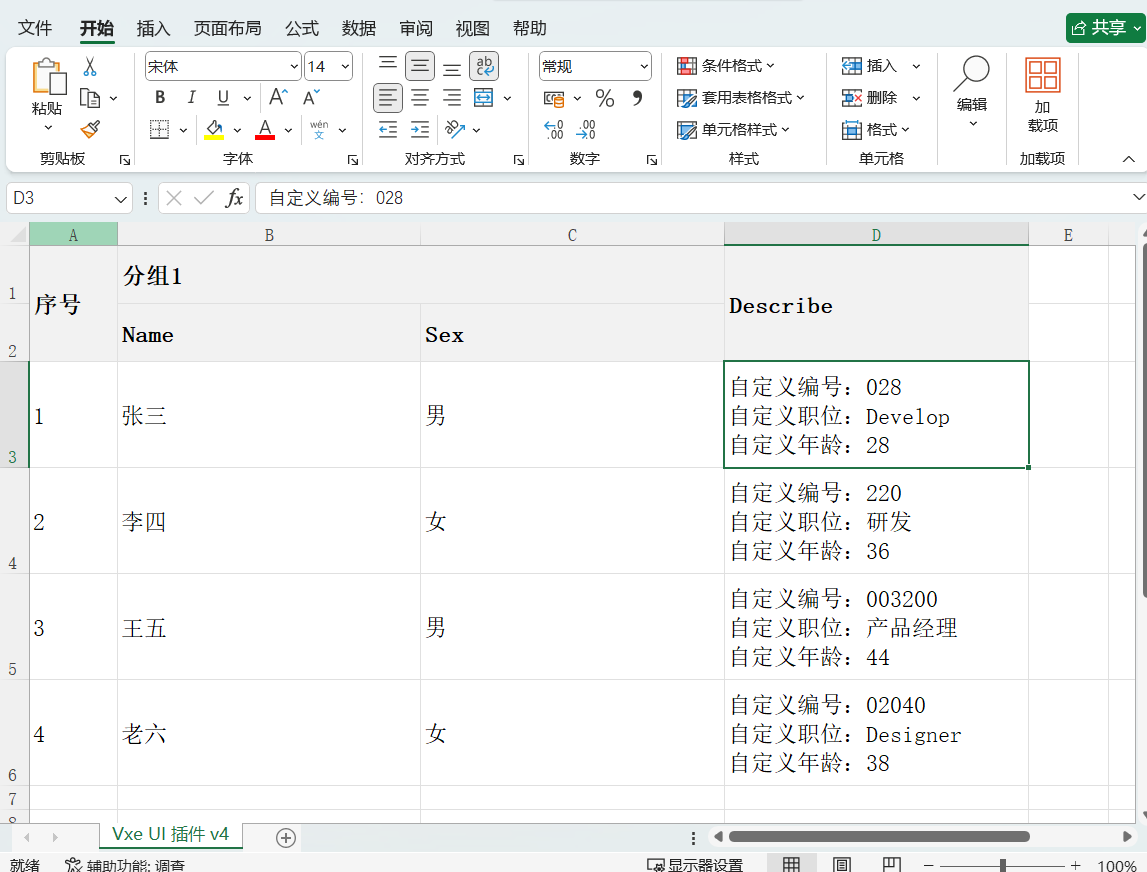
export-method 是一个函数,它接收当前行数据作为参数,返回一个字符串(或数字),该字符串将作为导出的单元格内容。
代码
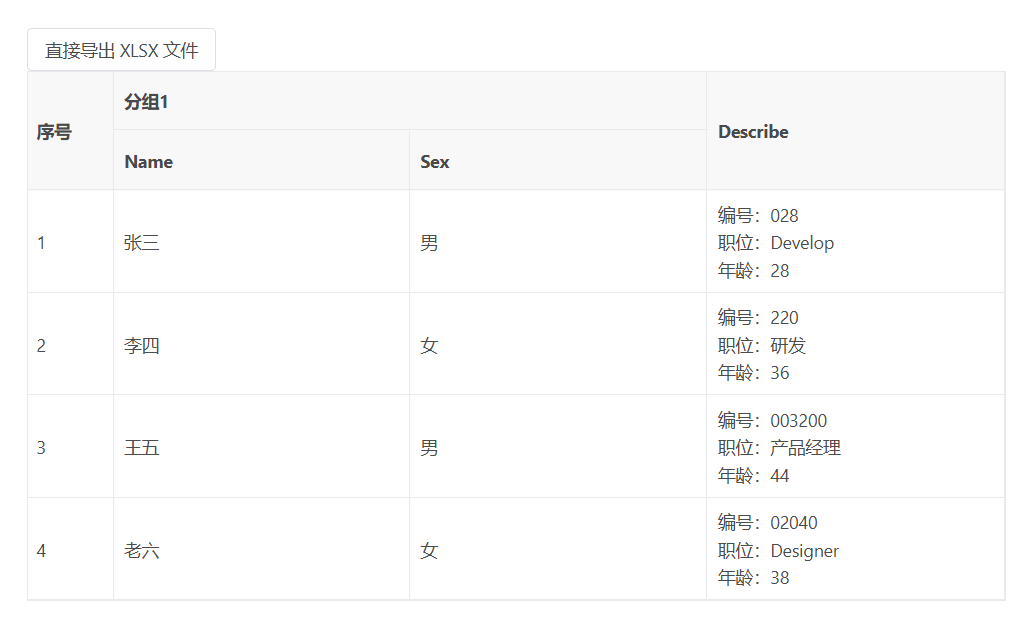
<template>
  <div>
    <vxe-button tatus="primary" @click="exportEvent">直接导出 XLSX 文件</vxe-button>
    <vxe-table border ref="tableRef" :export-config="exportConfig" :data="tableData">
      <vxe-column field="seq" type="seq" width="70"></vxe-column>
      <vxe-colgroup title="分组1">
        <vxe-column field="name" title="Name"></vxe-column>
        <vxe-column field="sex" title="Sex" :cell-render="sexCellRender"></vxe-column>
      </vxe-colgroup>
      <vxe-column field="describe" title="Describe" :export-method="describeExportMethod">
        <template #default="{ row }">
          <div>编号:{{ row.no1 }}</div>
          <div>职位:{{ row.role }}</div>
          <div>年龄:{{ row.age }}</div>
        </template>
      </vxe-column>
    </vxe-table>
  </div>
</template>

<script setup>
import { ref, reactive } from 'vue'

const tableRef = ref()

const tableData = ref([
  { id: 10001, name: '张三', role: 'Develop', sex: '1', age: 28, no1: '028', no2: '028', describe: '' },
  { id: 10002, name: '李四', role: '研发', sex: '0', age: 36, no1: '220', no2: '220', describe: '' },
  { id: 10003, name: '王五', role: '产品经理', sex: '1', age: 44, no1: '003200', no2: '003200', describe: '' },
  { id: 10004, name: '老六', role: 'Designer', sex: '0', age: 38, no1: '02040', no2: '02040', describe: '' }
])

const exportConfig = reactive({
  async sheetMethod(params) {
    const { worksheet } = params
    worksheet.eachRow((excelRow, i) => {
      // 设置行高
      if (i > 2) {
        excelRow.height = 80
      }
    })
  }
})
const sexCellRender = reactive({
  name: 'FormatSelect',
  options: [
    { label: '女', value: '0' },
    { label: '男', value: '1' }
  ]
})

const describeExportMethod = ({ row }) => {
  return `自定义编号:${row.no1}\n自定义职位:${row.role}\n自定义年龄:${row.age}`
}

const exportEvent = () => {
  const $table = tableRef.value
  if ($table) {
    $table.exportData({
      type: 'xlsx'
    })
  }
}
</script>
配置说明
- export-method 属性
- 作用:覆盖列默认的导出数据逻辑。
- 类型:Function({ row, column, columnIndex }) => string | number
- 返回值:导出的单元格内容(字符串或数字)。
- export-config 与 sheetMethod
- 作用:在导出时对 Excel 工作表进行高级定制,例如设置行高、列宽、样式等。
- 本例:为所有数据行统一设置行高为 80,使多行文本在 Excel 中完整显示。
- cell-render 与导出的关系
- 使用 cell-render(如示例中的 FormatSelect)定义的列,无需额外处理,导出时会自动根据 options 映射为对应的标签文本。
内容格式
- 列宽与行高:导出的 Excel 默认列宽可能无法完全显示多行文本,建议在 sheetMethod 中设置合适的行高和列宽。
- 换行符:在导出文本中使用 \n,Excel 会自动识别为单元格内的换行。





 扫一扫
扫一扫


 755
755

 被折叠的 条评论
为什么被折叠?
被折叠的 条评论
为什么被折叠?
 到【灌水乐园】发言





