



 本文详细介绍了Python中列表list的各种操作,包括增(extend、+、append、insert)、删(pop、remove、del、clear)、改、查(count、索引查找、位置查找)和排序(sort、reverse、copy)。重点讲解了这些方法的区别和用法。
- python中的list有很多种用法,在pycharm中输入List.(List是个定义好的列表如List=[1,2,3,‘python’,‘hello’])就会出现如下图所示的各种用法。
- 这里总结一下,这些用法基本包括了list的增删改查和排序。
- 下面就一一介绍一下这些用法:
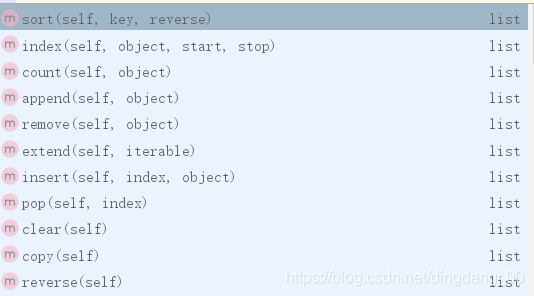
1、增加-----要增加列表的元素方法有很多种。这里首先介绍上图中的extend。
1.1、extend() 函数用于在列表末尾一次性追加另一个序列中的多个值(用新列表扩展原来的列表)。
A=[1,2,3,'python','hello']
B=[4,5,6,'good']
A.extend(B)
print(A)
=>[1, 2, 3, 'python', 'hello', 4, 5, 6, 'good']
1.2、+ 对于列表的连接我们还可以用“+”,一次面试中被问到列表的拼接,说了“+”,面试官这不是他想要的,他说这个+不规范,他想要是上面的extend。
A=[1,2,3,'python','hello']
B=[4,5,6,'good']
print(A+B)
=>[1, 2, 3, 'python', 'hello', 4, 5, 6, 'good']
备注:查了一下+和extend的区别:
相同点 : "+"和"extend"都能将两个列表成员拼接到到一起
不同点 : + : 生成的是一个新列表(id改变)
extend : 是将一个列表的成员一个个取出添加到原列表中 , 改变的是原列表的值 , id不变
A=[1,2,3,'python','hello']
B=[4,5,6,'good']
print(id(A),id(B))
A.extend(B)
print(id(A))
=> A:ID: 2075165811336 B:ID:2075165811400
  扩展后A:ID:2075165811336 由此可见extend扩展后A列表值变了,但是id没有改变。
1.3、append() 方法用于在列表末尾添加新的对象(该方法无返回值,但是会修改原来的列表)
A=[1,2,3,'python','hello']
A.append(4)
A.append('good')
print(A)
=>[1, 2, 3, 'python', 'hello', 4, 'good']
1.4、insert() 函数用于将指定对象插入列表的指定位置,list.insert(index, obj)
index是列表索引位置,obj是要插入的元素。
A=[1,2,3,'python','hello']
A.insert(1,"C++")
print(A)
=>[1, 'C++', 2, 3, 'python', 'hello']
2、删除
2.1、pop() 函数用于移除列表中的一个元素(默认最后一个元素),并且返回该元素的值,list.pop([index=-1])。
A=[1,2,3,'python','hello']
#POP()默认删除最后一个元素
A.pop()
print(A)  => [1,2,3,'python']
#删除索引为0的元素
A.pop(0)
print(A)  => [2,3,'python']
2.2、remove() 函数用于移除列表中某个值的第一个匹配项,list.remove(obj)。
A=[1,2,3,'python','hello']
A.remove(3)
print(A)  => [1, 2, 'python', 'hello']
2.3、del是删除整个列表
#encoding=utf-8
A=[1,2,3,'python','hello',1,2,3,2]
del A
print(A) => 报错 :NameError: name 'A' is not defined
=>
2.4、clear清空列表元素
A=[1,2,3,'python','hello',1,2,3,2]
print(A) => [1, 2, 3, 'python', 'hello', 1, 2, 3, 2]
A.clear()
print(A) => []
3、修改----修改列表元素一般有两个方法,一是通过索引,一是通过切片。
3.1、索引
A=[1,2,3,'python','hello']
A[1]="http"
print(A) => [1, 'http', 3, 'python', 'hello']
3.2、切片
A=[1,2,3,'python','hello']
A[:2]=["http","css"]
print(A) => ['http', 'css', 3, 'python', 'hello']
4、查找
4.1、查找元素出现的次数count()
A=[1,2,3,'python','hello',1,2,3,2]
print(A.count(2))  => 3
4.2、查找指定元素索引的值
A=[1,2,3,'python','hello',1,2,3,2]
print(A.index("python")) => 3
4.3、查找元素在列表中的位置 index(object,start,stop).
#encoding=utf-8
A=[1,2,3,'python','hello',1,2,3,2]
#从索引1到10,查找元素‘hello’在列表中的位置
print(A.index('hello',1,10))  => 4
5、排序
5.1、sort() 函数用于对原列表进行排序,如果指定参数,则使用比较函数指定的比较函数。
list.sort(cmp=None, key=None, reverse=False)
A=[1,5,7,3,90,12]
A.sort()
print(A) => [1, 3, 5, 7, 12, 90]
A.sort(reverse=True)
print(A) => [90, 12, 7, 5, 3, 1]
5.2、reverse() 函数用于反向列表中元素。
A=[1,5,7,3,90,12]
A.reverse()
print(A) => [12, 90, 3, 7, 5, 1]
5.3、copy() 函数用于复制列表,类似于 a[:]。
A=[1,5,7,3,90,12]
B=A.copy()
print(B) => [1,5,7,3,90,12]
C = A[:]
print(C) => [1,5,7,3,90,12]





 扫一扫
扫一扫


 6413
6413

 被折叠的 条评论
为什么被折叠?
被折叠的 条评论
为什么被折叠?
 到【灌水乐园】发言





