



0 开篇:LLM 应用里最贵的一段代码,叫"解析模型输出"
如果你写过任何接了 LLM 的业务系统,一定写过类似这样的代码:json.loads(resp.replace("```json", "").strip()),然后外面再套一层 try/except。这段代码就是整个系统里最脆弱、最难维护、最容易半夜报警的地方。LangChain 的结构化输出(Structured Output),就是为了彻底消灭这段代码而存在的。
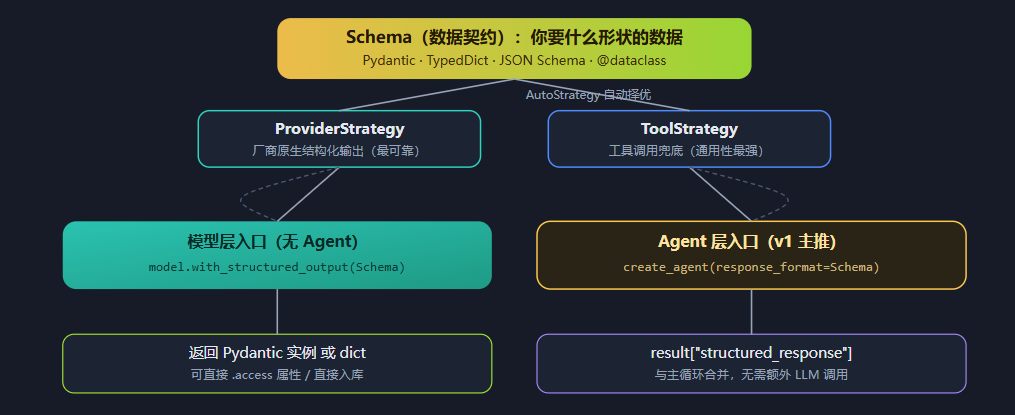
一句话定义:结构化输出 = 给模型一个"数据契约(Schema)",让模型在生成时就被约束在这个契约内,并由框架保证返回值是合法的 Python 对象。不是"生成完再猜",而是"生成时就按契约来"。
结构化输出在 LangChain v1 体系中的两个层级
模型层用 with_structured_output,Agent 层用 response_format —— 二者共用同一套 Schema 体系与策略
本讲义的阅读地图:
- 第 1 章先建立认知:什么是结构化输出、它替代了什么、LangChain 提供了哪几种"模式"。
- 第 2 章逐个拆解四种 Schema 写法(Pydantic / TypedDict / JSON Schema / @dataclass),每种都给出可直接运行的完整例子。
- 第 3 章是本篇最有价值的一章:搭一个 Fake Server(假模型),在完全不花一分钱、不需要 API Key 的情况下,把四种模式的校验行为差异"现场复现"出来。
- 第 4 章讲获取结果的两种路径:官方推荐的
with_structured_output,以及为什么输出解析器(Output Parser)已经不推荐了。
1. 结构化输出概述
1.1 什么是结构化输出
LLM 天生输出的是自然语言文本——为聊天而生,却不适合被程序消费。而真实业务需要的往往是:从一段简历文本里抽出姓名/邮箱/技能列表、把用户评价分类成 positive/negative、生成一份可入库的订单对象。结构化输出就是让模型"按契约输出",直接返回可以被程序使用的类型化数据。
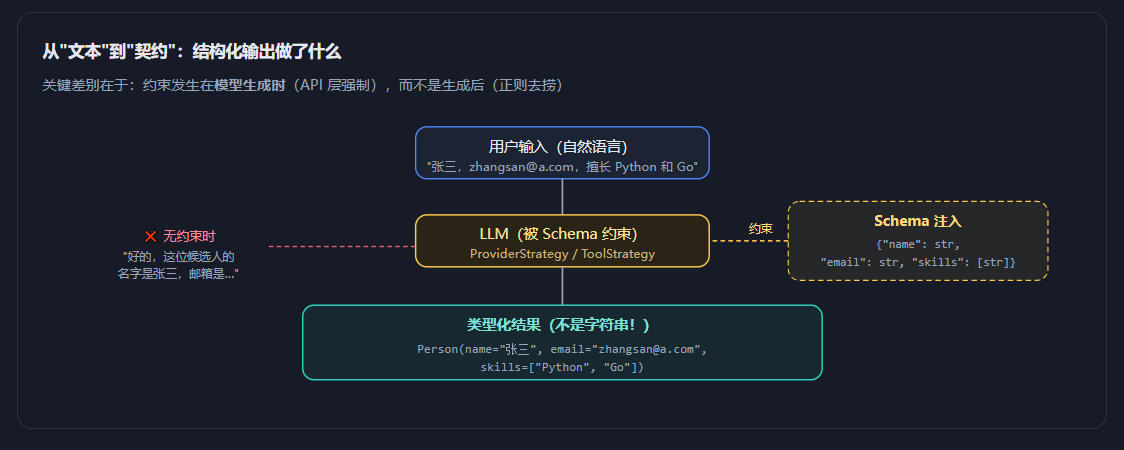
最小可运行示例(模型层)
from pydantic import BaseModel, Field
from langchain.chat_models import init_chat_model

# ① 定义数据契约:我要什么形状的数据
class Person(BaseModel):
    """一个人的基本信息。"""          # ← 类文档字符串会被送进模型的 schema 描述
    name: str = Field(description="姓名")
    email: str = Field(description="邮箱地址")
    skills: list[str] = Field(description="技能列表")

# ② 把契约"焊"到模型上
model = init_chat_model("openai:gpt-5.5")
structured_model = model.with_structured_output(Person)

# ③ 直接拿到 Python 对象,不是字符串
result = structured_model.invoke("张三,zhangsan@a.com,擅长 Python 和 Go")
print(type(result))      # <class '__main__.Person'>
print(result.name)       # 张三
print(result.skills)     # ['Python', 'Go']
print(result.model_dump())  # {'name': '张三', 'email': 'zhangsan@a.com', 'skills': ['Python', 'Go']}
三个关键认知:
① Schema 即文档——你的
Person类本身就是一份活的接口说明,字段名、类型、约束全在里面;② Field(description=...) 不是给人看的,是给模型看的提示词,直接影响抽取质量,务必写清楚;
③ 类的 docstring 同样会进入 schema,官方示例中
"""Contact information for a person."""就是这个作用。
1.2 传统方式 vs 结构化输出
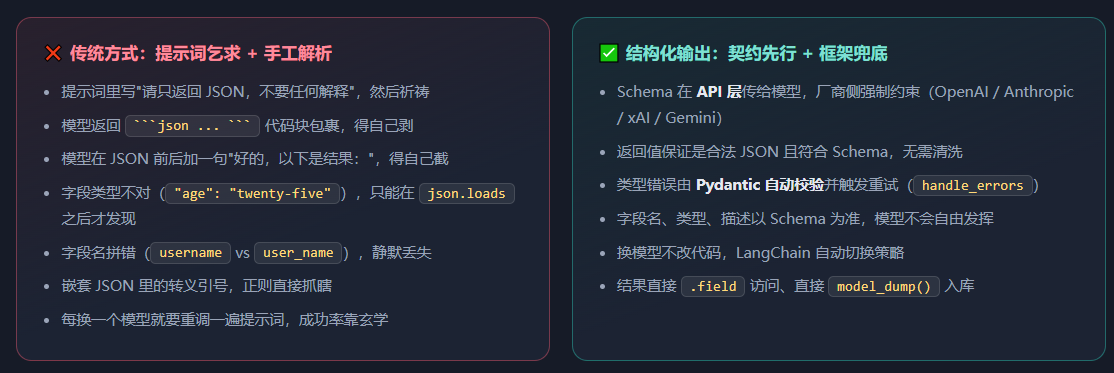
对比代码:同一需求,两种写法
# ============ ❌ 传统方式:提示词乞求 + 手工解析 ============
import json, re

prompt = """
请从下面的文本中提取人名和年龄。
【严格要求】只输出 JSON,不要输出任何解释,不要 markdown 代码块:
{"name": "字符串", "age": 整数}
文本:张三今年 25 岁
"""

resp = llm.invoke(prompt).content
# 实际可能拿到的东西(真实世界的惨状):
#   "好的!提取结果如下:\n```json\n{\"name\": \"张三\", \"age\": \"25\"}\n```\n希望有帮助!"

# 于是你要写这一坨防御代码 ↓
try:
    cleaned = re.sub(r"```json|```", "", resp).strip()
    start, end = cleaned.find("{"), cleaned.rfind("}") + 1
    data = json.loads(cleaned[start:end])
    age = int(data["age"])   # 还得手动转类型!
except Exception as e:
    # 出错了怎么办?重跑?返回 None?业务代码全线崩溃……
    age = None
# ============ ✅ 结构化输出:契约先行 ============
from pydantic import BaseModel, Field

class Person(BaseModel):
    """一个人的基本信息。"""
    name: str = Field(description="人名")
    age: int = Field(description="年龄,必须是整数", ge=0, le=150)

result = model.with_structured_output(Person).invoke("张三今年 25 岁")
# result 就是 Person 实例;age 一定是 int 且 0≤age≤150;
# 类型不对?LangChain 自动把错误回喂给模型让它重来(handle_errors=True)
print(result.age + 1)   # 26 —— 可以放心当 int 用
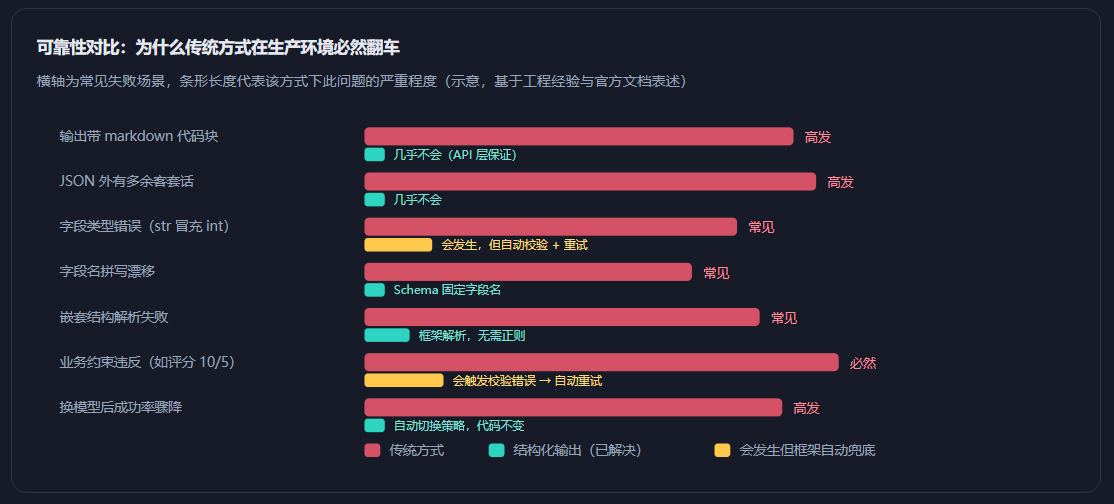
别走极端:结构化输出不是要你把模型当数据库用。需要长文本生成(写文章、写代码、写报告)的场景,自然语言输出依然是最优解。结构化输出的战场是信息抽取、分类打标、表单填充、Agent 最终答案、工具参数生成——凡是"输出的终点是程序而不是人"的场景。
1.3 结构化输出模式
LangChain 的结构化输出有两个正交的维度:一是Schema 用哪种写法(第 2 章的四种模式),二是底层用哪种策略实现(本节内容)。很多人把这两件事混为一谈,是理解混乱的根源。
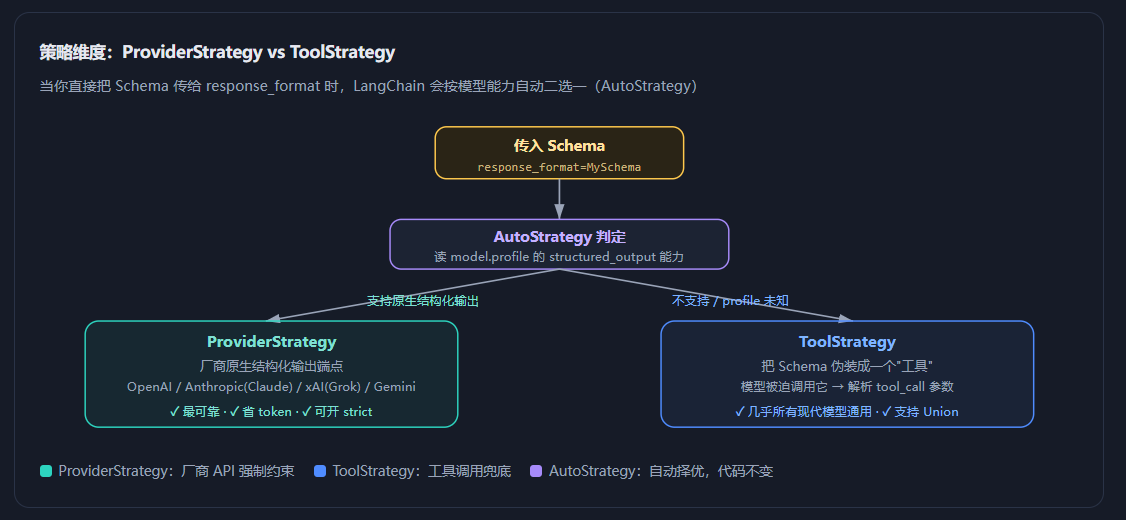
模型层:三种 method
在模型层调用 with_structured_output 时,很多厂商集成包额外暴露 method 参数,让你手动指定实现方式:
| method | 原理 | 说明与建议 |
|---|---|---|
json_schema | 使用厂商原生 JSON Schema 端点(如 OpenAI 的 response_format={"type":"json_schema"}) | ✅ 推荐。最可靠,且支持流式输出完整对象(Google GenAI 集成中已为默认值) |
function_calling | 绑定一个参数即 Schema 的工具,强制模型调用后解析其参数 | 通用性最强,几乎所有支持工具调用的模型都行;可靠性略低于 json_schema |
json_mode | 只要求模型输出合法 JSON,Schema 仍需写在提示词里 | 已不推荐。是 json_schema 的前身,只保证"是 JSON",不保证"符合 Schema" |
模型层 vs Agent 层,怎么选?
- 只要抽取/分类,不需要工具 → 用模型层
model.with_structured_output(Schema):轻量、直接、可 LCEL 串联。- 需要 Agent 先调工具查资料,最后给出结构化结论 → 用 Agent 层
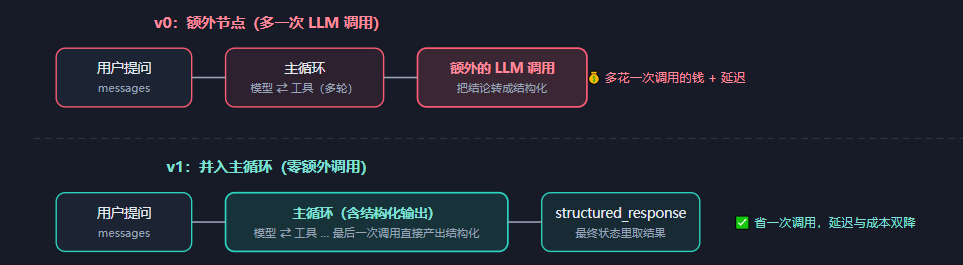
create_agent(response_format=...),结果从result["structured_response"]取。- v1 的性能红利:Agent 的结构化输出已合并进主循环,不再额外调用一次 LLM,官方明确表示这降低了延迟与成本。
from pydantic import BaseModel, Field
from typing import Literal
from langchain.agents import create_agent
from langchain.agents.structured_output import ToolStrategy, ProviderStrategy

class ProductReview(BaseModel):
    """Analysis of a product review."""
    rating: int | None = Field(description="The rating of the product", ge=1, le=5)
    sentiment: Literal["positive", "negative"] = Field(description="The sentiment of the review")
    key_points: list[str] = Field(description="Key points. Lowercase, 1-3 words each.")

# 写法 A:直接传类型 → 自动挑策略(推荐)
agent = create_agent(model="gpt-5.5", tools=tools, response_format=ProductReview)

# 写法 B:显式指定工具调用策略
agent = create_agent(model="gpt-5.5", tools=tools, response_format=ToolStrategy(ProductReview))

# 写法 C:显式指定厂商原生策略 + 严格模式(需 langchain>=1.2)
agent = create_agent(model="gpt-5.5", response_format=ProviderStrategy(ProductReview, strict=True))

result = agent.invoke({
    "messages": [{"role": "user", "content":
        "Analyze this review: 'Great product: 5 out of 5 stars. Fast shipping, but expensive'"}]
})
print(result["structured_response"])
# ProductReview(rating=5, sentiment='positive', key_points=['fast shipping', 'expensive'])
两个容易踩的坑:
① JSON Schema 字典必须显式包裹——直接
response_format={"type":"object",...}不会被自动识别,必须写成ProviderStrategy(你的字典)或ToolStrategy(你的字典);② JSON Schema 必须带顶层
title和description,否则会报错。
2. 四种模式的使用
LangChain 官方支持四种 Schema 写法,底层由 SchemaKind 分发路由:"pydantic" | "dataclass" | "typeddict" | "json_schema"。它们定义的都是同一件事——数据契约,但在校验强度、返回类型、跨语言能力上差异巨大。
四种模式总览:它们分别站在"表达力"与"校验力"的哪个位置
横轴 = 类型表达/校验能力,纵轴 = 跨语言/互操作能力;气泡大小代表社区使用广度
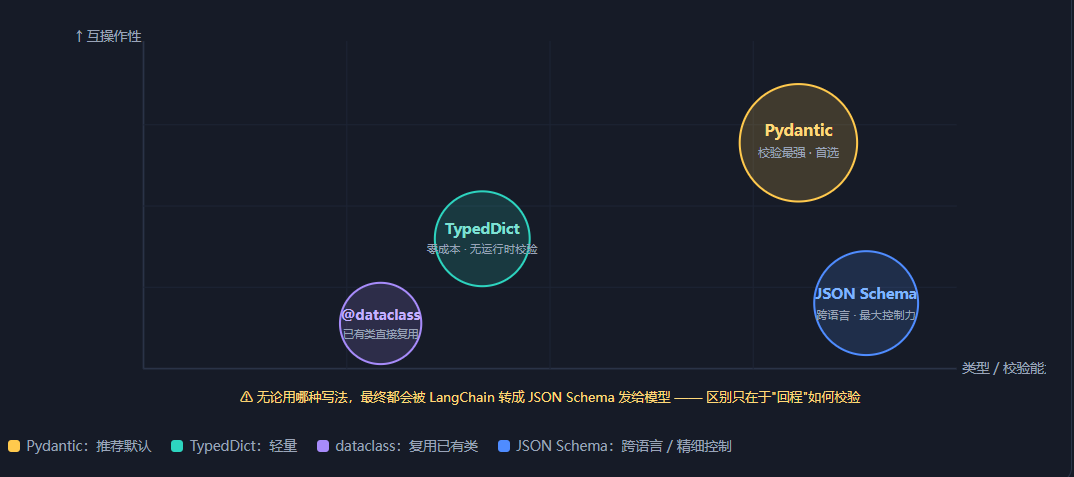
| 模式 | 返回类型 | 运行时校验 | 典型场景 |
|---|---|---|---|
| Pydantic 首选 | Pydantic 实例 | ✅ 自动、完整 | 信息抽取、分类、Agent 最终答案、任何需要"值约束"的场景(ge/le/regex) |
| TypedDict | dict | ❌ 无(仅静态检查) | 想零依赖、只需要 IDE 补全 + mypy 检查;或 Schema 很简单 |
| JSON Schema | dict | ❌ 无(需手动) | 跨语言共享契约、前端/后端共用一份 Schema、需要极精细控制字段约束 |
| @dataclass | dict | ❌ 无 | 项目里已有 dataclass 定义(配置类、DTO),不想再写一遍 Pydantic |
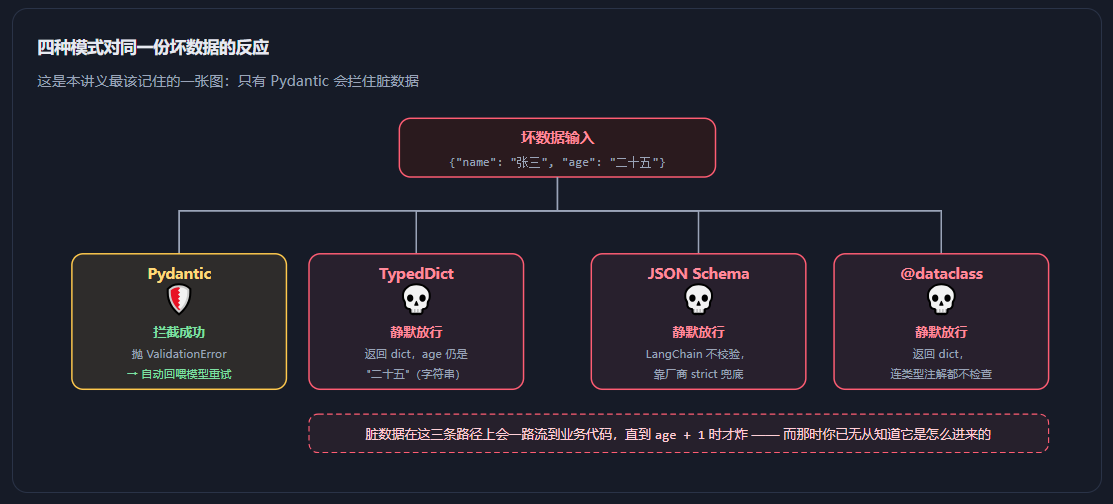
最重要的一张表,请刻在脑子里:只有 Pydantic 返回实例并做运行时校验,其余三种统统返回
dict且不做运行时校验。官方文档原话:"If schema is a Pydantic class then the model output will be a Pydantic instance of that class, and the model-generated fields will be validated by the Pydantic class. Otherwise the model output will be a dict and will not be validated." 这句话是第 3 章全部内容的伏笔。
2.1 模式 1:Pydantic —— 生产环境的默认答案
Pydantic 是 Python 生态事实上的数据校验标准(FastAPI 就建立在它之上)。在 LangChain 里用 Pydantic 定义 Schema,你会同时得到:类型校验、值域约束、字段描述(自动变成给模型的提示)、序列化/反序列化、以及一个可复用的数据类。
基础用法:从简历里抽信息
from pydantic import BaseModel, Field
from typing import Literal
from langchain.chat_models import init_chat_model

class Resume(BaseModel):
    """从简历文本中提取的结构化信息。"""   # ← 会作为 schema 的 description 发给模型
    name: str = Field(description="候选人姓名")
    email: str = Field(description="邮箱地址,如缺失返回空字符串")
    years_experience: int = Field(description="工作年限,整数", ge=0, le=50)
    skills: list[str] = Field(description="技能列表,每项不超过 4 个字", max_length=10)
    education: Literal["大专", "本科", "硕士", "博士", "未知"] = Field(
        description="最高学历,只能从给定选项中选择")
    expected_salary: int | None = Field(None, description="期望月薪(元),未提及则为 null")

model = init_chat_model("openai:gpt-5.5")
extractor = model.with_structured_output(Resume)

text = """
张伟,邮箱 zhangwei@example.com。8 年后端开发经验,熟练掌握 Python、Go、
Kubernetes。硕士学历。期望月薪 45k。
"""
resume = extractor.invoke(text)
print(type(resume))              # <class '__main__.Resume'>
print(resume.name)               # 张伟
print(resume.years_experience)   # 8
print(resume.education)          # 硕士
print(resume.expected_salary)    # 45000
print(resume.model_dump())       # 直接得到可入库的 dict
Pydantic 的三个"超能力":
① 值域约束——
ge/le/min_length/max_length/regex,违反即触发校验错误并自动重试;② 枚举收紧——用
Literal[...]把输出锁死在几个选项内,杜绝"硕士生""研究生""Master"这类同义词漂移;③ 可选字段——
int | None = Field(None, ...)明确告诉模型"没提到就填 null",比让模型编造安全得多。
进阶:嵌套结构、自定义校验、字段别名
from pydantic import BaseModel, Field, field_validator, model_validator
from typing import Literal
from datetime import date

# ① 嵌套:Schema 可以任意层级嵌套
class Actor(BaseModel):
    name: str = Field(description="演员姓名")
    role: str = Field(description="饰演角色")

class MovieDetails(BaseModel):
    """一部电影的详细信息。"""
    title: str
    year: int = Field(ge=1888, le=2100)
    cast: list[Actor]                     # ← 嵌套模型列表
    genres: list[str]
    budget: float | None = Field(None, description="预算(百万美元)")

# ② 自定义字段校验器:在 Pydantic 层兜住业务规则
class Order(BaseModel):
    """一张订单。"""
    order_id: str = Field(description="订单号,格式 ORD-XXXXXX")
    amount: float = Field(description="订单金额", gt=0)
    currency: Literal["CNY", "USD"] = "CNY"
    items: list[str]

    @field_validator("order_id")
    @classmethod
    def check_order_id(cls, v: str) -> str:
        if not v.startswith("ORD-"):
            raise ValueError("订单号必须以 ORD- 开头")   # → 触发模型重试
        return v

    @model_validator(mode="after")          # 跨字段校验
    def check_items_match_amount(self):
        if self.amount > 100000 and len(self.items) == 0:
            raise ValueError("大额订单必须列出商品明细")
        return self

# ③ 字段别名:模型习惯输出 user_name,你想用 userName
from pydantic import AliasChoices
class User(BaseModel):
    user_name: str = Field(validation_alias=AliasChoices("user_name", "username", "name"))
查看 LangChain 实际发给模型的 Schema
调试抽取效果时,最有用的一步是看看模型到底收到了什么样的契约。convert_to_openai_tool 可以把 Pydantic 类还原成发给厂商的 JSON:
from langchain_core.utils.function_calling import convert_to_openai_tool
import json

print(json.dumps(convert_to_openai_tool(Resume), ensure_ascii=False, indent=2))
{
  "type": "function",
  "function": {
    "name": "Resume",
    "description": "从简历文本中提取的结构化信息。",
    "parameters": {
      "properties": {
        "name":        {"description": "候选人姓名",           "type": "string"},
        "email":       {"description": "邮箱地址,如缺失返回空字符串", "type": "string"},
        "years_experience": {
          "description": "工作年限,整数", "type": "integer",
          "minimum": 0, "maximum": 50            # ← ge/le 变成了 JSON Schema 的 minimum/maximum
        },
        "skills":      {"description": "技能列表...", "type": "array",
                        "items": {"type": "string"}, "maxItems": 10},
        "education":   {"description": "最高学历...", "enum": ["大专","本科","硕士","博士","未知"],
                        "type": "string"},        # ← Literal 变成了 enum
        "expected_salary": {"description": "期望月薪(元)...", "type": ["integer","null"]}
      },
      "required": ["name","email","years_experience","skills","education","expected_salary"],
      "type": "object"
    }
  }
}
调试心法:抽取效果不好时,别急着改提示词,先跑这段代码看 Schema。你写的
description和约束,就是模型唯一能看到的东西——如果 description 含糊(比如只写"年龄"),模型就只能猜。
2.2 模式 2:TypedDict —— 零依赖的轻量选择
TypedDict 是标准库 typing(或 typing_extensions)提供的类型化字典。它只在静态检查期生效——mypy / IDE 能认出字段和类型,但运行时它就是个普通 dict,不做任何校验。适合"Schema 很简单、不想引入 Pydantic"的场景。
# 注意:LangChain 官方示例从 typing_extensions 导入(支持 Annotated 描述语法)
from typing_extensions import TypedDict, Annotated
from langchain.chat_models import init_chat_model

class MovieDict(TypedDict):
    """A movie with details."""
    # 语法:字段名: Annotated[类型, 元数据1, "字段描述"]
    title:    Annotated[str,   ..., "The title of the movie"]
    year:     Annotated[int,   ..., "The year the movie was released"]
    director: Annotated[str,   ..., "The director of the movie"]
    rating:   Annotated[float, ..., "The movie's rating out of 10"]

model = init_chat_model("openai:gpt-5.5")
structured = model.with_structured_output(MovieDict)

result = structured.invoke("Provide details about the movie Inception")
print(result)
# {'title': 'Inception', 'year': 2010, 'director': 'Christopher Nolan', 'rating': 8.8}
print(type(result))   # <class 'dict'>  ← 注意!不是 MovieDict 实例,就是个 dict
print(result["title"])  # Inception   ← 只能用 [] 访问,不能用 .title
嵌套与可选字段
from typing_extensions import TypedDict, Annotated, NotRequired

class Actor(TypedDict):
    name: Annotated[str, ..., "演员姓名"]
    role: Annotated[str, ..., "饰演角色"]

class MovieDetails(TypedDict):
    title:  Annotated[str, ..., "电影名"]
    year:   Annotated[int, ..., "上映年份"]
    cast:   Annotated[list[Actor], ..., "演员表"]      # ← 嵌套 TypedDict
    genres: Annotated[list[str], ..., "类型标签"]
    budget: Annotated[float | None, ..., "预算(百万美元),未知为 null"]
    poster_url: NotRequired[str]    # ← NotRequired = 可选字段(但注意:无 description)

structured = model.with_structured_output(MovieDetails)
TypedDict 的三个限制(务必知道):
① 返回 dict,不是实例——result["title"] 而非 result.title;
② 无运行时校验——模型返回 {"year": "2010"}(字符串)时,dict 会原样接受,错误一路潜行到你的业务代码才炸;
③ NotRequired 字段很难加 description——想给可选字段写描述,官方推荐写法是 Annotated[float | None, ..., "描述"] 而不是 NotRequired。
2.3 模式 3:JSON Schema —— 最大控制力与跨语言契约
直接传一个JSON Schema 字典。这是最"原始"的方式,也是控制力最强的方式——JSON Schema 能表达的约束(pattern、format、minimum、enum、additionalProperties)比 Pydantic 的封装更贴近厂商 API。同时它是语言中立的:同一份 Schema 可以给 Python 后端、TypeScript 前端、Java 服务共用。
import json

json_schema = {
    "title": "Movie",                        # ← 必须!顶层 title
    "description": "A movie with details",      # ← 必须!顶层 description
    "type": "object",
    "properties": {
        "title":    {"type": "string",  "description": "The title of the movie"},
        "year":     {"type": "integer", "description": "The year the movie was released"},
        "director": {"type": "string",  "description": "The director of the movie"},
        "rating":   {"type": "number",  "description": "The movie's rating out of 10"},
    },
    "required": ["title", "year", "director", "rating"],
}

# 模型层:直接传字典(method 用 json_schema 走厂商原生端点)
structured = model.with_structured_output(json_schema, method="json_schema")
result = structured.invoke("Provide details about the movie Inception")
print(result)   # {'title': 'Inception', 'year': 2010, ...}
print(type(result))  # <class 'dict'>  ← 依然是 dict,无校验
# Agent 层:JSON Schema 字典【必须】用策略类包裹,不能直接传
from langchain.agents import create_agent
from langchain.agents.structured_output import ProviderStrategy, ToolStrategy

agent = create_agent(
    model="gpt-5.5",
    response_format=ProviderStrategy(json_schema),   # ✅ 必须包裹
    # response_format=json_schema,                   # ❌ 不会被自动识别
)
report = agent.invoke({"messages": [...]})["structured_response"]
JSON Schema 的独有能力:pattern / format / 嵌套对象
invoice_schema = {
    "title": "Invoice",
    "description": "一张发票的结构化信息",
    "type": "object",
    "properties": {
        "invoice_no": {
            "type": "string",
            "pattern": "^[A-Z]{2}\\d{8}$",       # ← 正则约束:两位大写字母+8位数字
            "description": "发票号,格式如 IN20260101",
        },
        "issue_date": {
            "type": "string",
            "format": "date",                     # ← 日期格式
            "description": "开票日期,YYYY-MM-DD",
        },
        "amount":   {"type": "number", "minimum": 0, "description": "金额"},
        "tax_rate": {"type": "number", "enum": [0, 0.03, 0.06, 0.13], "description": "税率"},
        "seller": {                                   # ← 嵌套对象
            "type": "object",
            "properties": {
                "name": {"type": "string", "description": "销售方名称"},
                "tax_id": {"type": "string", "description": "纳税人识别号"},
            },
            "required": ["name"],
        },
        "items": {
            "type": "array",
            "items": {
                "type": "object",
                "properties": {
                    "name": {"type": "string"},
                    "qty":  {"type": "integer", "minimum": 1},
                    "price":{"type": "number"},
                },
                "required": ["name", "qty", "price"],
            },
        },
    },
    "required": ["invoice_no", "amount"],
    "additionalProperties": False,         # ← 禁止多余字段(strict 模式下很有用)
}
什么时候用 JSON Schema 而不是 Pydantic?
① Schema 要跨语言共享(前端 TS 用它生成表单校验,后端 Python 用它做抽取);
② 团队已有 Schema 资产(OpenAPI、数据库元数据导出的 JSON Schema);
③ 需要 JSON Schema 特有关键字(pattern、format: date、additionalProperties: false);
④ 不想引入 pydantic 依赖。 除此之外,优先 Pydantic——因为它能自动做校验,而裸 JSON Schema 不能(见第 3 章)。
2.4 模式 4:@dataclass —— 复用已有定义
Python 标准库的 @dataclass 也能当 Schema 用。它的价值在于:如果你的项目里已经有一堆 dataclass 定义(配置类、DTO、领域模型),可以直接拿过来给 LLM 用,不必为了 LangChain 再重写一遍 Pydantic。
from dataclasses import dataclass, field
from typing import Optional

@dataclass
class Person:
    """一个人的基本信息。"""       # ← docstring 同样会作为 description
    name: str                          # ← 类型注解必须有!
    age: int
    city: str
    email: Optional[str] = None
    tags: list[str] = field(default_factory=list)

model = init_chat_model("openai:gpt-5.5")
structured = model.with_structured_output(Person)
result = structured.invoke("李四,32 岁,住在杭州,邮箱 lisi@example.com")

print(result)
# {'name': '李四', 'age': 32, 'city': '杭州', 'email': 'lisi@example.com', 'tags': []}
print(type(result))   # <class 'dict'>  ← 注意!返回的是 dict,不是 Person 实例
# 想要对象?自己转一下(一次性成本)
person = Person(**result)
print(person.name, person.age)   # 李四 32
dataclass 的两个"反直觉"点:
① 返回 dict,不是 dataclass 实例——这是官方文档明确写的("Dataclasses: ... Returns dict"),很多人以为会拿到 Person(...) 对象,结果拿到 dict 然后 .name 报 AttributeError;
② 无法写字段描述——dataclass 的 field(metadata=...) 不能被 LangChain 稳定识别为 description,字段说明只能靠类 docstring 一笔带过,抽取质量通常不如 Pydantic/TypedDict。
2.5 选型决策:四句话定生死
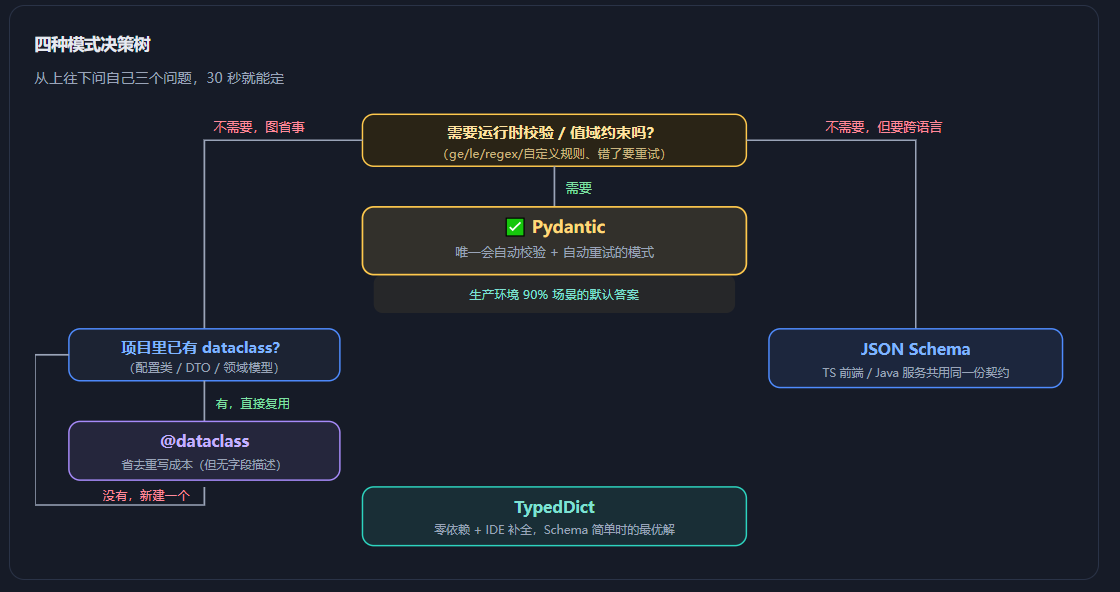
四种模式一句话总结:
- Pydantic = 要校验、要约束、要上生产 → 用它。
- TypedDict = Schema 简单、追求零依赖、只要 IDE 提示 → 用它(记得自己补校验)。
- JSON Schema = 契约要跨语言、要精细关键字、已有 Schema 资产 → 用它(记得必须带 title/description,Agent 层要包裹)。
- @dataclass = 代码里已经有现成的 dataclass,不想重写 → 用它(接受返回 dict、无字段描述)。
3.关于类型校验
第 2 章留了一个悬念:为什么"只有 Pydantic 会真正校验"这件事如此重要?这一章我们用可复现的实验把它讲透。核心工具就是——Fake Server(假模型服务端):不需要 API Key、不花一分钱、每次运行结果完全一致,还能人为制造"模型返回错误类型"这种在真实环境里靠运气才能遇到的场景。
3.1 Fake Server:零成本复现一切边界情况
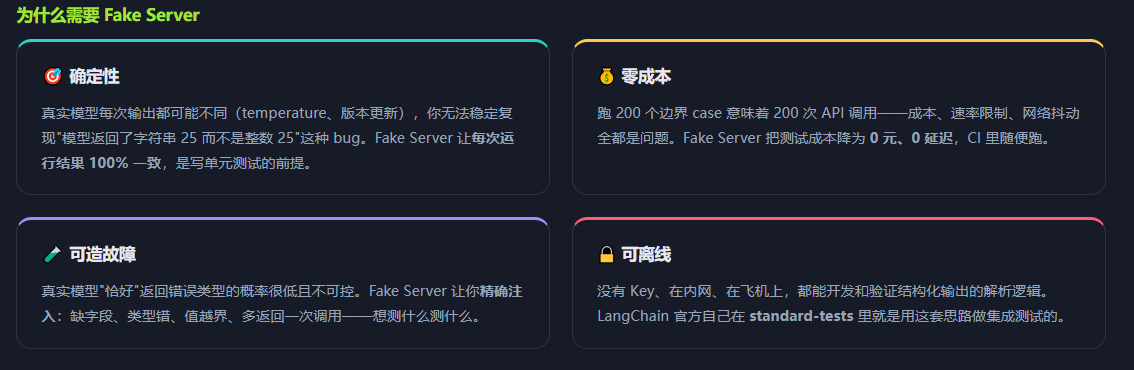
LangChain 官方提供的 5 个假模型
全部位于 langchain_core.language_models.fake_chat_models:
| 类 | 行为 | 适用场景 |
|---|---|---|
FakeMessagesListChatModel 本篇主角 | 按列表顺序返回预设好的完整消息对象 | 测试结构化输出的首选——因为你能直接构造带 tool_calls 的 AIMessage,精确模拟模型的结构化输出行为 |
GenericFakeChatModel | 通过迭代器逐条产出消息 | 测试流式(streaming)与 callback 逻辑,会把消息拆成 chunk |
FakeListChatModel | 按列表顺序返回字符串 | 测试普通文本链路;不适合测结构化输出(它不产生 tool_calls) |
FakeChatModel | 永远返回 "fake_response" | 只想让链路跑通、不关心内容的冒烟测试 |
ParrotFakeChatModel | 把输入原样复读回去 | 验证输入输出在管道里是否被正确透传 |
# pip install langchain-core   (无需任何 API Key)
from langchain_core.language_models.fake_chat_models import FakeMessagesListChatModel
from langchain.messages import AIMessage
from pydantic import BaseModel, Field

# ---------- ① 定义数据契约 ----------
class Person(BaseModel):
    """一个人的基本信息。"""
    name: str = Field(description="姓名")
    age:  int = Field(description="年龄", ge=0, le=150)

# ---------- ② 造一条"模型回复":带 tool_calls 的 AIMessage ----------
# 这就是 ToolStrategy 下模型"调用结构化输出工具"的真实形态
fake_ai_reply = AIMessage(
    content="",
    tool_calls=[{
        "name": "Person",                 # ← 工具名 = Schema 名
        "args": {"name": "张三", "age": 25},   # ← 模型"填"的参数
        "id": "call_001",
        "type": "tool_call",
    }],
)

# ---------- ③ 装进 Fake Server ----------
fake_model = FakeMessagesListChatModel(responses=[fake_ai_reply])

# ---------- ④ 像用真模型一样用它 ----------
structured = fake_model.with_structured_output(Person, method="function_calling")
result = structured.invoke("张三今年 25 岁")

print(type(result), result)
# <class '__main__.Person'>  name='张三' age=25
# ✅ 拿到了 Pydantic 实例,全程零 API 调用
注入故障:让"模型"返回一个错误类型
现在我们故意让假模型返回 "age": "二十五"(字符串而非整数)。这一行改动,就能把四种模式的校验差异一次性暴露出来。
bad_reply = AIMessage(
    content="",
    tool_calls=[{
        "name": "Person",
        "args": {"name": "张三", "age": "二十五"},   # ← 字符串!不是整数!
        "id": "call_002",
        "type": "tool_call",
    }],
)
bad_model = FakeMessagesListChatModel(responses=[bad_reply])

structured_pydantic = bad_model.with_structured_output(Person, method="function_calling")
try:
    structured_pydantic.invoke("张三今年二十五岁")
except Exception as e:
    print(type(e).__name__)
    print(e)
# 输出(Pydantic 模式):
# ValidationError
# 1 validation error for Person.age
#   Input should be a valid integer, unable to parse string as an integer
#   [type=int_parsing, input_value='二十五', input_type=str]
# ✅ 错误被当场抓住!没有脏数据流入下游。
这个实验告诉我们什么?Pydantic 模式在解析的那一刻就把错误拦下了。而在 Agent 层,这个
ValidationError会被 LangChain 捕获(handle_errors=True),转成一条ToolMessage回喂给模型让它重来——这就是"自动重试"的完整闭环(详见 4.1 节与下面 3.2 的对照)。
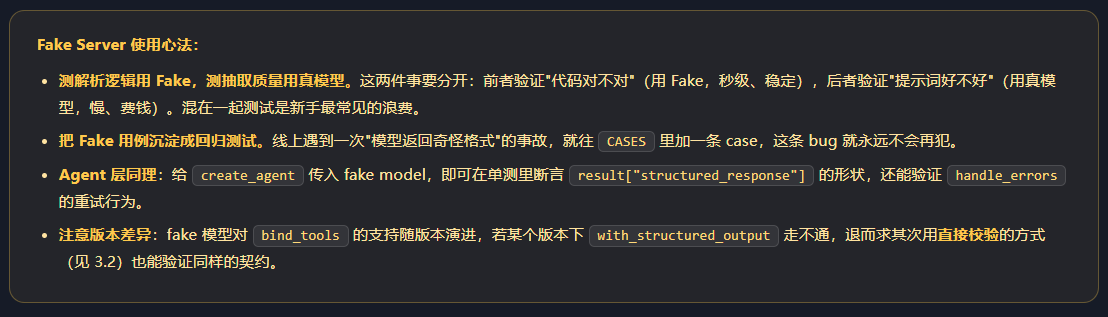
进阶:一次性跑完一组边界 Case(表驱动测试)
import pytest
from langchain_core.language_models.fake_chat_models import FakeMessagesListChatModel
from langchain.messages import AIMessage
from pydantic import BaseModel, Field, ValidationError

class ProductRating(BaseModel):
    rating:  int | None = Field(description="评分 1-5", ge=1, le=5)
    comment: str = Field(description="评价内容", min_length=2)

def make_model(args: dict):
    """把任意 args 包装成一个假模型"""
    return FakeMessagesListChatModel(responses=[
        AIMessage(content="", tool_calls=[{
            "name": "ProductRating", "args": args,
            "id": "call_x", "type": "tool_call",
        }])
    ])

# (用例名, 模型返回的参数, 是否应该通过校验)
CASES = [
    ("正常",        {"rating": 5, "comment": "很好用"},        True),
    ("评分越界(10)",  {"rating": 10, "comment": "好评"},       False),
    ("评分是字符串",  {"rating": "5", "comment": "好评"},      True),   # Pydantic 会强制转 int
    ("评分是中文",    {"rating": "五", "comment": "好评"},      False),
    ("缺失 comment", {"rating": 4},                         False),
    ("comment 太短", {"rating": 4, "comment": "好"},       False),
    ("rating 为 null",{"rating": None, "comment": "没提"},   True),
    ("多传字段",      {"rating": 5, "comment": "好", "x": 1}, True),   # 默认忽略多余字段
]

def test_structured_output_matrix():
    for name, args, should_pass in CASES:
        extractor = make_model(args).with_structured_output(
            ProductRating, method="function_calling")
        try:
            result = extractor.invoke("测试")
            assert should_pass, f"[{name}] 本应校验失败却通过了: {result}"
        except ValidationError as e:
            assert not should_pass, f"[{name}] 本应通过却失败: {e}"
3.2 四种模式的校验能力实测
现在把四种模式放到同一个"坏数据"面前,看各自的反应。实验输入统一为:{"name": "张三", "age": "二十五"}——age 是错误的字符串类型。
实测代码:四种模式跑同一份坏数据
from pydantic import BaseModel, Field, ValidationError
from typing_extensions import TypedDict, Annotated
from dataclasses import dataclass
from langchain_core.language_models.fake_chat_models import FakeMessagesListChatModel
from langchain.messages import AIMessage

BAD_ARGS = {"name": "张三", "age": "二十五"}   # ← 类型错误的坏数据

def fake(schema_name: str):
    return FakeMessagesListChatModel(responses=[
        AIMessage(content="", tool_calls=[{
            "name": schema_name, "args": BAD_ARGS,
            "id": "c1", "type": "tool_call"}])
    ]).with_structured_output

# ===== 模式 1:Pydantic =====
class PersonPydantic(BaseModel):
    name: str; age: int = Field(ge=0, le=150)
try:
    fake("PersonPydantic")(PersonPydantic, method="function_calling").invoke("x")
except ValidationError as e:
    print("模式1 拦截 ✅", e.errors()[0]["type"])
# 模式1 拦截 ✅  int_parsing

# ===== 模式 2:TypedDict =====
class PersonTD(TypedDict):
    name: Annotated[str, ..., "姓名"]
    age:  Annotated[int, ..., "年龄"]
r2 = fake("PersonTD")(PersonTD, method="function_calling").invoke("x")
print("模式2 返回 ✅", r2, type(r2["age"]))
# 模式2 返回 💀  {'name': '张三', 'age': '二十五'}  <class 'str'>   ← 脏数据混进来了!

# ===== 模式 3:JSON Schema =====
schema3 = {"title": "Person3", "description": "人", "type": "object",
           "properties": {"name": {"type": "string"},
                        "age": {"type": "integer", "minimum": 0, "maximum": 150}},
           "required": ["name", "age"]}
r3 = fake("Person3")(schema3, method="function_calling").invoke("x")
print("模式3 返回 ✅", r3, type(r3["age"]))
# 模式3 返回 💀  {'name': '张三', 'age': '二十五'}  <class 'str'>   ← 同样放行

# ===== 模式 4:@dataclass =====
@dataclass
class PersonDC:
    name: str
    age: int
r4 = fake("PersonDC")(PersonDC, method="function_calling").invoke("x")
print("模式4 返回 ✅", r4, type(r4["age"]))
# 模式4 返回 💀  {'name': '张三', 'age': '二十五'}  <class 'str'>   ← 同样放行
结论请用大字写在显示器上:官方文档
with_structured_output参数说明里那句 "Otherwise the model output will be a dict and will not be validated",在这份实测里得到了完整验证。TypedDict / JSON Schema / @dataclass 的"类型",只对 IDE 和 mypy 有意义,对运行时毫无约束力。
补救方案:给"不校验"的三种模式装上校验
如果你因为跨语言、复用已有类等理由必须选非 Pydantic 模式,务必在拿到 dict 后补一道 Pydantic 校验。这个模式我称之为"双 Schema 模式"——一份契约定义(给模型 / 给其他语言),一份校验器(给 Python 运行时)。
from pydantic import BaseModel, Field, ValidationError
from typing_extensions import TypedDict, Annotated

# 第一份:给模型看的契约(TypedDict / JSON Schema,可以跨语言共享)
class PersonTD(TypedDict):
    name: Annotated[str, ..., "姓名"]
    age:  Annotated[int, ..., "年龄,0-150"]

# 第二份:给 Python 运行时看的校验器(字段必须与上面一一对应)
class PersonValidator(BaseModel):
    name: str
    age:  int = Field(ge=0, le=150)

def safe_extract(text: str) -> PersonValidator | None:
    """抽取 + 后置校验,失败返回 None(或走重试)"""
    raw = model.with_structured_output(PersonTD).invoke(text)
    try:
        return PersonValidator.model_validate(raw)     # ← dict → Pydantic,顺带校验
    except ValidationError as e:
        logger.warning(f"结构化输出校验失败: {e}\n原始输出: {raw}")
        return None

# 更省事的写法:TypeAdapter —— 不必为校验单独写一个类
from pydantic import TypeAdapter
PersonTA = TypeAdapter(PersonTD)          # 直接把 TypedDict 变成校验器!
person = PersonTA.validate_python(raw)    # 校验 + 转换,失败抛 ValidationError
TypeAdapter 是这章的隐藏彩蛋。它能把任意类型注解(TypedDict、list[Person]、dict[str, int]、甚至裸 dict)包装成一个 Pydantic 校验器。这意味着你不必为了校验而改写 Schema 写法——保留 TypedDict 的轻量,享受 Pydantic 的校验。
用法:adapter = TypeAdapter(YourTypedDict) → adapter.validate_python(data) 校验 → adapter.dump_python(obj) 序列化。
校验能力总对照表
| 校验项 | Pydantic | TypedDict | JSON Schema | @dataclass |
|---|---|---|---|---|
| 字段是否缺失 | ✅ 运行时报错 | ❌ | ❌(厂商侧可能保证) | ❌ |
| 类型是否匹配 | ✅ 报错 / 智能转换 | ❌ | ❌ | ❌ |
| 值域约束(ge/le) | ✅ | ❌ | ❌ | ❌ |
| 正则 / 格式 | ✅ Field(pattern=...) | ❌ | ❌(可写 pattern 关键字) | ❌ |
| 自定义业务规则 | ✅ @field_validator | ❌ | ❌ | ❌ |
| 失败后自动重试 | ✅ handle_errors | ❌ 无从感知失败 | ❌ | ❌ |
| IDE 静态提示 | ✅ | ✅ | ❌ 就是个 dict | ✅ |
| 跨语言共享 | 可导出 JSON Schema | 需转换 | ✅ 天然支持 | 需转换 |
4. 获取结构化结果方式
LangChain 历史上有两条获取结构化结果的路径:with_structured_output(模型能力层)与输出解析器(提示词 + 后处理层)。在 v1 时代,前者是官方推荐,后者官方已明确表示"多数情况下不再必要"。这一章把两条路都讲清楚,包括为什么后者被淘汰、以及它残存的用武之地。
4.1 使用 with_structured_output 官方推荐
with_structured_output 是 BaseChatModel 上的方法(自 langchain-core 0.2 起提供),返回一个新的 Runnable:输入不变,输出变成 Schema 规定的类型。它把 Schema 下推到模型 API 层,让厂商在生成时就强制约束。
签名与核心参数
def with_structured_output(
    self,
    schema: dict[str, Any] | type,        # Pydantic类 / TypedDict类 / dataclass / JSON Schema字典 / OpenAI工具字典
    *,
    include_raw: bool = False,             # 是否同时返回原始 AIMessage
    **kwargs,                              # 透传给厂商,如 method="json_schema" / "function_calling"
) -> Runnable[LanguageModelInput, dict[str, Any] | BaseModel]
- schema 四种模式任选(第 2 章)。Pydantic 返回实例并校验;其余返回 dict 且不校验。
- include_raw
False(默认)只返回解析结果;True返回{"raw", "parsed", "parsing_error"}三键字典。 - method 厂商相关,常见:
json_schema(推荐)、function_calling、json_mode(不推荐)。
① 基础用法(四种模式同构)
from pydantic import BaseModel

class AnswerWithJustification(BaseModel):
    """An answer to the user question along with justification for the answer."""
    answer: str
    justification: str

model = init_chat_model("openai:gpt-5.5", temperature=0)
structured_model = model.with_structured_output(AnswerWithJustification)

structured_model.invoke("What weighs more a pound of bricks or a pound of feathers")
# AnswerWithJustification(
#   answer='They weigh the same',
#   justification='Both a pound of bricks and a pound of feathers weigh one pound.
#                  The weight is the same, but the volume or density may differ.'
# )
# ✅ 直接是 Pydantic 实例,可以 .answer / .justification 访问
② include_raw=True:同时拿到原始消息与解析结果
当你需要token 用量、response_metadata、或要在解析失败时看到模型到底说了什么,就用它。返回固定三键字典:
structured_model = model.with_structured_output(AnswerWithJustification, include_raw=True)
response = structured_model.invoke("What weighs more a pound of bricks or a pound of feathers")
{
  'raw': AIMessage(
      content='',
      additional_kwargs={'tool_calls': [{'id': 'call_Ao02pnFYXD6GN1yzc0uXPsvF',
          'function': {'arguments': '{"answer":"They weigh the same.", "justification":"..."}',
                       'name': 'AnswerWithJustification'},
          'type': 'function'}]}),
  'parsed': AnswerWithJustification(answer='They weigh the same.',
      justification='Both a pound of bricks and a pound of feathers weigh one pound. ...'),
  'parsing_error': None
}
# 实战用法 1:拿 token 用量做成本统计
usage = response["raw"].usage_metadata
print(f"输入 {usage['input_tokens']} tokens / 输出 {usage['output_tokens']} tokens")

# 实战用法 2:解析失败时保留现场,便于排查
if response["parsing_error"] is not None:
    logger.error(f"解析失败: {response['parsing_error']}")
    logger.error(f"模型原始输出: {response['raw'].content}")

# 实战用法 3:失败降级 —— 用原始文本兜底
answer = response["parsed"] or response["raw"].content
include_raw 的隐藏价值:默认
include_raw=False时,解析出错会直接抛异常,你永远看不到模型说了什么——这是排查"抽取效果差"时最痛苦的地方。加上include_raw=True,异常会被捕获进parsing_error字段,原始输出完整保留。调试期强烈建议打开。
③ 流式输出:边生成边拿到结构化对象
from langchain_google_genai import ChatGoogleGenerativeAI

class Recipe(BaseModel):
    name: str
    ingredients: list[str]
    steps: list[str]

model = ChatGoogleGenerativeAI(model="gemini-3.1-pro-preview")
structured = model.with_structured_output(Recipe, method="json_schema")

# 每产出一个 chunk 就是一次"部分填充"的 Recipe 对象,而不是半截 JSON 字符串
for chunk in structured.stream("Give me a recipe for chocolate chip cookies"):
    print(chunk)
# Recipe(name='', ingredients=[], steps=[])              ← 初始空壳
# Recipe(name='Chocolate Chip Cookies', ingredients=[], steps=[])
# Recipe(name='Chocolate Chip Cookies', ingredients=['flour'], steps=[])
# Recipe(name='Chocolate Chip Cookies', ingredients=['flour','butter',...], steps=[...])
# ✅ 可以直接拿 chunk 做 UI 渐进渲染,无需自己做 JSON 增量拼接
流式注意事项:并非所有厂商/方法都支持结构化流式。
function_calling路径下流式产出的是增量 tool_call 参数片段,行为与上面示例不同;请以你所使用集成包的文档为准。
④ 与 LCEL 组合:把结构化输出接进管道
from langchain_core.prompts import ChatPromptTemplate
from pydantic import BaseModel, Field

class Sentiment(BaseModel):
    """用户评论的情感分析结果。"""
    label: str = Field(description="只能是 正面 / 中性 / 负面")
    score: float = Field(description="置信度 0-1", ge=0, le=1)
    reason: str = Field(description="一句话说明理由")

prompt = ChatPromptTemplate.from_messages([
    ("system", "你是资深舆情分析师。只依据评论内容判断,不要臆测。当前日期:{date}"),
    ("human", "分析这条评论:\n\n{comment}"),
])

# 管道:dict → PromptValue → Sentiment 实例
chain = prompt | model.with_structured_output(Sentiment)

result = chain.invoke({"date": "2026-08-31", "comment": "物流太慢了,等了整整一周!"})
print(result.label, result.score)   # 负面 0.93

# 批量处理:一次分析上百条评论
comments = ["物超所值!", "一般般吧", "客服态度极差"]
results = chain.batch([{"date": "2026-08-31", "comment": c} for c in comments])
⑤ Agent 层:结构化输出已并入主循环(v1 重大改进)
v0 与 v1 的差别:省掉一整次 LLM 调用
v1 把结构化输出的生成从"额外节点"搬进了"主循环",官方明确表示这降低了延迟与成本
from langchain.agents import create_agent
from langchain.agents.structured_output import (
    ToolStrategy, ProviderStrategy,
    StructuredOutputValidationError, MultipleStructuredOutputsError,
)
from pydantic import BaseModel, Field
from typing import Literal, Union

class ContactInfo(BaseModel):
    name:  str = Field(description="Person's name")
    email: str = Field(description="Email address")

class EventDetails(BaseModel):
    event_name: str = Field(description="Name of the event")
    date:       str = Field(description="Event date")

# ===== 用法 A:自定义错误消息(所有错误都用这句提示模型重试)=====
agent = create_agent(
    model="gpt-5.5",
    response_format=ToolStrategy(
        schema=ContactInfo,
        handle_errors="请严格按 schema 输出,姓名和邮箱都不能为空。",
    ),
)

# ===== 用法 B:只对特定异常重试 =====
agent = create_agent(model="gpt-5.5",
                     response_format=ToolStrategy(ContactInfo, handle_errors=ValueError))

# ===== 用法 C:自定义错误处理函数(按异常类型分支)=====
def custom_error_handler(error: Exception) -> str:
    if isinstance(error, StructuredOutputValidationError):
        return "There was an issue with the format. Try again."
    elif isinstance(error, MultipleStructuredOutputsError):
        return "Multiple structured outputs were returned. Pick the most relevant one."
    return f"Error: {error}"

agent = create_agent(model="gpt-5.5", response_format=ToolStrategy(
    schema=Union[ContactInfo, EventDetails],      # ← Union:让模型自己选
    handle_errors=custom_error_handler,
))

# ===== 用法 D:自定义工具消息内容(写入对话历史的那条 ToolMessage)=====
agent = create_agent(model="gpt-5.5", response_format=ToolStrategy(
    schema=ContactInfo,
    tool_message_content="联系人信息已提取并写入 CRM。",
))

result = agent.invoke({"messages": [...]})
report = result["structured_response"]     # ← 结果在这里
自动重试的完整过程(官方示例复现)
下面这段对话日志,展示了 rating=10 违反 le=5 约束时,LangChain 如何把错误回喂给模型让它自我修正:
================================ Human Message =================================
Parse this: Amazing product, 10/10!
================================== Ai Message ==================================
Tool Calls:
  ProductRating (call_1)
 Call ID: call_1
  Args:
    rating: 10
    comment: Amazing product
================================= Tool Message =================================
Name: ProductRating

Error: Failed to parse structured output for tool 'ProductRating': 1 validation error for ProductRating.rating
  Input should be less than or equal to 5 [type=less_than_equal, input_value=10, input_type=int].
 Please fix your mistakes.          ← 错误被包装成 ToolMessage 回喂
================================== Ai Message ==================================
Tool Calls:
  ProductRating (call_2)
 Call ID: call_2
  Args:
    rating: 5                      ← 模型自我修正了!
    comment: Amazing product
================================= Tool Message =================================
Name: ProductRating

Returning structured response: {'rating': 5, 'comment': 'Amazing product'}
重试的本质:把 Pydantic 的报错文本(
Input should be less than or equal to 5)直接塞进ToolMessage回给模型。模型的指令遵循能力会让它读报错、改参数、重新调用。这是"错误即提示"的设计哲学——同一个技巧也广泛用于工具调用的参数纠错。默认错误模板为:Error: {error} Please fix your mistakes.
4.2 使用输出解析器(不推荐)
官方原话(langchain-core output_parsers 文档首页):"Output parsers emerged as an early solution to the challenge of obtaining structured output from LLMs. Today, most LLMs support structured output natively. In such cases, using output parsers may be unnecessary, and you should leverage the model's built-in capabilities for structured output."
—— 翻译:输出解析器是早期方案;如今多数模型原生支持结构化输出,再用解析器就没必要了,应该用模型自带能力。
输出解析器的思路是:在提示词里用自然语言告诉模型"请按这个格式输出",然后把返回的文本用正则/JSON 解析成对象。它和 with_structured_output 的根本区别在于——约束发生在提示词里,而不是 API 层。
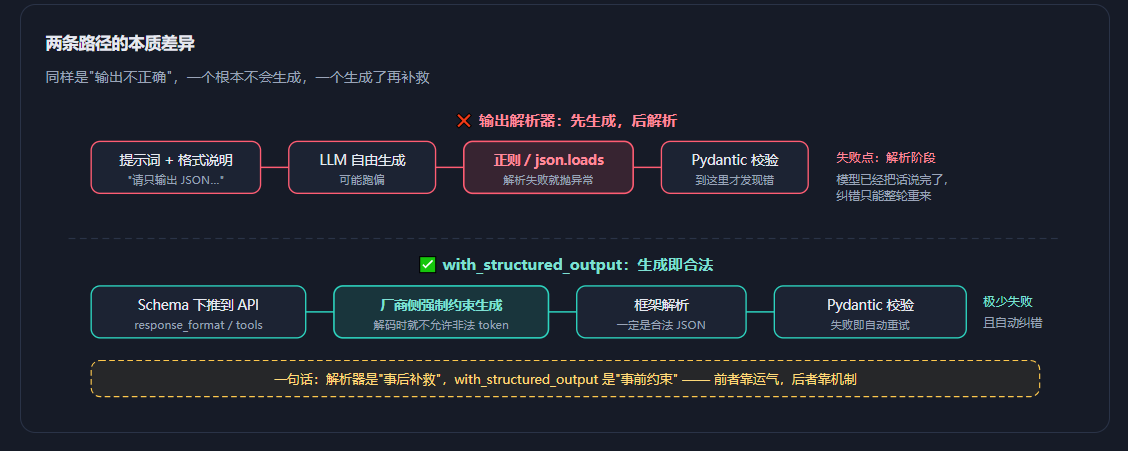
常见解析器一览(认识它们,是为了能读懂老代码)
| 解析器 | 输出类型 | 说明与现状 |
|---|---|---|
PydanticOutputParser | Pydantic 模型 | 用 get_format_instructions() 把 schema 写进提示词,再解析。新项目首选 with_structured_output |
JsonOutputParser | dict | 从文本里捞 JSON(能剥 markdown 代码块)。只保证"是 JSON",不保证"符合 schema" |
SimpleJsonOutputParser | dict | JsonOutputParser 的别名 |
StrOutputParser | str | ✅ 仍常用——把 AIMessage 转成纯文本,非结构化场景的标准组件 |
CommaSeparatedListOutputParser | list[str] | 按逗号切分,适合提取关键词/标签这类扁平列表 |
XMLOutputParser | dict | 解析 XML 标签。特定格式需求时仍有价值(某些模型对 XML 遵循更好) |
PydanticToolsParser / JsonOutputToolsParser | 模型 / dict | 解析 OpenAI 工具调用结果,属于"旧时代的结构化输出"实现 |
老代码长这样:PydanticOutputParser 写法
from langchain_core.output_parsers import PydanticOutputParser
from langchain_core.prompts import ChatPromptTemplate
from pydantic import BaseModel, Field

class MovieReview(BaseModel):
    title:   str   = Field(description="电影名")
    rating:  float = Field(description="评分 1-10")
    summary: str   = Field(description="一句话简介")

parser = PydanticOutputParser(pydantic_object=MovieReview)

# 关键:必须把格式说明拼进提示词 —— 这就是脆弱的根源
prompt = ChatPromptTemplate.from_template(
    "影评分析:{movie}\n{format_instructions}"
).partial(format_instructions=parser.get_format_instructions())

chain = prompt | model | parser          # ← 老三件套
review = chain.invoke({"movie": "Inception"})
# get_format_instructions() 实际生成的内容(节选):
# The output should be formatted as a JSON instance that conforms to the JSON schema below.
# As an example, for the schema {"properties": {"foo": ...}}
# the object {"foo": ...} is a well-formatted instance of the schema.
# Here is the output schema:
# ```
# {"properties": {"title": {"description": "电影名", "type": "string"}, ...}}
# ```
# ⚠ 这几段英文全部会消耗 input token,而且模型仍可能不遵守!
为什么不推荐:五个致命弱点
弱点 1:约束只存在于提示词里
- 模型没有义务遵守。
get_format_instructions()再详细,也只是"请求",不是"约束"。换模型、换温度、换个措辞,成功率就变了。 - 提示词约束是软约束,API 层约束是硬约束。把数据正确性寄托在软约束上,是架构级缺陷。
- 用
with_structured_output,Schema 通过 API 参数下传,厂商在解码层面强制。
弱点 2:格式说明吃掉大量 token
- 每次调用都要把几百字的 JSON Schema 文本塞进提示词。高频调用场景下,这笔输入成本相当可观。
- 成本是隐性的——你不会在账单上看到"格式说明费",但它确实每次都在计费。
- 原生结构化输出把 Schema 放在请求参数里,部分厂商对此有优化,且省去冗长说明文本。
弱点 3:解析失败无法自动重试
- 解析器抛
OutputParserException后,链路就断了。要实现重试,你得自己写with_retry、自己组织"错误反馈提示词"、自己控制重试次数。 - 这些重试逻辑写对很难——错误该怎么描述?原始输出要不要带上?重试几次放弃?
handle_errors=True(默认)已内置完整闭环:捕获 → 生成 ToolMessage → 回喂 → 模型自纠。
弱点 4:错误现场丢失
- 抛异常时你往往只拿到一句 "Could not parse LLM output",想知道模型到底说了什么还得自己加日志、自己抓
llm_output。 - 没有原始输出,你就无法判断是"提示词写得不好"还是"模型能力不够",只能瞎调。
include_raw=True一次性拿到raw/parsed/parsing_error,现场完整保留。
弱点 5:类型校验能力依然靠 Pydantic,但时机太晚
- 解析器路线里,Pydantic 校验发生在整轮生成结束之后。此时 token 已经花出去了,延迟已经产生了,失败成本极高。
- "先生成再验证"永远比"边生成边约束"昂贵——这是信息论层面的差距。
- 原生结构化输出在生成阶段就剪枝了非法路径,从源头降低失败率
迁移对照表:老代码怎么改
| ❌ 旧写法(解析器) | ✅ 新写法(with_structured_output) |
|---|---|
parser = PydanticOutputParser(pydantic_object=S) | 删除 → Schema 直接传给 with_structured_output(S) |
prompt.partial(format_instructions=parser.get_format_instructions()) | 删除 → 不再需要拼格式说明,提示词只写业务指令 |
chain = prompt | model | parser | 改为 chain = prompt | model.with_structured_output(S) |
try/except OutputParserException + 手写重试 | 改为 handle_errors=True(默认已开启自动重试) |
JsonOutputParser() 剥 markdown 代码块 | 不再需要 → 原生结构化输出不会输出代码块 |
Agent 里 response_format=Schema(v0 语义) | 改为 response_format=ToolStrategy(Schema) 或 ProviderStrategy(Schema) |
那解析器还有用武之地吗?有,但很窄:
- 模型不支持任何结构化输出能力时(某些小模型、老模型、自建推理服务)——官方文档也承认:"Output parsers remain valuable when working with models that do not support structured output natively."
StrOutputParser依然是最常用的组件——它把AIMessage转成字符串,跟"结构化"无关,纯粹是管道收尾工具,不属于被淘汰的范畴。- 需要特殊格式时——XML 标签输出(某些模型对 XML 遵循度优于 JSON)、逗号分隔的简单列表,
XMLOutputParser/CommaSeparatedListOutputParser仍有性价比。- 需要对输出做额外加工时——官方提到"or when you require additional processing or validation of the model's output beyond its inherent capabilities",即在结构化结果之上再加一层自定义处理。
4.2 小节的三句话结论:
- 新项目一律用
with_structured_output/response_format,不要从解析器起步。 - 老项目渐进迁移:保留 Pydantic 模型定义(这部分是资产,不用改),把"拼格式说明 + 解析器"这两环删掉即可。
- 判断一份教程是否过时:如果它教你
get_format_instructions()+prompt | model | parser做结构化输出,说明这份材料停留在 2023–2024 年。
上线前自检清单
Schema 设计
[ ] 1. 每个字段都写了 description,且描述的是"要什么"而不是"字段名重复"
[ ] 2. 枚举类字段用了 Literal / enum,而不是裸 str
[ ] 3. 数值字段加了 ge/le 等业务取值范围
[ ] 4. 可能缺失的字段用了 `T | None = Field(None, ...)`,并说明"缺失时填 null"
[ ] 5. 类上写了 docstring(它会作为整体说明发给模型)

模式与校验
[ ] 6. 生产路径用的是 Pydantic(或已用 TypeAdapter 补了校验)
[ ] 7. 明确知道返回的是实例还是 dict(Pydantic→实例,其余→dict)
[ ] 8. 若用 JSON Schema:顶层 title / description 齐全,Agent 层已用策略类包裹

错误处理
[ ] 9. Agent 层配置了 handle_errors(默认 True 即可,关键场景用自定义函数)
[ ] 10. 灰度/调试期开了 include_raw=True 并接入日志
[ ] 11. 用 Fake Server 覆盖了至少 5 个边界 case(类型错 / 越界 / 缺字段 / 空值 / 多字段)

成本与性能
[ ] 12. 确认没有在 Agent 之外又多调一次 LLM 做"格式转换"(v1 已并入主循环)
最后的一条经验:结构化输出做不好,90% 的问题出在 Schema 的 description 写得不像人话,而不是框架用错了。把
description当成"给一个没见过你业务的新实习生写的字段填写说明",抽取质量会立刻上一个台阶。


 扫一扫
扫一扫


 991
991

 被折叠的 条评论
为什么被折叠?
被折叠的 条评论
为什么被折叠?
 到【灌水乐园】发言


