



效果图
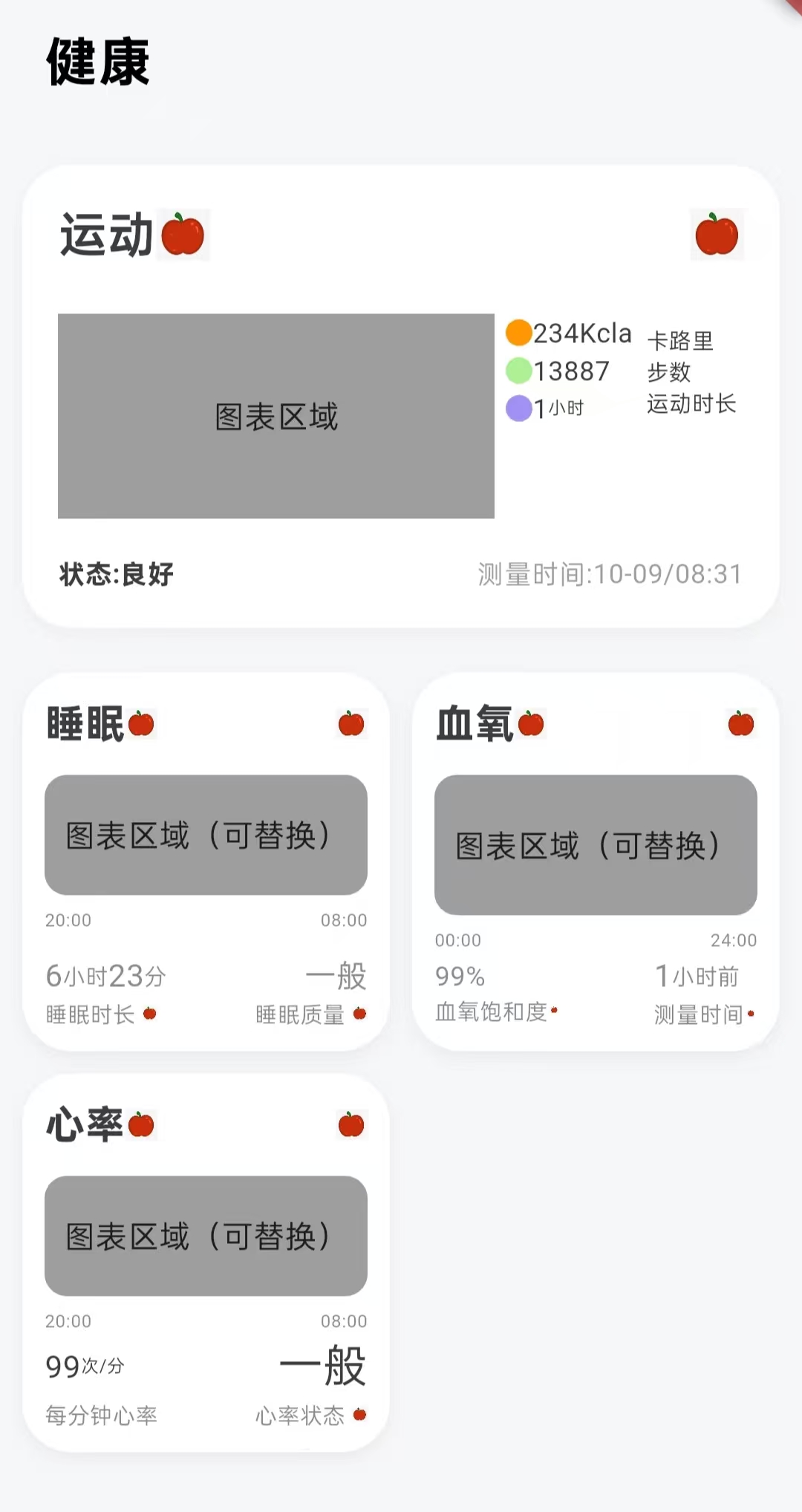
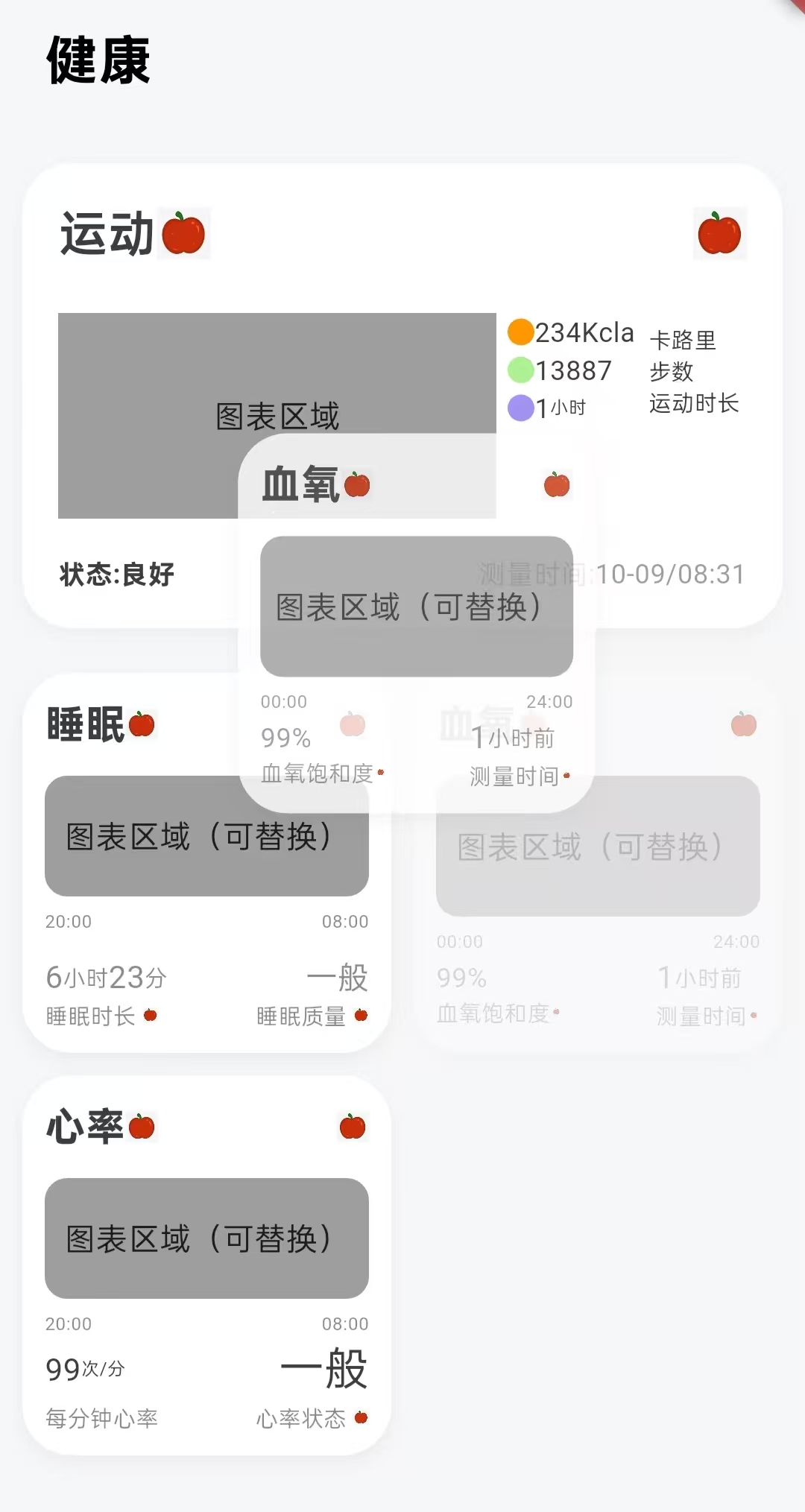
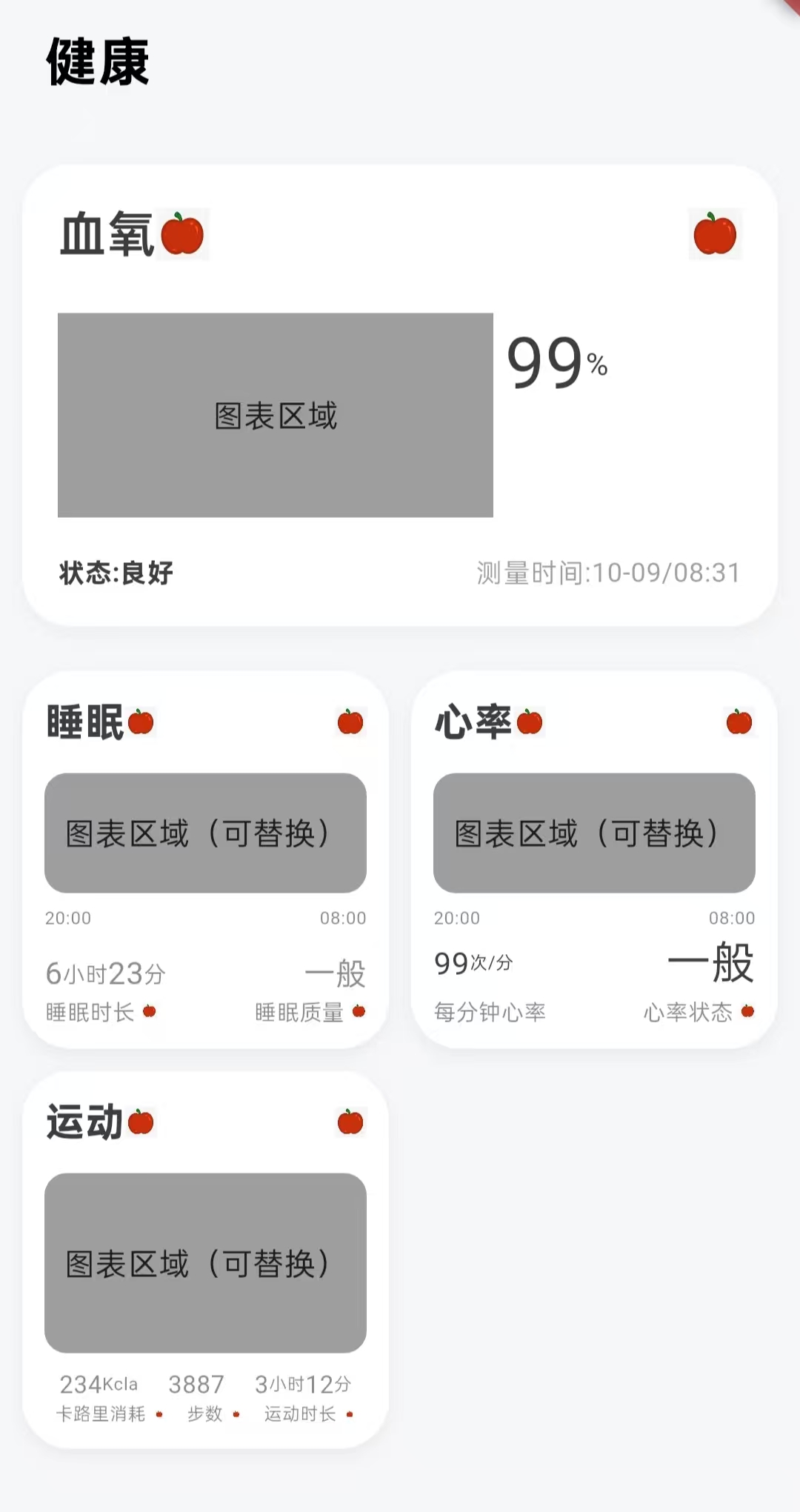
设计思路:两个区域
-
大卡片区域(顶部):重点展示你最关心的健康数据
-
小卡片区域(底部):紧凑显示其他健康指标
-
找出所有大卡片的相同点,提炼出大卡片的框架
-
找出所有小卡片的相同点,提炼出小卡片的框架
-
根据卡片不同内容的区域,根据类型来显示那些不同的内容
功能描述:
-
长按 底部的小卡片(按住约1秒)
-
拖动 卡片到顶部大卡片区域
-
松开手指 完成交换
视觉效果:
-
你拖拽的卡片会升格为大卡片显示
-
原大卡片会降级到小卡片区域
-
其他卡片位置自动调整
整体架构
HealthPage(主页面)
 ├── DragTarget(大卡片容器)
 │     └── buildBigCard() -> buildBigHealthCard() + _buildRightContent()
 │
 └── Wrap(小卡片容器)
       └── LongPressDraggable() -> buildSmallCard() + buildSmallHealthCard() + _buildBottomContent()
HealthPage
├── 大卡片区域 (DragTarget) - 接收拖放
├── 小卡片区域 (Wrap + LongPressDraggable) - 提供拖拽
└── 四种卡片类型 (CardType枚举)
拖放交换算法
初始状态:
大卡片: heartRate
小卡片: [sleep, sport, bloodOxygen]

用户将 sleep 拖到大卡片:
1. oldBig = heartRate (保存原大卡片)
2. bigCard = sleep (更新大卡片)
3. smallCards.remove(sleep) → [sport, bloodOxygen]
4. smallCards.add(heartRate) → [sport, bloodOxygen, heartRate]

最终状态:
大卡片: sleep
小卡片: [sport, bloodOxygen, heartRate]
数据流
eg:用户长按“睡眠”小卡片 → 拖动到大卡片区域 → 松手

1.LongPressDraggable 被触发

用户长按,小卡片进入“拖拽模式”;

Flutter 创建一个overlay层(浮动层);

在 overlay 中显示 feedback(即被拖动的卡片预览);

当前 widget 的原位置调用 childWhenDragging 显示半透明状态。

这里的“被拖拽数据” = data = CardType.sleep,这是拖拽过程中唯一携带的数据。

2.拖拽进入 DragTarget 区域(目标区域)

Flutter 调用 onWillAccept(data) → 询问是否接受(返回 true 表示可以投放);

同时 builder 会被再次触发,参数 candidateData 会包含当前悬停的拖拽对象;

因此 UI 重新 build,一旦 candidateData.isNotEmpty == true,我们就能让卡片“高亮”

3.用户松手 → 调用 onAccept

4.状态更新 → Flutter 重新 Build

总结:Draggable 产生数据 → DragTarget 感知数据 → onAccept 改变状态 → setState 触发 UI 重建
从哪些方面学习这个项目
1.Widget 结构与渲染逻辑
Widget:描述 UI 外观的不可变配置;

Element:Widget 的运行时实例;

RenderObject:真正绘制在屏幕上的渲染对象;

build():根据状态创建新的 Widget 树。
2.交互层:Draggable / DragTarget 数据流机制
LongPressDraggable、Draggable 的生命周期;

feedback、childWhenDragging 的区别;

DragTarget 的 3 个回调:

onWillAccept:悬停;

builder:实时 UI 构建;

onAccept:释放数据时触发;

泛型 <T>:如何在拖拽时安全传递不同数据类型。
3.状态管理层:数据结构与状态流
理解 setState() 的作用和 rebuild 范围;

学习 List 的常用操作(add、remove、insert、map、where 等);

了解 Flutter 的响应式更新模型;

当逻辑变复杂时,学习引入状态管理框架:

Provider

Riverpod

Bloc

MobX
4.理解项目的可扩展性、解耦性和代码组织结构。
View(UI) vs ViewModel(状态);

数据流从用户 → 状态 → UI 的单向流;

模块化文件结构
5.底层理解:Flutter 框架与事件机制
Flutter 的「声明式 UI」思想;

手势系统(GestureDetector、HitTest、PointerEvent);

Widget → Element → RenderObject 树结构;

布局和渲染流程(layout → paint → compositing → rasterization)。
实现步骤
1.声明有四种类型的卡片
enum CardType { heartRate, sleep, sport, bloodOxygen }
2.设置默认值,add和remove是List自带的 标准方法
CardType bigCard = CardType.heartRate; //默认当前大卡片类型是心率

  List<CardType> smallCards = [ //默认当前小卡片的类型列表
    CardType.sleep,
    CardType.sport,
    CardType.bloodOxygen,
  ];
3.构建主体UI,先是大卡片的逻辑框架(核心代码)
 // ===================== 大卡片(可接收拖放) =====================
          DragTarget<CardType>(
            onWillAccept: (data) => true, //总是接收拖放
            onAccept: (CardType newType) { //拖放后的处理
              setState(() {
                final oldBig = bigCard; //保存当前大卡片
                bigCard = newType;      //更新大卡片为新类型
                smallCards.remove(newType); //从小卡片移除该类型
                smallCards.add(oldBig); //将原来的大卡片加入小卡片
              });
            },
            builder: (context, candidateData, rejectedData) {
              return AnimatedContainer(  //带动画效果的容器
                duration: const Duration(milliseconds: 300),
                curve: Curves.easeOut,

                //当有拖拽的卡片悬停在这个目标上时,让卡片高亮(或变色)
                child: buildBigCard(bigCard,
                    highlight: candidateData.isNotEmpty
                ),
              );
            },
          ),
4.小卡片的逻辑框架(核心代码)
// ===================== 小卡片区域(提供拖拽) =====================
          Wrap( //流式布局,自定换行
            spacing: 10, //水平间距
            runSpacing: 10, //垂直间距
            children: smallCards.map((type) =>
                      LongPressDraggable<CardType>( //为每个类型创建可拖拽卡片
                data: type, //拖拽传递的数据
                onDragStarted: () => HapticFeedback.lightImpact(), //触觉反馈,手机震动
                feedback: Material( //拖拽时的预览效果
                  color: Colors.transparent,
                  child: SizedBox(
                    width: 160,
                    child: Opacity(
                      opacity: 0.8,
                      child: buildSmallCard(type),
                    ),
                  ),
                ),
                childWhenDragging: Opacity( //拖拽时原位置的显示
                  opacity: 0.3,
                  child: buildSmallCard(type),
                ),
                child: buildSmallCard(type), //正常状态显示
              ),
            )
                .toList(),
          ),
5.定义通用组件大卡片
  // ===================== 通用组件:大卡片 =====================
  Widget buildBigHealthCard({
    required String title,
    required String smallIcon,
    required String forwardIcon,
    required String leftText,
    required String rightText,
    required CardType type, // 传递卡片类型
  }) {
    return Container(
      margin: const EdgeInsets.only(top: 19),
      padding: const EdgeInsets.all(16),
      decoration: BoxDecoration(
        color: Colors.white,
        borderRadius: BorderRadius.circular(22),
        boxShadow: [
          BoxShadow(
            color: Colors.grey.withOpacity(0.1),
            blurRadius: 6,
            offset: const Offset(0, 3),
          ),
        ],
      ),
      child: Column(
        crossAxisAlignment: CrossAxisAlignment.start,
        children: [
          // 顶部标题行
          Row(
            children: [
              Text(
                title,
                style: const TextStyle(
                  fontSize: 22,
                  color: Color(0xFF3D3D3D),
                  fontWeight: FontWeight.w600,
                ),
              ),
              Image.asset(
                smallIcon,
                width: 24,
                height: 24,
              ),
              const Spacer(),
              Image.asset(
                forwardIcon,
                width: 24,
                height: 24,
              ),
            ],
          ),
          const SizedBox(height: 20),

          // 内容区域
          Row(
            crossAxisAlignment: CrossAxisAlignment.start,
            children: [
              // 左侧图表区域
              Container(
                height: 92,
                width: 196,
                decoration: BoxDecoration(
                  color: Colors.grey,
                ),
                child: const Center(
                  child: Text("图表区域"),
                ),
              ),

              const SizedBox(width: 5),

              // 右侧内容(根据类型显示)
              Expanded(
                child: _buildRightContent(type),
              ),
            ],
          ),

          const SizedBox(height: 16),

          // 底部左右文字
          Row(
            mainAxisAlignment: MainAxisAlignment.spaceBetween,
            children: [
              Text(
                leftText,
                style: const TextStyle(
                  fontSize: 12,
                  fontWeight: FontWeight.bold,
                  color: Color(0xFF3D3D3D),
                ),
              ),
              Text(
                rightText,
                style: const TextStyle(
                  fontSize: 12,
                  color: Colors.grey,
                ),
              ),
            ],
          ),
        ],
      ),
    );
  }
6.定义通用组件小卡片
  // ===================== 通用组件:小卡片 =====================
  Widget buildSmallHealthCard({
    required String title,
    required String smallIcon,
    required String nailIcon,
    required CardType type, //根据类型显示不同内容
  }) {
    return Container(
      width: 165,
      height: 170,
      decoration: BoxDecoration(
        color: Colors.white,
        borderRadius: BorderRadius.circular(22),
        boxShadow: [
          BoxShadow(
            color: Colors.black.withOpacity(0.05),
            blurRadius: 6,
            offset: const Offset(0, 3),
          ),
        ],
      ),
      padding: const EdgeInsets.all(10),
      child: Column(
        crossAxisAlignment: CrossAxisAlignment.start,
        children: [
          // 标题行
          Row(
            children: [
              Text(
                title,
                style: const TextStyle(
                  fontWeight: FontWeight.bold,
                  fontSize: 18,
                  color: Color(0xFF3D3D3D),
                ),
              ),
              Image.asset(smallIcon, height: 14),
              const Spacer(),
              Image.asset(nailIcon, height: 14),
            ],
          ),
          const SizedBox(height: 10),

          // 图表区域
          Expanded(
            child: Container(
              width: 151,
              height: 62,
              decoration: BoxDecoration(
                color: Colors.grey,
                borderRadius: BorderRadius.circular(10),
              ),
              child: const Center(
                child: Text("图表区域(可替换)"),
              ),
            ),
          ),

          const SizedBox(height: 6),

          // =============== 根据类型显示不同的底部内容 ===============
          ..._buildBottomContent(type),
        ],
      ),
    );
  }
7.构建大卡片:给大卡片模板传入数据
  // ===================== 构建不同类型的大卡片(传入大卡片数据) =====================
  Widget buildBigCard(CardType type, {bool highlight = false}) {
    switch (type) {
      case CardType.heartRate:
        return buildBigHealthCard(
          title: "心率",
          smallIcon: "assets/images/apple.png",
          forwardIcon: "assets/images/apple.png",
          leftText: "状态:良好",
          rightText: "测量时间:10-09/08:31",
          type: CardType.heartRate,
        );
      case CardType.sleep:
        return buildBigHealthCard(
          title: "睡眠",
          smallIcon: "assets/images/apple.png",
          forwardIcon: "assets/images/apple.png",
          leftText: "状态:良好",
          rightText: "测量时间:10-09/08:31",
          type: CardType.sleep,
        );
      case CardType.sport:
        return buildBigHealthCard(
          title: "运动",
          smallIcon: "assets/images/apple.png",
          forwardIcon: "assets/images/apple.png",
          leftText: "状态:良好",
          rightText: "测量时间:10-09/08:31",
          type: CardType.sport,
        );
      case CardType.bloodOxygen:
        return buildBigHealthCard(
          title: "血氧",
          smallIcon: "assets/images/apple.png",
          forwardIcon: "assets/images/apple.png",
          leftText: "状态:良好",
          rightText: "测量时间:10-09/08:31",
          type: CardType.bloodOxygen,
        );
    }
  }
8.构建小卡片:给小卡片传入数据
  // ===================== 构建不同类型的小卡片(传入小卡片数据) =====================
  Widget buildSmallCard(CardType type) {
    switch (type) {
      case CardType.heartRate:
        return buildSmallHealthCard(
            title: "心率",
            smallIcon: "assets/images/apple.png",
            nailIcon: "assets/images/apple.png",
            type:CardType.heartRate);
      case CardType.sleep:
        return buildSmallHealthCard(
            title: "睡眠",
            smallIcon: "assets/images/apple.png",
            nailIcon: "assets/images/apple.png",
            type:CardType.sleep);
      case CardType.sport:
        return buildSmallHealthCard(
            title: "运动",
            smallIcon: "assets/images/apple.png",
            nailIcon: "assets/images/apple.png",
            type:CardType.sport);
      case CardType.bloodOxygen:
        return buildSmallHealthCard(
            title: "血氧",
            smallIcon: "assets/images/apple.png",
            nailIcon: "assets/images/apple.png",
            type:CardType.bloodOxygen);
    }
  }
9.根据UI设计图分析,根据大卡片的UI上的不同,设置不同的内容
// ===========================构建大卡片右侧内容======================
  Widget _buildRightContent(CardType type) {
    switch (type) {
      case CardType.heartRate:
        return Column(
          crossAxisAlignment: CrossAxisAlignment.start,
          children: [
            Row(
              children: [
                Text("99", style: TextStyle(fontSize: 32, color: Color(0xFF3D3D3D))),
                Text("次/分", style: TextStyle(fontSize: 14, color: Color(0xFF3D3D3D))),
                SizedBox(height: 8),
              ],
            ),

          ],
        );

      case CardType.sleep:
        return Column(
          children: [
            Row(
              children: [
                Column(
                  crossAxisAlignment: CrossAxisAlignment.start,
                  children: [
                    Row(
                      children: [
                        Container(
                          height: 9,
                          width: 9,
                          decoration: BoxDecoration(
                            shape: BoxShape.circle,
                            color: Colors.green,
                          ),
                        ),
                        Text("40",style: TextStyle(fontSize: 10,color: Color(0xFF3D3D3D)),),
                        Text("分钟",style: TextStyle(fontSize: 8,color: Color(0xFF3D3D3D)),),
                      ],
                    ),
                    Row(
                      children: [
                        Container(
                          height: 9,
                          width: 9,
                          decoration: BoxDecoration(
                            shape: BoxShape.circle,
                            color: Colors.purple,
                          ),
                        ),
                        Text("3",style: TextStyle(fontSize: 10,color: Color(0xFF3D3D3D)),),
                        Text("小时",style: TextStyle(fontSize: 8,color: Color(0xFF3D3D3D)),),
                      ],
                    ),
                    Row(
                      children: [
                        Container(
                          height: 9,
                          width: 9,
                          decoration: BoxDecoration(
                            shape: BoxShape.circle,
                            color: Colors.pink,
                          ),
                        ),
                        Text("1",style: TextStyle(fontSize: 10,color: Color(0xFF3D3D3D)),),
                        Text("小时",style: TextStyle(fontSize: 8,color: Color(0xFF3D3D3D)),),
                      ],
                    ),
                    Row(
                      children: [
                        Container(
                          height: 9,
                          width: 9,
                          decoration: BoxDecoration(
                            shape: BoxShape.circle,
                            color: Colors.lightBlue,
                          ),
                        ),
                        Text("2",style: TextStyle(fontSize: 10,color: Color(0xFF3D3D3D)),),
                        Text("小时",style: TextStyle(fontSize: 8,color: Color(0xFF3D3D3D)),),

                      ],
                    ),
                  ],
                ),

               SizedBox(width: 6,),
                Column(
                  crossAxisAlignment: CrossAxisAlignment.start,
                  children: [
                    Text("清醒",style: TextStyle(fontSize: 10,color: Color(0xFF3D3D3D)),),
                    Text("快速眼动",style: TextStyle(fontSize: 10,color: Color(0xFF3D3D3D)),),
                    Text("浅睡",style: TextStyle(fontSize: 10,color: Color(0xFF3D3D3D)),),
                    Text("深睡",style: TextStyle(fontSize: 10,color: Color(0xFF3D3D3D)),),
                  ],
                ),
              ],
            )
          ],
        );

      case CardType.sport:
        return Column(
          children: [
            Row(
              children: [
                Column(
                  crossAxisAlignment: CrossAxisAlignment.start,
                  children: [
                    Row(
                      children: [
                        Container(
                          height: 12,
                          width: 12,
                          decoration: BoxDecoration(
                            shape: BoxShape.circle,
                            color: Colors.orange,
                          ),
                        ),
                        Text("234",style: TextStyle(fontSize: 12,color: Color(0xFF3D3D3D)),),
                        Text("Kcla",style: TextStyle(fontSize: 12,color: Color(0xFF3D3D3D)),),
                      ],
                    ),
                    Row(
                      children: [
                        Container(
                          height: 12,
                          width: 12,
                          decoration: BoxDecoration(
                            shape: BoxShape.circle,
                            color: Color(0xFFAEF194),
                          ),
                        ),
                        Text("13887",style: TextStyle(fontSize: 12,color: Color(0xFF3D3D3D)),),
                      ],
                    ),
                    Row(
                      children: [
                        Container(
                          height: 12,
                          width: 12,
                          decoration: BoxDecoration(
                            shape: BoxShape.circle,
                            color: Color(0xFF9F92F3),
                          ),
                        ),
                        Text("1",style: TextStyle(fontSize: 12,color: Color(0xFF3D3D3D)),),
                        Text("小时",style: TextStyle(fontSize: 8,color: Color(0xFF3D3D3D)),),

                      ],
                    ),

                  ],
                ),

                SizedBox(width: 6,),
                Column(
                  crossAxisAlignment: CrossAxisAlignment.start,
                  children: [
                    Text("卡路里",style: TextStyle(fontSize: 10,color: Color(0xFF3D3D3D)),),
                    Text("步数",style: TextStyle(fontSize: 10,color: Color(0xFF3D3D3D)),),
                    Text("运动时长",style: TextStyle(fontSize: 10,color: Color(0xFF3D3D3D)),),

                  ],
                ),
              ],
            )
          ],
        );


      case CardType.bloodOxygen:
        return Column(
          crossAxisAlignment: CrossAxisAlignment.start,
          children: [
            Row(
              children: [
                Text("99", style: TextStyle(fontSize: 32, color: Color(0xFF3D3D3D))),
                Text("%", style: TextStyle(fontSize: 14, color: Color(0xFF3D3D3D))),
                SizedBox(height: 8),
              ],
            ),

          ],
        );
    }
  }
10.根据小卡片的UI内容的不同,设置不同的内容
// ====================构建小卡片底部内容=============================================
  List<Widget> _buildBottomContent(CardType type) {
    switch (type) {
      case CardType.sleep:
        return [
          // 睡眠卡片的内容
          Row(
            children: [
              Text("20:00",style: TextStyle(color: Color(0xFF3D3D3D).withOpacity(0.6),fontSize: 8),),
              Spacer(),
              Text("08:00",style: TextStyle(color: Color(0xFF3D3D3D).withOpacity(0.6),fontSize: 8),),
            ],
          ),
          SizedBox(height: 9,),
          Row(
            children: [
              Text("6",style: TextStyle(color: Color(0xFF3D3D3D).withOpacity(0.6),fontSize: 14),),
              Text("小时",style: TextStyle(color: Color(0xFF3D3D3D).withOpacity(0.6),fontSize: 10),),
              Text("23",style: TextStyle(color: Color(0xFF3D3D3D).withOpacity(0.6),fontSize: 14),),
              Text("分",style: TextStyle(color: Color(0xFF3D3D3D).withOpacity(0.6),fontSize: 10),),
              Spacer(),
              Text("一般",style: TextStyle(color: Color(0xFF3D3D3D).withOpacity(0.6),fontSize: 14),),

            ],
          ),
          Row(
            children: [
              Text("睡眠时长",style: TextStyle(color: Color(0xFF3D3D3D).withOpacity(0.6),fontSize: 10),),
              SizedBox(width: 3,),
              Image.asset("assets/images/apple.png",height: 7,width: 7,),
              Spacer(),
              Text("睡眠质量",style: TextStyle(color: Color(0xFF3D3D3D).withOpacity(0.6),fontSize: 10),),
              SizedBox(width: 3,),
              Image.asset("assets/images/apple.png",height: 7,width: 7,),
            ],
          ),
        ];

      case CardType.sport:
        return [
          // 运动卡片的内容
          Row(
            mainAxisAlignment: MainAxisAlignment.spaceAround,
            children: [
              Row(

                children: [
                  Text("234",style: TextStyle(color: Color(0xFF3D3D3D).withOpacity(0.6),fontSize: 11),),
                  Text("Kcla",style: TextStyle(color: Color(0xFF3D3D3D).withOpacity(0.6),fontSize: 8),),
                ],
              ),

              Text("3887",style: TextStyle(color: Color(0xFF3D3D3D).withOpacity(0.6),fontSize: 11),),

              Row(
                children: [
                  Text("3",style: TextStyle(color: Color(0xFF3D3D3D).withOpacity(0.6),fontSize: 11),),
                  Text("小时",style: TextStyle(color: Color(0xFF3D3D3D).withOpacity(0.6),fontSize: 8),),
                  Text("12",style: TextStyle(color: Color(0xFF3D3D3D).withOpacity(0.6),fontSize: 11),),
                  Text("分",style: TextStyle(color: Color(0xFF3D3D3D).withOpacity(0.6),fontSize: 8),),
                ],
              ),


            ],
          ),
          Row(
            mainAxisAlignment: MainAxisAlignment.spaceAround,
            children: [
              Row(
                children: [
                  Text("卡路里消耗",style: TextStyle(color: Color(0xFF3D3D3D).withOpacity(0.6),fontSize: 8),),
                  SizedBox(width: 3,),
                  Image.asset("assets/images/apple.png",height: 3.35,width: 5.78,),
                ],
              ),

              Row(
                children: [
                  Text("步数",style: TextStyle(color: Color(0xFF3D3D3D).withOpacity(0.6),fontSize: 8),),
                  SizedBox(width: 3,),
                  Image.asset("assets/images/apple.png",height: 3.35,width: 5.78,),
                ],
              ),

              Row(
                children: [
                  Text("运动时长",style: TextStyle(color: Color(0xFF3D3D3D).withOpacity(0.6),fontSize: 8),),
                  SizedBox(width: 3,),
                  Image.asset("assets/images/apple.png",height: 3.35,width: 5.78,),
                ],
              ),


            ],
          ),

        ];

      case CardType.bloodOxygen:
        return [
          // 血氧卡片的内容
          Row(
            children: [
              Text("00:00",style: TextStyle(color: Color(0xFF3D3D3D).withOpacity(0.6),fontSize: 8),),
              Spacer(),
              Text("24:00",style: TextStyle(color: Color(0xFF3D3D3D).withOpacity(0.6),fontSize: 8),),
            ],
          ),
          //SizedBox(height: 9,),
          Row(
            mainAxisAlignment: MainAxisAlignment.spaceBetween,
            children: [
              Column(
                crossAxisAlignment: CrossAxisAlignment.start,
                children: [
                  Row(
                    children: [
                      Text("99",style: TextStyle(color: Color(0xFF3D3D3D).withOpacity(0.6),fontSize: 12),),
                      Text("%",style: TextStyle(color: Color(0xFF3D3D3D).withOpacity(0.6),fontSize: 12),),
                    ],
                  ),

                  //SizedBox(height: 4,),
                  Row(
                    children: [
                      Text("血氧饱和度",style: TextStyle(color: Color(0xFF3D3D3D).withOpacity(0.6),fontSize: 10),),
                      Image.asset("assets/images/apple.png",height: 3.35,width: 5.78,),
                    ],
                  ),
                ],
              ),

              Column(

                crossAxisAlignment: CrossAxisAlignment.start,
                children: [
                  Row(
                    children: [
                      Text("1",style: TextStyle(color: Color(0xFF3D3D3D).withOpacity(0.6),fontSize: 14),),
                      Text("小时前",style: TextStyle(color: Color(0xFF3D3D3D).withOpacity(0.6),fontSize: 10),),
                    ],
                  ),

                  // SizedBox(height: 4,),
                  Row(
                    children: [
                      Text("测量时间",style: TextStyle(color: Color(0xFF3D3D3D).withOpacity(0.6),fontSize: 10),),
                      Image.asset("assets/images/apple.png",height: 3.35,width: 5.78,),
                    ],
                  ),
                ],
              ),
            ],
          ),

        ];

      case CardType.heartRate:
        return [
          // 心率卡片的内容
          Row(
            children: [
              Text("20:00",style: TextStyle(color: Color(0xFF3D3D3D).withOpacity(0.6),fontSize: 8),),
              Spacer(),
              Text("08:00",style: TextStyle(color: Color(0xFF3D3D3D).withOpacity(0.6),fontSize: 8),),
            ],
          ),
          //SizedBox(height: 9,),
          Row(
            children: [
              Text("99",style: TextStyle(color: Color(0xFF3D3D3D),fontSize: 14),),
              Text("次/分",style: TextStyle(color: Color(0xFF3D3D3D),fontSize: 8),),
              Spacer(),
              Text("一般",style: TextStyle(color: Color(0xFF3D3D3D),fontSize: 20),),

            ],
          ),
          Row(
            children: [
              Text("每分钟心率",style: TextStyle(color: Color(0xFF3D3D3D).withOpacity(0.6),fontSize: 10),),
              Spacer(),
              Text("心率状态",style: TextStyle(color: Color(0xFF3D3D3D).withOpacity(0.6),fontSize: 10),),
              SizedBox(width: 3,),
              Image.asset("assets/images/apple.png",height: 7,width: 7,),
            ],
          ),
        ];

    }
  }
拓展:这个项目退出后再进去还是会恢复默认,因为没有实现持久化存储技术,感兴趣的同学可以去实现这个功能。
代码实例
import 'package:flutter/material.dart';
import 'package:flutter/services.dart';
//枚举定义:大卡片(4种),声明有四种类型的卡片
enum CardType { heartRate, sleep, sport, bloodOxygen }
class HealthPage extends StatefulWidget {
const HealthPage({super.key});
@override
State<HealthPage> createState() => _HealthPageState();
}
class _HealthPageState extends State<HealthPage> {
CardType bigCard = CardType.heartRate; //默认当前大卡片类型是心率
List<CardType> smallCards = [ //默认当前小卡片的类型列表
CardType.sleep,
CardType.sport,
CardType.bloodOxygen,
];
//UI构建
@override
Widget build(BuildContext context) {
return Scaffold(
backgroundColor: const Color(0xFFF6F7F9),
body:
ListView(
padding: const EdgeInsets.all(10),
children: [
const SizedBox(height: 50),
//健康行
const Padding(
padding: EdgeInsets.only(left: 10),
child: Text(
"健康",
style: TextStyle(
fontWeight: FontWeight.bold,
fontSize: 24,
color: Colors.black,
),
),
),
const SizedBox(height: 10),
// ===================== 大卡片(可接收拖放) =====================
DragTarget<CardType>(
onWillAccept: (data) => true, //总是接收拖放
onAccept: (CardType newType) { //拖放后的处理
setState(() {
final oldBig = bigCard; //保存当前大卡片
bigCard = newType; //更新大卡片为新类型
smallCards.remove(newType); //从小卡片移除该类型
smallCards.add(oldBig); //将原来的大卡片加入小卡片
});
},
builder: (context, candidateData, rejectedData) {
return AnimatedContainer( //带动画效果的容器
duration: const Duration(milliseconds: 300),
curve: Curves.easeOut,
//当有拖拽的卡片悬停在这个目标上时,让卡片高亮(或变色)
child: buildBigCard(bigCard,
highlight: candidateData.isNotEmpty
),
);
},
),
const SizedBox(height: 20),
// ===================== 小卡片区域(提供拖拽) =====================
Wrap( //流式布局,自定换行
spacing: 10, //水平间距
runSpacing: 10, //垂直间距
children: smallCards.map((type) =>
LongPressDraggable<CardType>( //为每个类型创建可拖拽卡片
data: type, //拖拽传递的数据
onDragStarted: () => HapticFeedback.lightImpact(), //触觉反馈,手机震动
feedback: Material( //拖拽时的预览效果
color: Colors.transparent,
child: SizedBox(
width: 160,
child: Opacity(
opacity: 0.8,
child: buildSmallCard(type),
),
),
),
childWhenDragging: Opacity( //拖拽时原位置的显示
opacity: 0.3,
child: buildSmallCard(type),
),
child: buildSmallCard(type), //正常状态显示
),
)
.toList(),
),
],
),
);
}
// ===================== 通用组件:大卡片 =====================
Widget buildBigHealthCard({
required String title,
required String smallIcon,
required String forwardIcon,
required String leftText,
required String rightText,
required CardType type, // 传递卡片类型
}) {
return Container(
margin: const EdgeInsets.only(top: 19),
padding: const EdgeInsets.all(16),
decoration: BoxDecoration(
color: Colors.white,
borderRadius: BorderRadius.circular(22),
boxShadow: [
BoxShadow(
color: Colors.grey.withOpacity(0.1),
blurRadius: 6,
offset: const Offset(0, 3),
),
],
),
child: Column(
crossAxisAlignment: CrossAxisAlignment.start,
children: [
// 顶部标题行
Row(
children: [
Text(
title,
style: const TextStyle(
fontSize: 22,
color: Color(0xFF3D3D3D),
fontWeight: FontWeight.w600,
),
),
Image.asset(
smallIcon,
width: 24,
height: 24,
),
const Spacer(),
Image.asset(
forwardIcon,
width: 24,
height: 24,
),
],
),
const SizedBox(height: 20),
// 内容区域
Row(
crossAxisAlignment: CrossAxisAlignment.start,
children: [
// 左侧图表区域
Container(
height: 92,
width: 196,
decoration: BoxDecoration(
color: Colors.grey,
),
child: const Center(
child: Text("图表区域"),
),
),
const SizedBox(width: 5),
// 右侧内容(根据类型显示)
Expanded(
child: _buildRightContent(type),
),
],
),
const SizedBox(height: 16),
// 底部左右文字
Row(
mainAxisAlignment: MainAxisAlignment.spaceBetween,
children: [
Text(
leftText,
style: const TextStyle(
fontSize: 12,
fontWeight: FontWeight.bold,
color: Color(0xFF3D3D3D),
),
),
Text(
rightText,
style: const TextStyle(
fontSize: 12,
color: Colors.grey,
),
),
],
),
],
),
);
}
// ===================== 通用组件:小卡片 =====================
Widget buildSmallHealthCard({
required String title,
required String smallIcon,
required String nailIcon,
required CardType type, //根据类型显示不同内容
}) {
return Container(
width: 165,
height: 170,
decoration: BoxDecoration(
color: Colors.white,
borderRadius: BorderRadius.circular(22),
boxShadow: [
BoxShadow(
color: Colors.black.withOpacity(0.05),
blurRadius: 6,
offset: const Offset(0, 3),
),
],
),
padding: const EdgeInsets.all(10),
child: Column(
crossAxisAlignment: CrossAxisAlignment.start,
children: [
// 标题行
Row(
children: [
Text(
title,
style: const TextStyle(
fontWeight: FontWeight.bold,
fontSize: 18,
color: Color(0xFF3D3D3D),
),
),
Image.asset(smallIcon, height: 14),
const Spacer(),
Image.asset(nailIcon, height: 14),
],
),
const SizedBox(height: 10),
// 图表区域
Expanded(
child: Container(
width: 151,
height: 62,
decoration: BoxDecoration(
color: Colors.grey,
borderRadius: BorderRadius.circular(10),
),
child: const Center(
child: Text("图表区域(可替换)"),
),
),
),
const SizedBox(height: 6),
// =============== 根据类型显示不同的底部内容 ===============
..._buildBottomContent(type),
],
),
);
}
// ===================== 构建不同类型的大卡片(传入大卡片数据) =====================
Widget buildBigCard(CardType type, {bool highlight = false}) {
switch (type) {
case CardType.heartRate:
return buildBigHealthCard(
title: "心率",
smallIcon: "assets/images/apple.png",
forwardIcon: "assets/images/apple.png",
leftText: "状态:良好",
rightText: "测量时间:10-09/08:31",
type: CardType.heartRate,
);
case CardType.sleep:
return buildBigHealthCard(
title: "睡眠",
smallIcon: "assets/images/apple.png",
forwardIcon: "assets/images/apple.png",
leftText: "状态:良好",
rightText: "测量时间:10-09/08:31",
type: CardType.sleep,
);
case CardType.sport:
return buildBigHealthCard(
title: "运动",
smallIcon: "assets/images/apple.png",
forwardIcon: "assets/images/apple.png",
leftText: "状态:良好",
rightText: "测量时间:10-09/08:31",
type: CardType.sport,
);
case CardType.bloodOxygen:
return buildBigHealthCard(
title: "血氧",
smallIcon: "assets/images/apple.png",
forwardIcon: "assets/images/apple.png",
leftText: "状态:良好",
rightText: "测量时间:10-09/08:31",
type: CardType.bloodOxygen,
);
}
}
// ===================== 构建不同类型的小卡片(传入小卡片数据) =====================
Widget buildSmallCard(CardType type) {
switch (type) {
case CardType.heartRate:
return buildSmallHealthCard(
title: "心率",
smallIcon: "assets/images/apple.png",
nailIcon: "assets/images/apple.png",
type:CardType.heartRate);
case CardType.sleep:
return buildSmallHealthCard(
title: "睡眠",
smallIcon: "assets/images/apple.png",
nailIcon: "assets/images/apple.png",
type:CardType.sleep);
case CardType.sport:
return buildSmallHealthCard(
title: "运动",
smallIcon: "assets/images/apple.png",
nailIcon: "assets/images/apple.png",
type:CardType.sport);
case CardType.bloodOxygen:
return buildSmallHealthCard(
title: "血氧",
smallIcon: "assets/images/apple.png",
nailIcon: "assets/images/apple.png",
type:CardType.bloodOxygen);
}
}
// ===========================构建大卡片右侧内容======================
Widget _buildRightContent(CardType type) {
switch (type) {
case CardType.heartRate:
return Column(
crossAxisAlignment: CrossAxisAlignment.start,
children: [
Row(
children: [
Text("99", style: TextStyle(fontSize: 32, color: Color(0xFF3D3D3D))),
Text("次/分", style: TextStyle(fontSize: 14, color: Color(0xFF3D3D3D))),
SizedBox(height: 8),
],
),
],
);
case CardType.sleep:
return Column(
children: [
Row(
children: [
Column(
crossAxisAlignment: CrossAxisAlignment.start,
children: [
Row(
children: [
Container(
height: 9,
width: 9,
decoration: BoxDecoration(
shape: BoxShape.circle,
color: Colors.green,
),
),
Text("40",style: TextStyle(fontSize: 10,color: Color(0xFF3D3D3D)),),
Text("分钟",style: TextStyle(fontSize: 8,color: Color(0xFF3D3D3D)),),
],
),
Row(
children: [
Container(
height: 9,
width: 9,
decoration: BoxDecoration(
shape: BoxShape.circle,
color: Colors.purple,
),
),
Text("3",style: TextStyle(fontSize: 10,color: Color(0xFF3D3D3D)),),
Text("小时",style: TextStyle(fontSize: 8,color: Color(0xFF3D3D3D)),),
],
),
Row(
children: [
Container(
height: 9,
width: 9,
decoration: BoxDecoration(
shape: BoxShape.circle,
color: Colors.pink,
),
),
Text("1",style: TextStyle(fontSize: 10,color: Color(0xFF3D3D3D)),),
Text("小时",style: TextStyle(fontSize: 8,color: Color(0xFF3D3D3D)),),
],
),
Row(
children: [
Container(
height: 9,
width: 9,
decoration: BoxDecoration(
shape: BoxShape.circle,
color: Colors.lightBlue,
),
),
Text("2",style: TextStyle(fontSize: 10,color: Color(0xFF3D3D3D)),),
Text("小时",style: TextStyle(fontSize: 8,color: Color(0xFF3D3D3D)),),
],
),
],
),
SizedBox(width: 6,),
Column(
crossAxisAlignment: CrossAxisAlignment.start,
children: [
Text("清醒",style: TextStyle(fontSize: 10,color: Color(0xFF3D3D3D)),),
Text("快速眼动",style: TextStyle(fontSize: 10,color: Color(0xFF3D3D3D)),),
Text("浅睡",style: TextStyle(fontSize: 10,color: Color(0xFF3D3D3D)),),
Text("深睡",style: TextStyle(fontSize: 10,color: Color(0xFF3D3D3D)),),
],
),
],
)
],
);
case CardType.sport:
return Column(
children: [
Row(
children: [
Column(
crossAxisAlignment: CrossAxisAlignment.start,
children: [
Row(
children: [
Container(
height: 12,
width: 12,
decoration: BoxDecoration(
shape: BoxShape.circle,
color: Colors.orange,
),
),
Text("234",style: TextStyle(fontSize: 12,color: Color(0xFF3D3D3D)),),
Text("Kcla",style: TextStyle(fontSize: 12,color: Color(0xFF3D3D3D)),),
],
),
Row(
children: [
Container(
height: 12,
width: 12,
decoration: BoxDecoration(
shape: BoxShape.circle,
color: Color(0xFFAEF194),
),
),
Text("13887",style: TextStyle(fontSize: 12,color: Color(0xFF3D3D3D)),),
],
),
Row(
children: [
Container(
height: 12,
width: 12,
decoration: BoxDecoration(
shape: BoxShape.circle,
color: Color(0xFF9F92F3),
),
),
Text("1",style: TextStyle(fontSize: 12,color: Color(0xFF3D3D3D)),),
Text("小时",style: TextStyle(fontSize: 8,color: Color(0xFF3D3D3D)),),
],
),
],
),
SizedBox(width: 6,),
Column(
crossAxisAlignment: CrossAxisAlignment.start,
children: [
Text("卡路里",style: TextStyle(fontSize: 10,color: Color(0xFF3D3D3D)),),
Text("步数",style: TextStyle(fontSize: 10,color: Color(0xFF3D3D3D)),),
Text("运动时长",style: TextStyle(fontSize: 10,color: Color(0xFF3D3D3D)),),
],
),
],
)
],
);
case CardType.bloodOxygen:
return Column(
crossAxisAlignment: CrossAxisAlignment.start,
children: [
Row(
children: [
Text("99", style: TextStyle(fontSize: 32, color: Color(0xFF3D3D3D))),
Text("%", style: TextStyle(fontSize: 14, color: Color(0xFF3D3D3D))),
SizedBox(height: 8),
],
),
],
);
}
}
// ====================构建小卡片底部内容=================================================
List<Widget> _buildBottomContent(CardType type) {
switch (type) {
case CardType.sleep:
return [
// 睡眠卡片的内容
Row(
children: [
Text("20:00",style: TextStyle(color: Color(0xFF3D3D3D).withOpacity(0.6),fontSize: 8),),
Spacer(),
Text("08:00",style: TextStyle(color: Color(0xFF3D3D3D).withOpacity(0.6),fontSize: 8),),
],
),
SizedBox(height: 9,),
Row(
children: [
Text("6",style: TextStyle(color: Color(0xFF3D3D3D).withOpacity(0.6),fontSize: 14),),
Text("小时",style: TextStyle(color: Color(0xFF3D3D3D).withOpacity(0.6),fontSize: 10),),
Text("23",style: TextStyle(color: Color(0xFF3D3D3D).withOpacity(0.6),fontSize: 14),),
Text("分",style: TextStyle(color: Color(0xFF3D3D3D).withOpacity(0.6),fontSize: 10),),
Spacer(),
Text("一般",style: TextStyle(color: Color(0xFF3D3D3D).withOpacity(0.6),fontSize: 14),),
],
),
Row(
children: [
Text("睡眠时长",style: TextStyle(color: Color(0xFF3D3D3D).withOpacity(0.6),fontSize: 10),),
SizedBox(width: 3,),
Image.asset("assets/images/apple.png",height: 7,width: 7,),
Spacer(),
Text("睡眠质量",style: TextStyle(color: Color(0xFF3D3D3D).withOpacity(0.6),fontSize: 10),),
SizedBox(width: 3,),
Image.asset("assets/images/apple.png",height: 7,width: 7,),
],
),
];
case CardType.sport:
return [
// 运动卡片的内容
Row(
mainAxisAlignment: MainAxisAlignment.spaceAround,
children: [
Row(
children: [
Text("234",style: TextStyle(color: Color(0xFF3D3D3D).withOpacity(0.6),fontSize: 11),),
Text("Kcla",style: TextStyle(color: Color(0xFF3D3D3D).withOpacity(0.6),fontSize: 8),),
],
),
Text("3887",style: TextStyle(color: Color(0xFF3D3D3D).withOpacity(0.6),fontSize: 11),),
Row(
children: [
Text("3",style: TextStyle(color: Color(0xFF3D3D3D).withOpacity(0.6),fontSize: 11),),
Text("小时",style: TextStyle(color: Color(0xFF3D3D3D).withOpacity(0.6),fontSize: 8),),
Text("12",style: TextStyle(color: Color(0xFF3D3D3D).withOpacity(0.6),fontSize: 11),),
Text("分",style: TextStyle(color: Color(0xFF3D3D3D).withOpacity(0.6),fontSize: 8),),
],
),
],
),
Row(
mainAxisAlignment: MainAxisAlignment.spaceAround,
children: [
Row(
children: [
Text("卡路里消耗",style: TextStyle(color: Color(0xFF3D3D3D).withOpacity(0.6),fontSize: 8),),
SizedBox(width: 3,),
Image.asset("assets/images/apple.png",height: 3.35,width: 5.78,),
],
),
Row(
children: [
Text("步数",style: TextStyle(color: Color(0xFF3D3D3D).withOpacity(0.6),fontSize: 8),),
SizedBox(width: 3,),
Image.asset("assets/images/apple.png",height: 3.35,width: 5.78,),
],
),
Row(
children: [
Text("运动时长",style: TextStyle(color: Color(0xFF3D3D3D).withOpacity(0.6),fontSize: 8),),
SizedBox(width: 3,),
Image.asset("assets/images/apple.png",height: 3.35,width: 5.78,),
],
),
],
),
];
case CardType.bloodOxygen:
return [
// 血氧卡片的内容
Row(
children: [
Text("00:00",style: TextStyle(color: Color(0xFF3D3D3D).withOpacity(0.6),fontSize: 8),),
Spacer(),
Text("24:00",style: TextStyle(color: Color(0xFF3D3D3D).withOpacity(0.6),fontSize: 8),),
],
),
//SizedBox(height: 9,),
Row(
mainAxisAlignment: MainAxisAlignment.spaceBetween,
children: [
Column(
crossAxisAlignment: CrossAxisAlignment.start,
children: [
Row(
children: [
Text("99",style: TextStyle(color: Color(0xFF3D3D3D).withOpacity(0.6),fontSize: 12),),
Text("%",style: TextStyle(color: Color(0xFF3D3D3D).withOpacity(0.6),fontSize: 12),),
],
),
//SizedBox(height: 4,),
Row(
children: [
Text("血氧饱和度",style: TextStyle(color: Color(0xFF3D3D3D).withOpacity(0.6),fontSize: 10),),
Image.asset("assets/images/apple.png",height: 3.35,width: 5.78,),
],
),
],
),
Column(
crossAxisAlignment: CrossAxisAlignment.start,
children: [
Row(
children: [
Text("1",style: TextStyle(color: Color(0xFF3D3D3D).withOpacity(0.6),fontSize: 14),),
Text("小时前",style: TextStyle(color: Color(0xFF3D3D3D).withOpacity(0.6),fontSize: 10),),
],
),
// SizedBox(height: 4,),
Row(
children: [
Text("测量时间",style: TextStyle(color: Color(0xFF3D3D3D).withOpacity(0.6),fontSize: 10),),
Image.asset("assets/images/apple.png",height: 3.35,width: 5.78,),
],
),
],
),
],
),
];
case CardType.heartRate:
return [
// 心率卡片的内容
Row(
children: [
Text("20:00",style: TextStyle(color: Color(0xFF3D3D3D).withOpacity(0.6),fontSize: 8),),
Spacer(),
Text("08:00",style: TextStyle(color: Color(0xFF3D3D3D).withOpacity(0.6),fontSize: 8),),
],
),
//SizedBox(height: 9,),
Row(
children: [
Text("99",style: TextStyle(color: Color(0xFF3D3D3D),fontSize: 14),),
Text("次/分",style: TextStyle(color: Color(0xFF3D3D3D),fontSize: 8),),
Spacer(),
Text("一般",style: TextStyle(color: Color(0xFF3D3D3D),fontSize: 20),),
],
),
Row(
children: [
Text("每分钟心率",style: TextStyle(color: Color(0xFF3D3D3D).withOpacity(0.6),fontSize: 10),),
Spacer(),
Text("心率状态",style: TextStyle(color: Color(0xFF3D3D3D).withOpacity(0.6),fontSize: 10),),
SizedBox(width: 3,),
Image.asset("assets/images/apple.png",height: 7,width: 7,),
],
),
];
}
}
}





 扫一扫
扫一扫


&spm=1001.2101.3001.5002&articleId=154341671&d=1&t=3&u=7379c35d305745738d6145718a0226c8)

 被折叠的 条评论
为什么被折叠?
被折叠的 条评论
为什么被折叠?
 到【灌水乐园】发言





